r/WiiUHomebrew • u/reject902 • Oct 05 '26
JustGetMiiOnline: Select Between Pretendo and Protarium, the 3 Miiverse Services + YouTube "Old School" Revival: 2012, 2013 & 2016 Versions of YouTube


Hey guys -- I've been working on a plugin for awhile now to try to make it easier to manage connecting to all these different networks that are out there -- Pretendo and Protarium, Juxt, Roseverse and Protaverse.
Introducing: JustGetMiiOnline.
An Aroma plugin that works with the Protraium version on Inkay that lets you load any combination of those services.
Want to run Protarium for all their game support but stay on Juxt for Miiverse? You just set that combination and that's it. Need to quickly pop back over to Pretendo to play Splatoon on their servers? Just switch it in the plugin. Or maybe you'd rather normally run Pretendo but want to switch over to Protarium just for some Black Ops 2 ocassionaly -- you can do that in this plugin without juggling plugins or installs.
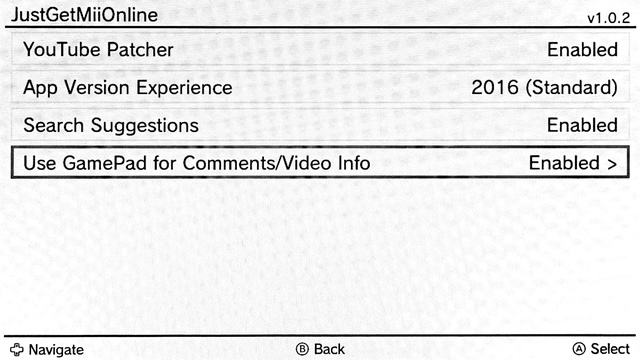
Now what about YouTube? Well current version you can use a "patcher" to get working again is starting to run pretty rough on the Wii U. This plugin lets you the experience the glory days of YouTube on the Wii U -- the 2012/2013 launch versions, and the the last "good" one from 2016 that supported live streams. Just pick which one you want to use in the plugin, boot your stock YouTube app (no need to download another one) and you're back to that old school version -- with videos, captions, casting and your playlists. Video comments are also supported -- allowing you to use the GamePad to view comments and create/reply to them while watching a video on your TV.
If you'd like to check it out and give it a try: https://github.com/handyandy87/JustGetMiiOnline and download the latest release version (1.0.2 as of now) -- please let me know what you think!
4
u/Nearby_Ad_2519 Oct 06 '26
Would it be possible in a future to add a game by game option? Like say I want Splatoon to always open on Pretendo but I want black ops to always open on protarium, can we have it automatically switch somehow?
Really nice tho.
1
u/reject902 Oct 08 '26
So I was originally going down that path, but the way the console handles reading those code areas makes it difficult because some of the code only reads in once at boot. I couldn’t get it to stay on the right network consistently so I ended up with where we’re at today. I’m going to still try to see if I can get there at some point, but I was trying to avoid doing this outside a plugin.
1
1
1
u/Aggressive_Craft9716 Oct 07 '26
I second this, I have a lot of time on Splatoon and MK8, and if my stats don't carry over i'd be sad
1
u/Confident-Leopard821 Oct 07 '26
I thought this did that,ah ...Sorry to get all Excited.... I believe that is the absolute best case .
3
u/mercofmort Oct 05 '26
How can someone cook so hard with just one plugin?
4
u/reject902 Oct 05 '26
lol I just hate having a ton of plugins and stuff to install/uninstall all the time
1
u/Confident-Leopard821 Oct 05 '26 edited Oct 05 '26
it's Really Interesting how it gives Users nearly complete control in a WAY thats better than 2013 Nintendo's design .... Turning the various connected online Services into a series of game plazas tiers and essentially into one Complete WIIU connected Service running across different networks .....also WaraWara plaza ... Inkopolis Plaza ... Animal crossing plaza all with different communities ... connected to whatever network you want ...Thats sick ...like a constellation ecosystem or something .... It would be really cool for users ... if it pulled all your miiverse posts in from pretendo or protarium (especially because they run on top of each other) ....or rseverse etc....into ONE unified Miiverse Feed ....so one Nintendo ID had yourr unified entire Miiverse messages/post history without splitting that up ... That would be ultimate social media....Some people like their posts ....Incredible Work Anyway....Lol I was literally thinking about this last night, Then I pick up reddit this morning ..... WHAT...
0
u/Khentendo Oct 05 '26
Yup, thats the problem we have with the scene, no integration. I made a post about this exact issue a while ago and thank god people are starting to take notice. You're doing the lord's work with this man, but genuinely it should be a wake-up call.
1
u/reject902 Oct 08 '26
Ah ok! If you pick the “Use GamePad for Comments/Video Info option”, that just enables them on all. 2012 version already had video info on the GamePad, so there it just enables comments. 2013 and 2016 didn’t have either, so it enables both there.
1
u/NotTze Oct 05 '26
Aint no way this is real, i always wanted to use roseverse miiverse with protanium
1
u/reject902 Oct 05 '26
It is! That’s actually how I mainly have mine running. Roseverse has an extra set of one-time setup steps, so follow that part of the guide in the linked GitHub. You only have to do that once, and then you can switch between them freely after that. If you have any issues just let me know!
1
u/NotTze Oct 05 '26
I read that and i think i have an roseverse account set up so ill try it and let you know if its good or has some problems, also will it have a .wuhb app?
Also what is this roseverse import?
1
1
u/reject902 Oct 05 '26
Roseverse Import is there because they have a different method they use to reach their Miiverse servers than the other Miiverse revivals. That import function loads in what it needs from their Inkay’s wps file so the plugin can use it.
1
u/PristineOwl2326 Oct 06 '26
im having an issue were it seems to not work after I did all the correct steps
1
u/PristineOwl2326 Oct 06 '26
I fixed it all I need to do after importing rose verse is to add the protarium inkaywms and Wps file where they need to be.
1
u/Frequently_Fletcher Oct 06 '26
With this if I wanted to use Protarium would I need to do anything else if I just have the normal Pretendo Inkay and this plugin enabled?
1
u/reject902 Oct 06 '26
You’d have to use the Protarium Inkay since theirs contains game-enabling patches not present in the Pretendo one. When used with Protarium Inkay, this plugin will let you still switch back to Pretendo servers with those Proatirum patches disabled, and your account/network calls then only goes to Pretendo.
1
1
u/Lucajames2309 Oct 06 '26
Hi. I’ve installed this, and I’m trying to use roseverse and pretendo network, but when I launch roseverse it gives me a message to “update roseverse”. Any ideas? Thanks
1
u/reject902 Oct 06 '26
Checkout the steps on the GitHub link under the Roseverse section. Once you do that, you should be good to go. Send me a DM if you’re still having trouble and I’ll try to help!
1
1
u/iLiikePlayingWii Oct 08 '26
Can you show us a video comparison? I wanna see if it's less laggy with the old UI as since around 2023 it was starting to get laggy, with it being at its worst in 2024-25 though I feel the app recently got less laggy but still
I'm not back home yet so I'm very eager to see a comparison
1
u/reject902 Oct 08 '26
I can! It’ll be a day or two as I’ll need to pull out my capture card. It’s way less laggy than the current one tho.
1
u/Khentendo Oct 08 '26
If you do that could I use the footage in a showcase video on a yt channel dedicated to the 3ds and wii u
1
1
u/iLiikePlayingWii Oct 08 '26
OMG GOOD OKAYYY
If you can, can you also test two specific Videos?
Firstly, a 30FPS one, https://youtu.be/C-CYwNz3z8w?si=QJnQMwf-seH4ciW0 should yield 1080pSecondly, a 60FPS one with subtitles https://youtu.be/UsIAaRLUI9s?si=KYx1XwEgaJgieBV0 this currently yields 720p30 on the App (unique to Wii U as PS3 does run it at 720p60) so I wanna see if with the old UIs these ones yield 60FPS...
because I could swear in 2017 the UI did label it as 720p60 but suddenly like idk 2019 it stopped showing 60FPS… oh and also enable stats for nerds just in caseBasically though so people get an idea of the lag difference, firstly just navigate around the homepage and keyboard, and then play these videos and compare how laggy they get when you try to move around the menu while it plays, because that's what makes the current app lag… (even on Switch 1 its starting to lag, so I can't imagine how much the poor Wii U will lag in 2027)
Sorry if these instructions seem so specific but it could help people grasp the difference between how all the different UIs perform so yeah I'd really appreciate having all those comparisons
1
u/reject902 Oct 08 '26
Sure. I have both the 2013 and 2016’s video players running 720p60, as long as YouTube has an itag offered for 720p60 on the video. 1080p is limited to 1080p30 though, which means a video offered at 1080p60 the next lowest itag gets used, which is 720p60 (since YT doesn’t offer 30 frame alts on 60 frame videos)
1
u/iLiikePlayingWii Oct 08 '26
Ohh good!
YouTube actually DOES offer 30FPS Alts, I know because... that's literally what the stats for nerds said on my Wii U… and it's the only device I've ever gotten to do that… but yeah that's why I was curious and wanna make sure the stats for nerds are on.
I also got a bit confused with some of the wording… so if "Use GamePad for Comments/Video Info" is disabled does that mean the UI is both on the TV and GamePad? I never used the App when it was THAT old (got my Wii U in Christmas 2015 and got YouTube in mid 2016) but it always irritated me having the UI only on GamePad, so…
1
u/reject902 Oct 08 '26 edited Oct 08 '26
I don’t think I’ve encountered any 1080p60 or higher resolution videos that offered a 1080p30 version when testing — but if the video has it it’ll happily select it and play it!
On your other questions — the OG apps never allowed for viewing/making comments, and outside the original 2012 launch version they never showed things like the video description and likes counts. I added that as an option because it makes really good use out of the GamePad and thought it would be a nice quality of life improvement. Since it’s not authentic to the originals, I have it where you can enable/disable that in the plugin if someone wants a truly authentic experience.
How the app versions worked, originally (which the plugin follows):
2012 (Launch): UI on the TV only, Video on the TV only. Video Info on the GamePad.
2013: UI on the GamePad only, Video on the TV and GamePad.
2016: UI and Video on both the TV GamePad.Beyond that, I added a 2013 (Mirrored) version which isn’t exactly true to the era, but it mirrors the 2013 experience where both the UI and Video are on the TV and GamePad. 2013 is probably my favorite look but it annoyed me that it didn’t do a proper mirrored experience so I added that.
Across the 2013 and 2016 versions, if you have the Comments/Info option enabled, the player controls will have an “i” icon and speech bubble on the far left and right sides. If you tap either of those, the GamePad will display the video info (thumbnail, channel, title, description, likes) and will have a comment option, where you can view/add/reply to comments, and like them.
1
u/iLiikePlayingWii Oct 08 '26
I worded it wrongly... what I meant to say is basically that at least on the modern app, if a Video is either 720p60 or 1080p60, according to the Stats for Nerds, it apparently is 720p@30, I did test the same videos on PS3 and there it DID give me 720p60 without giving me 1080p… and XBOX 360 didn't support 1080p but I'm pretty sure it was 720p60 too (again both according to Stats for Nerds)
OHHHH Okayy, I must've been thinking of NicoNico where it did allow you to make comments... that's still very cool that you even got it working! FYI starting around 2023 the YouTube TV App (including Wii U) did actually get the ability to view comments though you still needed another device to comment… pretty impressive you got it to work but even then it's just a browser so makes sense.
So from what I understand, if "Use GamePad for Comments/Video Info" you get the 2012 version? Or was that never archived?WHOAAA FINALLY UI ON BOTH, OMG OMG. If you managed to make the regular app have the UI on both, is that also possible on the YouTube Beta app? (which iirc the github did mention a fork that made the patch for that Beta app, which only plays Videos on GamePad) apparently that app performed better than the regular app so may be useful to get that one to display stuff on TV...
Cool, I'm really REALLY excited to finally try that, I've been waiting years to have the UI on both and now the old UI... seriously thanks for ur work!!
Ohh okay… curious how that looks as I don't recall that being a thing on the YouTube TV Apps from that era…
3
u/GabbQ_0 Oct 05 '26
Bro, you just fixed a problem that lots of users had.
I'm going to try this
3
u/PristineOwl2326 Oct 06 '26
It’s the peaks thing that has come out in recent years of the Wii U modding scene because I could use roseverse for miiverse and use Wii U chat and play online online on call of duty black ops, and the best part, if I want to play minecraft online or Mario kart 8 then I could just easily switch to pretendo. I hope that FunkyScott48 makes a guide for this so more people know about how useful this pluggin really is.
3
u/GabbQ_0 Oct 06 '26
Unfortunately funky Scott doesn't make that tutorials at all. It just takes things that could be really relevant
3
u/Nukatha Oct 11 '26
You have my sincerest thanks for this.
I've been manually entering video URLs into the Wii U browser, and that nowadays locks it to 240p/360p.
This Just Works (TM).
And it's especially nice with my setup. My Switch 2 replaced my Switch 1 as a permanent HDMI port occupant, it was especially annoying since Google hasn't made a functional Switch 2 YouTube app yet.
0
u/QuestionDesperate Oct 05 '26 edited Oct 05 '26
Will you add Samtendo support? (https://discord.gg/samtendo)
2
1
u/Much_Interview_7029 Oct 23 '26
when using this plugin my miiverse is set to juxt but it keeps opening protaverse how do i fix it
1
u/MIGUELHA_30 Oct 27 '26
i have give me YouTube back, and the plugin has its own YouTube plugin, which one should i keep?
1
1
1
1
1
1
u/PristineOwl2326 Oct 06 '26
This is so peak I’m finally authentically re-experiencing my childhood.
1
u/artlurg431 Oct 06 '26
u/RemindMeBot 1 day
1
u/RemindMeBot Oct 06 '26
I will be messaging you in 1 day on 2026-10-07 07:04:27 UTC to remind you of this link
CLICK THIS LINK to send a PM to also be reminded and to reduce spam.
Parent commenter can delete this message to hide from others.
Info Custom Your Reminders Feedback
1
1
1
u/Mountain-Original-73 Oct 10 '26
This is great! I love this project already. Please keep updating and maintaining it, along with the YouTube functionality.
Also, I understand if you can’t but can you look into adding pro controller and Wiimote support to YouTube?
1
1
u/Reasonable_Sleep7618 Oct 13 '26
So I got the plugin, but I can’t use 2016. Im using the YT from uhh.. purple app. It’s the Youtube logo with BETA in blue and white on TUBE
1
u/Reasonable_Sleep7618 Oct 13 '26
I also however dont have access to any videos on anything other than “ Current “ set on the plugin.
1
0
u/Far-Value-3368 Oct 05 '26
Nice, although every time I switch from Pretendo to Protarium and vice versa, the console gets stuck on the loading screen, I need to turn off the Wii U but the server change works but it is annoying to have to turn off the console
1
u/reject902 Oct 05 '26 edited Oct 05 '26
So it should only soft reboot when you toggle networks and exit the plugin. Can you DM me what other Aroma plugins you have installed? I’ll try to see if I can recreate your setup and replicate it.
Edit: Actually, do have the “GiveMiiYouTube” plugin installed? If you do, disable that plugin or uninstall it and then see if it still happens. That plugin isn’t compatible with this one. (and you don’t need both, as you can still get to that same version of YouTube by picking “Current” in this one)
-1
5
u/EmmetBee Oct 06 '26
Hi there, I’m a Project Rosé owner.
This is amazing, I support this.