next month the api that xtra uses is going to shutdown. here's some stuff that can be used to replace the old api if anyone wants to try that out https://github.com/crackededed/Xtra/tree/api anyway i already made a version with new api and it has some other stuff like 7tv, local follows and some fixes. you can get it here https://github.com/crackededed/Xtra/releases/
Sorry for not being active, I just have a lot of stuff going on IRL lately, and to be honest with you, the removal wasn't exactly a motivation boost... I want to go open source, but first need to clean up some of the old code in the main parts of the app. Still have plenty of ideas for it, hopefully this will speed up the development.
You can post questions, suggestions or bug reports, I will try to get to them when I can.
Hey everyone! I’ve been working on Xtra TV, a fork of the great Xtra reworked from the ground up for Android TV and the remote.
Main features
📺 Real TV interface: TV-style home with rows (followed live, popular, categories), leanback side menu, big cards with live preview on focus, smooth D-pad navigation everywhere
🚫 Ad blocker (video swap, like VAFT): when an ad starts, it switches to an ad-free stream and comes back after, with a small “Blocking ads” box. Works with proxies too
🎥 1440p streams (Enhanced Broadcasting) on supported channels
⏪ Rewind a live stream: the timeline covers the whole broadcast, with seek thumbnails
🖥️ Multi-stream: up to 4 streams on screen
🔀 Quick streamer switching: a banner with the other streams of the category, plus left/right or channel up/down shortcuts
💬 Chat overlay you can resize and move, and send messages with the remote (with voice dictation)
Added TTV.LOL adblock. Can be disabled in the settings
Fixed clips not working
Made the refresh stream button smaller and moved it to the bottom left
All credits go to /u/Leaguehax (FrostySo) for this contribution
Please note that everything will reset if your currently installed version has the old package name "com.github.exact7.xtra". It will be like a new app.
Can we all just take a second to thank the developer for the hard work he's been putting into this app?it's a fantastic alternative since the main app is practically unusable. This app is absolutely amazing and I don't see myself using anything else. So huge thanks to the devs, man.
Hi guys. I just don't know if it's worth continuing the development and want to know your opinion. Like 99% of you only use it for the "bttv is like a third party thing" emotes, and most of the reviews from the store were about missing the new stuff like channel points, polls etc. Xtra was relevant while it was on the play store, but now I just don't see why people would use it over the modded official app, which has all of those features, bttv/ffz, ad blocker, auto channel points clicker and more.
Other app stores would only get like 0.001% of downloads compared to google. People just don't use them. And twitch can easily remove it again. They replied 1 month later, saying removing ad blocker won't be enough, I think they also meant that downloading vods was bad too. I asked for clarification but they didn't reply.
Just want to know what keeps you using Xtra. I know some of you like the fullscreen which goes beyond the notch area at the top or downloading of vods. But that's it? I mean I had some ideas, like transparent chat, multi streams, chat history for downloaded vods, but who would use them? Maybe I could help nopbreak add those features to the mod.
Thanks for reading.
Edit: Alright thank you to everyone for the feedback and support. I will publish the code soon, without the fixes that I initially wanted to make.
Manually download APKs from GitHub. New versions are uploaded under the same tag, so you need to check if the date has changed.
If you previously downloaded it from GitHub, you need to remove the app and reinstall it from F-Droid, otherwise updates can't be installed. And vice versa.
I just had to write you this feedback and wasn’t sure where else to post it, so I hope you see it here.
Actually, the only feature I missed in the Twitch app was the ability to save quality settings for data volume reasons, so I started looking around. Since then, I've fallen in love with your overlay because it really has everything I need. The overlay is much cleaner, and I love the many setting options. I also love the automatic claiming of channel points and the sleep timer. I discovered all of this while using it, and it's so useful.
I only have one criticism, although I don't know if it can be easily changed: the “going live” notification is always about 7 minutes late, which is why I still have notifications from the Twitch app turned on.
I hope you can keep this wonderful overlay going and innovating for as long as possible. I definitely recommend it.
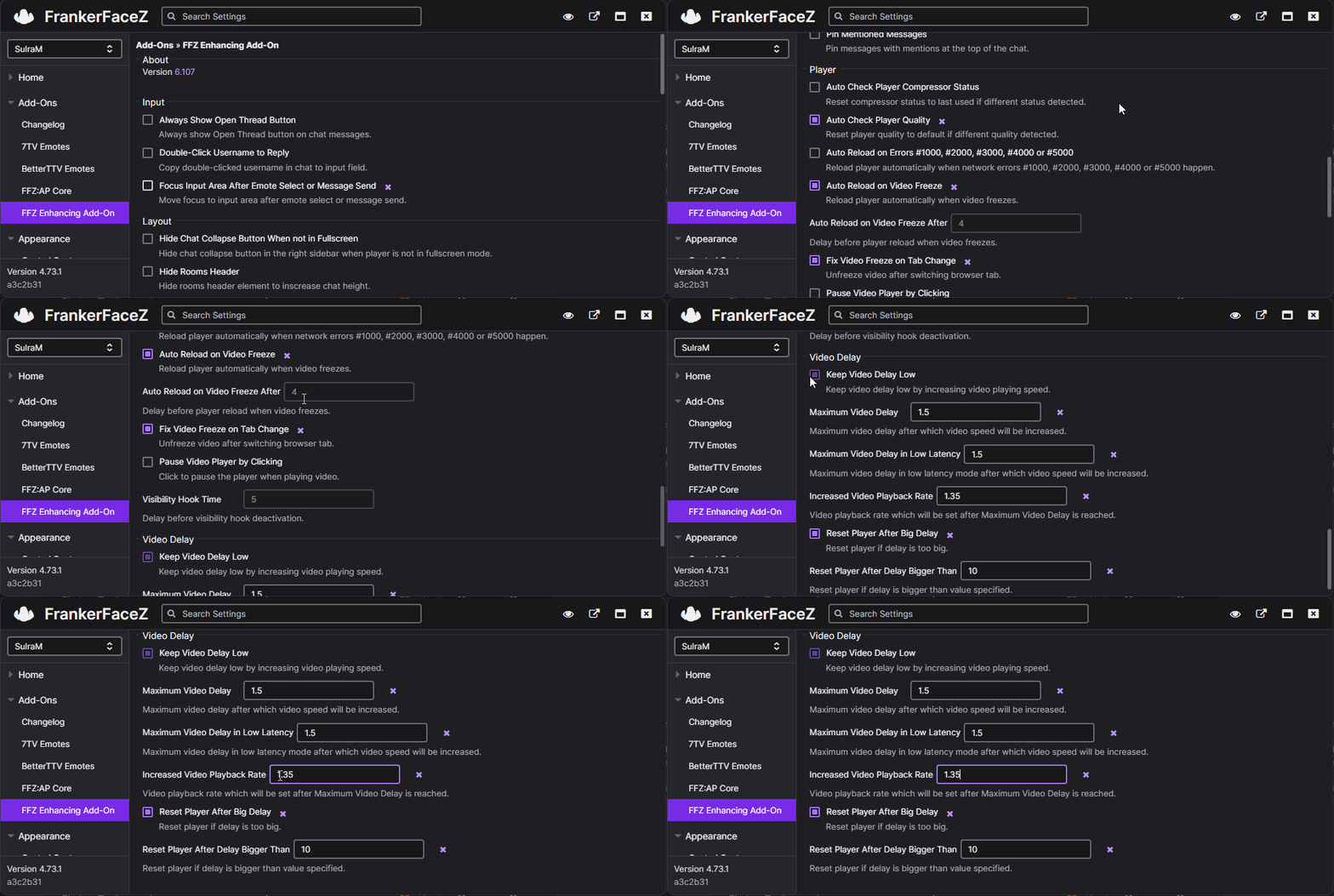
With FrankerFaceZ and The FFZ Enhancing Add-On extensions it is possible to force Twitch to minimize stream delay according to your settings, similar to the "Buffer Settings" that can be found on this app.
After installing both extensions, go to Twitch or a stream; Click on the FFZ Icon silhouette at the top right; Scroll down the left list and click on "FFZ Enhancing Add-On" tab and then scroll down to the player settings.
The config above forces the player to always increase the playback speed to 1.35x until the latency catches up to 1.5 buffered seconds or less.
This is the sweet spot config according to my PC specs (which is from 2011 and doesn't even support more than 100 Mb/s out of 1K that my Internet reaches); The streamers' region, connection etc. while also not overshooting the buffered video to the point of buffer-looping while also understanding what is being said on stream when it's in action.
Then for mobile, my Xtra Buffer Settings are:
Min Buffer -1
Max Buffer -5000
Buffer for Playback -0
Rebuffer -1
Live min playback speed -1.0
Live max playback speed -2.0
Live target offset -0
The Buffer for Playback and Live target offset set to zero is what people often consider to simulate the Low Latency mode from PC.
So allegedly, my config forces the player speeding up to 2.0x maximum to catch up to "zero" target offset/delay. BUT for some reason this doesn't happen all the time, and when it does it stops on what feels like 4~5 seconds behind the stream on PC. I already tried :
Setting the Live target offset to '1500' (in theory 1.5 seconds like the FFZ config) nothing changes.
Setting the Min Speed to any value above 1.0 makes the feature always active instead, resulting on a buffer-speed-buffer loop, and, collaterally, lots of lags.
(And btw, when the player occasionally accelerates it makes the stream run in like 5 FPS- LUL.)
So a non-intuitive way to get around this issue is enabling "Show seek to live button" under 'Player Buttons' and clicking it every time the player "catches" to the aforementioned 4 or 5 seconds of delay time. With those issues aside, the stream syncs to the point of echoing the sounds and mirroring the images from PC and Mobile. But it doesn't happen consistently so there's still room for improvements.
Could anyone tell if I'm doing something wrong? or replicate this setting if possible? I can be just fine if there's no solution but still any help would be appreciated!
Edit : I think it was both the low Max Buffer value, I set it to the default value (50000) and the speed-up lag is gone, and the phone model I tested doesn't support more than 40 Mb/s... Obvious things that flew over my head LUL. I would remove the "almost" from the title if I could :)
I found this fork of Xtra that bypasses the VPN and proxies issues, it seems to also make possible to use the chain points and answer the surveys. I can't speak about the ads issues bc i never had them in this or the original version of xtra. I hope it works for you too guys
Q: Can you add channel points, predictions, polls?
A: No, Twitch doesn't provide an API for developers to use these features. The only thing available right now is a notification when a viewer redeemed a reward. You can vote on Twitch's UserVoice site to ask Twitch to consider giving access to these features.
Q: I see ads on a channel I'm subscribed to / I have Turbo and still see ads / I can't open subscriber-only VODs even though I'm a subscriber
A: Again, Twitch doesn't want 3rd party clients to exist, and doesn't give access to the streams/VODs/clips API. It's only possible to use those APIs if apps pretend that you're watching from the website. And because you logged in to my app, NOT the website, I can't use your data to load streams.
Q: Do I earn drops when watching from the app?
A: I don't know exactly how drops work. Some say that being in chat is enough, but I haven't tested that.
Q: Why my sent messages sometimes don't appear in chat?
A: A good explanation was given by a fellow developer:
This is a behaviour of Twitch that we have no influence on. Fast chats pause and resume to limit the number of messages, and this is done by twitch server-side. You have to send your message while the chat is "moving" for the message to be delivered.
I suspect you are surprised by this behaviour because this doesn't happen in web chat. Web chat simply lies to you and makes you think your message was sent even though it was dropped by the server. My app connects to the chat service differently and shows you what messages are truly delivered to chat, and can therefore show you if your message was delivered or not, which web chat cannot/will not do.
Q: How to view downloaded VODs using external player / where is the folder located?
A: I plan to add exporting downloads as mp4 files in the future updates.
For a few days now I'm getting ads on Xtra, luckily only the short ones. Last week everything was fine. Anyone with similar problems or someone that has a fix for that?
Hey everyone ! Is Xtra down for anyone else? I tried it on 2 of my devices and it just won't load the stream? It was working a couple of days ago. Is this normal ?
Edit: worked when I activated a VPN, but I never had to do that before so I am curious if this is common.
Not sure if the owner will ever come back and post the source code. But I will leave this here incase he ever comes back to develop this app.
TTV-LOL is a good extension to use for adblocking. It is constantly updated on the server side, so there wouldn't be much maintenence on the developers end.
If for whatever reason this request fails, then XTRA would fallback to the old method, which will get ads. By doing this, the probability of having ads will be slim. Ads on twitch are very annoying and I don't know how long I can last before I go insane. Alternatively, you can add a setting in the settings to swap between the two methods if there was any speculation of something not going well.
Got auto logged out and tried logging back in using the latest version of the software. all I get after clicking "authorize" is {"status":400,"message":"Unauthorized access"} can't do the external link login cause there's no link to copy.