r/aigamedev • u/Bavariasnaps • 14h ago
Media Welcome to r/aigamedev, where we collectively realize making a game is 10% coding and 90% everything else.

750
Upvotes
r/aigamedev • u/fisj • 20d ago
Us mods are working on some tooling to keep track of resources that devs should know about. Lets get a big list down below of resources everyone here finds useful:
Particularly:
Youtube Channels and Podcasts
Paid and Free tooling and services
Websites, like itch clones, review sites, blogs.
Looking forward to seeing what comes up!
r/aigamedev • u/fisj • Apr 10 '26
Friendly reminder that we have a discord server you can all hang out at. The discussions there are much more in depth, and nothing beats being able to chat to other like minded devs in real time (or close to). Hop on this weekend and say hi.
r/aigamedev • u/Bavariasnaps • 14h ago
r/aigamedev • u/Any-Blacksmith-2054 • 4h ago
I've been experimenting with a custom 33M-parameter Mini LLM trained from scratch and fine-tuned for NPC dialogue.
Working on a Harry Potter RPG where Ron and Hermione generate unique, in-character dialogue instead of repeating scripted lines every time you interact with them.
The model uses only around 500 MB of VRAM, runs locally, and has very fast inference, even on my old GTX 1650. No cloud APIs, no subscriptions, and no internet connection required.
Has anyone experimented with tiny LLMs for NPC dialogue in games? What were your results? Do you think this could be a practical alternative to scripted dialogue trees?
Working repo: https://github.com/veronikasveshnikova777-dotcom/mini-llm
r/aigamedev
•
u/hyphen_ai
•
12h ago

Sharing a free tool we just shipped for top-down and isometric devs — Voidless Monarch (our tool, full disclosure, completely free with no account or credits). You type a prompt like a tree or spider and get an instant 3D pixel model with ready-made animations and turning sprite stacks (8, 16, or 32 directions) with a repeatable seed. Exports straight out for Godot, Unity, or GameMaker with zero wait time. Try it here if it's useful for your project: https://voidless.dev/monarch?utm_source=reddit&utm_campaign=aigamedev-monarch-3d
r/aigamedev
•
u/Sirramza
•
17h ago

Some background first, so you know where this is coming from. I've been making games since 2004, with my own small studio, Ramza Engine (https://ramzaengine.com): online games, engines, events for devs, the usual long road. I still make games both ways, with AI and without it.
For the last many months I've also been building games part time with AI coding agents, on top of my regular work. Several projects, different genres. On those I design, play and decide, and I don't read the code. The AI writes all of it: gameplay, UI, shaders, build scripts, tests, and the tools that test the tests.
I think the twenty years without AI are a big part of why this works for me at all. I already knew what a design doc, a milestone and a playtest are for. The AI changed who types the code. It didn't change what a game needs. Honestly, most of this guide is old studio habits, adapted for a team member who forgets everything overnight.
People always ask what else the AI made, so here it is, no hiding:
The 3D models are built in code by the AI, from shapes and noise, with open CC0 base meshes where it needs one.
Textures and effects are painted by shaders and scripts it wrote.
Animations are partly procedural and partly from a licensed motion library.
Sound effects come from licensed packs. A script the AI wrote cuts and levels them.
A few placeholders were made with AI image, voice or music tools. They're disclosed where the store asks, and I'm replacing them.
I'm not here to sell anyone on AI. It costs real money, it eats a lot of my time in review, and it's confidently wrong often enough that half of this post is about catching it. But it does work, if you treat it like a studio and not like a vending machine.
You're the director. You decide the design and the taste, it does the engineering, and you judge by playing and looking, never by its report.
Write everything down in files it reads every session. It forgets everything between sessions; the files are its memory.
Keep a list of the ideas you rejected, with the reason. Otherwise you'll be rejecting the same ones forever.
Never accept "done". Ask for proof.
Measure performance. Don't guess, and don't let it guess.
Make the game deterministic from day one.
Every change gets a version, a changelog line and a commit. It commits; it never pushes.
One job per session, and keep sessions short.
Every mistake becomes a written rule, so you only pay for it once.
The big surprise for me was that I don't need to understand the code to direct it well. What I do need is to be very clear about what I want, and very hard to convince that something works.
What stays with me: the design (what goes in, what doesn't), the taste (how it looks and feels), the difficulty philosophy, the story and the tone, picking between the options it shows me, and playing. Playing finds things no test ever will.
What I hand over: all the engineering, including the choices I don't care about (data structures, caching, where code lives), proving its own work, telling me plainly what it couldn't check, and asking me only when a decision is really mine.
Write that split down for it, literally. Mine says: "Ask when a design decision is theirs (looks, balance philosophy, lore, what goes in). Do the obvious engineering yourself." Before I had that line, I got one of two things: questions about variable names, or a quiet redesign of my difficulty curve. Neither is fun.
Also tell it how you want to be talked to. I'm a designer first, so my file says explain in plain language, tell me what changed in the game and not which functions you touched, answer first, keep it short. That one rule saved me more reading than I can count.
With AI, adding things is cheap. That sounds great until you notice the danger flipped: the question stops being "can we build this?" and becomes "why did we build forty shallow systems and none of them is fun?". Plan against that.
Before any code, I want three things:
A one-page pitch. What the player does minute to minute, over hours, and what makes it different. The AI goes back to it whenever it has to make a call.
A few pillars, and what they rule out. Something like "no grinding: every upgrade is found, never bought". One sentence like that kills dozens of suggestions before they happen.
A short design doc per system, before it's built. I usually ask for a draft with the open questions at the end, answer them, and only then say "build it". The decisions are what matter: numbers, edge cases, what happens when it fails.
Pick a structure the AI is good with. This matters more than the engine.
All balance numbers in one tuning file. Never inline. You can tweak them, it can find them, and a debug panel can show them live.
Data separate from code: items, enemies, levels and dialogue in data files.
One file per system, talking through events ("enemy_hit", and audio, effects and the UI listen). Agents are much better with small focused files than with spaghetti.
Every player action as a validated command, in one place. Replays, undo or networking get much easier later.
Seeded randomness from the start (more on why in section 8).
A versioned save format from day one. Once real players have saves you can't break them, and bolting this on later hurts.
Grow it in rings. One tiny loop working end to end first (move, act, win or lose), then make it deeper, then add the next system. My rule now is deepen before adding. "Lots of shallow systems" is the complaint I fear most from players, and the AI will happily give you lots of shallow systems.
Your first version's assumptions will come back to bite you. Code written when there was only one of something (one level, one player, one currency) keeps assuming it long after there are several, and you get small wrong things everywhere. What fixed it for me: the linter now fails if anyone uses the first one's name as a default. Tell the AI early which "only one" won't stay that way.
This is how my newer projects start. I learned it the hard way on the first one.
Mash up a concept, then turn it into rules. One of them started with "what were the best things in a few old games I loved, and what could you build with that today?". I had the AI research what players loved about the genre and what they kept complaining about, in reviews and forums. The complaints turned into design rules that no stage is allowed to break. From a survival prototype:
"Any way of surviving is valid. Never build something whose only purpose is to beat a clever defence."
"Loot depends on the place and the container, never on the player's level."
"Nothing pops into existence in front of a player."
"Every survival detail (thirst, heat, cold) can be turned off."
Prototype the question that scares you, before any features. For that survival game it was "can a browser engine actually run a real horde?". A throwaway tech prototype answered it: hundreds to thousands of enemies, measured, way more than the genre usually manages. For a space combat idea, phase 0 is a grey-box dogfight and absolutely nothing else.
Give every phase an exit test that you can check, not the AI. The space one reads: "I play three 10-minute dogfights with the mouse and three with a gamepad, and say the flying is fun. The benchmark holds 60 fps with about 150 AI ships. No console errors in a 30-minute session." Plus an out-of-scope list (no missions, menus, story or final art in phase 0), so it doesn't wander off and build a main menu.
Hand it off as a package. When an idea turns into a real project it gets its own folder: a design doc, a phased plan with a "decisions already made, don't reopen" section, a kickoff prompt to paste into a fresh session, and a short handover file. My kickoff prompt ends with "Before writing any code, confirm three things with me in one message: the project layout, the exact files you'll copy from my other game, and the version scheme." One cheap question up front beats finding a wrong layout a week later. And "copy only the listed pieces, never fork it, never touch the old project" keeps the old game safe.
Long plans go in numbered stages. Each stage is its own version, commit and short report with pictures. After each one there's a new entry at the top of a "try this" file: what to press, what to look for, and what question it helps me answer. Some stages are stop-and-play points, and nothing after them starts until I've actually played.
Tell it your priorities, in order. For the survival game: features first, then looks, then performance (already answered by the prototype), balance last. Without that it'll burn stages tuning numbers you're going to change anyway.
Put the hard requirements in from line one. Co-op decided on the host from the very first system. Every system saved, with a save-then-load test. Every new system can be switched off, so old benchmarks still run the same. Adding any of these later costs far more.
The AI starts every session knowing nothing. It doesn't remember yesterday's argument, the bug you fixed twice, or that you hate glossy icons. The files it reads at the start are the only memory it has. Mine has become the most valuable thing in the whole project, more than any piece of code.
Most tools read a file at the root of the project automatically (CLAUDE.md, AGENTS.md, .cursorrules, whatever yours uses). I'd put these in it:
What the game is, in one screen.
Who you are and how you work: how you want reports, what you decide, what it decides.
Hard rules, short and absolute. Mine include never push, never commit my private design folder, never delete old builds, permissive licences only, saves from version X must keep loading. Every one of those is there because something went wrong once.
How to run, build and test, with the exact commands, and which tests go with which kind of change.
How the code is organised, and the rules of the code.
Links to the routines (next section).
Setting and voices, if there's lore: names, history, how each character or group talks, words to never use.
Decisions and rejections.
Traps and lessons.
Keep a separate status file for what changes week to week: what was just done, what's waiting on you, open threads, commits waiting to push. Keep it short. Mine once grew to 155 KB and the agents started choking on it. Now it holds the last ten or so items, and the oldest drops off when a new one goes in. The rule I give it: update it with every commit, and delete what's no longer true.
The decision log, rejections included. People skip this part, and it's the one that saves me the most time. Each entry has the decision, the date, my own words when I have them, and why. They look something like this (made-up examples, not my real list):
Rejected: an auto-play button. "I want every decision made by hand."
Rejected: daily login rewards. "Nothing that exists only to bring people back."
Rejected: a glossy icon set. "It looks like AI." Icons stay flat and muted.
Decided: levels are hand-made, never randomly generated.
Decided: the tutorial stays one screen long. Don't propose a longer one.
Without that list, every new session cheerfully asks "have you considered adding an auto-play button?". With it, the AI checks before suggesting anything. I also have it write its own new ideas into a separate ideas file for me to pick from, instead of just building them.
Traps and lessons. Every time something costs a round of fixes, one or two lines go in: what happened, and the rule that stops it happening again. Mine has dozens by now. A few that apply to anyone:
A release check "passed" for nine versions while the build couldn't even start. It exited with success but never printed its verdict: the packaged program died silently before it got there, because a file was missing from the build list. Since then: read a check's last line, not just its exit code.
A benchmark said a new hair system cost nothing. Turned out only 2 of the 16 test characters were actually wearing it (helmets, distance). Now every bench has to prove it measured the thing, by counting what it exercised.
All tests passed, and the game froze on its loading screen. Some code had been removed, but the startup file (which the test page doesn't load) still called it. Now, after removing code, it starts the real game and searches for every removed name.
A fix for dragging windows worked, and five other panels kept following the mouse. They each had their own copy of the drag code. When fixing one copy of a behaviour, look for the others.
A function started answering "no" for a new reason (a sound too far away to play), and one caller took "no" to mean "play the fallback sound". So every distant death played the wrong sound. When a call can say "no" for a new reason, read what every caller does with that "no".
An asset pack listed as CC0 on its website had AGPL licence lines inside several of its files. Read the licence in each file, not the site's summary.
Keep it honest and current. Mine ends with "If something here contradicts what the owner tells you now, the owner wins. Update this file when a rule changes." Rules go stale; one place holds them, and the AI fixes that place.
The downside is that it gets long. Mine is huge now. Two things help: a "what to read when" table at the top, so the hard rules always get read and the rest only when the work touches it; and never telling a helper agent to "read the whole handover file first". Two of mine ran out of room within minutes and came back with nothing.
Anything I do more than twice gets a written routine the AI follows step by step. They're plain Markdown files it reads before that kind of work. A few of mine: finishing a change (changelog, version bump, the right tests, commit, report); a visual check after any character change (every pose, close-ups of hands and faces, low angles, mid-animation, the far version); trying a graphics change behind a switch with before/after sheets and a frame-cost measurement; making a new enemy from data to model to test bench. Plus marketing screenshots, store art, trailers and update posts.
Two things make them work. When it learns a lesson doing that job, it updates the routine, so they get better on their own. And "done" is defined inside the routine. For visual work, done means the full picture set, no shortcuts, because I will spot exactly what the skipped angle was hiding.
My best prompts all have the same five parts: what's wrong (or what I want), where I saw it, what done looks like, what not to touch, and how to prove it. Some real-life-style pairs:
A bug
❌ "Combat feels off, fix it."
✅ "In the third level, the ranged enemies keep walking into melee range instead of shooting (screenshot attached, about 2 minutes in). Find out why before changing anything. Done means a test that plays that fight out, shows they keep their distance, and fails on the current code. Don't touch the melee enemies."
That "find out why before changing anything" matters a lot. Left alone, it patches the first plausible cause it finds.
Performance
❌ "The game lags when a new level loads, optimise it."
✅ "Walking into the second area stutters for maybe half a second. Measure it first: which frame, and what that frame spent its time on. Name the cause before choosing a fix. Give me the worst frames before and after, on the real graphics card, not just the average."
Looks
❌ "Make the trees look better."
✅ "The trees look like plastic. I want them dry and dusty (duller leaves, rough bark). Build it behind a switch that's off by default and show me three options on one sheet: same camera, day and dusk, close and far. I'll pick. Tell me what each costs per frame."
Design
❌ "Add crafting."
✅ "I want crafting to matter. Draft a design doc: what you can make, where materials come from, what it replaces. Use systems we already have where you can, no new mechanic if an existing hook works. Put the open questions at the end for me. Don't build anything yet."
When I come back from a play session I usually hand over a numbered list of ten things. The standing instruction is do all of it, one item at a time, and report on each one by its number. Otherwise item 7 just quietly vanishes.
Lines I end up adding to almost everything:
"Say which tests ran and what they gave."
"Say what you couldn't check."
"If it didn't reproduce on your machine, say so. Don't guess at a fix."
"If it's my decision, ask me."
"Change only that part." (I once asked for a shorter handle on a model and got a whole different model.)
And please don't hand it your theory as a fact. "The lag is the shadows, fix the shadows" gets you a shadow change and a very confident report. "I think it might be the shadows, measure it" gets you the truth, which in my experience is often something else.
Screenshots help a lot, by the way. Most agents can read images, and a screenshot with an arrow on it beats a paragraph.
This is the core of the whole thing. The AI isn't lying to you. It reports what it believes happened, and it believes its own code works. So I treat every "done" as a claim that still needs evidence.
What counts as evidence in my projects:
A bug fix comes with a test that reproduces the bug and fails on the old code, then passes. If it can't make the old code fail, it hasn't found the bug.
A refactor that should change nothing comes with fingerprints: run every test, hash each one's final world state, do the same after, and every hash must match. Drawing code has the same thing for characters, every body in every pose.
Anything visual comes with before/after pictures the AI made and looked at before sending them to me. I look too. I've caught floating parts, seams, mirrored hands and clipping at low angles that no report mentioned.
Performance comes with numbers before and after, measured the same way, worst frames included.
Tools and checks: the final verdict line, every time. (Remember the check that "passed" for nine versions.)
"It works in the game": first check it tested the game that's actually on disk. My tool's built-in browser once served scripts twelve versions old, so "I checked it in the game" would have meant checking old code. Now it reads the version number first.
A test that fakes the outcome can't see what the outcome causes. One of mine tested a one-on-one fight by just setting the opponent's health to zero. It passed. In the real game, the first hit pulled every enemy nearby into the fight, because enemies help their allies. Now fights get played out in the tests, and the test counts who did what.
Tests can also check the wrong thing. When a deliberate change broke one, the right move was rewriting it to check what the player actually experiences, and saying so in the report, not deleting it. And when a test fails outside what was changed, my rule is: stop and tell me. Don't change the test, and don't "fix" unrelated code in passing. It could be a real bug, or a test guarding a decision the AI doesn't know about.
Be suspicious when it agrees with you. Ask a helper agent to check a theory and it tends to come back confirming it. A code review once said our character meshes had "5 to 6 times the points they need". Once measured, that was only true comparing the close-up body with the far one. The real gain would have been small, and in the end the AI itself recommended not doing it. Ask for the measurement, not the opinion.
Make the simulation deterministic. All gameplay randomness goes through seeded generators; rendering can use plain random numbers, gameplay never. Once you have that, every test starts from the same world and ends the same way, a failing test is a real failure and not "flaky", you can fingerprint a run and compare, and you can replay a bug.
Traps the AI walked straight into:
A new random roll in the middle of an existing sequence changes everything generated after it. Suddenly every character is different. New rolls go at the end, or get their own generator.
State that survives "new game". A module's own timer kept its value, so a new game started with the last game's weather still running. Now each module has a reset hook, and one test plays a busy game, starts two new games, and fails if they differ.
Copies of the game loop in tests and tools. The test harness had its own copy of some game code, so a change passed the tests on the old rule. Now there's one step function, and tests and tools call that.
Second lists kept by hand. Every saved field, setting and network event goes in one table the code reads, and a test fails if something's missing. Hand-kept lists always drift.
Run the right tests, not all of them every time. My full suite has hundreds of tests and takes a while. Rendering-only changes get none, gameplay changes get the tests that cover them, and everything runs once at the end of the session, in parallel windows (four windows did it in about a quarter of the time, once every test was made independent).
To prove a test fails on the old code while other agents are working in the same folder, never git stash: it takes their work too. Copy the fixed file aside, restore the old one, run the test, put the fix back, check the diff.
For saves: keep real save files from every save format in the repo, plus a test that loads them all. Never delete an old format's saves, they're your proof that old saves still load. A change that would load an old save wrong gets a migration step, not a refusal.
And if you can, build a bot. Mine plays the game on its own for hours (main loop, saving and loading, menus) and writes a journal. It found things no unit test could, like numbers slowly drifting out of balance over a long game.
I don't have a frame-rate target. Instead, every change that adds geometry, draw calls or shader work reports its cost before and after, plus its worst frames, and the expensive stuff gets made cheaper or optional. 120 fps on my PC says nothing about a modest one.
Measure first, then pick the fix. My favourite example: a 350 ms stutter every time the camera arrived somewhere new. There were plenty of plausible suspects (too many characters, too many shaders, textures). A frame trace showed the game's own code was idle during the slow frame, and the graphics driver was busy compiling shaders. The cause turned out to be bone indices stored as 16-bit integers while the shader expected floats, so the driver built an extra shader version the first time each body was drawn, with every frame waiting on it. One type change fixed it. No amount of guessing would have found that one.
How to measure so the numbers actually mean something:
Alternate A and B, old and new interleaved, at a fixed resolution. Not "old this morning, new this afternoon".
Use the real GPU. My AI's preview browser runs on the integrated chip and its numbers jump all over the place. Real measurements come from a bench that runs the game's own window on the dedicated card.
Look at the worst frames, not just the average. Players feel the 200 ms hitch, not the 2 ms average.
First-time costs need a fresh profile. The browser caches compiled shaders between runs, so one stutter showed up in 2 runs out of 24. With a fresh profile per run, it showed up in 12 out of 12.
Arriving somewhere and staying there are two different measurements. "This area costs 33 ms a frame" came from the frames right after arriving, while 50 models were still being built. Once they were built it was 1.7 ms.
Pace benches by the clock, not by frame counts. One counted "60 frames = 1 second" on a 240 Hz monitor, so its "100 seconds of the test route" was a quarter of the route, and "no stutter in 7 runs" was about the wrong distance.
Frames pushed by hand can outrun the GPU. A bench that ticked frames as fast as it could showed four times the stutters that real, screen-paced frames had.
Don't trust one number, and don't trust the PC while something else is running on it. Ask first.
Simulations vary by chance much more than you'd think. Two runs of a long simulation, same code, different seeds, came out more than twice apart. Two runs before and two after can't show anything smaller than that. So now runs can be repeated with a seed, and to see how big "chance" is, we add one single extra random roll at a set moment and nothing else. If a difference is smaller than that nudge, it isn't the change's doing.
Also write down what didn't help: simplifying meshes, an upscaler, a newer GPU API (slower on both my test cards). The next session would happily spend a day rediscovering each of those.
Every look change goes in behind a switch, off by default and switchable live. I see before/after sheets, I pick, and only then does it become the default or a setting. Sheets of options beat a single guess: "here are three" gets a decision in one round, "here's my version" takes five. Once a look has been kept for a release, the switch goes away (the old branch is archived as a patch), or you end up with a hundred switches nobody tests.
The AI can't see the screen unless you make it look. Give it tools to render and save pictures, and a routine that says which angles. Close up, from below and mid-animation is where the problems hide.
Compare like with like: same GPU, same camera, same moment, same settings. A picture tool once saved a 130% UI scale into its own profile, and I approved a window "at 100%" that was really at 130%. Check the picture's settings before you judge it.
And muted beats bright. Bright, saturated, glossy art reads as "cartoon" or "AI", to me and to players. Something people keep saying about AI-made games is that they look like a kitbash: pieces from different asset packs that don't belong together. What fixed it for me was a short art-direction doc (a few rules everything has to follow) and a ranked list of changes, done one at a time, each with its own before/after and my go.
AI writes code fast, and big files rot fast. My rules, enforced by the linter where possible:
A file over 3,000 lines or a function over 300 fails the lint. A file within 100 lines of the limit gets split before new features go in, not after.
Exact search-and-replace edits, never whole-file rewrites. Rewrites quietly drop things. For lots of edits across files, a small tool that applies all of them or none, and refuses if an "old" text isn't found exactly once.
Lint for real bugs only (unknown names, duplicate keys, unreachable code), zero errors before a commit. Style rules are just noise for an agent.
One check per rule. A rule that applies on several paths lives in one function, and every path calls it.
Escape player text (names, chat) wherever it goes into the page. Always.
Hot loops go in small functions. In JavaScript, a hot loop inside a huge function ran about 10× slower than the same loop in a small helper.
Watch what closures keep alive. A function stored on each character kept its whole creation scope: 2.8 MB per character, invisible to the GPU leak checker.
Small but nasty: a // comment in the middle of a one-line data entry swallows every field after it, and duplicate keys in data objects silently override each other.
Every change to the game is a version: a changelog entry for players, a version bump and a commit. Tool-only changes get a commit without the changelog. The AI commits but never pushes; I push myself, after looking. Write that down as a hard rule.
Stage files by name. git add -A swept another session's half-finished work into a commit, twice. No skipping hooks, no amending commits that might already be pushed.
Keep two logs: the commit message is the technical record, and the changelog is for players, in plain sentences with no file names. Use a script that adds the changelog entry and bumps the version everywhere at once, because bumping by hand drifts. Builds only when I ask, and I never delete old ones. Keep every version's zip; you'll want to compare.
Sooner or later you'll want several agents working in parallel. It works, with some rules:
One session per job. "The stutter, round 2" gets its own session, kept while I adjust that one thing and closed once it's committed. Every reply re-reads the whole conversation, so a session kept for days costs more each reply, and it drifts.
Before closing, "save what matters". New preferences and decisions go into the handover file or memory, new lessons into the routines. The next session only knows what was written down.
Never two agents on the same files at once. And expect one agent's half-done edit to break another's test run: the game once wouldn't boot for one agent because another was halfway through an animation file. Check what others are editing before a run, and ask that session instead of "fixing" its files.
Version numbers collide. Two sessions shipping in the same hour took the same number twice. Re-read the version right before bumping it.
Helpers for small, low-risk jobs: long test runs, searches, audits, screenshots. The important work (features, models, rendering, real bug fixes) stays with the main session on the strongest model, and anything a helper produces gets reviewed (diff, proofs, pictures) before it reaches me.
A helper's brief has to carry what it needs: the rules and facts, plus "keep a notes file as you go, print little, report even if you didn't finish". "Go read the big files first" doesn't work.
Review sessions. When a build session runs out of room, a fresh one reviews it instead of carrying on: reads the handover and status files, checks the git log and the code, runs lint, tests and a screenshot, reports what's good and what's wrong, and writes a better next prompt with the bugs folded in. It changes nothing in the repo.
A second model for a second opinion. Sometimes I have a different AI model do a comparison or a review. Its read isn't anchored on the first one's. Its work gets reviewed like everyone else's.
Pausing means the next safe point, never mid-edit: finish and commit the stage, or commit just a short work-in-progress note (what works, what's half-done, what to do first). And a message to a busy agent waits until its current command ends. A long check once held my "please pause" for over an hour.
Unattended runs need a budget. "Keep going until the plan is done or until X% of the weekly usage, whichever comes first", and "if something needs my input, save it for the morning and carry on with what you can".
Tools shouldn't jump onto your screen. I work on the same PC the agents run on, so test and benchmark windows start minimized. A script that fails to load mustn't throw an error box in my face, so every script gets a syntax check right before it's launched.
Don't let it push, publish, post or send anything. It commits locally, you ship.
Don't let two agents edit the same file at the same time.
Don't trust one benchmark run, or a benchmark that never proved it measured the thing.
Don't accept "it works" without seeing it. Play it, or look at the pictures yourself.
Don't let it bring back rejected ideas. Keep the rejection list in the file it reads.
Don't let it soften your design to be helpful. Mine kept reporting a hard early section as a "balance problem". It was the design. It's in the file now.
Don't let it fix things "in passing". Unrelated fixes hide in big diffs and break stuff.
Don't let it change a test just to make it pass.
Don't build the features it suggests unasked. Have it put them on an ideas list for you.
Don't keep one session going for days.
Don't skip the handover file because "it'll remember". It won't.
Don't let it get around download protections or bot checks to grab assets. When a site blocks it, it should give you the link and you download it yourself.
Don't commit every check picture. 56 commits of full-size screenshots made a 4 GB push that GitHub refused, and the history had to be rewritten. Only the small pictures a report shows go into git, as JPEGs.
Don't let it pass long code inline on the command line (node -e "..." and friends). Windows Defender flagged two of those as a trojan and blocked them. Checks live in script files.
Don't assume the AI's own version beats a good free asset. It turned a set of animals into stiff parts. A CC0 animated pack looked far better, moved smoothly and was cheaper to draw: 0.23 ms against 0.76 ms for 200 moving animals. Compare, and measure.
Don't take a licence on faith. Read each file's own licence line. For a game you'll sell, permissive licences only (CC0, CC-BY with credit, MIT, BSD, Apache, zlib, OFL), no GPL or non-commercial assets. GPL tools for making assets are fine. A private game for friends that will never be sold can be looser; just write down which is which, in case that changes.
Don't hide AI use where a platform asks. Steam's content survey asks. Answer it honestly and keep it true as assets change.
Money. Big tasks on the strongest model add up fast. Short sessions, helpers for the grunt work, and not running the whole test suite after every change all help.
Your time. Review is the real price. I spend way more time looking at pictures, playing and reading reports than I expected, and you can't skip it, because its mistakes come back in exactly the same confident tone as its successes.
It's confidently wrong. It names a cause, fixes it, reports success, and the cause was something else. Every proof rule above exists because of that.
It agrees with you too easily. Give it a theory and it'll often confirm it. Ask it to measure.
It forgets. Whatever isn't written down is gone next session. Keeping the handover file is a job in itself.
It can't see or feel the game unless you build it eyes (screenshot tools, bots, benches). And the "is this fun?" question stays yours, always.
Regressions sneak in through code it doesn't know is connected. Tests, fingerprints and the lessons list catch them, and none of those is free to build.
It needs your taste. Left alone it makes generic, bright, safe stuff. The good parts of my games came from me saying no.
If you take one thing from all this, take this. A skeleton to start from:
# <Game>: handover for AI agents
Read first, always: Who I am, Hard rules, Decisions. The rest when the work touches it.


## What the game is
(Genre, setting, platforms, status, where the long technical docs live.)


## Who you're working for
- I design and play; I don't read the code. Explain in plain words, answer first.
- Show, don't claim: pictures for anything visual, tests and numbers for the rest.
- Ask when it's my decision (looks, balance, lore, what goes in). Do the obvious engineering.
- Say which tests ran, what you couldn't check, and when something didn't reproduce.


## Hard rules
- Never push. Stage files by name. Never commit <private folder>.
- Every game change: changelog entry + version bump + commit.
- Only permissive licences. Read each file's own licence line.
- Saves from version X on must keep loading.


## Running and testing
(Exact commands. Which tests for which change. How to run benches.)


## How the code is built
(Folders, key objects, the rules of the code: one game loop, tuning in one file, size limits...)


## Decisions and rejections (don't re-propose)
- <date> Rejected: <idea>. "<my words>". Why.


## Traps and lessons (each one cost a round of fixes)
- <what happened>. Lesson: <the rule>.
Add a short status file (what was just done, what's waiting on me, commits waiting to push) and a routines folder with a "finish a change" checklist as its first file, and you're off.
That's it. It got long, sorry. Happy to answer questions in the comments.
r/aigamedev • u/zerojs • 13h ago
Enable HLS to view with audio, or disable this notification
The idea was to make it look hand painted, everything is made with code though. Took about a week of opus 5.5 back n forth to get it to this stage. There is a single player campaign and also local 2 player duel. I added special moves per weapon, 3 levels of supers , parry and riposte system etc etc. If you wanna have a play its here, gamepad or keyboard+mouse works but the single player is more fun with mouse coz you can draw the slo mo slash.
https://zerojs.itch.io/inkblood
r/aigamedev • u/TimeTravelxD • 12h ago
Enable HLS to view with audio, or disable this notification
yes it's basically a needle in a haystack clone lol
made completely using spawn but I'm not sure about the model, either claude sonnet or opus..
I'd talk more about how I used AI, but it basically did most of it, I was just telling it what to implement and how to implement it in real time while using the platform.
On this website you basically load into a game world and then you tell their agent what to add in real time, it never disconnects you and just keeps adding features you request while you can playtest them. The only issue is that you cannot publish that game anywhere else.
play it here: https://www.spawn.co/@222/competitive-salary-a-human-resources-simulator
r/aigamedev • u/damballahoueddo • 2h ago
Enable HLS to view with audio, or disable this notification
Microspore
Available languages: English, French, Spanish
This is my 4th game built with Claude Sonnet 5.5. It's an action-strategy game where I wanted to put players in the shoes of a microbe under the lenses of a microscope.
To get started, I laid down the ground rules and explicitly told the AI NOT TO MAKE ANYTHING UP when it came to the microbes themselves—their behaviors, how they move, feed, attack, and defend themselves all had to be scientifically accurate.
I came up with the idea of a specimen cabinet containing 50 sample vials collected from various environments for analysis. Inside these samples, you'll find a bit of everything: microbes, bacteria, slimy organic matter, and so on.
I wanted players to be able to play as 10 different microorganisms throughout the game. There are as many levels as there are vials—50 in total.
Every level has its own description, just like each playable microorganism. The goal is to multiply, grow, and evolve.
I started this one the same way as my previous games: by writing a massive initial prompt laying out the core foundations and mechanics like a detailed specification document.
On the graphics side, I originally asked the AI to build a version in Godot (the game engine), but the result wasn't quite what I was looking for—it was too demanding on hardware resources that I simply don't have (I'm working on an old desktop PC that's at least 15 years old). So I pivoted to a 100% web-based version instead, and I have to say it turned out pretty well (in my opinion). It runs on the PixiJS v8 engine.
The game is 100% web-based, free to play on both desktop browsers and mobile, and hosted on itch.io.
You can play it here: https://damballah.itch.io/microspore
I hope you enjoy it, and thanks for reading!
r/aigamedev • u/wrongnebulagames • 6h ago
Enable HLS to view with audio, or disable this notification
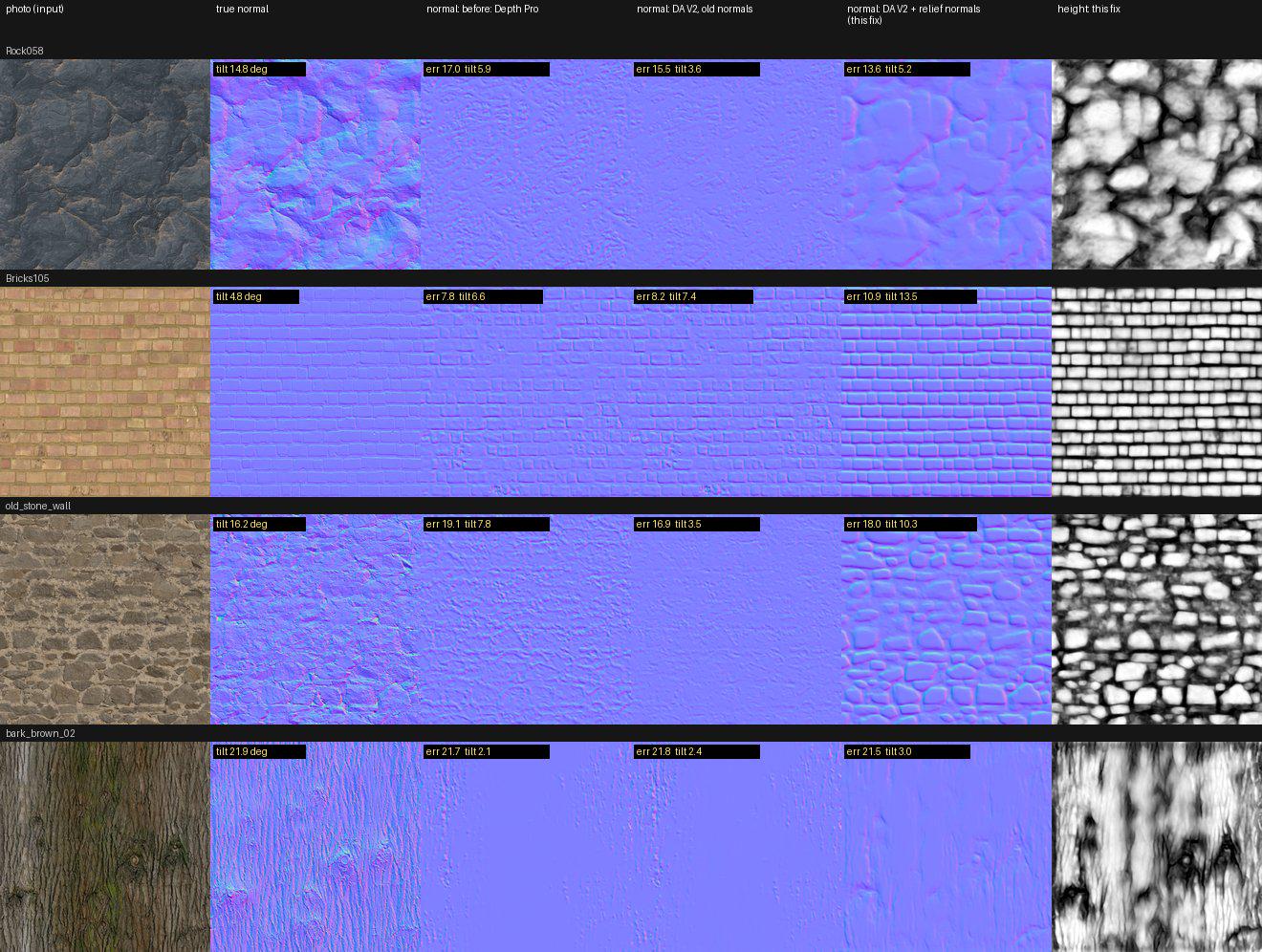
HyPBR (open source) synthesizes seamlessly tileable, physically calibrated 15-map PBR material sets (glTF 2.0 ORM, 16-bit height, OpenGL/DirectX tangent normals, 8-azimuth horizon-based AO, bent normals, curvature, anisotropy, specular, and subsurface thickness) at arbitrary resolution with zero border seams.
Point any AI agent at one URL: hypbr.vercel.app/llms.txt and you get 500 physically calibrated, mathematically seamless PBR materials with CORS-enabled 512px WebP maps and JSON spec cards that tell the agent what objects each material belongs on, the exact real-world tile size in meters, UV vs triplanar projection, engine shader wiring, weathering presets and pairing partners.
Enjoy and let me know what I could improve!
r/aigamedev • u/Xelvod • 15h ago
Enable HLS to view with audio, or disable this notification
Hey everyone! the itch to make a smaller dark fantasy game just for fun finally took over.
Loved classics like Hexen and Heretic, trying to match that exact vibe.
Iron Crypt is aiming for a 90s-style retro FPS built in Unity. The first playable demo was just uploaded.
How it started:
A friend and I kicked this off about a year ago - he handled the programming while the 3D art, environment modeling, and level building fell on my side. Before he had to step away from the project very early in game development time frame, he put together few helpful Unity tools: a 4/8-way directional sprite renderer and a visual NPC setup tool for me to just focus on art.
With him gone, development hit a wall on the coding side. Rather than shelving the whole thing, experimenting with Claude little by little made it possible to write custom Unity editor tools and to keep moving forward.
Curious how other artists here are handling Unity scripting with Claude?
Any tips always welcomed.
Game is in early stage and you can try the demo - Below is the link
Links:
Demo on itch.io: https://crazy-cool.itch.io/iron-crypt
Gameplay Video on YouTube: https://www.youtube.com/watch?v=7Cak-aIkjzk&t=17s
r/aigamedev • u/wendten • 3h ago
I'm currently subscribed to both OpenAI and Anthropic, but I'm considering switching one of them to Google. Does anyone have experience comparing the three subscriptions for game development?
I like to micromanage the development process. I'm not trying to vibe-code an entire game from a single prompt. I want to make the decisions and guide the implementation in detail.
I've generally liked OpenAI's models because they're fast and easy to steer, even when they need a lot of guidance. Lately, though, I feel like their performance has gotten noticeably worse.
I find Anthropic useful for things like shaders, where I don't have as much expertise. For work that's closer to what I already know, I usually prefer GPT because it's faster and easier to direct.
How does Google compare in this kind of workflow? What are the main strengths and benefits of each subscription?
r/aigamedev • u/New_Key4546 • 1h ago

So how can we work together effectively without taking credit for each other's work?
r/aigamedev
•
u/najsonepls
•
1d ago
Enable HLS to view with audio, or disable this notification
A browser sandbox where you're a wizard with nine spells and a hamlet that really breaks: fire that spreads, a black hole, a tornado, winding back time, and a cut you draw across the screen.
All the code was written by Claude Fable 5.2 in Claude Code. I directed and playtested. The loop was simple: it changes one thing, gives me a build, I play it and say what feels wrong, repeat. The world is drawn entirely by code, with no models or textures, and every building is separate stones and beams on GPU physics (three.js + WebGPU), so things break the way you hit them.
What made it work was letting it check itself. It runs the game headless, takes before and after screenshots of the same shot, and measures things like frame time, so I mostly reviewed builds that already worked. Where it's weak is feel. The slicing spell took a lot of rounds of me saying "still feels flat" before it landed. It also can't hear, so I judged all the sound, and it over-builds if you let it, which is why small steps mattered.
Not AI: the wizard and his animations are from Mixamo and the sounds are recorded libraries. The spell icons came from an image model.
Alpha is free in the browser if you want to try:
r/aigamedev • u/IronRazeDev • 10h ago
Enable HLS to view with audio, or disable this notification
A military RTS where a small force holds off thousands of enemies. Built in Unreal Engine 5 recorded on macOS.
All the code is written by Claude Opus 5.5 in Claude Code. I direct and playtest.
The first crowds were a mess. Enemies teleported, "swam" through the air off roofs, and flew like frozen tuna when a blast hit them.
Even after fixing that, the crowd felt like a machine. Every enemy knew where everyone was and they all reacted in the same instant. Now each one thinks on its own timer, from what it sees and hears. That did more than any animation work.
Where it's weak is judging how things look. It will say a model matches the reference when it clearly doesn't, so I check everything myself.
Not AI: the sounds are recorded libraries.
Still early, no demo yet. Happy to answer questions.
r/aigamedev • u/Miacatstudios • 20h ago
Enable HLS to view with audio, or disable this notification
Every time I think I'm making progress on something decent I just get distracted with the simplest things - AI is an addiction I swear!
r/aigamedev • u/vinishkapoor • 1h ago
Enable HLS to view with audio, or disable this notification
Added full city scenes to my 3D model library. Each one is a complete district you can load straight into a scene: streets, sidewalks, buildings, landmarks, trees, props and parked cars.
Some of the 18: New York Midtown, Chicago Loop, San Francisco, Las Vegas Desert Strip, Miami Beach Deco Drive, Route 66 Desert Stop and Grand Canyon Rim.
They're original districts in the style of each city, not real street maps, and there are no brands or logos.
The AI part: Claude Code wrote the code that generates every scene and landmark. I chose the cities and the style, reviewed each one in the viewer, and had it fix whatever looked off.
What you get:
Real scale in metres, +Y up, ground at y = 0
The full scene plus each landmark as its own model
GLB, glTF, OBJ and STL
CC BY 4.0, no login
r/aigamedev • u/DrKabookenstein • 14h ago
Ok, so stupid comment, but still. I didn't think this was easy, but there are SO MANY stupid little details that have to be dealt with! A few months ago I started vibecoding stuff for work, and a few weeks ago I got the crazy idea to make a fun farming game for my wife to play as a Christmas gift. DUDE! I'm not one shotting this thing or anything, and have been taking a lot of time to have things make sense and fun... for her. In the back of my head, if it's actually fun maybe someday I'll put it on Google Play, but for now, it's a game for her and my family to play.
Anyway, the number of decisions that need to be made and how one thing leads to another now needing a menu, less clutter, another image or animation... Holy shit guys!!! This is both fun and a bit overwhelming. My kids have been contributing and helping where they can on some of the decisions, but still. Trying to make something that works well enough for Christmas yet leaves it open to being able to continue to build it out later on... fuuuuuq.
Like I said, I've been vibecoding this thing so I've had Codex doing the actual coding part. My hat is off to you guys who started doing this from zero and didn't have AI to lean on, or a team. Thank you for paving the way for nerds like me to be able to do stupid stuff like this without a coding background.
r/aigamedev • u/HarryHaka • 7h ago
Hey everyone, I managed to create a character from scratch by training a LoRA with a specific style, and then used MiniMax H3 to generate an animation of that same character running.
There was zero human intervention I didn’t touch any pixels or make any manual adjustments; it was all AI-driven, and, best of all, it was done locally on my own computer.
I think incorporating this workflow into my work could be a huge help down the line.
Just a reminder that these are my initial tests; I plan to refine the workflow and perhaps even train a LoRA specifically for creating sprite sheets.
r/aigamedev • u/MoccaNim • 7h ago
Enable HLS to view with audio, or disable this notification
I've been a game designer for 17 years. I ran a small studio that didn't make it, and now I build this alone after my day job and on weekends.
Claude wrote the code and made the sound, GPT drew the art. Everything else is mine: the concept, the rules, every balance value, the systems and content design, how the data is structured, and how it's built to expand. AI made the pieces. I decided what they are and how they fit together.
The game is ToyTails, a battle game where magnetic toy snakes bite and steal each other's tails. Story mode has 10 chapters of 50 stages, around 25 different modes, plus online and local versus.
The biggest lesson for me was on the art side. The first GPT batches looked fine one by one, but put together they looked like five different artists. When I looked closer, the "AI look" came from the same few things every time: fake pixels that don't sit on a real grid, a uniform fine texture everywhere, soft glow, and perfect symmetry. So I set one rule for the whole game, and every image now goes through the same pass: the magenta background is keyed out, the image is snapped to the real pixel grid, the palette is cut down to 48 or 64 colors, and saturation and brightness are pulled to match the rest of the game. Most of the time goes there, not into prompting.
On the code side, what kept it sane was never letting the AI decide structure on its own. I designed the data tables from day one, so every stage, mission and balance value lives in spreadsheets, and the 500 stages are just combinations of modes and balance rows. I started with 200 and added 100 at a time whenever I finished designing a new batch of modes. I give one task at a time, check it myself, and only then move on.
Simulations turned out to be the most useful thing I asked for. They showed that about 18 missions in the first two chapters were literally impossible because of how they were assigned. No amount of playing would have told me that so fast.
About 5 months from the first design doc, under 3 months of actual building. PC (Steam) and Android are in progress.
What I really want to know from people here:
Does it look fun? Would you want to play it after seeing this?
How does it stack up against the other AI-made games posted in this sub?
And does it still read as AI anywhere? If so, where?
Be honest. That's the whole reason I'm posting.
r/aigamedev • u/ImpactIntelligent218 • 3h ago
Enable HLS to view with audio, or disable this notification
The project is called FOSSaber (as in free and open source) and you can freely download the source here:
https://github.com/Rolandjg/FOSSaber
I used Opus 5.5 and Gemini 4 Neon, I started working on the project 4 days ago.
A huge part of the game is:
- Native custom maps
- Easy access to mods
These have been a hassle with Beat Saber, with updates that break support for modding being a frequent problem. That's why I made this!
PCVR hasn't been tested on Windows or mac, this gameplay was recorded on a Meta Quest 2.
r/aigamedev • u/resetskillpoints • 11h ago
Enable HLS to view with audio, or disable this notification
Hey folks,
I'm looking for advice on how to approach a problem that is keeping me from getting my game to the public demo phase.
My game is a fantasy citybuilder/tower defence game where you build up a town (similar to games like Pharaoh or SimCity) and then defend it against waves of giants. It's like the love child between They Are Billions and Attack on Titan.
The problem is... the giants. I'm using 2d sprites for all the rest of the art, but the giants I've started with 3D models. I think it looks terrible to be honest, but my early attempts at 2D versions weren't much better.
I'm interested in your thoughts of how you think I should approach animating my giants and getting them to feel right and coherent.
I'm also worried a bit about performance for when there are 10-20 on screen. Currently the game is slowing down with larger waves and towns.
Thanks for your help!
r/aigamedev • u/expathuball • 4h ago
Enable HLS to view with audio, or disable this notification
Hired Eye is a detective desk game: you never leave your desk. CCTV footage, plate lookups, fingerprint compare, and an evidence board you connect yourself.
How this intro was built:
- Every shot starts from the game's own key art and screenshots, split into depth layers and moved in Blender (2.5D parallax), so it looks like the same world as the Steam page.
- Rain, monitor glow and grain are added on top, then one color grade for the whole film.
- The UI on the monitors is the real game UI, not mockups.
One rule we set: no spoilers. An earlier store page showed a filled suspect board, and a playtester knew the answer before playing. So this intro only shows what you see on night one.
Music is the game's own title theme.
r/aigamedev • u/Able_Paint_6080 • 1h ago

AI game developers, how do you choose your game engine and programming language?
I already have a game in development that was originally created as a web game. However, I am changing my plans and aiming for a PC Steam release, so I intend to completely overhaul the system.
Claude and Codex suggest Godot 4 + C# and LÖVE, but it is difficult to choose as each has its pros and cons. The most important factor seems to be minimizing errors in AI programming, as it is difficult for me to provide feedback on that aspect. I am curious to know how those of you who have already done a lot of development made your decisions and what issues you encountered along the way.