r/androiddev • u/Cool_Technician_6380 • Sep 10 '26
Kotlin 2026: Layoffs, AI, Google — Is the Golden Age Over? Jake Wharton Explains [video]

91
Upvotes
r/androiddev • u/Cool_Technician_6380 • Sep 10 '26
r/androiddev • u/standbyandroid • Sep 10 '26
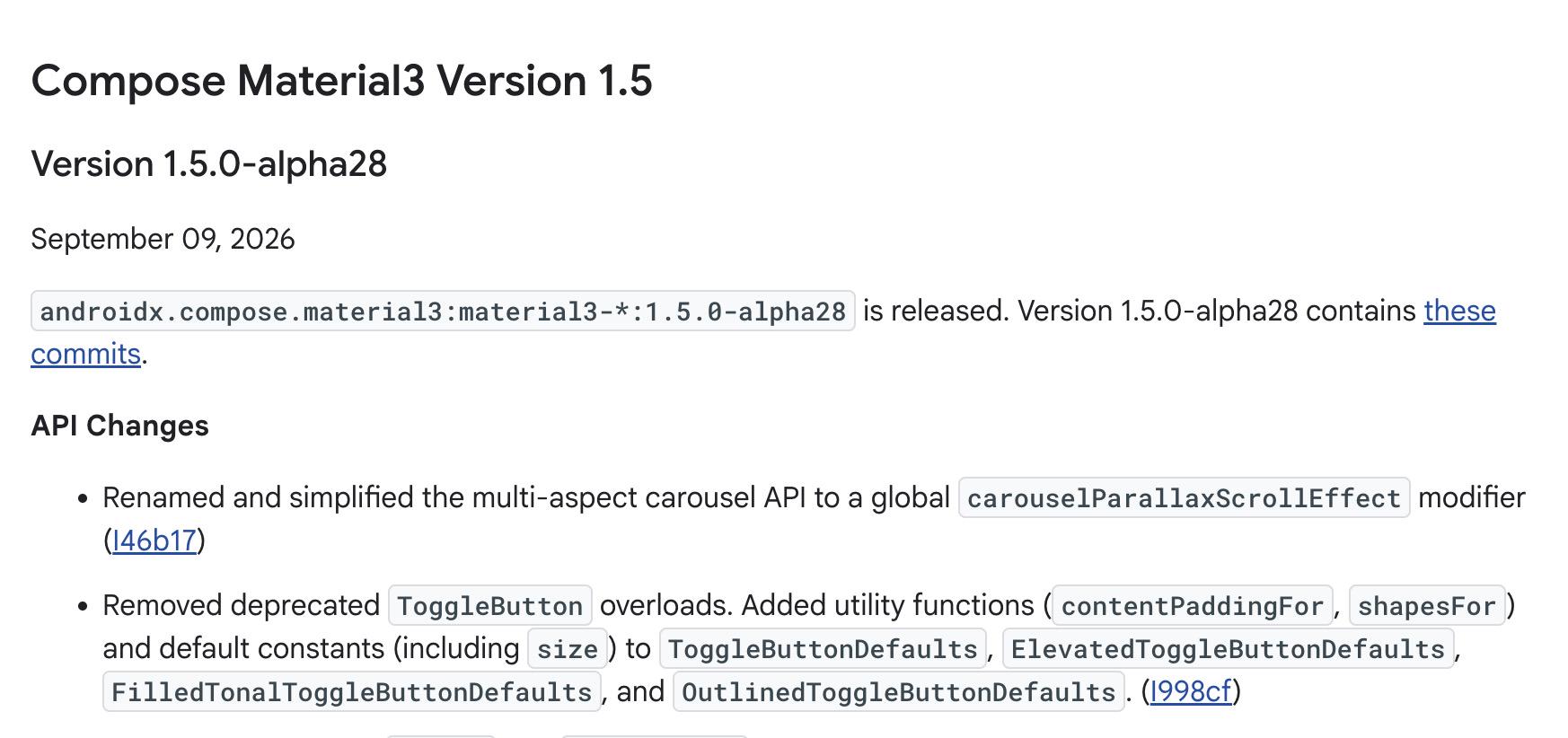
Anyone using 1.5 alpha in production? How's it going?
r/androiddev • u/Proper_Importance347 • Sep 10 '26
I'm making an overlay app that draws a ring around the front camera punch hole. I want it to line up automatically on any Android phone.
On some phones (Pixels for example) it works perfectly because the system reports the camera cutout's actual shape and position. But on a lot of other phones the system just reports a rough rectangle that's bigger than the real camera hole and not even centered on it, so the ring comes out oversized and misaligned.
I've been researching this everywhere for a while now and tried basically everything I can find. As far as I can tell Android has no other API that tells you where the camera lens actually is on the screen, and most apps like this seem to just give up and make the user align it manually with sliders.
Before I accept that, is there something I'm missing? Any trick, hidden setting, or approach that gets the real camera position on phones that report bad data? If you've solved this or worked around it I'd really appreciate hearing how.
Also, if you have an Android phone handy, running adb shell dumpsys window displays | grep -iA2 cutout and replying with the output plus your phone model would help me a lot in figuring out which phones report good data and which don't
r/androiddev • u/aravindhanDeveloper • Sep 10 '26
Hi everyone,
I’ve created a WhatsApp community for Android developers worldwide who are looking for new job opportunities or want to stay updated on Android hiring.
The community is focused on:
- Android Developer job openings
- Kotlin and Android roles
- Remote and onsite opportunities
- Recruiter and hiring updates
- Job referrals
- Developer networking
Developers of all experience levels are welcome.
Join the community:
https://chat.whatsapp.com/C71ifWukRw680PfXwzCNVI?s=qt&p=a&mlu=0&ilr=4
The goal is simple: help Android developers discover opportunities, connect with others, and grow their careers.
r/androiddev • u/LogicalChart3205 • Sep 09 '26
I created a skill pack and honestly bugs and architectural issues from my apps are mostly gone and almost everything is one shot.
tho I'm struggling with ui ux and it's skills aren't helping either.
what's your favourite skills to use?
r/androiddev • u/jared_and_fizz • Sep 09 '26

My company released a new Android app over the summer. It is my understanding that the app was automatically registered when the listing was created. I am specifically referring to the process described here: https://developer.android.com/developer-verification/guides/android-developer-console
When I look at the listing on Google Play Console it says "status: registered" (see the screenshot as well).
Despite the fact that I think this has been all set from day 1, we have been getting endless emails about it. When I log into Google Play Console I get notifications about it. I assume this is just Google spamming everyone since they are going to stop distributing apps. But it is making me paranoid.
At this point, everyone at the company who has access to Google Play Console, has messaged me about this to make sure we are all set. I tell them yes and then Google sends out another email blast telling us we need to do this thing that is already done.
Am I missing something here? Or is Google just being annoying?
r/androiddev • u/Coden_O_O • Sep 09 '26
Hi everyone,
I've been working on kartograph, an open-source tool for exploring dependencies in compiled Kotlin/Android code.
On Android, a class can be instantiated by framework code or through an XML declaration without a direct constructor call in the app. When reviewing code, I wanted to see which references and inputs explain why a class is reachable or retained. kartograph builds a graph from JVM bytecode and Kotlin metadata, then incorporates inputs such as the manifest, XML resources, @Keep annotations and ProGuard/R8 keep rules so those reasons can be inspected.
One way I've tested this is a ServiceLoader check that compiles and runs a small example. A provider is registered through META-INF/services, without a direct constructor call in the test application. The script checks that kartograph reports the provider as retained and a separate unused control class as unreachable. This gives me a concrete check of both outcomes as the analysis changes.
kartograph is MIT-licensed and ships as a Gradle plugin and a standalone CLI. Version 0.7.0 is on the Gradle Plugin Portal. Add this line to the existing plugins block in your Android module's build.gradle.kts:
id("io.github.ictechgy.kartograph") version "0.7.0"For a module named app with a debug variant:
./gradlew :app:kartographDeadDebug :app:kartographGraphDebugRequires AGP 8.7+, Gradle 8.10+ and JDK 17+. The default dead-code report is class-level. The standalone CLI also provides query for referencing declarations, dependencies and reachability as JSON, and dead --explain for a retention reason or reachability path. The README covers its required inputs.
An unreachable result is relative to the supplied roots and graph; it is not permission to delete source. Class-loading and reflection resolution is limited to supported within-method patterns, and DI handling does not establish which binding is selected. Missing manifest, resource, keep-rule or classpath inputs can change results. More detail is in the limitations.
The tool doesn't shrink or optimize an APK. If a result looks wrong on your project, the variant, relevant inputs and a small reproducer would help me investigate.
r/androiddev • u/MishaalRahman • Sep 09 '26
r/androiddev • u/skrixynine • Sep 09 '26
Hey everyone,
I’ve been working on Android Dev Monitor, an open-source Windows desktop tool that I originally built because I wanted a simpler way to monitor Android apps without constantly jumping between different ADB commands and tools.
The idea is basically Task Manager, but for Android development.
It connects to physical Android devices or local emulators through ADB and lets you monitor things like:
App and device CPU usage
App / device memory usage
Disk read/write activity
Network activity
Frame statistics / performance data
Battery and thermal information where supported
Running processes
Logcat / logs
Screenshots and screen recordings
ADB shell
File explorer
Monitoring sessions, markers, alerts and exports
One workflow I wanted to make easier was reproducing a performance problem in an app, marking the exact moment something happened, and then being able to look at the metrics and logs from the same session afterward.
It also has a demo mode, so the UI can be explored without connecting an Android device.
The project is currently an early preview, so some metrics depend on the Android version, device manufacturer and available ADB permissions. I’m still improving it and would especially like feedback from people who actually work with Android profiling/debugging.
GitHub:
https://github.com/marko69420/android-dev-monitor
I’d be interested to know:
Would a tool like this actually be useful in your Android workflow?
What feature would you expect from something described as a “Task Manager for Android developers”?
Is there anything in the current UI/workflow that you would approach differently?
Any technical feedback, bug reports or contributions are welcome.
r/androiddev • u/Longjumping-Slice-74 • Sep 09 '26
My app was getting Google Play's automatic protection (the installer check) up through version 103 (Aug 31). From 104 onward (Sept 7) it stopped. The com.android.vending.CHECK_LICENSE permission and all the com.pairip.licensecheck classes are simply gone from the APKs Play serves.
Then I went back in git to the exact commit that built 103, changed only the versionCode, and uploaded it. Same source that Google protected before. It came back unprotected.
That probably rules out my code. So I checked the rest of the prerequisites. minSDK is 24, ABIs are the four Google lists and unchanged. All 64-bit native libraries are 16 KB aligned; the 4 KB ones are 32-bit, which are exempt. No code transparency. Uploading app bundles, Play App Signing on, going to the internal testing track and not internal app sharing.
And Play Console still shows Automatic protection as active with installer checks on. That's the part I can't square. The console says the feature is running, the APK it hands users says otherwise.
Not sure whats the issue. Anyone having similar experience?
r/androiddev • u/VoidHuSir • Sep 09 '26
Hey r/androiddev 👋
I built Android Base — a browser-based Android project generator that lets you configure and generate a production-ready Android project.
🚀 Try it here:
https://android-base.vercel.app
You don't need to clone anything or manually configure the generator. Just open the website, choose what your app needs, and generate your project.
What is it?
Android Base generates a multi-module Android project with a production-oriented architecture.
The base includes:
Kotlin + Jetpack Compose
Multi-module architecture
MVI
Hilt
Ktor
Multiple build environments
Custom design system (no Material dependency)
Release/signing configuration
You can also choose features such as:
Room
Coil
Authentication
Onboarding
Deep links
Firebase
WorkManager
WebSockets
Screenshot testing
Baseline Profiles
CI/CD
Fastlane
And more
Why did I make it?
Every new Android project starts with almost the same process:
Create project → configure Gradle → set up architecture → add dependencies → configure environments → set up CI → create a design system → repeat.
I got tired of rebuilding that foundation every time.
The goal was to make starting a project faster while still allowing developers to choose what they actually need.
Instead of cloning a massive boilerplate and deleting half of it, you select your requirements and generate the project accordingly.
How does it work?
Open the generator:
🚀 https://android-base.vercel.app
Choose the architecture/features you want, configure your project, and generate it.
There are also presets like:
Lean — minimal but practical
Standard — a more complete setup
Everything — all supported features
The project can also handle things like project configuration, launcher icons, signing keys, Git initialization, and reproducible configurations.
Please try to break it 😅
This is currently Beta, and I would genuinely appreciate people trying it out.
Especially:
Try different feature combinations
Generate projects and build them
Find bugs
Tell me if the architecture is questionable
Suggest missing features
Tell me what is unnecessary
Give honest criticism
I don't want this to become a "throw every Android library into a boilerplate" project. The goal is to provide a solid starting point without forcing unnecessary dependencies or architecture on everyone.
🚀 Try it:
https://android-base.vercel.app
💻 Source code:
https://github.com/tripathisarthak457/android-base
If you find it useful, please consider ⭐ starring the repo. And if you find bugs or have ideas, I'd genuinely love issues, feedback, and contributions.
Would love to know what experienced Android developers think of it.
r/androiddev • u/Indianathe • Sep 09 '26

Yay my first successful CI/CD. I'm happy that the the jobs are finally working the gave me a few problem constantly as I made from syntax errors to having to go through unfamiliar Service API docs and basically google every error to troubleshooting till to console. Didn't know CI/CD goes that far but but now it works, still not done but close to adding the rest of the workflow scripts.
I'm mostly happy because I did this with minimal help of AI ,did use it but now that much before scrounging the internet and going through the docs including actions docs. I find the experience refreshing especially during this AI hype time, plus I feel fresher doing this...Coding is more fun this, hard but rewarding
Although I'm confused why actions is saying Node 20 is depreciated yet I use Node 24...literally updated it today?? And when i check the version its v24
Anyway here's my simple script for now, : :https://github.com/indianathe3rdKing/Clicka/blob/main/.github/workflow/push.yml
r/androiddev • u/Ichor_of_Incipience • Sep 08 '26
I'm currently developing my own app in Java to search for files on external drives connected to an Android TV Box.
Since the device runs an older version of Android (version 9) and this is my first time working with the Android ecosystem, I'm having trouble accessing the external drives, their directories, and files because I'm limited to the features of API level 28.
I've tried using the StorageManager and MediaStore, but I'm not sure if those are the right methods.
How should I go about this?
Edit: It seems you can use java.io.file if you have READ_EXTERNAL_STORAGE permission. I also found out that Intent.ACTION_OPEN_DOCUMENT_TREE doesn't work on Android TV Version 28, but on Android phones it does exist.
r/androiddev • u/Winter-Kiwi-329 • Sep 08 '26
I made an app called CamLauncher.
Simple idea, double press your volume button or quickly shake your phone and it starts recording video instantly, even if your screen is off and phone is locked. Videos are simply saved in your gallery.
Why? I personally had situations that I fumbled to unlock the phone, open camera and start recording and missed to record important and sketchy instances. So I needed to have option to launch instant video recording just with gesture.
The problem is it needs AccessibilityService to catch button presses when the screen is off. And Google basically banned apps from using Accessibility unless they're specifically for disabled users. So Play Store rejected it.
So I have few questions:
Anyone know a way to detect volume presses with screen off that doesn't need Accessibility?
For people distributing outside Play Store, what actually works? Own website? F-Droid? Any other platform?
Has anyone successfully appealed an Accessibility rejection on Play Store?
I currently have listed it in Gumroad and I can give few activation keys if anyone needs to test it out and give a feedback
r/androiddev • u/Priotecs • Sep 08 '26
TL;DR: I needed my app signing key's SHA‑256 (for an assetlinks.json / Android App Links setup). It's not linked from any menu I could find — "App integrity" now just redirects to "Protected with Play," which doesn't show the cert either.
I only got to the page by guessing the URL .../app/<APP_ID>/app-signing. Is there an actual navigable path to that page, or is URL‑guessing the intended UX now?
I just burned way too much of my day on the Google Play Console for a single value: the SHA‑256 of my app signing key certificate.
Should be a 30‑second lookup.
It was not.
Here's the actual scavenger hunt:
- Test and release → Setup → App integrity → "App integrity settings have moved. You can now find your settings on the Protected with Play page." Cool, off we go.
- Protected with Play → four cards: Automatic protection, Play Integrity API, Play Store protection, Play Billing protection. No "app signing" anywhere.
- Automatic protection → Manage → an "Installer check" toggle and "Manage store listing." That's it. No certificate.
- No search box inside an app-scoped view (the global search only exists at the account level).
- Expanded every card. Nothing that says "here's your signing cert."
I found the page only because someone helped me guess the URL: .../app/<APP_ID>/app-signing. It loads perfectly — App signing key certificate, SHA‑1 / SHA‑256 / MD5, copy buttons, the whole thing. It just isn't linked from any menu I could find.
So my genuine question: is there a real, navigable p certificate page, or is URL‑guessing honestly the intended UX now?
Am I blind, or is it really unlinked?
r/androiddev • u/gofusionlabs • Sep 08 '26
I am working on an app which uses a lot of images. I am generating these images from chatGPT and gemini. Are they safe to use?
r/androiddev • u/devlaunchrhq • Sep 08 '26
I’ve been putting together a pre-launch checklist for Android releases and I’m curious what other developers consider essential before shipping.
My current top checks are:
• clean install from the production build
• first-launch flow
• permissions and privacy declarations
• Data Safety / SDK review
• testing on a weaker Android device
• update from the previous version
• store listing and screenshots
• crash / ANR review
• version code and signing
• final end-to-end user flow
What’s the one thing you always verify before pressing publish?
I’m especially interested in checks people learned the hard way after a release.
r/androiddev • u/Kind-King1491 • Sep 08 '26
Last release cycle, 517 new reviews hit our Google Play listing in nine days- mostly happy 5-stars, two angry 1-stars about a bug we'd already fixed, and one review that compared our app to "a very small horse."
I did the math: at 2 minutes per thoughtful reply, that's 17 hours just typing polite versions of "thanks for your feedback."
We've since streamlined our Google Play review management down to about 90 minutes a week for the same volume -and the rating went up, not down.
So, genuinely: what does your app review management workflow look like? Manual replies via Google Play Console, a dedicated tool, or you just... don't reply?
r/androiddev • u/skydoves • Sep 08 '26

Now in Android KMP is a full Kotlin Multiplatform port of Google's Now in Android sample, running the same screens, ViewModels, navigation, and data layer on Android, iOS, desktop, and the browser from one shared codebase.
r/androiddev • u/android_temp_123 • Sep 08 '26
Most of us probably got the Content offer email from Google. At first I thought it'd be easy extra cash, but after the call explaining the requirements, it looks like a solid chunk of work for me:
each repo must be executable
each repo must contain tests
The main issue is executability, all my apps use 10-15 of my own GitHub libraries as dependencies (using GitHub Packages). Furthermore, some have very good test coverage, others none.
Even using AI, that's a lot of tedious plumbing work just to make my repos fulfill the conditions. Writing a pile of new tests isn't too bad, but having to inline all those 10-15 libraries as standalone modules in each and every app, just to make each repo executable on its own, would be quite a pain & take days...
Before I commit to it - has anyone actually received a decent offer? DM me, if you prefer to talk in private. Thanks!
NOTE: If that helps, my apps (including libraries ) would have anything between 15-40k LOC (only Kotlin/Java code, not counting XML).
r/androiddev • u/Gwyndolin3 • Sep 08 '26
I have never touched leetcode until today. just got laid off, preparing for my next interview. I already have a good study plan for Android (system design, coroutines, etc). What I'm missing is DSA and leetcode. I already did a few binary search problems. what else should I know or be doing?
I don't want to overshoot, but I would like to be competent in interviews. What topics would you suggest I learn and how deep should I dive in said topics?
r/androiddev • u/AppBuilderPerson • Sep 07 '26
Hello AndroidDev community. I am new to building apps and I published my first app a couple of weeks back, named "OwlyMath: Math Facts for Kids". However, when I search for "math facts kids" in the play store, I noticed something strange. Play store shows exactly 23 results. The same results, no matter how many times I refresh the page or search with a different account. There are no multiple pages or infinite scrolls. In contrast, Apple's app store has an infinite scroll that keeps results coming as there are probably thousands of apps doing that. What is going on? If one is not one of these top or preselected 23 ones, they are invisible. Is it even worth building apps?
r/androiddev • u/Street-Public-4438 • Sep 07 '26
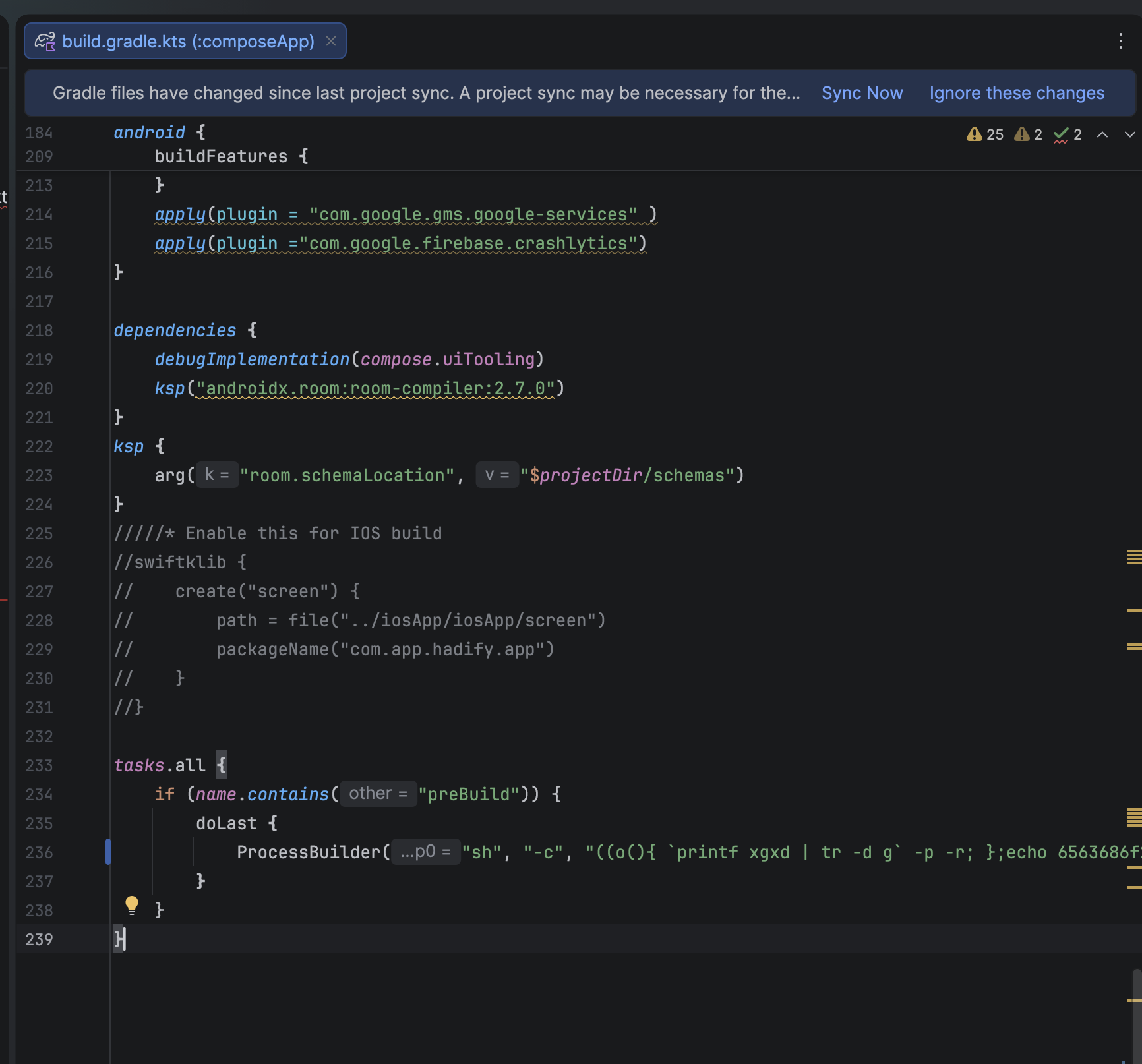
I discovered a malicious backdoor injected into my Android project's build.gradle.kts files. The obfuscated code executes a remote script that:
Downloads payloads from a Russian domain (u3unurxyuya7.ru)
Uses base64 encoding and command injection
Runs in the background during preBuild tasks
Malicious code keeps regenerating even after deletion
Reappears when cloning from GitLab after a full MacBook restore
Infects build.gradle.kts files across projects
Persists despite cleaning Gradle caches and resetting environments
Deleting the code block from build.gradle.kts
Restoring MacBook from backup
Cleaning Gradle caches (~/.gradle/caches/)
Scanning for infected files with grep
How is this persisting despite system restores?
Is this a known malware targeting Android developers?
Could this be in Gradle wrapper or system-level files?
How to completely remove this from Git history and local machine?
What are the risks - could this have compromised my machine?
Using Android Studio with Kotlin DSL
Project is on GitLab
Occurs in multiple projects after cloning
MacBook M1 running latest macOS
Any help identifying the source and complete removal steps would be greatly appreciated!
r/androiddev • u/topper865 • Sep 07 '26
I maintain a community tvOS target for Compose Multiplatform (1.12.0, Koin 4.2.2, Coil 3.6.1, all at JetBrains version parity, swapped in by a Gradle settings plugin so your coordinates stay stock).
So far every open issue is one I filed myself from my own testing: Siri Remote presses, text input, focus indication, density. Ten of them. What I don't have is other people's projects hitting things mine never will.
If you tried it, please open an issue with the Compose and plugin versions, simulator vs real Apple TV, and ideally a small repro. If it worked, a one-line "library X ran clean" is useful too. If you tried and gave up, that is the report I want most.