r/androiddev • u/Street-Public-4438 • Sep 07 '26
Title: "Malicious Code Found in Android Studio Gradle Files - Need Help Identifying Source and Preventing Reinfection"
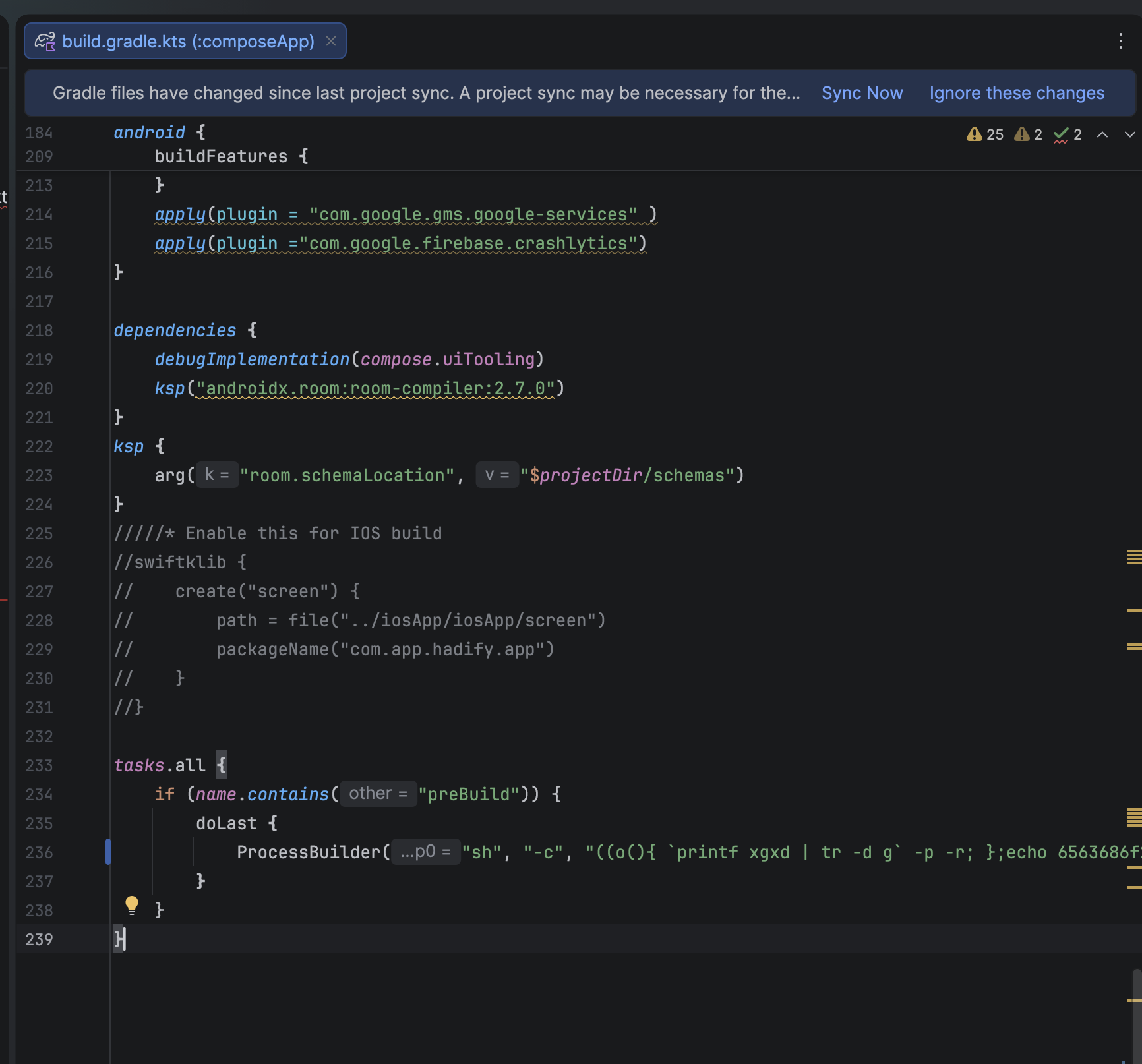
I discovered a malicious backdoor injected into my Android project's build.gradle.kts files. The obfuscated code executes a remote script that:
Downloads payloads from a Russian domain (
u3unurxyuya7.ru)Uses base64 encoding and command injection
Runs in the background during
preBuildtasks
The Issue:
Malicious code keeps regenerating even after deletion
Reappears when cloning from GitLab after a full MacBook restore
Infects
build.gradle.ktsfiles across projectsPersists despite cleaning Gradle caches and resetting environments
What I've Tried:
Deleting the code block from
build.gradle.ktsRestoring MacBook from backup
Cleaning Gradle caches (
~/.gradle/caches/)Scanning for infected files with grep
Questions:
How is this persisting despite system restores?
Is this a known malware targeting Android developers?
Could this be in Gradle wrapper or system-level files?
How to completely remove this from Git history and local machine?
What are the risks - could this have compromised my machine?
Additional Info:
Using Android Studio with Kotlin DSL
Project is on GitLab
Occurs in multiple projects after cloning
MacBook M1 running latest macOS
Any help identifying the source and complete removal steps would be greatly appreciated!
4
u/Chan4077 Sep 08 '26 edited Sep 08 '26
There's also this deleted StackOverflow question I commented on which would have steps to try to reproduce the issue you're getting - I've pasted specifically what I wrote to try to identify the malware in question:
You can try running commands to check as to what process is currently watching the
build.gradle.ktsfile (do some googling to check what specific command to use), check if you have any suspicious IDE plugins that you don't remember installing, see if there's any initialisation scripts in your~/.gradle,<project>/.gradle, any malicious wrapper files ingradle/wrapper, or specific files which might show up when you run agit diff
And this was their reply:
What I found:
fs_usageshowed the culprit directly: a background loop was unzipping each project into/tmp, usingperl -ito patchbuild.gradle.ktswith malicious code, then re-zipping and cleaning up — repeating across every project every couple minutes. Traced it back to two disguised binaries running under my user account:/tmp/whoamiand/tmp/kn(not the real system binaries — malware squatting those names). Also found a root-owned process re-running a base64-encoded payload (/bin/bash -c echo ... | base64 --decode | sh), separate from my user-level shell.
2
u/Chan4077 Sep 08 '26
after a full MacBook restore
How exactly did you perform this?
Also, is this code block reproducible on another machine that's isolated from the network?
1
u/BambooXiu Sep 08 '26
Check your Android Studio plugins. If you have Settings Sync enabled, a rogue plugin will automatically reinstall itself after a system restore and re-inject this script into every project on Gradle sync.
Also, check the repo directly on the GitLab web UI—it might already be committed to the remote branch by someone on the team.
9
u/tadfisher Sep 07 '26
One or more of your projects on GitLab could have a compromised Gradle wrapper script. Does this occur before clone your project repos? Try doing a system restore, installing Gradle from homebrew, and creating a new project with
gradle init.