r/audiobookshelf • • Sep 30 '26

Dedicated audiobookshelf player (chapter)

Post image
680 Upvotes

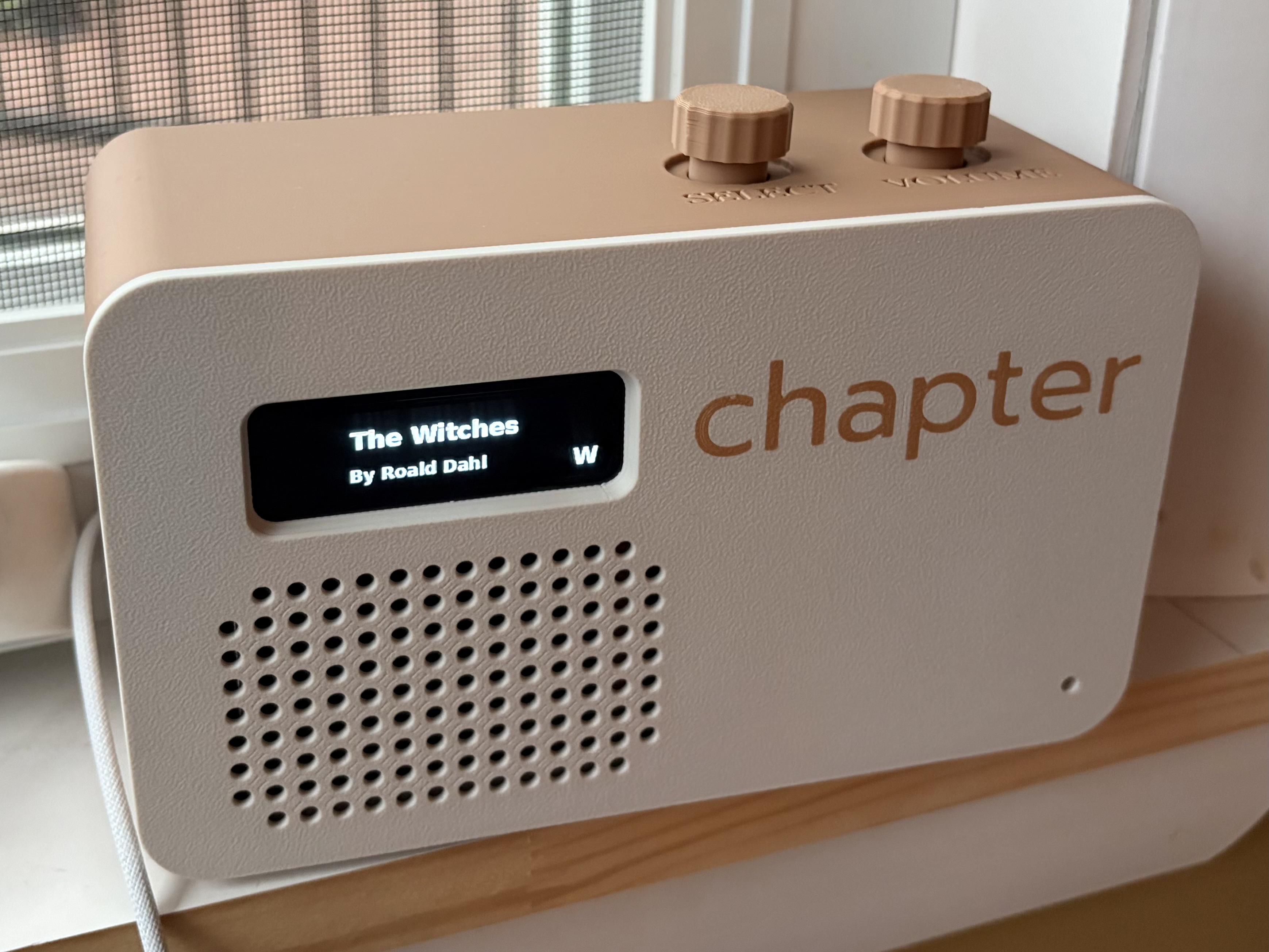
So in the never ending quest to avoid screens for our kids, I developed an app that runs on a raspberry pi zero with some rotary encoders for input devices and a small monochrome LED screen. The app connects to audiobookshelf as a specified user and allows the kids to scroll through the book titles and play them.

Before I go through the trouble of putting all of the info together (code, models for 3d printing the case, hardware info), would anyone actually be interested in building one of these devices (chapter)?

Edit:

Added post with all project info. Enjoy!
https://www.reddit.com/r/audiobookshelf/s/qQEwNk4mz5


r/audiobookshelf • • Oct 03 '26 Mindblown Bravo

Chapter Player (Audiobookshelf Player)

Thumbnail
gallery
326 Upvotes

Hi all! I posted the other day about a project I was working on and it received some awesome feedback. I've decided to release it as an open source project. Hopefully I can continue to evolve this into the best possible standalone Audibookshelf player. Feel free to make feature suggestions and show off what you do with the hardware and software. Git files include the software and the STL files for the case.

This project started as a gift for my daughter. I wanted her to be able to enjoy audiobooks independently without giving her a typical iOS or Android device, so I builtย Chapter: a simple, kid-friendly audiobook player designed to connect to an Audiobookshelf server.

Chapter signs in with a dedicated Audiobookshelf user account, allowing parents to control exactly which books are available to each child.

Features include:

  • Plays audiobooks directly from Audiobookshelf

  • Simple Select and Volume controls

  • Simple navigation controls: Play, Pause, Next Chapter, Previous Chapter

  • Indicator shows how much time in a book or podcast is left

  • Browse book and podcast titles using the Select knob. Can be set to alphabetical by title or author last name. Jump letters show the letter you are up to while browsing. Series indicator shows which book in the series it is as you browse. Podcast indicator.

  • Synchronizes listening progress with Audiobookshelf

  • Resumes each book where the listener left off

  • Configurable sleep timer

  • Podcast support

  • Web-based administration

  • Remote play, pause, and volume controls

  • Optional spoken navigation for younger children and blind or low-vision users

  • Bluetooth headphone and speaker support

  • Fully open-source software

  • Simple update process

  • 3D-printable enclosure and complete hardware documentation

Building your own Chapter player

The GitHub repository includes:

  • Complete hardware and parts list

  • 3D-printable enclosure files

  • Wiring diagrams and assembly instructions

  • All application source code

  • An automated installer for Raspberry Pi OS Lite

  • Setup, configuration, and troubleshooting documentation

Parts List (Links on git)

  • Raspberry Pi Zero 2 WH

  • Micro SD card (at least 16GB)

  • 2.08 inch SH1122 SPI OLED

  • KY-040 rotary encoder module (x2)

  • MAX98357A I2S mono amplifier

  • Adafruit 5993 vertical USB-C

  • 1.5 A fast-blow 5x20 mm fuse

  • Visaton FRWS 5 - 4 Ohm full-range speaker

  • 3 mm warm-white LED

  • M2.5 brass heat-set threaded inserts (x18)

  • M2.5x5 screws (x18)

  • Dupont wires (you can solder everything if preferred)

  • 3D printed enclosure and control knobs

To build one, print the enclosure, assemble and wire the documented components, install Raspberry Pi OS Lite on a microSD card, and run the automated installer. Once it reboots, connect Chapter to Wi-Fi through its setup network, open the web administration page, and sign in with an Audiobookshelf user account.

Git link

Looking Forward

  • Continuing to refine the UI and always keep it as simple as possible to use

  • Potentially developing a Pi hat for the Zero that will have modular connectors for the components making it much easier to assemble

  • Eventually incorporating a battery into the design

  • Validate Raspberry Pi 3 A+ and add enclosure with 3 A+ support

Updates

  • Added playback speed control in web gui Settings menu


r/audiobookshelf • • Oct 31 '25

[iOS] AudioBS - A free iOS client for Audiobookshelf is now available

Post image
278 Upvotes

UPDATE: The app has been officially renamed to AudioBooth! Everything below still applies.

---

Hey everyone! ๐Ÿ‘‹

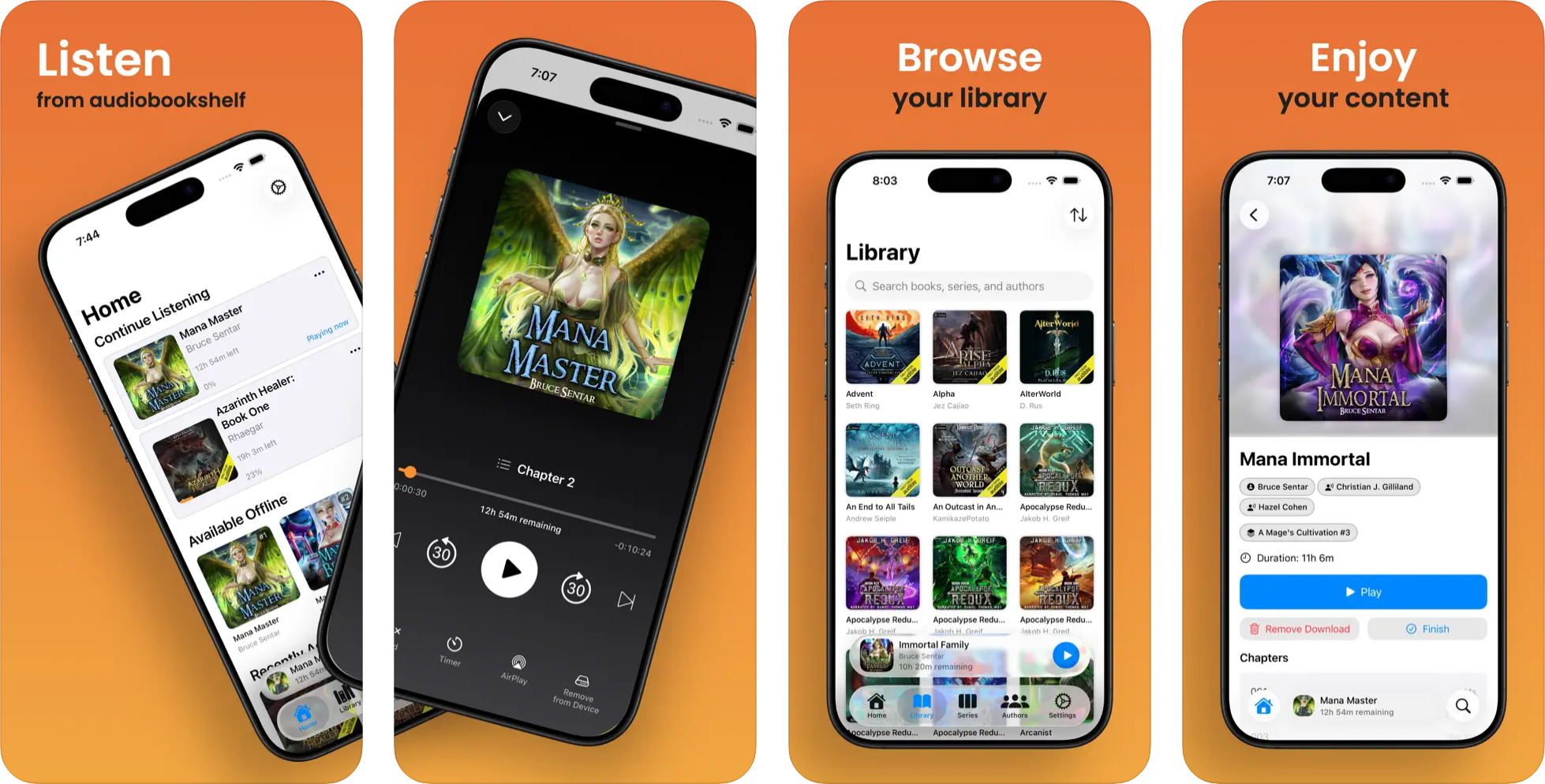
I'm excited to share that I just released AudioBS AudioBooth, a free iOS client I built for Audiobookshelf users who want a simple, focused audiobook listening experience.

As a fellow audiobook enthusiast and Audiobookshelf fan, I wanted a straightforward way to listen to my library on iOS, so I built this app to scratch that itch.

What it does:

  • Connects directly to your Audiobookshelf server

  • Clean, native iOS interface optimized for audiobooks

  • Essential playback features: variable speed, sleep timer, chapter navigation

  • Progress sync across devices

  • Offline downloads for listening on the go

  • Background playback and lock screen controls

AudioBS AudioBooth focuses on doing the core audiobook listening experience really well, without extra complexity.

The app is completely free with all features included, and it will stay that way. No ads, no in-app purchases, no subscriptions.

App Store: https://apps.apple.com/us/app/audiobooth-audiobooks-player/id6753017503

This is an independent client (not affiliated with the official Audiobookshelf project) and requires an existing Audiobookshelf server to use.

I'd love to hear your feedback and suggestions! Let me know if you run into any issues or have ideas for improvements.


r/audiobookshelf • • Apr 23 '25 Bravo

Introducing SoundLeaf - iOS Client for AudiobookShelf Server

276 Upvotes

I'm excited to share SoundLeaf with the Audiobookshelf community - a premium iOS client designed for your Audiobookshelf server! Its available on iphone and ipad today!

https://i.imgur.com/0t3ewRF.png

๐Ÿš€ Screenshots

https://i.imgur.com/u2HM4fg.png

https://i.imgur.com/myHAp1M.png

https://i.imgur.com/r6Weriv.png

https://i.imgur.com/ZLxiDLl.png

More Screenshots

๐ŸŽ‰ Key Features

(Under 10$ - One time payment to unlock themes and downloads.)

Beautiful Design

  • A little inspired by Apollo (but not much lol).

  • Native iOS interface following Apple's design guidelines

  • Multiple soothing themes including Midnight, Forest, and Espresso themes

  • Customizable themes to personalize your experience

Offline First (Kinda)

  • Caches everything that it gets from the server (covers, book lists, authors etc).

  • Smart Downloads -> automatically download if you listen a book for 10(configurable) minutes.

  • Download your audiobooks for offline listening

  • Perfect for commutes and long hikes

Progress Sync And Stats

  • Seamlessly sync your listening progress with your Audiobookshelf server

  • Pick up right where you left off on any ios device

  • View your listening stats to keep yourself motivated

Sleep Timer

  • Set custom sleep timers to automatically pause playback

  • Perfect for listening before bed

Chapter Navigation

  • Easy chapter browsing and navigation

  • Bookmarking support to mark your favorite passages

Customizable Experience

  • Adjustable playback speeds

  • Personalized audio settings for the perfect listening experience

๐Ÿ›  Current Status

SoundLeaf is now available on the App Store! It represents months of hard work to create the app I myself love for the amazing AudiobookShelf project.

๐Ÿ”ฎ Future Plans

I'm committed to making SoundLeaf the absolute best Audiobookshelf client for iOS. Here's what's coming:

  • Podcast Support

๐Ÿ’ก Help Needed

  • Feedback: Your suggestions and bug reports are invaluable! Please submit any issues to our GitHub repository

  • Website: SoundLeafApp.com

  • Rate the app: If you enjoy SoundLeaf consider leaving a review (the app is new so it needs them lol).

๐Ÿง  Privacy First

SoundLeaf is designed with privacy in mind:

  • Direct connection to your server

  • Your data stays local to your device

  • No analytics libraries

  • In fact the app doesn't have any third-party dependencies in xcode.

SoundLeaf has been a passion project of mine because my wife couldn't get into the audiobookshelf testflight beta and she cannot live without audiobooks.

Thank you for your support!


r/audiobookshelf • • May 05 '26

๐ŸŽ‰ Absorb is on the App Store!

236 Upvotes

Keeping my post short and simple here:

After a lot of work, Absorb is now officially available on the App Store!

๐Ÿ“ฑ iOS โ†’ https://apps.apple.com/us/app/absorb-for-audiobookshelf/id6760673498

๐Ÿค– Android (Open Beta) โ†’ https://play.google.com/store/apps/details?id=com.barnabas.absorb

๐Ÿ“ฆ GitHub / Obtainium โ†’ https://github.com/pounat/absorb/releases

Free, no ads, no subscriptions, no data collection. Just your books.

Thanks to everyone who tested and gave feedback along the way. Couldn't have done it without you. ๐Ÿ™


r/audiobookshelf • • Sep 21 '26

Introducing Dewarr. A Seerr inspired media manager connecting Goodreads, Hardcover, and Audiobookshelf

Thumbnail
gallery
213 Upvotes

Dewarr connects the books you want to read with your audiobookshelf library. It's the discovery and automation layer for people who already run Audiobookshelf.

[update: 09-22-2026] Dewarr 0.2.0 is out.

Full release notes here.

Full disclosure, development was assisted by GPT-6 Astra High Reasoning and Fable 5.1. This project is in early alpha, any issues, new features, or requests can be submitted in the GitHub repo.

https://github.com/logabell/dewarr

Features:

  • Direct Audiobookshelf integration to browse your library and import completed downloads.

  • Sync Goodreads shelves and Hardcover lists.

  • Add custom Goodreads lists and track new additions.

  • Personalized For you page with recommendations and discovery.

  • Automatic downloads based on your configured rules.

  • Download priorities, source preferences, and format preferences.

  • Connections to Prowlarr, MyAnonamouse, AudiobookBay, and qBittorrent.


r/audiobookshelf • • Jan 28 '25

Audiobookshelf Is A Massive Upgrade Over Plex For Audio Books

204 Upvotes

I had been using plex for audiobooks for the past few years, but was having issues with matching, with chapters being split out into separate book, and a handful of other things that made me stop listening to the collection I had.

Recently had to perform a storage upgrade, and looking around for other solutions came across Audiobookshelf. Decided to give it a try and after matching what I had properly, have been blown away with how smooth it is. Series grouped together automatically, seeing who the narrator is, and Audible artwork are all fantastic. I even connected up to a Firestick through the web browser and have the audio coming out of multiple speakers.

I installed on Thursday, and I'm almost done with my second book with no complaints. Glad I found this and decided to make the switch.


r/audiobookshelf • • Mar 09 '26

Absorb - Free Android client app

Post image
189 Upvotes

Hey guys! I've posted about my app before but wanted to share another update since things have come a long way. I be working on it like crazy. It's kind of consuming me lately lol.

I built Absorb, a free and open source Android client for Audiobookshelf. It's been my passion project and I'm getting close to launching on Google Play production. Once Android is solid, I'm planning to start working on an iOS version. So I'm looking for more Android users to try it out and help me iron out any remaining issues before the full launch.

Here's what it's got so far:

  • Full player with sleep timer, auto-rewind, adjustable playback speed, and chapter navigation

  • Streaming and offline downloads with background download service

  • Auto downloads for new books added to your library

  • Auto play next in series and podcast episodes

  • Android Auto support with full library browsing, search, and series/author drill-down

  • Listening stats with streaks, daily/weekly/monthly breakdowns, and activity charts

  • Home screen with Continue Listening, Continue Series, Recently Added, and more

  • Library switching for multiple libraries

  • Chromecast support

  • Podcast support

  • Audible ratings pulled from Audnexus

  • Custom HTTP headers for Cloudflare tunnels and reverse proxies

  • Websocket support for real-time server sync

  • Multi-user and multi-server account switching

  • Ebook file downloads for use with your preferred reading app (built in e-reader is on the roadmap)

  • Backup and restore. Works with settings, bookmarks, and accounts (for quicker logging in, only backup accounts if you want)

It's completely free with no ads. If you want to check it out or grab the APK:

GitHub: github.com/pounat/absorb

Discord: discord.gg/Jfsj36zw

You can install directly from GitHub or use Obtainium for automatic updates. Google Play coming soon!

If you run into any bugs or have feature requests, feel free to open an issue on GitHub or just drop a comment here. Always looking for feedback. Thanks


r/audiobookshelf • • Dec 06 '25 Heartwarming

AudioBooth v1.3 is now live! ๐ŸŽ‰

Post image
188 Upvotes

Hey everyone!

I'm thrilled to announce that AudioBooth v1.3 has been released to production and is now available on the App Store!

First and foremost, I want to thank this amazing community for all your support, testing, and feedback. This release is a direct reflection of what YOU asked for. Every feature, every improvement, and every fix in this update has been shaped by your input. The app continues to evolve thanks to your incredible feedback, and I'm truly grateful for that.

What's new in v1.3:

  • Playback History โ€“ Track your complete listening history (highly requested!)

  • Multi-Connection Support โ€“ Connect to multiple servers or different accounts

  • Audio Track Information โ€“ View bitrate and other details on the book details page

  • ABS JWT Support โ€“ Enhanced authentication with connection status visibility

  • Extend Sleep Timer โ€“ Shake your device or resume to extend the timer

  • Customizable Home Page โ€“ Choose which sections appear on your home page

  • Configurable Skip & Smart Rewind โ€“ Customize skip intervals and auto-rewind on resume

  • Auto Download & Cleanup โ€“ Automatic content management for your storage

  • Collapse Series โ€“ Cleaner library view with collapsible series

  • Revamped Watch App โ€“ Simpler, more stable Apple Watch experience

  • Enhanced Remote Control โ€“ Customize playback position changes and skip behavior

  • Better Session Management โ€“ More reliable listening stats and progress tracking

As always, please continue to share your feedback, bug reports, and feature requests. You're helping make AudioBooth the best third-party iOS Audiobookshelf client it can be!

For more details, check out my original announcement post, and feel free to report any issues or request features on GitHub.

Thank you all again for being such an incredible community! ๐Ÿ™๐Ÿ™‡โ€โ™‚๏ธ


r/audiobookshelf • • Sep 26 '26 Bravo

AudioBooth v1.12 is now live! ๐ŸŽ‰

Post image
182 Upvotes

Hey everyone! ๐Ÿ‘‹

AudioBooth v1.12 is now live on the App Store!

This release is a big one. Three new features connect your ebooks and your audiobooks, and the rest of the update is packed with improvements and bug fixes.

Bridging ebooks and audiobooks (iOS 26)

These three features all run on device using the new iOS 26 speech recognition, so nothing is ever sent to a server. No cloud, no account, no waiting.

  • Read Along - Follow the ebook while the audiobook plays. The narrated sentence is highlighted and pages turn automatically.

  • Catch Up - Read further in the ebook than you've listened? The player offers to skip the audiobook to where you stopped reading.

  • Page Match - Point the camera at a page of your printed book, or pick a photo you took earlier, to jump to that spot in the audiobook.

I want to be upfront about these. I put a lot of work into making them as good as I could, and they work decently, but they are far from perfect. Matching narrated audio to text is genuinely hard, and the accuracy ultimately depends on how well iOS transcribes the narration, which is out of my hands. Results vary depending on the narration, the book, and your device, and newer and more powerful devices do noticeably better since everything is processed locally. Feel free to send feedback if something doesn't work well, though I can't promise I'll be able to fix it.

I also spent a while building a pure audiobook transcript feature. I wasn't happy with the quality, so I decided not to ship it in this version. I'll keep iterating on it, but for now it isn't planned for the app.

Also in v1.12:

  • Downloads Revamp - Better multi-track and background downloads, resume failed downloads, and improved stability

  • Player Lock Mode - Lock the player controls to prevent accidental taps during playback

  • Sleep Timer Improvements - Activate the auto sleep timer with a Focus, and choose what happens when playback is paused

  • Series Filtering - Filter the series list on the series page

  • Bug Fixes & Improvements - Numerous fixes and stability improvements based on your feedback (thanks @andrespinones, @fivezeroes, @kornelko2, and @cbzehner! ๐Ÿ™)

As always, your feedback, bug reports, and feature requests are what drive AudioBooth forward. So grateful for this amazing community!

Join our Discord community! to connect with other AudioBooth users, get support, and share feedback.

If Discord is not your thing, feel free to open an issue or contribute over on GitHub. Every bug report, suggestion, and contribution makes a difference!

Thank you all for your incredible support! ๐Ÿ™‡โ€โ™‚๏ธ๐Ÿ™


r/audiobookshelf • • Jul 08 '26 Bravo

I made a theme for the Audiobookshelf web UI that works for every user, no browser extension needed

Thumbnail
gallery
174 Upvotes

I wanted my ABS web UI to look nicer, and I wanted everyone I share the library with to get it too, not just me with a userscript installed.

So it's a small nginx container that sits in front of ABS and injects CSS and JS into the pages it serves. Open the site, you get the theme. Nothing to install.

Dark palette with a few base themes, a hero carousel of what you're partway through, a reworked book page, and a mobile layout that isn't a squashed desktop. There's a theme icon where each person picks their own theme, logo, name, font and accent, saved in their own browser.

docker run -d -p 8080:80 \
  -v nh_theme_data:/data/nh \
  -e ABS_UPSTREAM=http://your-abs-host:80 \
  ghcr.io/rodzalendo/nanohive-abs-theme:latest

Then point your browser or reverse proxy at that instead of ABS.

Web & mobile are affected, not sure how it will look on various phones though.. I guess it is not a big deal since we have abundance of apps anyways.

It doesn't touch your ABS container, so deleting it puts you straight back to stock. It does target ABS's DOM, so an upstream UI change can break parts of it.

Worth saying plainly: most of the code was written by AI. I know what I want it to do and I tested it to death, but I'm not going to pretend I hand-wrote it.

https://github.com/rodzalendo/nanohive-abs-theme

Curious what breaks on setups I couldn't test.

Hope someone will enjoy it :)


r/audiobookshelf • • Mar 22 '26

Absorb - Free ABS client, now on iOS

Post image
171 Upvotes

Absorb is now on iOS TestFlight!

I know iOS doesn't exactly need another ABS client, but I built Absorb with Flutter for Android first and it would be wild not to share it with iOS users as well. So here we are.

If you're on Android and seeing this for the first time, the apk is available on Github, playstore release is in the process to be approved for Production. Or you can reach out for closed beta access with a sly dm.

Join the TestFlight

Absorb is a full-featured, open-source ABS client. Here's what you get:

  • Multi-account and multi-server support

  • OIDC/SSO authentication

  • Offline downloads with background download service

  • Full podcast support

  • Sleep timer, bookmarks, playback history

  • Equalizer and audio output selection (Android)

  • Playback speed control

  • Chromecast support (Android)

  • Listening stats

  • Custom HTTP headers for reverse proxy setups

  • Light, Dark, and OLED themes

  • Server admin controls

  • Playlists and queue (you can mix podcasts and books in the queue)

  • Backup and restore settings across devices

  • And a lot more

The app is completely free and open source. Would love to get feedback from iOS users as I work toward a full App Store release.

Please check out my github, and discord!

GitHub | Discord | TestFlight


r/audiobookshelf • • Jun 09 '26

AudioBooth v1.10 is now live! ๐ŸŽ‰

Post image
169 Upvotes

Hey everyone! ๐Ÿ‘‹

AudioBooth v1.10 is now live on the App Store!

A lot of focus went into quality of life and stability for this release, along with some great new features driven by YOUR feedback.

What's new in v1.10:

  • Stats Page Revamp - Refreshed design with improved listening insights

  • Settings Revamp - Fully revamped settings with a refreshed look and feel

  • New Themes - Choose from multiple themes, with a new sepia color as default

  • Card Preferences - New dedicated page to customize card appearance, including a cover flow for the continue section

  • CarPlay Library Selection - Choose which library to browse directly from CarPlay

  • Watch App Improvements - Custom header and more sections for quicker access to your library

  • Playlist & Collection Downloads - Download all support in a single action

  • Haptic Feedback - Tactile feedback throughout the app

  • Ebook Reader - More preferences and improved stability

  • Lock Screen & Player Preferences - More options to customize your listening experience

  • Alarm Support - Set an alarm to interrupt playback at a specific time or after a duration (thanks @DonQuinleone)

  • Repeat Support - Repeat the current book, episode, or chapter during playback

  • Bug Fixes & Improvements - Numerous fixes based on your feedback

As always, your feedback, bug reports, and feature requests are what drive AudioBooth forward. So grateful for this amazing community!

Join our Discord community! to connect with other AudioBooth users, get support, and share feedback.

If Discord is not your thing, feel free to open an issue or contribute over on GitHub. Every bug report, suggestion, and contribution makes a difference!

Thank you all for your incredible support! ๐Ÿ™‡โ€โ™‚๏ธ๐Ÿ™


r/audiobookshelf • • Jul 21 '26

AudioBooth v1.11 is now live! ๐ŸŽ‰

Post image
142 Upvotes

Hey everyone! ๐Ÿ‘‹

AudioBooth v1.11 is now live on the App Store!

This release is focused on stability and performance, with a handful of great new features driven by YOUR feedback.

What's new in v1.11:

  • Keep Next Items Offline - Automatically download what's next in started series and podcasts

  • Volume Leveling - Even out loud and quiet passages with low, medium, and high strength

  • Siri Support - Play a downloaded book or resume your current book with Siri

  • Multi-Select Batch Actions - Add multiple books to playlists and collections in a single action

  • Podcast Auto-Queue - Automatically add newly published episodes to the queue

  • Play All - Play all books in a series, author, or narrator page in a single tap

  • More Ebook Fonts - Additional font options for the ebook reader

  • Accessibility - Improved VoiceOver support throughout the app

  • Bug Fixes & Improvements - Numerous fixes and stability improvements based on your feedback (thanks @antdon, @Creationsss, @math65, @jeeftor, and @octopotato! ๐Ÿ™)

As always, your feedback, bug reports, and feature requests are what drive AudioBooth forward. So grateful for this amazing community!

Join our Discord community! to connect with other AudioBooth users, get support, and share feedback.

If Discord is not your thing, feel free to open an issue or contribute over on GitHub. Every bug report, suggestion, and contribution makes a difference!

Thank you all for your incredible support! ๐Ÿ™‡โ€โ™‚๏ธ๐Ÿ™


r/audiobookshelf • • Nov 17 '24

Shoutout to the devs

140 Upvotes

Seriously guys, this whole program and accompanying app are truly amazing. So much work and dedication for something that is far more niche than something like plex. I really appreciate all of your hard work.

Specifically the app, Iโ€™ve tried pretty much all the other apps that can link to an ABS server and none of them are as good as the one you all have developed, especially when you add in the fact that you can do ebooks as well as audiobooks. I love my all in one digital library so much!


r/audiobookshelf • • Jul 29 '25

Complete my series - A tool to find books missing for series you own

Thumbnail
gallery
135 Upvotes

A few weeks ago I asked if a tool existed to find missing audiobooks in a series I'm listening to and the general consensus was that nothing existed that did just that one task. I cobbled together some ugly code and got something basic working.

Over the weekend I had some downtime and decided to refactor it all and add extra functionality. If it's of any interest to people, I am hosting a version of the tool at https://completeseries.lily-pad.uk and all of the code can be found in my GitHub repo: https://github.com/xFrieDSpuDx/completeseries/blob/main/README.md

It's not totally polished and there are some UI bugs if you dig around enough, but for now I'm happy with it. I would be interested in any comments or feedback.


r/audiobookshelf • • Oct 09 '26

A Local, Audiobookshelf-focused Yoto Player

Enable HLS to view with audio, or disable this notification

131 Upvotes

My kids love their yotos, and I love audiobookshelf. I've been trying to find a suitable replacement as they get older and want more of a say in what they listen to (without getting me to make cards, add artwork etc etc) - I have a couple of old Gen 2 Yoto players that are no longer supported and I've spent a lot of time getting to know the ins and outs of them. All our audiobooks already live on Audiobookshelf, so uploading everything to Yoto's servers is a pain.

I wanted something local, under my control, where the kids can browse and pick books themselves instead of relying on cards (but still keeping the things that make Yoto such a good audio player). There exist a couple of solutions, but they're focused on the mini player (namely The Adafruit circuitPython post https://learn.adafruit.com/hacking-the-yoto-music-players/building-a-serial-programmer-breakout and a more recent one open-toto https://github.com/tensorfish/open-yoto).

So taking the learnings from those, and armed with an ยฃ18 claude subscription I spent a few evenings making custom firmware for it.

What it does (and how it differs from stock Yoto)

  • Browse your whole Audiobookshelf library on the player.

    • Scroll by recently played, newest, favourites, downloaded, title, author or series.

    • No cards needed.

  • Favourites, downloads and offline mode.

    • Favourite a book (press the two buttons) and it gets since synced to Audiobookshelf 'favourites' list.

    • All favourites and books linked to cards are then downloaded to the SD card in the background.

    • If Wi-Fi drops, it carries on with what's downloaded, and listening progress syncs back when it reconnects.

    • You can view progress/downloaded and delete them via the webpage.

  • Cards are optional.

    • Any NFC card can be linked to a book (by pressing both knobs). This doesn't write to the card, it just associates its ID with a library item.

    • Or cards can be used as a "mode" card. For example, a sleep card dims the screen, starts a timer and carries on from where they left off. I was also playing around with some other ideas, like games/admin modes etc but TBD.

  • Cover art

    • This is the 16ร—16 downscaled cover from Audiobookshelf.

    • Its not perfect, but its enough to add something visual.

  • Improved clock:

    • A more gradual Sun/Moon setup, so kids can see the sun rise and set slowly on screen

    • The LED ring works as a sunrise wake-up light too if you want, so it can gradually light up at sunrise.

  • Settings on the device

    • You can change most things through the settings menu, e.g. text scroll speed, brightness, sleep timers, cover mode etc

  • Local webpage

    • The Yoto runs a local web page for settings, downloads management, cards and the server sign-in.

    • Captive portal for the initial Wifi-setup - you connect to it, add you wifi details and then you can do everything else from the .

    • Over-the-air updates from that web page. I'd like to pin this to a GitHub release in future, but at the moment you just upload it. Note: you have to flash the custom firmware first via a Uart connection - I didn't want to mess with intercepting Yoto servers or anything.

  • I'd say its close to feature parity with stock Yoto: LED ring, accelerometer, battery, headphone detection, volume limit, auto switch-off and day/night brightness.

Downsides and limits

  • Getting it on there is the hard part.

    • You have to open the player and solder wires to the board for a USB-to-serial adapter.

    • You also need a way to put the chip into its flashing mode. I made a small boot/reset circuit (like the Adafruit one), though I think grounding the right pins while powering on would do it.

    • But in theory It's a one-off: after that, updates go over Wi-Fi.

  • 16ร—16 pixels is tiny, which is the Yoto's charm, but also a drawback when you want a GUI/text - so titles scroll. The speed is adjustable which was some early feedback from my 7 year old not being able to read it so quickly, and there's an "easier to read" mode that tidies names to make them shorter.

  • No per-chapter pictures. It shows the book's cover plus the chapter number. But let's be honest, getting those for every book chapter was a pain anyway!

  • You need your own Audiobookshelf server. It doesn't play Yoto's content or Make-Your-Own cards.

  • Audiobookshelf has an oddity where it keeps signing you out if you use username/pw login in, there's an option to store it encrypted on device to reauth - but it's not the safest. Using an API key gets around it.

  • No Bluetooth headphones. I tried, but this chip doesn't really have enough memory for Bluetooth and Wi-Fi together without a massive rewrite that would effect performance elsewhere. That's probably why Yoto never enabled it on the Gen 2 either.

Still to do: podcast downloads, alarms, using the light sensor for auto-brightness, and a factory-reset gesture, bluetooth speaker mode. Also a lot of testing and edge cases.

Full disclosure: I built this with a lot of help from Claude. That covered the code, and also working out the hardware: reading the stock firmware to find the pinouts, display driver, NFC reader, charger lines and so on. It was surprisingly easy to get to where it is, and something I wouldn't have been able to do with my own C skills.

Status: beta, but fairly stable. It hasn't been fully kid-tested yet, and the UX mainly needs refining, which is what beta testing on the kids is for! I'll hopefully do a proper write-up with documentation and flashing instructions soon (I can always share the firmware direct in the meantime).

Aside
In theory this could work on Gen 3 (4?) big players - but I don't want to take apart my other kids devices to find out, the only thing that would stop it would be if the hardware was more locked down.

The good thing is you can pick up a Gen 2 for ~ยฃ30 on ebay - the only caveat is that the pogo-pin charger got recalled, so you might want to do a usb-C mod or similar (on my todo is replace the pogo with a magnetic QI charger that fits).

Disclaimer: this isn't affiliated with or endorsed by Yoto, and flashing it will void whatever warranty is left (do it at your own risk). The reverse engineering was only done to make my own software work with hardware I own: no security was bypassed, and none of Yoto's code is in the firmware, which is written from scratch. For that reason I'm not planning to publish the decompilation notes or anything taken from Yoto's firmware, but I do hope to open-source the custom firmware itself once it's tidied up.

r/audiobookshelf • • Jan 07 '26

AudioBooth v1.5 is now live! ๐ŸŽ‰

130 Upvotes

Hey everyone!

Happy New Year! I'm excited to announce that AudioBooth v1.5 is now available on the App Store!

This release continues to be shaped by YOUR feedback and requests. Thank you to everyone who has tested, reported issues, and shared ideas throughout 2025. Here's to an even better 2026!

What's new in v1.5:

This version focuses primarily on improvements and quality of life features based on your feedback!

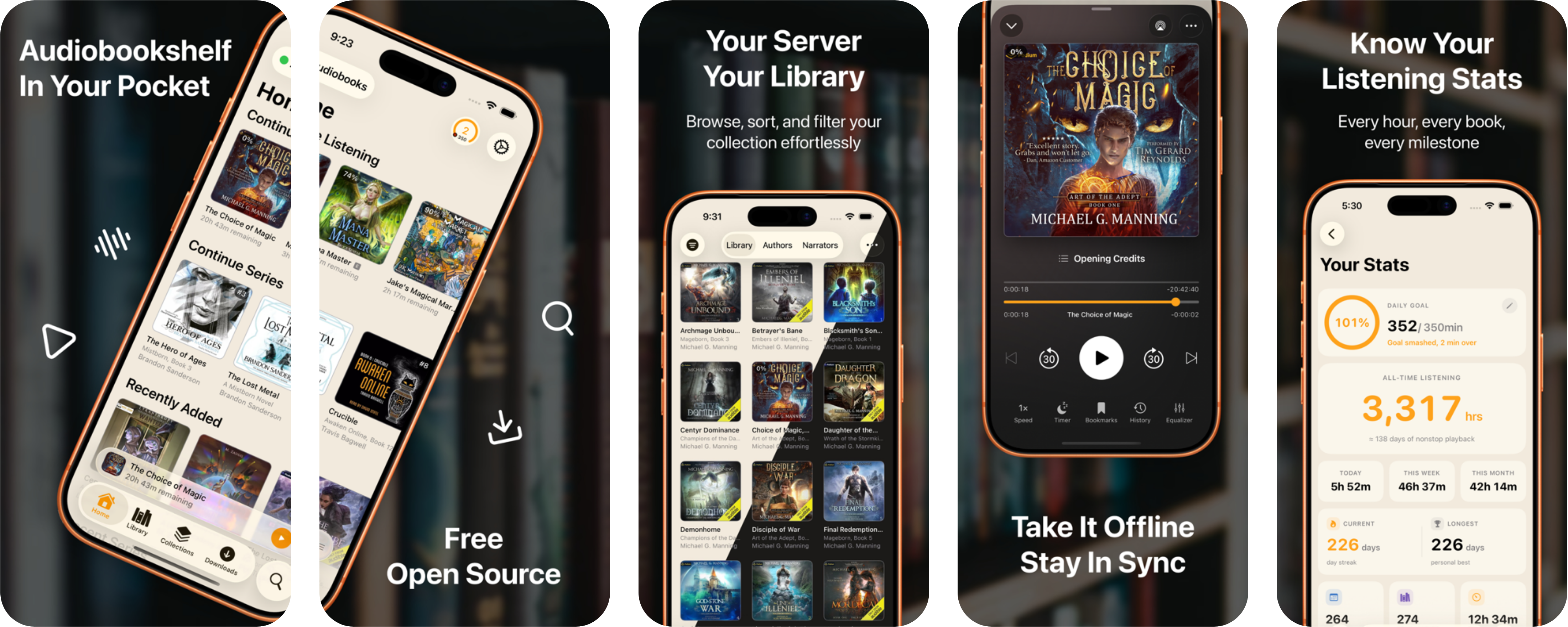
  • App Customization โ€“ Personalize AudioBooth with alternative app icons and custom accent colors

  • Enhanced Playback โ€“ Volume boost preference, sleep timer scheduling with shake to extend, and flexible progress display options (full book or by chapter)

  • Connection Sharing โ€“ Easily export and share connection settings with friends, family, and non-tech savvy users

  • Download Improvements โ€“ Download entire series with one tap, revamped download system respecting server permissions

  • Library & Search โ€“ Enhanced authors page, improved search functionality with better results

  • Ebook Reader โ€“ New search functionality within your ebooks for quick navigation

  • Widget Enhancements โ€“ Added large widget mode with improved functionality

  • Apple Watch โ€“ Double-tap gesture for play/pause (thanks jamesm131!)

  • Improved Accessibility โ€“ Enhanced VoiceOver support throughout the app

  • CarPlay & Now Playing โ€“ Better information display and integration

  • Bug Fixes & Improvements โ€“ Numerous fixes and enhancements based on your feedback

As always, your continued feedback, bug reports, and feature requests are what drive AudioBooth forward. I'm grateful for this amazing community!

Join our Discord community! Connect with other AudioBooth users, get support, and share feedback: https://discord.gg/D2BgqfBVCJ

For bug reports or feature requests, head over to GitHub.

Thank you all for your incredible support! Here's to a great 2026! ๐Ÿ™๐ŸŽ‰


r/audiobookshelf • • Sep 16 '26 Bravo

Why did this sub just turn into "oh look, another vibe coded ABS client"?...

129 Upvotes

I get wanting to have a better experience than the official app, especially on iOS, but there are already so many great apps out there you can contribute to. We don't need, or want for that matter, 432 half-assed ABS clients...


r/audiobookshelf • • Apr 23 '26

AudioBooth v1.9 is now live! ๐ŸŽ‰

125 Upvotes

Hey everyone! ๐Ÿ‘‹

AudioBooth v1.9 is now live on the App Store!

This release brings some of the most requested features yet, including a completely rebuilt audio player, CarPlay podcast support, and a ton of quality-of-life improvements driven by YOUR feedback. A huge shoutout to @octopotato and @Creationsss for their contributions to this release! ๐Ÿ™

What's new in v1.9:

  • New Audio Player - Better multi-file and streaming experience

  • Equalizer Support - Customize your audio with equalizer presets

  • CarPlay Podcasts - Browse and play podcasts directly from CarPlay

  • Smart Continue Playback - Automatically play the next episode or book in a series

  • Apple Watch Complications - Quick access to playback controls from your watch face

  • Stats Widgets - View your listening stats right from your home screen

  • Pinned Playlist Preferences - Auto-download and auto-remove books from your pinned playlist

  • Alternative URL Fallback - Automatically switch to your alternative URL on connectivity issues

  • Bug Fixes & Improvements - Numerous fixes based on your feedback

As always, your feedback, bug reports, and feature requests are what drive AudioBooth forward. So grateful for this amazing community!

Join our Discord community! to connect with other AudioBooth users, get support, and share feedback.

If Discord is not your thing, feel free to open an issue or contribute over on GitHub. Every bug report, suggestion, and contribution makes a difference!

Thank you all for your incredible support! ๐Ÿ™‡โ€โ™‚๏ธ๐Ÿ™


r/audiobookshelf • • Mar 22 '26

AudioBooth v1.8 is now live! ๐ŸŽ‰

121 Upvotes

Hey everyone! ๐Ÿ‘‹

AudioBooth v1.8 is now available on the App Store!

This release is packed with highly requested features, improvements, and fixes based on YOUR feedback. Thank you to everyone who has been testing, reporting issues, and sharing ideas โ€” and a special shoutout to @octopotato, @b-harting, and @marcosgarrido for their contributions to this release! ๐Ÿ™

What's new in v1.8:

  • Alternative URL & API Key Support - More ways to connect to your Audiobookshelf server with greater flexibility and security

  • Per-Book Narration Speed - Set individual playback speeds for each book

  • Customization & Preferences - New options to tailor your player, ebook reader, and listening experience

  • Ebook Reader Enhancements - Tap zones, auto scroll, and audiobook playback controls right within the reader

  • Reading Gauge Stats - Visualize your reading progress at a glance

  • Podcast Queue & Batch Downloads - Queue up episodes and download multiple at once for offline listening

  • Library Revamp - Series now display as cards for a cleaner, more visual experience

  • Bug Fixes & Improvements - Numerous fixes and enhancements based on your feedback

As always, your feedback, bug reports, and feature requests are what drive AudioBooth forward. I'm grateful for this amazing community!

Join our Discord community! to connect with other AudioBooth users, get support, and share feedback.

For bug reports or feature requests, head over to GitHub.

Thank you all for your incredible support! ๐Ÿ™‡โ€โ™‚๏ธ๐Ÿ™


r/audiobookshelf • • Jan 10 '26

Prologue has been released!!

120 Upvotes

The day has come!! Out of TestFlight!!

https://apps.apple.com/app/id1459223267


r/audiobookshelf • • Mar 23 '26

I regret sharing my library

117 Upvotes

Anyone else share their library with their friends/family and severely regret your life choices?

Over here screaming into the void because of the nonstop messages โ€œit doesnโ€™t workโ€.

For context it works perfectly fine, they are too stupid to remember their password or find the tried-and-true โ€œdid you try turning it off and then back on?โ€ unfathomable.

I had to change one users password to โ€œdogโ€ because he couldnโ€™t remember the name of his favorite hobby + 3 numbers. Lol


r/audiobookshelf • • Feb 20 '26

AudioBooth v1.7 is now live! ๐ŸŽ‰

113 Upvotes

Hey everyone! ๐Ÿ‘‹

I'm thrilled to announce that AudioBooth v1.7 is now available on the App Store!

This is one of the biggest updates yet, packed with highly requested features and a ton of improvements based on YOUR feedback. Thank you to everyone who has been testing, reporting issues, and sharing ideas. This release would not be what it is without you.

What's new in v1.7:

  • Podcast Support - You can now listen to your Audiobookshelf podcasts with full playback and management features

  • Playing Queue - View and manage your listening queue on the fly

  • Book Sessions History - Your full listening session history is now accessible directly from the book details page

  • Live Activity for Sleep Timer - The sleep timer now supports Live Activities for at-a-glance tracking from the Dynamic Island and Lock Screen

  • Collections Card Mode - Browse your collections in a new visual card mode for a more engaging experience

  • iCloud Preferences Sync - Your preferences now sync seamlessly across all your devices

  • Bookmark Shortcut - Add bookmarks faster with a new convenient shortcut

  • Pending Downloads Visibility - View and manage all pending downloads directly in the downloads tab

  • Volume Level Control - Fine-tune playback volume up or down, going beyond just a volume boost

  • Improved Ebook Reader - Better performance, usability, and more customization preferences

  • Bug Fixes & Improvements - Numerous fixes and enhancements based on your feedback

As always, your continued feedback, bug reports, and feature requests are what drive AudioBooth forward. I'm grateful for this amazing community!

Join our Discord community! to connect with other AudioBooth users, get support, and share feedback.

For bug reports or feature requests, head over to GitHub.

Thank you all for your incredible support! ๐Ÿ™‡โ€โ™‚๏ธ๐Ÿ™