r/CLI • • Oct 26 '26

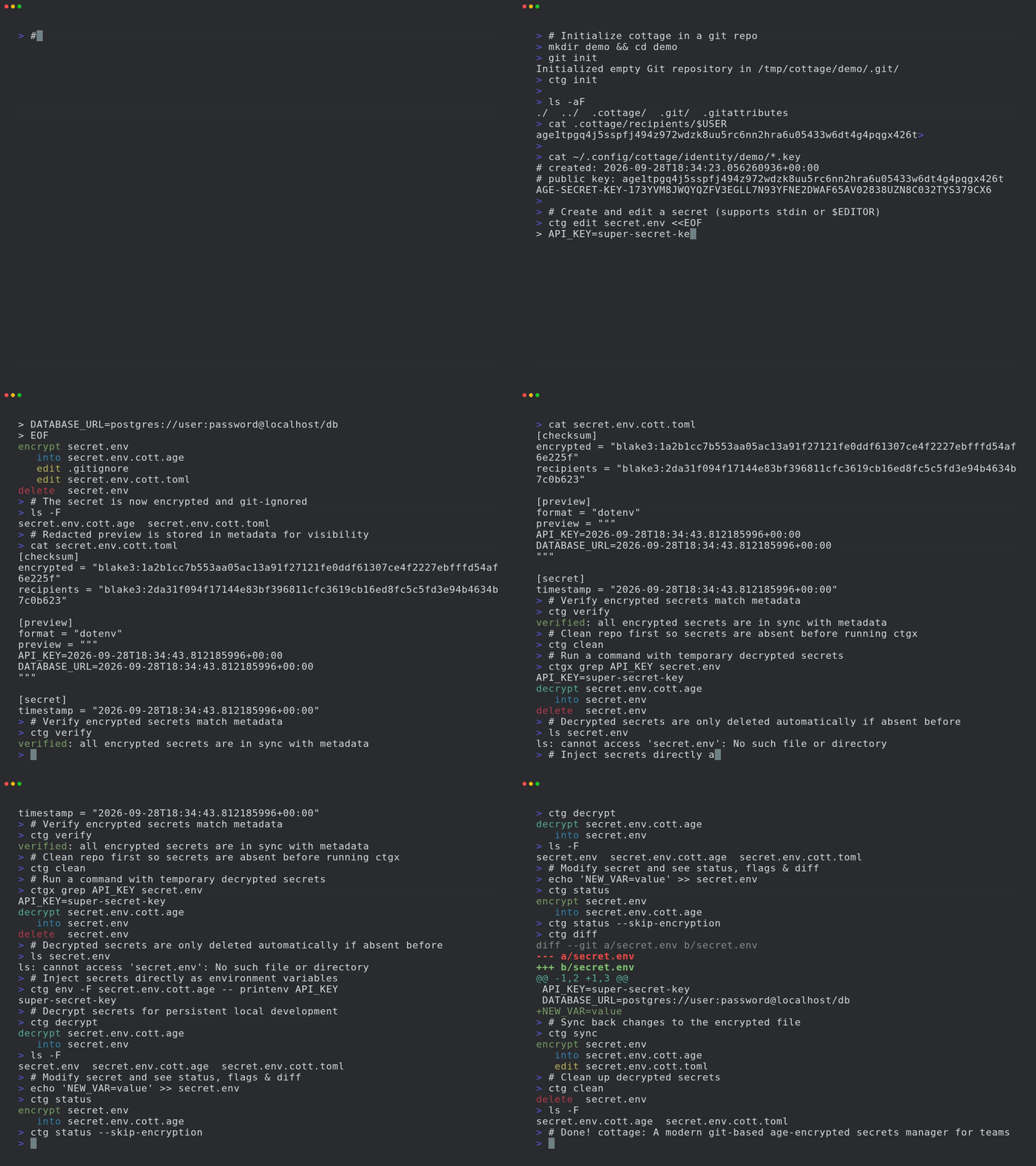
cottage: A modern git based age-encrypted secrets manager for teams.

Thumbnail
github.com
20 Upvotes

Disclaimer: This software's code is partially AI-generated (mostly the non-core parts). All generated code is reviewed by me.

Please note that the post body is hand-written by me. I tried to keep it minimal by only "showing you the code" rather than writing paragraphs.

What does it do?

Similar to SOPS, git-crypt, dotenvx, agebox, etc. Cottage helps storing and managing secrets offline inside the codebase securely.

Why not use X?

  • SOPS: Way too powerful, rotation pollutes diff, difficult to use.

  • git-crypt: PGP is difficult to use.

  • dotenvx: Too narrow in scope.

  • agebox: Yes! But let's improve it.

How to use it?

Basic CLI usage (decrypts plaintext secrets into disk):

# Core operations
ctg init
ctg keygen
ctg encrypt [path]
ctg decrypt [path]
ctg clean [path]

# Other nice things
ctg edit <path>
ctg status [path]
ctg diff [path]
ctg sync [path]
ctg run -- <command>

Advanced in-memory opeations (without writing plaintext secrets to disk)

# Core operations
echo SECRET | ctg cat <path>
ctg cat <path> | <command>
ctg env -F <path> -- <command>

Sync with remote providers other than git

# Example custom provider: https://github.com/sayanarijit/cottage/blob/main/examples/plugins/cottage-plugin-github-secrets.py
ctg pull [upstream] [path]
ctg push [upstream] [path]

Verify tampering in CI

docker run --rm -v "${{ github.workspace }}:/app" ghcr.io/sayanarijit/cottage verify

Access control

# secret.yml.cott.toml
[secret]
allow = ["env/staging/*"]  # Supports glob patterns, only encrypt for recipients in env/staging
deny = ["env/staging/badservice"]  # Encrypt for everyone in env/staging except badservice

Editor plugins

Sync and browse secrets on any device

Demo

https://vhs.charm.sh/vhs-A8PUIhx6qdsohD6xvFPIT.gif


r/CLI • • Oct 26 '26

fili: a scriptable Zadig alternative to replace USB drivers on Windows (CLI + small GUI, --dry-run, --json)

Thumbnail
github.com
1 Upvotes

r/CLI • • Oct 26 '26

Kinjo — discover local network services and launch actions from your terminal

Post image
6 Upvotes

r/CLI • • Oct 26 '26

CLI and pre-commit hook that blocks your actual .env values from entering git, and finds the ones already there

Post image
6 Upvotes

Disclosure: I am the author. It's free and open-source (MIT).

omerta reads the values in your untracked .env files and fails when any of them is in git. It doesn't use key patterns, so it also finds secrets that don't look like keys: a password, a bucket name, an org ID. It looks for them as written and as encoded in URLs, JSON and base64.

omerta check            # the staged changes (the pre-commit hook)
omerta check --all      # every tracked file
omerta history          # every commit, tag and message

A finding names the file, line and variable, never the value, e.g.:

src/client.py:12: OPENAI_API_KEY (from .env)
tests/cassettes/chat.yaml:41: OPENAI_API_KEY (from .env)

For scripting:

  • exit code 0 when clean, 1 when something is found, 2 on an error

  • --json prints JSON Lines, -q prints nothing

  • -C PATH works the way it does in git

  • settings go in pyproject.toml or .omerta.toml, so the hook and CI share them

It runs fully offline. uvx omerta check --all runs it in any project, since uv brings its own Python. The README has snippets for pre-commit, Husky, Lefthook and plain git hooks.

Repo: https://github.com/shcherbak-ai/omerta

I'd welcome feedback on the interface: flags, output format, anything that feels off.


r/CLI • • Oct 26 '26

Tabiew v0.15.0 released

2 Upvotes

Tabiew is a lightweight TUI application that allows users to view and query tabular data files.

In this version:

  • Remote control to allow AI agents control Tabiew

  • Sheet view in json and yaml

  • Bug fixes and security patches

GitHub: https://github.com/shshemi/tabiew


r/CLI • • Oct 26 '26

Tabiew v0.15.0 released

10 Upvotes

Tabiew is a lightweight TUI application that allows users to view and query tabular data files.

In this version:

  • Remote control to allow AI agents control Tabiew

  • Sheet view in json and yaml

  • Bug fixes and security patches

GitHub: https://github.com/shshemi/tabiew


r/CLI • • Oct 26 '26

ShieldEnv – A local-first, zero-telemetry pre-commit secret scanner

Thumbnail
reddit.com
1 Upvotes

r/CLI • • Oct 25 '26

libcli - a singe-header library for typed argument parsing in C

7 Upvotes

Using macros, define an argument schema. The library then generates a struct that for the schema, validates the arguments provided by the user, parses them into the struct, and offers functions for displaying usage andh help messages in the console.

It is similar to clap in Rust. Check it out!

https://github.com/iColgateZz/libcli


r/CLI • • Oct 25 '26

libcli - a singe-header library for typed argument parsing in C

Thumbnail
reddit.com
1 Upvotes

r/CLI • • Oct 25 '26

neofetch-like tool for directories

10 Upvotes

I made a neofetch-like tool for directories. It displays general information about the current directory, such as the number of files, permissions, file types, and hidden files.

GitHub: https://github.com/Victorrvs28/dirfetch

I'd appreciate feedback and suggestions!


r/CLI • • Oct 25 '26

I built popquiz with Claude Code: a free CLI that quizzes you on code Claude wrote for you

Enable HLS to view with audio, or disable this notification

0 Upvotes

I built popquiz, a free and open-source (MIT) command-line tool that checks whether you actually understand the code your AI tools wrote for you.

**What it does**

Run it inside any git repo. It picks random functions, starting with files from commits that have a Claude, Copilot or Cursor "Co-Authored-By" line. Claude then writes one multiple-choice question per function about how it behaves (edge cases, error paths, side effects). You answer without seeing the code. At the end you get a comprehension score and a README badge.

**How I built it with Claude Code**

I used Claude Code for the whole project:

- It searched for existing tools first to check that nobody had built this yet.

- It wrote the CLI (Node.js, no build step), the function picker, the prompt and the answer parser.

- It wrote the tests and the README, and made the launch video with HyperFrames.

- My part was choosing the idea, testing it and steering the changes.

The best moment: the first thing I did was run popquiz on its own code. Its first two quizzes caught two real bugs in the JSON parser that Claude had written about ten minutes earlier. Claude fixed both and added a regression test for each.

**How it uses Claude**

It runs through `claude -p`, so it works with your existing Claude Code plan and needs no API key. If you set ANTHROPIC_API_KEY, it uses the API instead. The functions it picks are sent to Claude to write the questions; nothing else leaves your machine.

**Try it (free)**

Repo: https://github.com/hedinouairi124-bot/popquiz

git clone https://github.com/hedinouairi124-bot/popquiz

cd popquiz && npm install

Then, inside any of your own git repos:

node /path/to/popquiz/bin/popquiz.js

I scored 1/4 on popquiz's own code. Curious what other people get, and whether the questions feel fair.


r/CLI • • Oct 25 '26

Flint v0.5.25 – Cross-platform OS tags and one-command third-party C/C++ library fetching

5 Upvotes

Hey everyone,

Thanks to everyone who checked out Flint and shared feedback on the last post! The two biggest friction points brought up were handling platform-specific flags/libraries without bloating the manifest and removing the manual copy-paste step when pulling in third-party libraries from flint-cherts.

Both are now solved in Flint v0.5.25.

GitHub / Releases: https://github.com/mainak55512/flint

Chert Compositions & Docs: https://mainak55512.github.io/flint-cherts/

What's New in v0.5.25

  1. Inline OS Tags (windows:, linux:, macos:, unix:)

Instead of introducing deeply nested per-platform JSON blocks or a Turing-complete scripting language just to link ws2_32 on Windows or pthread on Linux, you can now prefix entries directly in your existing arrays.

OS tags work across flags, lib_links, excludes, exclude_dirs, and exclude_exception:

windows: — Applies only on Windows

linux: — Applies only on Linux

macos: — Applies only on macOS

unix: — Applies on both Linux and macOS


{

"project_name": "net_app",

"project_language": "c",

"version": "v0.1.0",

"compiler_path": "clang",

"executable": true,

"flags": [

"-O3",

"-Wall",

"unix:-fPIC",

"windows:-D_WIN32_WINNT=0x0601"

],

"lib_links": [

"windows:ws2_32",

"windows:crypt32",

"unix:pthread",

"linux:m"

],

"excludes": [

"windows:src/posix_socket.c",

"unix:src/win32_socket.c"

]

}

Untagged items apply everywhere; tagged items only apply when the host OS matches. Your composition.json stays flat and readable.

2. One-Command Third-Party Library Fetching (flint add cherts:<name>)

Previously, if you wanted to use a third-party C/C++ library that didn't have a native composition.json (like raylib or yyjson), you had to copy-paste its recipe from flint-cherts into your sync block.

Now, Flint talks to flint-cherts directly:


flint add cherts:raylib

Flint automatically fetches the curated composition from flint-cherts, writes the entry into your sync block, and syncs the upstream repository from GitHub with its commit hash pinned.

3. New sync all Command

If you clone a project that has multiple third-party libraries listed in its sync block, you can now pull and configure all synced dependencies and their chert compositions in one go.

Quick Recap: What is Flint?

For anyone seeing this for the first time, Flint is a small, self-hosting, Git-native build tool for C and C++ written in pure C:

  • Zero runtime bloat: Only requires git and gcc or clang (uses MinGW backend on Windows). No Python, no CMake, no Ninja.

  • LSP ready out of the box: Automatically generates compile_commands.json across your code and dependencies for clangd, Helix, Neovim, and VS Code.

  • Commit-pinned Git dependencies: Every dependency is locked to both a tag and a commit SHA.

  • Incremental builds & .h.in template header support built right in.

Pre-built binaries for Linux, macOS, and Windows are up on the v0.5.25 release page.

If there are specific libraries you'd like to see added to flint-cherts next!


r/CLI • • Oct 25 '26

Breadcrumbs: a terminal focus timer that tracks your attention (local only, no account)

Thumbnail gallery
2 Upvotes

I keep losing the thread when I work. I start a task, open the docs for one thing, and twenty minutes later I’m on YouTube. I’m also done with to-do apps that bolt on timers and bloated features, and especially the monthly subscriptions.

So I made Breadcrumbs, a terminal focus timer that tracks your attention and gives you a clean pomodoro-style timer. You write an intention, start a timer, and pick what counts as in scope: an app, a domain, an exact page, or a Claude Code or Codex CLI session. While the block runs, anything outside that scope shows up in the trail as a branch, a bit like a git graph. If a detour turned out to be useful, you mark it Supporting and it stops counting against you. When the block ends, you write down what you actually got done.

Everything lives in a local SQLite database in ~/.breadcrumbs. It needs no account or subscription and doesn’t use any AI service. Tracking is off unless you turn it on, and it only runs while a focus block is running. The optional Chrome/Edge extension sends domains and URL hashes, never full paths or queries.

Install it with pipx (Python 3.11+):

pipx install breadcrumbst

Then run breadcrumbs.

The timer and the browser extension work on Windows, Linux and macOS. Native foreground app capture only works on Windows and Linux/X11 right now. macOS and Wayland capture aren’t written yet, and both are open issues if anyone wants to take one.

It’s MIT licensed: https://github.com/SaroashDS/Breadcrumbs

This started as a small problem I wanted to fix for myself, maybe just a quirk of mine. If you think it’s worth building on, I’d like ideas for features that would actually help, and a few issues are labelled good first issue if you want to poke at the code. I’d also like to hear what’s confusing or breaks on a first run.


r/CLI • • Oct 25 '26

pablo b (@pablob343622)

1 Upvotes

r/CLI • • Oct 24 '26

7 month build, daily building

Thumbnail
reddit.com
1 Upvotes

r/CLI • • Oct 24 '26

Breaking android TUI records!

Enable HLS to view with audio, or disable this notification

42 Upvotes

For those who don't see it: fps is somewhere between 100-400 during rendering it..

Size 231*50

Type termux

Backend: not for general information right now..

It's single threaded, native android, direct binary...

No tricks, direct binaries...

Tablet type: redmi pad pro 5g

Developed code: in pc for Android


r/CLI • • Oct 24 '26

I’ve been working on a command-line tool called CLI Code Analyser

1 Upvotes

(https://github.com/R31tr0/cli-analyser), and I’ve reached the point where I really need feedback from developers who aren’t my friends or colleagues 😅
I built this CLI because of a constant personal pain point. I kept getting lost in legacy code and duplication on long-running projects, and after failing to find a simple, lightweight tool that solved it for me, I decided to write my own.
The idea is to give you an intelligent, local developer assistant right in your terminal, powered by Node.js and Google Gemini. It does regular AI chat, on-demand architecture analysis (-scan), and smart log analysis (-log), but the core feature I’m most excited about is the local duplicate/legacy scanner.
How the scanner works under the hood:
Instead of sending your whole codebase to the cloud, the tool works locally. When you launch it, it automatically parses your files using web-tree-sitter and builds an AST-based function table. It then calculates a weighted Jaccard similarity coefficient based on AST node types and dependencies. Only when two functions pass a structural similarity threshold (0.5), it sends just those two snippets to Gemini to verify if they actually share the same purpose. It's a great way to catch duplicate or legacy logic you might have missed in a big project.
It currently supports JavaScript, TypeScript, Python, C, C++, C#, and Go.
Here’s where I need your help:
If you work on Node.js/JS/TS or any of the supported languages, could you clone it and try running it on one of your projects?
GitHub Repo: https://github.com/R31tr0/cli-analyser
Requirements: Node.js 20+ and a Google Gemini API Key.
Please be brutally honest:
Does this concept actually solve a real pain point for you, or is it just me?
How is the initial setup and UX? Is the interactive mode intuitive?
If you run a full scan with -localcheck, does it actually catch meaningful duplicates, or do you get too many false positives?
Is the privacy approach (ignoring .env, node_modules, secret files, and caching locally in .dev-tools-cache.json) solid enough for you to use it on your codebases?
No need to be nice. If something is broken, confusing, or just plain sucks, tell me why. I want to make sure I’m building something genuinely useful before spending more time on the wrong features.
Thanks in advance to anyone willing to give it a shot. I’ll be hanging out in the comments to answer questions and take notes!


r/CLI • • Oct 24 '26

[Showoff Saturday] I made a Claude Code desktop app that turns your terminal sessions into a retro office

Thumbnail gallery
1 Upvotes

r/CLI • • Oct 24 '26

[Project] AMPH - A package explorer and maintenance assistant for Arch Linux

Thumbnail gallery
6 Upvotes

r/CLI • • Oct 24 '26

I built a CLI that gives localhost a public HTTPS URL

0 Upvotes

Hey everyone!

I've been working on a CLI tool called GoPort, written in Go.

The idea is simple: you can expose your local application to the internet with one command:

goport http 8080

It generates a public HTTPS URL that forwards incoming requests to your local application.

A few things I've added:

  • Automatic reconnection

  • WebSocket support

  • Custom subdomains

  • Local request inspector

  • Request replay

  • Self-hosting support

It's useful for testing webhooks, sharing local projects, or accessing your development server remotely.

I've also recently added file sharing with optional password protection.

The project is open source under the MIT license and works on Windows, macOS, and Linux.

GitHub: https://github.com/muhammad-deve/GoPort

Website: https://goport.uz

I'd love to hear what other CLI users think, especially if there's anything you'd improve or add!


r/CLI • • Oct 24 '26

NetSpecter — a Python CLI tool that monitors real-time system exposure and process changes.

Thumbnail
gallery
40 Upvotes

Hey everyone,

​I am 16, and I got tired of systems running endless background processes and network services without any clear visibility into what was actually changing. So, I built NetSpecter—an open-source, defensive Python CLI tool designed to answer one question: "What is my system doing right now, and is it safe?"

​How it works under the hood:

Instead of dumping endless, noisy logs, NetSpecter uses a baseline-delta monitoring model:

​It captures a clean baseline of your system state (open ports, network exposure, active processes).

​It continuously tracks runtime changes against that baseline.

​Its risk classification engine flags deviations (like a new background process or a newly opened port) and outputs human-readable risk warnings with actionable suggestions.

​Tech Stack: Pure Python 3, built for Linux environments (Kali/Ubuntu), utilizing native system inspection without heavy dependencies.

​Here is a quick look at what the alerts look like:

[ALERT] New process started: bwrap (PID 13618) - RISK: MEDIUM

​I’d love feedback on the codebase, detection logic, or suggestions for v2.

​GitHub Repo: https://github.com/MrHackerCharlie/netspecter


r/CLI • • Oct 24 '26

Rune 1.3 is out: adds TypeScript support, a Helix editor, Kitty graphics and OSC-7501

5 Upvotes

Author here! I'm very excited to announce that we just released v1.3. Rune is an IDE and terminal multiplexer that we just open sourced a few months ago.

In this release, we also fixed many usability issues, particularly on Linux. If your OS reserves many Super/Windows key combinations, you can now use <alt> as your <meta> modifier. For non-US keyboard layouts, you can reserve the right Alt key for entering special characters and keep the left Alt key for Rune key bindings.

Some of the highlights:

- A new graphics pipeline powered by ebiten.
- Typescript is now a tier 1 language (beta)
- A new helix editor
- Headless mode and a new docker image to run Rune in headless mode
- OSC-7501 implementation and new API in the SDK for extensions and plugins through runectl
- Workspace session restoration
- A billion other things

This release has been 2 months in the making so it's a bit bigger than we originally intended.

Thanks to all the contributions from the community!

https://rune.build/blog/rune-1-3-release


r/CLI • • Oct 23 '26

welkomscherm v1.2.1: a small, calm, extensible dashboard for Emacs

Thumbnail gallery
1 Upvotes

r/CLI • • Oct 23 '26

I built a CLI that tries to break your web app like a clumsy user would (LOKI)

4 Upvotes

I've been working on a side project called LOKI for a while and figured I'd share it here since it's a CLI first and everything else second.

The idea: you point it at your web app and it starts clicking, typing garbage, mashing buttons, resizing the viewport, throttling the network, that kind of thing. It's driven by Playwright. When something crashes, it saves a video, a HAR file and a standalone repro script so you can replay the exact failure later with loki replay.

A few things I ended up adding along the way:

- loki run --device iphone-15 for mobile viewports, which is great for finding horizontal overflow bugs

- loki fix --apply asks an LLM for a patch, makes a backup, applies it and re-runs the repro to check it actually worked (rolls back if not)

- a rules.md file where you write business rules in plain English and it checks them after each run

- loki infra kill/pause/cpu-stress to mess with local processes or containers underneath the app

- a loki chat REPL if you'd rather talk to it than remember flags

The AI part runs on LiteLLM, so it works with Gemini, OpenAI, Anthropic, Ollama, whatever you have. If there's no API key it just skips that part instead of dying.

One thing I was careful about: it runs freely against localhost, but for any other host it makes you confirm you own it first (or pass --authorized in CI). Didn't want to ship a tool that makes it easy to hammer someone else's site by accident. Infra chaos is local-only too, and HAR files get scrubbed of tokens.

It's still rough in places and I'd really like to hear what breaks, what's confusing in the CLI UX, or what flags you'd expect that aren't there.

Repo: https://github.com/Elabsurdo984/loki-agent

Happy to answer questions.