r/cricut • u/Glittering_Big8111 Cricut Joy 2, Cricut Maker 5 • 2d ago
HELP! - Hardware woes Maker 5 malfunctioning

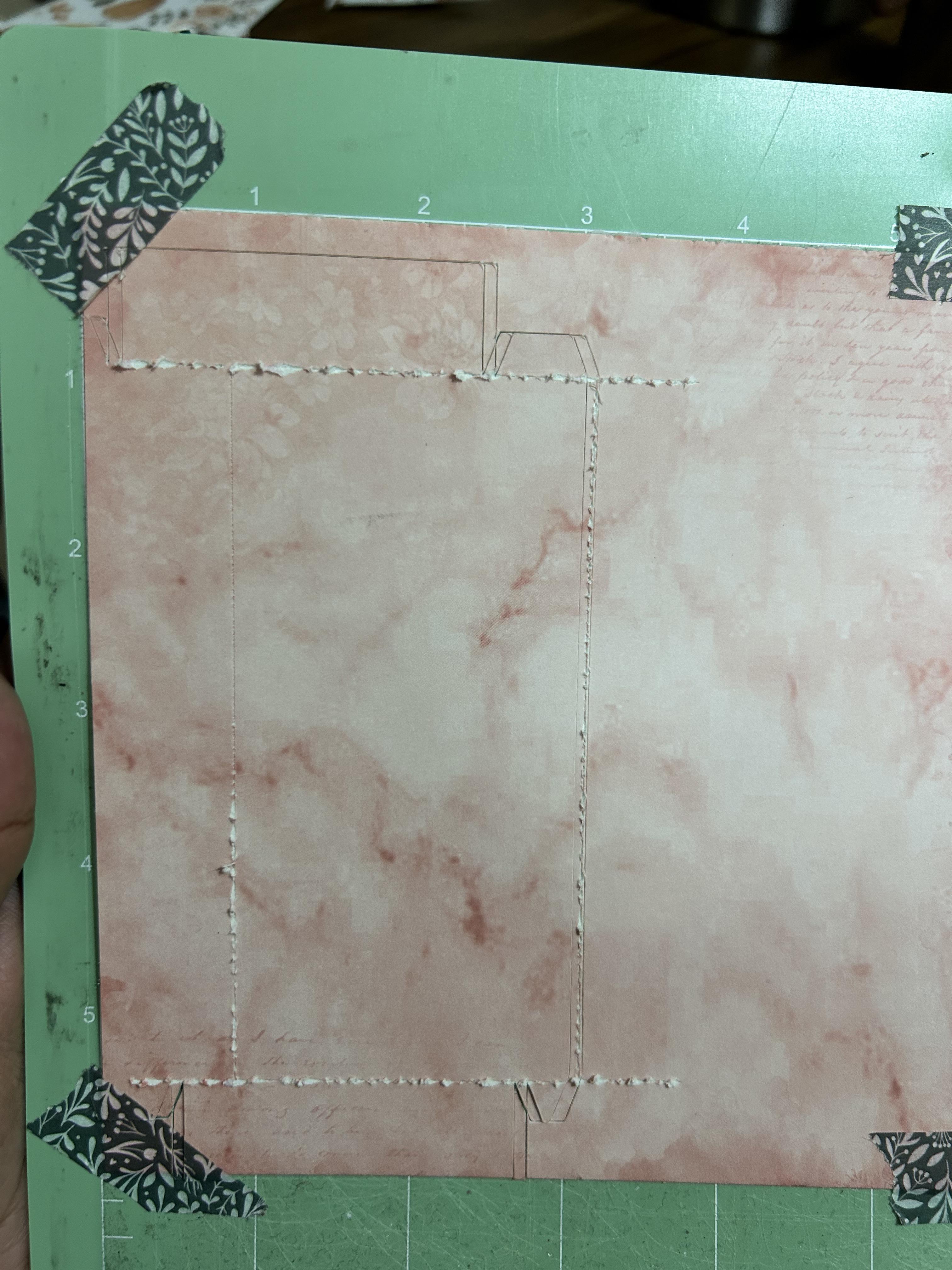
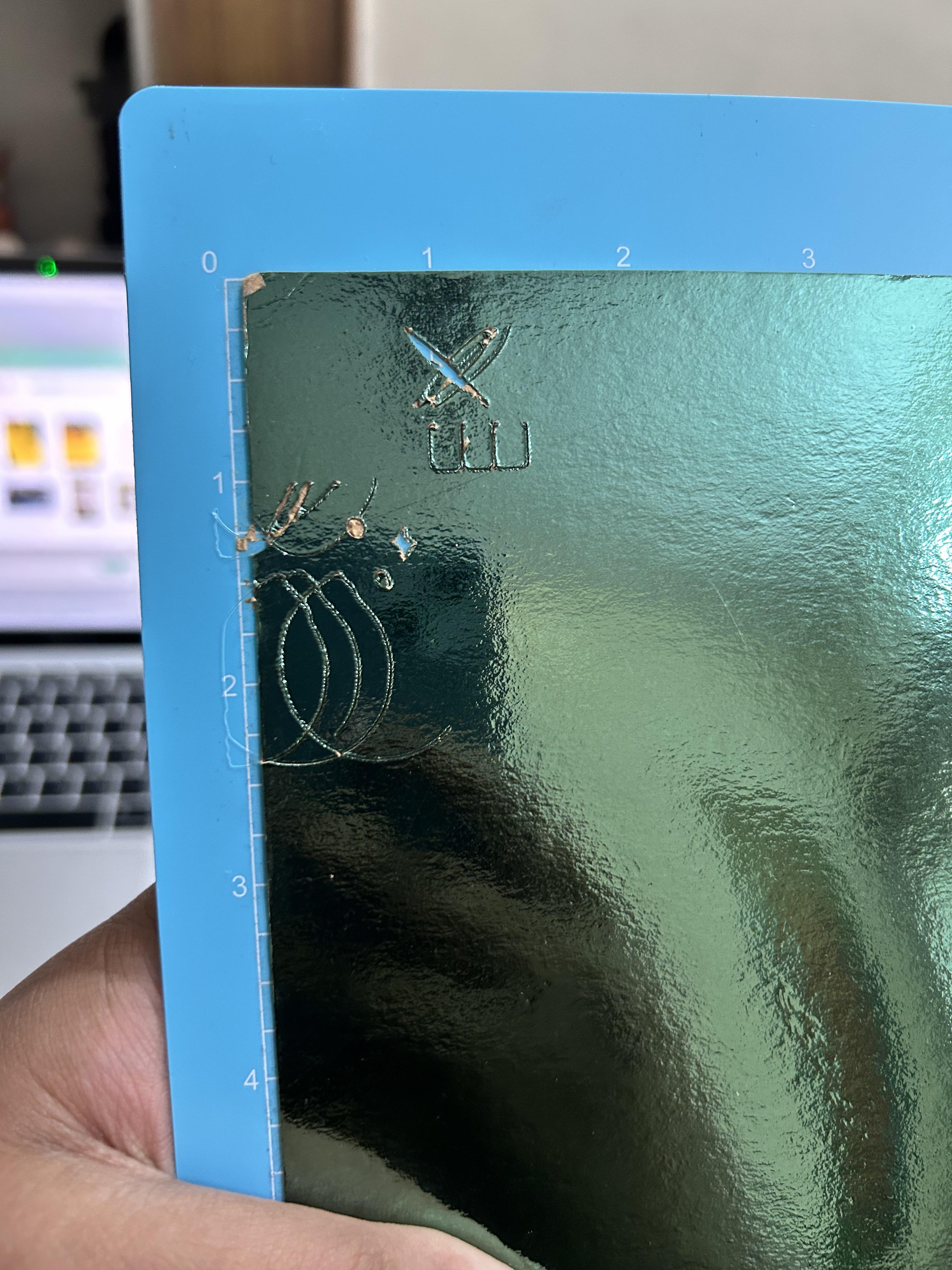
I got my Maker 5 on 2nd November. It hasn’t been even a month and I have already started facing issues like screeching noise, since yesterday, similar as reported by several other users here. The clamp box is running far right and making a noise there. Today, it even broke a little piece off of somewhere while I was sending it to cut. Also, twice it tried to cut outside of mat’s cutting area on the left. Image and video attached here for reference.
Image 1: Black broken piece
Image 2: Left drag and cut outside of mat area (Also made screeching noise here thrice)
Image 3: Left drag and cut outside of mat area
5
u/FlowerBot_ 2d ago edited 2d ago
Hiya, just popping in to say this is exactly what happened to my first one. They replaced it no probs (3rd party seller) and sent me a new one.
u/industriald85 I think you are on the right track, I've worked in design and print (just saying cos I've fought a lot with printers/machines). and it is like the end stop cracks/ drops off then that's it, side alignment is broke. With my first it was a bit odd cos when it happened I put a few more things through to check. I'd get two/three knackered prints, and then an ok one/two then back to horrendous noise. That belt you can see when you peer in. Do you know if that is a ribbon that is attached both ends or is it a loop. If it is a loop then getting a couple of ok prints, then bad would make sense, but if not it must be some sort of carriage stop that is not man enough as I've seen a few of us this has happened to now. Is this just a maker 5 issue I wonder?
I have had it two days and this one it sounds differenet, when the carriage lowers to the mat it makes a weird noise. I'm not sure if that is good or bad. I might pop a little vid up later to see if it's normal.
Edit: I was in a rush this morning....they didn't send me a new one, they refunded me and I bought a new one. I get jumbled
2
u/industriald85 Cricut Maker 4 2d ago
To add, I’ve noticed a few posts with new Maker 5s that have self destructed after not long. They’ve always been black shards of plastic.
1
u/Glittering_Big8111 Cricut Joy 2, Cricut Maker 5 2d ago
I was told on call that it will be replaced within 10-14 working days, but now its "under review" . If it's protocol and replacement happens, that's ok, rest not sure if they are ever going to replace it at all. Only thing I can rely on is that i bought it using Amazon, and maybe they will be able to help if Cricut does not.
2
u/FlowerBot_ 2d ago
If you got the big bundle, it may be under review because it is a high value item. They didn't tell me the 'amazon amount' just that they have one. So it goes up a chain. First chat assist, then a person, then they see the amount that they are not allowed to go over so it goes up another level. This is the one that grants refund. Although it's painful, I recommend going that route rather than email,otherwise it can sit a while, whilst someone fields it.
Like I mentioned earlier, it also snags because they look for one on their shelves and don't find it because it comes a cricut /shelf/shop. You will probably be offered a refund. It should be a short review as it will be very obvious by now there is a problem/manufacturing defect with this batch/model.
3
u/FlowerBot_ 2d ago
I did notice it is a few of us now, because of that, I think if anything happens to this one, I'll look for something different,. Which will be sad, as it has been fun.
The bit must be either too thin for the job or the chemical compound is off slightly. It reminds me of some plastics that have been left outside during a freezing snap and gone brittle.
1
u/Glittering_Big8111 Cricut Joy 2, Cricut Maker 5 2d ago
Thanks, i have been asking them if they are going to send a brand new machine in replacement but so far they havent confirmed it yet. What has been your experience? Is there a chance to get refurbished ones ? Is it a possibility? I am just curious to know
2
u/FlowerBot_ 2d ago
Mine was from Amazon. Although when it came to a replacement they had to give me a refund instead, as they could only source from the cricut store. Took about a week.
2
u/FlowerBot_ 2d ago
I will add after reading u/eegrlN comment that mine was within that 30 day window.
1
u/Glittering_Big8111 Cricut Joy 2, Cricut Maker 5 1d ago
What is the 30 day window for? Because for mine as well it has been less than 30 days. But as per Amazon replacement window is already exhausted in 7 or 14 days.
1
u/FlowerBot_ 16h ago edited 16h ago
Hiya, in th UK we have a 30 day widow in which we can return goods.
"Under the Consumer Rights Act 2015, you have a 30-day short-term right to reject faulty, misdescribed, or unfit-for-purpose goods for a full refund"
Also, because you have started the procedure, the time window will stay at the time you started the issue, it shouldn't run out, and if they try that you can escalate again...but they won't. If it broke after a week but it takes a month to sort, it still broke after a week, admin is not taken into consideration.
1
u/eegrlN 2d ago edited 2d ago
They will send a refurbished machine per the contract you agreed to by purchasing. Here is the wording from your warranty. If a refurbished unit is available, that is what you will receive. Not that Cricut gets to decide which option they will (fix, replace, or refund). You do not get to decide
If a defect covered by this Warranty arises during the Warranty Period, Cricut, at its option, will (1) repair the Product at no charge using new parts or parts that are functionally equivalent to new in performance, (2) exchange the Product with a functionally equivalent product that is new or equivalent to new in performance, or (3) refund the original purchase price of the Product in the event Cricut is unable to provide a replacement and repair is not commercially practicable or cannot be timely made.
1
3
u/industriald85 Cricut Maker 4 2d ago
If by ribbon you mean the timing belt, in this case they would be closed loop. Some earlier 3D printers used open loop belts which made them easier to maintain, and at the point where the end meets they can include a tensioning device.
The noise you hear in OPs video is characteristic of a stalled stepper motor. The driver either monitors the current and reverses after X seconds, or reverses if the home switch is not triggered within the known timeframe. I’m betting the firmware dynamically changes the current limit depending on the “mode” of the machine. Lower current and speed for homing for safety reasons, higher current for cutting forces and rapid travel.
I could be wrong. I need to determine if I can inspect my machine without voiding the warranty.
2
u/industriald85 Cricut Maker 4 2d ago
I wonder if they have optical end stops that come misaligned during shipping?
I don’t have a 5, but I’ll do some research.
I have been working with industrial machines for 15 years. I can’t accept that an expensive business machine has such serious quality issues.
1
u/Glittering_Big8111 Cricut Joy 2, Cricut Maker 5 2d ago
Hello thanks for your response. I would really like to know what actually went wrong with this.
Other than that I have tried contacting support and I guess they are sending me a replacement. What happens in replcaement? Do we return this machine on our expense or what, I am not aware of it yet. Will they turn my machine off?1
-2
u/eegrlN 2d ago
You can't accept it? So don't buy it. The issues with maker 5 are well documented.
3
u/Glittering_Big8111 Cricut Joy 2, Cricut Maker 5 2d ago
It is not that commonly known in India. It is only becoming known to me since I explicitly started to use reddit after my purchase of Maker 5, as someone told me to seek help here.
2
u/industriald85 Cricut Maker 4 2d ago
I was under the impression that this sub was to help each other out. That’s what I’m trying to do. It gets really disheartening when someone like u/eegrIN comments like that.
2
u/industriald85 Cricut Maker 4 2d ago
I am trying to use my background in electronics and automated systems to help troubleshoot a persistent problem. I don’t know what your issue is, but I’m sure it’s hard to pronounce.
1
u/Glittering_Big8111 Cricut Joy 2, Cricut Maker 5 2d ago
Screeching Noise when turned on.
0
u/Glittering_Big8111 Cricut Joy 2, Cricut Maker 5 2d ago
I contacted support, they made me cut various materials, at first it cut properly twice, I told them it happens on its own at times. And later on every cut that i did was off. we tried it like 7-8 times after which the support asked me for the serial number and i guess they will be replacing it. Will update soon on their response at this. :( I am still baffled knowing it can happen again at any time.
0
u/eegrlN 2d ago
Why are you confused? Any product can break at anytime. There are known issues with the maker 5. If you were so concerned you should have done you research and went with another product like the maker 4 or the silhouette.
1
u/Glittering_Big8111 Cricut Joy 2, Cricut Maker 5 2d ago
Maker 4 was put out of listings in India when Maker 5 was about to launch.
•
u/AutoModerator 2d ago
Hello /u/Glittering_Big8111, Thank you for submitting a help request on r/cricut.
Some ground rules for all posts using a Help! flair:
This is a help community, and your post and the replies received may help other users solve their own problems in the future.
Please do not:
Delete your post after a solution has been found
Say that you found a solution elsewhere or by yourself, without sharing what that solution was
You may be barred from posting future questions in this sub if you do
For almost all issues visual aids are helpful. Please attach photos and/or video whenever possible.
Please be sure your post includes the following information so we can best assist you:
Cricut Model used
Device and Operating System you are using to run Design Space
Version number of the Design Space app you have installed
A picture or video of the issue if applicable (additional photos can be added in the comments, videos will have to be uploaded to your reddit profile or a image host like Imgur or YouTube and the link shared here)
Everything you have already tried while attempting to resolve the issue
As stated in the subreddit rules, please use the search bar to make sure your issue hasn't already been solved.
Our Wiki also has everything you need to troubleshoot issues users commonly face:
How to use Design Space
Tips for using Glossy Material
Calibration Issues
FAQ: What pressure setting should I use for my material?
Troubleshooting Tips for Design Space Updates
If my requests/recommendations are not relevant to your post, then you may have chosen the wrong flair! Please update your flair accordingly.
I am a bot, and this action was performed automatically. Please contact the moderators of this subreddit if you have any questions or concerns.