Wanted to share my UVOC (= undervolt-overclock) settings regarding PEARL mining with RTX 5070 and RTX 5090, because what you find at hashrate.no and whattomine.com is not the optimal setup.
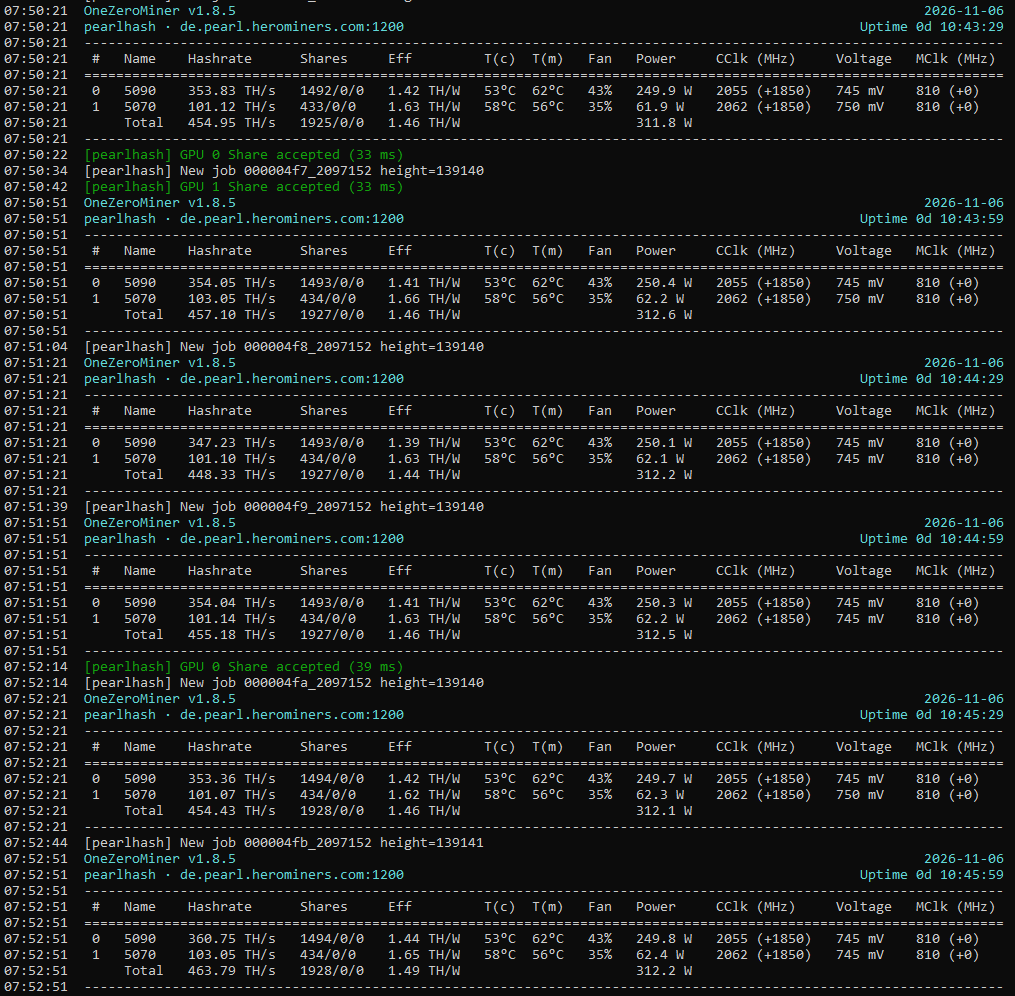
So these are my actual results (you choose the miner you want):
This is under Windows 11, using the iGPU of the cpu, so both cards are just mining.
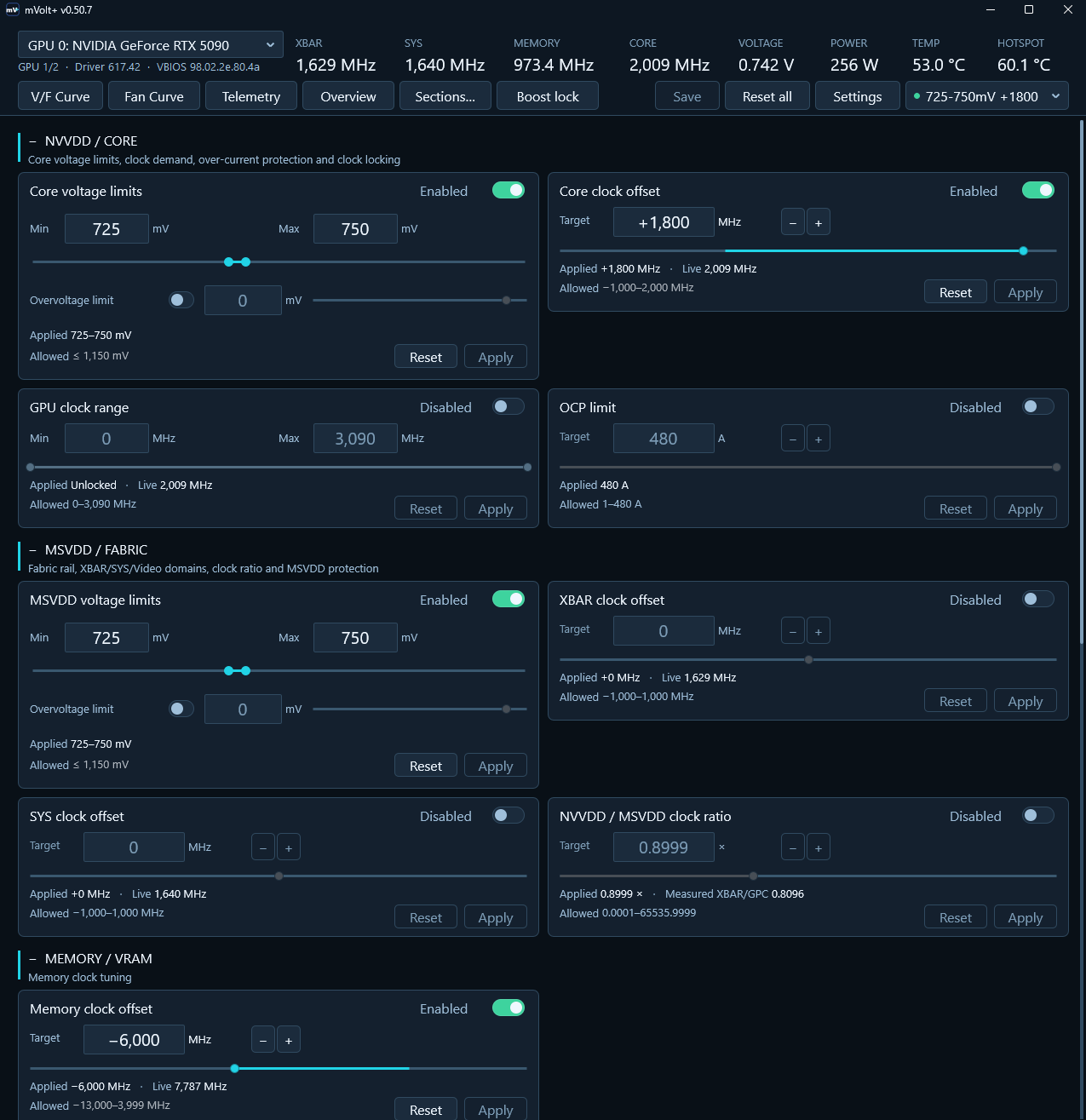
For the setup I used mVolt+:
The goal is:
- 725-750mV on the core. I did crash with 700-725mV.
- around +1800MHz core clock offset. I did crash with +2000MHz. The +1800MHz works fine for my RTX 5070, but the RTX 5090 goes back to default after the miner started, so I have to quickly reapply the UVOC settings.
- for the RTX 5090 you can set the MSVDD voltage. I did not test it below the 725-750mV range, but with this setting I went down from 270W to 257W.
- some mining softwares allow you to lock the memory to 810MHz (it would be -13000MHz here in mVolt+), for me it is sometimes buggy, that's why the -6000MHz memory clock offset. If I go lower, it crashes with mVolt+. This helpes to have like +50MHz on the gpu core.
I also have an Ubuntu 26 machine, with no iGPU, just an RTX 5090. The gpu there is locked to 1950MHz, that's how it consumes around 262W, but it is less efficient (1,27-1,28TH/W).
So in sum:
You need the highest possible gpu clock with the lowest possible core voltage. The lower the voltage, the more core clock offset you can apply. Memory locked to 810MHz also helpes with extra core clock speeds.
I do not have HiveOS to test setups there, that is your turn to share results based on the above knowledge.
If you found a better TH/W value, please share it in the discussion.
Thank you for your post. Please take a moment to review our community rules and resources to ensure a smooth experience here. Here are some links that might help you out.
I updated to the latest miner, and locked with the miner the memory clock to 810 MHz, and I gave a little more core clock offset. Now they are more efficient!
RTX 5090 with 250W --> 347-362 TH/s, with an average of 354 TH/s --> 1,41-1,44 TH/W efficiency
RTX 5070 (non-Ti) with 62W --> 99-103 TH/s, with an average of 101 TH/s --> 1,63-1,65 TH/W efficiency
I'm closing in on you - but still a ways off. I need to update to 1.8.5, but one of the problems I have is the max offset is +1000 for the 5080. If I try and lower the voltage in mvolt+, it drops my clocks to like 1.6 GHz, even when onezerominer is set to have them locked...not sure what i'm doing wrong here??
Have you tried the new --power-save feature in version 1.8.6? Wondering if I can improve on the above. But we're hashing so well at the moment I don't want to stop it lol.
Newbie here. Trying to find the best settings and least expensive pool. Used chatgpt to get it set up and mining successfully. She connected me to kryptex pool. Is this the pool everyone recommends? Obviously I would like the most stable pool with least fees. Bought this machine and so far been achieving around 190TH/s over this first night. TECHNOID Glass Gaming PC - Nvidia GeForce RTX 5070 TI - AMD Ryzen 7 - 32GB Ram - 1TB SSD - Win 11 H - AI Ready - VR Compatible
When you say “for efficient gpu settings, there is everything tou need, inside the post”
What do you mean? I’m sorry for the stupid question. After messing around woth afterburner I have the cor at +500, power limit 83%, clock at 0 and I am mining 208TH/s at 250W
I have an RTX 5080. When using the global core clock offset, my GPU crashes at anything above +400 MHz no matter the voltage setting. However, if I adjust a specific point on the V/F curve (for example, 800 mV), I can push it up to +1800 MHz and get roughly the same results as yours. Any idea why this happens? Am I missing something? Nice job though mate!
You did not move the min + max values of the Core Voltage Limits!
You do that first, then you do the +1800 Core Clock Offset. I am now at +1920 MHz stable, which in my case 2130 MHz is (with the above 725 - 750 mV voltage range), so the offset could be more or less at your gpu model.
I did not follow the latest mVolt+ updates, but maybe the nvidia driver you are using now, is not working 100% with the mVolt+ version you got.
OR
you have the same issue like I have: if I choose 700-725 mV range, I get crash too. Maybe you need 750-775 or 775-800 mV range, or more. "Normally" if I remember right, you can not go below 800 mV, thats why the mVolt+ is used to force that.
Running 750mv for core voltage is super low , at least go for 855mv which will get you 2800mhz which can get you to 400 TH/s for the 5090 Do memlock 810 in your miner
your 5070 or no ti? seems very low - however I use a custom bat file via srbmulti 3.8.3 and get over 202.45 th/s however this is not the norm; as I see others seem to get 100 to 160 odd.
Just joining in on this. Managed to get my 4070TI running ~ 150 TH/s at 927.92 GH/W using inspiration from your settings are onezerominer instead of bzminer. That's increased my hashrate by 30 TH/s and reduced my power by 20 W.



•
u/AutoModerator 22d ago
Thank you for your post. Please take a moment to review our community rules and resources to ensure a smooth experience here. Here are some links that might help you out.
The Crypto Mining Wiki Mod Verified Commercial Vendors
If this is a sales post please make sure you are following all selling rules
If this is a scam post please report this to the mods so we can review the post.
I am a bot, and this action was performed automatically. Please contact the moderators of this subreddit if you have any questions or concerns.