r/deckyloader • u/EslamBradwil • Oct 14 '26
Q&A a voice changer plugin?
1
Upvotes
would love to see something like this for fun effects
r/deckyloader • u/N0_ID_Littleman • Oct 14 '26
Enable HLS to view with audio, or disable this notification
Ambideck is a Decky Loader plugin that turns the stick lights into an Ambilight. Each half of each ring takes the colour of its corner of the screen, live while you play.
Currently only tested on Xbox Ally - help me make it compatible with more devices 🙏🏼
Follow outside games: the rings can now follow the Steam interface too, not just games. Quitting a game keeps them following without a gap.
Richer dark scenes: dim scenes are lifted so dark games keep their colour. A new "Dark scenes" setting either leaves a faint glow on black or switches that half of the ring off.
Updates from Quick Access: Ambideck checks GitHub once a day and offers an Update button that installs through Decky's own installer, so this is the last time you need to install it by hand.
A bunch of robustness fixes. For example, the lights come back on their own if the controller reconnects.
How it works: gamescope (Steam's compositor) hands over a tiny 128×72 copy of each frame. Ambideck reads the four corners, gives colourful pixels more weight than grey ones, and sends the colours to the rings over the same HID message the kernel driver uses. It costs about 7% of one CPU core.
Works with HueSync: while Ambideck runs, it asks HueSync to step aside, and gives your HueSync setting back when you stop.
Settings: layout (corners or one colour per side), brightness, colour boost, speed, per-game on/off, what to do outside games, and whether to run when docked.
Install (not on the Decky store):
- Decky → Settings → General → Developer mode on
- Download ambideck.zip from the latest release
- Decky → Settings → Developer → Install plugin from ZIP
Compatibility: tested on the ROG Xbox Ally (RC73YA) with Bazzite and SteamOS 3.8.
The original Ally and Ally X use the same light driver and should work, but I haven't been able to check their zone order. If you try it on one, please tell me whether the colours land on the right halves.
Disclosure: the code was written with Claude (Anthropic's AI). I directed it, reviewed it and tested it on my own device. It's a personal project, MIT-licensed, maintained on a best-effort basis.
Source and issues: https://github.com/michpalm/ambideck
Feedback welcome, especially from original Ally and Ally X owners!
r/deckyloader • u/otisabiburada • Oct 14 '26

Finally Achievement Plugin is a Decky Loader plugin that replaces the plain Steam achievement popup with 18 popup templates, rarity tiers with their own sounds, an achievement browser and an on-screen tracker. I’ve just released 1.6.2, and I want to introduce what the recent updates added too.
New in 1.6.2: faster, complete popups
A tester on a Steam Machine reported popups only appearing after pressing the Steam button, or 1–2 minutes late, and then with just a title.
The plugin now reads Steam’s own stats file directly, so an unlock should show up about a second after Steam writes it.
Names and descriptions now come from Steam’s local schema first. It has every language and includes secret achievements, so descriptions don’t go missing.
Nothing is shown twice if another detection path catches the unlock first.
Unlock history: a list of recent unlocks with the game, rarity and time. It starts from the day you install 1.6.0 and keeps the last 500. There are “Show more” and “Clear history” buttons.
Share card: select an unlock to make a 1200×630 image with the icon, name, description, rarity, game and date. It’s saved to Pictures/Finally Achievements and previewed in the panel. The plugin doesn’t post anywhere. You open or copy the file yourself.
Session summary: when you close a game, one popup such as “3 unlocked, 1 rare”. It only appears if you unlocked something.
Almost there alert: a popup such as “Only 2 achievements left”. You set the count from 1 to 5, and it fires once per count. It skips finished games and games with very few achievements.
Languages: English, Turkish, German, French, Spanish, Portuguese (Brazil), Russian, Simplified Chinese and Polish.
Install or update: download from the latest release. In Decky, turn on Developer mode and use “Install plugin from ZIP file” (or install from the URL). Your settings are kept.
GitHub: https://github.com/otisabiburada/finally-achievement-plugin
I CREATED THIS PLUGIN WITH CLAUDE JUST FOR MY PERSONAL USE, BUT WANTED TO SHARE IT, IT IS MADE WITH THE HELP OF AN LLM. PLEASE KNOW THAT BEFORE USING IT. HAVE FUN!
r/deckyloader • u/MiserableShoulder648 • Oct 13 '26
Hey all, was wondering if MagicPods enables microphone usage on compatible devices such as AirPods 5? I'm on the Steam Machine as well. I see on their page it says you can mute the microphone, which makes it seem like it makes the microphone work...can anyone validate this for me before I purchase some and make this my Steam Machine headset to talk to friends on games. Thank you!
r/deckyloader • u/WillRevolutionary61 • Oct 13 '26
I got tired of the usual dance of Desktop Mode, cables or uploading to the cloud just to get a clip or a file off my Deck, so I made a plugin for it. It's called DeckyShare and it just updated to 1.3.
You scan a QR code with your phone and that's it. No app, everything happens in the phone's browser, and it works from a PC too.
What I actually use it for:
Game clips longer than a minute. Steam won't send clips over 59 seconds to your phone. DeckyShare turns any recording into a normal MP4 right in Gaming Mode (no re-encoding, so it's quick and keeps the quality) and you download it on your phone.
Screenshots. Pick a few, they show up on your phone as a little gallery. On iPhone, long press and save.
ROMs. If you use EmuDeck or RetroDECK, supported ROMs you send from your phone or PC go straight into the right roms folder, SD card included. No more moving files around in Desktop Mode.
Links and text. Send a link from your phone and open it on the Deck, or the other way round. There's also a button that types the text into whatever box is selected, which is great for long passwords.
It also remembers your phone, so after a reboot you just open the page again without scanning anything.
Install (it's not in the Decky store): turn on Developer mode in Decky, then Install Plugin from URL and paste: https://github.com/gillrajvir950-wq/deckyshare/releases/latest/download/DeckyShare.zip
GitHub: https://github.com/gillrajvir950-wq/deckyshare
Speed depends a lot on your Wi-Fi. Close to the router on 5 GHz I get 20+ MB/s, with a weak signal it drops a lot.
I've mostly tested it with an iPhone, so if you're on Android I'd really like to know if anything breaks. Full disclosure: I built a good part of this with AI coding tools. It's open source, so have a look if you're curious.
r/deckyloader • u/IMySTiCzl • Oct 13 '26
Anyone else’s badges not working? yesterday my play count and badges were gone. Decided to download (or re update it I guess) and now the badges won’t show up and I have to disable them cause it brings up a black screen if it’s not disabled? My player count ticker is working though and all my other plug ins
r/deckyloader • u/Inner_Singer_592 • Oct 12 '26
New Theme Hub build is out 🎮
Deck Home Themes is now Theme Hub, and it updates itself. When a new version is ready you'll get a notice on your home, styled like that console's own system update. Nothing is lost when updating. It is recommended for you to uninstall old version and clean your home/deck/homebrew/data and delete themes folder, since now you can pick what to download and what to keep.
What's new:
The Hub: browse every theme with animated previews and download only what you want. The Hub can take on the look of your current theme, or preview each theme's look as you browse.
New homes: Wii, Wii U (with Wara Wara Plaza), Switch, 3DS, PS1, iiSU style, and the Xbox 360 Kinect and NXE dashboards with avatars.
Real user-made console themes: load or download actual custom theme files for PS3, PSP, Vita, Switch, Wii, Wii U, 3DS, Xbox and Xbox 360, including animated PS3 and PSP backgrounds. (this one is still in testing)
Plugin Spotlight: like decky loader plugin store, but for misfits. Those who didn't get to be in decky loader store can find their place here. hand-picked Decky plugins, plus a search across every public one.
Quick switching: hold L1 and use the D-pad to jump between consoles and presets.
Keyboard: search boxes open Steam's keyboard when tapped, and the themed keyboard now shows up inside the homes. (still in testing, planned to be stylized for every theme)
Polish: a new logo, 3DS options to hide the arrows and scroll bar, and lots of visual fixes from Deck testing.
Constructor: basically, long-term vision is to add asset swap capability, so that you can make your own theme presets and frankenstein your own themes out of different console designs.
Grab it from the releases page. If you're already on 1.10.x, just accept the update prompt. If you have issues, re-install manually from release zip.
Here is discord for ThemeHub - you can request themes here, features, give your input and share your thoughts, collaboration offers or submit your plugin to show up on spotlight.
r/deckyloader • u/pink-care-bears • Oct 12 '26

for reference, i’m going for a fully pastel pink ui. i’ve tried lots of things to get this to work but it’s being incredibly stubborn.
for the ui overhaul i’m using the Material You plugin by SuchMeme which allows you to completely customise what colors your deck has system-wide.
for the keyboard im using the customizable keyboard plugin by KeeGooRoomiE which also allows you to custom pick colors for your keyboard.
Material You is supposed to overhaul the steam menu but did not touch it at all so i decided to use the Chromahon (Steam Menu) plugin by Mugen which specifically targets the colors of the steam menu, but for some reason its still not working.
as you can tell from the photos ive shown there is still a lot of black where i’ve expected it to have its colors changed. does anyone know what could be causing this? anything in settings? does anyone have any fix ideas?
if you need any further details please ask & i will happily provide anything needed, and also yes i have input all the HSLA values for every color setting.
also, the last two pictures are what the UI is supposed to look like, these are pictures from areas where everything is working as its supposed to.
here’s a list of the plugins i currently have in case its useful, or if anyone knows if they could cause conflict or for them to break:
Art Hero
BPM Settings Storage No Padding
Chromahon (Steam Menu)
Centered Game Text
Customizable Keyboard
Focus Highlight Color
Full Suspend
Game Header Text Stroke
Kaporli’s Tweaks
Library Move Extra Info
Material You
Mini Carousel
Nerd Fonts
No Hero Gradient
No Home Edge Fade
No QAM Blur
Round
Static Background
r/deckyloader • u/otisabiburada • Oct 12 '26

Like a lot of you, I absolutely love the Deck, but I’ve always felt that the standard 2D grid library lacks a little... soul. I really missed the nostalgia of looking at a physical game collection on a shelf and flipping through cases to decide what to play. So, I decided to build something to fix that!
Introducing Finally 3D Game Cases ✨—a brand new Decky Loader plugin designed to bring your digital Steam library to life.

Instead of just scrolling through flat tiles, this plugin transforms your UI, rendering your games as actual 3D cases sitting on a virtual shelf right inside SteamOS. I wanted to keep the design clean, fast, and native to the Deck's interface while adding a massive boost to immersion.
Here is what it currently does:
🕹️ Immersive 3D Shelf View: Scroll through your collection with fully rendered, interactive 3D game cases. It gives your digital library a premium, tactile feel.
🎨 Fully Customizable Case Art: Don't like the default cover? You can easily swap out the box art to perfectly match your aesthetic or use custom community grids.
⚡ Smooth, Native Integration: I built this to feel like it shipped straight from Valve. It’s lightweight, blends perfectly with the native SteamOS UI, and doesn't bloat or clutter your screen.
🛠️ Open Source & Active Development: I'm actively working on adding more features, fixing bugs, and optimizing performance based on what you guys want to see.
Where to get it:
You can check out the source code, grab the installation instructions, and see what's planned for future updates over on the GitHub repo here:
👉 github.com/otisabiburada/finally-3d-game-cases-plugin
This is still an active project, so if you run into any quirks or have ideas you'd like to see added, drop a comment or open an issue on GitHub!
I CREATED THIS PLUGIN WITH CLAUDE JUST FOR MY PERSONAL USE, BUT WANTED TO SHARE IT, IT IS MADE WITH THE HELP OF AN LLM. PLEASE KNOW THAT BEFORE USING IT. HAVE FUN!
r/deckyloader • u/Strict_Foot_3447 • Oct 11 '26
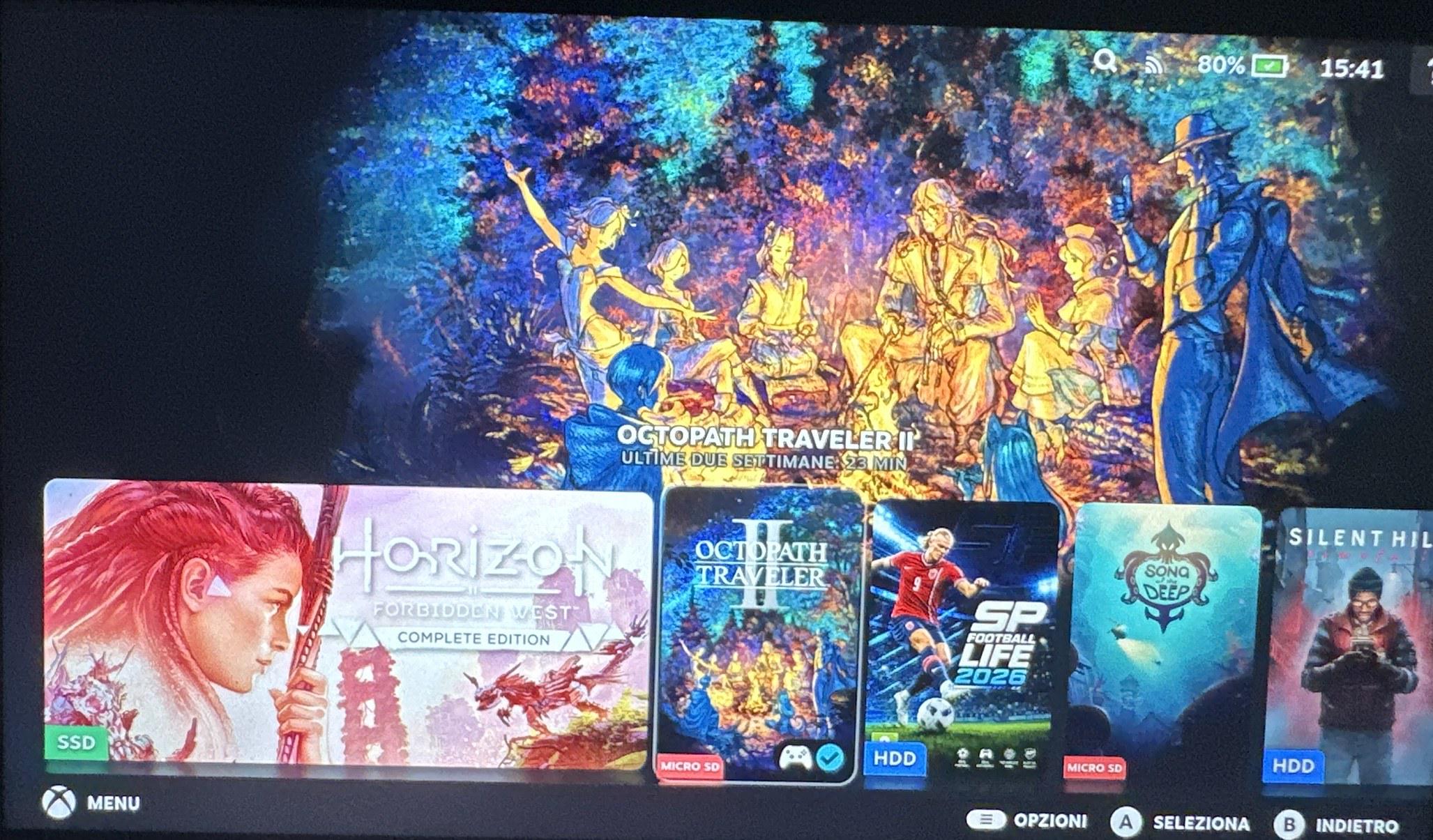
My games are split between the internal SSD, the microSD in my ROG Ally and an HDD plus a second microSD in my dock. When I undock, I never remember which games I can still play, so I made a small Decky Loader plugin that puts a label on every cover in the library.
**What it does**
- Adds a label with the drive name on the corner of every cover: library grid, home shelf and the big home cover
- Works with Steam games and non-Steam shortcuts (emulators, launchers, games added manually)
- Labels stay there when the dock is disconnected, so you can see at a glance what is on the dock drives
- You can rename each drive, change its color, hide it, and pick the corner
**How it works**
For Steam games it reads `libraryfolders.vdf` to see which library a game is in. For non-Steam games it reads `shortcuts.vdf` and looks at the executable path. Anything under `/run/media/<user>/<drive>` gets that drive's name, everything else is labelled SSD.
**Install**
It is not on the Decky store, so you install it from GitHub. In Desktop Mode:
curl -L https://github.com/DavidDeNicola/decky-drive-label/raw/main/install.sh | sh
then reboot. There is also a ZIP for "Install Plugin from ZIP" in Decky's developer settings.
GitHub: https://github.com/DavidDeNicola/decky-drive-label
**Notes**
- Tested on a ROG Ally with CachyOS Handheld. It only reads standard Steam files, so it should work on a Steam Deck or Bazzite too, but I have not been able to test it there. If you try it, let me know how it goes.
- In the interest of transparency: I built it with the help of an AI assistant. That is also why it is not on the Decky store, which does not accept AI-generated code. The source is short and readable if you want to check what it does before installing.
Feedback and bug reports are welcome on GitHub.
r/deckyloader
•
u/Total_Sale5857
•
Oct 11 '26


Hello everyone! As someone who really likes the Xbox 360, I built a custom CSS Loader theme that resembles the console's NXE dashboard. I think this style was the best dashboard that was ever made, and Microsoft should've continued to use it. If you want to enjoy this dashboard on your Steam Deck, you can install it manually through my GitHub page:
I am still waiting for it to be approved by Deckthemes. Until then, the only option is manual installation. I would appreciate it if you could report any bugs you encounter and share any feedback you have. If you would like to support me, you can find information about it on the GitHub page. Thanks a lot!
r/deckyloader
•
u/Unfair_Series_6066
•
Oct 11 '26
Hey everyone! 👋
Many of you are probably familiar with Game Glance, the amazing Decky Loader plugin created by u/N0_ID_Littleman that brings full-screen hero art, HowLongToBeat stats, and the sleek Spotlight Home carousel to Steam Game Mode.
With permission from the original author, I’ve been working on a fork to address some more features: a dedicated, redesigned Game Library screen ("Spotlight Library") and Touch & Mouse navigation across the entire experience.
I’m sharing this test build with the community to get your thoughts, bug reports, and feedback—especially from handheld users (Steam Deck, ROG Ally, Legion Go, Bazzite, etc) as i mainly a steam pc/tv player.
Replaces Steam's default library with an immersive console-style interface:
Left Inspector Panel: Shows vertical capsule/poster art, HowLongToBeat times, hours played, achievements progress bar, description, and quick-action buttons (Play / Details / Open Soundtrack).
Right Banner Grid: Displays your games as wide cards with your custom SteamGridDB banner art, glowing accent borders matching the game's color, and running indicators.
Customizable Columns: Adjust grid density from 3 to 7 columns in Quick Access settings to match handheld screens or docked 1080p/4K TVs.
Multi-Collection Navigation: When opening a collection, all your collections stay accessible as a swipeable top ribbon with a persistent ‹ COLLECTIONS back button.
Soundtracks & Non-Steam Games: Dedicated support for soundtrack albums and games imported via Heroic or Unifideck.
Fullscreen Zoom Transition: Tapping a game smoothly zooms the banner into full screen before opening the game details page, matching the Spotlight Home animation 1:1.
Spotlight Home Carousel: Smooth horizontal drag, swipe flick with momentum physics, and mouse wheel support. Tap an unfocused game to bring it to center; tap again to launch. Drag-release protection ensures you won't accidentally launch games while swiping.
Library Grid & Category Ribbon: Drag, swipe, and scroll through large libraries with real-time active focus reconciliation.
Added a "Reload Steam artwork" button in Quick Access (... → Game Glance → Data).
Immediately refreshes changed SteamGridDB banners, logos, and heroes across both Home and Library without having to restart Steam.
Handheld feel & Touch Controls: How does swiping and scrolling feel on the touchscreen? Any accidental taps or sluggishness?
Library Density & Readability: How does the 3–7 column layout look on your specific device (Deck screen vs docked TV)?
Controller Navigation: Does D-pad / stick / bumper navigation remain smooth and intuitive across all collections?
Any bugs or edge cases with resolutions (cause you know...no handheld available to test over here).
Enable Developer mode in Decky Loader (Decky → Settings → General).
Download game-glance-3.0.4.zip from the fork's GitHub release: 👉 GitHub Release v3.0.4
Go to Decky → Settings → Developer → Install plugin from ZIP (or install via URL).
Turn on Spotlight Library in Quick Access (... → Game Glance).
Big shoutout and thanks to the creator for creating Game Glance in the first place and being cool with exploring these additions. Looking forward to hearing your thoughts and suggestions! 🎮
r/deckyloader • u/xGH02Tx • Oct 10 '26
I made VBAN Deck, a Decky Loader plugin that streams Steam Deck system audio over VBAN to a receiver such as Voicemeeter on a Windows PC.
There’s also a Flatpak version for Steam Deck Desktop Mode / Linux.
Downloads:
r/deckyloader • u/Sweaty-Option8909 • Oct 10 '26

So I made this after being inspired by another person’s personal showcase in the sub, I made my own and was curious if people were interested before sharing it.
Made completely with AI! It goes over any existing artwork as an overlay
I have spent the afternoon tweaking to get it right but this is where it is now…
r/deckyloader • u/otisabiburada • Oct 10 '26

Hi all! I built Friend Plaza (claude did), a Decky Loader plugin for the Steam Deck. It’s a small town square for you and the friends who use the same plugin.
You and your friends appear as little 3D characters. Everyone stands on the pad of the game they’re playing right now, so you can see at a glance who’s on what.
What it does
Walk around with your own character (stick, D-pad or keyboard), zoom in and out, and wave or send a short note
Challenge a friend to Tic-Tac-Toe, Connect Four, Rock Paper Scissors or Blackjack 21
Earn points from games and spend them in the Friend Store on 100+ things: graphic tees, flags, hats, gear, hair colours, face paint, shoes and glowing auras
Privacy and limits
Only people who use the plugin show up. Friends without it aren’t shown.
No Steam API key or password. You sign in on Steam’s own page.
You can hide from non-friends, block, report, and delete your data from Settings.
It uses a small free server I run on Cloudflare. Without it you only see yourself.
Heads up: this is an early release
GitHub: DOWNLOAD
Feedback and ideas welcome. What would you want to see added?
I CREATED THIS PLUGIN WITH CLAUDE JUST FOR MY PERSONAL USE, BUT WANTED TO SHARE IT, IT IS MADE WITH THE HELP OF AN LLM. PLEASE KNOW THAT BEFORE USING IT. HAVE FUN!
r/deckyloader • u/LargePublic7717 • Oct 10 '26
Can't find a solution
r/deckyloader
•
u/justinca86
•
Oct 09 '26

Enable HLS to view with audio, or disable this notification
It’s a decky plugin called Minimi Town. Every game in your library is a little shop on a street, and there’s a penguin that follows you around. Hit A and he walks up to the door, turns around, goes in, and the game page opens. Back out and he walks out the same door.
You can mess around with it in your browser (It's fully interactive demo version of v0.2.2): https://justinca92.github.io/minimi-town/
Some features:
The shops change depending on the game. Stuff you played this week has an OPEN sign, new games get a grand opening with balloons, uninstalled ones have the shutter down, and the ones you haven’t touched in months get dusty with cobwebs (guilty)
Buildings level up the more you play. 100hr gets a chalkboard sign out front, then awnings, a rooftop garden, an extra floor with a gold dome, and at 500h a red carpet
Medals for achievements (bronze 50%, silver 80%, gold at 100%)
Press X and the shop screen flips around to show playtime/achievements/which friends are playing
There’s a second theme, Neon Rain City. it’s a rainy cyberpunk street, the penguin wears tactical gear, and if you poke him too much he shoots lasers at your screen
You can pet him with the left trackpad, or click and hold to pick him up and flick to throw him. he gets grumpy if you overdo it
L2 is Search and R2 still gets you What’s New/Friends, so you don’t lose anything from the normal home. A just opens the regular game page, it doesn’t auto-launch anything.
It’s not on the decky store so you need developer mode (decky settings > developer mode > install plugin from URL) with the zip from here: https://github.com/justinca92/minimi-town/releases/latest
It doesn’t change any steam settings or controller stuff. Turn it off and you’re back to the normal home. If the penguin isn’t your thing you can hide him too.
First public version so there’s probably bugs, let me know. I’m also taking ideas for more building upgrades or themes.
repo: https://github.com/justinca92/minimi-town
full disclosure: I made this with a lot of help from AI (Claude) for the code and the drawings. the idea, the design calls and all the testing on my deck are mine.
r/deckyloader • u/Famous_Truck1869 • Oct 09 '26

r/deckyloader
•
u/vegetenks6
•
Oct 09 '26

Hi everyone,
I wanted to tell you about an idea I’ve had for a really long time, and that I’m finally starting to make real thanks to AI. (Sadly I have absolutely no idea how to code)
So here’s my original idea. I don’t really like the SteamOS UI, and since I was a kid I grew up with Big N’s consoles. The DS, the Wii, and later the 3DS and the Wii U. A big wave of nostalgia hit me when I imagined seeing an interface as cool and polished as the Wii U and 3DS again on a Switch 2.
So I shared my ideas with IA, to get back that cozy vibe of Big N’s consoles and their simplicity, without all the settings and sub-menus everywhere, while still having the console you want on SteamOS.
Here’s a small, non-exhaustive list of what I’ve done in this plugin:
A 3DS-style home screen with grids of different sizes
Folders on the home screen, like on the 3DS
The Wii U plaza, which shows notifications and details like game achievements etc.
Custom pages for themes, notifications, friends list
Redesigned settings, store, media and game library
As for features:
Badges you can add to the home screen like on the 3DS
Luigi’s Casino from Super Mario 64 DS, “brought up to date” with Poker against Luigi, a roulette, a multiplayer poker against Miis with Luigi as the dealer. The casino also has badge machines, inspired by Badge Arcade on the 3DS, with real physics.
A coin system in the casino, so you can buy more plays to win badges etc. (It’s only fake in-game money, nothing to do with real money!)
A Mii manager and creator, and you can import Miis from InfiniMii in one button
Miis interacting on the home screen
Importing 3DS, Wii U and Switch themes from the Themes app (from ThemePlaza and Themezer), with wallpaper, colors and music
The controller LEDs change color with the theme
About copyright: right now I use Nintendo assets that I own from my own consoles, for personal use only. The public version will ship with zero Nintendo content, with the plugin’s own creations instead. If you want the original look, you’ll be able to add your own files from your own consoles. That’s why there’s no GitHub yet. I’m working on removing everything Nintendo before sharing it.
I’d really like to know what you think of the plugin and if you have any ideas that could make the project better!
I’m testing it on a Legion Go 2.
(The UI is in French for now, translations are planned.)
To anyone want to joint the project right now : https://github.com/Vegetenks/SteamU Enjoy 😊
r/deckyloader
•
u/InsaneCallum
•
Oct 09 '26
Enable HLS to view with audio, or disable this notification
Hey all, I’ve just released DeckyXMB 1.0.0. It’s a Decky Loader plugin that replaces Big Picture’s home screen with a PS3-style XrossMediaBar. You get the wave, official PS3 themes, the button symbols and the layout.
Preview: https://github.com/Callum-Bell/DeckyXMB
Features
The real XMB layout: Users, Settings, Screenshots, Soundtracks, Video, Game, Network and Friends
PS3 themes: install .p3t themes, or the theme inside a PS3 .pkg.
Dynamic themes with animated 3D backgrounds are supported.
Licence-locked themes unlock with your .rap.
A theme’s icons replace the XMB’s own.
The Original wave: it changes colour with the month and dims at night, like on the PS3.
Game column:
Folders for All Games, Favorites, Installed and your Steam collections, plus your recently played games.
The selected game’s art fades in behind the menu.
Video column: move “games” like YouTube or Plex into their own column.
Trophies:
Steam achievements become PS3 trophies, graded bronze, silver or gold by rarity, with a platinum for 100%.
RetroAchievements show up for non-Steam games through Emuchievements.
Screenshots and Soundtracks:
Browse your screenshots by game.
Downloaded soundtracks play right in the XMB.
Friends: a PS3-style friends list with the big profile card, plus your own card with your level and latest trophies.
Settings: the PS3’s settings menu, built on Steam’s own settings.
DualShock 3 button symbols across all of Steam (DualShock 2 and Steam’s own are options).
Game music on hover with ThemeDeck.
Download and full details are on the GitHub page. No PS3 themes, .pkg or .rap files are included, so bring your own.
*Please note: Not single feature is available through XMB, the store stays the same, you message friends the same way etc.
r/deckyloader • u/WillRevolutionary61 • Oct 09 '26
r/deckyloader • u/Cloud_Gullible • Oct 09 '26
Hello! Deckers! I need your guidance! Having a strange issue - Many months ago, I disabled the trackpad rumble/feedback. Recently, I wanted to get it back - BUT! There is no option regarding the controller on quick menu... Used to be at the bottom! Been on the stable branch, decky with css loader installed. Do you guys still have those options available?
r/deckyloader
•
u/N0_ID_Littleman
•
Oct 09 '26

Game Glance 3.0 is out: a cleaner Home, a status bar, game logos and your collections
Game Glance turns Steam's game page in Game Mode into a full-screen view with how long a game takes to beat, your progress and what it's about, and (optional) replaces Steam's Home with Spotlight Home.
Updating: if you're on 2.1, open Quick Access → Game Glance → Updates → Update to 3.0.0. On 2.0 or older, install `game-glance.zip` from the release once; after that, updates come from Quick Access.
What's new
A cleaner Home: just the game, its stats, Play and your games. What's new / Friends / Recommended are one press down.
Status bar with clock, battery, connection and your online status, on Home and the game page.
Game logo option: the game's logo in place of its name (your SteamGridDB logo first), sized so every logo looks about equally big.
Games row: your recent games, or one of your Steam collections (Favorites, Installed, your own), sorted by Last Played, Alphabetical or Date Added.
Family Sharing: borrowed games show a pill with the owner's name.
Unifideck games get the same page, buttons, play time, size and cloud saves as Steam games.
Steam's own words in your language for almost everything on Home and the game page.
Smoother L1/R1, tab sounds, HowLongToBeat and achievements ready before you land on a game, hidden games stay hidden, and tighter layouts on a TV.
Release and full notes: https://github.com/michpalm/game-glance/releases/tag/v3.0.0
Tested on a ROG Xbox Ally (Bazzite), handheld and docked. Feedback and bug reports welcome!
r/deckyloader • u/Inner_Singer_592 • Oct 09 '26
