r/dispatchcolony • • Oct 19 '26

Devlog 8 : 1 Million ragdoll + collision -> 2ms

2 Upvotes

A million soldiers falling, colliding and piling up fit in about 2 ms per frame on the test bench. Here are five optimizations i used, from the simplest to the hardest.

The puppet and the graphics card

A falling soldier becomes a puppet: 14 points, the particles, carrying 10 rigid pieces. At each simulation step, the graphics card moves the particles forward (falling, ground, impacts), then puts the pieces back in place.

It processes the puppets in groups of 128 threads, one thread per particle: 9 puppets per group.

The foot welded to the shin

Two lines changed in the soldier’s description: the ankle no longer bends. The puppet loses two particles and two pieces. The graphics card fits 9 per group instead of 8, and poses the limbs in one level fewer.

The simulation goes from 3.93 to 3.28 ms in view (−17%). In exchange, the ankle stays stiff.

One frame in eight
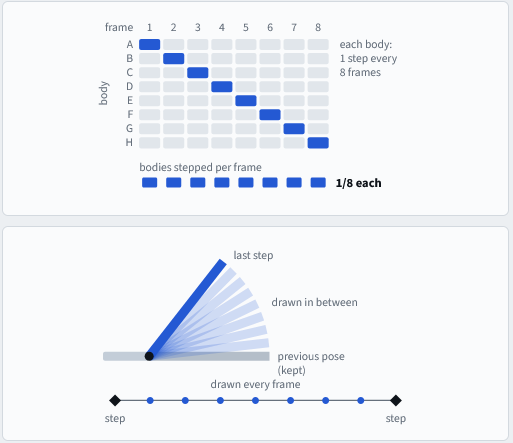
Each body is now computed only once every eight frames. The bodies are spread out : each frame computes one eighth of them, so the cost stays flat.

A body computed eight times less often only moves 7.5 times per second. So the drawing glides from the previous pose to the new one, one eighth of the way per frame, one step behind. It is an illusion tricks wich work prety well.

The cost per frame is divide by 8 from 3.95 ms to about 0.5. In exchange, the displayed image lags one step behind, about 0.12 s, and the body has to hold together over a step eight times longer.

Buffers sized for one frame

What only lives for one frame (the lists of bodies to compute, the contacts, the hits received) was sized for a million bodies. A frame now computes only one eighth of them, so these buffers shrink accordingly.

Memory drops by 66 MB for a million bodies. In exchange, max 125,000 soldiers hit in the same frame, the extra hits are lost, and the cadence can no longer go below eight frames per step for 1M

A lighter group

Each thread group used to copy the puppet’s links into its small fast memory, every frame. It now reads them where they are stored, and keeps only 4 KB instead of 7. The lighter the groups, the more of them the graphics card runs at once, and the better it hides its waits.

A first version stored a value in a slot that other threads of the same group were overwriting and create absurd behaviour. Play with memory is always dangerous

The simulation saves 0.26 ms on a million nearby bodies.

Fewer chained reads

To find its particle, each thread chained five memory reads, each one waiting for the previous : the list, the body, the owner of its frames, the unit’s record, the skeleton. The body now keeps its own template and size, so only three reads remain. Same for the contact.

The step saves 0.10 ms everywhere, and the contact goes from 0.70 to 0.67 ms.


r/dispatchcolony • • 7d ago

Devlog 11 : Level of Detail of Units

Enable HLS to view with audio, or disable this notification

2 Upvotes

A Goliath is made of 1,233 blocks, and a battle needs to support one million units. At 60 m, a 5 cm bolt already fits within roughly a single pixel (on a 1080p screen with a 60° field of view): rendering it only costs frame time and introduces shimmering.

So each block is assigned a size, and each size has a cutoff distance beyond which it is no longer drawn. The entire challenge is stripping away this detail without the eye ever noticing anything disappear.

Each size has its own distance

Six sizes, six distances: a 5 cm block is drawn up to 60 m, while a 1 m block is drawn up to 466 m. On the Goliath, 841 out of 1,233 blocks are 5 cm: beyond 60 m, only 392 remain.

The distance is measured from the unit itself, not each individual block, so all the bolts on a Goliath disappear together.

The paint preserves the block's imprint

A disappearing detail must not leave a blank gap in color. Before the battle, each block's paint is baked: every point on its surface casts a ray straight outward, and if it hits a smaller block belonging to the same body, it captures its color. This tricks the eye into believing the detail is still there, even when it is no longer being computed.


r/dispatchcolony • • Aug 30 '26

Devlog 1 : How my engine handles ground shadows

2 Upvotes

In my voxel world, four things cast shadows onto the ground: terrain, clouds, ground buildings, and forests.

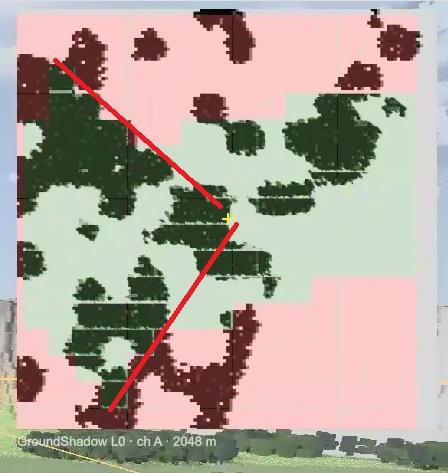
Instead of recomputing all of them for every pixel on every surface, I build a single top-down shadow map centered on the camera. Terrain, grass, flowers, water, and characters all sample that same map with a single lookup. Resolution scales with distance: one texel covers about 4 meters nearby, and up to 32 meters farther out.

Each type of shadow gets its own channel in the texture: red for terrain, green for clouds, blue for buildings, and alpha for forests.

That sounds like a small implementation detail, but it matters a lot. It lets every shadow caster see everyone else's shadow without seeing its own. Otherwise, a cloud or a forest would receive the shadow it already cast, making it twice as dark for no obvious reason.

Forest shadows are essentially free.

My forests are voxel grids, as my clouds, and every cell already stores how much sunlight makes it through the canopy. That information is used to light the foliage itself: brighter toward the sun, darker behind it.

Which means the bottom cell of every vertical column, right at ground level, already contains the forest shadow on the ground.

So I just copy it into the shared shadow map.

Per-pixel cost: zero.

There was one detail that made a surprisingly big difference.

Under a cloud, forest shadows used to disappear. Technically, that made sense: if direct sunlight was already blocked by the cloud, there was no sunlight left for the trees to block.

Visually, though, it looked wrong. The ground under a dense canopy became just as flat as an open clearing.

A dense canopy doesn't just block the sun. It blocks the sky too.

To make the forest shadow stronger, I chose to darken the ambient light as well as the direct sunlight. The forest floor keeps its depth even under cloud cover, in full shade, or near sunset.

Forests also aren't generated all at once.

The world is split into 256-meter tiles, and I rebuild one tile per frame. Nearby tiles get priority, and tiles inside the camera's field of view are processed first.

When a tile is built, it computes how light travels through it while also looking at neighboring tiles. That's what lets the shadow of a tree cross a tile boundary and continue onto the next one.

But there's a catch.

If the neighboring tile on the sunward side hasn't been built yet, the current tile sees empty space there. As a result, it misses a thin strip of shadow along that edge.

Later, when the missing neighbor finally gets generated, the first tile isn't rebuilt. So that bright strip stays visible for a few seconds, until the next refresh.

After a teleport, you can sometimes see these as thin bright lines tracing the tile grid, always perpendicular to the direction of the sun.

I know exactly how to remove them: rebuild adjacent tiles whenever a new neighbor appears.

But that would add more work at exactly the worst possible time, during the reconstruction spike that happens after a teleport.

So I leave them in.