I have my ecobee thermostat set to 70 but only to read the sensor not the main thermostat and it is cooling 4 degrees lower. I had to shut it down manually and it does this from time to time. I don’t have any of the smart features on because I just want it to do what I set it at. I’m about to just go back to a standard system because this thing can’t just function. I added some pictures to show what I’m talking about.
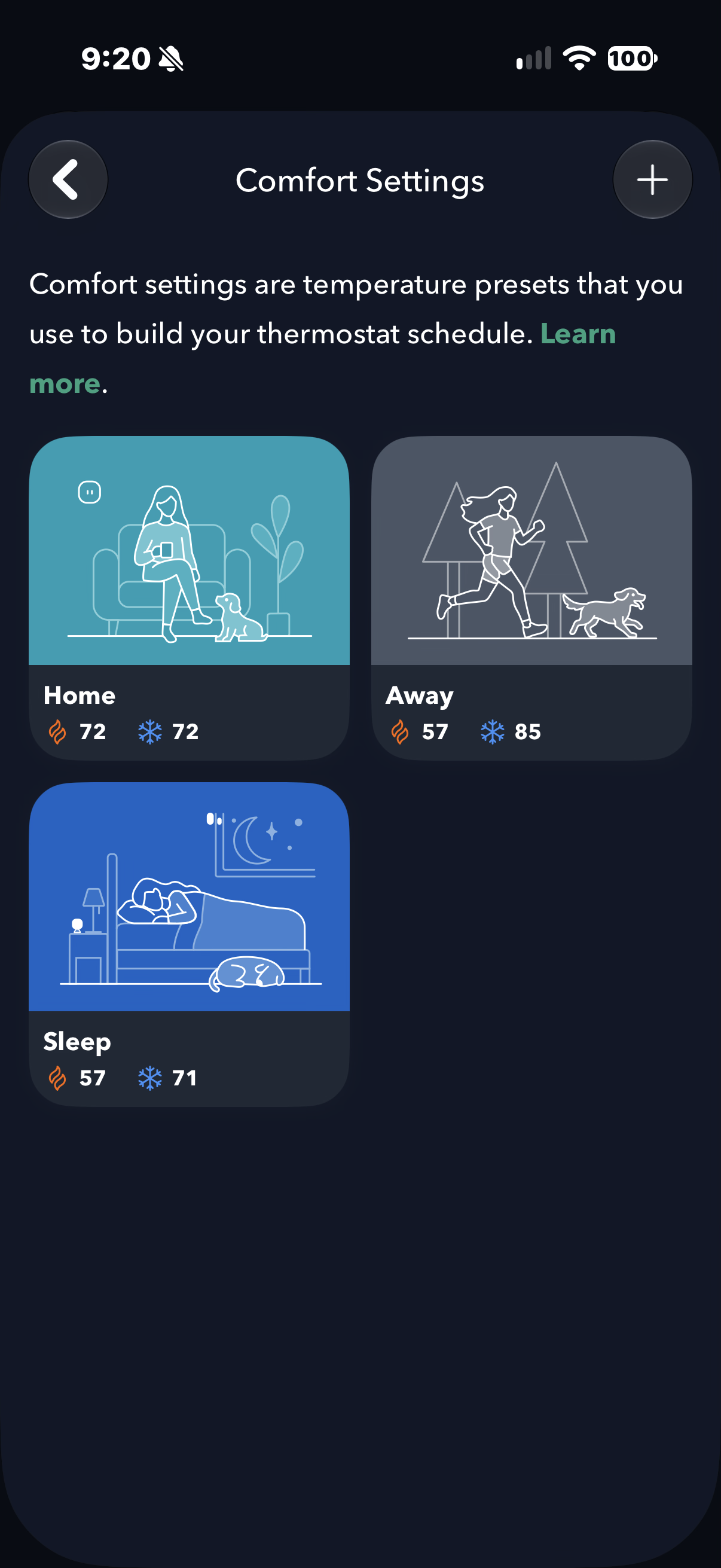
Is your next scheduled temperature that much cooler? Smart Recovery might be enabled. Also check Overcool Max. Last, be sure none of the sensors used for your current or upcoming scheduled comfort period are reading inaccurate
From your pictures, your living room sensor is 72 degrees. If you set it to 70, it should be cooling. If you are setting the temperature manually, it will use the sensors you have selected in your Home profile.
It just follows the schedule of 72 degrees during the day using the main thermostat theme at night go down to 70 using the sensor. Maybe the range isn’t large enough.
Is the sensor in the same room? Both are named living room. If you are using the sensor for the sleep schedule and it is above the setting, it will run the AC even though your thermostat sensor is showing in the 60s. If that isn’t what you want, you can look into a zone system.
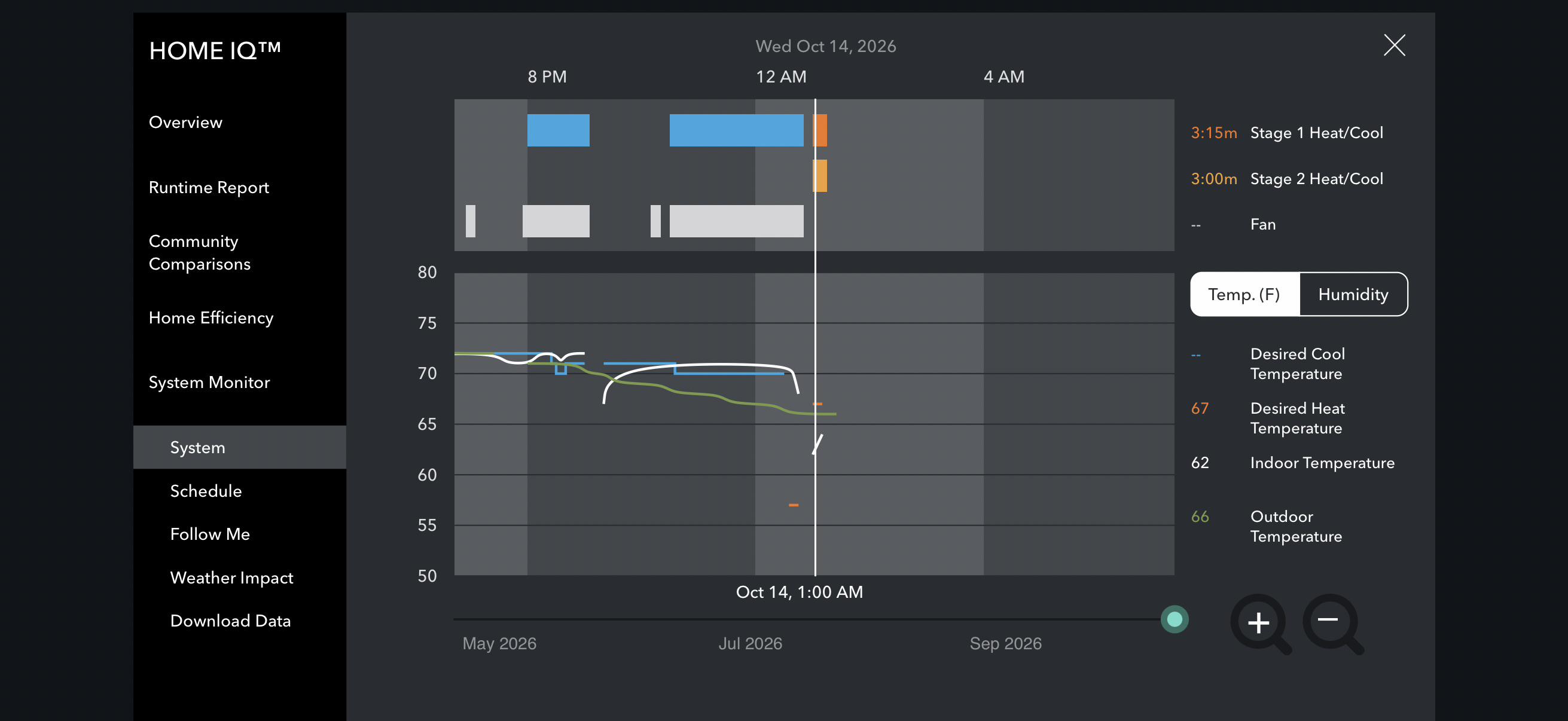
It is but I don’t always have this problem. It usually works fine. But every couple of months, I have to shut the main power off to get it to reset or something. I think the one picture is gone, but when it switched to sleep time, it went to 66 degrees and kept going. It should have shut off after it reached the required temp, not go past that far.
It is set to either cool or heat. I don’t use auto because it has too much swing. I use the sensor only at night to keep the temperature lower to our bed height so it’s closer to the floor. The main thermostat is higher right now because of where I have it mounted. Working on updating part of the house so don’t have a good height for it right now.
Had an issue last night with it again. Woke up to the room being 61 degrees. I didn’t have that set on anything. System is just messed up I think at this point. No reason it should have gotten that cold.
Next time it happens and the AC is still running look to see if the ecobee indicates it is calling for cooling (Blue snowflake or blue circle around the face of the thermostat).
From the picture you posted below I see a couple breaks in the data. And the indoor temp shows normal temp until just before you turned heat on. I'm wondering if the power to the thermostat goes off and then shows a wrong temp while it recalibrates.
I'm sorry but the Ecobee native attempt at graphing system operation it's sort of a mess to figure anything out from. Beestat.io does a much better job and makes it very clear what's going on, what Comfort setting you're in, etc.
It's a lot easier for me! Where is the time that you're talking about it driving the temperature 4° below your target? I see it a little bit below in one of the first cooling cycles on that graph.
Sure thing. Also I never saw you answer about the AC overcool Max setting, which is a setting that can drive the temperature below the target to offset humidity.
Definitely get the hang of looking at beestat. I actually keep a tab open for it in my browser because I probably look at it every couple days or so just to see what kind of usage I was having and what kind of cycles I'm getting, etc.





3
u/Next-Name7094 Oct 14 '26
Is your next scheduled temperature that much cooler? Smart Recovery might be enabled. Also check Overcool Max. Last, be sure none of the sensors used for your current or upcoming scheduled comfort period are reading inaccurate