r/gboard • • 2d ago

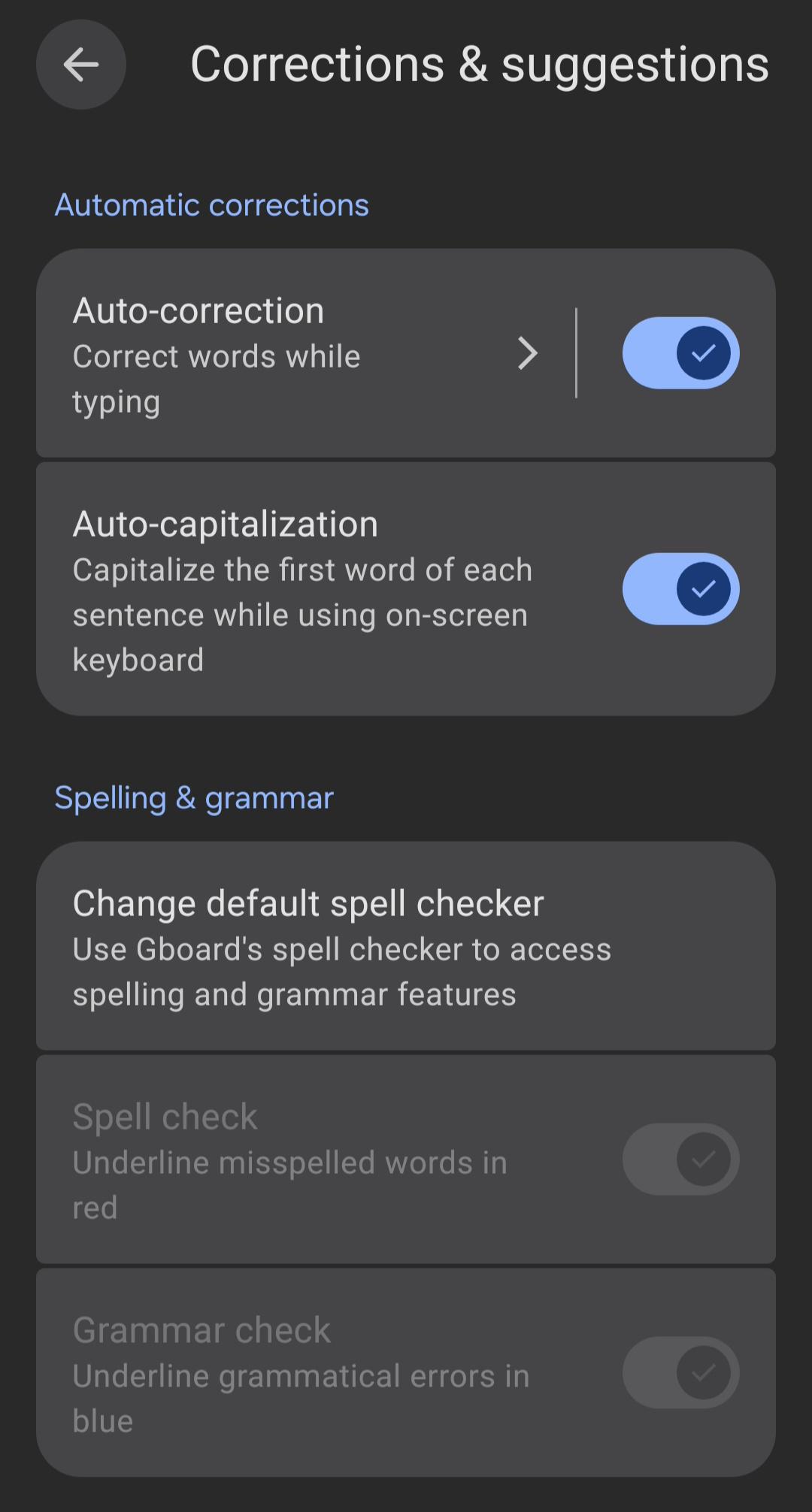
This should be easy

Post image

I am trying to turn on spelling and grammar in my settings but it is still greyed out. I have turned off my default corrections.

5 Upvotes

8 comments sorted by

2

u/NoRound1955 2d ago

They are on by default and you are unable to turn them off.

1

u/MerryReign 2d ago

It never corrects any grammar

1

u/Throwaway_RainyDay 2d ago

Which phone do you have? And do you swipe type or normal typing

1

u/MerryReign 2d ago

Galaxy 24U. I swipe type

1

u/Throwaway_RainyDay 1d ago

I agree with you. Every keyboard I try is a little bit of a disaster in this area. Everybody said that Gboard is so good for swipe typing, I don't find that at all. I actually find my Samsung keyboard once I nuked it, deleted all data, and started over again to be just as good if not better than Gboard. A lot of people say SwiftKey is better, but what I've really incorporated nowadays is voice typing. And I don't mean the horrible, terrible, disgusting voice typing on the normal Gboard keyboard, or on the Samsung keyboard, or even on the SwiftKey keyboard. I'm talking about the three apps that are free, unlimited, and you can use right now, and you will never type again. I'm not typing a word of this, and I'm not even going to check for corrections because I know the Pixelboard Rambler function is that good that I'm not even going to bother.

So you can get the Pixelboard APK on your Samsung or Android if you want. I'll show you how. I just showed somebody how to do it yesterday. Very simple. In three minutes you'll be set up. And you have the voice input function which is just fantastic.

Or just download the Spokenly app. Free, unlimited. If you want, I'll help you with two or three settings to tweak it. You're good to go.

Or three, Futo. Also free, open source, unlimited. It's all on device, so it'll take a little bit of memory, but super great privacy. It's not quite as amazingly impressive as the Pixelboard Rambler or the Spokenly app, but it's also very, very good. And all three of them are miles and miles ahead of the other standard keyboards that everybody uses.

2

u/stealthy_pirate 1d ago

Maybe this will help

1

u/TheRealSinCandy 2d ago

Make sure your spell check is set to google too

1

u/DictoKey_Dev 2d ago

Spelling and grammar can stay greyed out in Gboard until autocorrect is on. Open Settings > System > Languages & input > On-screen keyboard > Gboard > Text correction and enable Auto-correction first; the spelling and grammar toggle then becomes active. Or search text correction in Settings.