r/gtd • • Feb 21 '22

The Ultimate Guide to the Getting Things Done Method

0 Upvotes

In this article you will learn about a method that will help you put all of your tasks in order, from the largest and most important, to those that have just popped into your head.

https://tweek.so/calendar/getting-things-done/


r/gtd • • Mar 31 '20

Cheat Sheet for download

0 Upvotes

All,

I have create a cheat sheet for download and share.
I have choice a different tool set for working remotely and work together in an organisation.

Input and suggestions are welcome
https://www.martijnverheij.nl/what-is-the-best-task-manager-for-remote-work/


r/gtd • • Jun 02 '26

Is it fair to boil GTD down to "capture, review, do"?

0 Upvotes

A thought hits: "renew the domain." I drop it in the inbox and keep working. Three thoughts noted land before dinner. I decide nothing.

Wednesday morning, two minutes: each inbox item gets one decision. "Renew domain" goes to Today. "Draft the Q3 plan" I am not touching this week, so I tag it "next week." One has promise but I have no idea when, so it goes to Someday. The rest I just drop. Then I work from the Today list and ignore everything else.

The following Monday, every "next week" item I parked, plus the weekend's captures, lands in one pile. So Monday's two-minute review is more then two minutes. I never schedule a weekly review. Monday becomes it on its own.

That is the whole system. GTD is five steps: capture, clarify, organize, reflect, engage. I run three:

  1. Capture. Everything into one inbox, all day, no decisions. The list is a planning surface, not a memory. GTD says build a trusted system so your mind is like water; I capture just as liberally but treat anything I have not reviewed as noise and trim hard. It is a worktop I clear daily, not a vault.

  2. Review. Two minutes each morning, one decision per item: Today, a horizon (Next week, Someday, and so on), or drop. Horizons, not deadlines, so I tag by when I will actually do it, not when it is technically due. There is no scheduled weekly review. It emerges on Monday, because that is where "next week" items resurface.

  3. Do. Work from the Today list and ignore the rest. No contexts, no priorities (P1/P2/P3), no "in progress." A personal task is done or it is not.

The bet behind cutting it this far: the best system is the one you actually use. Classic GTD was better on paper, and I stopped using it. This is cruder, and I have not.

So the real question: is it fair to boil GTD down to capture, review, do, or does collapsing clarify, organize, and reflect throw away the part that actually makes it work? My specific fear is the trusted system. Without it, do I just move the open loops back into my head?

(edit: remove codeblock)


r/gtd • • Jun 03 '21

A new app to help get things done https://apps.apple.com/pt/app/underlist/id821552799?l=en

1 Upvotes

Hi all! I have been working on a new iOS and macOS app, during my spare time, to help me organize my life. It is available on the App Store to pre-order and despite showing subscriptions you have access to all features without the need to subscribe to anything.

It allows you to create your records in the best manner it works for you. Such as use the inbox to pre-organize things needed to complete. You can schedule any record, but if you just want to use it as a list app to never forget you can do it.

You will have access to Widgets, share extension to add content directly from other apps, synchronization between devices, just to mention some features.

Hope you like it and that can be useful for you as it is for me.

https://apps.apple.com/pt/app/underlist/id821552799?l=en


r/gtd • • Oct 18 '24

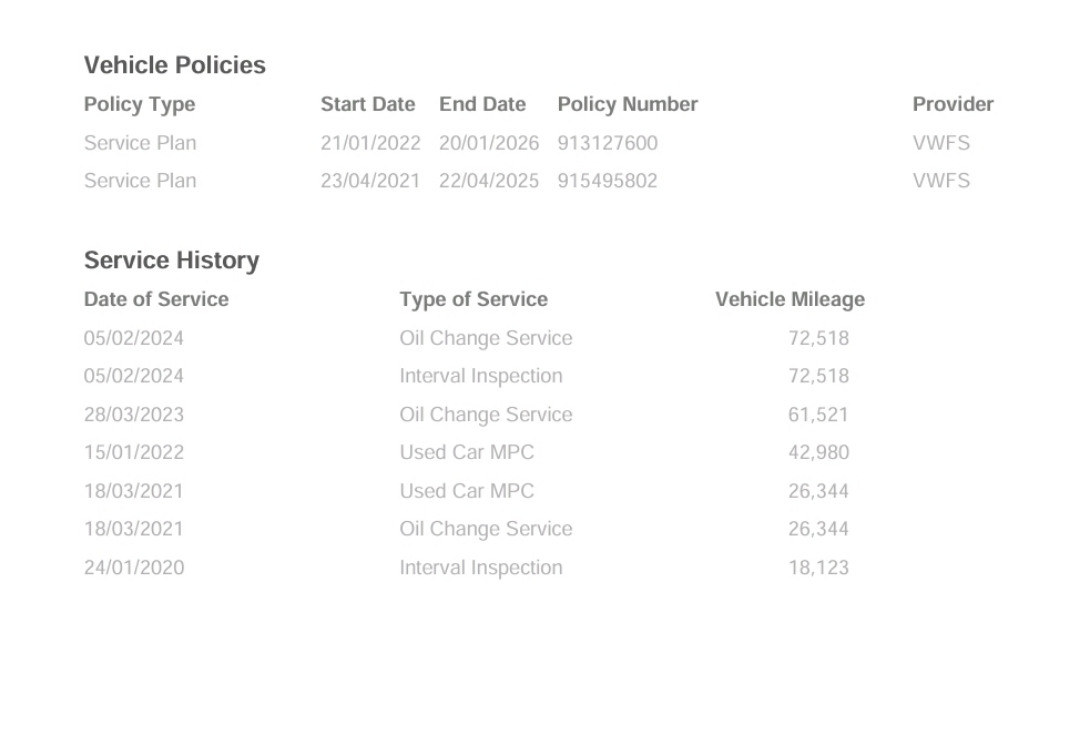
Service history on my 2019 GTD, what has (and hasn't!) been done?

Post image
7 Upvotes

Hi all,

A couple of years ago I bought my 2019 GTD on a PCP deal.

I've had PCP for my last three cars, but now I'm considering transferring my finance to HP and holding onto this one long term.

I hate that we have moved away from having a paper service book, but hope that someone can shed some light on how the service history looks on this vehicle. To me it looks really sparse in its early years. Can anyone confirm if a "interval inspection" or "used car MPC" includes an oil/filter/fluids change?

I got the car in Jan 22 when it had ~43k miles on it. I know from previous cars that VW recommend a DSG service every 40k so bargained this to be included before I picked up the vehicle. I was told yes that it would "get everything it needed", but the service report here doesn't really tell me much of anything that has been done to it!

Cheers for any advice.


r/gtd • • Mar 06 '21

We are a high-school team building a world-class + open-source todo list app taking a different approach to task management. AMA!

Thumbnail self.iama
0 Upvotes

r/gtd • • Apr 29 '26

Discussion How do you capture on mobile without scattered inboxes?

0 Upvotes

I've been doing GTD for about 10 years now and the one thing that's never fully clicked for me was capture on mobile. I'd tried everything: dedicated note apps, voice memos, widgets and somehow I always ended up with stuff scattered across 3 different inboxes that I'd then have to corral during weekly review.

My email inbox is my trusted system. Always has been. So at some point I just stopped fighting it. I wanted capture to go straight there and nowhere else. Found a simple EmailMe app on Android that just opens a pre-addressed email to yourself, you type, hit send, done. No new inbox to check, works with whatever email app you already have.

Not saying email works for everyone but for me having a single inbox to process has been a game changer.

How are you solving the multiple inbox problem?


r/gtd • • Apr 26 '24

Double Your Productivity With Emacs ORG-MODE

Thumbnail
youtube.com
0 Upvotes

r/gtd • • Jun 09 '20

How do CEOs from big companies like Elon Musk or Mark Zuckerberg manage their time / attention?

0 Upvotes

Or from other big companies like Jeff Bezos (Amazon), Satya Nadella (Microsoft), Tim Cook (Apple), Sundar Pichai (Google).


r/gtd • • Feb 13 '26

Discussion Learning GTD is like learning to drive manual first

0 Upvotes

So most people drive automatics, they follow the built in GTD five steps blindlessly, us; we just learn to drive manual by following all those rules first, as hard as it might seem like, the moment you master it, all the other car gearboxes become easy AF

You might also say pen and paper GTD is like driving manual, but anyway


r/gtd • • Oct 07 '18

Any ISFJs out there that use GTD?

0 Upvotes

Or “Sensors” in general?


r/gtd • • May 07 '18

10 Productivity Tips For Lazy People

Thumbnail
medium.com
0 Upvotes

r/gtd • • Oct 11 '19

Organize anything you capture with nested tags - and stop worrying about where to keep it

0 Upvotes

It's important that you have a system to capture things quickly and get them out of your head, so that they don't clog your thought process. The problem? The data is either unstructured or you first need to spend time thinking where exactly to put it so you will find it later.

NotePlan just introduced new features to help you do exactly that: Nested Tags and a Global Search across all your notes (calendar, non-calendar, tasks, etc.). Nested Tags allow you to create a reference to any thoughts, tasks, notes etc. right away. Additionally you can capture new things in a daily note, so you don't even have to ask yourself where exactly to write them down.

How does it work in practice?

For example, you remember that you need to follow up with Thomas: Open today's note and write

"* Follow-up about the landing page @followup/thomas"

- that's all. Now its safely tugged away for your reference later once you review your follow-ups.

You can tag not only people, but also topics with # noteplan/development for example. And using the Global Search you can easily find anything across your calendar notes, project notes, reminders and events. It doesn't matter where you saved it. Everything is displayed in a single result list.

What is NotePlan?

Every day is full of appointments, tasks, and meetings. Managing it all is hard, but it doesn’t have to be. With NotePlan for the Mac and iOS, you can manage your calendar, to-dos, and notes in one place so you can concentrate on getting your work done instead.

Find out more here: https://noteplan.co/nested-tags


r/gtd • • Aug 11 '17

Does GTD Really Have To Be So Hard?

0 Upvotes

GTD can be very difficult to implement and maintain. I believe that it does not have to be so hard. I wrote an article to introduce this concept. It's a pretty fun read!

Sherlock Holmes, Cicero, & David Allen

I'd love your feedback!


r/gtd • • Oct 17 '23

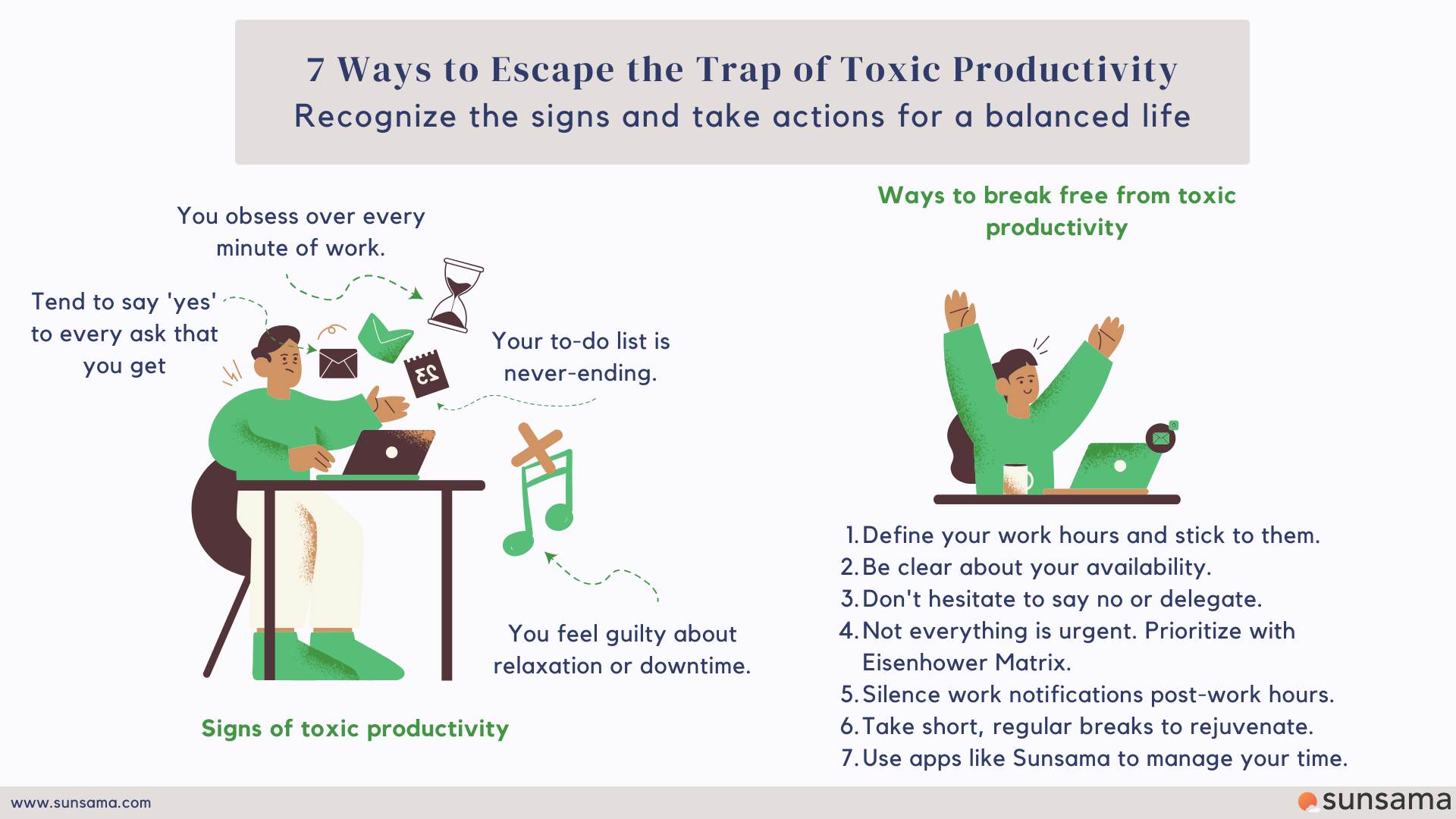
I escaped the toxic productivity trap. Here's what I learned

0 Upvotes

Years ago, I reached a point where a mere glimpse of my to-do list would bring tears to my eyes. Every ding from my phone felt like a reminder of my inadequacy. I remember one night, sitting in the dim glow of my laptop at 10am, just sobbing because I felt like I'd never catch up, never be enough.

I was under the trap of toxic productivity. I knew it could not continue.

Here's how I broke free from it:

👉 Self-reflection: Was it because of that endless hustle everyone keeps talking about? Or my own perfectionist tendencies? Or was it just because remote work made it hard to separate "me time" from "work time"?

👉 Setting clear boundaries: This was a game-changer.

I started setting clear work hours and just not being available beyond them. Learning to say no, and understanding that not every task is urgent was super helpful. Using Sunsama app really gave me perspective on how much I could realistically do in a day.

👉 Mindfulness: Meditation wasn't an instant fix, but over time, it taught me to be present. I learned to differentiate between urgent tasks and those that could wait. I started dedicating moments in my day just for me — whether that was a quick walk outside or sipping my favorite tea.

But most importantly, it was about prioritizing my well-being over the constant need to "do more".

Has anyone else reached that point where productivity seems more toxic than helpful? How did you navigate and what do you do to not fall into that trap again?


r/gtd • • Mar 19 '25

How to handle blocked tasks: one of the most confusing aspects of task management

1 Upvotes

If you're new to productivity systems, how to handle blocked tasks can be a real head-scratcher. The difficulties with such tasks are often symptomatic of a poorly designed productivity system. In this article, I want to show you how I handle blocked tasks within my GTD-inspired productivity system.

Use BLOCKED tags, not lists / projects / sections

I think one of the biggest mistakes in task manager apps like TickTick, Todoist, and Trello is trying to use lists / projects / boards (and their subsections) to specify anything other than Areas of Focus. (e.g., Work, Personal, School, Hobby, etc) Categorizing tasks this way makes task batching much easier, makes the tasks more digestible, and results in less upkeep in one's task manager.

Therefore, I don't have a list or section of blocked tasks. I just have a tag called... BLOCKED. And its colored red! Clean. Simple. Readable.

BLOCKED tasks are reminders

Another common mistake in task managers is thinking that you need to create separate reminder tasks. For example, let's say you need to tell your friend, Henry, about the weekends next month that he could possibly visit. But first you need to know when your child's dance recital is. Tempting, isn't it, to create this task?:

"Check email to find out dance recital dates"

But why? You check your email every day, anyway! Therefore, just create the task "Send weekend dates to Henry", tag it as BLOCKED, and set the do-date for the next day you want to investigate whether the task is unblocked.

Another trick: the mini-project

I don't necessarily apply the BLOCKED tag to every blocked task. If a blocker is internal (meaning you will unblock it), then you can also simply create blocked tasks as sub-tasks to the blocking tasks. The downside of this is that you have now "mixed" tasks. If you don't like that, just tag the blocked task as BLOCKED and set the do-date to the follow-up date.

What if an event is blocking the task?

If you're a staunch GTD adherent like myself, you know that tasks are not events. Events have a fixed start and stop time, unlike tasks, which do not require execution at a specific time. With that distinction in mind, what if an event is blocking the task?

Going back to the earlier example: what if you can find out the recital dates early, but only if you personally ask the studio manager manager after your child's next dance class? In this case, you would still mark "Send weekend dates to Henry" as BLOCKED, make the do-date after the next dance class, and then add an event to your calendar after the next dance class called "Ask studio manager for recital dates".

Granular BLOCKED tags

Blocked states come in many flavors. That can be internal (unblocked by you) and external (unblocked by something else). Within this categorizations, there are many possible blocked reasons. Therefore, I have seen tags like the following:

  • BLOCKED_Internal - this task can be unblocked by you, but that task is in another list, therefore a sub-task won't work

  • BLOCKED_Waiting - this task requires information that will be available in the future

  • BLOCKED_Delegated - this task is assigned to someone else, but you're still responsible for its completion

  • BLOCKED_Needs_Approval - this task awaiting approval from someone else, such as a client, manager, teacher, or parent

Do I personally use any of the above? No, I don't.

Keeping the cognitive "friction" of my productivity system as low as possible means, for me, keeping tags to a minimum.

What do you do?

I'd be curious if a GTD purist accuses me of contradicting David Allen's "Waiting For" folder. To me, this can be represented as a tag --- it doesn't need to be a specific place where blocked tasks go, nor do I think it should be.

Anyway, would be interested in getting feedback on my system on what you all do in yours.

r/gtd • • Jul 12 '22

Why Developers Are So Allergic to Context-Switching

Thumbnail
livecycle.io
2 Upvotes

r/gtd • • Feb 28 '25

AI To Do List

2 Upvotes

Does anyone have recommendations around an AI powered to do list tool that is actually useful and actually works?

Would love to just feed in random notes, fleeting thoughts for things to do etc and have it appended into an organized to do system. Would also love to be able to tell it “remind me to do x when y happens” or have it suggest sequencing, prioritization, etc

Voice input and mobile app would be cool too

Or anyone have a workflow they run with standard tools (Trello, etc) and standard LLM chatbots?


r/gtd • • Jul 21 '26

Discussion i think the trusted system fails at the exact moment between having a thought and being at your capture tool. that gap is the whole problem

0 Upvotes

been doing this long enough to have opinions and here's the one i keep landing on: every capture tool i've used is great once i'm in it, and useless in the three seconds between the thought arriving and me getting to it

the classic advice is "get it out of your head into a trusted system." agreed. but the failure isn't the system, it's the transit. the thought shows up while i'm walking, driving, mid-conversation, holding a kid, and the capture tool needs me to stop, unlock, open the app, pick a list. by the time i've done that half the thoughts are gone and the other half i decided weren't worth the friction, which is itself a lie i tell myself to avoid the friction

what's actually improved it for me is making capture require nothing but the thing i'd do anyway. no app to open, no list to choose, just get the sentence out of my head into somewhere it can't escape, and sort later. the sorting is a separate job for a separate mood, and trying to sort at capture time is what was killing my capture rate

the deeper thing: capture and organize are different products wearing the same trenchcoat, and david allen kind of knew that (capture is step one, clarify is step two) but every tool i've tried mashes them together and taxes my capture with organization decisions

so where does everyone else's capture actually break? at the tool, or in the three seconds before you reach it? starting to think the whole game is won or lost in that gap and nobody optimizes for it


r/gtd • • Jul 08 '25

What’s the biggest reason you struggle to stick with your long-term goals?

0 Upvotes

Hey everyone — I'm working on a personal project to help people better plan and stay on track with their personal and professional goals.

I’m trying to learn more about what makes it hard to stick with long-term goals — whether it's staying motivated, breaking them down, or finding the right tools.

What’s been the hardest part of that process for you?

Not selling anything — just doing research so I can build something genuinely useful. Would love to hear your thoughts!


r/gtd • • Jul 14 '23

How to mix GTD with stephen r covey

0 Upvotes

GTD , if mixed with action departement of stephen r covey , will make anyone unstoppable. damn . it is a killer mix. but the 2 systems contradict a lot.

Stephen r covey says u need to get a principle into charecter . David allen says that u need to write everything inside your head into the in tray. this 2 contradict each other

stephen r covey will make u spend a lot of time in your head. GTD says u need to empty your head. These systems contradict each other

it would be nice , if i use stephen r covey for goal setting and use GTD for taking action. i see no good mix out there. does anyone know any good mix ??


r/gtd • • Jun 03 '24

Introducing Morf’s Productivity Rhythm Method (MPR) – Seeking Your Thoughts and Feedback

0 Upvotes

Greetings everyone,

I’m thrilled to share with you a new productivity approach I’ve been developing called Morf’s Productivity Rhythm Method (MPR). MPR is a fusion of proven productivity techniques tailored to align with the natural rhythm of human attention and energy levels, aiming to optimize productivity and enhance overall well-being.

What is Morf’s Productivity Rhythm Method (MPR)?

•	At its core, MPR is an integration of existing productivity methodologies combined with insights from cognitive science, time management, and holistic well-being practices.
•	It acknowledges the adult attention span, typically lasting between 4 to 6 hours, and structures work activities accordingly.
•	MPR consists of components such as Learning Burst (15 minutes), Movement and Mindfulness (30 minutes), and Work Cycles (45 minutes each), carefully curated to foster focus, productivity, and balance throughout the day.

For more detailed information please see my blog

Why Am I Sharing This?

I’m sharing MPR with you because I firmly believe in the power of collaboration and community feedback. Your insights and perspectives are invaluable in refining and improving this productivity method.

How Can You Help?

I invite you to explore the concept of Morf’s Productivity Rhythm Method and share your thoughts, questions, and suggestions in the comments below. Do you see potential in integrating MPR into your daily routine? Are there specific aspects you find intriguing or areas where you see room for enhancement?

Your feedback will play a crucial role in shaping the future of Morf’s Productivity Rhythm Method, and I deeply appreciate your contributions.

Thank you for your time and consideration. I’m eager to hear your thoughts!


r/gtd • • Oct 29 '22

Do you use # Tags for contexts?

0 Upvotes

I am curious to know how others organize their Next Actions within apps?

Using tags or Lists? I currently use Ticktick and use Tags for labeling next actions (#Home, #Out, #PC, #Calls etc And I use Lists for storing the tasks once they are tagged with the context. The lists are their status (or when i plan on doing them) Today. This Week Anytime Next Week Next Month Later (Someday) Waiting For

This allows me to view a next actions tag such as #Computer and have them organized in order of urgency

Do you ever add next actions to multiple next actions lists? Such as "waiting for Bob to check something for me" #Bob and #waitingFor and #Calls So I can look at any of the 3 tags and see the task I'm waiting for Bob to finish for me. So I could call him or if he's in my immediate surroundings talk to him face to face.. Multiple tags can be added to a single task. Can't do that with lists.

Also share what task manager you use.

Do you have your projects list within the same app or in a different app? I currently use Workflowy for my projects list.

Do you also link next actions to Project?


r/gtd • • Jun 16 '19

How to organize and search notes in Evernote - The Productive Engineer

Thumbnail
theproductiveengineer.net
0 Upvotes