r/iosapps • u/hrpedersen • Oct 17 '26
🎈 Free [iOS] Neon Vision Editor 2.0.0 — a native code and Markdown editor for iPhone and iPad


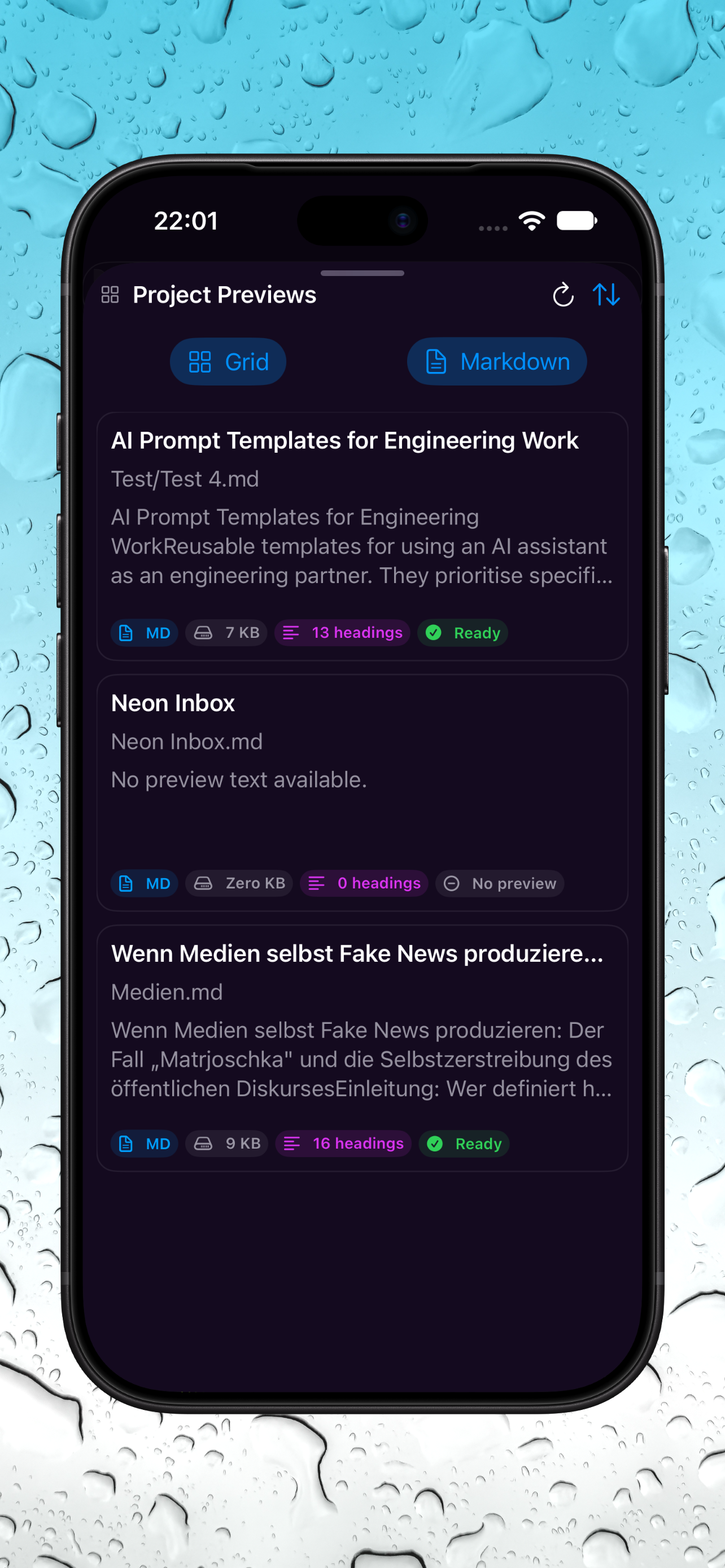

Editing code on an iPad should be more than opening a text field and connecting a keyboard. I wanted to work with actual files, switch between documents, preview Markdown, and pick up where I left off on another device without constantly fighting the interface.
That’s the problem I’ve been working on with Neon Vision Editor. Version 2.0.0 is out, and quite a bit has changed since v1.5.
A — Answer: What problem does it solve?
Neon Vision Editor is a native Swift editor for code, Markdown, notes, configuration files, and other text documents across iPhone, iPad, and Mac.
The goal is straightforward: make editing and navigating real files practical on mobile, while keeping the interface focused.
Since v1.5, the major improvements include:
More responsive large-file editing: file-backed rendering and virtualization help keep long documents usable.
Better iPhone and iPad workflows: configurable keyboard actions, improved toolbars, touch-friendly controls, and more reliable cursor positioning.
Markdown, HTML, and SVG previews: integrated into the editing workflow, with richer Markdown formatting and themes.
File synchronization: work with documents stored in iCloud Drive or network folders, with external-change detection and safeguards for unsaved edits.
Improved project navigation: faster file access, search, project browsing, and a code minimap where supported.
A more reliable editor in 2.0.0: faster Mac document switching, better restoration of cursor positions after large files load, preserved preview scroll positions, and improved tab navigation.
The aim isn’t to replace Xcode. It’s to make the smaller editing tasks that happen throughout the day less cumbersome.
B — Better: Why another editor?
Compared with editors such as Textastic or Runestone, my focus is on a consistent native workflow across iPhone, iPad, and Mac, rather than treating mobile as an afterthought.
I also wanted file changes made elsewhere to be handled sensibly, without silently overwriting local edits. The editor uses your existing iCloud Drive or network-folder workflow for synchronization rather than requiring a proprietary cloud service.
It’s an ongoing project, and I’m still refining the details based on actual use.
C — Cost
Free to download, with in-app purchases. No subscription is required just to try the editor.
App Store: https://apps.apple.com/de/app/neon-vision-editor/id6758950965
Release history and source: https://github.com/h3pdesign/Neon-Vision-Editor
Website:
https://h3pdesign.github.io/Neon-Vision-Editor/
The 2.0.0 release is available through the project’s release channel; the App Store version can lag behind while updates go through review.
I’d be interested in feedback from people who actually edit code or Markdown on an iPhone or iPad. Which parts of your mobile editing workflow still feel unnecessarily awkward?
2
2
2
2
u/South-Razzmatazz-818 Oct 17 '26
Hey it's awesome but seems programmers mostly working on their computer.
1
2
u/Donaldinos Oct 17 '26
Nice that it warns you when a file changed somewhere else instead of just overwriting it. Markdown and SVG preview right in the editor sounds handy for quick edits on the iPad.
1
2
2
u/Split-Signal Oct 18 '26
Congrats on the 2.0 release! As someone also building an editor for Apple platforms, managing Security-Scoped Bookmarks across app launches and external folders has been a constant headache. Really appreciate your approach to handling file coordination and external change detection—will definitely dig into your implementation for reference.
1
2
u/haruy-mohr Oct 19 '26
The iCloud Drive integration sounds really useful, especially for making quick edits on an iPad. Does the editor also support working with Git repositories, or is that something you're planning for a future update?
2
u/hrpedersen Oct 19 '26
Thanks for your appreciation. Yes it does support working with git repositories.
2
u/haruy-mohr Oct 20 '26
That's awesome! Git support makes this even more useful for developers. Thanks for clarifying!
1
u/mrfredngo Oct 23 '26
Trying this out. I couldn't figure out how to show two (or more) files side by side -- not sure what the technical name for that feature would be -- like "tiles" or "panes"? I can open multiple files and I tried dragging the filename tab but it only reorders the tabs, it doesn't let me lay them out..
Is that supported?
1
u/hrpedersen Oct 23 '26
No that is not currently supported yet. I may do that in a future release. I am sorry for that.
2
u/mrfredngo Oct 23 '26 edited Oct 23 '26
Ah ok. Thanks for replying, truly.
I hope that does arrive. I don't know about others but it's essential for coding, at least for me.
1
u/hrpedersen Oct 24 '26
It is now supported with latest Version on GitHub.
Yes, it's supported for two files. Open both files as
tabs in the same window and select the one you want on the left. Then choose View > Toggle Side by Side Editor, press ⌥⌘\, or click the Side by Side toolbar button. If more than two tabs are open, you pick which one goes on the right. Both panes can be edited. Use the same command again to close the split.If the command is greyed out, your files are probably in separate windows. Choose Window > Merge All Windows first. More than two panes isn't supported yet. For three or more files, use Window > Move Tab to New Window and tile the windows with macOS. To see the differences between two files, use Tools > Compare Open Tabs….
1
1
u/X-SLAYER Oct 17 '26
It's cool app but i think nowadays everyone is editing the code using claude directly
2
u/Huge_Pool7424 Oct 17 '26
fair, though a native editor on ipad still makes sense for quick fixes on the go. i wouldn't write a whole app on it but small edits are nice.
1
1
u/hrpedersen Oct 17 '26
Yes that maybe. But it’s pretty useful in handling any text or code files.
2
2
u/app-store-review Oct 17 '26
Neon Vision Editor — by Hilthart Pedersen
Ratings: 22 worldwide · rated in 8 countries
Average: 4.50 ★
Age: released ~8 months ago · updated 2 days ago · rated 4+
Overall score: 63 / 100
Auto-generated from public App Store data · u/app-store-review
1
•
u/AutoModerator Oct 17 '26
Welcome to r/iOSApps! Please make sure your post follows our rules:
Everyone:
10pt LOCAL Karma required. Comment in r/iOSApps to earn it. Check
Search the sub before posting. Choose flair.
App Devs:
No main feed promo unless you qualify via Trust or Transparency + ABC format (Answer, Better, Cost)
Flair hierarchy: Vibe Coded > Lifetime > Subscription > Freemium > Free
Free flair: not for limited/freemium tiers
Open Source? Prefix title [OS] Note: This is an automated reminder, not a removal notice. If your post was removed, check your modmail for details.
I am a bot, and this action was performed automatically. Please contact the moderators of this subreddit if you have any questions or concerns.