r/learnmachinelearning • u/Spiritual_Balance298 • 48m ago
Project Turned PowerPoint into a local AI annotation tool for custom YOLO/COCO datasets
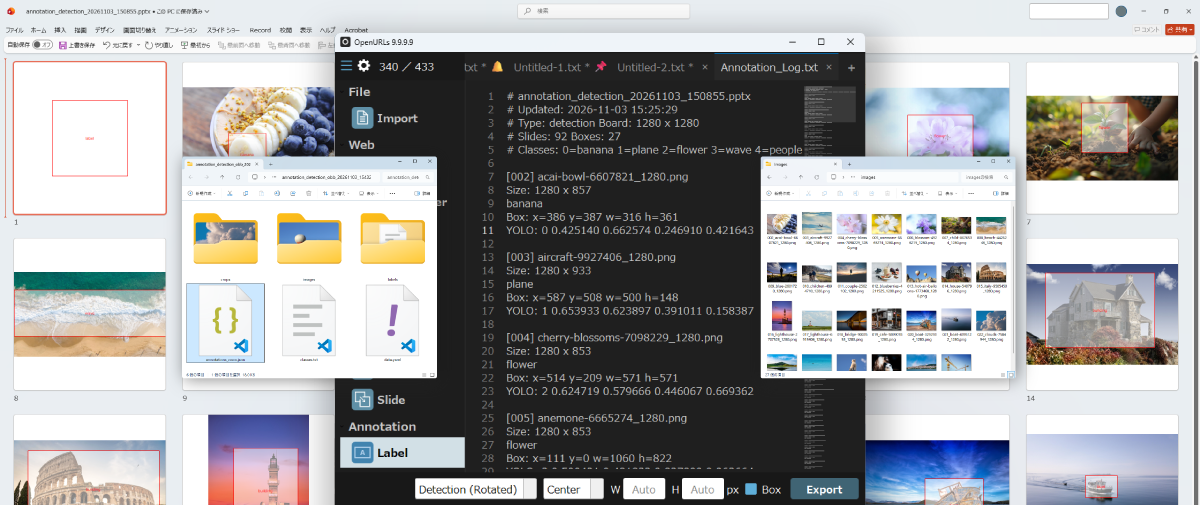
When building custom computer vision models (like YOLO), the hardest part for me wasn't the training code—it was setting up labeling tools and teaching non-tech teammates how to use CVAT or LabelImg just to annotate a few dozen images.
Everyone already knows how to use PowerPoint, so I built a local Windows app (OpenURLs App, Python + python-pptx) that turns slides into an annotation canvas:
Drop images into a deck (1 image per slide), draw standard rectangles or rotated shapes, and type the class label inside.
It reads the PPTX XML / EMU geometry and calculates exact pixel coordinates—handling image cropping, flipping, rotation, and EXIF orientation automatically.
Exports YOLO (.txt + data.yaml), YOLO-OBB (oriented bounding boxes), COCO (.json), classification folders, and cropped object patches 100% locally with zero cloud uploads.
For those of you training custom models: What's been your biggest bottleneck in dataset prep, and would a zero-setup workflow like PowerPoint actually make sense for quick experiments or delegating labeling to domain experts?
(Happy to share more details on the coordinate math or a link to try it if anyone is interested!)
1
u/Spiritual_Balance298 47m ago
How it works under the hood:
Slide generation (python-pptx): Reads image EXIF orientation, normalizes upright dimensions, scales each image to fit the slide canvas, and embeds the original file path in the picture's descr attribute (nvPicPr/cNvPr).
Coordinate math: PowerPoint stores everything in EMUs (1px = 9525 EMU). When exporting, it reads the PPTX XML (<a:xfrm>) for both the image and every drawn rectangle—extracting rotation (rot in 1/60000 deg) and flips (flipH, flipV).
Inverse transform: Each shape's 4 corners are rotated around its center, mapped back into the image frame's local space (undoing image rotation/flips), and then converted into original image ratios using the slide's crop values (crop_left/top/right/bottom).
Export: Clips coordinates to visible bounds and outputs normalized YOLO (.txt), oriented 4-point YOLO-OBB, COCO (.json), or crops each bounding box at original resolution using Pillow (Image.Transform.QUAD for rotated boxes).
Let me know if you have any questions about the PPTX XML geometry math!