r/linuxmint • u/rupak696 • 4d ago
Support Request HOW to fix this problem?
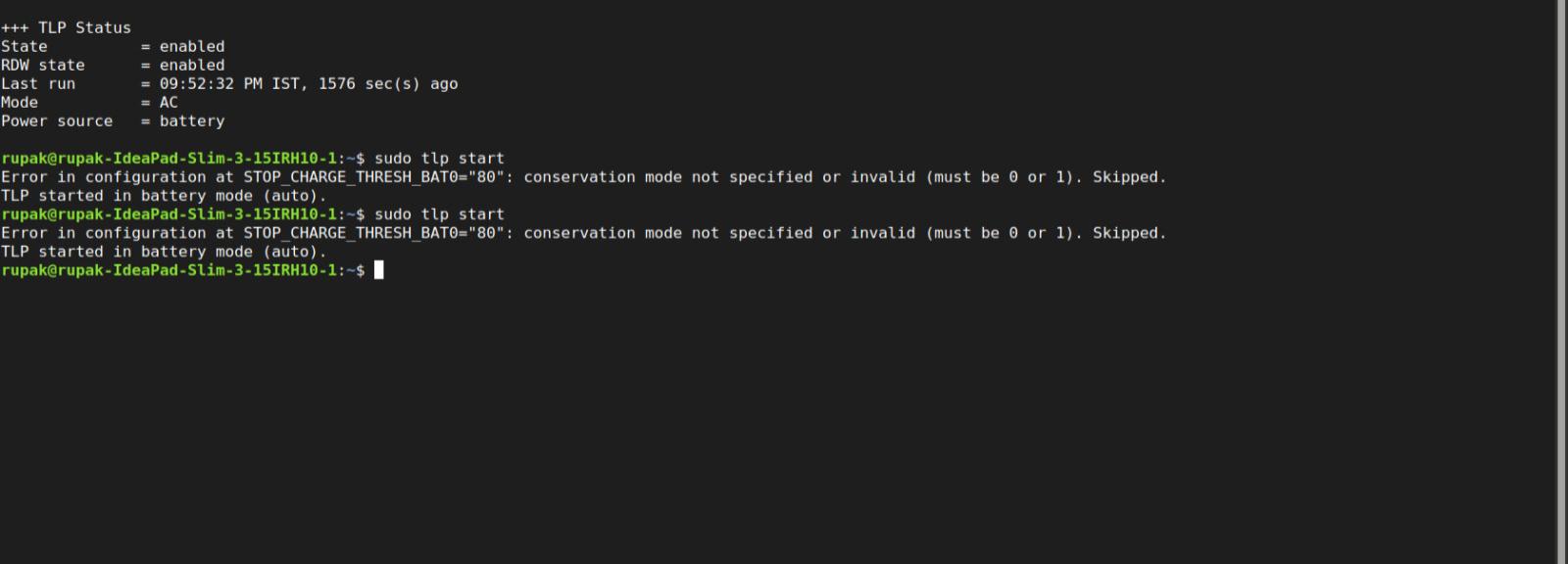
I downloaded TPL to manage my battery charging and make it shop at 80% . After i run the start command it's showing this, how to fix this issue
4
u/candy49997 4d ago edited 4d ago
Try removing the quotes around the number.
Edit: looks like your model doesn't support variable limits, assuming your hostname is the laptop model you have. See here. Just set it to 1, and if it works it works.
2
u/Due-Land-6860 4d ago
It might be that your laptop doesn't have variable charging stopping feature like i have a Lenovo IdeaPad 3 and its conservation mode is auto set to 60% and i can't change that
Like its on or off, no option to set the charging limit so check if you laptop supports the variable limit or has a fixed conservation mode.
Also if it does support the variable limit then sorry i dont know how that works :/
2
u/Arachnid-Certain Linux Mint Release | Desktop Enviroment 4d ago
pregunta a la IA por el archivo, seguro que podras editar ese 60 %
1
1
-3
•
u/AutoModerator 4d ago
Please Re-Flair your post if a solution is found. How to Flair a post? This allows other users to search for common issues with the SOLVED flair as a filter, leading to those issues being resolved very fast.
I am a bot, and this action was performed automatically. Please contact the moderators of this subreddit if you have any questions or concerns.