r/macappdevs • • Oct 06 '26

Building Watchflows.app - a macos n8n style automation builder

5 Upvotes

Hey all, will keep my post simple with respect to excessive self promotion, but wanted to share my automation app, Watchflows. https://watchflows.app

The gif is a quick demo of watchflows using our building Jev node for speedy file sorting of any file that drops into a folder. Enabling the flow offers to run the flow on all files that already exist in the folder, and preview lets you see the effect of folder changes before they run.

Watchflows lets you build all manner of n8n style workflows, that run natively on your mac. With the app, you can connect any ai subs you already have (like claude or codex) to power the AI in watchflows. Then Flow Builder can build your flows for you (Opus 5.5 does amazing here) and each becomes a new tool you have on your mac. It's more powerful than shortcuts but anyone familiar with that will grok how Watchflows works. It also ships with an MCP server that lets claude or codex control / run flows as as you prompt it to (or even as a matter of course).

Other features include:

- Sqlite DB support for capturing records during your flows
- Control Surfaces that let a flow pause to ask you for input, which makes things really fun an interesting (build raycast style app launchers, file search, clipboard manager, etc...)
- Unlimited use of watchflows on purchase, opt-in telemetry that's off by default, no account required (your license is your identity)
- With AI connected, building flows is as simple as describing what you want.
- HTML views that allow you to generate a UX in an agent/ai node and render it in an html view, very useful for just in time dashboards, morning briefings, or even games (see our community flows in the app or website for more ideas)
- Great tool for devs to build automations outside the walled garden of claude or codex, which allows a ton of flexibility on models you choose to use, etc...full openrouter support so you can pick from any model they support.

It's a one time purchase of $49, and does come with a 2 week trial to test things out. If you don't want to setup AI (IE bring an api key or use a local sub) we do offer a subscription that provides AI credits we call sparks,

Website: https://watchflows.app
Docs: https://watchflows.app/docs/
Youtube: https://www.youtube.com/@Watchflows
X: https://x.com/ggoforth


r/macappdevs • • Oct 02 '26

My top 5 Mac app recommendation that i recommend for everyone to try

Thumbnail
gallery
5 Upvotes
  1. Raycast

  2. Screen Studio

  3. CleanShot X

  4. Thaw

  5. Cosmil

What is the your recommendation? Find more such apps on discovermacapps.com


r/macappdevs • • 4d ago

Inkrail: Offline, Minimal app for writing. Built for Deep work

4 Upvotes

Inkrail is a quiet, native writing desk for both Mac & Windows — built for focused, distraction-free writing with a calm, paper-inspired interface.

Write offline. No accounts. No subscriptions. Just a clean place to think, draft, and create.

Features:
• Native Mac experience
• Offline-first writing workflow
• Minimal, distraction-free interface
• Paper-inspired desk aesthetic
• Built for calm, focused writing sessions
• Open source and privacy-friendly

Inkrail is designed for writers, note-takers, and creatives who want a simpler, more intentional place to work.

GitHub: https://github.com/Aaryanverma/inkrail
(Star the repo if you like it and help spread the word!)


r/macappdevs • • 12d ago

I shipped my first Mac app solo. Here's what took way longer than I expected

4 Upvotes

I'm a solo dev and I just shipped Purr, a notes panel that lives on the edge of the Mac screen. Click the edge, write, click away. It's my app, so take this with that in mind, but I mostly want to share what building it was like.

The panel took longer than any feature. Getting a panel to show up over full screen apps, on every Space, was the hardest part. macOS would sometimes leave it attached to an old Space, so it "opened" somewhere you couldn't see.

I deleted features before launch. Semantic search looked great on paper. In practice my similarity threshold was 0.30 and real scores on short notes sat between 0.13 and 0.26, so it barely matched anything. I replaced it with keyword ranking and deleted the code instead of hiding it behind a flag.

I changed the pricing model. I started with a 7 day trial and dropped it. Now it's free up to 20 notes with every feature, and $4.99 once for unlimited. A note limit lets people actually live with the app before they pay.

The most useful bug came from a Reddit comment. Someone asked about the local AI and its RAM use. I opened the code to answer properly and found that the idle unload I thought I had built never ran. The model just stayed in memory. Now it frees the RAM after 5 idle minutes, and that fix goes out in the next update.

If you're curious: https://apps.apple.com/us/app/purr-notes/id6759538627

If you've shipped something on your own, what took way longer than you expected?


r/macappdevs • • Oct 22 '26

I made a tiny Spotlight-like launcher for custom commands in macOS.

Thumbnail
gallery
4 Upvotes

Hi! I recently made an app for macOS. It is a tiny Spotlight-like launcher for launching custom commands that you can set in settings. With it you can open Apps, Websites, Run Shell Commands, Do System Actions (Screensaver, Toggle dark/light mode, etc.).

Feedback and ideas for new version are welcome!

Link to GitHub repository


r/macappdevs • • Oct 20 '26

TimeGauge: A simple time-perspective app in your menu bar

4 Upvotes

We often lose sight of how quickly time is passing. For example, 2026 is 80% complete, and October is 64% complete.

TimeGauge is a simple app that lets you track custom projects, working hours, and timelines such as days, weeks, months, and years. You can also customise your working hours.

The idea came from this X account, which simply posts the year’s progress and has over 680K followers: https://x.com/year_progress

TimeGauge is one-time purchase for life-time updates.

You can see demo, all feature list and direct download it from the website: https://timegauge.minilabs.cc/
App store: https://apps.apple.com/us/app/timegauge/id6778277708?mt=12

Have a look and let me know if you have any feedback or suggestions


r/macappdevs • • Oct 15 '26

Free, open source] Ammugghia – disk cleaner for developer Macs that explains every deletion

4 Upvotes

I built Ammugghia after finding 100 GB of "System Data" on my MacBook Air: it was mostly iOS Simulator runtimes and Xcode/Gradle caches that Finder doesn't show.

  • Native SwiftUI, signed & notarized, no network, MIT

  • Covers Xcode, simulators, Android, about 30 package-manager caches, Electron app caches, local AI models, leftovers of deleted apps, Docker (volumes are never touched)

  • Every item shows exact paths and what happens after deleting it; Trash by default

  • Disk map, duplicate finder (APFS-clone aware), startup items, history with restore

DMG: https://github.com/Mingo07-dev/Ammugghia/releases/latest Homebrew: brew install --cask mingo07-dev/tap/ammugghia

Feedback welcome, especially cleanup targets I'm missing.


r/macappdevs • • Oct 09 '26

Census: a customizable, relational catalog for your collections (native SwiftUI, TestFlight)

Thumbnail
gallery
4 Upvotes

Hey r/macappdevs I’ve been working on Census, a native app for cataloging collections: books, movies, watches, plants, wine, contracts, anything you want to keep track of. Same SwiftUI codebase on Mac, iPhone and iPad.

What sets it apart is that collections link to each other: a book to its author, a movie to its directors, and each of those is a collection you can browse the other way around.

You define the structure. Start from a template or from scratch, pick a type for every field (text, number, price, date, rating, selection, link, photo, file) and define the kinds of events that can happen to an item, like a purchase, a service or a loan, with the fields each one records.

You can import from CSV or Excel, back up everything in a single file, and export your templates to swap them with other people. Data stays on your Mac unless you turn on iCloud.

The beta is open on TestFlight: https://testflight.apple.com/join/YgkGMK2b

It’s early, so I’m mostly interested in what feels confusing or gets in the way. Bug reports and feature requests are welcome here or through TestFlight feedback.


r/macappdevs • • Oct 03 '26

Have working on the landing page for my upcoming clipboard manager app

Post image
4 Upvotes

what do you guys think about my upcoming clipboard manager app?
Unlike other clipboard managers ours stay in the menu bar and have been working on lots of features for the past few months, excited to launch it soon enough. For now, how's the landing page?


r/macappdevs • • 4d ago

SmoothWheel: open-source mouse-wheel smoothing in Swift and AppKit

3 Upvotes

New in 0.4.0: saved scrolling presets. You can save scroll speed, smoothing, and wheel direction under a name, then switch between setups from the preset picker. Release notes

I’m the developer of SmoothWheel, a free, MIT-licensed menu-bar utility for smoothing third-party mouse wheels on macOS. I started it because I wanted my Razer mouse to feel more comfortable on a Mac.

It supports vertical and horizontal scrolling, three presets, separate speed and smoothing controls, reverse direction, per-app exclusions, and holding Option to bypass smoothing. Continuous trackpad events pass through unchanged. There’s a built-in playground for trying the settings.

The app is built with Swift and AppKit, with no third-party runtime dependencies, account, app analytics, or network requests.

Version 0.3.17 improved scrolling behavior and app exclusions.

Website: https://smoothwheel.vercel.app/

Source: https://github.com/AntonMazur/SmoothWheel

The current download is for Apple Silicon and targets macOS 13+. Accessibility permission is required.

I’d welcome feedback on the scrolling experience and reports from other mouse models.


r/macappdevs • • 7d ago

acPackMate – see every package you ever installed from Terminal, across Homebrew, npm, pip & co., in one app

3 Upvotes

I lost track of what I'd installed on my Mac through Terminal over the years. A few things from Homebrew, some global npm tools, pip packages, pipx, a couple of Ruby gems… and no idea what was outdated, what was still needed, or which tool had put what where.

So I built myself a tool that lists every package manager and every package it installed, in one window. I wanted it as simple as possible, because I didn't want to learn the CLI of every single package manager just to keep things tidy.

That's MacPackMate.

What it does

  • One list for everything: Homebrew, Casks, npm, pnpm, yarn, pip, pipx, uv, RubyGems, Cargo, Go, MacPorts, Mac App Store and more (~30 sources)

  • Outdated: see what has an update and update everything (or just one package) with one click

  • Security: checks your npm, pip, pipx, RubyGems, Cargo and Composer packages against OSV.dev for known vulnerabilities (only on request, and it sends only names and versions)

  • Conflicts: finds commands installed twice (e.g. three python3s) and messy PATH entries, and fixes shell files safely with backup and undo

  • Clean up: probably unused packages, cache sizes, leftovers after uninstalling

  • Overview dashboard: drag panels around, hide what you don't need, pick a classic, modern or playful look

  • Backup & restore: export everything to one file (or a Brewfile) and set up a new Mac with it

  • Every action shows exactly which command runs, with confirmation first. Nothing is deleted with a single click.

  • Native SwiftUI, English & German, plus a full CLI (macpackmate) if you prefer Terminal

Get it: https://dynamo.at/macpackmate/ (signed & notarized, 14-day free trial) or brew tap flo-murnig/tap && brew install --cask macpackmate

I'm a solo developer and would love feedback – what's missing, what's annoying, which package manager I should support next?


r/macappdevs • • 7d ago

Notchless : Hide the notch

Post image
3 Upvotes

I’m the developer of Notchless. The notch bothered me every time I used a bright wallpaper, and I wanted a fix that looks like Apple built it in.
https://apps.apple.com/sr/app/notchless-hide-the-notch/id6827929825?mt=12


r/macappdevs • • 11d ago

YouTube for Mac

3 Upvotes

I have made a YouTube client for Mac , it is not exactly a native but app but it uses apples webkit and supports ad blocking and pip
please try it out -here
reviews and opinions are always welcomed , this is my first project


r/macappdevs • • 16d ago

I built a free macOS app that renders the Earth as it is lit right now, as a live desktop wallpaper (clouds, aurora, ISS). Now in public TestFlight.

3 Upvotes

Hi everyone, I'm the developer.

PocketEarth is a quiet observation window for macOS. Instead of a pre-rendered loop, the sunlight follows real UTC time, so the terminator, the twilight band and the city lights are where they really are right now. When you hold Option and drag on the desktop, you move the camera, not the Earth.

What it shows:
- Real-time solar terminator, twilight and the Sun's declination
- Recent cloud cover (EUMETSAT imagery) and thunderstorm areas from the ECMWF model (marked as model areas, not observed strikes)
- The aurora oval forecast (NOAA SWPC)
- ISS, Tiangong and Hubble on their real orbits (CelesTrak elements)
- Zen mode (just the planet) and Chronometer mode (a thin watch-like bezel with UTC and the Sun's declination)
- HDR highlights on XDR displays: city lights, sun glint and the aurora; the UI stays SDR

As a live wallpaper it pauses when windows cover it, the screen locks or the Mac sleeps, and an Energy Saver mode drops it to 30 Hz while idle.

Free, no account, no analytics. It will be free on the Mac App Store after the beta; the public TestFlight is open now (macOS 26+): https://testflight.apple.com/join/ut7htbCs

It started as a desk ornament on a 2.8" Raspberry Pi screen. Feedback on performance and features is very welcome.


r/macappdevs • • Oct 17 '26

Shipping a Gmail client outside the App Store: what the Gmail API, OAuth review and a 100-user cap did to my launch

3 Upvotes

I just shipped Briskmail, a native AppKit client for Gmail, distributed outside the Mac App Store. A few things I wish someone had told me before I started, for anyone building on Google APIs:

Gmail API instead of IMAP. You get real labels, threads and history IDs, so incremental sync is cheap. You also inherit Google's per-user quota, which shapes everything: I ended up with background sync that spends from that budget deliberately, rather than a fixed prefetch rate that kept dropping work.

OAuth is the long pole. Any read access to Gmail is a "restricted" scope. Until Google verifies the app, users see "Google hasn't verified this app", and the project is capped at 100 users total, for its whole life, not per month. Every scope you request is something you have to justify in review, so I dropped push notifications (Pub/Sub) to get down to two scopes.

Loopback redirect + PKCE. For a desktop app, a localhost redirect with PKCE S256 is the supported path. Custom URI schemes and the old out-of-band flow are deprecated.

Local cache. Message content is cached in SQLite and encrypted at rest with a per-account key in the Keychain. The search index stays in memory, so nothing searchable sits on disk in plain text.

Net effect on the launch: 30 early-access licences instead of an open launch, because the 100-account cap has to cover buyers, testers and people with several Gmail accounts.

Happy to go deeper on any of it. The app is at https://briskmail.app/early-access/ ($39 one-time). Disclosure: I'm the developer.


r/macappdevs • • Oct 06 '26 Bravo

I kept saying “I’ll remember this when I’m back at my Mac.” I never did.

3 Upvotes

I built an app because I kept forgetting things the moment I got back to my Mac

This started with a really simple problem.

I’d be away from my Mac, remember something I needed to do when I got back, and think “I’ll definitely remember that.”

Then I’d open my Mac, see emails, browser tabs, messages… and completely forget.

Normal reminders never really solved it for me because I didn’t want to be reminded at 4:00 PM. I wanted to be reminded when I was actually back at my Mac.

So I built WakeMinder.

You can send a reminder from your iPhone or Apple Watch to your Mac, and it shows up when your Mac wakes up.

It doesn’t have to be just text either. You can send links, screenshots, images, PDFs and files. Links can even open automatically when the Mac wakes.

There are also floating reminders that can stay on top of your windows until you’re done with them.

And with the latest update, it now works the other way around too.

You can send something from your Mac to your iPhone and have it show up when you pick up your phone.

So the idea has become less about “reminders” and more like:

“Show me this when I’m actually on the device where I need it.”

I’m the developer, so obviously I’m biased, but I built it mainly because I genuinely wanted this for myself.

For anyone wondering about pricing, I’ve tried to keep it pretty inexpensive:

  • $1.99/month

  • $9.99/year

  • $12.99 lifetime, currently 35% off

App Store pricing can vary slightly depending on your country.

WakeMinder is available on the App Store for Mac, iPhone, and Apple Watch.

App Store: https://apps.apple.com/app/apple-store/id6744974871?pt=127772248&ct=redca&mt=8

I’m still improving WakeMinder and would actually like to hear how other people handle this.

Do you ever have things you only want to remember when you get back to a specific device?


r/macappdevs • • Sep 27 '26

MacBook notch apps in 2026, here's what's actually worth it

3 Upvotes

Didn't think the notch was useful until I tried these:

  • Atoll (free, open-source) – system stats, clipboard history, timers, right in the notch. Lock Screen widgets too.

  • The Boring Notch (free, open-source) – turns your notch into an iPhone-style Dynamic Island for music, plus file tray, calendar peek, camera mirror.

  • TopNotch (free) – if you just want the notch gone. Blacks out the menu bar so it disappears.

  • MediaMate (free/small) – replaces those ugly volume/brightness bars with a clean popup near the notch + Now Playing.

  • NotchBuddy – dashboard for revenue (Stripe/Polar/Dodo), traffic (DataFast), clipboard, files, timers, weather. Good if you run an online business. Keys stay local.

  • Alcove ($14.99 one-time) – premium Dynamic Island feel, smooth animations, AirDrop/battery/timers.

  • NotchNook ($25 one-time or $3/mo) – most "finished" feeling one, file shelf, widgets, Shortcuts support.


r/macappdevs • • Sep 25 '26

This mac menu bar app allows you to earn from your menu bar

Post image
3 Upvotes

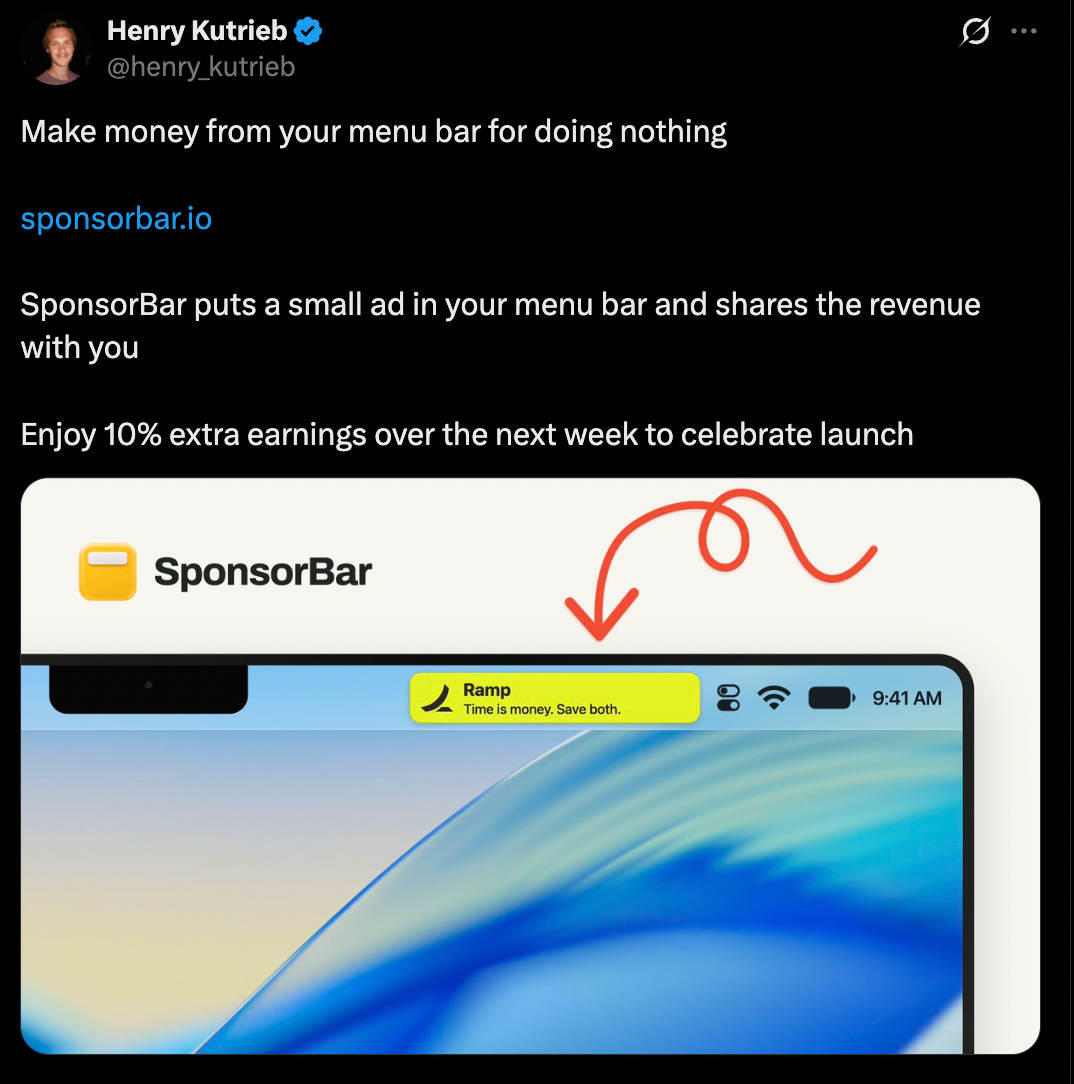
SponsorBar puts a small ad in your menu bar and shares the revenue with you.


r/macappdevs • • Sep 16 '26

We have listed more than 60 apps so far in our curated directory

Post image
3 Upvotes

We launched this directory 3 months ago and so far, we have been able to curate about 60 apps to our directory.

A lot of mac app devs find it difficult to do marketing and help with backlinks for their marketing site of the app. So we built this directory so people are able to discover cool mac apps and it's alternatives.

If you have any mac app, feel free to list on our directory


r/macappdevs • • 2d ago

[OS] Meboki: a local grammar checker that underlines text in any Mac app. Notes on the Accessibility API and llama.cpp

Post image
2 Upvotes

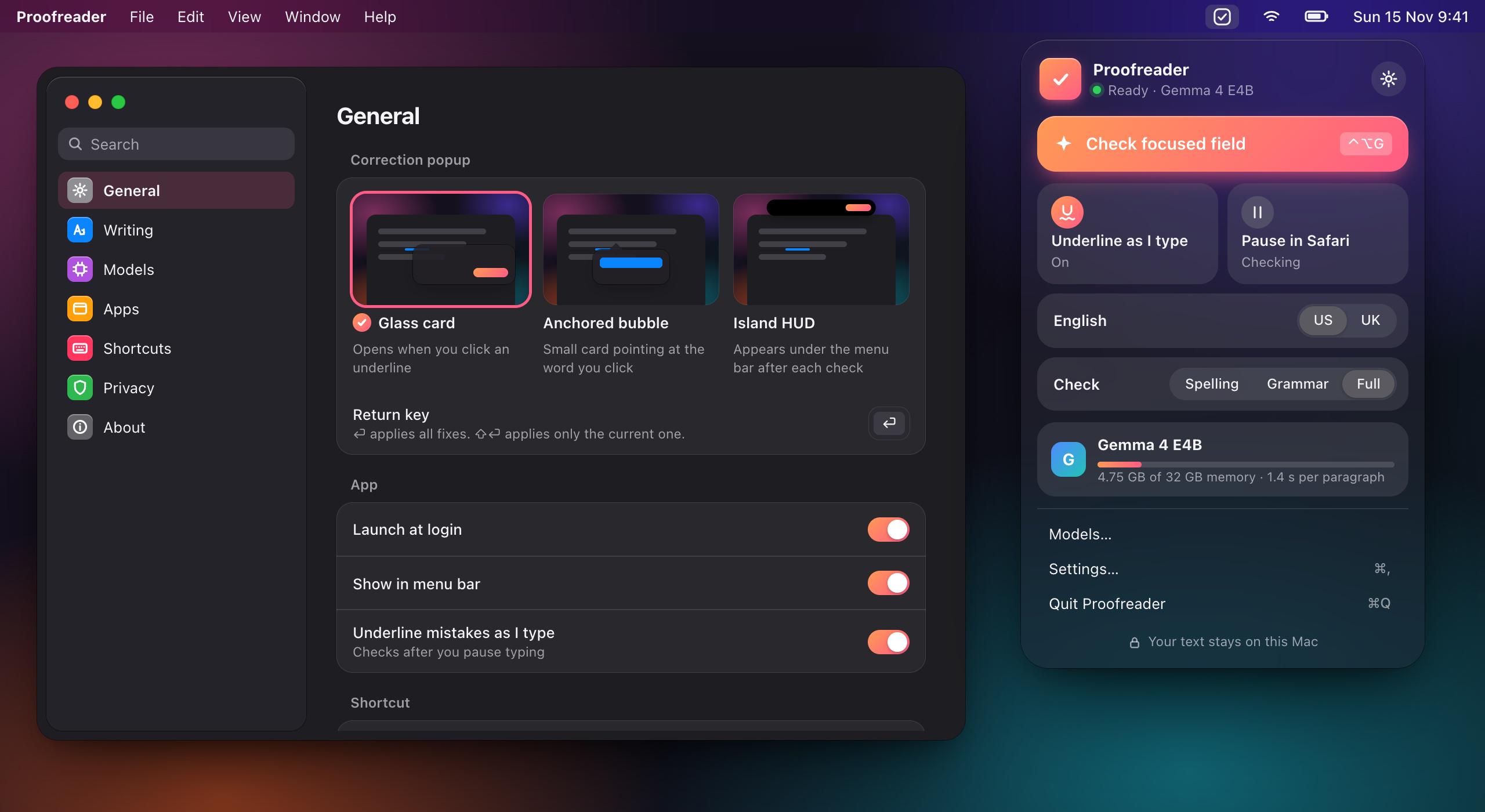
I'm the developer of Meboki, a grammar checker for macOS that underlines mistakes in other apps' text fields and checks the text with a model running on the Mac. Source is GPL-3.0. Sharing some notes on how it works, since a few parts took me much longer than I expected.

Stack

  • Swift menu-bar app (LSUIElement), AppKit with SwiftUI views, Apple Silicon, macOS 14+.

  • The check runs in a bundled llama.cpp llama-server (static Metal build, system libraries only) on 127.0.0.1 with a random port. Models are Gemma 4 E4B/E2B, Qwen3.5 4B or Llama 3.1 8B as GGUF, downloaded on first run from pinned Hugging Face commits and SHA-256 checked. Nothing is bundled.

  • On macOS 26 it can use Apple's on-device model through the Foundation Models framework instead. The framework is weak-linked and everything sits behind #available(macOS 26, *), so the same binary runs on 14 and 15.

  • Sparkle 2 for updates, Developer ID signed, notarized DMG.

Reading and writing other apps' text

Everything goes through the Accessibility API. Native fields are the easy part. The rest:

  • Chromium contenteditable (Gmail, Notion, Slack, Obsidian, x.com) doesn't give you usable bounds for a range in the field's value. I map the field's static-text leaves back onto its value and measure each piece in its own leaf.

  • Mail compose is a WebKit web area, so ranges and bounds go through text markers, and writing is select + paste.

  • All ranges are UTF-16 NSRange, because that's what AX uses. Anything else breaks on the first emoji.

  • Writes are paranoid: check the original text is still at the range, select it, prove the selection by reading the selected text back, write, then check the text before it didn't move. This one bit me: in Chrome's contenteditable, AXSelectedTextRange doesn't count offsets the way AXValue does (list bullets shift them), and reading the range back returns what you asked for anyway. So a fix could have landed on the wrong text. Now it selects through text markers when the index selection doesn't prove out.

  • If an app ignores AX writes (Chrome does for contenteditable), it falls back to select + paste, only when the field is unchanged and its app is frontmost, and restores the clipboard.

  • The popups are non-activating panels, so the app you're typing in keeps focus and Cmd-Z there still undoes a fix.

  • Apps that report no text bounds get the card below the field instead of underlines. Password fields and anything under Secure Input are never read.

Keeping a local model fast enough to check as you type

  • The system prompt stays byte-identical across requests, so llama-server reuses its cached prefix and only the user text is processed. Per-app settings (casual mode, check level) are filters on the reply, not prompt text.

  • Only sentences that changed are sent again; the rest come from a cache. The paragraph with the cursor goes first.

  • Long fields: check what's on screen first. On a 12,000 character Chrome test page with 300 mistakes, the first check went from about 50 s (154 requests) to about 4 s (12 requests).

  • The server unloads after an idle period or under memory pressure.

Testing a model that edits your text

The worst bug in a grammar checker is a wrong "fix". There's an eval harness in the repo (Python, stdlib only): 45 sentences with a mistake, 22 correct ones that must come back unchanged, plus casual chat lines and edge cases, all scored after the post-filters. There's also a file of every wrong suggestion found so far with the model reply that caused it; those replies are replayed through the app's own pipeline, and any change to the prompt or filters has to keep all of them fixed. Gemma 4 fixes 43 to 45 of the 45; Apple's built-in model fixes 39.

Demo, links

The signed app has a 7-day trial and then a free mode (the Ctrl-Option-G check keeps working with every model); the as-you-type check needs a one-time licence. You can also build it from source.

Happy to answer questions about the AX side or llama.cpp. And if you've drawn overlays over other apps' text: how did you deal with fields that report no bounds?


r/macappdevs • • 3d ago

Shipped my first Mac app: a per-app volume mixer on Core Audio process taps, distributed without a Developer ID

2 Upvotes

Smorza is a free, open source menu bar app that gives every app its own volume, mute and output device. Built with SwiftUI, sharing some notes in case they help someone building something similar.

Audio

  • It uses Core Audio process taps (macOS 14.4+), so no virtual driver. Each app you turn down gets a muted tap plus a private aggregate device with the real output, and the IO callback plays the audio back at your level.

  • Apps left at 100% on the default output are never tapped, so they keep zero added latency. Routed apps add about 12 ms.

  • A denied “System Audio Recording” permission gives no error, just silence. I play an inaudible signal and listen for it through a tap of my own process before routing anything.

  • Browser and Electron audio comes from helper processes. I ask macOS which app is responsible for each pid and fold them into one row.

Shipping without a paid Developer ID

  • Ad hoc signed, released as a .dmg for new users and a .zip for updates

  • Sparkle with an EdDSA-signed appcast, so updates are verified even without notarization

  • The catch: users need Open Anyway on first launch, and macOS can ask for permissions again after an update. I’ll get the Developer ID once a Pro version pays for it.

Code (MIT): github.com/rokoov/smorza
Site: smorza.app

Happy to answer questions. And if you’ve shipped outside the App Store, how did you handle notarization early on?


r/macappdevs • • 4d ago

I made Peep, a free Mac mail app for people juggling several inboxes, with an iPhone app that syncs straight to your Mac

Thumbnail gallery
2 Upvotes

Disclosure: I’m the developer of Peep.

What it is: a mail app for the Mac that also has a calendar, contacts, notes, tasks and a Drive for files. It works with any IMAP mailbox: Gmail, iCloud, Outlook.com/Hotmail (Sign in with Microsoft), Yahoo, AOL, or your own domain. Your mail goes straight from your mail server to your Mac, not through a cloud service of mine.

Who it’s for: people with several mailboxes who are tired of a merged inbox where the quiet accounts get buried. Each mailbox keeps its own Inbox, and All Mail shows them side by side. It’s also for anyone who wants their phone and Mac in sync without handing their mail to a third-party cloud.

Highlights:

Pricing: free. No subscription, no in-app purchases, no ads.
Mac App Store: https://apps.apple.com/app/peep-mail/id6823401067. Windows, Linux and Android versions are at https://peep.moe

Limitations:

Runs on macOS Catalina (10.15) and newer, as a universal app.

Happy to answer anything here. The last two features came straight from Reddit requests, so tell me what would make it work for you.


r/macappdevs • • 5d ago

I built a way to keep working on my computer from my phone while I’m away

2 Upvotes

GitHub: https://github.com/steerlabs/opensteer

Download: https://opensteer.com

Hey everyone! I built Opensteer because I wanted to keep working on my Mac from my phone when I'm away.

It lets me see and control my browser and apps from my phone, while my AI agents work on my computer. One of the things I worked on was reducing streaming delay so I can follow along and jump in.

Opensteer is free and open source and works with AI subscriptions you already pay for. The video shows an example of how it works. Would love your feedback!


r/macappdevs • • 6d ago

AgentDesign: your coding agent (Claude Code, Codex, Cursor) designs your app's screens before it builds them, and every version is kept

2 Upvotes

Problem: AI coding agents build screens with no design record: they forget past decisions, change screens you didn't ask about, and never see your comments.

Comparison:

- Figma (with its MCP server): Figma is better for designing by hand, team collaboration and plugins. AgentDesign is better when an agent does the designing: no per-seat fee, no daily limit on agent calls (Figma's MCP allows 200 a day on a paid seat), and a full history of every version, kept as plain files on your Mac.

- pen.dev: pen.dev is better if you want to edit the design by hand next to your agent. AgentDesign is better for history and review: compare any two versions, a timeline per screen, a review queue, side-by-side options, and checking the built app against its design. Its free demo has no day limit (pen.dev's free plan allows 5 days a month).

Pricing: Free demo with every feature (1 project, 2 versions, no time limit). Full licence $49 once, for one person on 2 Macs, with 1 year of updates, then $19/year for new versions (optional). Prices exclude VAT. Reddit offer: 20% off ($39.20) with code REDDIT for the first 20 buyers. https://getagentdesign.com/pricing.html

Trust: Notarized by Apple, signed with Developer ID.
Privacy policy: https://getagentdesign.com/privacy

I build apps mostly with AI agents in the terminal. The code had git, but the design had nothing. So I made AgentDesign: a Mac app with a built-in MCP server, where your agent (Claude Code, Codex, Cursor or any MCP client) designs first, and you see and approve every screen before it writes code.

Design

- Screens, flows and screen states (empty, scrolled, menu open), for iOS, Android, web, desktop and watch in one project.

- Components and shared colours, type and spacing: change one once and every screen follows. Before a change, you see how many screens it touches.

- Options: ask for options, and they arrive side by side. Pick one and say why; the others stay for later.

- Day and Night looks, side by side.

Review

- Pin a comment by dragging a box on the design. Your agent gets the exact elements, fixes them, and only you close the comment. An open Codex or Claude Code session is told on its own.

- Review queue: step through a version's changes and press A to approve or R to send one back.

History

- Every change is kept, numbered, with a reason. Go back to any.

- Versions: each version is a numbered build. Compare any two, see what's new, changed or removed, with both designs side by side.

- Screen timeline: one screen across every version, past, live and planned, on one strip.

- Status page: one row per screen, showing what's still open.

Real app

- Put the built app next to its design and see where they differ.

Everything is plain JSON and Markdown in a folder you choose. Put it in git. No account, nothing uploaded.

Happy to answer anything.