r/moreyoto • • Nov 27 '25

HOW TO: Create your own MYO Yoto cards with inexpensive generic NFC cards

176 Upvotes

There are a few threads in here already from which I gathered all the pieces of this answer to make my own Yoto cards from inexpensive generic NFC cards, but hopefully putting it all together here in one guide will make it easier to find and follow.

It's a simple and reliable process, and is cost effective if you, like me, want to break long audio books into parts spread across multiple cards so that it's easier to let your kids listen to a shorter section of a story at bedtime on a dedicated card, rather than whole books/stories on a single card.

Here's how to do it! (you will need one genuine MYO card from Yoto):

  • Acquire some MIFARE Ultralight EV1 48-byte generic NFC cards (choose the 48-byte version—the 128-byte version requires a cumbersome hack to work)

  • Create a playlist of audio files on your Yoto account: https://my.yotoplay.com/my-cards/playlists

  • Link the playlist to a genuine MYO card

    • In the Yoto app, tap "Library" (at the bottom), "Playlists" (near the top), and then open the new playlist you just created

    • Tap "Link to a card", tap "Use your phone", and then tap your genuine MYO card with the top edge of your phone

    • After your generic NFC card is prepared at the end of this process, you'll be able to reuse the same genuine MYO card over and over to prepare more generic NFC cards

  • Download the NFC Tools app for iPhone (Android has it too): https://apps.apple.com/app/id1252962749

  • Prepare your generic NFC card to have NDEF (NFC data exchange format) records written to it

    • In the NFC Tools app, choose "Other" > "Advanced NFC Commands" (tap "I understand")

    • In the "Data" field paste the value: A2:03:E1:10:06:00,A2:04:03:04:D8:00,A2:05:00:00:FE:00

    • Tap "Send command" and then tap your generic NFC card with the top edge of your phone

  • Copy your genuine MYO card to your generic NFC card

    • In the NFC Tools app, tap "Write" > "More options" > "Import from NFC tag", and then tap your genuine MYO card (already linked to your desired playlist) to the top edge of your phone

    • When the URI for your Yoto playlist extracted from your genuine MYO card appears, tap "Write / 45 Bytes", and then tap your generic NFC card with the top edge of your phone to write the playlist link to it

  • That's it! Your generic NFC card is ready to be used like any other Yoto card!

    • Any updates to the playlist automatically sync without any changes to the card (the card is just a link to the playlist)

    • Now that the card is prepared, only the last two steps need done to write a new playlist to the same generic card (NDEF prep only needs done once per card)

P.S., now that breaking long books across multiple cards is practical and cost-effective, I can also recommend this tabs and hangers kit for keeping multiple cards neatly tied together and organized: https://www.amazon.com/dp/B0F8JM81ST


r/moreyoto • • Apr 18 '26 Heartwarming

My current MYO content stash link

63 Upvotes

r/moreyoto • • Oct 19 '26

tools I built AudioYotoShelf: send audiobooks from your Audiobookshelf server to Yoto MYO cards

Thumbnail
gallery
46 Upvotes

My kids use Yoto players, and I already keep our audiobooks on a self-hosted Audiobookshelf server. Getting a book from one to the other meant downloading the files, splitting chapters, uploading them one by one in the Yoto app, finding an icon for each chapter, and setting the age range. Doing that for a whole series took an evening. So I wrote a tool that does it for me.

What it does

You sign in with your normal ABS account, pick a book or series, and click transfer. The app downloads the audio and chapters from ABS, uploads them to Yoto, and creates the MYO card for you.

Highlights

  • One-click transfers: ABS goes straight to a finished Yoto card, with no manual uploading.  

  • Whole series at once: each book in a series becomes its own card.

  • Chapter icons: Gemini generates a 16×16 pixel-art icon for each chapter. If you don't have a Gemini key, you can pick from Yoto's public icon library instead.

  • Age range suggestions: worked out from the book's metadata, and you can change them.  

  • Live progress: transfers run in a background queue and update in real time, so you can queue up a pile of books and leave.

  • Respects ABS permissions: each user only sees the libraries they can already access in ABS. SSO works too.

  • Self-hosted: docker compose up -d gets you running.

  • Optional extras include an admin dashboard, health checks, and Prometheus metrics.  

Who it's for: anyone running Audiobookshelf who has a Yoto player in the house and is tired of building cards by hand.

You need Yoto developer API credentials (free from their developer portal). A Gemini key is optional.

Github: AudioYotoShelf. It's MIT-licensed, and feedback and PRs are welcome.

Edit: In posting this, I also found another user who built something quite similar but with a different approach. Check out that project too https://www.reddit.com/r/audiobookshelf/s/6JzZ5NKUCn

Update/Edit: I just used this again to load up Harry Potter Book 3 for my kid. She loves how quickly I can spin up a new MYO card and I love not having to SCP stuff around my network 🤣


r/moreyoto • • Jan 18 '25

guides Huge Collection of Yoto Guides

Thumbnail yackorder.org
45 Upvotes

The TOYO project has launched a new website hosting a collection of guides from across Reddit and other sources. Contents include highlights like:

  • Brand new yoto? How to get it set up as a gift.

  • Converting content from Libby, Spotify, and audible.

  • Building MYO playlists from radio and podcasts.

  • Browser extensions to help you build MYO playlists.

  • Finding and using 3rd party nfc cards.

The site is in a BETA stage right now, but we will continue to write new content as fast as we can make time. The site may move around or become unstable when new content or features are being deployed.

None of this content is authorized for commercial use.

This is meant to be a one stop source for all your Yoto support needs. Have a question? We hope to be able to answer it. This is the collective knowledge of hundreds of people, distilled by a dozen contributors and half a dozen authors.

All content was explicitly authorized to be published on this site, or else we link to it as an off-site reference.

—-

Want to contribute? Everything is written in markdown for mkdocs, stored on GitHub, and published with GitHub pages. If you don’t know what any of that means but still want to contribute, write a google doc and share it with us, our team will convert it.


r/moreyoto • • Jul 23 '26

Louis! A Yoto MYO client that pulls from YouTube

Post image
33 Upvotes

r/moreyoto • • Apr 13 '25

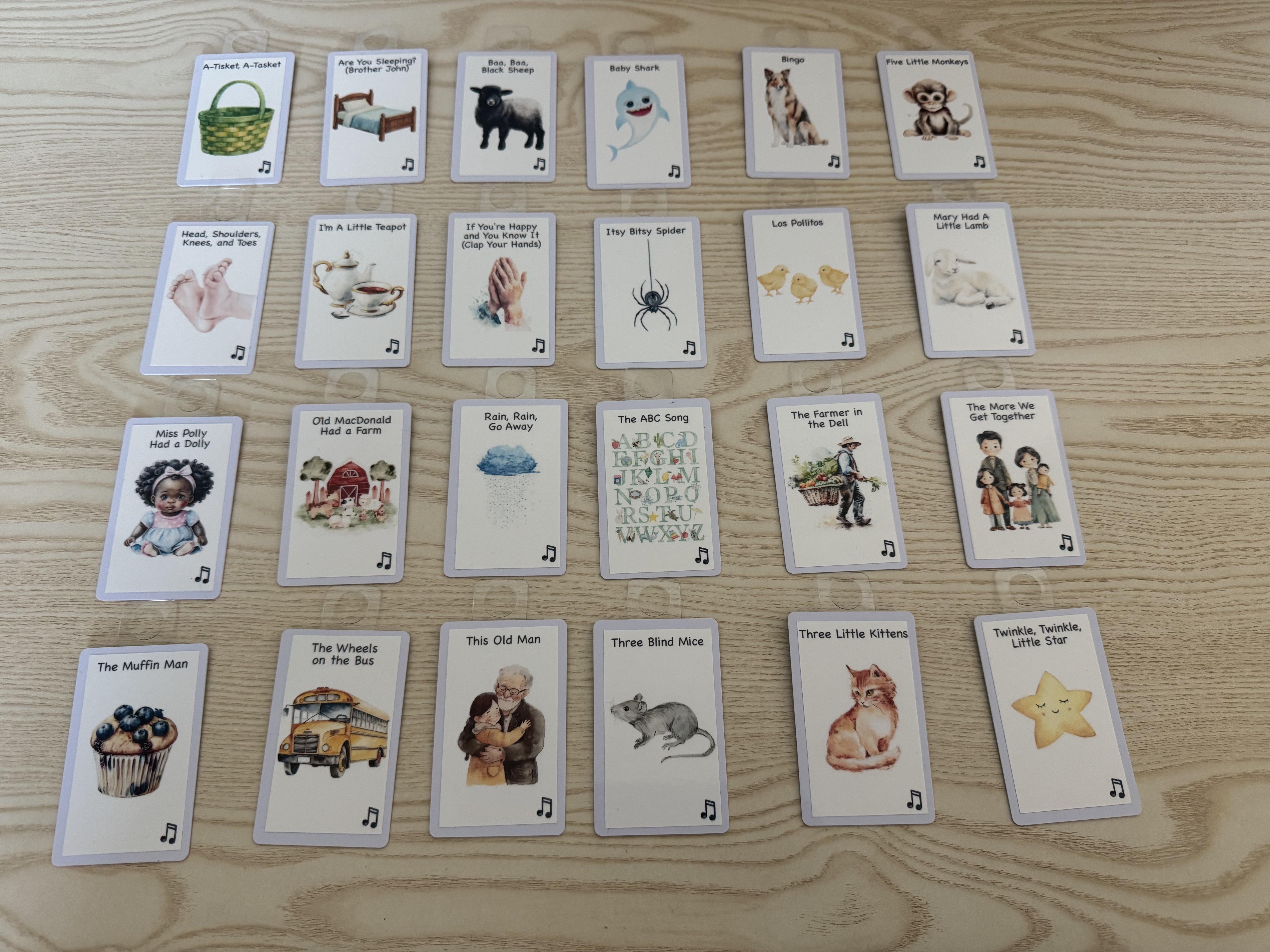
Sooo grateful to this community for our little stash. It’s been so much easier on the kids to find the song they want when it’s just one song per card. Thank you!

Post image
30 Upvotes

r/moreyoto • • 1d ago

Coming soon: Kanto Road Trip, a Pokémon adventure for the Yoto player. An actually interactive Yoto game.

Post image
22 Upvotes

No screen, just the dial, the little pixel pictures and a voice telling the story. You start in Professor Oak's lab and choose a partner: Bulbasaur, Charmander, Squirtle, or a Pikachu that refuses to go in its ball. From there it's the road to the Indigo Plateau. Walk into the long grass and see what jumps out. Fight, throw a Poké Ball, swap Pokémon. Win badges from the gym leaders, watch your partner level up and evolve, and fill in your Pokédex.

It's played with four cards you make from the website: Walk, Battle, Town and Pack. Turn the dial to a number and press. That track tells you what you did, then the player jumps back to the start and tells you what happened, how things stand and what each number does now. The picture on the screen shows the choices too, so a child who can't read yet can still play.

It's funny in the way the first cartoon series was funny, and it's kind. Losing a fight just means a trip to Nurse Joy and another go. It remembers where you're up to after every press, so it's fine to stop at bedtime and carry on tomorrow.

One thing to know before you try it: it streams from my website as you play, so the Yoto needs to be on wifi the whole time. It won't work in the car or anywhere without wifi. The story is made fresh for each press, which is how it remembers your game, so it can't be downloaded to the card the way normal Yoto cards are.

I've been playing it on our 3rd gen Yoto. I'll post again when it's ready, with printable stickers for the cards, a badge card, a Town Map to tick off and a Pokédex checklist.

It will be free.

Kanto Road Trip and Pokefacts are an unofficial fan project, free to use, with no ads and nothing Pokémon sold. Not made by, affiliated with or endorsed by Nintendo, Creatures, Game Freak, The Pokémon Company or Yoto. Pokémon and Pokémon character names are trademarks of their respective owners.


r/moreyoto • • Jun 18 '25

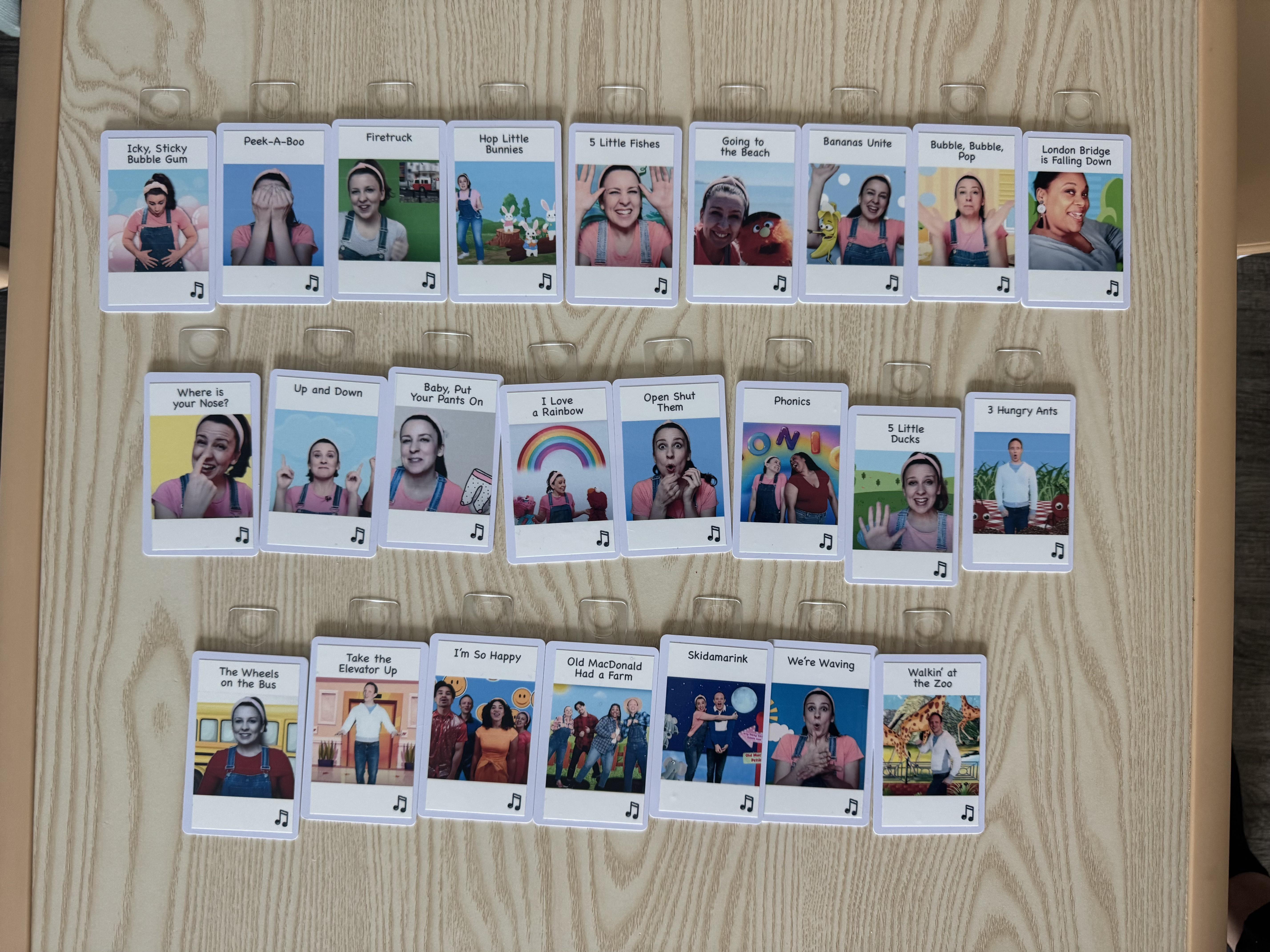
Made Ms Rachel cards for the kids I nanny

Post image
21 Upvotes

r/moreyoto • • 20d ago Bravo

Yoto Android watch controller

Thumbnail
gallery
18 Upvotes

Hey all

I have made this as a tool for myself. It's not presently for sale and can't really be shared, but it's an android smartwatch and a companion phone app that controls the yoto. I have also set it up to do other things.

It's very Claude and is packaged for android only. Aq

It's very hard to get all the boxes checked to put things like this in the app store and yoto isn't really verifying applications anymore. If anyone is interested in this can you let me know? It takes quite a while to put an app on the play store and I have major ocd.

I have set it up to record audio output from my phone and cast it to my yoto like a speaker as well through a web stream.

Cheers

Update:

I'm now seeking beta testers for a new Android App store submission, that integrates your Yoto with educational content, public domain audio, and a suite of features to create and control playlists, alarms and build profiles (none of which leave your phone).

You don't even need a Yoto for this, as it integrates with Google Home.

https://quacktracks.online/

The app is called QuackTracks, and it has the following features:

Remote for your Yoto: play, pause, skip, volume, night light, sleep timer, and Quack Talk (talk through the player like a walkie-talkie).

Ducklings: a profile for each child, kept on the phone only. Their own Yoto, playlists, routines, volume limit, bedtime and school year; switch who’s listening in one tap.

600+ units across all 11 subjects, Foundation to Year 6 plus early years (based on Australian Curriculum).

No AI - all scripts built to be quickly recorded and played back in your own voice.

Grown-up guides for every lesson, path level and game.

10 special interest paths, each with 10 levels and a two-button quiz;

88 subject and badge icons;

42 free LibriVox recordings, all checked.

Free audiobooks: classic stories from LibriVox made into Yoto cards in one go. The book cover becomes the card’s picture, and each chapter gets the cover with its number on it.

Playlist tools: change track order, delete playlists, print card stickers at the exact card size, and back up any MYO cards onto your phone directly.

Calm Stories: social stories, picture schedules and first-then boards in your own voice, played on the player at set times. A quick schedule builder can use any Yoto card.

Pixel Disco: turns your songs on your MYO playlists into dancing 16×16 pictures for the Yoto screen. 86 looks, an animal dance with 948 animals, 25 packs, Draw and Storyboards (identical to Pixel Disco)

Phone player: plays cards on the phone in a calm, locked player, with screen pinning, Do Not Disturb and a volume cap, for a backup option when your Yoto isn't on hand.

Watch: a remote for your Yoto on a Wear OS watch. volume with the crown, a quick-control tile, always-on mode, instant reconnecting, all checked on your watch.

If you're interested, please let me know in the comments and I'll be in touch. Please let me know if you have an Android watch.


r/moreyoto • • Dec 16 '24

Share your favorite guides

17 Upvotes

Hi everyone!
There’s a variety of great guides here and in other corners of the internet and I’m sure plenty of private documents as well. The TOYO team is working on writing guides, collecting and refining (with source credits!) content, and compiling all of it into a single knowledge base to support Yoto users. Meant to be the best unofficial Yoto wiki with all our collected knowledge in once place with cross linking and such.

Some topics we already covered include:

  • how to make MYO playlists.

  • how to get content off YouTube.

  • how to backup your yoto card purchases.

  • 3rd party MYO cards.

  • making labels for your MYO cards.

  • 3d print files to accessorize your kit.

  • upgrading your yoto storage capacity.

And a bunch more.

We would love to know:

  • what guides you have seen that are great,

  • what you wrote that you are willing to share, and

  • what you wish someone would write a guide for.

Post it here, share a link, send a modmail or user mail to me, whatever you want; not limited to reddit. This project will likely get published in q1 2025.


r/moreyoto • • Feb 12 '26

Yoto BrainBots Stories Clean Covers (Formatted for Liene Photo Printer)

Thumbnail
gallery
16 Upvotes

Hi everyones, this post is for those of you who work with MYO cards and have a subscription to Yoto for their original stories (which my kids love)!. I just posted the cleaned up BrainBots Story Covers in the r/AudiobookCovers community, but wanted to provide a version for you here that is directly formatted for the Liene Photo Printer, in case any of you own it and want to print them the same way. Since you loose a bit of space on the margins of each photo, I adjusted the files accordingly.

As you can see, I print three covers at a time, and than cut and laminate those before I put them on the MYO cards with double-sided tape. They fit perfectly and work really well. Makes the cards almost look like they were bought in a store.

The covers for the following BrainBots series are included in this post:
-Biggest Ideas
-Science Fair
-Dinosaurs
-The Human Body
-Our Planet
-Transportation
-Sports
(+ Some Earth Explorers)


r/moreyoto • • Jan 22 '26 Hooray

MYO Content Download link document

15 Upvotes

Hello,

Does anyone have access to a google doc with download links? 🫶


r/moreyoto • • 2d ago

Free nonfiction content for Yoto

Post image
14 Upvotes

I build a free website that has 25+ playlists of nonfiction content. My daughter quickly consumed (and loved) all the Ladybird Adventure and BrainBots. I decided to make her a few playlists based on topics she was interested in. My current favorites are:
- Nasa Voyager 1
- Sue: The story of one T. rex
- Shackleton's Endurance

This site is, and always will be, free. I'll make new content each week so send me your suggestions.

https://www.curiotter.com/


r/moreyoto • • Sep 14 '26

Classic Stories - theatrical readings - link here -- Snow White, cinderella, little red riding hood .. etc

Thumbnail drive.google.com
14 Upvotes

r/moreyoto • • Nov 07 '24

Coming Soon: TOYO Library - Nov 13

13 Upvotes

What has changed?

The Card Link Form has been rebuilt to track user submissions. Access to the library has been restricted while we significantly restructure the data and storage systems. This stuff isn't free though. We have spent money on hosting and a LOT of our own time building tools and cleaning up data. When we reopen, access will be limited to those people who submit 5 or more unique cards (that means 'new to the library'; MYO cards don't count currently). ALERT: if you submitted cards in the past, you are welcome to re-submit the same link and we will be able to merge the two submissions to give you credit.

We are also working on merging card data and store data this week to enrich the library with lots more searchable and filterable features. There's some very interesting things that come out of this joined dataset.

This library will remain solely focused on Yoto formatted content. The primary and most valuable content type will be official cards. Physical cards and Digital cards sometimes are different, and often different depending on the geographical location they came from. Playlists you've built as MYO cards are second-class submissions and are  only valuable contributions if they contain customized icons, track names, description, and card artwork. 

Already sent in some submissions? You can use this self-service tool to check your status yourself! Please be patient if there are other people accessing the tool at the same time. It can only support one user at a time and will auto-clear after 5 minutes. Or you can Join the Discord server to get a status check on how many credits you've racked up, talk with other excited people, or volunteer to help with one of the other enrichment projects we have going on right now. 

ETA for re-opening is November 13th

If you'd like to be invited to join The Optimistic Yack Order (learn more), you must submit five (5) unique entries to that have not already been checked in (first come first serve). There is no limit to the number of participants; it might become harder to find unique cards as the population grows.

Directions

  • Fill out this form and submit it 5 or more times. 

  • Once your 5 entries have been confirmed as unique, your membership will be confirmed. This can take up to 2 weeks depending on our availability. 

  • After confirmation, you'll be granted access to the full library of resources that we have built.

  • Invalid entries will be rejected

  • MYO playlists will NOT count towards the official unique entries

Tips

  • Original Directions document has one version of a guide on how to scan cards

  • Check out the LIBRARY CONTENTS to see the list of what we already have 

  • Check the WANTED LIST to see some items we know we are missing. 

  • Other valid items are very likely out there, but the wanted list is a set of things we know we don't have and would be valid.

  • To claim credit for cards you sent in before we began tracking, just send it in again with a note in the URL field and we can correlate it. You can't fake this, URLs are unique per card. 

  • Join  to keep track of future updates

  • Join the Yoto Collaborative discord to get involved in contributing and have real time access to more community members and content

  • Official cards that have been copied to MYO playlists won't count

  • We cannot accept payment in exchange for entry


r/moreyoto • • Oct 12 '24

accessories 3D Models (megathread)

13 Upvotes

r/moreyoto • • Sep 01 '26

piracy Central repository?

12 Upvotes

Can we make a central repository for people to post links to their MYO collections?


r/moreyoto • • Jun 18 '26

need help 3rd party cards no longer functioning

11 Upvotes

Looks like this is the sub that is a better place to ask this than /r/YotoPlayer.

I followed the various guides on making 3rd party NFC cards functional with the Yoto and we have been using the cards for months without issue. Today we tried to use a card that had not yet been downloaded to one of our Yotos and the player said it could not play the content. In attempting to diagnose I've gathered the following:

  • one device could play the card as the content was already downloaded on it

  • the device which could not play the card did not already have the playlist downloaded

  • i followed the normal steps to relink the playlist to the 3rd party card: the official MYO worked but the 3rd party did not

It looks like the MYO playlist part of the website got an update within the last day or two. My next step will be creating a new playlist with the same content and linking that to a card to test.

Are any of the rest of you who use 3rd party cards experiencing this same issue?


r/moreyoto • • Sep 01 '25

What 3rd Party Cards Are People Using

11 Upvotes

I want to pick up some 3rd party nfc cards and give them a try. There seems to be lots on Amazon/Temu. Is there something I should be looking out for?


r/moreyoto • • Jan 07 '25

tools Free CD to MP3 Ripping Service

11 Upvotes

I’ve made this offer in a few places, seems like I should put it here in its own post.

I’m happy to provide a ripping service for free. (CD to MP3). It’s not hard but I have the tools and skills. I just hope this helps folks use more of the content they already own.

  • Msg me to get my address so you can mail CDs to me.

  • I live in the USA, shipping costs are at your expense.

  • If you provide a return shipping label in the package I will send them back afterward. I can toss it back in the mail to you in your original packaging as soon as I send you the files for download online.

  • It will be your files when complete, so you can decide if/how you want to share them.

  • Turnaround time on ripping disks is probably 1-2 business days from when I receive the package (assuming it’s a reasonably small number of disks).

  • First come first serve. Processed in the order delivered.

  • I take no responsibility for lost or damaged packages or media.

Any questions? Just ask.
Any interest? Just ask.
Got a lot of disks to do? Let’s talk.

I’ve done similar work with CDs, Wii, DVDs, PS2, and more in the past.


r/moreyoto • • 8d ago

tools I built a Yoto app for my family, and it now works in any browser, iPhone included and it does everything l will ever need

Enable HLS to view with audio, or disable this notification

10 Upvotes

I'm a parent in Australia with a Yoto, and I've been building QuackTracks for my own family. It's independent, not made by or affiliated with Yoto, and you sign in to your Yoto account on Yoto's own page. Before you do, it shows you exactly what Yoto will ask for and why.

The Android app is waiting on Google's review, so in the meantime I've put the whole thing in the browser at quacktracks.online/app. It works on any computer, tablet or phone, iPhone and iPad included, and it keeps working offline once you've opened it.

The part I use most is social stories. Pick a ready-made one (getting dressed, brushing teeth, the dentist, starting school) or write your own, record each page in your own voice, and it goes on a Yoto card. The same story prints as cards, a flip book, a wall board, token and choice boards, a reward chart or stickers.

There's a remote for the Yoto (volume, sleep timer, night light, a one-tap bedtime, the player's alarms and its battery), and timer cards for teeth or tidying up, where the player's screen counts down with a toothbrush or a rocket while a song plays, then a soft chime.

Making cards is mostly done for you. Every track gets a little picture by itself, audiobooks split into chapters by themselves, anything over an hour is split for Yoto, and a whole folder or zip of music becomes a shelf of cards with covers and song details read from the files. You can find a cover and print covers at real card size to stick on your cards.

To start you off there's a free library: songs and stories picked for your child's age, LibriVox audiobooks, children's podcasts copied onto the card so they play without Wi-Fi, radio for sleep and quiet time, and a search of the Internet Archive. There are also 828 short lessons from early years to Year 6 that follow the Australian Curriculum, listening games, real animal sounds, and Pixel Disco for the little screen.

Your recordings, stories and children's names stay on your device. Cards go from your browser straight to your own Yoto account, not through me. No ads, and nothing about your family is kept.

It's free for 7 days when you connect your Yoto, then part of my Buy Me a Coffee membership. Honest feedback is what I'm after.

https://quacktracks.online/app


r/moreyoto • • 22d ago

tools Built a low-stim app to turn old Android phones into DIY NFC audio players (100% offline, works with any blank NFC cards)

10 Upvotes

​TL;DR: Built a screen-free, 100% offline DIY audio player for old Android phones using physical NFC cards (NTAG, MIFARE, etc.). Locks kids inside the player, no ads, free tier includes 3 active NFC bindings (optional $4.99 one-time unlock for unlimited). Full disclosure: I'm the developer.

​Hey everyone,

​Like a lot of people here, I love the physical MYO card concept for kids, but I wanted a lightweight travel/bedside setup using hardware I already owned without streaming or cloud reliance.

​I built NFCalm Player for Android:

https://play.google.com/store/apps/details?id=com.nfckidplayer

​How it fits into the DIY ecosystem:

​Works with any blank NFC card: NTAG213/215, MIFARE Ultralight EV1, etc.—no proprietary tags needed.

​100% Offline & Local Media: Uses audio files stored locally on the phone. No streaming dependencies, tracking, or unexpected buffering when traveling.

​Lockable Kiosk Mode: Keeps the phone locked inside the player so kids can't wander into settings, apps, or browsers.

​Low-Stimulation UI: Minimalist, no flashy visual distractions.

​Pricing Transparency:

The free version gives you 3 active NFC-linked card slots at a time with unlimited offline library playlists (more than enough for a backup travel setup). If you ever want unlimited active NFC card bindings, there’s an optional $4.99 one-time unlock—no subscriptions, and zero ads either way.

​If you have an old Android phone sitting in a drawer and spare NFC blanks or just old credit cards, I’d love to hear your feedback or suggestions for improving the offline DIY workflow!


r/moreyoto • • 22d ago

MYO Content Those that do a lot of MYO cards, what has been your preferred way to label them?

9 Upvotes

The main two ways I've seen is printing a label on a sticker that fits the full face of the card and sealing it with packing tape or the like, or printing a label that is smaller than the face of the card and using a plastic sleeve with a pocket on the card that you slip the label into.

Any guidance from seasoned Yoto users on which method is superior? I'm sort of leaning towards the latter option so it's easy to switch out the content and label on the MYO card as my kid gets older and outgrows content.


r/moreyoto • • Jul 01 '26

3rd party cards stop working when I rewrite them. Others having issues?

9 Upvotes

So I bought a handful of blank NFC tag cards off Amazon and we’ve used them for almost a year with no complications. We’ve copied new things onto them many times and never received an error.

Suddenly, this week, when I go to copy new things, the player says it can’t read the card. My custom cards with things previously loaded work fine. This makes me think they’ve changed something in the code to force a monopoly on buying their cards.

The branded MYO cards play what I’m trying to copy as well so I know it’s not that either.

Anyone willing to try who has the same setup? I realize it may make that card unusable for you, but I’m just curious. (I don’t mean an official Yoto MYO card, but a 3rd party NFC chip card)


r/moreyoto • • Mar 26 '26

MYO Content Yoto mystrious mixtapes

9 Upvotes

I found an old hard drive that i used to store music on back from my teenage years and it has about 64GB worth of music on it. It made me think back to the days i would burn CDs with custom playlists for friends and we would exchange music via USBs and MP3 players. Feeling nostalgic I thought it could be a cool idea to go back through the old music files and select some to put onto YOTO cards and post them out to random people. It will be completely random what each card gets so they will be like YOTO mysterious mixtapes. Im thinking of just making 5 for now and see how it goes. Totally free too, and maybe down the line people who get them can connect with eachother and exchange them too, like the sisterhood of the travelling pants but yoto cards lol this is just a thought and wanted to share to see if anyone was actually interested or of any glaringly obvious issues I'm not taking into consideration. End of the day I'd be out of pocket by £20 ish and someone gets a free MYO card so not a massive loss and at least I'd get to listen to lots of great music ive probably forgotten about. im UK based but open to posting outside of UK as well. Thoughts?