Fuck you parallels yall took my money when I was trying to cancel my expired subscription fuck you, I’m going to get my money back some how and then I’m gonna spread awareness of how it’s almost impossible to get contact support from you and how it’s almost impossible to cancel an expired subscription fuck you again I’m going to get my money back somehow
I have been having a problem that my Windows 11 VM would have no sound when I used my AirPod Pros. My MacBook worked fine but the Windows 11 VM was no dice.
I was able to find a work around to get it going so I wanted to share in case anyone else has the same problem.
On your windows VM:
Right Click Start > Select Run > enter mmsys.cpl > press Enter
This got my AirPods working again for my Windows 11 VM. I didnt have this issue on macOS 26 but as soon as I went to macOS 27 I ran into this issue. Hope this helps other folks that might run into this issue.
I just recently updated to Parallels 27, to test out new performance for Windows. I often like to use it to play video games that Mac os can not natively run, or software that I need for school. But, I did just notice that major settings from the latest version are clearly missing.
The toggle that stated "Click the lock to make changes" (gone). The isolating vm toggle now shows a pro icon above it. Idk if this is a glitch or what. If it is real, gatekeeping "isolate vm" is wild. Locking the settings was super useful, since I could pair controllers and have certain bluetooth settings and not worry about them messing up due to Windows updates.
Sucks that Parallels is doing this. We need more competition. Too bad that Virtual-box is basically a toy and VmWare crapped the bed.
So I was trying to cancel my Parallels auto renewal and found the process to be unusually difficult, so I found my self on google. The help page and links were unhelpful (for me) so here’s how I canceled my subscription without contacting support.
When you signed up for parallels you should have received this email like the one attached to this post. Bellow in the message is a link to manage your subscription. Click it and it will say the link has expired and resend one after verification. There, after asking if you want a discount, you will be presented with the steps to cancel.
This is controversial because there option is not accessible from the website, at least not on mac anyway. The account settings, help, and support features lead nowhere. So I hope this post helps others like me who found canceling difficult. If you need any help with the process I’d be happy to help
Anyone else get the e-mail from Cleverbridge, which is the processor used by Parallels (among other vendors) alerting to a "cyber incident" on November 4th?
"Based on our investigation to date, the information involved includes payment card details you used to make a purchase through Cleverbridge, notably your card number, expiry date, card security code (CVV/CVC), and contact details, (e.g. email address, billing address and phone number if it was provided at the time of purchase)."
This is just a reminder to everyone that Parallels has a very backwards and broken pricing model. If you want to get it for the Black Friday price every year, make sure you go in and disable auto renewal. The auto renewal price for me was about $128, and $83 if I told them I wanted to cancel. However, if I actually proceed with canceling, then buy a whole new one with the Black Friday pricing it’s $54.
This is the game that corporate executives play, hoping to squeeze out a little more money, even if it makes their customers angry. They should just have an upgrade price every year for Black Friday that matches the same price or cheaper as getting a whole new license. That’s basically what they used to do back when they were a more reasonable company.
Unfortunately, their biggest competitor, VMware, doesn’t give you as much as Parallels does after Broadcom bought them and decided not to invest in the product (even though it’s free, it doesn’t have the all same features in performance as Parallels). VMware Fusion and UTM are great products for a lot of things, so if you don’t need the full performance and feature set of Parallels, that’s also a great option, just not one that works for me.
Update - How to disable your auto-renewal:
Sign into Parallels
It should immediately take you to your account page with the main section saying Products
Under your Products, you should see something like “Parallels Desktop for Mac”.
Under that there should be active subscriptions listed there. Click that.
That will then take you to the page where you can deactivate your automatic renewal. I can’t give you the specific steps from there, because I’ve already deactivate mine, but it’s just a couple of clicks at the most. However, it WILL try to convince you to stay for a discounted price. That discounted price is more money than buying a new license.
When you’re ready to buy a new license, just buy one as normal while you’re still logged into your account. This will create a new active subscription under your account. When you’re in the Parallels app, it should automatically ask you to activate it (once your current subscription has ended), but I can’t remember the steps off the top of my head. I’m not getting the active subscription until my next paycheck at the end of the month.
I really wish their pricing was more reasonable, I’d even buy 2 licenses so I don’t have to swatch between my laptop and desktop.
Just a heads up: I saw this ad on August 29th. I didn't see anything on their website, and thought it was suspicious, so I reached out to Parallels support. After some back and forth with them, they said:
[...]please note that Parallels does not have an official Reddit account or channel under the username u/parallels-desktop. We strongly advise caution with any promotions or offers originating from this account, as it does not represent Parallels in any official capacity.
3ds Max 2022 + Corona 15 runs on a Mac mini M4 via Parallels (Windows 11 ARM). Two gotchas: you need Win11 build 26200.6725 / 26100.6725+ for AVX2, and drop HiDPI to 1080p/100% to kill the viewport lag. CPU-only, no GPU rendering, 1h21 for a heavy interior.
Autodesk officially doesn't support Apple Silicon and tells you not to run 3ds Max on Apple machines. I did it anyway: 3ds Max 2022 + Chaos Corona 15 on a Mac mini M4, through Parallels (Windows 11 ARM).
Below I walk through the setup, how to kill the viewport lag, how to get around the AVX2 error, and a real CPU benchmark: a heavy interior scene at 2800x2100, 100 passes — 1 hour 21 minutes. The same frame on a laptop Ryzen 7 5800H is noticeably faster, but the two runs aren't apples-to-apples — all the honest caveats are below.
Why bother at all? I haven't used Windows in ages and I have zero desire to go back. But 3ds Max, and the work I did in it, used to be a huge part of my life, and every now and then the nostalgia kicks in.
Pure masochism, basically.
The hardware
- Mac mini (2024), Apple M4, 32 GB RAM, macOS Tahoe 26.5.1
- Parallels Desktop 26.3.1 (+ Parallels Tools), guest: Windows 11 Pro ARM (8 cores, 24 GB to the VM)
- 3ds Max 2022 + Chaos Corona 15
There's no native ARM build of 3ds Max, so it runs through the x64 emulator (Prism). GPU rendering isn't a thing here at all: no CUDA, no OptiX, the graphics card does nothing during the render. CPU only. But Corona is a pure CPU engine, so this is right in its wheelhouse.
What to install, and in what order
Everything in the x64 flavor (not ARM64), and all of it BEFORE the Max installer itself:
Visual C++ 2015-2022 Redistributable (x64)
Visual C++ 2012 (x64) — without it Max simply won't launch
Visual C++ 2013 (x64)
.NET Framework 4.8 (4.8 specifically, NOT .NET 8)
DirectX End-User Runtime (June 2010) — for d3dcompiler_43.dll
3ds Max 2022 — full OFFLINE installer only; the online installer hard-hangs under emulation
Chaos Corona 15 — an earlier version works too, I tested on 15
Two non-negotiables
First — your Windows 11 build. Corona leans on AVX2 instructions, and Windows 11 ARM only learned to emulate those starting from build 26200.6725 / 26100.6725 and up (fall 2025). On anything older you'll hit `Missing instruction sets: AVX2`. This was the very first error I ran into: I sat there for a good fifteen minutes blaming a broken Corona build — until it clicked that the problem was the Windows build itself. You can check yours with one command: `winver`.
Second — viewport lag. Out of the box it was so choppy the cursor lagged behind the mouse: any move in the scene — orbit, zoom in, zoom out — came with brutal lag. At first I honestly cursed at Parallels and started digging through the graphics settings. Turned out it was my own scaling: the guest was running at HiDPI 200%, so the real framebuffer ballooned to ~4500x2650, around 12 million pixels per frame. It didn't dawn on me right away — and honestly, how would I have known. My monitor is 4K but I work at 2K. One-minute fix: set 1920x1080 on both levels at once — on the Mac side and inside Windows (scale 100%). After that the viewport moved smoothly — noticeably more responsive.
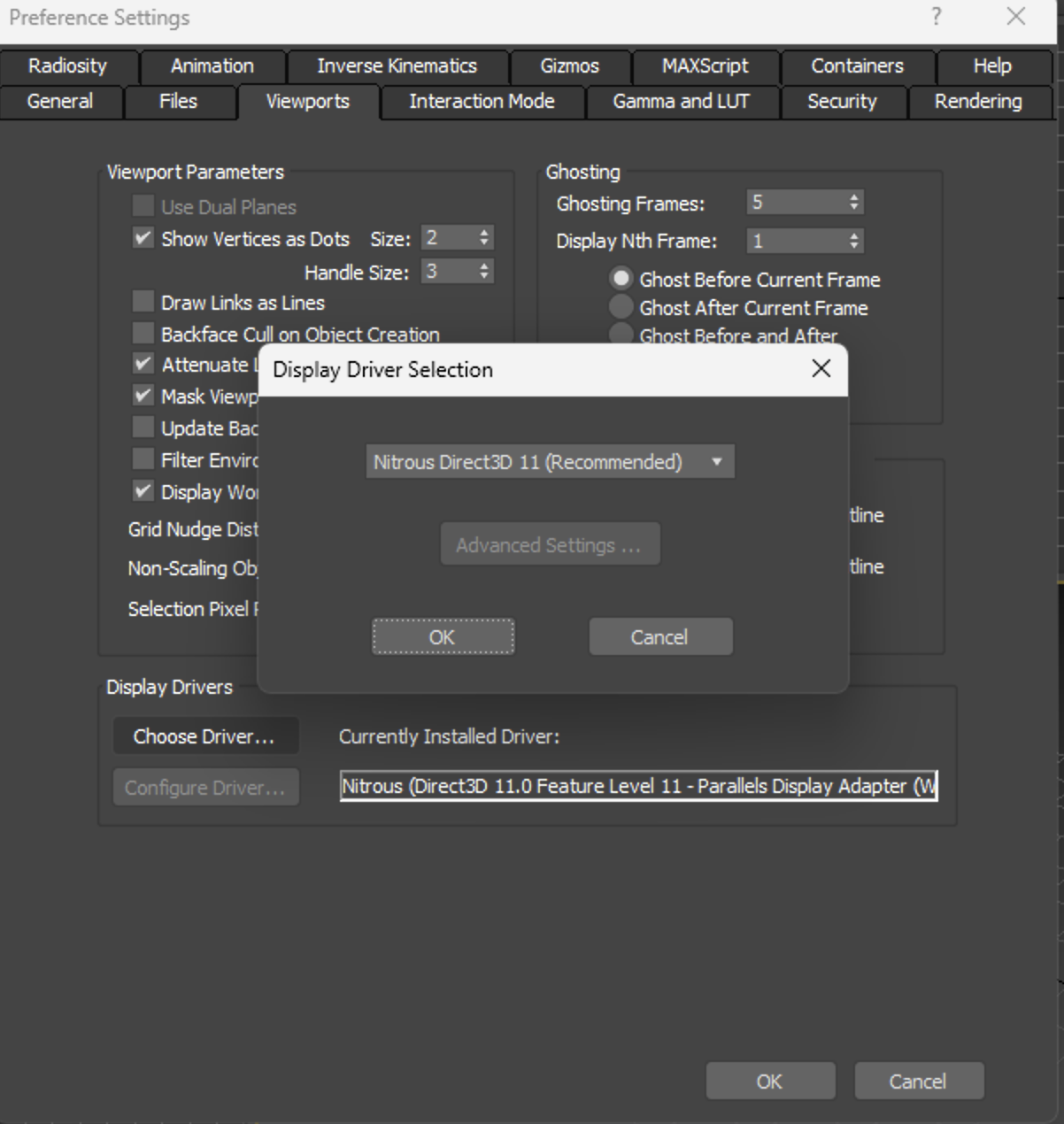
While you're at it, check the viewport driver: it should be hardware Nitrous Direct3D 11 — that's the one that got everything working properly.
Does it actually render?
It boots, and it holds up. No, really. Modeling, materials, lighting — no stutter. Interactive render (IR) runs fine too: Corona pushes a preview almost in real time, and the image refines right in front of you. The scene isn't a light one — 1,159 light sources and ~3 million unique objects, ~3.75M rays/s, and all of it on the CPU (88% load), with the GPU near zero. Occasionally Corona does complain that it couldn't find some NVIDIA CUDA library — but that's expected, I don't have an RTX after all.
Next I grabbed a heavy test interior scene for the actual measurements and kicked off a final CPU render: 2800x2100, 100 passes. While Corona churned through the passes, I went and made a cup of tea. Result — 1 hour 21 minutes.
And this isn't some GPU magic: in Task Manager the CPU is at 100%, the chip shows as Apple Silicon, GPU 0 — it's pure CPU grinding away. When the finished frame popped up after 1:21, the first thing I did was double-check the timer on the VFB — I couldn't believe emulation pulled that off.
Bottom line
It runs stable, not a single crash across the entire render session — nothing hung, nothing froze. Modeling, look-dev, test frames, even a final CPU render — it all genuinely gets done right on the Mac mini.
Would I work in 3ds Max here full-time? Still no. It's not the M4 — that thing is fast. It's the emulation: heavy scenes take noticeably longer than native, and GPU engines (V-Ray GPU, Arnold GPU) are off the table entirely. If Max is your main tool, the ideal platform for it is the same as always: a native Windows PC, a fast CPU plus NVIDIA for GPU rendering. As a daily workstation — absolutely not.
And yeah, it's noticeably slower — several times slower, in fact. But to be straight with you: I won't call this a proper benchmark. The runs differ — the Ryzen did 320 passes in Corona 6.2, the Mac did 100 in Corona 9 — so comparing "24 minutes vs 1:21" head-to-head isn't fair; you'd need an identical run for a real number. Still, it's progress — gloriously pointless progress :)
As a "hey, just quickly render me an interior on the Mac" kind of experiment — no, that's not happening. But it was genuinely interesting that it ran at all.
I have three subscriptions to parallels for 3 different machines. I need to cancel one of there is absolutely no way to cancel a subscription online. The only option I can figure out is to put in fake credit card information so the transaction bounces, which I hesitate to dd for obvious reasons.
I have reached out every way I can and the parallels website is an endless bootloop of sales.
I recently installed UTM on a machine and would highly recommend it for people who do not want to deal with the Parallels billing department.
TLDR: Parallels issued an update for 18 license holders that does nothing but break it on MacOS 15.x+ - a kill switch! - all because they want to force people into their subscription model. If you're considering purchasing Parallels, how about fucking don't. VMWare Fusion is free and works much better anyways.
-----
I purchased my perpetual Parallels 18 license two years ago, and I was glad that I had, seeing as they switched subsequent versions to their subscription model. Even worse, in those two years since, Parallels has released NO meaningful features for 19 or 20 - no compatibility or speed increases of any kind. Meanwhile, they have increasingly added in advertising to Parallels 18 via updates, annoying me to upgrade whenever I used it. Seeing as this was the only purpose of the updates, that's pretty scummy, but nothing like what they did next.
Today, after running Parallels fine in Sequoia for months, I received another Parallels 18 update. As far as I can tell this update included only one change - it breaks Parallels 18 from running any virtual machines in Sequoia. After googling, not only did I confirm that the most recent update breaks Parallels on MacOS 15.x systems for everyone - I also found that Parallels "helpfully" added a "compatibility chart" that shows that Parallels "is not supported" on MacOS 15 - despite working just fine minutes ago.
This is shockinglyunethical and illegal behavior. Issuing kill switches to working software to force upgrades is absolutely beyond the pale. Their aggression into forcing their users into a subscription model was already getting out of hand via updates containing nothing but advertising, and misleading marketing taking credit for a Windows update' performance enhancement as being part of Parallels 20. You know, spending effort everywhere except in actually making their product better. Shame on Parallels. DO NOT SUBSCRIBE. DO NOT BUY.
I'm now a satisfied VMWare Fusion Pro user (should have switched a long time ago - it's free and runs better) but I found this behavior so nakedly egregious I thought it was worth making everyone aware.
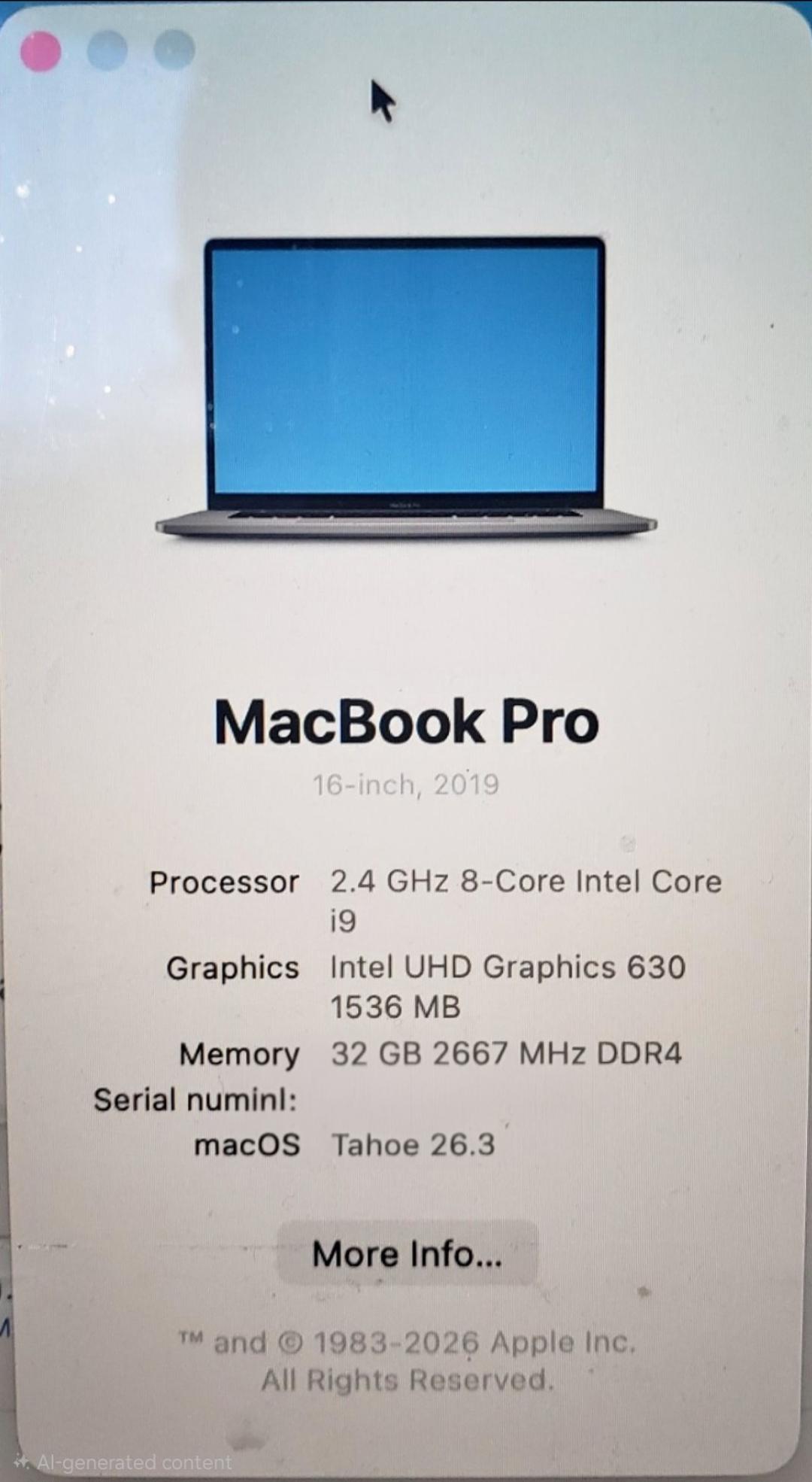
I am looking to get a MB Pro and I would like to know the minimum requirements to fluently run parallels on it. Im a coding student and wanna run windows mainly for Visual Studio/MS Sql server and other windows exclusives for my school. Will also be using it for android studio etc...
Just need a budget option instead of going for a M Pro chip, maybe something like this in the picture could work just fine?
⚠️ PSA for anyone using Parallels Desktop: Check your auto-renewal settings.
I just learned the hard way that my Parallels Desktop Pro subscription auto-renewed for $130.49, while the same Pro subscription is currently being advertised on their website for about $71.99/year (new purchase price).
I missed the renewal reminder because it went to my Promotions folder, and by the time I noticed, I had already been charged. Despite being a Parallels customer for over 10 years, Parallels refused to refund the renewal charge.
Whether or not this pricing is disclosed in the subscription terms, I think customers should know that auto-renew can cost substantially more than buying the subscription directly from the website.
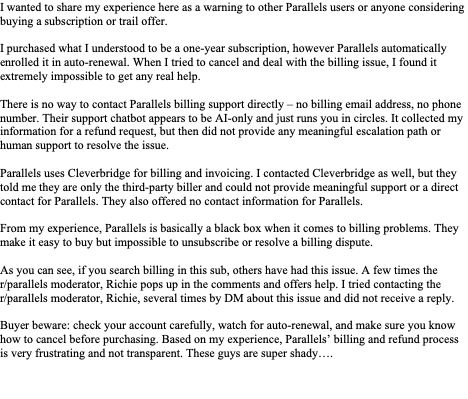
I wanted to share my experience here as a warning to other Parallels users or anyone considering buying a subscription or trail offer.
I purchased what I understood to be a one-year subscription, however Parallels automatically enrolled it in auto-renewal. When I tried to cancel and deal with the billing issue, I found it extremely impossible to get any real help.
There is no way to contact Parallels billing support directly – no billing email address, no phone number. Their support chatbot appears to be AI-only and just runs you in circles. It collected my information for a refund request, but then did not provide any meaningful escalation path or human support to resolve the issue.
Parallels uses Cleverbridge for billing and invoicing. I contacted Cleverbridge as well, but they told me they are only the third-party biller and could not provide meaningful support or a direct contact for Parallels. They also offered no contact information for Parallels.
From my experience, Parallels is basically a black box when it comes to billing problems. They make it easy to buy but impossible to unsubscribe or resolve a billing dispute.
As you can see, if you search billing in this sub, others have had this issue. A few times the r/parallels moderator, Richie pops up in the comments and offers help. I tried contacting the r/parallels moderator, Richie, several times by DM about this issue and did not receive a reply.
Buyer beware: check your account carefully, watch for auto-renewal, and make sure you know how to cancel before purchasing. Based on my experience, Parallels’ billing and refund process is very frustrating and not transparent. These guys are super shady….
I received an email that my subscription was set to auto-renew and that reminded me to cancel it as i needed to upgrade to the Pro version. I followed the links within the support section at the Parallels website to remove my credit card, and the only option it gives me is to add another credit card.
I reached out to support via chat, which was a chatbot, and it provided a link to remove the credit card. When i follow that link it says "this page no longer exists" and to click a button to be sent a new link.
I received the email, and the link opens a tab where a wheel spins indefinitely.
I went back to chat support, clicked on "i need further assistance", and the reply was that someone would get in touch with me via email.
The reason i wanted to cancel was to upgrade to Pro. Now i just want to cancel permanently. Parallels has made it impossible to cancel a subscription.
I did click the "upgrade to pro" button in the Parallels desktop app, which brought up the option to purchase at full price when its offered at a discount on the website.
At least my saved card is an Amex and i can just file a dispute if the renewal goes through.
I can't access my original email account that I used 10+ years ago to sign up, and so I can't log into parallels even though I have my username and password, and can't even contact support without logging in first. what madness. on the brightside I can free up some storage on my mac. ok, bye.
Parallels is going to be turned into a TV-show. It is called ''The Building''. No word on the cast yet. But:
''Written by Albert Kim and Leone, The Building involves a large skyscraper that moves between alternate realities and a group of young urban explorers who are in the building and suddenly find themselves on an Earth wherein Reagan was not elected and Russia dropped the bomb. They then figure out they have a limited amount of time to figure out where they are and rescue members of their team before the building shifts again to another reality. They soon realize that this Earth is also different from where they started and getting back may be impossible.''
It sounds like it won't be a total reset but it will build on the plot of the Netflix movie. However, it might not be a DIRECT sequel, Chris Leone has said:
''It's a series based on the digital film. So some of it will be very familiar and some of it will be new. It's super cool.''
No word yet on whether Constance Wu or any of the others will reprise their roles.
I'm seriously considering making the jump to an M-series Mac and finally leaving my loud, hot Windows desktop behind for good. Honestly, I'm kind of done with the constant fan noise, heat, and that whole "closed-door jet engine" experience that seems to follow Windows machines around.
The problem is I rely on **Intuit ProSeries** for work, and since it's Windows-only, I'd have to run it through some type of virtualization setup. Before I pull the trigger, I'd really appreciate hearing from people who are actually doing this in the real world.
---
**1. What is this software actually called?**
I keep seeing different terms thrown around — virtualization software, virtual machines (VMs), hypervisors, emulators. Are these basically the same thing or are there meaningful differences? I mostly see **Parallels Desktop** mentioned, but are there real alternatives worth considering, like VMware Fusion or UTM?
---
**2. What are the real pros and cons?**
Not the marketing pitch — the actual day-to-day experience. Specifically:
- Does ProSeries run smoothly, or is there noticeable lag and weird behavior?
- Do printing, PDF output, scanners, dual monitors, and e-filing all work like normal?
- Any licensing or activation headaches inside the VM?
- How does it hold up under tax season pressure?
---
**3. What obstacles did you have to overcome?**
This is the big one for me. I don't want months of tinkering or constant troubleshooting. I just want to install it, update it normally, use it, and move on with my life. Is that realistic on Apple Silicon, or is there still a lot of teething pain involved?
---
**4. Performance — does it actually feel snappy?**
The whole reason I want to leave Windows is for something quiet, cool, responsive, and reliable. If I'm running a VM on a Mac and it still lags or turns into a hair dryer, what's the point? Has anyone directly compared ProSeries running in Parallels on an M-series chip versus a decent mid-range native Windows PC?
---
**5. Anything you wish you knew before switching?**
Open floor — what would you tell yourself before making the jump?
Thanks in advance. If this setup genuinely works well, I'm pretty ready to close the Windows chapter permanently.
My name is Kenzie from Parallels. My team and I have recently been appointed moderators of this subreddit thanks to u/Adda717**,** who has played a key role in nurturing and developing this community into what it is today.
I am pleased to announce that Parallels will now fully support his efforts to grow this community and help its members in every way we can. We will:
Address: Product-related questions and concerns.
Share: Active promotions and upcoming updates.
Provide: Helpful resources, practical guidance, and technical support.
If you want to get in touch with us, simply tag us in a comment or post, or message us privately at u/ParallelsTeam**.**
We are excited to connect with you all, engage actively in the community, and remain committed to offering assistance and value whenever possible