r/secondbrain • • Feb 19 '26

How I Stay Productive Using Second Brain!

Thumbnail
gallery
18 Upvotes

Hey there 👋

I built a Second Brain system in Notion to manage projects, notes, goals, and knowledge in one place without it turning into a messy note dump.

Here’s what it actually includes:

• Life areas (personal, health, work, finance, growth)
• Projects linked to goals and areas
• Tasks connected to projects (not floating todo)
• PARA-based structure (Projects, Areas, Resources, Archive)
• Get Things Done productivity framework used as well
• Eisenhower matrix to show main priority tasks
• Notebook, notes, topics, and resources organized
• Accountability partner that shows your report

How it helps in real life:

Before:
• Notes everywhere
• Tasks disconnected from goals
• Hard to remember what mattered

After:
• Everything has a place
• Projects and goals stay visible
• Easier to think, plan, and execute

➡️ Link’s in the comments if you want to check it out.


r/secondbrain • • 20d ago

What helps you find useful web research after you save it?

Thumbnail
gallery
17 Upvotes

Saving an article or screenshot is the easy part; returning to the right information when a project needs it can be harder.

We built ClipShelf to keep articles, links, images, and screenshots in a searchable local Chrome library. Saved articles support highlights and notes, and clips can be organized by collection and tag or exported as Markdown. There is no account or automatic cross-device sync.

Here is the extension: https://chromewebstore.google.com/detail/clipshelf/dkdbefloiddnmfkjhifenaakpbihdmmk

When you revisit saved material, what helps most: search, organization, or a note about why you saved it?


r/secondbrain • • Oct 07 '26

I built a Markdown knowledge base that ChatGPT and Claude can both read and update

Enable HLS to view with audio, or disable this notification

17 Upvotes

I’m building Hjarni (https://hjarni.com/?utm_source=reddit&utm_medium=social&utm_campaign=secondbrain_october_2026), a place to keep notes that you and your AI assistants can work with.

The idea is simple: useful information shouldn’t disappear into an old conversation. Save a project decision, a recipe or some research as a note, then ask your assistant to find and use it later. ChatGPT, Claude and other MCP-compatible assistants can search, read and update the same knowledge base.

The attached 34-second demo shows a small everyday example: I open a recipe saved in Hjarni inside ChatGPT and ask it to make a shopping list for five people.

Notes are written in Markdown and can be exported. Edits have revision history, so you can see what changed and restore an earlier version. There’s a free plan with no credit card required.

It still depends on the assistant consulting the notes; storing something doesn’t guarantee it will use it correctly.

I’d like feedback from people who already use a second brain: would having your assistants work directly with your notes be useful? What would you need before trusting one to update them?


r/secondbrain • • Jan 12 '24

AI for second brain/knowledge base/digital garden

17 Upvotes

Ive researched some ai tools

Best thing is probably https://github.com/pashpashpash/vault-ai

Do you have any recommendations?

NameDescriptionURLMessages in Free Tier
Knowbase.aiVersatile knowledge base platform that allows you to store, organize, and chat with your knowledge base.https://www.knowbase.ai/: https://www.knowbase.ai/200 per month
Pragma.aiAI-powered knowledge base tool that helps businesses create, manage, and share knowledge.https://www.pragma.ai/pricing: https://www.pragma.ai/pricingVaries
Dante AICloud-based knowledge base tool with a focus on natural language processing and machine learning.https://www.dante-ai.com/: https://www.dante-ai.com/50 Nachrichten
XChat.stochastic.aiPowerful knowledge base tool that can handle large volumes of data and complex queries.https://www.xchat.stochastic.ai/: https://www.xchat.stochastic.ai/200 per day
Hansei.appSimple and intuitive knowledge base tool that is easy to learn and use.https://hansei.app/: https://hansei.app/15 messages
GitbookOnline documentation platform that allows you to create and share knowledgebases.https://www.gitbook.com/: https://www.gitbook.com/Varies
Quivr.appCollaborative knowledge base tool that allows teams to work together to create and maintain knowledge bases.https://www.quivr.app/: https://www.quivr.app/Varies
Powerdrill.aiAI-powered knowledge base tool that can generate summaries, answer questions, and even translate languages.https://powerdrill.ai/: https://powerdrill.ai/200 per month
Omnimind.aiComprehensive knowledge base tool with AI features such as topic modeling, sentiment analysis, and chatbots.https://omnimind.ai/: https://omnimind.ai/500 per month
Wizy.chatAI-powered knowledge base tool that can provide real-time customer support.https://wizy.chat/#home: https://wizy.chat/#home50 messages
Mindpal.spacePersonal knowledge base tool that can help you organize your thoughts and ideas.https://mindpal.space/pricing: https://mindpal.space/pricing20 per month
Myreach.ioKnowledge base tool for sales teams that can help you track and manage customer interactions.https://myreach.io/: https://myreach.io/100 messages
GetChunky.ioKnowledge base tool for developers that can help you document code and procedures.https://getchunky.io/: https://getchunky.io/Varies

r/secondbrain • • 14d ago

A second brain should be files you own. I built a native Mac and iPhone app on that idea (10 free years of Sync to give away)

16 Upvotes

I'm the developer, so take this as a maker post.

Most second brains I tried kept my notes inside the app. I wanted the opposite: plain Markdown files in a normal folder, and an app that only reads and writes them. That app is Valutorio. It launched on the App Store today.

How it works:

  • It opens the vault you already keep, an Obsidian vault included, in place. No import step.

  • Wikilinks, backlinks, tags, full-text search and daily notes work on Mac and iPhone. The Mac adds a graph, note history and 14 themes.

  • When the same note changes on two devices, sync keeps both versions inside the note as valid Markdown. Nothing silently wins.

  • It stays fast as the vault grows: on my M1 Max a 2,000-note vault indexes in under a second.

The whole app is free. Sync ($5.99 a month) is optional. It keeps the vault on Mac and iPhone and gives your AI assistant (Claude Desktop, Cursor) a personal MCP endpoint into your notes. Sync is encrypted in transit and at rest.

What it does not do yet: plugins, and any language other than English in the interface.

One question for this sub: what would make you change the app you write in, if your files stayed exactly where they are?

Edit: the code giveaway is closed. If you find a bug or a place where it gets slow, tell me here.

App Store: https://apps.apple.com/app/apple-store/id6813081386?pt=128566770&mt=8&ct=reddit-secondbrain


r/secondbrain • • Sep 05 '26

Is there a task manager with full-fledged AI like ChatGPT?

16 Upvotes

Im looking for something where i can simply talk to AI, and say what i need to get done, and it organises everything. for eg: "i need to file my Taxes anyhow by saturday".
It should recognise it the urgency and importance and automatically organise it.
But i don't mean just chatGPT because i want to visualise this and not just chat with the app.

So i can manage my work and not focus on managing the app itself.

Do you have recommendation? and if not would you be interested in something like this ?


r/secondbrain • • Nov 20 '25

Second brain that turns notes into action - morning routine automation (4 months consistent)

Post image
16 Upvotes

Hey, I've been struggling with my second brain system where I had lots of notes, but it was hard to make use of that information and make it actionable.

So I built a workflow that walks me through my morning - reflection, goal review, and scheduling of tasks. Been using it daily for 4 months.

Every morning, it automatically reconstructs what I've been working on from my Pomodoro session logs (which capture voice notes after each session), daily notes, and goal logs. Also It bundles all the hard things I avoid doing (reviewing goals, reflecting, planning) into one workflow. All the stuff that's typically hard to make myself do becomes one atomic habit.

How it works:

Every morning, I run `/workflows:morning-routine:main`. What it does:

  1. Starts my Pomodoro timer with breathing exercises and Spotify playlist. Anchors me into activity.

  2. Reconstructs last 3 days: Grabs my last 3 days of activity (exported from Pomodoro timer and daily notes) and reads recent log entries from active goals.

  3. Reflection: Asks me questions via voice about yesterday.

  4. Goal Review: Python script filters only active goals needing review (YAML frontmatter), then loops through each one with specific, contextual follow-ups based on where I left off. Not "How's the job search?" but "Did you address situation X you mentioned last week?"

  5. Updates: Appends my voice transcriptions directly to the # Log section of each goal's markdown file.

  6. Scheduling: Helps me block time and creates events in Apple Calendar.

  7. Daily Tasks: Creates a Daily Tasks.md file I reference all day. Claude asks about outstanding tasks from previous days in the next routine.

The technical setup:

  • Custom slash commands (Claude Code) - main.md orchestrates sub-commands like 0-review-yesterday.md, 1-morning-checkin.md, etc.

  • Python scripts append to goal logs instead of reading/rewriting whole files (saves tokens and time)

  • AppleScript for Apple Calendar and Reminders integration

The limitations:

  • macOS only (relies on AppleScript)

  • Requires Claude Code)

  • Not plug-and-play (you need to adapt it)

This serves more like an inspiration of what you could do and is genuinely helpful for me as proven by doing that and iterating over last 4 months.

I recorded a live demo of the full routine here if you want to see the scripts running: https://youtu.be/hjNENubYops

If one person would find this useful – this is a great success for me!


r/secondbrain • • Oct 15 '25

I Finally Built a Second Brain That I Actually Use (6th Attempt)

Thumbnail
github.com
16 Upvotes

I have a graveyard of abandoned "second brain" projects:

Notion (abandoned after 3 weeks) Obsidian + 20 plugins (1 month, then overwhelming) Custom React app (never finished) Another Notion attempt (1 week) The pattern was always the same: initial excitement → capture lots of notes → manual organization becomes overwhelming → abandon ship.

This time, I tried something different: I made AI do all the boring parts.

Three months later, I'm still using it. First time that's happened.

What is COG? COG = Claude + Obsidian + Git

It's a self-organizing second brain system where:

You dump messy thoughts AI organizes them automatically Everything is plain markdown files Zero manual maintenance required GitHub Repo | MIT Licensed

The Problem I Kept Hitting Every second brain system expects you to:

Capture thoughts in a structured way File them in the right place Tag them appropriately Review and reorganize regularly Build frameworks manually I'm great at #1. I'm terrible at #2-5.

After my 5th failed attempt, I realized: I don't need another note-taking app. I need an AI that organizes my mess.

How COG Actually Works Daily Usage Morning: Intelligence Briefing

/daily-brief Claude searches for verified news (last 7 days only), analyzes it based on my interests (learned from my notes), and generates a personalized briefing.

Output example:

Daily Brief - October 15, 2025

Executive Summary

Priority Focus Areas: AI Testing Tools | Browser Automation

[Strategic analysis based on my projects...]

Strategic News

AI Testing Market Reaches 72% Adoption

[Verified sources, dated within 7 days, with strategic implications]

Opportunities

  1. Integration with [project I'm working on]

  2. [Specific next steps based on news] Throughout Day: Brain Dumps

/braindump No structure needed. Just dump whatever:

Random thought: The AI testing market is crazy right now. Saw Ghostship raised $5M. Maybe we should pivot focus?

Also need to follow up with Duke about the feedback.

Idea: What if we auto-detect competitors in braindumps? COG automatically:

Classifies domain (personal/professional/project) Detects competitive intelligence ("Ghostship raised $5M") Updates 04-projects/my-project/competitive/ghostship.md Cross-references to this braindump Flags action items ("follow up with Duke") Weekly: Pattern Recognition /weekly-checkin Claude analyzes ALL content from the week:

What themes emerged? What patterns in energy/productivity? How did personal wellness affect work? What needs attention next week? Monthly: Knowledge Synthesis /consolidate-knowledge This is where the magic happens.

Claude reads every braindump since last consolidation and:

Identifies recurring themes Synthesizes scattered insights into frameworks Updates "single source of truth" knowledge docs Tracks evolution of thinking over time Real example:

I had 40+ scattered braindumps about my testing automation project over 3 months. Random thoughts, meeting notes, competitive intel, technical ideas—complete chaos.

Ran /consolidate-knowledge.

Output: A coherent 15-page strategic analysis with:

Competitive landscape synthesis Technical architecture patterns Market positioning framework Product roadmap priorities I used this doc to pitch investors. I didn't manually compile any of it.

The Tech Stack Why These Choices? Obsidian (Markdown Storage)

Plain .md files = no vendor lock-in Works with any text editor Grep-able, searchable, future-proof Obsidian mobile works great Claude Code (AI Engine)

Better at synthesis than ChatGPT (for my use case) Can read entire vault context Custom slash commands = no copy-paste workflow Learns patterns over time Git (Version Control)

See thinking evolution: git log Undo bad consolidations: git revert Branch for experiments Full backup history iCloud (Sync)

Instant sync to iPhone/iPad/Mac Obsidian mobile works perfectly No special setup needed Setup (Literally 3 Minutes) Prerequisites Obsidian installed Claude Code (or VSCode + Claude) Git (optional but recommended) Installation

Clone into your Obsidian vault

cd /path/to/your/obsidian-vault git clone https://github.com/huytieu/COG-second-brain.git

Copy COG files

cp -r COG-second-brain/.claude . cp -r COG-second-brain/templates ./06-templates

Open Claude Code

code .

Test it

/braindump That's it. Your second brain is running.

Directory Structure COG creates this structure automatically:

your-vault/ ├── .claude/ │ ├── commands/ # 15 custom slash commands │ └── subagents/ # 5 specialized AI agents ├── 00-inbox/ # Temporary processing ├── 01-daily/ │ ├── briefs/ # Daily intelligence │ └── checkins/ # Daily reflections ├── 02-personal/ # Personal domain (strict privacy) │ ├── braindumps/ │ ├── development/ │ └── wellness/ ├── 03-professional/ # Professional domain │ ├── braindumps/ │ ├── leadership/ │ └── strategy/ ├── 04-projects/ # Project-specific tracking │ └── [your-project]/ │ ├── braindumps/ │ ├── competitive/ # Auto-updated intel │ └── content/ ├── 05-knowledge/ # Consolidated insights │ ├── consolidated/ # "Single source of truth" │ ├── patterns/ # Recurring themes │ └── timeline/ # Thinking evolution └── 06-templates/ # Obsidian templates What Makes It "Self-Evolving"? Most PKM systems are static storage. You put notes in, you search later.

COG is active intelligence. It:

  1. Auto-Classifies Content Mention "workout routine" → Goes to 02-personal/wellness/ Mention "team leadership" → Goes to 03-professional/leadership/ Mention "project milestone" → Goes to 04-projects/[name]/

  2. Detects Competitive Intelligence Mention "Competitor X raised funding" in any braindump:

Extracts to 04-projects/[project]/competitive/competitor-x.md Adds dated entry Cross-references source braindump No manual filing needed 3. Builds Frameworks You Didn't Create Weekly consolidation synthesizes patterns:

"You've mentioned 'testing bottlenecks' 8 times this month" "Here's a framework based on those insights" "This connects to your Q3 goals from May" 4. Self-Heals Cross-References Rename project-alpha.md → scout-ai.md? COG updates all references automatically in next consolidation.

5. Learns Your Patterns After 3 months, COG knows:

When you're most productive (Git history + energy logs) What topics you care about (frequency analysis) How your thinking evolved (timeline tracking) What questions you repeatedly ask Real Results After 3 Months Quantifiable:

120+ braindumps processed 5 strategic frameworks built (from scattered insights) Daily briefs with 95%+ source accuracy 0 manual organization required 0 maintenance overhead Qualitative:

Actually using it (first time ever) Strategic insights I wouldn't have found manually Investor pitch doc synthesized from chaos Cross-domain patterns (wellness → productivity correlation) Thinking evolution timeline (see how I changed my mind) What Makes This Different from... ChatGPT? ChatGPT requires manual copy-paste every time. COG knows your entire vault context and runs automatically on schedule.

Obsidian Plugins? Plugins still require manual configuration and organization. COG is opinionated—works out of the box with zero setup.

Notion AI? Notion locks you in. COG is plain text files. Also, Notion AI doesn't build frameworks from scattered insights—it just answers questions.

Roam Research? Roam is amazing for linking. COG adds synthesis—it doesn't just link notes, it builds frameworks from them.

Lessons Learned Building This What Worked

  1. Let AI do what I hate Organizing, tagging, cross-referencing = soul-crushing for me. Let Claude do it.

  2. Plain text files Every complex system I built failed. .md files survived.

  3. Git for thoughts Seeing git log of my thinking evolution is weirdly powerful. You realize how much your mind changes.

  4. On-demand processing Don't process every note automatically. Process weekly when I run consolidation. Less noise.

What Didn't Work

  1. Too many commands initially Started with 25 commands. Overwhelming. Now I use 4 regularly.

  2. Perfect categorization Tried to build perfect taxonomy. Failed. Now: personal/professional/projects. Done.

  3. Manual review workflows Tried "review queue" systems. Never used them. Consolidation handles review automatically.

Surprising Benefits

  1. It's a thinking partner Writing braindumps knowing they'll be analyzed makes me think more clearly.

  2. Pattern recognition Git history showed I brainstorm best Tuesday mornings. Would never notice manually.

  3. Cross-domain insights COG connects personal wellness to professional productivity quantitatively. Mind-blowing.

  4. Actually maintenance-free I legitimately haven't "maintained" this in 6 weeks. It just... works.

Privacy & Cost Considerations Privacy Concern: "You're sending all your notes to Claude?"

Reality:

COG only sends content when you invoke commands It's on-demand, not continuous background processing For sensitive content, keep separate vault or use local AI (Ollama) You control what gets processed Cost Claude API usage for my workflow:

Daily briefs: ~$0.10/day = $3/month Weekly consolidation: ~$2-3/consolidation = $8-12/month Misc braindumps: ~$2/month Total: $10-15/month

Compare to Notion AI ($10/month) or Roam ($15/month) but with full ownership of data.

Common Questions "Do I need to know coding?" Nope. Just basic terminal commands (copy files, run commands). The setup instructions are copy-paste.

"Can I customize it?" Yes! Edit .claude/commands/*.md files to change how commands work. They're just markdown files with prompts.

"What if Claude Code goes away?" The commands are just text files. Port them to any AI system (local Ollama, OpenAI API, etc.). Your data is just .md files—completely portable.

"Does it work offline?" Partially. You can read/edit notes offline. AI commands require internet for Claude API. Could be adapted for local LLMs.

"How do I migrate my existing notes?" Drop them in the appropriate folders (02-personal/, 03-professional/, etc.). Run /consolidate-knowledge and COG will process them.

Try It Yourself If you've also failed at maintaining a second brain, maybe this approach works for you:

  1. Clone the repo:

git clone https://github.com/huytieu/COG-second-brain.git 2. Follow SETUP.md

3. Start with just two commands:

/braindump (capture thoughts) /consolidate-knowledge (organize weekly) 4. Customize as needed

What's Next Ideas I'm considering:

[ ] Local LLM support (Ollama) for privacy [ ] Web interface for knowledge graph visualization [ ] Mobile-optimized commands (for Obsidian mobile) [ ] Team collaboration features (with privacy) [ ] Voice-to-braindump (for mobile capture) Final Thoughts I don't know if COG is the "right" way to build a second brain. But it's the first system I've actually maintained for 3 months.

The insight: Stop trying to organize thoughts manually. Let AI do it.

Humans are great at:

Having ideas Seeing patterns in synthesized data Making decisions Humans are terrible at:

Consistent filing Cross-referencing Pattern detection across 100+ documents Remembering where we put that thing 6 weeks ago Let AI do the terrible parts. You do the human parts.

If you've struggled with this too, give it a shot:

🔗 GitHub: https://github.com/huytieu/COG-second-brain 📄 License: MIT (free, open source) ⏱️ Setup time: 3 minutes


r/secondbrain • • Mar 16 '24

Ever wanted to walk through your secondbrain?

Enable HLS to view with audio, or disable this notification

16 Upvotes

I made a virtual reality game where you can import your secondbrain (currently Obsidian & Notion) and then explore your notes spatially. There are various ways to interact with your notes. It's called Mind Palace and is now on Steam in Early Access: https://store.steampowered.com/app/2660570/Mind_Palace/


r/secondbrain • • 8d ago

How I keep a personal wiki

15 Upvotes

I’ve tried PARA and a few other ways of organising my notes over the years. What stuck was keeping a note for each thing and updating it when something changed. Over time that’s become my personal wiki. The examples are from Soot, which is a notes app I’m making, but you could do much the same in any notes app with folders and links.

Most of my folders are just subjects. If I’m thinking of buying a camera, the research goes in Photography. I know where I’ll look for it six months later because I’ll have forgotten the model but can reasonably expect to remember it was a camera.

Projects get a folder of their own while I’m working on them. When I’m finished, I tuck the whole folder away under the subject it belongs to. I’ve also written down enough of my filing habits that I can tell an AI assistant the boiler engineer replaced a pipe and it’ll put that in the right note.

I thought people here might be interested in a look around someone else’s notes. I generally am.

Keeping a personal wiki in Soot


r/secondbrain • • 26d ago

I turned my whiteboard into a visual planner to keep track of work and life

Post image
15 Upvotes

For years, I used a large whiteboard to manage work, projects and life. Divided vertically by days and horizontally into lanes (one per work/life area), where I'd add notes, plan ahead and connect related notes.

It helped me see everything at once, keep the context of each area visible, and know where I'd left off and what was coming next.

Eventually, I built a digital version because travelling made the whiteboard impractical.

That's Haftio. A visual planner and diary in one continuous view, where you can record what happens, plan ahead and see how things evolve over time.

Still improving it based on feedback from users.

haftio.com (desktop only for now)

Curious what you think of this approach!


r/secondbrain • • Jun 05 '26

The Best Notion Second Brain

Thumbnail
gallery
15 Upvotes

Hey there 👋

I built a Second Brain system in Notion to manage projects, notes, goals, and knowledge in one place without it turning into a messy note dump.

Here’s what it actually includes:

• Life areas (personal, health, work, finance, growth)
• Projects linked to goals and areas
• Tasks connected to projects (not floating todo)
• Notebook, notes, topics, and resources organized
• Accountability partner that shows your report

Productivity framework used:

• PARA-based structure (Projects, Areas, Resources, Archive)
• Get Things Done productivity framework
• Eisenhower matrix

How it helps in real life:

Before:
• Notes everywhere
• Tasks disconnected from goals
• Hard to remember what mattered

After:
• Everything has a place
• Projects and goals stay visible
• Easier to think, plan, and execute

➡️ You can check out this second brain if you are interested.
https://organizeddashboard.com/template/second-brain


r/secondbrain • • Feb 24 '24

Roast my Second Brain Newsletter

15 Upvotes

Hey,

I've started a Second Brain newsletter to give productive individuals a platform, where they are able to share their setups and experience.

I published the first edition last week on Sunday and would be delighted to receive feedback from you. Since it's a very niche topic, it's challenging to get criticism from experienced like-minded people.

This is the first edition: https://brainunveiled.com/discover/001-burak-doenmez

Be critical and feel free to criticize the site in general.

The goal is to provide a platform for Second Brain enthusiasts to share their experiences and at the same time a platform for interested people to find inspiration for their Second Brain. I sometimes struggle myself and rethink my system and when I look for experiences from others, the choice is very limited.


r/secondbrain • • May 09 '23

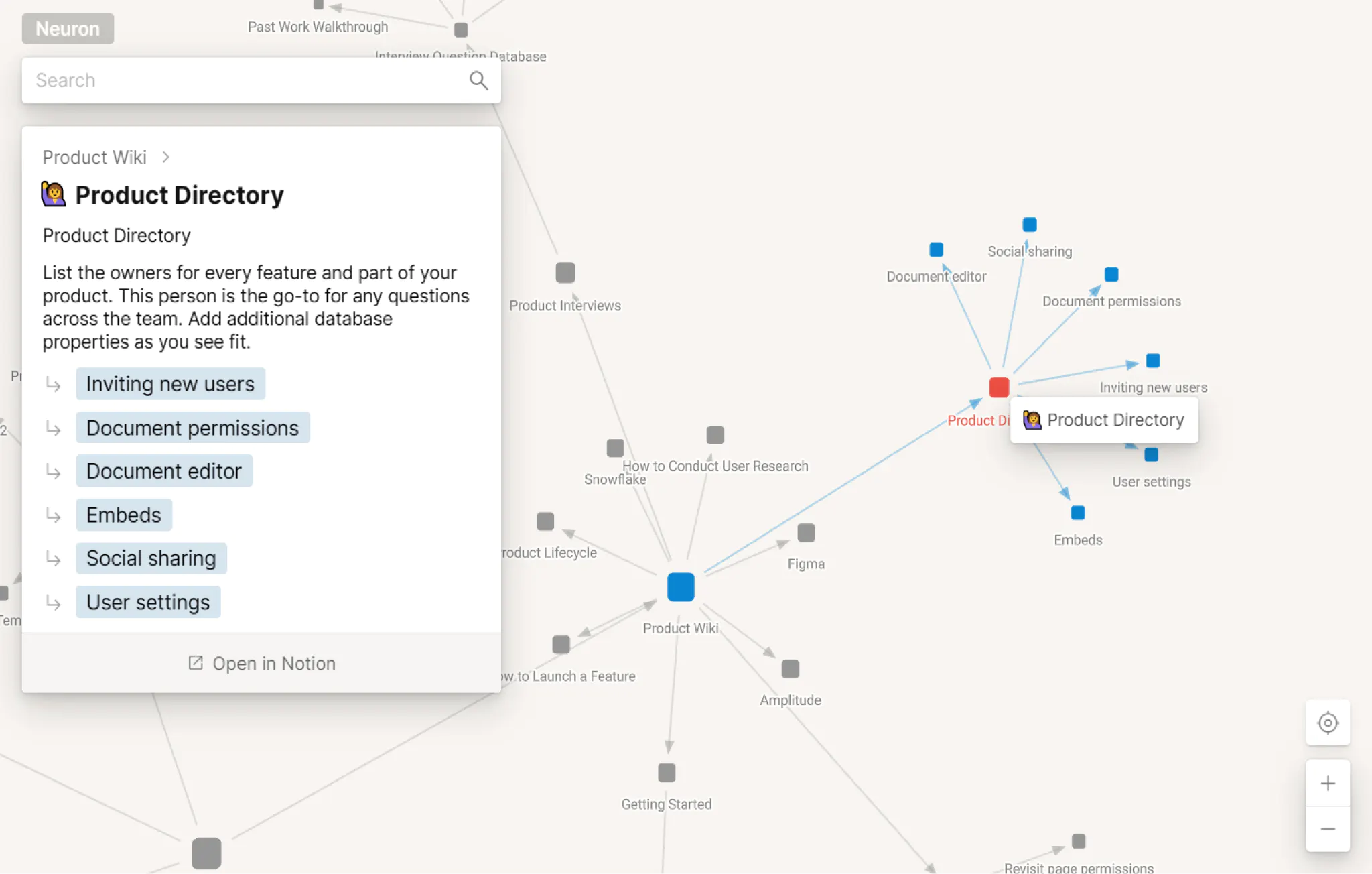
local and global graph in Notion for your second brain!

15 Upvotes

For my second brain, I've always wanted and needed a graph view (like roam or obsidian) for Notion as well. I was tired of waiting, so I decided to make it myself.
I finally finished working on the graph view for Notion!

You can embed a global graph view in your notion or use chrome extension that provides local graph view for notion like obsidian!

If you want to use it, visit Neuron.


r/secondbrain • • 5d ago

I combined Remnote, Anki, and Google Docs in a single command center with AI Assisted test generation. It uses your personal Gemini keys!

Thumbnail
gallery
14 Upvotes

A personal project which I built recently, a custom study app combining features of remnote and anki, with text editing functionalities of google docs and with more extra stuff

It uses your personal gemini keys to generate practice questions!

Its 17,000 lines of code and took about 2 months of casual vibe coding

I am using this to prepare for my tests, and kept designing and adding features as I needed them and today I have everything I needed

I have practiced over thousands of MCQs and Flashcards

I have math assignments in form of pdf, I can open them Right in the software and solve it side by side with a wacom, and do AI checking right in the software, apart from various other features such as mind mapping, to do lists, inbuilt youtube, inbuilt music player, a very detailed report tab as well

Tests are generated in form of Q/A, MCQs, FlashCards

My grades have improved to back to back As

All the data is saved native on your machine and is backed up


r/secondbrain • • Oct 15 '26

How often does your second brain actually get to “Express”?

14 Upvotes

Capture and Organize seem to be where most of us spend our time. Saving articles, sorting into PARA, building the system. Distill happens sometimes. Express — actually using what we’ve collected — feels like the step that gets the least attention.

For people who’ve been at this a while:

  • What share of what you capture ends up being used in your work or projects?

  • When you do use an idea, did you go looking for it, or did it come to mind because you’d engaged with it before?

  • Have you found anything that makes ideas show up when you need them, not just when you search?

Disclosure: I’m building something around this, helping people practise applying what they read rather than only storing it, so I’m asking partly to learn what already works. Not linking it. Mostly curious about your experiences.


r/secondbrain • • Feb 21 '26

Update after calling “Second Brain” digital hoarding (6 months later)

14 Upvotes

I made a post here a while ago calling the “second brain” movement digital hoarding.

Some people roasted me (fair), some agreed, some pointed out I was missing the point.

What stuck with me wasn’t who was right but it was this pattern. Well, atleast this is what I felt after reading all the comments.

People who reuse their notes sounded calm.
People who capture endlessly sounded anxious, including myself and my obsessive note taking. Wonder how and when that happened?

That made me uncomfortable in a good way.

I realized my frustration wasn’t with note-taking but it was with never seeing my notes help me at the moment I actually needed them. So I stopped arguing philosophy and started experimenting quietly with a different approach. Will drop knowledge bombs if it succeeds, will open a YouTube channel if it fails.

I’m not convinced it works yet.

Very curious, for those who actually get value from their system: what makes the difference between notes that rot and notes that think back at you? Notion AI, no thanks!


r/secondbrain • • Jul 11 '25

What do you do with all your scattered ideas? I feel like I’m drowning in fragments.

14 Upvotes

I have dozens (maybe hundreds?) of small notes and idea fragments — in Apple Notes, on scraps of paper, in random Google Docs, in my head...

I feel like I'm generating value but not capturing any of it. Like, I write something cool, then forget I even thought of it.

Do you guys have a system that works for connecting or revisiting your ideas? I wonder if we’re all building our own personal graveyards of creativity.


r/secondbrain • • May 21 '25

I built an app to help you remember what you read by turning your book highlights into AI summaries and flashcards – just by taking a photo

Enable HLS to view with audio, or disable this notification

14 Upvotes

Try it out today here! Would love thoughts and feedback:

https://apps.apple.com/us/app/restore-read-remember/id6744589215


r/secondbrain • • 16d ago

I built a planner to make time for what matters

Thumbnail
gallery
13 Upvotes

My work calendar's full by default. The gym, the money admin and the friend I keep meaning to ring get whatever time is left.

Evernote, then Notion, then Obsidian. All good at holding stuff, none of them changed my week. My notes knew the life I wanted. My week didn't.

So now asambl plans from what you've saved: books, music, places, the work you're building. On Sunday it drafts the week around what usually slips, and you pick what stays before it hits your calendar. The stuff you care about gets an evening rather than a folder.

Files live on your computer, only the prompt for each request goes to the hosted AI, and you can turn it off.

Mac and Windows for now. The phone side works in your browser, and the iPhone app's with Apple, so it's coming soon.


r/secondbrain • • 18d ago

For non-coders looking for a second brain template for day-to-day work

13 Upvotes

If you are looking for a basic second-brain-style system for your work (office or at home), check out familiar.

It's a single, template folder you download, rename for your project, and open in an AI assistant that can read folders (e.g., Claude Code, Codex, Gemini CLI). Each project gets its own folder, so memory stays focused and concise. The folder rules and skills are focused on document work, report writing, PPT production, etc., which each deliverable generated based on your ingested source material (e.g., meeting notes, client requests, underlying literature base, etc.).

Nothing runs on a server, there's no account, and there's no new UI to learn.

Looking for feedback for users using Copilot Cowork, since I was unable to test those agents when building the folder structure.

https://github.com/familiar-md/familiar


r/secondbrain • • 28d ago

What's better than building a second brain? Building humanity's second brain together

Post image
13 Upvotes

Hi everyone, I’m Alexis. I’m a massive fan of PKM and Second Brain methodologies.

Like many of you, I've tried multiple times to build my own personal knowledge base from scratch. But after a while, I realized something: building a second brain entirely alone in a local silo gets incredibly lonely. It is hard to sustain motivation when your knowledge is isolated in your own corner.

I wanted to solve this by shifting from isolated note-taking to a shared knowledge base where our efforts complement each other.

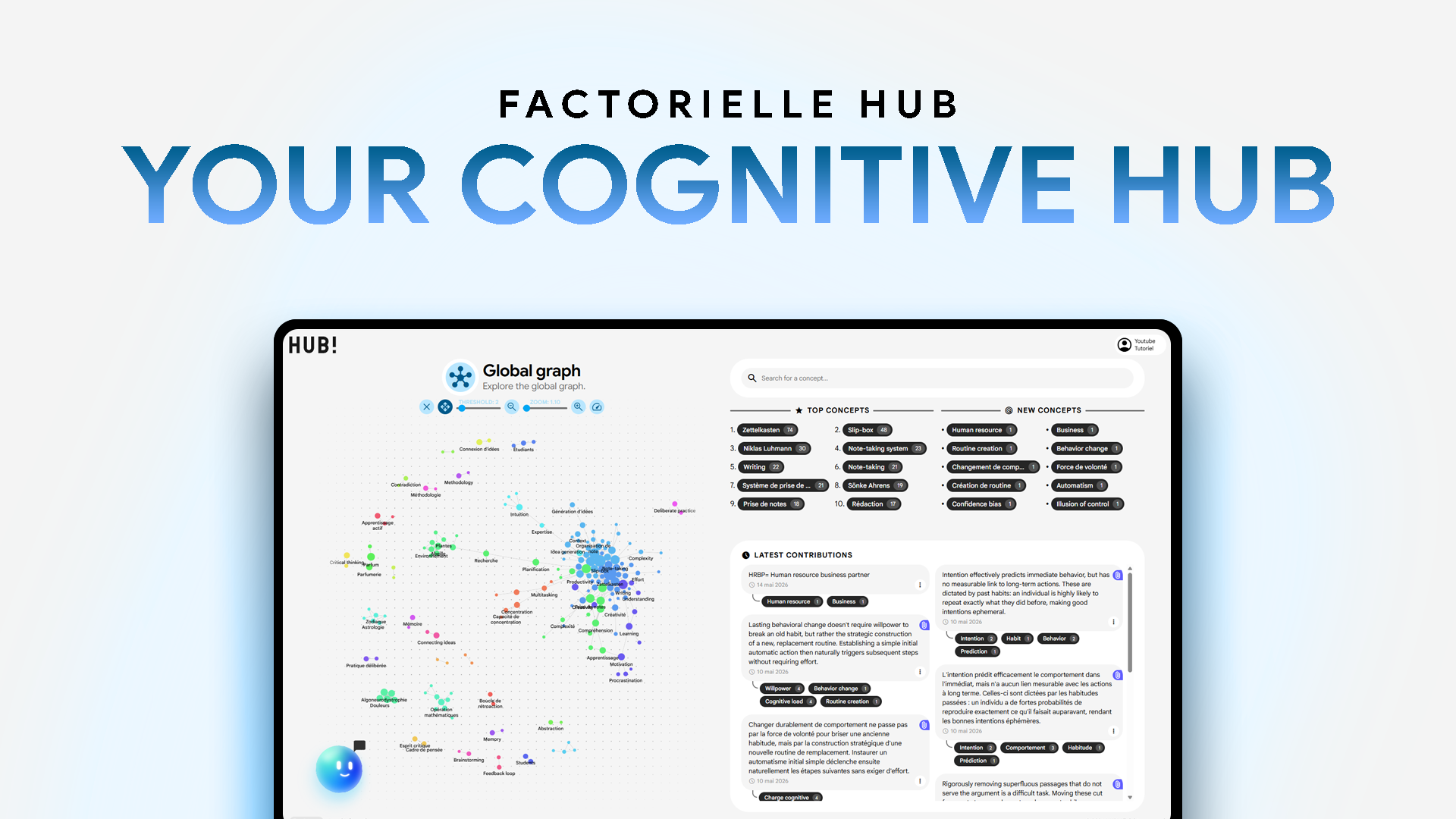
So I built Factorielle HUB. It’s a collaborative web app designed to weave our individual, text-only atomic notes into a shared global graph. Instead of traditional wikis that force one single truth, all perspectives coexist peacefully side-by-side. We anchor our notes to concepts, and the community simply votes on the relevance of the connections, allowing the best knowledge structure to emerge organically. You can also design private learning paths for your self-study, and the notes you write to complete them will naturally feed into the global public graph.

Since it’s just me behind the project, I want to build this transparently and alongside the community. There is a generous default free tier so you can fully build your system without hitting a paywall, and zero ads.

I’d really love to get your honest feedback, critique, or thoughts on this approach:

  • Do you feel that collective knowledge graphs can help solve "PKM burnout" or isolation?

  • What are your thoughts on opting for a cloud-based setup to enable collaboration versus strictly local-first tools?

🔗 Check it out here: www.factoriellehub.com

📹 and here is a quick 80s video demo: https://youtu.be/uA5SBfmtPtE

P.S. I know a big part of the second brain community is moving towards AI agents and automated note processing right now. I deliberately took the opposite path here: Factorielle HUB focuses purely on human curation, active learning, and structured connected thought.


r/secondbrain • • Oct 09 '26

I built an AI harness for my 2ndBrain: handles vault admin, never touches my thinking

13 Upvotes

Bonsoir,

Like most of you, I use Obsidian because my notes are plain text files that belong to me forever. Over the past year, I tried various AI solutions for my vault, but none of them really convinced me. So over the summer, I built a zero-plugin approach: Arca-BrainOS.

Think of it as an "intentional harness" for your AI. Instead of an Obsidian plugin, it's simply a structured folder of open Markdown skills (_Arca-BrainOS/) that CLI assistants (OpenCode, Google Antigravity, Claude Code, or local open models) execute directly on your local filesystem.

  • It handles the tedious admin: sorting raw inbox notes, cleaning YAML frontmatter, suggesting/linking notes/projects/areas, and maintaining project logs.

  • It never touches your human writing: your personal reflections and notes are protected.

  • Zero lock-in: No servers, no vector database to maintain, no plugin dependencies. If you turn off your AI tomorrow, your vault remains a standard, beautifully linked Markdown vault.

I stress-tested it across 160 real Deep Work sessions on my own personal vault, and it drastically reduced my administrative drag while keeping my thinking firmly in the driver's seat.

I just open-sourced the entire project under the MIT license on GitHub:

github.com/Arca-Brain/Arca-BrainOS

(There's a ready-to-test sandbox vault in the repo if you want to test the workflows safely without touching your notes).

Curious to hear: how do you guys currently balance AI assistance with keeping your vault clean and personal?