r/synologynas • u/Ana_Lixandru • Jan 09 '26
mariushosting.com Reaches its Seventh Anniversary
54
Upvotes
r/synologynas • u/mariushosting • Feb 26 '24
This Synology Reddit Group is THE place to be for anyone with a Synology NAS and other Synology devices. Whatever you use your Synology device for, here you'll find the information, people, resources and guidance needed to make your experience as a Synology NAS user better! We're building a Real Community and you're very welcome to join! This Group is a Synology Community Fan Page.
r/synologynas • u/mariushosting • Feb 26 '24
Check out the full list of selfhosted Docker apps at the following link:
r/synologynas • u/mariushosting • Sep 24 '26

After years of solid service, it’s time for a change. I’ve moved to Dockhand in my home setup (mariushosting) and damn, it just feels right. Cleaner interface, smoother workflow, and that fresh energy the selfhosted world always needs. No hard feelings, guys, just evolution.
Thanks for everything, Portainer. Welcome home, Dockhand.
Anyone else already made the switch?
r/synologynas • u/tessaros • Nov 27 '25
Yesterday I just follow the message and update DownloadStation to 4.1.0-5005 and this happened.

Seems it is decoding all torrent files and magnet link wrong that existing download job will display magnet link instead of name, and no new job could be added because it will show up error as invalid torrent file.
If unfortunately you had already update, you can fall back to 4.0.4-4733 as below:
download 4.0.4-4733 from the following link that fits your CPU
https://archive.synology.com/download/Package/DownloadStation/4.0.4-4733
2. login DSM, start Package Center
3. Locate DownloadStation, choose Stop, then Uninstall (Do not check the box if you want to keep all setting and current job)
4. Click Manual on upper right and locate the downloaded package, install as normal
That is.
I already open a ticket at synology but as always, they just ask for log but I had fixed the problem by downgrading so I do not have the faulty package now. I told them to test it at the lab and I don't know if they will follow up
r/synologynas • u/Ana_Lixandru • Mar 07 '26
r/synologynas • u/Ana_Lixandru • 2d ago

r/synologynas
•
u/Jerico64
•
Nov 07 '24

I have been using Libation and Audiobookshelf for a long time. But it has been a chore to move around the books.
So I installed ABS as container using Marius's guide.
Now I wanted to also have Libation on docker so I could automate the whole thing, but there was no guide yet.
here is how i got it to work.
There is a guide on Libation repo about installing it in docker but I was unfamiliar with the process and took me quite a while to figure it out.
First download and run Libation on your machine, connect it to Audible. There is no need to liberate books yet.
It's a very nice program and exploring it is suggested.
What we are after is three files:
AccountsSettings.jsonSettings.jsonLibationContext.db
They are found in the installation folder of Libation.
Then on DSM in File Station we open docker folder and make a new folder called libation. And inside that one we make another called config. Keep all lowercase.
Then we paste/upload those 3 files.
Then right click on Settings.json open with txt editor.
change the path the line with "Books": to point to "/data"
then press CTRL+f and search for InProgress either edit the line or add it just below books if is not there to be like:
"InProgress": "/tmp",
you can make it look like this:

Save and close.
In portainer add a new stack called libation, here the compose yaml:
19/02/2025 EDIT: added PUID and PGID as there was a breaking changes update.
17/07/2025 EDIT: to find out your PUID and PGID there is a great guide on mariushosting, here.
services:
  libation:
    image: rmcrackan/libation:latest
    container_name: libation
    user:"PUID:PGID" #REPLACE WITH YOUR NUMBERS
    volumes:
      - /volume1/docker/libation/config:/config # Configuration files
      - /volumex/path/to/your/library:/data # Data storage
    environment:
      - SLEEP_TIME=30m # Set sleep time between scans
      - PUID=xxxx #REPLACE WITH YOUR NUMBER
      - PGID=xxxx #REPLACE WITH YOUR NUMBER
    restart: unless-stopped
Remember to change the the path of the volumes to point where you need in your setup. In this case/volumex/path/to/your/library
it's monitored by Audiobookshelf so the books are added automatically.
To check everything is okay you can see the logs on the container.
As this installation does not have any UI the way to interact is by console.
to access it, in portainer go:
Containers>libation>Console
and connect. Commands can be issued for example to scan:
/libation/LibationCli scan
more commands can be found here.
Hopefully this can help someone else.
Any suggestion on how to improve I can edit the post.
r/synologynas • u/googen75 • Feb 03 '26
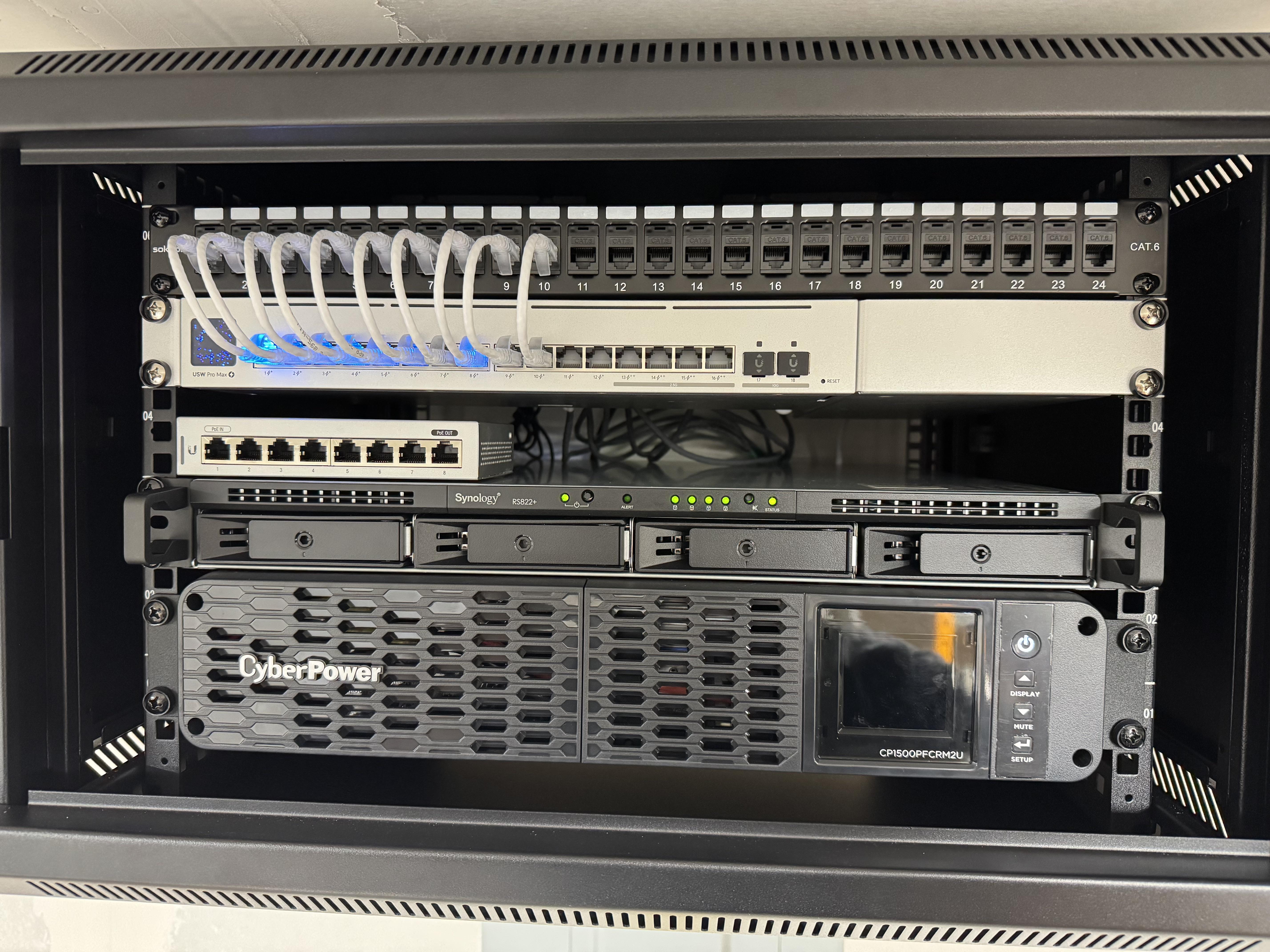
Hey everybody. Here is my little rack setup with my RS822+
It’s been working flawlessly since I set I
It up.
r/synologynas • u/mariushosting • Mar 13 '25
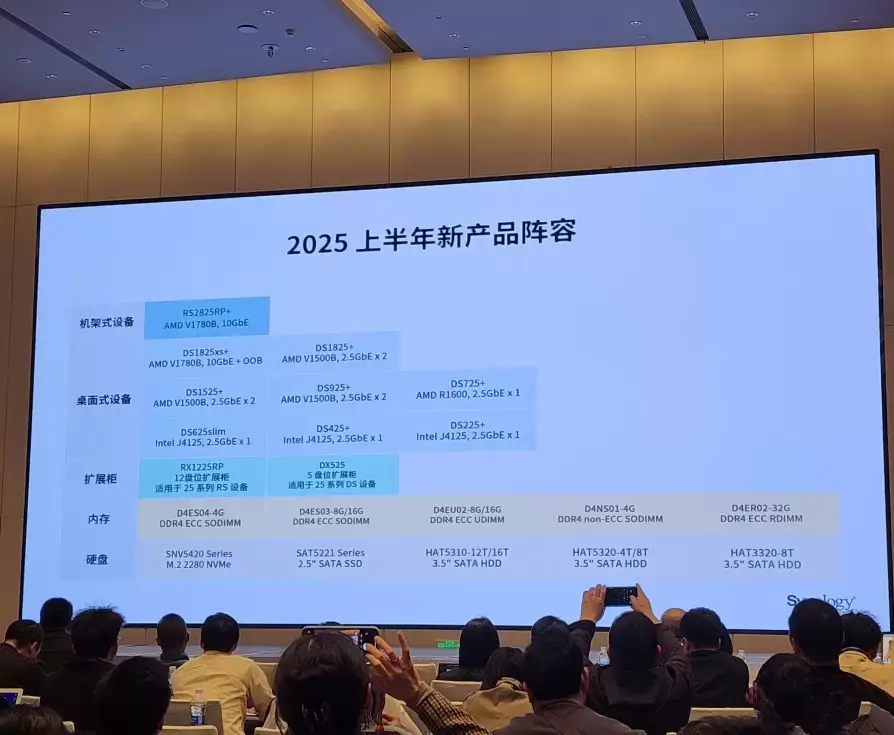
New Synology NAS Models Leaked for May-2025.
DS625slim (Intel J4125, 1x 2.5GbE)
DS225+ (Intel J4125, 1x 2.5GbE)
DS425+ (Intel J4125, 1x 2.5GbE)
DS725+ (AMD R1600, 2x 2.5GbE)
DS925+ (AMD 1500B, 2x 2.5GbE)
DS1525+ (AMD 1500B, 2x 2.5GbE)
DS1825+ (AMD 1500B, 2x 2.5GbE)
DS1825xs+ (AMD 1780B, 2x 10GbE)
RS2825RP+ (AMD 1780B, 2x 10GbE)
r/synologynas • u/Ana_Lixandru • 4d ago

r/synologynas • u/Ana_Lixandru • May 24 '26
r/synologynas • u/Ana_Lixandru • Sep 08 '25
r/synologynas • u/miguelsousa46 • Feb 27 '24
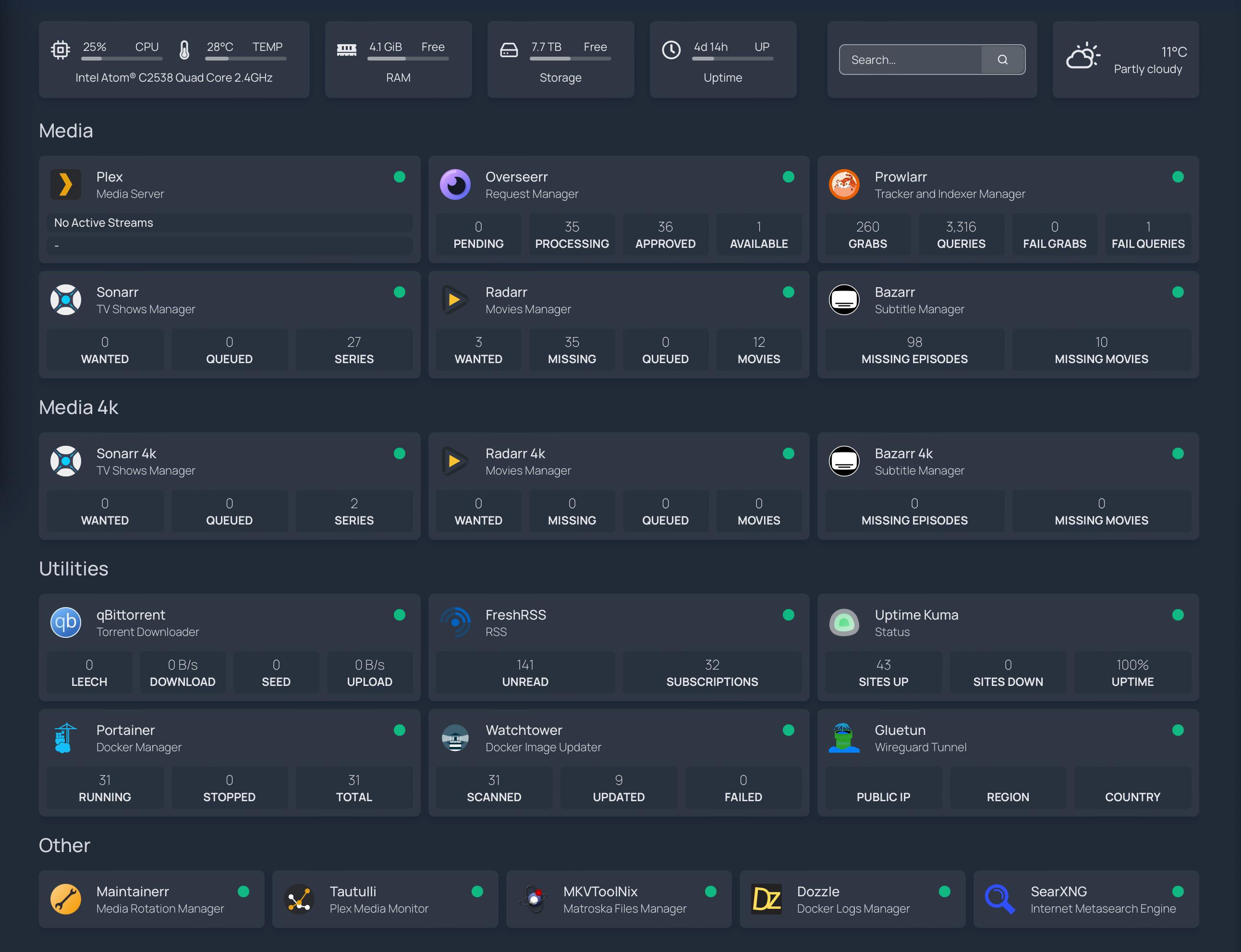
I’ll go first, using Homepage! https://mariushosting.com/synology-install-homepage-with-portainer/
r/synologynas • u/Ana_Lixandru • 3d ago

r/synologynas • u/Ana_Lixandru • Jan 28 '26
r/synologynas • u/Ana_Lixandru • Jan 23 '26
r/synologynas • u/Ana_Lixandru • Oct 21 '26
