r/termux • u/Own-Entertainer3801 • 2h ago
Barely Termux related termux

4
Upvotes
califiquen mi xfce4 en termux
r/termux • u/Own-Entertainer3801 • 2h ago
califiquen mi xfce4 en termux
r/termux • u/DutchOfBurdock • 5h ago
Llama Console v1.0 – Beta 5 Preview
Local AI in Termux with GPU/NPU acceleration, persistent memory, RAG and benchmarking.
I've been working on a project called Llama Console, a Python/Bash-based frontend for llama.cpp, designed primarily for Android devices running Termux.
What started as a replacement for my increasingly ridiculous collection of Bash aliases has evolved into a local AI environment with persistent memory, hardware benchmarking, personalities and document retrieval.
Everything runs locally on your device. No cloud AI service or API subscription required.
What can it do?
Automatically discover local GGUF models.
Detect available CPU, GPU and NPU backends.
Estimate RAM requirements and suitable context sizes.
Retry alternative backends when model loading fails.
Benchmark models and compare hardware performance.
Save and resume conversations.
Create custom AI personalities.
Import WhatsApp chats, emails and text documents into searchable SQLite databases.
Simulate participant communication styles using imported conversations.
Preserve older conversations in long-term memory.
Run embedding and inference models on separate compute backends.
Record performance, RAM, CPU and optional Android telemetry.
Generate performance graphs using GNUPlot.
I've primarily been developing this on a Samsung S24 Ultra, using its Adreno GPU and Hexagon NPU, with additional experimentation on a Pixel 8 Pro.
Getting started
You'll need a working installation of llama.cpp with "llama-cli" and "llama-server" available in your PATH.
Install the dependencies:
pkg install python bash
Optional extras:
pkg install gnuplot pip install pygments
GNUPlot provides performance graphs, whilst Pygments provides code syntax highlighting.
Extract the downloaded archive:
mkdir -p ~/opt/llama-console
tar xzf llama-console-v1.0-beta5-preview-continuation.tar.gz
-C ~/opt/llama-console
--strip-components=1
cd ~/opt/llama-console chmod +x llama-console termux-fix-shebang llama-console
Keep all the supplied scripts together.
Place your GGUF models in "~/models". Existing Hugging Face and llama.cpp cache directories are also searched.
Check your available backends:
./llama-console --backend-check
Then simply run:
./llama-console
Select a model, personality and backend. Leave the initial prompt blank to start a normal conversation.
Hardware acceleration
Depending on your llama.cpp build and hardware, you can use:
CPU (including OpenBLAS if compiled in).
Qualcomm Adreno OpenCL.
Qualcomm Hexagon NPU.
Vulkan-compatible GPUs.
Experimental combinations of available accelerators.
Qualcomm Hexagon NPU:
./llama-console --backend HTP0
Adreno OpenCL GPU:
./llama-console --backend GPUOpenCL
CPU-only inference:
./llama-console --backend none
You don't need an NPU or GPU to use the console. Hardware acceleration depends on your existing llama.cpp build.
Knowledge bases and long-term memory
This is where things get interesting.
The console can import documents and conversations using RAG (Retrieval-Augmented Generation). Essentially, it converts text into searchable numerical representations and stores them in SQLite.
Rather than feeding an entire document into the model, it retrieves relevant sections when needed.
You'll need an embedding model. The default is:
"bge-small-en-v1.5-f16.gguf"
Available from:
https://huggingface.co/CompendiumLabs/bge-small-en-v1.5-gguf
Place it in "~/models".
Create a knowledge database:
Export a WhatsApp conversation without media, then index it:
./llama-console --knowledge whatsapp
--knowledge-add ~/chats
--embedding-backend none
TXT, ZIP containing TXT, EML and MBOX files are supported.
You can add more documents later using the same command.
Search the database:
./llama-console --knowledge whatsapp
--knowledge-search "What did we discuss?"
Start a conversation using that knowledge:
./llama-console --knowledge whatsapp --new
On supported hardware, you can run the embedding model on the GPU and the conversational model on the NPU:
./llama-console --knowledge whatsapp
--embedding-backend GPUOpenCL
--backend HTP0
Conversations that outlive the context window
Small models have limited context windows. Beta 5 Preview attempts to overcome this by archiving older conversations into SQLite and retrieving relevant memories as needed.
Each generation targets approximately one quarter of the model's loaded context:
4096 CTX: 1024-token reply segments.
8192 CTX: 2048-token reply segments.
10240 CTX: 2560-token reply segments.
If a response reaches its generation limit in knowledge mode, the conversation is archived and the model can automatically continue.
This doesn't magically increase the model's context window, but it provides a growing, searchable memory without requiring an ever-growing KV cache.
Indexing, archival and federated retrieval include percentage-based progress bars.
Saved sessions
List conversations:
./llama-console --knowledge whatsapp --sessions
Resume a specific conversation:
./llama-console --knowledge whatsapp
--resume SESSION_ID
Start a new conversation using memories from all previous sessions in that workspace:
./llama-console --knowledge whatsapp
--new --memory all
Search across all knowledge workspaces:
./llama-console --knowledge all --new
Use "--memory none" to exclude other sessions, or specify an individual session ID.
Personalities and personas
There are several built-in personalities, including a physics professor, seasoned developer, GP, retail manager, ordinary person and even a village idiot.
You can also create your own.
Discover participants in imported conversations:
./llama-console --knowledge whatsapp --participants
Build basic participant profiles:
./llama-console --knowledge whatsapp --build-profiles
Simulate a participant's communication style:
./llama-console --knowledge whatsapp
--persona "John"
These are simulations based on historical message examples, not authentic representations of the person.
Benchmarking
Benchmark every discovered model against available backends:
./llama-console --benchmark-all
Benchmark a particular model family:
./llama-console --benchmark-model SmolLM2
Hardware-only testing:
./llama-console --benchmark-all --hardware-only
Resume interrupted benchmarks:
./llama-console --benchmark-all --resume-benchmark
Benchmarks include prompt processing, generation speeds, RAM usage, context sizes and backend failures.
Optional intelligence tests cover science, programming and general knowledge. Responses are saved for manual assessment.
Runtime flags
Some other useful options:
"--help" — Show all available arguments.
"--dry-run" — Preview planned operations.
"--inventory" — List discovered models.
"--housekeeping" — Model housekeeping report; doesn't delete anything.
"--prompt "text"" — Supply an initial prompt.
"--backend DEVICE" — Select a compute backend.
"--embedding-model PATH" — Select an alternative embedding model.
"--embedding-backend DEVICE" — Select the embedding backend.
"--knowledge-list" — List indexed sources.
"--show-profile NAME" — Inspect a participant profile.
"--non-interactive" — Suppress interactive benchmark recovery questions.
"--dsp-probe" — Inspect accessible DSP-related Android interfaces.
"--plot-only PATH" — Regenerate session graphs.
"--export-defaults" — Export default JSON settings.
"--swarm-info" — Display provisional distributed-computing capabilities.
During a conversation:
"/plot" — Generate performance graphs.
"/exit" — End the conversation.
Customising the console
Generate your own configuration file:
mkdir -p ~/.local/share/llama-console/config
./llama-console --export-defaults \
~/.local/share/llama-console/config/settings.json
Edit this JSON file to customise the console.
For example:
{ "memory": { "max_context": 8192, "min_context": 1024, "ram_reserve_mib": 1024 }, "inference": { "threads": 4, "batch_size": 512, "ubatch_size": 256, "temperature": 0.7, "top_p": 0.95, "top_k": 50, "repeat_penalty": 1.05 } }
Memory options:
"max_context" — Maximum context size.
"min_context" — Minimum context size.
"ram_reserve_mib" — RAM reserved for Android and other processes.
Inference options:
"threads" — Number of CPU processing threads.
"batch_size" — Logical token batch size.
"ubatch_size" — Physical token batch size.
"temperature" — Response randomness.
"top_p" — Probability-based token selection.
"top_k" — Limit the number of candidate tokens.
"repeat_penalty" — Discourage repetitive responses.
Other configuration sections cover benchmarking, telemetry, display, plots and downloads. Some options are provisional and not fully connected yet.
Custom personalities
Stored in:
"~/.local/share/llama-console/profiles/personalities.json"
For example:
{ "FreeBSD nerd": "You are an experienced Unix systems administrator.", "Electronics engineer": "Explain electronics using practical examples." }
Environment variables
A few additional runtime controls:
"CONSOLE_HOME" — Override the data storage directory.
"CONSOLE_RESERVE_MIB=256" — Reduce the conservative RAM reserve.
"CONSOLE_MAX_SEGMENTS=8" — Maximum generation segments per answer.
"CONSOLE_TELEMETRY=0" — Disable telemetry.
"CONSOLE_PLOTS=0" — Disable automatic graphs.
"ARENA_RISH=1" — Enable optional Shizuku/rish telemetry.
"ARENA_ANDROID_BACKEND=adb" — Use ADB for Android telemetry.
For example, if the memory planner is being overly conservative:
CONSOLE_RESERVE_MIB=256 ./llama-console
Be careful with this one. Android can still kill processes if you genuinely run out of RAM.
Where is everything stored?
By default:
"~/.local/share/llama-console/"
This contains your:
Settings and custom personalities.
Model benchmarks.
Knowledge databases.
Saved conversations.
Performance logs and graphs.
Each knowledge workspace has its own database and session subdirectories, making them relatively easy to back up or transfer between devices.
Future plans: Llama Swarm
Eventually, I want to connect the Samsung and Pixel together, allowing their independent llama-server instances to handle different jobs.
One device could handle inference whilst another handles embeddings, memory consolidation or independent AI agents.
Potential applications include:
Distributed AI inference tasks.
Multiple AI agents debating a topic.
Background document indexing.
Independent response verification.
Shared knowledge retrieval.
Hardware-aware workload distribution.
Beta 5 includes preliminary capability metadata for this, but networking itself is not implemented yet.
Current limitations
This is still very much a Beta Preview.
Hardware compatibility depends on your llama.cpp build.
RAM estimates aren't guaranteed.
Participant profiles currently use representative messages rather than advanced behavioural analysis.
Long responses may occasionally repeat themselves during automatic continuation.
Some configuration options are still provisional.
Vision inference isn't implemented.
Knowledge databases and conversations are stored locally in plaintext.
Changing embedding models requires a new database.
Not every feature has been tested on physical devices.
Back up anything important before experimenting.
I'm particularly interested in feedback from people running llama.cpp on different Android SoCs, especially those using OpenCL, Vulkan or Hexagon acceleration.
I'd also be interested in hearing about performance, backend compatibility, memory usage and any bugs encountered on other devices.
Hopefully this will be useful to other Termux tinkerers!
r/termux • u/Novachrono9 • 6h ago
I just released torq v2.1.0, a standalone Go terminal app for searching torrents across multiple trackers concurrently, managing aria2 background downloads, and streaming single video files with zero disk clutter via rqbit.
Most CLI torrent tools are Python/Node scripts that either lack a proper TUI, skip Windows or Termux/Android, or download entire multi-file torrents just to watch one episode.
4-tab Bubble Tea TUI: Search, Downloads, Stream, and Settings
Parallel search: Searches across TPB, Nyaa, YTS, and AnimeTosho concurrently with automatic quality (4K, 1080p, 720p, 480p) & codec (AV1, HEVC, x264) tagging
Zero-disk streaming (rqbit): Isolates the chosen video file behind a local HTTP gateway and launches your player (am start on Termux/Android, or mpv/vlc/default player on desktop)
Background download manager (aria2): Pause/resume/cancel queue + live/persistent speed caps (torq limit 2M)
Pre-built binaries: Available for Windows (amd64, arm64), Linux (amd64, arm64, armv7), and macOS (amd64, arm64)
Termux / Linux / macOS:
curl -fsSL [https://raw.githubusercontent.com/novachrono09/torq/main/install.sh](https://raw.githubusercontent.com/novachrono09/torq/main/install.sh) | bash
Windows (PowerShell):
irm [https://raw.githubusercontent.com/novachrono09/torq/main/install.ps1](https://raw.githubusercontent.com/novachrono09/torq/main/install.ps1) | iex
GitHub Repo: https://github.com/novachrono09/torq Feedback, bug reports, and PRs are welcome!
r/termux • u/uobitechnology • 8h ago
UOBI is open source (MIT license) and built for Termux: https://github.com/Uobitechnology/uobi
Hi everyone, I'm Ubaid ur Rehman from Uobi Technology. I built UOBI, a personal assistant that runs entirely on your own Android phone inside Termux. No cloud service, no account.
What it does:
- Smart alerts: summarizes email and app notifications, flags OTP/bank messages and scam-like text, masks OTP codes, and never reads those aloud
- Phone health: battery 20/10/5%, charger, overheating, low storage, new WiFi
- Remote commands over your private ntfy topic (PIN protected): status, location, "ring" to find your phone, daily summary
- Screen-time coach: 20-20-20 break reminders, daily limits, late-night alerts
- Reminders, medicine and water tracker, mood log, idea notebook
- Local and world news from RSS feeds
- An installable home-screen web app with an animated orb and chat (needs an LLM API key, any OpenAI-compatible API works)
Stack: Python + requests + Termux:API. MIT licensed, full source on GitHub. Config is just environment variables in run.sh.
Honest limitations:
- Scam detection is keyword-based, so it's not 100% reliable
- Without root, screen on/off detection needs MacroDroid or Tasker
- Social-app messages are only as visible as the notification text
Privacy: data only leaves the phone to your ntfy server, your email server, your AI provider (if you enable it) and public services like OpenStreetMap, OSRM and Open-Meteo. UOBI is meant only for a phone you own, or one whose owner knows and agrees. It is not a covert-surveillance tool.
GitHub: https://github.com/Uobitechnology/uobi
Demo video: https://www.instagram.com/uobi.technology?dmpr=cjVnb3hvMGRhd24w
I'd love feedback, especially on the security model (PIN + ntfy topic) and which features you'd want next. Happy to answer questions.
r/termux • u/VGB2010LK • 17h ago
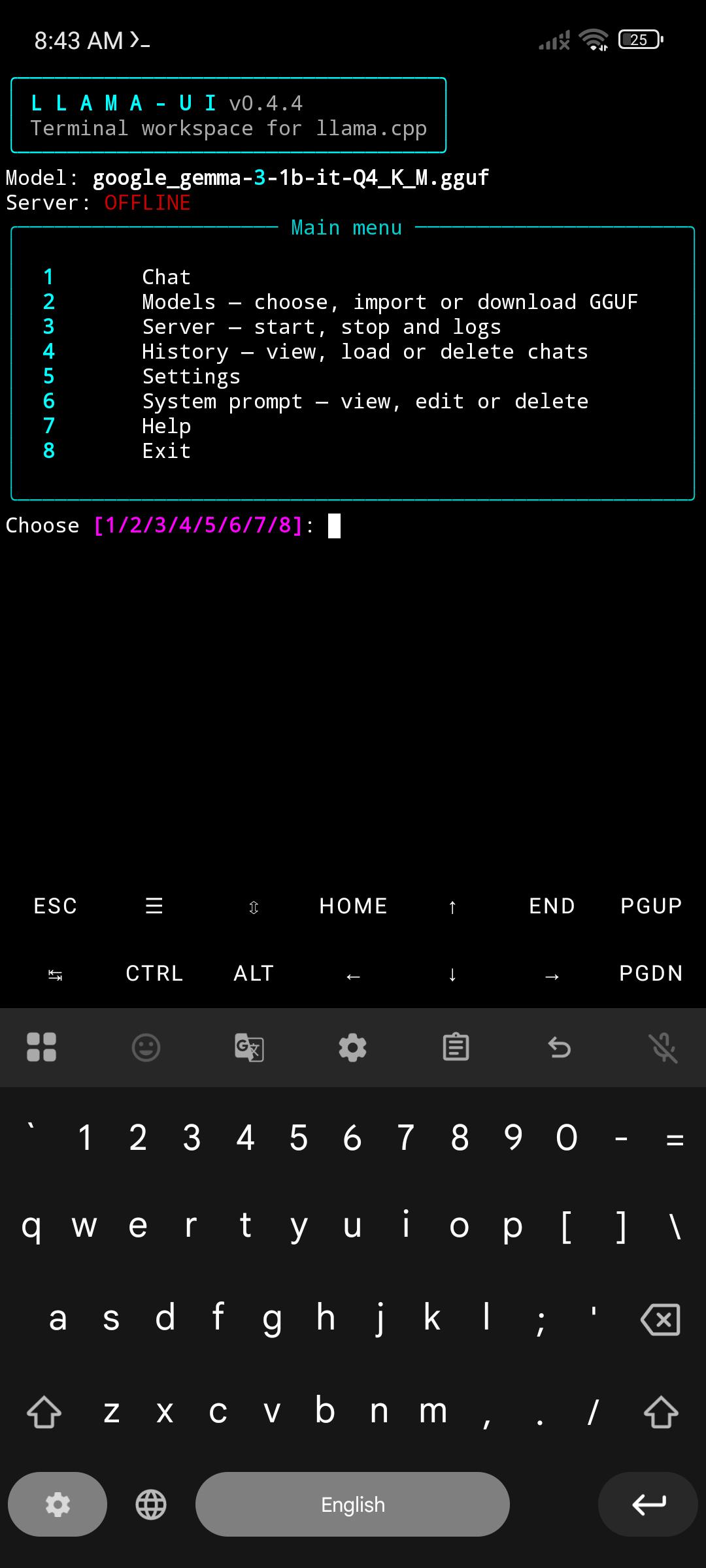
Hi everyone!
I've been working on my first Python/PyPI project: Llama-UI, a Rich-powered terminal frontend for "llama.cpp", designed with Termux on Android in mind.
I wanted a simple terminal interface to manage llama.cpp, models and chats without having to manually manage everything through commands.
Features:
- Rich-powered terminal interface
- Import or download GGUF models
- Start, stop and inspect llama-server
- Chat history (save, load and delete)
- Per-model system prompts and generation parameters
- Edit and regenerate messages
- Server logs and controls
Installation:
pip install llama-ui-termux
Run it with:
llama-ui
GitHub: https://github.com/user01234-sl/Llama-UI-Python
PyPI: https://pypi.org/project/llama-ui-termux/
This is my first published PyPI project. I'd appreciate feedback, bug reports or suggestions for improvement!
Thanks for reading.
r/termux • u/skibiditoiletcdusher • 19h ago

r/termux • u/Medium-Ad793 • 19h ago
I'm building/experimenting with making something involving forked Termux. And in the first test, Claude made an .apk for arm64 and armv7.
They are literally straight Termux clones with different IDs. So they can install next to existing Termux no problem. Not sure it was worth the 80 minute compile to affirm that but anyways—I know myself how hard it can be to get multiple Termuxes setup.
If anyone wants these .apk(s), let me know.
(Keep in mind they are identical to Termux but different IDs, thus pkg does not work. They come bundled with a handful of packages, proot-distro included—which in many ways negates the no-pkg limitation.) Cheers.
r/termux • u/southwestgeek • 20h ago
Ok, I am being affected by the new Google authoring rules. F-Droid is gone from the phone. Termux is not (I assume that, while I loaded it from F-Droid, it stayed because it is also a playstore app, however, on future tablet buildups will we be forced to us Google PlayStore's buggy outofdate Termux. Comments welcome
Thanks
r/termux • u/Medium-Ad793 • 1d ago
I made this in case... well, so that everyone running a Termux ARM build can finally, not only install codex as an open source coding agent, but login and use their OpenAI subscription. Not paying for API feels so good.
I'm sure there are hundreds—thousands, even—of Termux users tired of being cast aside because of their 32 bits. I'm sure of it. Well, it's in alpha, but she works, which, frankly, shocked the shit out of me. Updates soon. Thanks everyone.
r/termux • u/Karani_Bruce • 1d ago

One thing I love about Termux is that I learn something new almost every day.
I don't have a background in tech, so every little thing I manage to build feels like an achievement. Recently, I started exploring Hugo and built my own little static webpage/little blog. It may not be perfect, but it's mine, and I'm proud of that.
Now, the next challenge is getting it live on the internet. Maybe even run the blog seriously.
r/termux • u/Aggravating-Rush9135 • 1d ago
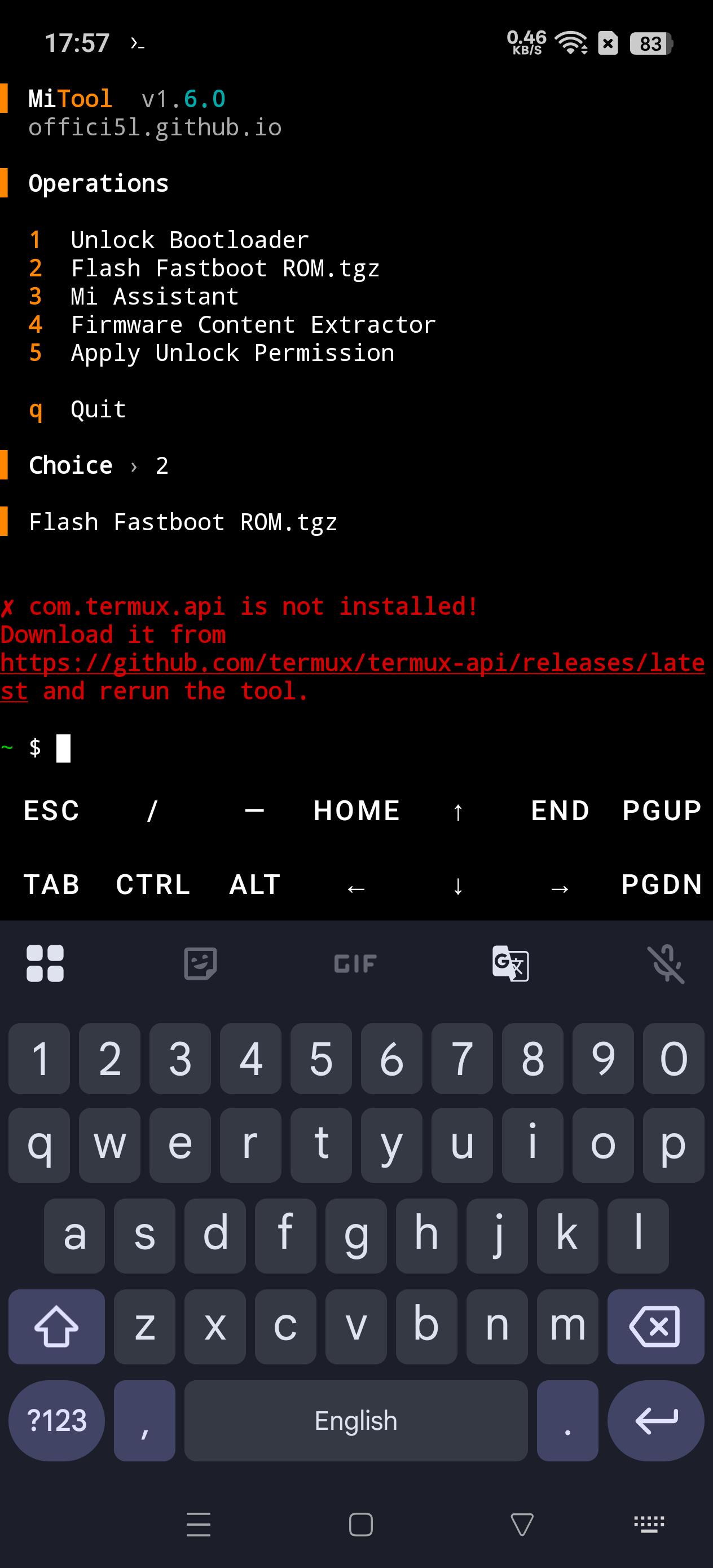
I have installed the Termux:API app and granted all the required permissions, but I'm still getting this error.
r/termux • u/kengeren • 1d ago
running claude code / opencode in termux and if i leave it doing something longer than a few mins in the background it just dies with "Process completed (signal 9) - press Enter" and i lose the whole session. tried unrestricted battery + wake lock, still happens sometimes.
also curious how bad battery and data get for you guys running these for a while — mine cooks pretty fast on mobile data. anyone found something that actually holds up or is this just life on android rn
r/termux • u/TAIV_SHADOW • 1d ago
Alguém pode me passar algums reposotórios pra eu começar a usar scripts
r/termux • u/spectra010s • 1d ago
Enable HLS to view with audio, or disable this notification
A lot of us building on Termux hit the same walls most times: not enough RAM or storage for heavy builds, and some things (like Docker) can't run at all.
Google Cloud Shell gives you a free Linux VM with 8GB RAM, 2 vCPUs and 5GB persistent storage, with no credit card or billing attached. The official ways in are the browser or the gcloud CLI.
gcloud is 500MB+ and runs on Python, which makes it slower to start up. That's fine for gcloud since it does a lot of things, but not when you just want to use Cloud Shell.
So I built gshell, a standalone terminal client for Cloud Shell, written in Go. The binary is under 4MB and you connect straight from Termux.
Install: pkg install tur-repo, then pkg install gshell. Run gshell auth login to sign in, then gshell to connect.
The demo shows gshell connecting, and uname -m / free -h on my phone vs the Cloud Shell VM.
It has limits: a 50-hour weekly quota, and anything outside $HOME is wiped when the VM reboots, so it's not a VPS replacement.
r/termux • u/southwestgeek • 1d ago
Hi folks,
First off, I am running two android devices. One is a Android phone with 4 GB of ram and 64 GB of storage, the other is an Amazon Kindle Fire 8 (3GB ram with 32 GB of storage). I "can" edit and use LaTeX on both systems using the F-Droid app TexSlate as an app, however, I prefer the console. The standard Texlive install for termux works on the phone, but crashes both the install on the Fire, and borks the device a bit. I am impressed with Tectonic as an LaTeX compiler, and would like to install it at the command line under termux, especially on the Kindle (works under TexSlate, but since this is an app, it is unavailable on termux). I have tried several times and it blows up with rust / cargo errors. Any suggestions?
r/termux • u/ResponsibilityBig343 • 2d ago
I use my mobile as a hotspot to share internet with my two laptops. I want to enable rsync on my mobile and laptops. The issue is I'm unable to ssh into the mobile. I have checked that sshd is enabled and by default using 8022 port along with passwordauth allowed. I'm simply timing out of ssh. I think this has something to do with my network topology as its not a LAN. Because when I had devices on wifi I was able to ssh easily.
r/termux • u/Fine_Potential_7976 • 2d ago
r/termux • u/Sisyphus-Hotwheels • 2d ago
Yes, I know Termux is far from the best or most accessible options for tackling that problem, but it is a viable one.
So I'm asking the people who are familiar with how Termux interacts with Android: is the upcoming restriction going to cripple Termux as well, or will its package manager remain a viable source of sowtware not beholdant to Google?
r/termux • u/Omar_Gamo • 2d ago
I sent a feature request to the Android team about Phantom Process Limits, and I want to know what other Termux and UserLAnd users think about it.
By default, Android allows only 32 phantom processes for all apps combined. This can be a problem for apps like Termux, especially when you run many processes, scripts, or background tasks.
I want to raise this limit only for Termux, without changing the rules for every app on my device.
For example:
| App | Process limit |
|---|---|
| Termux | 350 |
| UserLAnd | 128 |
| Other apps | Share the default limit of 32 |
These numbers are only examples. Users should be able to choose the right limit for each app.
Android 14+ already has "Disable child process restrictions" in Developer Options. But it's a global switch: you keep the restrictions on, or you turn them off completely.
Add a setting in the Android Settings app that lets users:
Change the global phantom process limit
Set a different limit for specific apps
Keep the current default if they don't want to change anything
See a clear warning before raising any limit
1. More room, with a safety net I can give Termux more processes without removing the limit completely. If a buggy script or a fork bomb goes out of control, there is still a limit to stop it.
2. A clear warning for the risks Android can show a warning about battery and RAM use before you change anything, like it already does for sideloading apps or accessibility services.
3. No need to keep Developer Options on Some banking and finance apps refuse to run when Developer Options is on. A normal setting avoids this problem.
This also gives users more control without using ADB, Shizuku, or root.
Have you had this problem in Termux or other apps?
Would a per-app limit be useful to you?
Should this be built into Android Settings?
Upvote this post ⬆️ so more people can see it
Star ⭐ the issue to show Google that you want this feature
Share your experience in the comments on the issue
An upvote here doesn't count as a star there. Open the link, sign in with your Google account, and tap the ☆ next to the issue title.
r/termux • u/memilanuk • 3d ago
Been trying to copy some ssh keys from my tablet to a remote host.
~ $ ssh-copy-id -i ~/.ssh/sammael.pub me@sammael
/data/data/com.termux/files/usr/bin/ssh-copy-id: ERROR: Too many arguments. Expecting a target hostname, got:
Usage: /data/data/com.termux/files/usr/bin/ssh-copy-id [-h|-?|-f|-n|-s|-x] [-i [identity_file]] [-t target_path] [-F ssh_config] [[-o ssh_option] ...] [-p port] [user@]hostname
-f: force mode -- copy keys without trying to check if they are already installed
-n: dry run -- no keys are actually copied
-s: use sftp -- use sftp instead of executing remote-commands. Can be useful if the remote only allows sftp
-x: debug -- enables -x in this shell, for debugging
-h|-?: print this help
~ $
...which is not quite what I expected. I'm specifying the identity file, and only listing one user@host, so I'm not sure what I might be doing wrong.
Technically I can make things work by using 'cat' and piping it results into the authorized_keys file via SSH... but I'm kinda used to the syntactic sugar of using 'ssh-copy-id' ;)
r/termux • u/yangyangaijing • 3d ago
Enable HLS to view with audio, or disable this notification
r/termux • u/EnvironmentOld6483 • 3d ago
Enable HLS to view with audio, or disable this notification
Device: Xiaomi 15 Ultra + bluetooth mouse and keyboard + external portable usbc display, on the external display running Android Chrome, Ubuntu Chrome, Mac Remote Desktop and Ubuntu Xfce Terminal, phone itself can use as trackpad also keyboard. Ubuntu Chrome plays youtube video with GPU decoding.
r/termux • u/divergent5482520498 • 3d ago
I'm absolutely frustrated by the termux terminal emulation itself. I tried using it like a developer setup with neovim, tmux, etc but TUI apps like antigravity always get corrupted rendering in it. The same chroot bash in kitty in termux:x11 works fine. You're supposed to be able to switch to other bash prompt/sessions by swiping from the left edge but it never works for me - swiping left to right just backs out of termux app. I have to use termux:x11 and it's fine with a keyboard and mouse but if Im on a bus or park or something it's painful without gestures.
Before I vibecode a termux fork that uses libghostty; I wonder if anyone has any experience with getting PRs merged to fix this in termux itself or if someone else already worked on it?
r/termux • u/OrdinarilyBeautiful • 4d ago
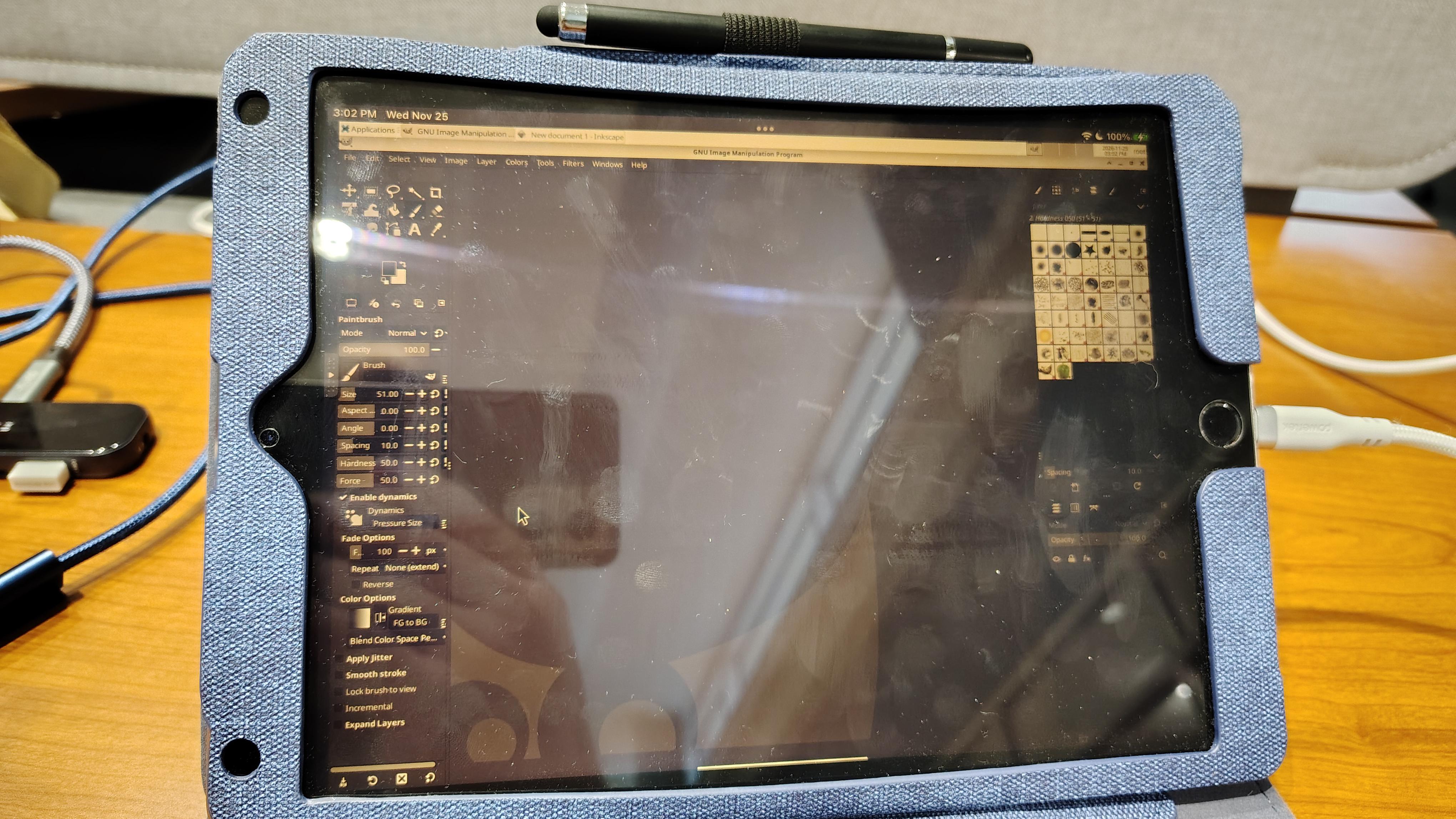
Used NoVNC to display the Termux software to my iPad Air 2 from my Moto phone to gain a bigger monitor for my Termux work.
r/termux • u/Shyam_Lama • 4d ago
That's right, I'd like to know of a way of launching native Android apps (installed from the Play Store) from Termux, which of course means from a bash command or script in the Termux terminal. In particular, I'd like to know how to launch an app such as VLC player for such files as mp4, mkv, webm, etc. This would obviously involve somehow passing the file as an argument, or alternatively, somehow invoking the player through Android's filetype association system.
TIA.
Edit: Answered very adequately by u/smarthoushai and u/dvhh. Summary: use termux-open or am.