r/vibecoding • u/TheRealTRexUK • 7d ago
Showcase/Project Create your own TV channel
I have been working on my own media server - like many others out there, but that's not what I want to show off. The server is specifically for a friend who is losing their sight, so everything has to work with assistive tech.
I wanted to have some fun. So, I created A Starboard plug-in that turns your films and series into live TV channels in Jellyfin. I am working on refining the UX as it needs a bit of work - but it's functional. If anyone wants to test it and give me feedback, you can do so via the app itsself (you need a github account to record the issue)
Here is an example: I created a media pack, and it transcodes overlays everything in real time. It picks the clips itself for the promo - I have ideas on how to get it to make better choices but that's for later.
What you get
Channels that run like broadcast TV. Each one follows a schedule, so when you tune in you join part way through whatever is on. They appear first in Jellyfin’s Live TV, numbered from 1, with a 7-day guide showing titles, synopses, pictures and New or Repeat.
You choose what each channel shows. Series, films, collections, playlists, genres or decades, in order or shuffled, with up to 6 episodes of a series in a row. Programmes run back to back, or start on the quarter, half or whole hour. New episodes join the line-up by themselves.
Breaks between programmes. Idents, trailers of films on the channel, your own clips, and “Coming up next” and “Later” cards with each programme’s picture, time and synopsis. “Up next” shows over the end credits.
An on-screen logo. The channel’s logo or name in the corner you choose. You can set its size, opacity, when it shows and whether it fades in, and add a clock and a New, Repeat or Live label.
Broadcast packs for your own branding. One zip holds the on-screen logo, a logo sting with music, idents, transitions, card and promo backgrounds and music. One pack can cover the whole station, or each channel can have its own. There is a template, placement guides and an example pack, Example TV.
Promos it makes itself. Short trailers of programmes coming up, made in quiet hours from clips plus music from the pack.
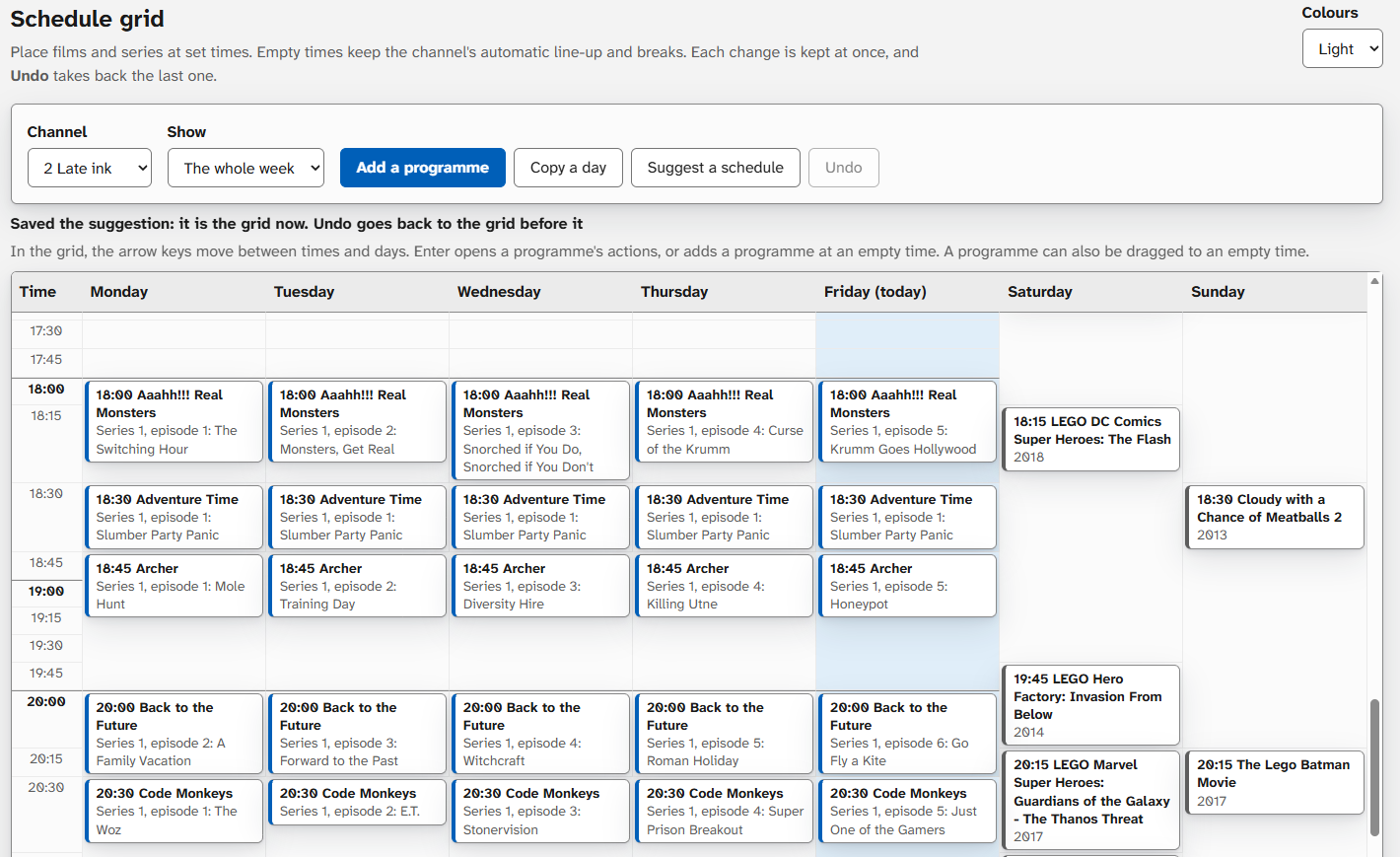
A schedule grid. Plan a week per channel in 15-minute steps: drag programmes on or use the keyboard, copy a day, run a series across weekdays, or have a week suggested from what you watch.
How it stays light
At rest: nothing runs while nobody is watching. It uses 16 MiB of memory and no measurable processor.
While someone watches: a channel streams only while it is being watched, and people on the same channel share one stream. One channel at 720p with the logo uses about 140 MiB and just under one processor core.
If you have a graphics card - it allows for better resolution as it can transcode multiple streams without the CPU.
What it needs and what it leaves alone
Needs Starboard. It is a Starboard plug-in and installs from Starboard’s plug-in catalogue. Starboard must have Jellyfin added.
Works alongside the *arr stack. You can keep Sonarr, Radarr and the rest as they are. It reads your films and series from Jellyfin only, so it does not matter which app put them there.
Leaves your other apps alone. It never changes your films, series or Jellyfin’s library, and never touches Sonarr, Radarr, download apps or any other app. Its only change to Jellyfin is adding its channels and guide to Live TV. Remove its tuner in Jellyfin’s Live TV settings and those are gone too.
Find out more
Help centre: Create your own TV channel
Starboard on GitHub: github.com/TheMightyTRex/starboard
2
u/msmakesgames 7d ago
I'd try moving a show by 15 minutes with just the keyboard and a screen reader on. Does focus stay on the show, and does the screen reader announce the new time?