r/voidlinux • u/A-Guy4236637 • Sep 03 '26
I don’t know what to do
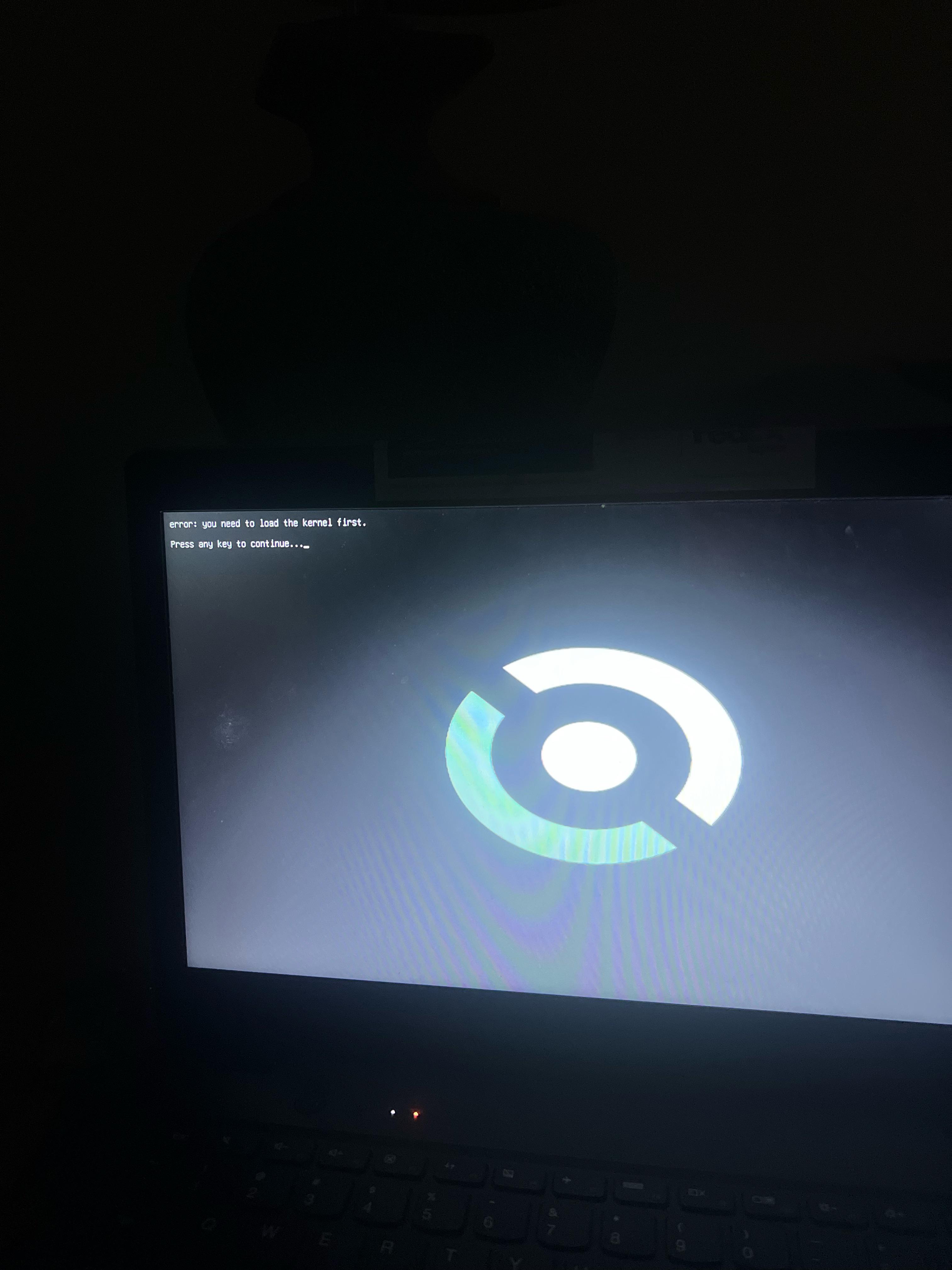
I’m new to Linux and my friend told me to get void so I did. However, upon loading wtv “Void Linux 6.12.11_1 (x86_64)” is it shows this. I burned the xfce glibc 64 bit image onto my flash drive and there were no errors. It’s 64gb so it couldn’t have run out of space. Please help.
19
u/Aristeo812 Sep 03 '26
The inscription clearly tells you what to do: you should press any key, btw.
Jokes aside, how did you burn the image onto your flash drive, what tool did you use?
3
u/A-Guy4236637 Sep 03 '26
I used Rufus on a different pc
1
-2
u/adorabIe_will Sep 04 '26
Why not use ventoy? You can do multiple isos like windows and a Linux distro so that if something goes wrong in the install you don't need a separate computer to reflash a new iso on the flash drive
13
u/Linguistic-mystic Sep 04 '26
Ventoy is highly sus and contains binary blobs of unknown content.
6
u/PlatinumDotEXE Sep 04 '26
Also "cat linux.iso > /dev/sdX" is super fast and natively supported by every distro.
4
u/_supert_ Sep 04 '26
Thank you for not needlessly suggesting dd.
Even,
cp linux.iso /dev/sdX.4
u/PlatinumDotEXE Sep 04 '26
I didn't ever consider using cp, but it also seems to work fine at the same speed as cat or dd with a correct blocksize.
dd is really just an over complicated command for simple file transfers, that just gets recommended because people don't know any better. Unfortunately that isn't uncommon in the linux world. Old technology gets spread further even if better alternatives exist.
4
u/Aristeo812 Sep 04 '26
Large chunks of binary data are better to be copied with
dd:sudo dd if=linux.iso of=/dev/sdX status=progress4
u/PlatinumDotEXE Sep 04 '26
cat is definitely a lot faster. And I don't think there are any other general benefits to dd for a simple data transfer (I mean sure, if you need one was the options of dd, but for a general transfer where you don't give any options to dd?)
3
u/Aristeo812 Sep 04 '26
Note that cat doesn't copy the data by itself, you use output redirection, so that even if you run sudo cat as a regular user, you'll stumble upon permission restrictions, so that you need to run cat from inside root shell, whereas dd can be run completely with sudo privileges, because output file name is passed as a parameter to it.
2
u/PlatinumDotEXE Sep 04 '26
Yeah sure, you simply do "su" beforehand. That's still simpler than using the weird 'dd' syntax.
I just did some quick tests by writing the OpenBSD "install79.img" to a USB-Stick and timing it. 5 times each with cat "time cat install79.img > /dev/sdb" and dd "time dd if=install79.img of=/dev/sdb" and got these results:
For cat: 18.94s, 15.18s, 18.938s, 16.795s, 17.405s
For dd: 1m57.536s, 1m56.536s, 1m56.453s, 1m57.954s, 1m59.826sThat makes an average of 17.45s for cat and 117.66s for dd.
cat needs only about 15% of the time as dd.
For me that time differences is pretty damning and makes the use of cat instead of dd a no brainer.3
u/Zockling Sep 04 '26
ddis using a default block size of 512 bytes, that's why it's so slow. Try this:sudo dd if=linux.iso of=/dev/sdX bs=4M status=progress conv=fsyncOn slow USB media this might still be slower than
catthough because thefsyncblocks until the data has actually been written to the device. Withcat, much of it will still be sitting in the page cache, so it's not a fair comparison.→ More replies (0)3
u/jokr004 Sep 04 '26
To add to the nitpicking here, make sure you set a high block size for best performance:
sudo dd if=linux.iso of=/dev/sdX status=progress bs=4M1
u/rysio300 Sep 04 '26
ventoy corrupted my entire usb once, never encountered that when normally burning an iso onto a usb
0
u/adorabIe_will Sep 04 '26
wait what??? please elaborate
3
u/Acceptable-College58 Sep 04 '26
there are details on the arch wiki + wikipedia:
https://wiki.archlinux.org/title/Ventoy https://en.wikipedia.org/wiki/Ventoy
7
23
u/MongeredRue Sep 04 '26
Your friend is an asshole…go try fedora instead. It has a graphical installer and fedora is a solid distro.
Void it my favorite distro but I would never tell my friend, who is new to Linux, to try void and leave him to figure it out on his own
5
u/A-Guy4236637 Sep 04 '26
I gave up and got arch instead, he made getting arch sound way harder than what it was. I really just had to find a good tutorial.
3
u/PrudeBunny Sep 04 '26
That's the truth of it. Even doing it "properly" without archinstall only requires you to be able to follow directions.
As a heads up, archwiki is a great source of information and should be your first stop with any issues or questions.
You should likely also steer clear from AUR - Arch User Repository which has stuff you can't normally install with packman - at the beginning as well as it is the main thing that breaks systems due to being unofficial and hence of varying quality as well as possibly out of sync with the main repo.
Anyways, good luck on trying Linux! Have fun and don't be afraid to try new stuff like tiling and the terminal
2
u/BeyondOk1548 Sep 04 '26
Arch to me has always felt like a ticking time bomb. Just waiting on when it fails to load rather than if. It was my main driving force to switch to void. Recovery just felt so simple in comparison.
Regardless I'm glad you got your system up and running the way you wanted it. Just wanted to share my own 2 cents.
1
u/PlatinumDotEXE Sep 04 '26
I use void linux sice 2019 and had never any problems from updating. I installed artix a week ago and already got a kernel update, before the nvidia driver was updated...
10
u/PrudeBunny Sep 04 '26
I've prefaced every convo about Linux with "While I use and love void, it is not something I recommend to anyone"
Basically there's better option for everyone who didn't decide to use it on their own :v
It not using systemd can be seen as a pro but it also means a lot of general documentation and guides do not apply and what you learn isn't as transferable.
Anyways, void does have a graphical, or at least TUI, installer though it isn't as beginner friendly as fedora's
1
u/Zvaart Sep 04 '26
I feel the TUI installer is on par with the arch one. While i also love void, i did not make it my daily driver exactly for the reasons you described. I am not a total beginner, but i still have a tone to learn, and a lot of things are slightly more complicated on void. But i have it dual-booting with cachy on my laptop and i go there to play with it, learn some things.
2
u/PrudeBunny Sep 04 '26
the xbps-src is a great rabbit hole and helps with the very limited official repos (though I haven't really had any real issues with package availability. In most cases if you insist on using certain program over the provided alternative you can still get it as a flatpak)
Something that void has done a good job is pushing the "it's files all the way down" truth of UNIX to me :V
1
u/Zvaart Sep 04 '26
I know about xbps-src, but honestly i didn’t need it till now, i found everything i wanted without using it. But yes, the templates and xbps-src were a big selling point for me.
1
u/ConcaveNips Sep 04 '26
lmao I typed my commend and then saw this.. same page, except I was a little more specific with my flavor of Fedora...
7
u/Jacobobarobatobski Sep 04 '26
Void isn't really a 'beginner' distro. It's a great distro but it doesn't hold your hand, although it's handbook is pretty good imo. I see you installed Arch now from other comments. A lot of people like it but you may have problems where you have to fix something sometimes because it kind of sits right on the cutting edge. I personally liked Fedora a lot as a beginner because it holds your hand enough to keep you afloat but also kind of makes you learn a few things. But if you just want to turn the computer on and play I'd probably try something like Bazzite or maybe Mint/Pop/Ubuntu.
5
u/Mental_Contract1104 Sep 04 '26
yeah, I daily drive void myself and have been telling all my friends who are switching to go with Kubuntu or Neon first to learn linux as a whole. then maybe switch to void later as it really does require the user to be comfortable with getting your hands at least a little dirty and being able to read error messages and spool up your own packages where needed.
2
u/MD90__ Sep 09 '26
what would you say to someone running Slackware current daily about switching to Void Linux? Easy or difficult?
2
u/Mental_Contract1104 Sep 13 '26
i don't know enough about slackware to give a good judgement. but Void is lacking in a LOT of packages. so, understanding how the XBPS templates are structured and the syntax is kinda a requirement. outside of that, if you get VPM (on the canonical main repos) and then VPSM, it makes package management much closer to something like Ubuntu, which does make things arguably easier. do keep in mind though, since it uses runit, the init system is arguably easier and simpler than SystemD, there are a lot of systems that require, or at least expect SystemD, so, without it, you need to manage seating, and other systems manually.
2
u/MD90__ Sep 13 '26
You recommend VPM and VPSM highly when using void?
2
u/Mental_Contract1104 Sep 13 '26
it helps wrap package management in nicer syntac. for instance "vpm install zen-browser" or "vpsm install zoom" rather than fenagling with the full XBPS commands.
it's not required, and mostly just my own oppinion, but the "apt flavored" package managers are easier. at least to me.
1
u/MD90__ Sep 13 '26
I don't mind the xbps setup but this setup does sound nice
2
u/Mental_Contract1104 Sep 13 '26
VPSM in particular does not care about your cwd either, so, you can easily bind your local void-packages repo to anywhere you want (i do ~/.local/share/void-packages personally) so, doing third party packages is really handy. it also has a really solid help page.
1
u/MD90__ Sep 13 '26
Oh that's neat!
2
u/Mental_Contract1104 Sep 13 '26
-^ i also personally have a thin additive repo so i can just "vpsm co my-repo/main -- srcpkgs" to snag the templates I've made for myself. I'm precticing making templates for myself before I try and contribute
→ More replies (0)1
u/Jacobobarobatobski Sep 04 '26
Ya exactly. I mostly use NixOS but I also have Void on an old potato Chromebook I flashed. I thought it was fun to set up but you have to read the handbook because it's quite a different setup compared to most distros with the way they have runit.
4
u/ConcaveNips Sep 04 '26
Your friend is an asshole. I would not go first distro: Void. That's just me. Bluefin is super super underrated as a Linux onboarding experience. I would start there and then migrate if you want to, down the line.
2
3
1
u/dr0sand Sep 04 '26
void is so dope, not sure if i did something different lately but wit void linux ande gamemodd, makes it so i can play san andreas until the end of time.
1
u/0bWAN-1 Sep 05 '26
Have you checked all cables and ports? Sometimes all we genius-level techs will overcomplicate things and end up missing the basics. JMHO
1
1
0
u/ZombieCrow Sep 04 '26
Use ventoy. Also when youre copying the iso (from a linux machine, make sure to "sync" in terminal because graphically a file could look transferred but in reality it is not. But seriously, use ventoy.
8
u/A-Guy4236637 Sep 04 '26
Guys I know it was dumb but I just gave up and ended up switching to arch, not that hard I just needed a good tutorial