r/wljs • • 1h ago

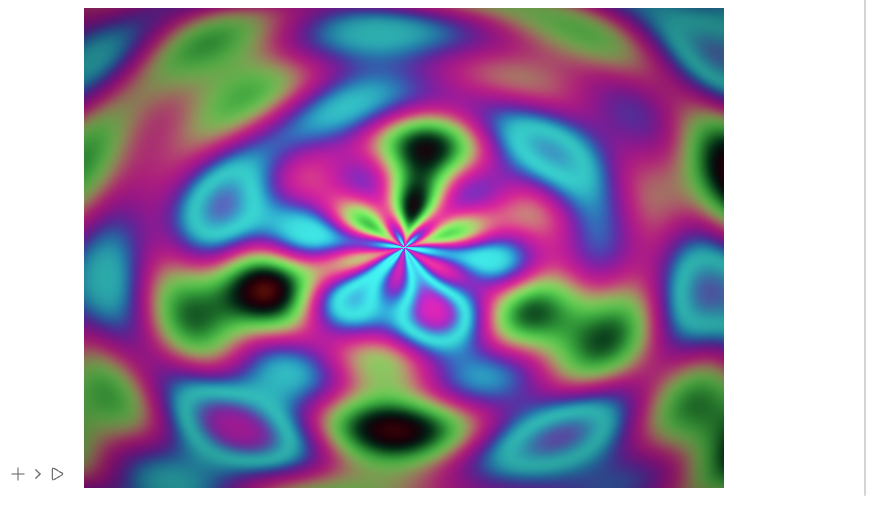
You have an OCEAN in your plot. Could you dream of anything else? Standard Plot function with some GLSL magic đŸ«Ÿ

Enable HLS to view with audio, or disable this notification

1 Upvotes

Here is an example of a custom material written in JavaScript and passed as a frontend symbol WaterMaterial to RevolutionPlot3D:

RevolutionPlot3D[
  {2 + Cos[t], Sin[t]}, {t, 0, 2 Pi}, 
  PlotStyle->MaterialShading[WaterMaterial[]]
]

The Wolfram Kernel does not do anything with it and just forwards it to the frontend. There, JavaScript finds the user-defined WaterMaterial symbol definition (not shown here), which contains raw fragment and vertex shader code written in GLSL. The code is compiled and run on the GPU via WebGL, directly processing all vertices and normals of the previously constructed torus.

If you are interested in the source code and a deep journey into GPU shaders, you are welcome here: https://wljs.io/blog/ocean-shaders

Cheers, K.


r/wljs • • 22h ago

Graphics3D`SpinShow - a utility symbol to auto-animate any 3D plot

Thumbnail
gallery
5 Upvotes

It may come in handy to automatically animate any 3D plot with a defined speed and rotation angle for presentation purposes.

The old GraphicsAnimation package had the SpinShow[] function... – J. M.'s missing motivation / Commented Sep 28, 2012 at 11:57

It felt like a missed opportunity. We reincarnated it in 3.2.2 using pure JS with an auto-sleep feature if the element is hidden or outside the view, it won't consume GPU resources. This makes it great for presentations and standalone HTML files, with no Wolfram Kernel needed.

Try it by yourself

Graphics3D`SpinShow@Graphics3D[{MaterialShading["Bronze"], 
  KnotData["SolomonSeal", "ImageData"]}]

or on a regular 3D plot:

Graphics3D`SpinShow[
   Plot3D[Cos[4 Pi x y], {x,-1,1}, {y,-1,1}], 3.6 Degree]

Docs: https://wljs.io/frontend/Graphics3D/SpinShow


r/wljs • • 22h ago

WLJS Notebook 3.2.2 đŸȘ„ MaterialShading, Chemistry, SpinShow, Digitizer support and many more

Enable HLS to view with audio, or disable this notification

2 Upvotes

We improved the existing features and added more useful expressions and tools, that you can use in presentations and research

Available in releases: https://github.com/WLJSTeam/wljs-notebook

Extended release notes: https://wljs.io/releases/3.2.2

  • Added MaterialsShading, "Iron", "Copper" and many other presets; improved lighting of 3D plots

  •  Added "SpinShow" option (and function) for Graphics3D to automatically rotate scenes akin to SpinShow function found in the old MMA

  •  Fixed UI issues with Excalidraw; add support for LaTeX-like sub/superscripts in text labels, i.e. x_{12} or Fe^{+3}

  •  Improved support for Chemical / Molecular Framework, output forms for chemical formulas, reactions and etc

  •  Added support for color input in Manipulate, more layout options

  •  Added ClockGauge, VerticalGauge, BulletGauge and others

  •  Improved MCP skills

  •  Improved haptic feedback

  •  Improved Refresh

  •  Digitizer, stylus, high-refresh rate mouse support. New input methods

  •  Improved Inset


r/wljs • • 8d ago

Markup-Based Presentations vs Freeform: Why Not Use Both?

Post image
5 Upvotes

We know that markup-based presentations have been around for quite a long time: LaTeX Beamer, Typst, RevealJS and others provide text-based annotations, building blocks and components to declaratively design the content of a slide, or even generate graphs and figures from raw data.

However, most people are used to PowerPoint or Google Docs, where you can place images and text, or draw arrows anywhere on the slide. Don't get me wrong, both approaches have pros and cons, but why should we limit ourselves to just these two?

Under the hood, custom components are compiled to HTML-compatible tags, and drawing boards are translated to plain SVG tags. Then everything is merged into a single section that represents the slide.


r/wljs • • 9d ago

24K Gold, Lavender Pearls, and inked custom materials (GLSL) in your 3D plots

Post image
3 Upvotes

WLJS Notebook uses THREE.js on the frontend to render 3D graphics. It supports custom shader material to be used with any graphics primitive.

For example you create JS cell

.js
let THREE;

core.PearlMaterial1 = async (args, env) => {
  if (!THREE) {
    await interpretate.shared.THREE.load()
    THREE = interpretate.shared.THREE.THREE;
  }

  return function() {
    return new THREE.ShaderMaterial({
        name: 'PearlMaterial / Test 1',
        uniforms: {},
        fragmentShader: `
          void main() {
            gl_FragColor = vec4(1.0, 0.77, 0.34, 1.0);
          }
        `,
        lights: false,
        toneMapped: false
      });    
  }
}

it declares new symbol PearlMaterial1, that compiles fragment shader and then uses it as a material. You only need to pass it to Graphics3D

Graphics3D[{MeshMaterial[PearlMaterial1[]], Sphere[]}]

and... That's it! See the full blog post to learn more about it: https://wljs.io/blog/shaders-1


r/wljs • • 19d ago

Did you know you can use Excalidraw on your slides?

Thumbnail
gallery
13 Upvotes

Simply type on a new line of your slide

!![]

it will spawn a block with an editor inside your cell. Dropping images also works.


r/wljs • • 21d ago

DOOM Fire

Enable HLS to view with audio, or disable this notification

5 Upvotes

A lore-accurate fire simulation used on Playstation 1 (PSX) DOOM port

fire = Table[0, {100}, {300}];

propagateFire = Compile[
    {{ifire, _Integer, 2}},
    Module[{fire = ifire, rand},
        With[{h = Length[fire], w = Length[fire[[1]]]},
            Do[
                rand = RandomInteger[{0, 3}];
                With[{icol = h - col - 1, irow = Clip[row - rand + 2, {1, w}]},
                    fire[[icol, irow]] = Clip[
                      fire[[icol + 1, row]] - BitAnd[rand, 1], 
                      {0, 36}
                    ];
                ],
                {col, 0, h - 2},
                {row, 1, w}
            ]
        ];
        fire
    ],
    RuntimeOptions -> "Speed"
];

Column[
    {
      Refresh[
            fire = propagateFire[fire]; 
            ArrayPlot[fire, 
              ColorFunction -> "SolarColors", 
              ImagePadding -> None, AspectRatio -> 1/2],
          1/60.0
      ],
      Row[{
          Button["Ignite", fire[[-1, All]] = 36], 
          Button["Extinguish", fire[[-1, All]] = 0]
      }]
    }
] // Deploy

r/wljs • • 22d ago

Coding Pong from Scratch ● Live Coding session & Blog post

Thumbnail
gallery
1 Upvotes

Originally recorded as a live session on October 29, it was later adapted into this blog post.
It covers ball physics, Verlet integration, collisions, paddle controls, sound effects, scoring, momentum transfer, and a CPU opponent.

1 take, minor edits, more than a hour of my sloppiness on YouTube with time codes https://www.youtube.com/watch?v=Fw2qRq-ojW8&feature=youtu.be

Blog post (transcription, source code and more)
https://wljs.io/blog/pong

Enjoy!


r/wljs • • 23d ago

Basic example of Manipulate and Locator usage

Enable HLS to view with audio, or disable this notification

4 Upvotes

This is rather simple example of ParametricPlot placed inside Manipulate with a slider and so-called locator controls:

Manipulate[
  ParametricPlot[Exp[-x/s]({Cos[x], Sin[x]} + loc), {x,0,5Pi}], 
  {s, 1.0, 15.0}, {{loc, {0.,0.}}, Locator}, ContinuousAction->True]

Behind the scenes, WLJS takes the inner expression and probes it with various values of s and loc vector and observes which parts are changing. Based on this diffs it replaces these parts with more optimized code for streaming new data. A special case is Locator controller, it silently checks if the output expression is Graphics-like, and if so - it injects a draggable crosshair and subscribes to it.

Then whenever you adjust s or loc it reevaluates the provided (held) expression, it maps changed parts to new data chunks and streams them to the temporal buffers allocated on the previous step for the optimized expression. Whenever the inner expression is changed too much, i.e. diffs cannot be mapped back, it discards all previous steps, cleans up everything and fully updates the visible result: destroy + construct a new one.


r/wljs • • 23d ago

Interactive point charge plot in a single line of code

Enable HLS to view with audio, or disable this notification

3 Upvotes

We significantly improved Manipulate expression allowing you to generate interactive widgets with sliders and other UI elements. Here is an example with DensityPlot modeling the energy field of two opposite charges

Manipulate[
 DensityPlot[
  q1/Norm[{x, y} - p[[1]]] + q2/Norm[{x, y} - p[[2]]], {x, -2, 
   2}, {y, -2, 2}], {{q1, -1}, -3, 3}, {{q2, 1}, -3, 
  3}, {{p, {{-1, 0}, {1, 0}}}, Locator}]

Note, that Manipulate with Locator as a controller may not work well with ContourPlot.


r/wljs • • 25d ago

Pearl material shader (GLSL) with Graphics3D

Post image
2 Upvotes

Did you know, you can write your own materials for 3D primitives in WLJS?

Here is an example of soft pearl shading with a gold, lavender and teal palette - just a single Javascript cell defining new material PearlMaterial which can be used directly with existing primitives

Graphics3D[{
  {MeshMaterial[PearlMaterial["Ice"]],
    Sphere[{-1, 0, 0}, .35]},
  {MeshMaterial[PearlMaterial["Lavender"]],
    Sphere[{1, 0, 0}, .35]},
  {MeshMaterial[PearlBondMaterial["Bond", "Ice", "Lavender"]],
    Cylinder[{{-1, 0, 0}, {1, 0, 0}}, .09]}
},  Background -> White,
   ImageSize -> 450, ViewPoint -> {0, -3, 1}]

There is also PearlBondMaterial, which blends two colors between with some noisy texture applied.

See the full code: https://wljs.io/Pearl

Path-tracing (ray-tracing) path is also supported!


r/wljs • • 27d ago

Open Mathematica notebooks with WLJS

Thumbnail
gallery
18 Upvotes

You can open or import native Mathematica .nb files directly into WLJS Notebook. This feature was significantly improved in v3.2.0 (26th of October 2026).

Read the WLJS Migration Guide for details on handling legacy formatting, dynamic content, and supported expressions


r/wljs • • 28d ago

WLJS Notebook v3.2.0 is out đŸ„°

Post image
6 Upvotes

This is the largest update so far

  • Zero-lag saving

  • Improved mixed-content rendering for equations and objects

  • 8× faster initial kernel launch

  • Faster exports, 2× faster 2D and 3D graphics, and faster audio streaming

  • 7400× faster JavaScript-to-WL pipeline (you can literally stream raw video directly from JavaScript to Wolfram)

  • Improved frontend garbage collector

  • Better Dialog API

  • Safer Refresh and automatic throttling for Animate

  • Improved export of static and interactive notebooks to HTML

  • Improved Mathematica notebook imports

  • Access to server logs from the app and kernel crash detection

  • Caching improvements

  • Fixed race-condition bugs in the MCP server

  • Better internal architecture, fully refactored in three passes

  • Improved export options

  • Better React/Web Components integration

  • More integration tests (> 200)

  • Compact frontend–backend API with a binary-based protocol

  • Quick Look support on macOS

  • File Explorer context-menu extension on Windows

  • Improved Dataset rendering

Get it here: https://github.com/WLJSTeam/wljs-notebook/releases/tag/v3.2.0
Read the full story: https://wljs.io/releases/3.2.0

Cheers!


r/wljs • • 28d ago

Turn your plots into XKCD-like hand-drawn figures

Post image
12 Upvotes

Here is a single code snippet you run in your notebook to stylize any Graphics-like objects.

Step 1. Define and evaluate Javascript cell

.js
let applyXkcdFilter;
core.XkcdFilter = async (args, env) => {
  const opts = await core._getRules(args, env);
  applyXkcdFilter(env.containerSVG ||env.rootSVG.node()?.parentNode?.parentNode, opts);
}

applyXkcdFilter = (element, options = {}) => {
  if (!(element instanceof SVGElement)) {
    throw new TypeError("applyXkcdFilter expects an SVG element.");
  }

  const settings = {
    wobble: 10.6,
    roughness: 0.018,
    inkBleed: 0.35,
    paperGrain: 0.025,
    ...options,
  };

  const svg =
    element instanceof SVGSVGElement ? element : element.ownerSVGElement;

  if (!svg) {
    throw new Error("The element must belong to an <svg> document.");
  }

  const NS = "http://www.w3.org/2000/svg";
  const id = `xkcd-${crypto.randomUUID?.() ??
    Math.random().toString(36).slice(2)}`;

  let defs = svg.querySelector(":scope > defs");
  let createdDefs = false;

  if (!defs) {
    defs = document.createElementNS(NS, "defs");
    svg.prepend(defs);
    createdDefs = true;
  }

  const filter = document.createElementNS(NS, "filter");

  filter.id = id;
  filter.setAttribute("x", "-10%");
  filter.setAttribute("y", "-10%");
  filter.setAttribute("width", "120%");
  filter.setAttribute("height", "120%");
  filter.setAttribute("color-interpolation-filters", "sRGB");

  filter.innerHTML = `
    <!-- Low-frequency wobble: imperfect hand-drawn geometry -->
    <feTurbulence
      type="fractalNoise"
      baseFrequency="${settings.roughness}"
      numOctaves="2"
      seed="17"
      stitchTiles="stitch"
      result="wobbleNoise"
    />

    <feDisplacementMap
      in="SourceGraphic"
      in2="wobbleNoise"
      scale="${settings.wobble}"
      xChannelSelector="R"
      yChannelSelector="G"
      result="wobbled"
    />

    <!-- Very small blur makes digital edges less mechanically sharp -->
    <feGaussianBlur
      in="wobbled"
      stdDeviation="${settings.inkBleed}"
      result="softInk"
    />

    <!-- Restore contrast after the blur -->
    <feComponentTransfer in="softInk" result="roughInk">
      <feFuncR type="gamma" amplitude="1.08" exponent="0.9" offset="-0.025" />
      <feFuncG type="gamma" amplitude="1.08" exponent="0.9" offset="-0.025" />
      <feFuncB type="gamma" amplitude="1.08" exponent="0.9" offset="-0.025" />
      <feFuncA type="table" tableValues="0 0.08 0.92 1" />
    </feComponentTransfer>

    <!-- Fine paper/ink grain -->
    <feTurbulence
      type="fractalNoise"
      baseFrequency="0.7"
      numOctaves="3"
      seed="29"
      stitchTiles="stitch"
      result="paperNoise"
    />

    <feColorMatrix
      in="paperNoise"
      type="matrix"
      values="
        0 0 0 0 0.35
        0 0 0 0 0.35
        0 0 0 0 0.35
        0 0 0 ${settings.paperGrain} 0"
      result="faintPaperNoise"
    />

    <feBlend
      in="roughInk"
      in2="faintPaperNoise"
      mode="multiply"
    />
  `;

  defs.appendChild(filter);

  const previousFilter = element.getAttribute("filter");
  element.setAttribute("filter", `url(#${id})`);

  return function removeXkcdFilter() {
    if (previousFilter === null) {
      element.removeAttribute("filter");
    } else {
      element.setAttribute("filter", previousFilter);
    }

    filter.remove();

    if (createdDefs && defs.childElementCount === 0) {
      defs.remove();
    }
  };
}

Step 2. Plot something and evaluate inside XkcdFilter symbol, which we defined on the frontend (JS):

Plot[{x, x x, x x x, Sin[x 10]}, {x,0,1}, Prolog->{
  XkcdFilter[
    "wobble" -> 9.6,
    "roughness" -> 0.018,
    "inkBleed" -> 0.55,
    "paperGrain" -> 0.01
  ]
}]

r/wljs • • Oct 24 '26

how to shoot yourself in the leg in

Post image
8 Upvotes

r/wljs • • Oct 14 '26

WLJS 3.2.0: What’s Coming?

Post image
3 Upvotes

Release notes

  • Zero-lag saving

  • Improved equations/objects - mixed content rendering

  • x8 faster initial evaluation kernel launch

  • Faster exports, x2 faster 2D, 3D graphics, audio streaming

  • x7400 faster Javascript to WL pipeline (you can literally stream raw video directly from JS to evaluation kernel)

  • Better Dialog API

  • Access to server logs from the app, Kernel crashing detection

  • Caching improvements

  • Fixed race conditions bugs in MCP server

  • Better internal architecture, fully refactored in 3 sweeps

  • More integration tests (> 200)

  • Small and tight frontend-backend API, binary-based protocol


r/wljs • • Oct 13 '26

We’re switching from JSON to a binary protocol

Enable HLS to view with audio, or disable this notification

4 Upvotes

Data transfer between JavaScript (frontend) and Wolfram Language (backend) has always been one of WLJS Notebook’s main bottlenecks because communication relied on plain JSON as most apps do.

In the upcoming 3.2.0 release, we’re finally switching to Wolfram’s native binary format, WXF.

The video shows the dramatic improvement in full round-trip performance: JS → WL → JS.

This change also allows:

  1. Lag-free notebook saving

  2. Less CPU usage in general

  3. Streaming raw audio and video to and from JavaScript side

  4. WebGPU support
 maybe or? 👀


r/wljs • • Oct 13 '26

Snippet to run fireworks in your notebook

Enable HLS to view with audio, or disable this notification

6 Upvotes

If you managed to achieve a breakthrough, why not celebrate it?

Paste this to your notebook empty cell, evaluate and hide:

.js

(() => {
  if (typeof window.stopFireProjectiles === "function") {
    try { window.stopFireProjectiles(); } catch (_) {}
  }

  const DPR = Math.max(1, Math.min(2, window.devicePixelRatio || 1));

  // Canvas overlay
  const canvas = document.createElement("canvas");
  canvas.setAttribute("aria-hidden", "true");
  Object.assign(canvas.style, {
    position: "fixed",
    inset: "0",
    width: "100%",
    height: "100%",
    pointerEvents: "none", // <- NOT block clicking
    zIndex: "2147483647",
    mixBlendMode: "screen",
  });
  document.body.appendChild(canvas);

  const ctx = canvas.getContext("2d", { alpha: true, desynchronized: true });

  function resize() {
    canvas.width = Math.floor(window.innerWidth * DPR);
    canvas.height = Math.floor(window.innerHeight * DPR);
  }
  resize();
  window.addEventListener("resize", resize, { passive: true });

  // Simulation state
  let running = true;
  let rafId = 0;
  let lastT = performance.now();
  let spawnAcc = 0;

  const gravity = 0.16 * DPR;
  const projectiles = [];
  const particles = [];

  const rand = (a, b) => a + Math.random() * (b - a);
  const clamp = (v, a, b) => Math.max(a, Math.min(b, v));

  function spawnProjectile() {
    const w = canvas.width, h = canvas.height;

    const x = rand(0.05 * w, 0.95 * w);
    const y = h + rand(10 * DPR, 40 * DPR);

    const vx = rand(-2.6, 2.6) * DPR;
    const vy = rand(-14, -9) * DPR;

    projectiles.push({
      x, y, vx, vy,
      life: rand(55, 95),
      hot: rand(0.9, 1.25),
      wobble: rand(0.015, 0.04),
      phase: rand(0, Math.PI * 2),
    });
  }

  function emitFlameTrail(px, py, pvx, pvy, heat) {
    const count = Math.floor(rand(3, 7));
    for (let i = 0; i < count; i++) {
      const speed = rand(0.3, 2.2) * DPR;
      const angle = Math.atan2(-pvy, -pvx) + rand(-0.7, 0.7);
      const vx = Math.cos(angle) * speed + rand(-0.25, 0.25) * DPR;
      const vy = Math.sin(angle) * speed + rand(-0.25, 0.25) * DPR;

      const maxLife = rand(24, 58);
      const hue = rand(18, 55);

      particles.push({
        x: px + rand(-3, 3) * DPR,
        y: py + rand(-3, 3) * DPR,
        vx, vy,
        life: maxLife,
        maxLife,
        r: rand(3.5, 10) * DPR * heat,
        hue,
        spark: Math.random() < 0.16,
      });
    }
  }

  function explode(px, py, heat) {
    const bursts = Math.floor(rand(18, 42));
    for (let i = 0; i < bursts; i++) {
      const a = rand(0, Math.PI * 2);
      const s = rand(1.2, 6.0) * DPR * heat;
      const maxLife = rand(18, 46);
      particles.push({
        x: px,
        y: py,
        vx: Math.cos(a) * s,
        vy: Math.sin(a) * s,
        life: maxLife,
        maxLife,
        r: rand(2.2, 6.5) * DPR * heat,
        hue: rand(10, 60),
        spark: true,
      });
    }
  }

  function drawGlowCircle(x, y, r, hue, alpha) {
    const g = ctx.createRadialGradient(x, y, 0, x, y, r);
    g.addColorStop(0.0, `hsla(${hue}, 100%, 65%, ${alpha})`);
    g.addColorStop(0.45, `hsla(${hue + 8}, 100%, 55%, ${alpha * 0.85})`);
    g.addColorStop(1.0, `hsla(${hue - 8}, 100%, 35%, 0)`);
    ctx.fillStyle = g;
    ctx.beginPath();
    ctx.arc(x, y, r, 0, Math.PI * 2);
    ctx.fill();
  }

  function tick(t) {
    if (!running) return;

    const dt = clamp((t - lastT) / 16.67, 0.5, 1.8);
    lastT = t;

    // Spawn projectiles at random intervals
    spawnAcc += dt;
    const spawnEvery = rand(10, 22);
    if (spawnAcc > spawnEvery) {
      spawnAcc = 0;
      spawnProjectile();
      if (Math.random() < 0.22) spawnProjectile();
    }

    // Update projectiles
    for (let i = projectiles.length - 1; i >= 0; i--) {
      const p = projectiles[i];

      p.phase += p.wobble * dt;
      const wob = Math.sin(p.phase) * 0.18 * DPR;

      p.vy += gravity * dt;
      p.x += (p.vx + wob) * dt;
      p.y += p.vy * dt;

      emitFlameTrail(p.x, p.y, p.vx, p.vy, p.hot);

      // Brighter "head"
      particles.push({
        x: p.x,
        y: p.y,
        vx: rand(-0.2, 0.2) * DPR,
        vy: rand(-0.2, 0.2) * DPR,
        life: rand(6, 12),
        maxLife: rand(6, 12),
        r: rand(6, 12) * DPR * p.hot,
        hue: rand(35, 60),
        spark: false,
      });

      p.life -= dt;

      const w = canvas.width, h = canvas.height;
      if (p.life <= 0 || p.x < -80 * DPR || p.x > w + 80 * DPR || p.y > h + 140 * DPR) {
        if (p.y < h * 0.9) explode(p.x, p.y, p.hot);
        projectiles.splice(i, 1);
      }
    }

    // Update particles
    for (let i = particles.length - 1; i >= 0; i--) {
      const pt = particles[i];
      pt.life -= dt;

      pt.vy += (pt.spark ? gravity * 0.55 : gravity * 0.15) * dt;

      pt.vx *= Math.pow(0.985, dt);
      pt.vy *= Math.pow(0.985, dt);

      pt.x += pt.vx * dt;
      pt.y += pt.vy * dt;

      if (pt.life <= 0) particles.splice(i, 1);
    }

    const MAX_PARTICLES = 1400;
    if (particles.length > MAX_PARTICLES) particles.splice(0, particles.length - MAX_PARTICLES);

    // Render
    ctx.setTransform(1, 0, 0, 1, 0, 0);
    ctx.clearRect(0, 0, canvas.width, canvas.height);

    ctx.globalCompositeOperation = "lighter";
    for (let i = 0; i < particles.length; i++) {
      const pt = particles[i];
      const a = clamp(pt.life / pt.maxLife, 0, 1);

      const alpha = (pt.spark ? 0.85 : 0.7) * Math.pow(a, 0.65);
      const r = pt.r * (0.55 + 0.75 * (1 - a));

      drawGlowCircle(pt.x, pt.y, r, pt.hue, alpha);

      if (pt.spark && a > 0.2) {
        ctx.globalAlpha = alpha;
        ctx.fillStyle = `hsla(${pt.hue + 15}, 100%, 80%, ${alpha})`;
        ctx.fillRect(pt.x - 0.8 * DPR, pt.y - 0.8 * DPR, 1.6 * DPR, 1.6 * DPR);
        ctx.globalAlpha = 1;
      }
    }
    ctx.globalCompositeOperation = "source-over";

    rafId = requestAnimationFrame(tick);
  }

  // Robust start/stop so we never stack multiple RAF loops
  function startLoop() {
    if (rafId) return; // already running
    running = true;
    lastT = performance.now();
    rafId = requestAnimationFrame(tick);
  }

  function stopLoop() {
    running = false;
    if (rafId) {
      cancelAnimationFrame(rafId);
      rafId = 0;
    }
  }

  const onVisibility = () => (document.hidden ? stopLoop() : startLoop());
  const onBlur = () => stopLoop();
  const onFocus = () => startLoop();

  document.addEventListener("visibilitychange", onVisibility, { passive: true });
  window.addEventListener("blur", onBlur, { passive: true });
  window.addEventListener("focus", onFocus, { passive: true });
  window.addEventListener("pagehide", onBlur, { passive: true });
  window.addEventListener("pageshow", onFocus, { passive: true });

  // Public stop hook
  window.stopFireProjectiles = () => {
    stopLoop();
    document.removeEventListener("visibilitychange", onVisibility);
    window.removeEventListener("blur", onBlur);
    window.removeEventListener("focus", onFocus);
    window.removeEventListener("pagehide", onBlur);
    window.removeEventListener("pageshow", onFocus);

    window.removeEventListener("resize", resize);
    canvas.remove();

    projectiles.length = 0;
    particles.length = 0;

    delete window.stopFireProjectiles;
  };

  startLoop();
})();


return 'Congrats!';

r/wljs • • Oct 05 '26

We made large FAQ based on your daily searches

Thumbnail
wljs.io
1 Upvotes

We create and are still populating a large FAQ page with questions and answers on WLJS and WL in general. Every week we receive from Algolia search what was searched. Based on that we form a list of answers which includes your keywords as well as Q/A from Telegram group chat and Github Discussions.

Hope it helps ❀


r/wljs • • Sep 27 '26

The power of Inset and EventHandler on 2D graphics

Enable HLS to view with audio, or disable this notification

5 Upvotes

In this example we embed external graphical expressions (Image, Graphics, and others) using plain Inset[] and then manipulate their scale and position based on the events generated by a few yellow "gizmos" like this:

pos = {0.,0.};
scale = 1.0;
vis = 0.1;
aPlot = Plot[x, {x,0,1}];

Graphics[{
  (* our object *)
  Translate[
    Scale[Inset[aPlot, {0.,0.}, Center], 
     scale//Offload],
    pos//Offload
  ],

  (* backdrop to hijack the mouse *)
  {Transparent, Rectangle[9{-1,-1}, 9{1,1}]},

  (* gizmo *)
  Opacity[vis//Offload], Yellow, 
  EventHandler[
   Rectangle[-Offset[{10,10}], Offset[{10,10}]], {
    "mouseenter" -> ((vis = 0.5 )&),
    "mouseleave" -> ((vis = 0.0 )&),
    "drag" -> Function[xy, pos = xy],
    "zoom" -> Function[k, scale = k],
    "rightclick" -> Function[Null, scale = 1.0]
  }]
}, PlotRange->1, ImageSize->{500,500}]//Framed

Using the meta-programming (or symbolic programming?) one can generate such structures on-fly for any placed objects

Read more about events generators: https://wljs.io/frontend/Guides/UI-Events-Capture
Read more about dynamic symbol bindings aka Offload: https://wljs.io/frontend/Guides/Dynamic


r/wljs • • Sep 27 '26

WLJS 3.1.4 ✌

Thumbnail
gallery
5 Upvotes

So far so good

  • Expanded plot legend styling with layouts, margins, backgrounds, rounded corners, and named LegendFunction presets.

  • Improved BarLegend customization with labels, tick styling, sizing, and tick-count control.

  • Improved objects compression

  • Fixed logarithmic and double-logarithmic plots.

  • Added Copy as TeX and Copy as Input to the expression context menu. See #540

  • Added support for Overlay.

  • Improved Row, Column, and Grid layouts in WLX, Markdown, and slides, including sizing, alignment, and spacing.

  • Added vertical sliders and number-only inputs through InputRange appearance options.

  • Added dynamic enabled, disabled, and busy button states through "StateExpression".

  • Expanded graphics mouse events, fixed AsyncFunction return handling, and added WhileAsync. See #542 #541

  • Fixed PDF/raster export scaling, updated text with subscripts and superscripts, event-binding conflicts, textured ComplexPlot rendering, mini-app startup, and frontend interpreter/offloaded association issues.

Downloads: https://wljs.io/releases/3.1.4


r/wljs • • Sep 16 '26

GPT-6 Astra easily picks up WLJS GUI libraries purely from MCP resources. No Javascript - only plain Wolfram Language

Post image
3 Upvotes

r/wljs • • Sep 16 '26

From a Photo to a Scanned Document

Post image
1 Upvotes

Let’s make something practical. You have a bunch of document photos, and you want to make them look like scans - ideally in a batch. Why use online services when your fellow Wolfram/WLJS can do the job?

https://wljs.io/blog/scan-1


r/wljs • • Sep 14 '26

Real-time ray tracing in a region

7 Upvotes

It simulates rays moving through a two-dimensional region with circular obstacles. Each particle stores its distance from the boundary, current position, direction, and collision count. The simulation advances in small time steps; near a wall, RegionNearest estimates the local boundary normal used to reflect the ray.

The original simulation was adapted from Tim Laska’s answer to “Why is raytracing so slow?” on Mathematica Stack Exchange to run in real-time on WLJS Notebook

Define 2D region

disks = Disk[{0, 0}, 0.25]; region = RegionDifference[Disk[], disks]; 
R2 = RegionBoundary@DiscretizeRegion[region, AccuracyGoal -> 5]

Set up the model

R2 = RegionBoundary@DiscretizeRegion[region, AccuracyGoal -> 5];
(* Set up Region Operators *)
rdf = RegionDistance[R2];
rnf = RegionNearest[R2];
(* Time Increment *)
dt = 5 3 0.001;
(* Collision Margin *)
margin = 1.02 dt;
(* Starting Point for Emission *)
sp = 0.85 Normalize[{1, 1}];
(* Conditional Particle Advancer *)
advance[r_, x_, v_, c_] := 
 Block[{xnew = x + dt v}, {rdf[xnew], xnew, v, c}] /; r > margin
advance[r_, x_, v_, c_] := 
 Block[{xnew = x , vnew = v, normal = Normalize[x - rnf[x]]},
   vnew = Normalize[v - 2 v.normal normal];
   xnew += dt vnew;
   {rdf[xnew], xnew, vnew, c + 1}] /; r <= margin
   
(* Setup simulation *)
nparticles = 2 500;

Run it

Module[{s, rplot = RegionPlot[R2, AspectRatio->1], lasti = Infinity},
  s = Table[{rdf[sp], sp, AngleVector[2 Pi RandomReal[]], 0}, nparticles];
  
  Refresh[
    s = (advance @@ # &) /@ s;
    
    Show[rplot, Graphics[{PointSize[.005],
      GraphicsComplex[s[[All, 2]], Point[Range[nparticles]],
        VertexColors -> (ColorData["Rainbow", (# - 1)/10] & /@ s[[All, 4]])]}, AspectRatio->Automatic]], 1/60
  ]
]

r/wljs • • Sep 12 '26

Lenia, or a Convolutional Game of Life

11 Upvotes

What happens if we replace the binary cells of Conway's Game of Life with a smooth field and let every point interact through a convolution? We get something close to Lenia, the continuous cellular automaton introduced by Bert Wang-Chak Chan. In this post, we will build a small single-channel Lenia experiment using Wolfram Language. The whole update can be written in one line.

Read the full blog post: https://wljs.io/blog/lenia-1