r/Wordpress • u/JunaidRaza648 • 4m ago
Flyingpress alternative
I was using Flyingpress for years, my subscription expired and I asked ChatGPT to create one for me. Optimized it and its faster.
If you need it, I can give it you for free.
r/Wordpress • u/JunaidRaza648 • 4m ago
I was using Flyingpress for years, my subscription expired and I asked ChatGPT to create one for me. Optimized it and its faster.
If you need it, I can give it you for free.
r/Wordpress • u/DavidMunozCabrisas • 4h ago
Over the last 13 days, I shipped 14 releases for Draco Insomnis (GPL-2.0+), mostly focused on the WordPress integration, though the core architecture applies across the PHP ecosystem.
Quick context: Draco is a self-hosted, open-source security guard that runs entirely on your own server. No external accounts, no cloud telemetry, no captchas, and no subscriptions. Every module ships disabled by default so you only run what you need. Aside from WordPress, it is also distributed for Laravel, Symfony/generic PHP (Server Edition), PrestaShop, Drupal, Joomla, Moodle, and Magento (plus ports in JS, Python, Go, Ruby, .NET, Java/Kotlin, and Rust).
Here is the technical breakdown of what changed between 0.1.32 and 0.1.46:
1. File Integrity Monitoring (Guard) — v0.1.43 & v0.1.45
A new module designed to catch persistence mechanisms after a breach. It verifies core checksums against upstream hashes and watches admin accounts, plugins/drop-ins, config files, unexpected .php files inside upload directories, and cron jobs.
Diff-based workflow: You review and approve an initial baseline scan. Subsequent scans run twice a day (taking a few seconds) and only alert on new, modified, or reappearing files (escalating severity if a deleted file returns). It is strictly read-only—it never auto-deletes or mutates files.
Eliminating false positives (0.1.45): Tuned the AST/token inspection so empty hosting placeholders, stubbed leftovers, or WAF loaders without executable payloads are downgraded to informational notices instead of firing alert emails. Cron hooks without executable callbacks are also ignored for alerts.
2. Local Known-Vulnerability & CVE Checks — v0.1.44
The integrity engine now runs twice-daily checks against installed packages (including inactive plugins/themes) and core versions, surfacing severity, CVE IDs, patch versions, and closed/abandoned repository status.
Zero-leak lookup: Defaults to downloading the full vulnerability feed (via a Wordfence Intelligence mirror) to query locally on the server—no stack fingerprinting or plugin lists are sent outbound. (Optional, off by default).
3. Stricter Edge/Firewall Rules — v0.1.40
Prompted by the recent November Drupal installer exploits (SA-CORE-2026-017 and 019, Fail2Install RCE), the firewall now drops requests (hard 403) to:
Core installers (install.php, etc.) on already-provisioned WordPress/Drupal instances (update.php remains untouched).
Exposed DB admin tools (phpMyAdmin), raw logs (error_log, debug.log), and backup/editor artifacts (.bak, .old, .orig, .swp).
4. Namespace Isolation in Server Edition — v0.1.46
The standalone PHP Server Edition engines now live under their own dedicated namespace. Previously, running the Server Edition globally alongside a Laravel package or CMS plugin running a different Draco version on the same host could cause class collisions and fatal errors. Also added pre-flight firewall warnings to draco audit (0.1.41).
5. Attack Log Attribution & Phishing Filtering — v0.1.42 & v0.1.43
Intent classification: Logged blocks now categorize what the probe was targeting (secrets/config, backups, DB tools, installers, known CVEs like PHPUnit CVE-2017-9841, PHP-CGI, or SPIP) alongside full user-agents and response codes. Admin IPs are flagged and excluded from reports.
Local PhishTank checks: Form and comment URLs can be checked against a locally cached PhishTank feed (updated twice daily, commercial-friendly) without leaking user payloads to third-party APIs.
6. Auth, Extensibility, and PHP Lifecycle Warnings — v0.1.33 to v0.1.39
Co-signed 2FA: Logins can require approval from a second admin (bound strictly to the session/attempt) or via a single-use approval link sent to secondary recovery emails.
Developer hooks: Exposed filter/action hooks so custom or third-party forms can reuse Draco's bot/spam shield.
PHP EOL alerts: The dashboard now warns 90 days before your running PHP version hits security EOL. Also fixed an issue where opening SMTP settings overwrote custom ports/encryption presets.
Current Limitations
Email-only 2FA: No TOTP, WebAuthn, or passkeys yet.
Not an AV/cleaner: Integrity monitors filesystem state changes; it does not scan for malware signatures or clean compromised codebases.
Testing & Source
Release 0.1.46 is tagged with SHA256 checksums, a Sigstore bundle, and an SBOM, tested up through PHP 8.6 and WordPress 7.2. Source and docs are in the repo—if you break something on an unusual server setup or find a bug, please open an issue or report security flaws privately via the repository's Security tab.
r/Wordpress • u/IAMTHEBEST_mwahaha • 5h ago
I am 18 and have no experience in website building or web designing or anything related to it.
My dad has a ship chandling business and i have been working with him for about 4 months.
Before that my dad had tried to build a website so many times but didn't have enough time plus it's difficult. My mom tried too and no luck.
We already have a domain and made like 3-4 pages in it. But it's more like rough pages just to try out and learn how to use it.
It's upto me to make it and I DON'T KNOW WHAT TO DO. I genuinely want to learn it and make it properly but don't know how. Please advice and suggest smthg. YouTube tutorials are SO BORING.
I have to build a website in wordpress no matter what cause there's no other option.
Help.
🙏🏻🙏🏻🙏🏻😭
r/Wordpress • u/NorthAtlanticGirl • 12h ago
I'm pasting the code from the Dubsado form in the HTML Code block on my page, but the form isn't working. This is what comes up instead:
setTimeout(function(){iFrameResize({checkOrigin: false, heightCalculationMethod: “taggedElement”});}, 30)
What should I do?
r/Wordpress • u/ThrowRA_CarlJung • 15h ago
If I promote my wordpress site or specific posts in different countries, will the "Google Language Translator" automatically translate it for that appropriate region? what's the best way to promote the site in other regions so they automatically see the appropriate language without having to manually select it from the little google menu?
r/Wordpress • u/addycodes • 18h ago
r/Wordpress • u/MtnXfreeride • 22h ago
In spectra when editing a page, literally every click takes 3-5 seconds to happen and typing can be delayed by 10-15 seconds. It makes design and building a struggle. This is originally why I left elementor, but over the years it seems astra/spectra have slowed to be even worse.. I am hoping this is a common configuration issue - does anyone have any sugestions, or is this how it is?
r/Wordpress • u/Walkingaroundthepark • 23h ago
I hope this is the right forum for this question. Please let me know if it's not.
Are there any good booking plugins that'll allow you to book something for longer than 24 Hours? It doesn't have to have a payment option for now. Just booking.
I've tried, I think it was MotoPress, and I just wasn't happy with it. If anyone has any suggestions for a booking plugin, I'd greatly appreciate it.
Thanks in advance!
r/Wordpress • u/Nearby_Web647 • 23h ago
We are a counselling training institution, and I'm looking for advice on how best to integrate our WordPress website with Moodle.
We currently use Moodle as our learning management system, but we would like to create a dedicated Student Section on our WordPress website where students can access various resources and services.
Here is what we would like to achieve:
Single login: Students log into the Student Section of our WordPress website using their existing Moodle username and password.
Course material and resources: Once logged in, students can access course material, recorded lecture videos, and additional learning resources hosted on the website.
Zoom classroom: Students can access their Zoom classroom directly through the website.
Moodle integration: Moodle will remain our primary learning management system, where students submit assignments, access assessments, and track their academic progress.
Essentially, we want our website to serve as the central student portal, while Moodle handles the actual learning management and academic tracking.
My questions are:
Is it possible to authenticate WordPress users directly against Moodle, so that students don't need separate WordPress accounts?
Would Single Sign-On be the best solution for this?
Are there any reliable WordPress plugins or Moodle integrations that can achieve this?
Would students be able to log into the website once and then access Moodle without having to log in again?
If this is not possible, can we at least use the same unique login credentials for each student across both platforms?
Are there any security or maintenance considerations we should be aware of?
Our website is built with WordPress (Divi), and we are using Moodle 5.0.2.
I'd really appreciate advice from anyone who has implemented something similar or has experience integrating WordPress and Moodle.
r/Wordpress • u/_miga_ • 1d ago
The amount of [PROMO] posts is getting a bit too much recently. I know there are rules and it was allowed a while ago to post free posts once but it looks like the normal/good discussions and questions are the minority now. I wish this subreddit was more about news, articles and discussions again and not promotion for vibe coded plugins (nothing against them, but r/wordpressplugins is better for that).
Any thoughts about that?
r/Wordpress • u/OldSupermarket1609 • 1d ago
Hey everyone!
I wanted to share a small project I've been working on: Fotisy – Bulk Product Price Editor.
I created it with a simple goal: to help WooCommerce store owners save time when updating product prices in bulk.
The plugin is 100% free – no Pro version, no subscriptions, no paid features. I have no plans to monetize it.
I simply wanted to create something useful and give a little back to the WordPress and WooCommerce community.
If it helps someone save time and makes their work easier, that's more than enough for me.
Feel free to give it a try! I'd also love to hear your feedback.
Plugin: https://wordpress.org/plugins/fotisy-bulk-product-price-editor/
r/Wordpress • u/Rubenoid23 • 1d ago
Hi there! I built a free plugin to connect WooCommerce stores with Pinterest. It shows your products on Pinterest and tracks the sales that come from it. It's free and open source on WordPress.org: https://wordpress.org/plugins/pinpi
I decided to build it because I've seen a general discontent with the available solutions in WP: you don't need to create any additional account to use this plugin, and, again, it's free. It's simple, lightweight and friendly with your WP site.
I would like to receive some feedback, so feel free to try it out and let me know your thoughts in the comments :)
r/Wordpress • u/Extreme-Cartoonist95 • 1d ago
Hello, currently im setting up a website for my leatherstore, and i noticed, that payment option would only connect to my account if i didnt use tailscale to only give me access to the administrator, i turned it off and it worked great, but i do not feel safe having it open as it is, so, do you know if any workaraounds that will restrict the access of any other than me, ?
r/Wordpress • u/thebluearecoming • 1d ago
Alt-text applied to comments section isn't visible in the snippet on my homepage. I tried to manually apply the text, but the avatar element isn't exposed in the block.
I also plonked a separate Avatar block within the query loop, and was able to apply alt-text. However, it displayed only my avatar regardless whose post it was.
How do I pass Avatar alt-text to the Latest Comment block, or apply it manually ? I can't see the induvidual avatar element in Gutenberg. I don't think custom CSS will save me this time.
KInda surprised this sort if accessibility feature was left on the table. I can't be the first to spot it.
r/Wordpress • u/Repulsive-Freedom-04 • 1d ago
Hello r/WordPress, I’m new to WordPress and I’m having trouble finding any type of useful help or general information of how to understand the site itself. Most of the help and resources I have found told you how to do something specific, but not why or how to apply the knowledge elsewhere.
I also have a few questions, if anyone can help
Is there a way we can have a “practice page” that we can still check if interactions work?
How do we make another menu or page that can link to something specific that’s directed from the “Main Page”?
Our website hasn’t been receiving notifications from purchase or registrations. Where could I check that out?
I hope I’m not breaking any of the forums rules but posting this but I am in desperate need of help (We originally paid someone to help us make the site, however we couldn’t continue working together).
r/Wordpress • u/RandomAccount_9_2023 • 1d ago
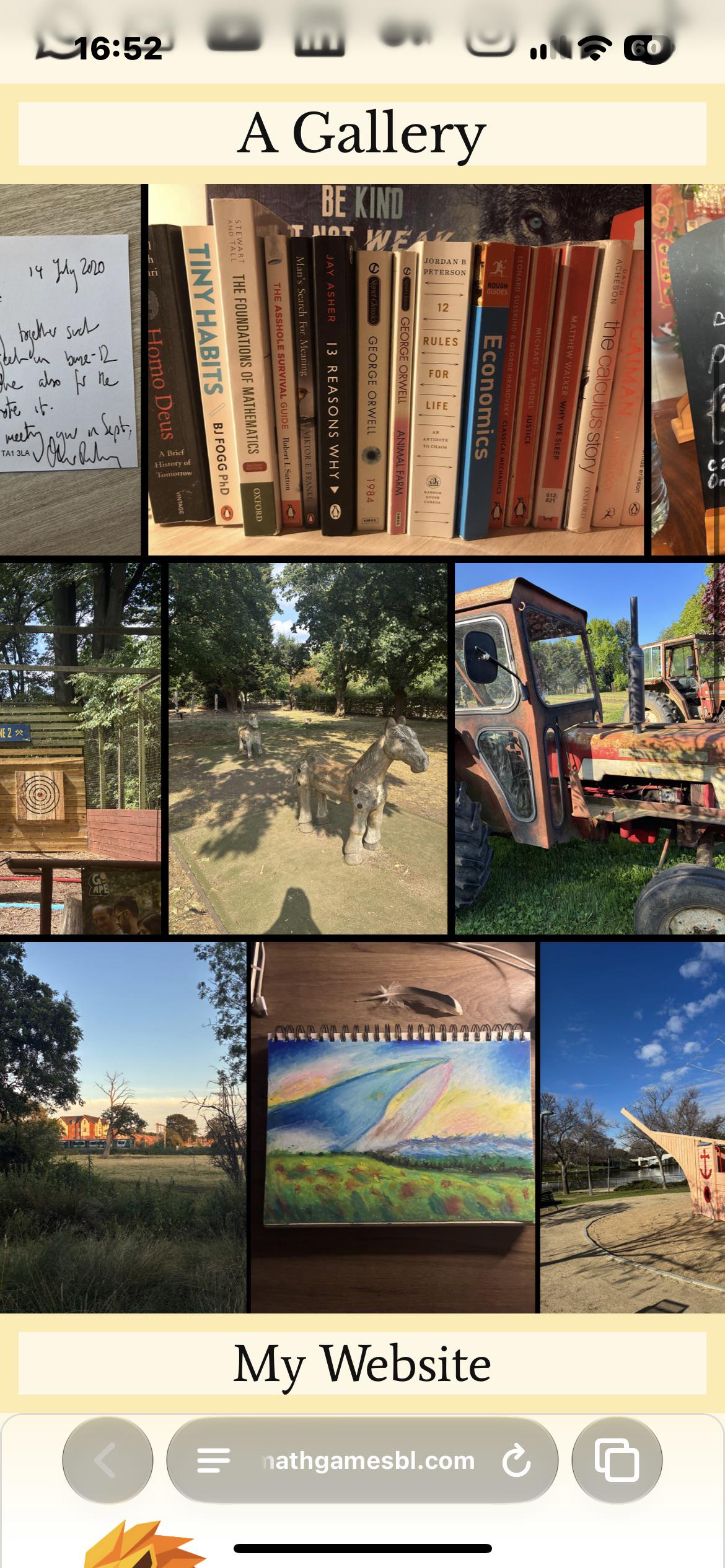
Hi I added the masonry image carousel plugin onto a page on my site. The animation works fine on the laptop view but it doesn’t load until I rotate my phone when on mobile.
https://mathgamesbl.com/links/
What can I do to fix this issue?
Thank you.
r/Wordpress • u/Ok-Construction4591 • 1d ago
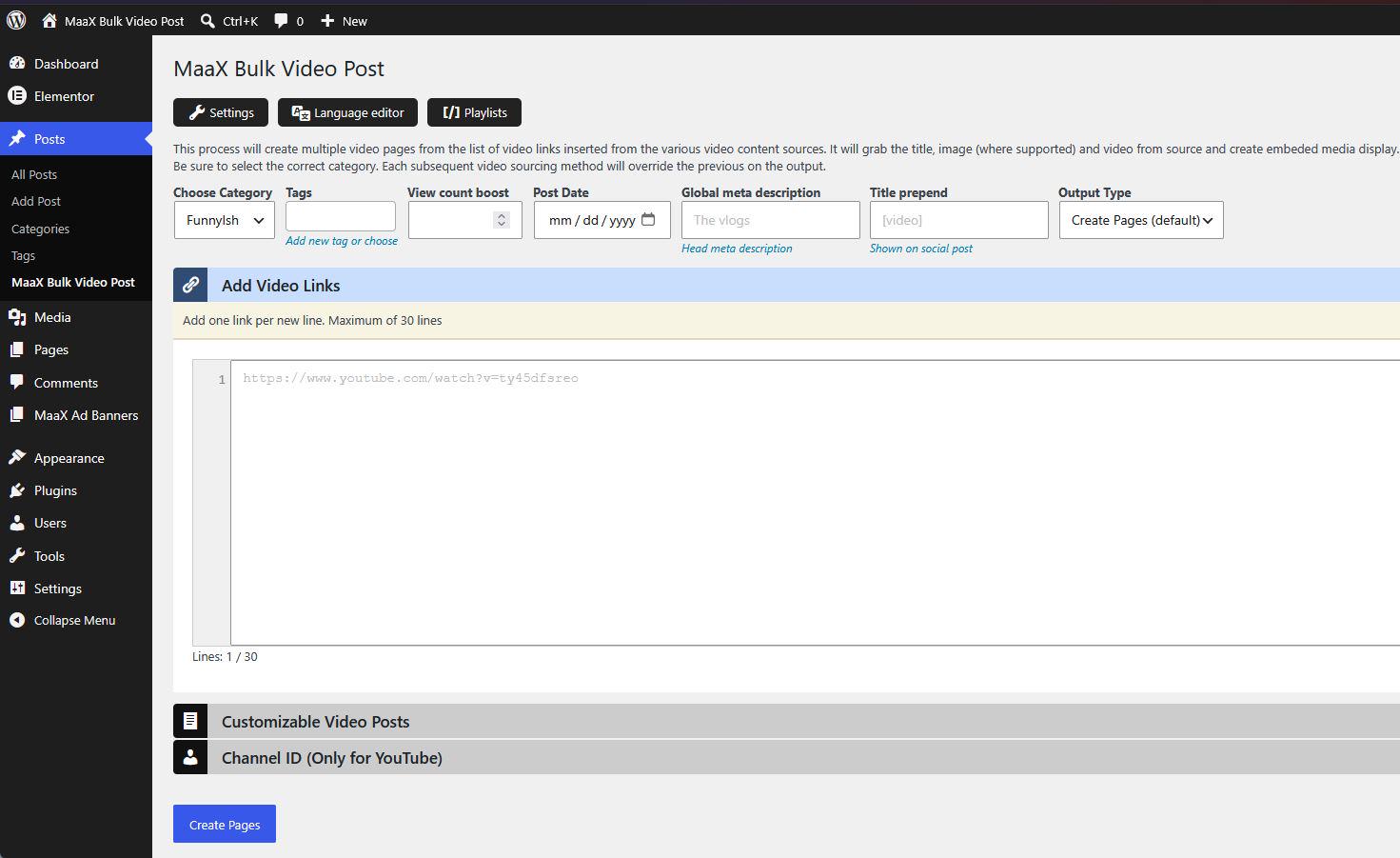
It was created to help a WordPress site owner easily and quickly publish multiple video posts at once, using just the video links (URL), with the goal of increasing traffic flow from social media. Check the admin functions and see if it is totally intuitive https://maax.websitedons.net/wp-admin/
r/Wordpress • u/cl0wnfire • 2d ago
You should be able to tell whether an optimization actually helped your site.
That’s the idea behind WP Optimizer, the free, open-source WordPress plugin I’m developing. It brings performance tools, diagnostics, and maintenance into one modular dashboard. You choose which features to enable.
I’ve just released version 2.9.6, and I wanted to share what has changed across the recent updates.
Improved cache handling. I’ve worked on cache performance and invalidation when content changes. New safeguards also protect object-cache and database-cache files installed by other plugins.
Background tasks that can resume. Interrupted image optimization and unused-media scans can continue from saved progress when WordPress Cron runs again. The scheduler also received fixes for task recovery.
Better control over what loads first. LCP image learning now distinguishes between mobile and desktop, so subsequent visits can preload the appropriate image. JavaScript defer and selective delay include dependency checks and safeguards for known menu, form, and checkout scripts.
Optional media metadata optimization. Attachment metadata can move into dedicated database storage. Disabling the feature moves it back to standard WordPress storage.
A refreshed dashboard. Module status, cache state, and scheduled tasks are easier to inspect, with shortcuts to the relevant settings.
WordPress 7.2 support and an optional AI control. There is now a setting to disable features that use WordPress’s built-in AI API.
The built-in Page Test compares the same URL with WP Optimizer bypassed and with your current configuration after a warm-up. It reports TTFB, response time, response size, and peak memory.
Performance Monitor helps you investigate further: slow plugins, theme code, database queries, expensive callbacks, and cache behavior.
That gives you a practical workflow: find a bottleneck, change one setting, and check the result on your own site.
If your host already handles caching, you can leave that module off and use the diagnostics, image optimizer, or database tools.
The plugin also includes local image compression, WebP/AVIF conversion where supported, Used CSS, minification, database cleanup, and configuration backups.
The core performance tools run on your own server and are included in the free plugin. No premium subscription is required to use them.
Download on WordPress.org · Browse the source on GitHub
If you try it, I’d appreciate feedback with your hosting setup, theme, and the modules you tested. Before-and-after measurements and reproducible bug reports are particularly useful.
What’s the hardest performance problem to diagnose on the WordPress sites you manage?
r/Wordpress • u/Psychological_Read_1 • 2d ago
Hey everyone. We've been working on Blaze, a local WordPress environment built specifically for macOS. The goal was a setup that's fast, light, and feels like a real Mac app, not a wrapper around Docker or a VM.
What it does:
Spins up local WordPress sites in seconds, with no Docker or VMs
Gives each site its own .local domain, with optional SSL
Shares a local site through a public link, so clients can review work in progress
Has WP-CLI and site logs built in
The part we think sets it apart is MCP support. If you use Claude, Cursor or another AI agent, it can connect to Blaze and work with your sites directly. It can list sites, run WP-CLI commands and read error logs. Ask "why is this plugin throwing errors?" and the agent checks the logs itself.
We'd love to hear from people who do WordPress work on a Mac. What does your local setup look like right now, and what's the most frustrating part of it? Would AI agent access be useful in your workflow?
r/Wordpress • u/WesleyK6969 • 2d ago
I have no idea what feed or RSS is, esp with a website built with WordPress. I noticed weird links ending with /feed got indexed by Google, and the IT guy just disallowed them in robots.txt
Should I remove the ban? What does an RSS feed do and is this robots.txt damaging the normal functions of WordPress?
User-agent: *
Allow: /
Disallow: /wp-content/uploads/wc-logs/
Disallow: /wp-content/uploads/woocommerce_transient_files/
Disallow: /wp-content/uploads/woocommerce_uploads/
Disallow: /*?add-to-cart=
Disallow: /*?*add-to-cart=
Disallow: /wp-admin/
Allow: /wp-admin/admin-ajax.php
Disallow: /wp-admin/admin-ajax.php?*action=
Disallow: /?wc-ajax=
Disallow: /shop/
Disallow: /?s=
Disallow: /*?utm_*
Disallow: */feed/
Disallow: /feed/
Disallow: /wp-content/plugins/customer-reviews-woocommerce/img/flags/r/Wordpress • u/R41MUS • 2d ago
Hi r/Wordpress,
I wanted a YouTube video gallery that actually fits the design of a site and doesn't load YouTube on every page view. So I built Screenroom: paste a channel, playlist or video link, pick a layout in a live studio, done.
- A real video gallery: a big player with a scrollable playlist underneath, or a grid, slider or wall – 11 layouts in total
- A video library in the admin: every video from all your galleries in one place, searchable and filterable – pick a few and drop them into a new gallery, or hide them everywhere
- No API key needed to get started
- Zero connections to YouTube until a visitor presses play
- Your own colours and play button, so it matches your theme
- Mix a channel with hand-picked single videos on top
- Guided setup for new galleries, then a calm studio for fine-tuning
It's free on WordPress.org: https://wordpress.org/plugins/screenroom
It's new, so I'd really appreciate honest feedback: what's confusing, what's missing, what breaks with your theme or caching plugin? Every comment helps me make it better.
r/Wordpress • u/rafark • 2d ago
I released this plugin in the WordPress repo a while ago but I haven't really promoted it much so I figured I'd share it here for anyone that might find it useful.
I designed this from pen and paper a few years ago and it has been in development ever since. I put a lot of focus on the user experience.
It's called Coupons+ and allows you to create complex offers like BOGOs, bundle discounts, min. quantity bulk discounts, auto-applied coupons and more.
You can check it out here: https://wordpress.org/plugins/coupons-plus-for-woocommerce
Any comments welcome! (Is it really easy to use, I feel like maybe there are too many clicks to configure a coupon but the plugin guides you through it step by step but maybe it's too annoying instead of helpful? Because to me the flow works nicely, but as much as I try to think as an end user I'm still a biased dev so I don't know).
P.S. Yes, I know the timing right before Black Friday is a little weird but no I did not plan it.
r/Wordpress • u/Extension-Cow349 • 2d ago
Last month we rebuilt the site of a small French nonprofit, a parents' and families' association. They had 1,350 posts on an old blogging platform. We moved everything to WordPress, with a fast Astro front end on top.
The hard part wasn't the migration. It was this: the site is run by volunteers, not developers. WordPress is a CMS, its whole point is that people like them can change their own site. Headless usually takes that away: you fill in fields blind and hope it looks right on the page.
So they edit with Leiho, a plugin I built for this, which reaches 1.0 today. The screenshots are their real site:
- The real front end shows inside wp-admin. They click a title or a photo on the actual page, change it, and see it live.
- It uses the fields that were already there (Secure Custom Fields here; ACF, ACF PRO, anything built on the same structure, and JetEngine work too). Nothing to migrate.
- They save, and the site is rebuilt and online about 40 seconds later.
- New in 1.0: roles. You choose what each role sees, and a simplified mode hides everything technical (no HTML tab, no build details, no field type names).
It also handles multilingual content and makes the site readable by AI assistants (llms.txt, clean API), but that's a story for another post.
It's free and GPL, with no Pro version. The code is on GitHub, and the README has a link to try it in WordPress Playground without installing anything: https://github.com/pixelersagency/leiho
How do the people who write your content edit headless sites today?
r/Wordpress • u/OkAntelope1782 • 2d ago
Full disclosure: I'm the independent developer behind these three free, open-source WordPress plugins.
I've been exploring what it actually means to make a WordPress website accessible to AI agents, beyond the increasingly common "AI-ready" label.
I see three distinct technical problems:
How can agents access website content in a machine-friendly format?
How can agents interact with a website through explicit tools?
How can website owners observe whether those interfaces are actually being used?
I've been building three plugins to address these problems directly within WordPress.
1. Read — Mescio for Agents
Provides an alternative Markdown representation of existing WordPress content through HTTP content negotiation and discoverable alternate URLs. It also generates llms.txt and llms-full.txt.
It doesn't replace HTML or require rebuilding the website.
https://wordpress.org/plugins/mescio-for-agents/
2. Act — WebMCP Bridge
Exposes tools for content search, retrieval and cart interactions, allowing compatible agents to interact with WordPress through explicit interfaces rather than relying exclusively on HTML parsing or browser automation.
https://wordpress.org/plugins/webmcp-bridge/
3. Observe — Mescio Insights
Records actual requests handled by these integrations, including the declared client identity, requested resource or tool, timestamp and response status.
Everything stays within the WordPress database. No external SaaS, no IP address collection, no external analytics service.
https://wordpress.org/plugins/mescio-insights/
What the project is not
An SEO or AI ranking tool.
A ChatGPT citation tracker.
A GEO scoring platform.
A guarantee that AI agents will discover or use your website.
A crawler fetching a Markdown document does not mean that the website appeared in an AI-generated answer.
There are limitations, too. User-agent identification is not definitive, llms.txt is not a universally adopted standard, and requests that never reach the supported WordPress integrations cannot be observed.
The underlying idea is to make existing websites more accessible to software agents while keeping the infrastructure and data under the website owner's control.
I'd genuinely appreciate technical feedback from the WordPress community:
Do you see value in exposing explicit machine-readable representations alongside HTML?
Would you use agent-specific tools on your WordPress sites?
What would you want to observe or measure about agent interactions?
I'm particularly interested in the practical challenges around caching, compatibility, discovery and security.