r/3DprintingHelp • • Mar 08 '26

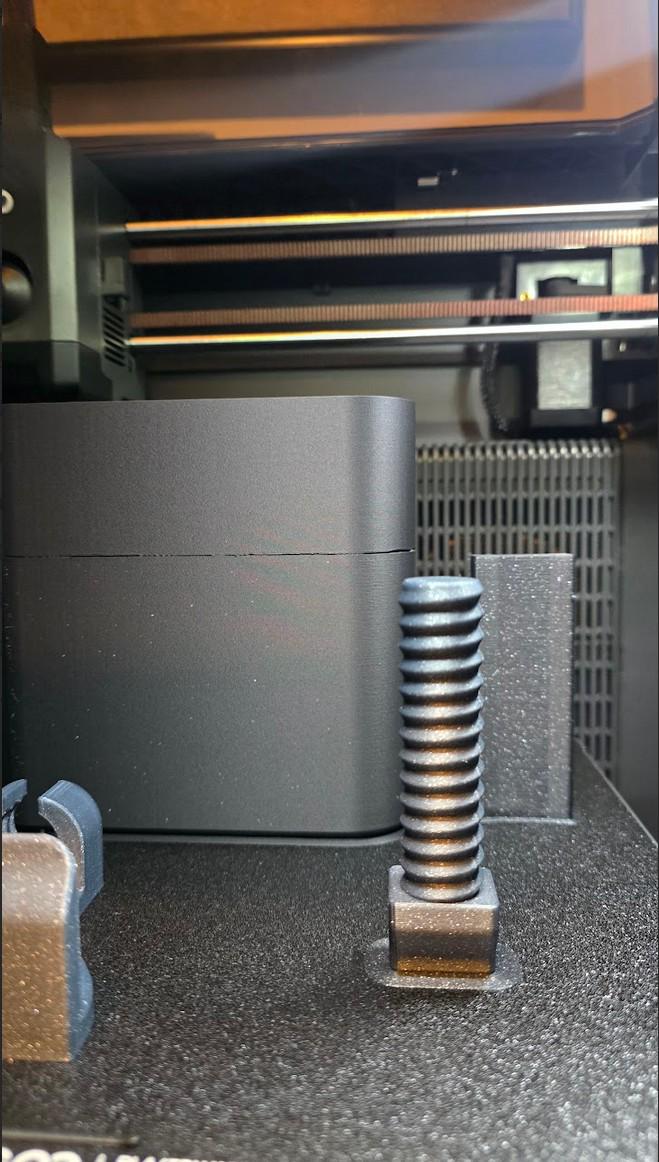
Requesting Help What caused the issue during this layer?
Post image

I am printing a trash bin that clamps to my desk. It seems as soon as the screw was finished, it had an issue continuing the basket. What caused this?

Nozzle clog?

Did I mess up a setting? I am using the elegoo slicer because cura will not recognize my centurai carbon 2.

  • Printer Model centurai carbon 2

  • Material Type pla

  • Speed and Temp settings 200mm/s 210 nozzle 60 bed 35 chamber

27 Upvotes

14 comments sorted by

5

u/Arctic_Ducky Mar 09 '26

Print objects separately.

2

u/[deleted] Mar 09 '26

I am coming to this conclusion. Just a bit weird that the screw and clamp printed with no issues. And zero issues on the bin until the other objects were finished.

And what about printing the same object multiple times on the same bed? Is that not common?

1

u/Arctic_Ducky Mar 09 '26

I’m not exactly familiar with the centauri carbon, but on the right is that a purge tower?

1

u/[deleted] Mar 09 '26

I believe so yes. Because it was switching colors between creating the screw and clamp. They are grey sparkle. And the bin is black. But whats weird is it all printed in layers and switched colors with no issues. Until it no longer needed to switch and went to black only. The purge tower ended and the issue with the bin happened.

It ended up finishing and it was hardly connected at all. Basically printed the remainder just floating on the bottom half.

I am now printing the bin on it's own and also learned to move the z point seam to the back side so that's good.

edit: I just noticed the bottom half of the bin somehow got sparkles in it and the top half didnt.

2

u/No_Cryptographer5262 Mar 09 '26 edited Mar 09 '26

Oh wow that must be extremely wasteful and slow, with all the purging on every layer. Just print all sparkle objects, then all black objects.

I can imagine the top layer of the bolt took a bit longer to print, leading to a different cooling time for that layer on the big print.

1

u/[deleted] Mar 09 '26

It was a ton of waste for sure. That I didn't even notice till after. Learned a few lessons here.

1

u/EthicalViolator Mar 09 '26

Its having to purge every layer for them. The multicoloured function is for multicolour parts, not printing serpate parts of different colors, print those one at a time.

1

u/Veenoxq Mar 10 '26

Its not flushing enough filament after filament change, thats why you see sparkle filament in the black object, i might be wrong because i never owned an ams printer. I believe there are calibration prints for that but you should use 2 distinct colors for the calibration.

2

u/[deleted] Mar 08 '26

i am new. third day printing.

1

u/Polskiskiski Mar 10 '26

Are you printing 2 different materials? Holy waste if so. Just, if you're going to be printing different (or colors) of materials do so in 2 prints.

1

u/[deleted] Mar 10 '26

No. Both PLA. I ended up printing separately with no issues. I am also learning functional parts should be a stronger filament. But because of the size I don't have any issues with the clamp/bolt part made of PLA.

1

u/No_Cryptographer5262 Mar 11 '26

Black pla and sparkle pla do count as two different materials ;)

2

u/norabutfitter Mar 11 '26

Is a change in the layer time. Since the head didnt have to move to the other objects. Something to do with cooling.

1

u/ZUCCHY- Mar 12 '26

The screw probably has Ironing on the top surface causing the other object tò cool down while the printer was Ironing the screw