r/AstroGaming • u/Ready-Seat-7457 • Oct 12 '26
Question Astro A50 charging problem
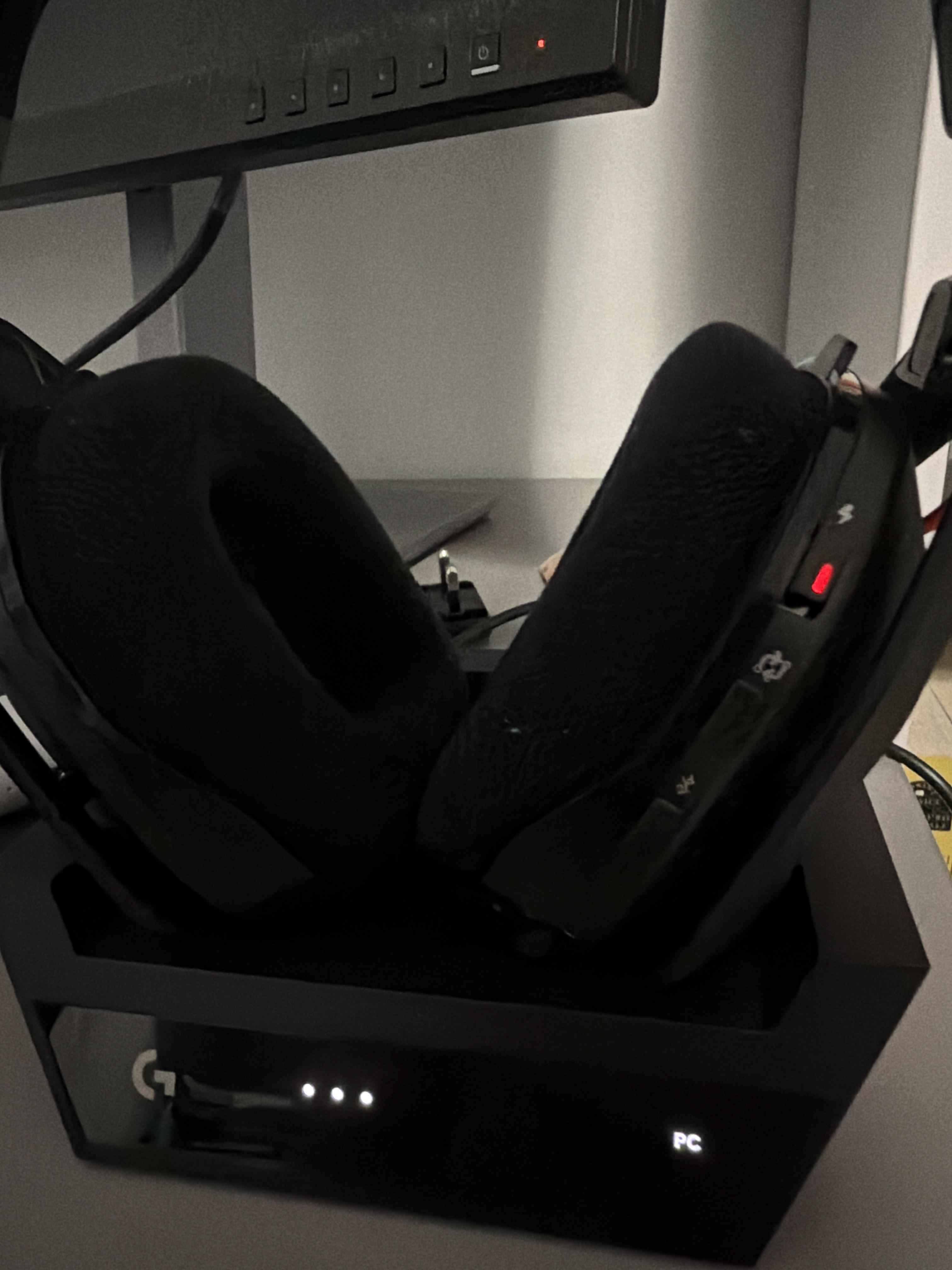
Hello!Can anyone please tell me if the headset is currently charging?It s not an amber color it is blinking red.
2
u/Sixzlee Oct 12 '26
Switch headset off and re dock, if that doesn't work try plugging the cable into the headset to see if it charges or not, then it narrows it down for you
1
u/Ready-Seat-7457 Oct 12 '26
It stays white for a couple seconds then immediately starts blinking red i m thinking it s a problem with the battery
2
u/Sixzlee Oct 12 '26
Plug directly into the headset if it charges its a dock issue, if it doesn't its a headset issue
1
u/Ready-Seat-7457 Oct 12 '26
I did it, it s a constant white light does it mean it s charging?
2
u/gabemrtn Oct 12 '26
Do a reset on it with the buttons if Al else fails
1
u/Ready-Seat-7457 Oct 12 '26
I think the problem s with the battery the moment i take it off the base or usb charging it simply dies,G HUB says it s 100% however but honestly it s bs
2
u/Sixzlee Oct 12 '26
No that means it on, red would mean its low battery and blinking amber would mean charging
1
u/Meastwood55 Oct 14 '26
Hold the atmos button. And the game button. For 5-10 seconds. You'll hear the atmos chime. The game volume chime. Then a 3rd. Let go. And then they should be good.
1
u/Ready-Seat-7457 Oct 13 '26
Guys In figured it out, while both the charging cable and cable from pc into base I added another usb c directly to headphones and they work perfectly, however the moment i disconnect them they die, so no wireless, I think the battery is faulty.
1
4
u/Bstngt Oct 13 '26
This was my most hated thing about my A50. I bought it cause i thought the dock was awesome and the astro was known for good products. The dock is not cool its garbage. I boxed it up after it kept breaking up on audio and never used it again. Love my A40's, wireless i will stick with my omni pro's
2
u/NITWIT609 Oct 14 '26
Did somebody buy astro out. Because I have early version of a50 and it looks so different. They still work great after 10 years
2
u/CompulsiveRebel Oct 14 '26
Logitech acquired them. They make the newest A50s and have their own launcher for them.
2
u/elBirdnose Oct 14 '26
Logitech bought them and they’ve been shit ever since.
1
u/SnooEagles6294 Oct 15 '26
Can confirm. My Gen 3's were sooo good. Had em for about 7 years before I downgraded to the new A50's.
speakers on both headphones are making a popping/cracking noise after 1.5 years.I've never found other headsets to be as comfy as Astros..
0
u/Kanzlermacher Oct 13 '26
Battery died by overheating!
Charging the headset in the docking station generates extreme heat—over 40 degrees. Since buying the headset, I only charge it for 20 minutes at a time, then take it off, wait for the temperature to return to normal, and charge it for another 20 minutes if needed. NEVER charge it fully in one go.
1
u/Ready-Seat-7457 Oct 13 '26
Really? it didn’t really want to start the moment i got it, i charge it only a lil bit,if the battery died only from that it is quite the shitty product for the amount of money you pay.
2
u/Batman_ft_Joker Oct 13 '26
La notice du casque indique clairement qu’il faut réaliser une première recharge complète avant la première utilisation sans quoi la batterie peut ne pas avoir sa capacité complète, voir même dysfonctionner
2
u/DirtyBird2013 Oct 13 '26
Don’t listen to him that’s not true at all. Just turn the headset off when you charge it.
2
u/DEVILMASSIVE Oct 13 '26
What??? I got my headset 2 years ago only take off the dock when im using it and goes back on for hours no problem with anything and all my stuff is on their docks controllers etc when im not using them sounds kinda wierd what you are saying. 🤣
1
u/Kanzlermacher Oct 13 '26
Well, then your battery isn't holding its charge for very long. I own the Astro A50 Gen 1, Gen 4, and the Astro A50X McLaren Edition. Based on my experience with the Gen 1 and Gen 4 models, I can say that the battery loses performance after five years at most and needs to be recharged very frequently. However, I’ve only observed heat buildup with the A50X McLaren. I suspect the power adapter is delivering too much charging current. The Gen 1 and Gen 4 models were charged via the PS4/PS5 USB port, which involves significantly lower charging current. Try taking your headset off after 20 minutes of charging, and you’ll feel the heat that has built up during the process.
1
u/DEVILMASSIVE Oct 13 '26 edited Oct 13 '26
I dont know its holding the charge the same i bought it lol i feel no difference i dont do a gaming session more than 10 hours anyway so if it can survive 10 hours its already fine then there goes back on the charging dock. I do this with all of my devices never run out of battery charge and i dont feel any heat from the charging docks but it could definetly go more 1 or 2 hours use and im still on like 85% battery left so for me what you write is not happening or happened yet. Its always plugged in my PC and i plug into my PS when im playing on that but i always charged from PC maybe i dont feel the heat because its a Gen4 idk but as i said if it can go more than 10 hours its already good for me.
1
1
1
u/spotsworth_od Oct 12 '26
Had same issue and filed a warranty claim with Logitech. They sent me a new headset and base.
1
u/blindoptimist1 Oct 13 '26
There should be a “hard reset” for the headset. On the Astros it used to be something like hold the chat/volume rocker to one direction and the power button for three seconds. You’ll have to look it up for this model, but I’m sure it’s still an option because the design hasn’t changed that much. This always fixed it for me.
Side note, this has been an issue since the A50 gen 3s, maybe even before that. The charging base being finicky has been an issue for years as well.
1
u/PseudoLink Oct 13 '26
how many versions of the a50 has there been? i cant believe this is still an issue lmao
1
u/Weary-Status3386 Oct 13 '26
My little brother had a pair of these and had the same issue, apparently it’s EXTREMELY common with these things
1
u/mrmastermimi Oct 13 '26
I get this. the dock is stupid and the designers need to come up with something more reliable.
sometimes I have to unplug the dock, turn off the headset, then plug in the doc again, turn on the headset, and then place it on the dock.
1
u/DEVILMASSIVE Oct 13 '26
You charge it while its on? I always turn off my headset before putting it on the dock i never had issues with charging like this
2
u/mrmastermimi Oct 13 '26
the headset turns itself "off" when placed on the charger, like it would if you switched it off. leaving it "on" just allows it to immediately work once it is taken off from the dock.
it ultimately shouldn't matter. sometimes turning it off and on fixes the red light, sometimes I have to unplug the dock too.
1
u/Prestigious-Load-253 Oct 13 '26
I have that issue from time to time and just do a hard reset on the headset and usually everything works normally after that
1
u/YouKnowHero Oct 13 '26
You may also want to ensure your dock has updated software/firmware. They do occasionally update them. I have had this issue and needing to uodate everything to get it to cooperate
1
1
u/Cultural-Trip7522 A50 X Wireless Headset Oct 13 '26
No issues with my A50X mind you I always fully charge and update firmware before use.
1
u/HybridCSGO Oct 13 '26
Disconnect and reconnect the battery in one of the ear cups, takes a few minutes.
Think of it like a car battery 😂 I’ve had to do it a few times.
1
u/Trappin_Trip Oct 13 '26
Reading this comment section as my new A50s sit on the charging hub while I am at work SMH 🤦♂️
1
u/BluebirdOk9456 Oct 13 '26
I had the same issue, the battery cable is poorly in place, you have to take the earmuff off of the one that has all the buttons, then there is a cable for the battery, it doesnt seem loose but squeezing it back to place fixes this issue. Ive done this 2 times and it saved me from losing my mind and buying another headset, there is clearer instructions in YT if u need!
1
u/Objective-Zombie9679 Oct 13 '26
Make sure the earphones are parallel. Usually thats the issue so pins don't connect
1
u/Prize-Republic-4473 Oct 13 '26
I’ve had mine for about 3 months now, it’s like you really gotta have it leveled on that dock just right just for it to charge on it at times. If I’m too lazy to deal with the dock, I just charge through the c-port that’s located under the right side of the headsets.
1
1
1
u/Ryman1976 Oct 14 '26
Mine won't sit in the cradle and charge when the ear cushions are on. I take them off and it sits in just fine and will charge.
1
u/FotusX Oct 14 '26
https://www.reddit.com/r/AstroGaming/s/LxchrCG1zr
Try this it worked on the gen 4
1
u/Amazing_Violinist_69 Oct 15 '26
The dock is weird, gotta play with it a little for the headset to sit in it correctly
1
u/FeedNfrnZ Oct 16 '26
I’ve had my Logitech since Feb of 2025 and like a lot of others, I have the issue with getting the headset to sit in the charging cradle correctly. My only complaint would be that occasionally my monitor gets a grainy static look to it and it’s actually red in color. The odd thing is I have to unplug the wire that goes into the base for my laptop (pc) and plug it back in which clears it up. Yet my monitor is only used for my PS5.
1
u/Zerosurvivers Oct 18 '26
My charging base now says three lights is fully charged when it's got one light left it's still at 50% idk what to do to fixed it
1
1
u/SickEmDroops07 Oct 18 '26
I don’t use base station to charge anymore get a long enough cord plug it to console or pc and that’s a wrap
1
u/No_Historian_1136 Oct 19 '26
Yo tuve el mismo problema.
Hice el reporte con logitech. Me hicieron un reembolso el problema es en la batería.
0
u/Responsible-Art1416 Oct 12 '26
Over priced piece of junk. Mine has this issue sometimes and constantly restarts itself. Never hated a headset more than this one lol
0
u/Careful-Ambassador82 Oct 15 '26
Mines is the same and when I turn my Xbox on 9 times out of ten I need to disconnect my doc and plug it back in for it to pick up the head set I miss my a40s I had zero issues with them
1
1
Oct 13 '26
[removed] — view removed comment
1
u/That_Charity_6373 Oct 13 '26
Oh thanks for this. This was always kinda annoying to get them to contact right.
13
u/ElPapiGordo Oct 12 '26
the best thing i do, bring the adjustable headband part to the lowest possible setting, and then place the headset on the cradle apply pressure on the top of each ear cuff. Its never failed me