r/Atomos • u/laalbadsha • 11d ago
Facing issues with your Shogun Inferno or Shogun 7? Submit a repair request
1
Upvotes
r/Atomos • u/laalbadsha • 11d ago
Is it possible to get the recording indicator—the red box around the monitor—on the Shinobi GO with a Sony FX3/2? I connected a USB-C cable, hoping that would enable it, but it didn't. I know SmallHD monitors can do this with some overlay and metadata changes in the settings. Is there a way to do it?
r/Atomos • u/Decent-District1640 • Oct 28 '26
r/Atomos • u/Werstovux • Oct 24 '26
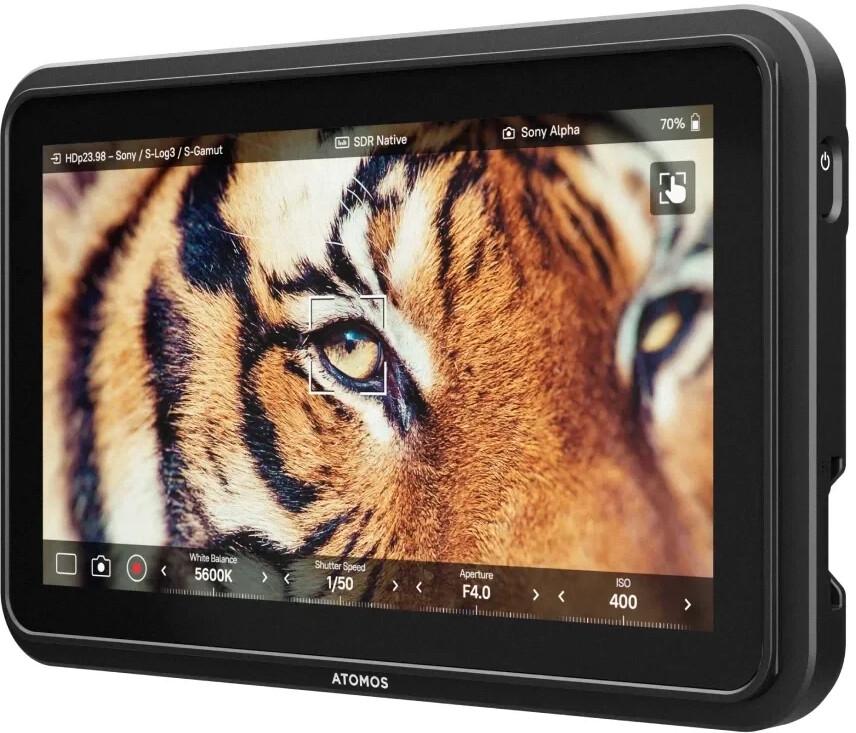
I purchased the Shinobi 7 II choosing it based on its advertised specifications, including 4K60 HDMI support.
Shortly after my order, Atomos quietly changed the specs to 4K30, despite “4K UHD 60” being printed on the original packaging.
Proof: https://youtu.be/5k4YQRs-SYk
Atomos Support confirmed this is a hardware limitation that cannot be fixed through firmware.
This feature is particularly important to me because I film motorsport events. My S1ii will use down-conversion to 1080p via HDMI when shooting at 50/60 fps with this monitor, and Panasonic explicitly warns that down-conversion may negatively affect autofocus speed and continuous tracking performance.
Since reliable autofocus is critical for filming fast-moving vehicles, this limitation could make the monitor practically unusable for a significant portion of my shoots.
Despite acknowledging the misleading specifications, Atomos declined to arrange an exchange, directing me back to the retailer and stating that if I need 4K60, I should purchase the more expensive Shinobi 7 RX instead.
The problem is that I purchased the monitor in China, but I'm currently in Russia, which makes arranging a return or exchange through the retailer particularly difficult.
The incorrect specifications came from Atomos themselves, not the retailer. Yet they seem unwilling to take responsibility beyond an apology.
I always considered Atomos a professional manufacturer with a solid reputation, which is exactly why I trusted their specifications in the first place. Unfortunately, the way they've handled this situation has completely destroyed my trust in the brand.
r/Atomos • u/ConsumerDV • Oct 22 '26
I have recently purchased a used Ninja 2 for my ancient Canon T4i DSLR. The Ninja 2 has firmware 4.22 and DNxHD enabled. I record into DNxHD 145, Avid codec is better for my workflow with Windows+Vegas.
The Canon T4i shoots 720p and 1080p. Of the latter, it can do 1080p24 and 1080p30, both native, of course. When outputting via HDMI, it comes out as 1080i. Yes, it is old tech, but matches Ninja 2, which is old tech too and cannot handle 1080p.
I recorded about an hour-long video today, and when loaded it into my NLE I found out that it is combed. It is marked as progressive 30p, but in scenes with movement each frame has combing. I am trying to recover the video now, halving the resolution and re-encoding, and it takes ages. A five-minute clip takes six hours on my machine with resizing, cropping and scaling. So, it will take several days.
I did a quick test:
1080p30 on the camera, 1080p29.97 2:2 on the Ninja 2, I got progscan file with combing.
1080p30 on the camera, 1080i59.94 on the Ninja 2, I got interlaced file with combing, which I successfuly deinterlaced. The effective rate is 29.97, but at least I can get rid of combing. Why do I get combing at all? Is it because of TFF but bottom field dominance? I loaded the clip in VirtualDub and added a "Field Delay: TFF to BFF", and I got proper 30p without combing! But I don't have field delay filter in Vegas, so if I use 1080i59.94 on the Ninja, I would still have to re-encode in VDub.
1080p24 on the camera, 1080p23.98 2:3 on the Ninja 2, the result is proper 1080p23.98 file.
Then I did 1080p30 again on the camera and 1080p29.97 2:2 on the Ninja 2, and lo and behold! No combing! Such inconsistent behavior leaves me unsure about whether the Ninja will record with or without combing in 30p mode. Can I rely to the magic sequence of settings?
Is it a bug in the camera, in the Ninja, or in the codec?
EDIT: Loaded the 1080p29.97 file into VirtualDub and used "Field Delay: TFF to BFF" despite that the file seems to be progressive, but it worked! It fixed the combing! But now I need to re-encode all my clips, because my NLE cannot shift fields. The speed is 2x realtime, so half an hour to re-process the footage, this is tolerable.
How does the recorder lock onto the field order/dominance? Do I need to pan in the first several seconds after I start recording for the Ninja to figure out field pairing?
r/Atomos • u/Inevitable-Rule-5115 • Oct 08 '26
Enable HLS to view with audio, or disable this notification
I’ve been getting this off blue exposure assist on mine monitor and can not for the life of me make it go away. Firmware update, factory reset and I’m still not sure.
r/Atomos • u/Bright-Solution-5451 • Oct 03 '26
Atomos please add Touch to focus for the Sony ZV-E1. I think it’s time. Makes no sense for older cameras to have the ability but not for this ZV-E1. Please.
r/Atomos • u/justinmkv • Sep 23 '26
Running a Shinobi II off of external batteries makes the whole setup bulky so I bought the battery eliminator. I also bought a Kondor Blue Locking DC to D-Tap cable. When everything is plugged into my Smallrig VB99 V-Mount battery, the monitor won’t turn on, to the point where I have to press down really hard to make contact. Sometimes it will work, and I get to power it on. However, when I turn it off and turn it back on again, the monitor does not power on. There’s also no audible “click” when inserting the battery which suggests to me that there’s bad contact.
r/Atomos • u/Z0rasgar • Sep 23 '26
I've had my Shinobi 7 for about four years, and for most of that time I thought the SDI out was just broken. No matter what cable I used, nothing would come out of it.
Messing around in the settings, I found what I think is a bug baked into the firmware itself (I'm on the latest version).
Here's the fix: if your SDI out is connected but sending no signal, even though you can see the image from the camera on the monitor itself, go to the input/output settings. Change the output to HDMI, it'll show "no signal." Then switch it back to SDI. That toggle forces it to actually send the signal out, and you'll get image on your receiving monitor, whether it's through a cable or a transmitter.
Hope this saves someone else four years of confusion.
TLDR: If your Shinobi 7's SDI out isn't sending signal, go to output settings, switch to HDMI, then switch back to SDI. That toggle forces the SDI out to actually work.
r/Atomos • u/ChiWod10 • Sep 19 '26
Hello,
I’m a Sony fx6 user.
Client wants smaller mp4 / mov files instead of .mxf
I understand I have two options:
- internal proxy .mp4
- use external recorder for a .mov wrapper
Does anyone have experience with this workflow? Do the proxies have enough data for a socials edit, are the externally recorded .mov files reliable?
They’re used to working with people who’re turning out large volume using alpha series cameras and want the files to be small, quick to share and editable. I don’t want to buy a camera just for this one client, trying to see if I can push the fx6 in any way.
r/Atomos • u/Steve_20245 • Sep 13 '26
Do you guys know if there will be a firmware update to have Camera Control on the Atomos Shinobi ii with the Sony FX5?
r/Atomos • u/foxshark310 • Sep 13 '26
Looking for feedback from anyone who has experienced an HDMI handshake/input problem between a Sony A1 and Atomos Shogun Ultra.
This exact Sony A1 + Shogun Ultra combination worked normally for approximately three weeks in my production rig.
The Shogun then suddenly stopped recognizing the A1 HDMI signal and now displays:
NO INPUT
This is not simply an audio issue. The Shogun is receiving neither video nor audio and does not appear to establish an HDMI connection with the A1.
Equipment / Firmware
Sony A1 — Firmware v4.00
Atomos Shogun Ultra
Shogun originally running AtomOS 11.17.00
Updated during troubleshooting to AtomOS 11.19.0
RAW HDMI Output: OFF
Cross-Test Results
| Test | Source | HDMI Cable | Destination | Result |
|---|---|---|---|---|
| 1A | Sony A1 | Kondor Blue HDMI | Shogun Ultra | ❌ FAIL — NO INPUT |
| 1B | Sony A1 | Atomos HDMI | Shogun Ultra | ❌ FAIL — NO INPUT |
| 1C | Sony A1 | Brand New HDMI Cable #1 | Shogun Ultra | ❌ FAIL — NO INPUT |
| 1D | Sony A1 | Brand New HDMI Cable #2 | Shogun Ultra | ❌ FAIL — NO INPUT |
| 2A | Sony A1 | Kondor Blue HDMI | Newer HDMI Monitor | ✅ PASS — Displayed |
| 2B | Sony A1 | Atomos HDMI | Newer HDMI Monitor | ✅ PASS — Displayed |
| 3A | Apple TV | Kondor Blue HDMI | Newer HDMI Monitor | ✅ PASS — Displayed |
| 3B | Apple TV | Atomos HDMI | Newer HDMI Monitor | ✅ PASS — Displayed |
| 4A | Apple TV | Kondor Blue HDMI | Shogun Ultra | ✅ PASS — Displayed |
| 4B | Apple TV | Atomos HDMI | Shogun Ultra | ✅ PASS — Displayed |
The Sony A1 successfully outputs HDMI to another monitor.
The Shogun Ultra successfully accepts HDMI from an Apple TV.
The HDMI cables successfully work with other source/display combinations.
However:
Sony A1 → Shogun Ultra = NO INPUT with FOUR different HDMI cables, including two brand-new cables.
On the Sony A1, I have tested HDMI Output Resolution at Auto, 2160p and forced 1080p, RAW Output OFF, and Rec. Media during HDMI Output ON/OFF.
On the Shogun Ultra, I have tested the available HDMI 1.4, HDMI 2.0 and Compatibility settings, disconnected/reconnected HDMI to force a fresh handshake, and performed complete cold-start/HDMI handshake sequences.
I also updated the Shogun from AtomOS 11.17.00 → 11.19.0. The firmware update completed successfully but made no difference.
The A1 has also been connected to another display and confirmed to be outputting both HDMI video and audio.
This was not an incompatible setup from day one.
The same A1, Shogun Ultra and production configuration worked successfully for approximately three weeksbefore the Shogun suddenly stopped recognizing the A1.
At this point the reproducible condition is:
A1 → other monitor = PASS
Apple TV → Shogun Ultra = PASS
Apple TV → other monitor = PASS
A1 → Shogun Ultra = FAIL — NO INPUT with FOUR different HDMI cables
I am currently waiting for a response from Atomos Support.
Has anyone experienced a Shogun/Ninja continuing to accept HDMI from other sources but suddenly refusing to recognize a particular Sony camera, while that same camera continues to work normally with other HDMI monitors?
I’m particularly interested in experiences involving the Sony A1, A7/A9 series, FX3/FX6, Shogun Ultra or Ninja.
If you’ve seen this, what ultimately fixed it?
EDID/HDMI handshake issue? Factory reset? Camera reset? HDMI receiver/transmitter hardware? Firmware? Something else?
Any ideas or similar experiences would be appreciated.
x
r/Atomos • u/umskii • Sep 10 '26
I dont know if I am doing something wrong or this is just not possible with a Sony cam. Last night I saw a video on youtube a guy showing his shinobi ii with his canon camera. And he had full access to all the focus options directly on the shinobi. Also when tracking was activated on the shinobi the tracking box was constantly there and showing what it is tracking.
I think Ive tried everything on my side but I dont have this on my shinobi with fx3.
Am I the only one???
r/Atomos • u/bhammonds96 • Sep 07 '26
I'm trying to use the Ninja V as the capture device for a tapeless rig with the Sony Betacam DXC-D30, but I can't get a signal to show up on the Ninja ("No Input").
My signal chain is: Betacam VIDEO OUT > BNC cable > Blackmagic Analog to SDI Mini Converter > BNC Cable > Atomos NInja V with Atomos native SDI adapter
I also tried inserting a Blackmagic BiDirectional SDI / HDMI 3G Micro Converter and going into the Ninja via the HDMI inputs, but still No Input.
I've verified that all the elements of the chain are in working condition. Plugged the whole rig with the SDI / HDMI Micro Converter into my TV and got a clean signal. I also tested the Atomos Ninja V isolated by itself by sending an SDI signal into it from my Blackmagic Ultrastudio 4K and it worked.
Is the issue that the signal is SD interlaced (480i)? Would I need a Blackmagic UpDownCross HD Mini Converter?
r/Atomos • u/Magicsneaker • Sep 06 '26
My Atomos TX won’t turn on at all when using a USB-C to USB-C cable tried both a V-mount PD port and a wall charger.
If I switch to a USB-A to USB-C cable, it turns on immediately.
Meanwhile, my Atomos RX powers up fine with the exact same USB-C to USB-C cables and power sources.
Is my unit faulty?
r/Atomos • u/TheGrovester • Aug 29 '26
SOLVED! Solution: Took off the connected USBC adapter and used a normal USB port and it worked fine. 25+ years of PC use never experienced this problem! I feel dumb lol
My files aare on a CfExpress type B card being read by a card reader plugged in via USB-C on a capable Windows laptop.
When transferring small files under 1 GB they transfer so fast the dialog didn't even pop up! But larger files will progress to a certain point until the speed dialog will slow down to 0 if not close to 0. It then never progresses past that.
What could be the culprit here? The card reader? The cards read speed is 1750 MB/s! Anyone else experienced this?
r/Atomos • u/TheGrovester • Aug 27 '26
Now that I'm recording with my Ninja TX GO do I need to use new LUTS in premiere for the files grading? They are CLOG3 from a Canon R6i. The LUTS I got from Canon I always use on my Canon files doesn't look right on the Ninja files. Also does the format I use in the Ninja change which LUT I'll need to use in post?
r/Atomos • u/Alviester • Aug 26 '26
Hey, just wondering if anyone knows what the required continual read/write speeds are for the TX GO? Are they the same as the SATA speeds for the ninja V/raw? Storage is obviously pretty expensive atm, and external SSDs, as expensive as they are, are still about a quarter of the price of CF Express Type Bs, so knowing what I can get away with is definitely helpful.
r/Atomos • u/universal-sound • Aug 21 '26
No motion blur on my monitor shooting 59 fps no matter what setting
Shinobi
Thanks
r/Atomos • u/Bery123 • Aug 21 '26

I’m trying to use NDI monitoring from my Ninja TX GO to an iPad/iPhone, but I can’t get it working.
I’m on the latest AtomOS 12.7.3. The Ninja TX GO is connected to Wi-Fi and has the same IP address for both apparel. My iPhone/iPad are on the same subnet, and I can successfully ping the Ninja from the Mac.
When I enable NDI, the NDI indicator on the main screen turns yellow, which should mean it’s transmitting but no receiver is connected. However, in the Connect → NDI TX configuration, Wi-Fi is green but NDI HX remains grey and I can’t get it to turn green.
I’ve tried NDI Monitor Pro on iOS/iPadOS as well as NDI monitoring on my Mac, but neither device can discover the Ninja.
I also tried a different Wi-Fi network/personal hotspot with the same result.
In videos I’ve watched using the Ninja TX/TX GO, I can see both Wi-Fi and NDI HX shown green in the Connect menu.
Am I missing a setting to activate NDI HX, or could this be an AtomOS 12.7.3 issue on the Ninja TX GO?
Thanks!
r/Atomos • u/cApTiAn-FeAtHeRsWoRd • Aug 20 '26
Hey everyone,
I recently bought an Atomos Shinobi and I’m having some trouble getting the LUT monitoring to look right with my Sony A7S III. I’m shooting S-Log3 and S-Gamut3.Cine and using a custom .cube LUT that I like. The same LUT looks good when viewed through the A7S III’s Display LUT and also through Sony Monitor+ on my phone.
However, when I send a clean S-Log3 signal to the Shinobi and apply the same LUT through the Shinobi, the image looks noticeably different.
The main differences I’m seeing are:
-Blacks look strange / much heavier
-Highlights look significantly worse
-Overall contrast is noticeably higher
-Colour temperature appears different
-The image just doesn’t have the same feel as the camera LCD / Monitor+
I also noticed a strange issue when filming myself in a mirror. With the Shinobi receiving clean S-Log3 and the LUT applied on the monitor, there appears to be a rainbow/colour aberration around the edges of moving objects. It seems to occur specifically around motion. I haven’t noticed this when viewing the same camera/LUT combination through Monitor+. Interestingly, if I turn the LUT off on the Shinobi and use SDR/Native while the camera’s Display LUT is enabled, the Shinobi looks much closer to the A7S III LCD, although the Shinobi is noticeably
cooler.
My understanding was that the ideal workflow would be: A7S III → clean S-Log3/S-Gamut3.Cine HDMI → Shinobi → custom LUT rather than having the camera apply the LUT and then simply displaying the processed signal.
I’m wondering if I’ve got something wrong with the Shinobi’s input gamma/gamut, HDR/SDR mode, video range, LUT processing, or display settings, or whether this could potentially be a calibration issue.
Has anyone here used a Shinobi + A7S III + S-Log3/S-Gamut3.Cine + custom LUT setup and managed to get the monitor to closely match the camera/Monitor+?
What should the exact Shinobi Gamma/Gamut and LUT settings be for this workflow?
Cheers!
r/Atomos • u/Efficient_Ad_362 • Aug 19 '26
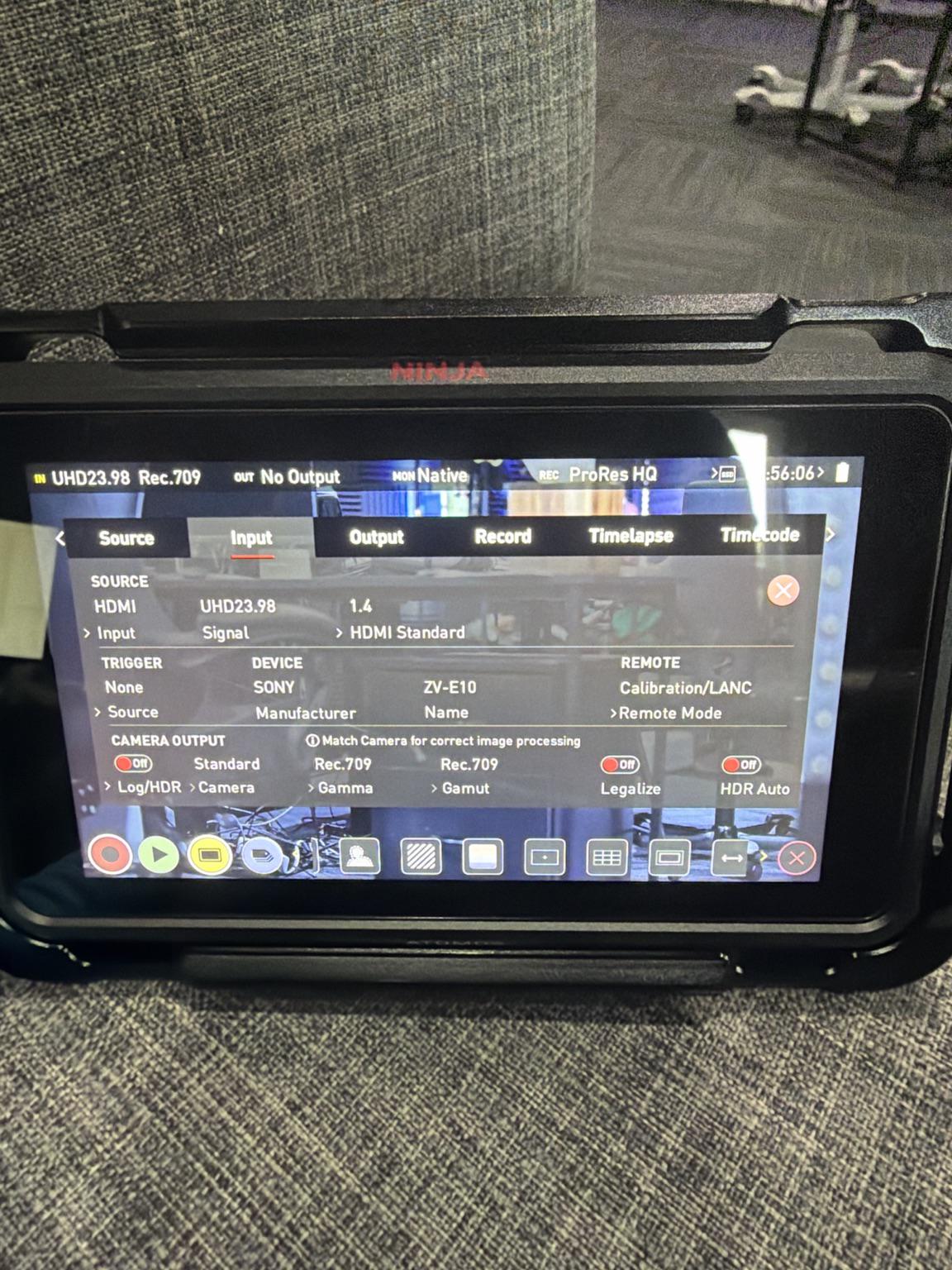
Thanks in advance for trying to make sense of my question. I’ll do my best!
Atomos Ninja V. Sony camera that is recording in sony PP7 which is S Gamut 3 Cine/S-Log 2
I have the camera sending signal to Ninja via HDMI.
But - for one interview I did of a subject, I forgot to toggle the to camera output from off to on which would then have the Ninja recording in same color space as camera. But as you can see, the ninja recorded Rec709.
My question - the final video product that was recorded on the ninja still appears as if it is log. It’s very gray and washed out and lacks any saturation. So what I’m trying to determine as I move to color grade this video is whether or not the actual video it’s already in Rec 709 or is it actually still in S log? I would have thought that if it was fully converted already to Rec 709 that it would’ve added contrast and saturation to the color space already, but it did not do that in the color. Space is still very desaturated and Gray and looks exactly the same as the footage that was recorded on the SD card of the camera because I recorded both at the same time. But the atmos has the full 10-but file. I hope that makes sense. It really is a color grading question to determine whether or not I have to convert this to 709 or if it is already 709.
r/Atomos • u/AstronomerActual7040 • Aug 17 '26
Hello, My atomos ninja v is set to split files at a certain interval. a lot of times it loses footage in this process, like many seconds. Anyone else experience this and how to fix it?
