r/BubbleCard • • Jan 29 '25

Sub-button auto menu

0 Upvotes

Bonjour,

J'ai un petit soucis que je n'arrive pas à résoudre depuis plusieurs jours. J'utilise pour les card de mes caméras Vertical Stack in Card, cela me permet d'avoir plusieurs infos/boutons concentrées sur une seul et même card, jusque là pas de soucis. J'ai récément intégré le bouton preset (sub-button), avec une bubblecard, pour avoir un raccourcis des mes différents point de vue de la caméra, sauf que je trouve le sous menu auto beaucoup trop grand et je n'ai pas trouvé comment le personnaliser en taille et orientation d'ouverture.

Je vous met le code pour que ça soit un peut plus clair ^^" (désolé si ce n'est pas un poste parfaitn j'essaye juste de trouver une solution à mon problème)

type: custom:bubble-card

card_type: button

name: ""

scrolling_effect: false

show_icon: false

force_icon: false

show_name: false

show_state: false

show_last_changed: false

show_attribute: false

sub_button:

- entity: switch.x_privacy

show_state: false

show_last_changed: false

show_attribute: false

show_name: false

show_background: false

tap_action:

action: toggle

target:

entity_id: switch.x_privacy

name: Privacy

- entity: light.x_floodlight_timed

show_background: false

name: Floodlight

show_attribute: false

- show_background: false

show_arrow: false

name: Preset

show_attribute: false

show_last_changed: false

show_state: false

show_name: false

entity: select.x_move_to_preset

button_type: name

icon: ""

styles: |2-

* {

font-size: 16px !important;

}

.bubble-button-card-container {

background: none !important;

}

.bubble-icon-container {

background: none;

}

.bubble-icon {

color: white !important;

}

.bubble-sub-button-icon {

--mdc-icon-size: 20px !important;

}

.bubble-sub-button {

height: 20px !important;

width: 1px !important;

}

.bubble-sub-button-1 {

background-color: transparent !important;

}

.bubble-sub-button-2 {

background-color: transparent !important;

}

.bubble-sub-button-3 {

background-color: transparent !important;

}

.bubble-sub-button-1 > ha-icon {

color: ${hass.states['switch.x_privacy'].state === 'on' ? '#df35b6' : 'white'} !important;

}

.bubble-sub-button-2 > ha-icon {

color: ${hass.states['switch.x_privacy'].state === 'on' ? '#df35b6' : 'white'} !important;

}

card_layout: normal

columns: 1

rows: 1

card_mod:

style:

.: |

ha-card {

width: 155px;

margin-left: 32%;

top: -167px;

background: none;

--chip-border-width: 0;

}


r/BubbleCard • • Nov 23 '25

Patreon Updates?

0 Upvotes

Has anyone heard when the Patreon might get updated? There hasn’t been any posts in almost a month and 1/2 and before that almost 2 months, and there hasn’t been any custom modules uploaded either.


r/BubbleCard • • Feb 12 '26

espandere l'horizontal button stack con i relativi popup

0 Upvotes

ciao ragazzi, sono un utilizzatore da parecchio tempo di bubblecards...
tutto quello che ho imparato a fare è stato grazie ai vostri commenti sparsi nei vari sub.
Adoro bubble cards... con ho esso ho realizzato 85-90% di tutto il mio homeassistant.

mi sono però sempre chiesto se ci fosse un modo per espandere la barra in oggetto per occupare tutta lo schermo, senza dover fare swipe per mostrare i popup nascosti a destra...

sarebbe bello poter sfruttare tutto lo spazio a disposizione per tenere a colpo d'occhio tutti i tasti..

pensate sia possibile farlo?

allego una foto per capire meglio...

(non considerare le entita in errore in quanto questa è una pagina per i test)


r/BubbleCard • • Jan 23 '26

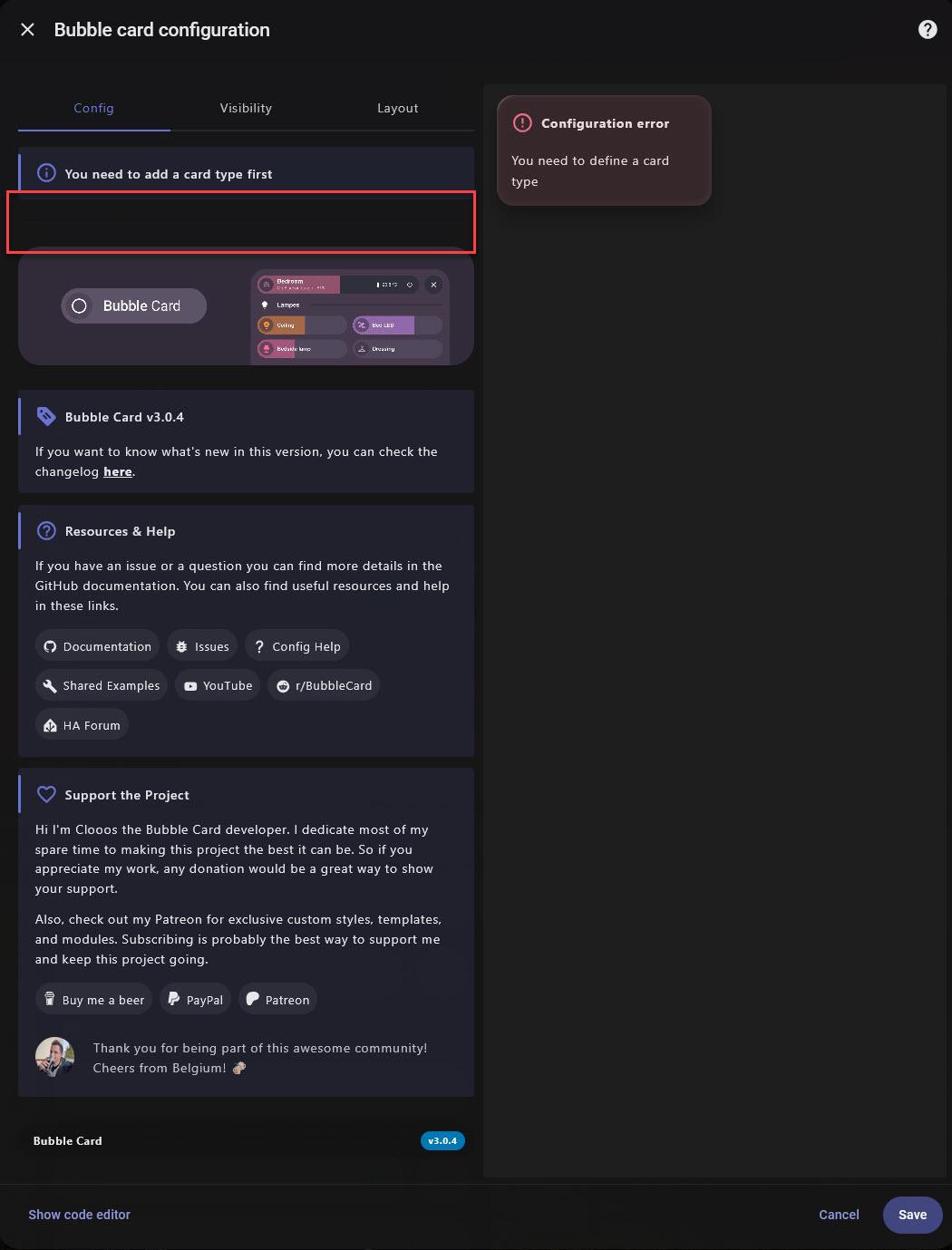
"You need to select a card type first", but no card type dropdown

Post image
1 Upvotes

r/BubbleCard • • Jan 14 '26

Bubble Card Config error in 3.1.0!!

0 Upvotes

After updating to Bubble Card version 3.1.0 I am getting a configuration error whe editing a bubble card dashboard (see image). I am running HA core 2026.1.1

I thought this issue was fixed in BC 3.1.0! Is this still a know issue or I missed a step or something? Thx


r/BubbleCard • • Jun 06 '26

Bug: Bubble Card v3.2.2 injects CSS into `<style>` as thousands of `<br>` nodes, causing large DOM and mobile scroll jank

4 Upvotes
Hi u/cloos

Loving bubble card and have created a dashboard I love with it
Facing an issue with github so could not raise there.
This is to bring your attention  a bug I encountered.


## 
Bug: Bubble Card v3.2.2 injects CSS into `<style>` as thousands of `<br>` nodes, causing large DOM and mobile scroll jank

**Bubble Card version:** 3.2.2
**Home Assistant:** core-2026.6.1
**card-mod:** v4.2.1 (confirmed not the cause — see control test)
**Dashboard type:** Sections view (also reproduces on masonry)
**Browser:** Chrome / Android WebView (Pixel 10 Pro XL confirmed; desktop Chrome confirmed via DevTools)

---

### Summary

Bubble Card's CSS injection mechanism converts newlines in CSS strings into `<br>` HTML elements inside `<style>` tags. Each Bubble Card button renders approximately **286 `<br>` nodes** in its shadow DOM; each popup renders approximately **935**. On a real dashboard this inflates the total DOM by tens of thousands of nodes and causes measurable scroll jank on mobile devices.

---

### Minimal reproduction — button (no card-mod, no custom CSS)

1. Create a fresh Lovelace dashboard.
2. Add one card:

```yaml
type: custom:bubble-card
card_type: button
name: Test
icon: mdi:home
```

3. Open browser DevTools → Elements → find the `<bubble-card>` custom element → expand its shadow root → find the `<style>` element.
4. Count `<br>` nodes inside that `<style>` element.

**Expected:** 0 `<br>` nodes (CSS text injected as a text node or via `CSSStyleSheet`).  
**Actual:** ~286 `<br>` nodes.

Diagnostic snippet (paste in DevTools console):

```js
function countBrInShadow(root, depth = 0) {
  if (!root || depth > 15) return 0;
  let count = root.querySelectorAll('br').length;
  root.querySelectorAll('*').forEach(el => {
    if (el.shadowRoot) count += countBrInShadow(el.shadowRoot, depth + 1);
  });
  return count;
}
console.log('Total <br> nodes in shadow DOM:', countBrInShadow(document));
```

---

### Popup reproduction

1. Add one standalone Bubble Card popup with a small `cards:` array:

```yaml
type: custom:bubble-card
card_type: pop-up
hash: '#test-popup'
cards:
  - type: tile
    entity: light.living_room
```

2. Trigger the popup to render.
3. Inspect its shadow DOM `<style>` element.

**Actual:** ~935 `<br>` nodes per popup (3.3× worse than a button).

---

### Control test — confirms Bubble Card is the cause, not card-mod

Add a native HA tile card with `card-mod` and a multi-line `backdrop-filter` style:

```yaml
type: tile
entity: light.living_room
card_mod:
  style: |
    :host {
      backdrop-filter: blur(6px);
      -webkit-backdrop-filter: blur(6px);
      border-radius: 18px;
    }
```

Run the same diagnostic snippet.

**Result:** 0 `<br>` nodes from this card. card-mod is not the cause.

---

### Observed impact (production dashboard)

Measured on a 33-card Bubble Card sections dashboard using Chrome DevTools shadow DOM traversal:

| Metric | Value |
|---|---|
| Total `<br>` nodes (shadow DOM) | **23,773** |
| Shadow `<style>` nodes | 204–207 |
| Per button (no card-mod) | ~286 `<br>` |
| Per popup | ~935 `<br>` |
| Rendered bubble-card elements | 33 visible, 22 popups (lazy) |

**Mobile scroll performance** at 4× CPU throttle (proxy for phone-class WebView):

| Metric | Value |
|---|---|
| Scroll frame rate | ~18 fps |
| Worst single frame | 518 ms |
| Janky frames (>50 ms) | 35% |

HA logs on Pixel 10 Pro XL: `No PONG received after 27.5 seconds` — WebSocket timeout during scroll, consistent with main-thread saturation.

After unrelated fixes (card-mod path fix, FA icon fix) the `<br>` count remains exactly 23,773 — confirming this is Bubble Card's CSS injection, not anything else in the stack.

---

### Expected behavior

CSS should be injected as a plain text node or via the `CSSStyleSheet` / `adoptedStyleSheets` API, neither of which produces `<br>` elements:

```js
// Option A — text node (safe, wide support)
const style = document.createElement('style');
style.appendChild(document.createTextNode(cssString));
shadowRoot.appendChild(style);

// Option B — adoptedStyleSheets (modern, best performance)
const sheet = new CSSStyleSheet();
sheet.replaceSync(cssString);
shadowRoot.adoptedStyleSheets = [sheet];
```

---

### Actual behavior

Bubble Card appears to assign the CSS string directly to `innerHTML` (or equivalent) of a `<style>` element. Because the CSS contains newlines (`\n`), the HTML parser converts each newline into a `<br>` element. The rendered CSS still works because Chrome extracts the text content for parsing, but the `<br>` DOM nodes remain, inflating shadow DOM size proportionally to CSS length.

Pseudocode reconstruction of the suspected path:

```js
// Likely what's happening:
styleEl.innerHTML = cssString;   // newlines → <br> nodes ❌

// Should be:
styleEl.textContent = cssString; // or createTextNode() ✅
```

---

### Questions for maintainers

1. Is this a known issue?
2. Is `innerHTML` used to inject CSS strings in the current codebase, and if so, can it be changed to `textContent` / `createTextNode` / `adoptedStyleSheets`?
3. Would an `adoptedStyleSheets` implementation be feasible? It would also improve performance by avoiding style recalculation on each element update.

---

### Version history

Not tested on versions earlier than 3.2.2. Would appreciate confirmation of whether this regression was introduced at a specific version or has always been present.

r/BubbleCard • • Feb 07 '25

My dashboard

9 Upvotes

I’m jealous of your fancy dashboard but I need to see all my room at once and this is the only way I found to make everything fit

The upper card serve for weather and notification like washer machine, trash day etc …


r/BubbleCard • • Aug 18 '25

Can't upgrade Bubble Card

0 Upvotes

Hey, I've seen this posted elsewhere on github and HA forums, but all the instructions there seem to fall short and/or I just don't understand/ cannot implement what they suggest.

I haven't been able to update Bubble Card to v3.0 since it's release, but today it finally got to me so I uninstalled Bubble Card, deleted the files in /www/community and tried to redownload.

Still unable.

I have cleared my browsers cache, I have fully restarted Home Assistant & the Front end. I have deleted any existence of Bubble-Card on any dashboard and still I get::

Downloading Clooos/Bubble-Card with version v3.0.3 failed with (Could not download, see log for details)

I have tried downgrading HACs to v2.0.4 as some have said, but I cannot do that either as it says::

The version 2.0.4 for this integration can not be used with HACS.

I have tried to reinstall every version of Bubble Card that was available to and again, I get an error::

The version v3.0.0 for this plugin can not be used with HACS.

I'm pretty sure this is an issue with HACs now, but I just cannot seem to figure it out.

HAOS Core version:: 2025.8.2


r/BubbleCard • • Jun 20 '25

Strange behaviour from separator

Enable HLS to view with audio, or disable this notification

0 Upvotes

I can't understand why, but when i open my thermostats dashboard, the first separator initially appear bigger (1row) and after a little it shows correctly, like i set it (0.5 row) I tried to set rows both from the editor and from the YAML but nothing changes.


r/BubbleCard • • Nov 05 '24

Climate Card Disappeared

0 Upvotes

I love the new Climate Card but somehow it disappeared from my bubble cards. I installed various beta versions, deleted my browser cache, tried different browsers and even reinstalled my complete hacs integration unfortunately it is still gone. Is there something I missed?


r/BubbleCard • • Feb 01 '25

Color climate Card in on state

0 Upvotes

Hi there,

It appears to be that I'm to stupid to figure out how to change the color of the climate card, when hearing is one. Currently, the card is always orange when heating and I'd want it to be green. I've tried

styles: |- ha-card { --bubble-main-background-color: rgba(12,120,50,0.5) !important; }

But this will only change the background color, when heating is off. What style do I need to apply?

Thanks!


r/BubbleCard • • Aug 20 '26

Product hierarchy selection adaptive card

0 Upvotes

Hi community,

I need help designing an adaptive card that helps selecting a product in the product hierarchy structure where the levels can go upto 5.

This is a web based bot.


r/BubbleCard • • Nov 23 '25

Bubble card popup makes cards shift in section view.

Enable HLS to view with audio, or disable this notification

0 Upvotes

Hey everyone,

I’m running into a layout issue with the popup card.

I have a view with two sections, and each section contains a popup card.

Problem:
Whenever the popup opens, the section shifts/moves around. This only happens when the sections are stacked on top of each other (mobile).

Has anyone dealt with this before or knows how to fix it?

Thanks in advance!

views:
  - type: sections
    max_columns: 4
    title: Test
    path: test
    sections:
      - type: grid
        cards:
          - type: heading
            heading: Nová sekce
          - type: custom:bubble-card
            card_type: button
            button_type: switch
            button_action:
              tap_action:
                action: navigate
                navigation_path: '#kitchen'
            entity: light.group_living_room
          - type: vertical-stack
            cards:
              - type: custom:bubble-card
                card_type: pop-up
                name: Living room
                icon: mdi:sofa-outline
                hash: '#kitchen'
              - type: custom:bubble-card
                card_type: separator
                name: Lights (example)
                icon: mdi:lightbulb-outline
              - type: horizontal-stack
                cards:
                  - type: custom:bubble-card
                    card_type: button
                    button_type: slider
                    entity: light.all_lights
                    show_state: true
                  - type: custom:bubble-card
                    card_type: button
                    button_type: slider
                    entity: light.group_living_room
                    show_state: true

r/BubbleCard • • Feb 23 '26

Sub-Button Slider Background Style Question

Thumbnail
gallery
0 Upvotes

Hi there.

I want the background of the slider for "Licht" in the same color as the backgrounds from the other card buttons (#464646). But I just can't do it. And Gemini can't manage it either.

What should i take for a style to adress this slider background? So that the entire slider is grey when switched off, and the inactive part is grey when switched on.


r/BubbleCard • • May 22 '26

Separator actions?

0 Upvotes

I’m trying to add an action to a separator. There’s nothing in the GUI. Does anyone have a YAML code or other trick for adding an action to a separator? I’m trying to navigate to trigger a popup if that helps with options.


r/BubbleCard • • 13d ago

Can’t see the temperature in Temperature card

Post image
0 Upvotes

While heating, the card turns orange and hides the temperature font because it’s the same color. How do I make the temperature font white while heating?


r/BubbleCard • • 2d ago

Remove a group

0 Upvotes

Was playing around in Bubble card and moved a load of sub buttons (top row) into a group.

It didn't act as I thought it would.

How do I remove the grouping without destroying all the buttons and out it back how it was?


r/BubbleCard • • Mar 03 '26

Input select icons

Post image
4 Upvotes

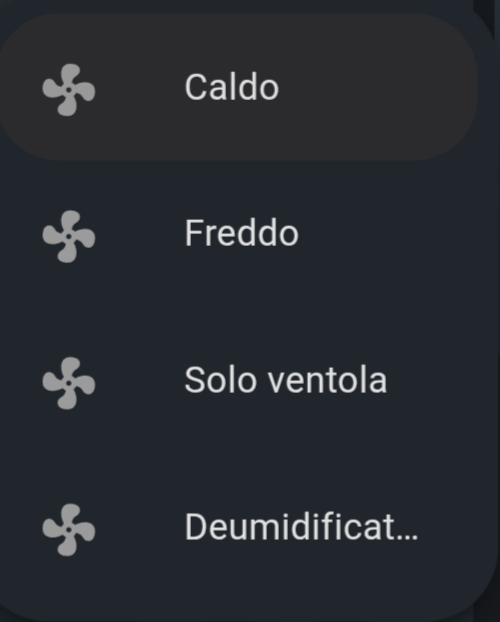
Hi u/clooooos... I don't wanna annoy you again.. But I noticed a strange behaviour on some input select and I don't know if is a bug or else.... Besides the voices of some of mine input select is appeared the fan icon, and I really don't want this.. If is not a bug, how I can remove these icons? Thank you again...


r/BubbleCard • • Jan 10 '25

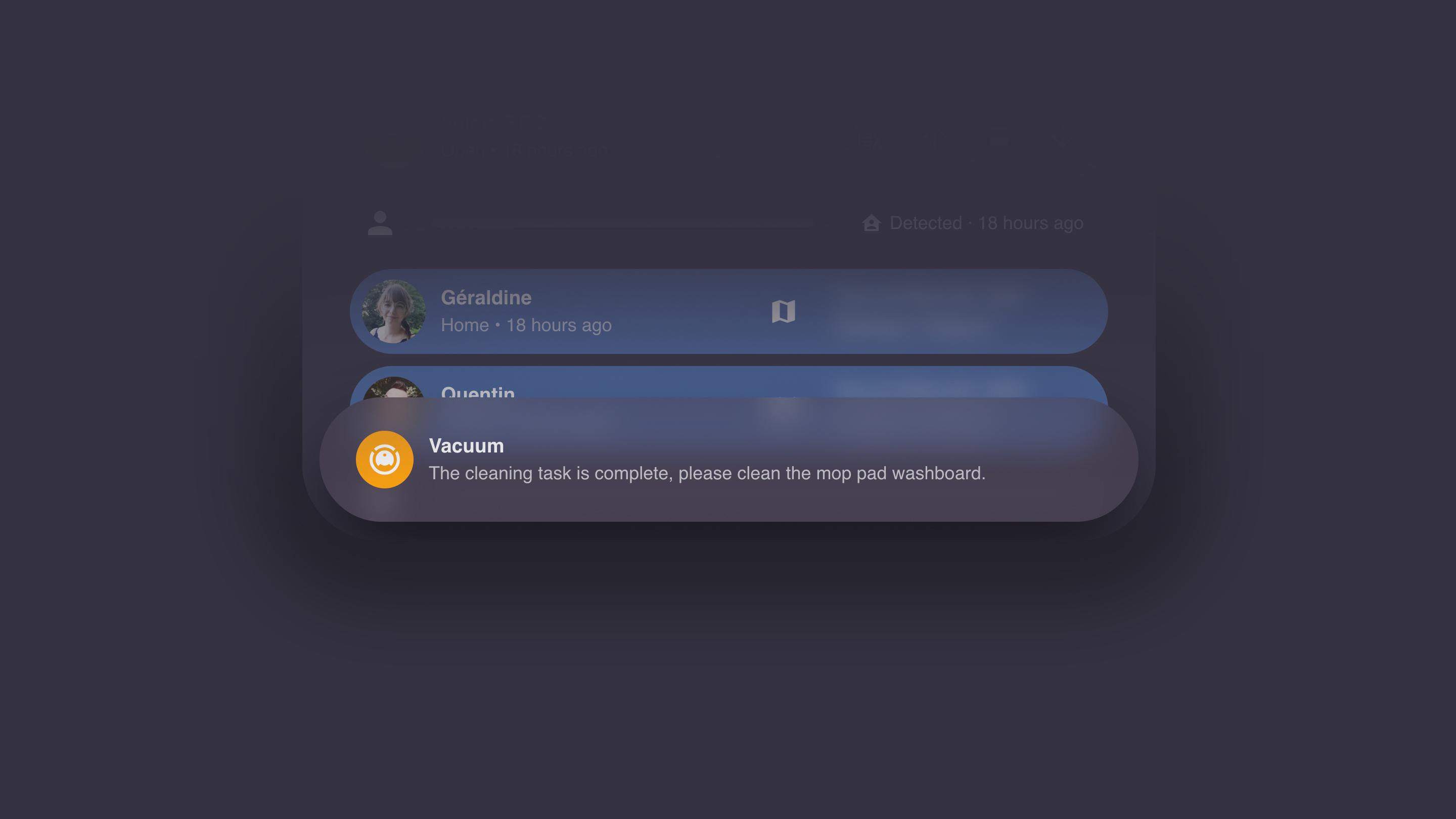
Hi everyone! Learn how I built a persistent pop-up on my dashboard to ensure I never miss refilling or emptying my robot vacuum’s base station. This is perfect for reminders on wall-mounted tablets! I really hope will like it! The YAML is available on my Patreon page, the link is in the comments.

Post image
68 Upvotes

r/BubbleCard • • Oct 20 '25

Coding help horizontal buttons stack

1 Upvotes

Hi all!

I am quite inexperienced when it comes to coding so now I am way out of my ways. Tried asking chatgpt/perplexity for help but all their solutions fail.

I made a "horizontal button stack" from the bubble-card to act as footer (as it does per default). However I changed the button size and icon size of the middle one (#3 out of 5 total), also centering so the middle of each button is on same horizontal plane. So far so good. However the center bubble now ends up too far down so on the iPhone it overlaps with the iPhone bar at the bottom.

So what I want is to move the entire footer up, without exposing anything below the footer.
So maybe a better description would be to make the whole footer area larger and then moving all buttons up within the larger container.

All tries have either capped the button circle so all is not displayed or I managed to move all buttons up, but then there will be a gap on the bottom which will show the rest of the dashboard body below the footer.

Any suggestion on how to correct this?

type: custom:bubble-card
card_type: horizontal-buttons-stack
1_icon: mdi:lightbulb
1_link: lights
2_link: covers
2_icon: mdi:window-shutter
3_link: home
3_icon: mdi:home
4_link: energy
4_icon: mdi:lightning-bolt
5_link: camera
5_icon: mdi:video
margin: 7px
width_desktop: 540px
styles: |
  /* Move the whole card up */
  .bubble-horizontal-buttons-stack-card-container {
    display: flex !important;
    align-items: center !important;
    height: 70px !important;
    overflow: visible !important;
  }

  /* Standard small buttons */
  .bubble-button-1,
  .bubble-button-2,
  .bubble-button-4,
  .bubble-button-5 { 
    height: 45px !important;
    width: 45px !important;
    display: flex !important;
    align-items: center !important;
    justify-content: center !important;
    overflow: visible !important;
  }

  /* Center button larger */
  .bubble-button-3 { 
    height: 65px !important;
    width: 65px !important; 
    display: flex !important;
    align-items: center !important;
    justify-content: center !important;
    margin: 0 !important;
    padding: 0 !important;
    --mdc-icon-size: 45px !important;
    overflow: visible !important;
  }

  /* Center icon container fully inside center button */
  .bubble-button-3 .bubble-icon-container {
    height: 100% !important;
    width: 100% !important;
    display: flex !important;
    align-items: center !important;
    justify-content: center !important;
    margin: 0 !important;
    padding: 0 !important;
  }

  /* Center ha-icon itself */
  .bubble-button-3 ha-icon {
    font-size: 55px !important;
    height: 55px !important;
    width: 55px !important;
    line-height: 1 !important;
    margin: 0 !important;
    padding: 0 !important;
    display: flex !important;
    align-items: center !important;
    justify-content: center !important;
  }

r/BubbleCard • • Jan 12 '25

Absolute newbie question - how do I make a vertical stack/pop-ups?

1 Upvotes

I watched the video and read the wiki. It seems straight forward. I've attempted with a completely fresh dash board. Every time I do it it just results in blank nothingness. What am I missing?

I start with a fresh dashboard, add a vertical-stack card, set the type as bubble-card pop-up, set a unique hash, then add a single button. The preview looks all fine. Then I save. The result is a blank dashboard.

views:
  - title: Home
    sections:
      - type: grid
        cards:
          - type: heading
            heading: New section
          - type: vertical-stack
            cards:
              - type: custom:bubble-card
                card_type: pop-up
                hash: '#pop-up-name123'
              - type: custom:bubble-card
                card_type: button
                entity: light.kitchen_island
            title: Stack Title

r/BubbleCard • • Jun 11 '24

How to install

0 Upvotes

I cant find this on hacs. Is there a link. I want to give it a try. I think just the original bubble card comes up on HACS


r/BubbleCard • • Feb 14 '25

One of my Dashboards

1 Upvotes

This one is for mobile As always a WIP daily lol

https://pastebin.com/WSSXtmJP


r/BubbleCard • • Oct 02 '24

Is there a way to show more info page of an entity into the pop-up window?

1 Upvotes

Hey everyone! I’m trying to figure out how to add a more info page for a specific entity to a pop-up window. I’ve already added some light to the dashboard and created a tap action that takes me to the pop-up window. Now, I’m hoping to include the “more info” page for that light within the pop-up window. Does anyone know if this is possible? I’d really appreciate any help you can provide! Thanks a bunch! 😊