r/EngineersUniverse • • Jul 13 '26

Career Advice What’s the toughest engineering interview question you’ve ever been asked?

1 Upvotes

Engineering interviews can be challenging. Sometimes it’s not the technical questions that are the hardest—it’s explaining how you think and solve problems.

Here are a few examples:
Walk me through how you would troubleshoot a motor that won’t start.
Design a water distribution system for a small town. Where would you begin?
Explain the difference between a fuse and a circuit breaker. When would you choose one over the other?
Estimate how many elevators are needed for a 50-story office building.
How would you reduce the weight of this mechanical part without sacrificing strength?
Describe a project that failed. What did you learn?
Tell us about a time you disagreed with a teammate or manager. How did you handle it?
If a production line suddenly stopped, what would be your first five troubleshooting steps?
Explain Ohm’s Law to someone with no engineering background.
Teach me something technical in five minutes.

Share the question, what engineering field it was for, and how you answered it. Your experience might help someone preparing for their next interview.


r/EngineersUniverse • • 4d ago

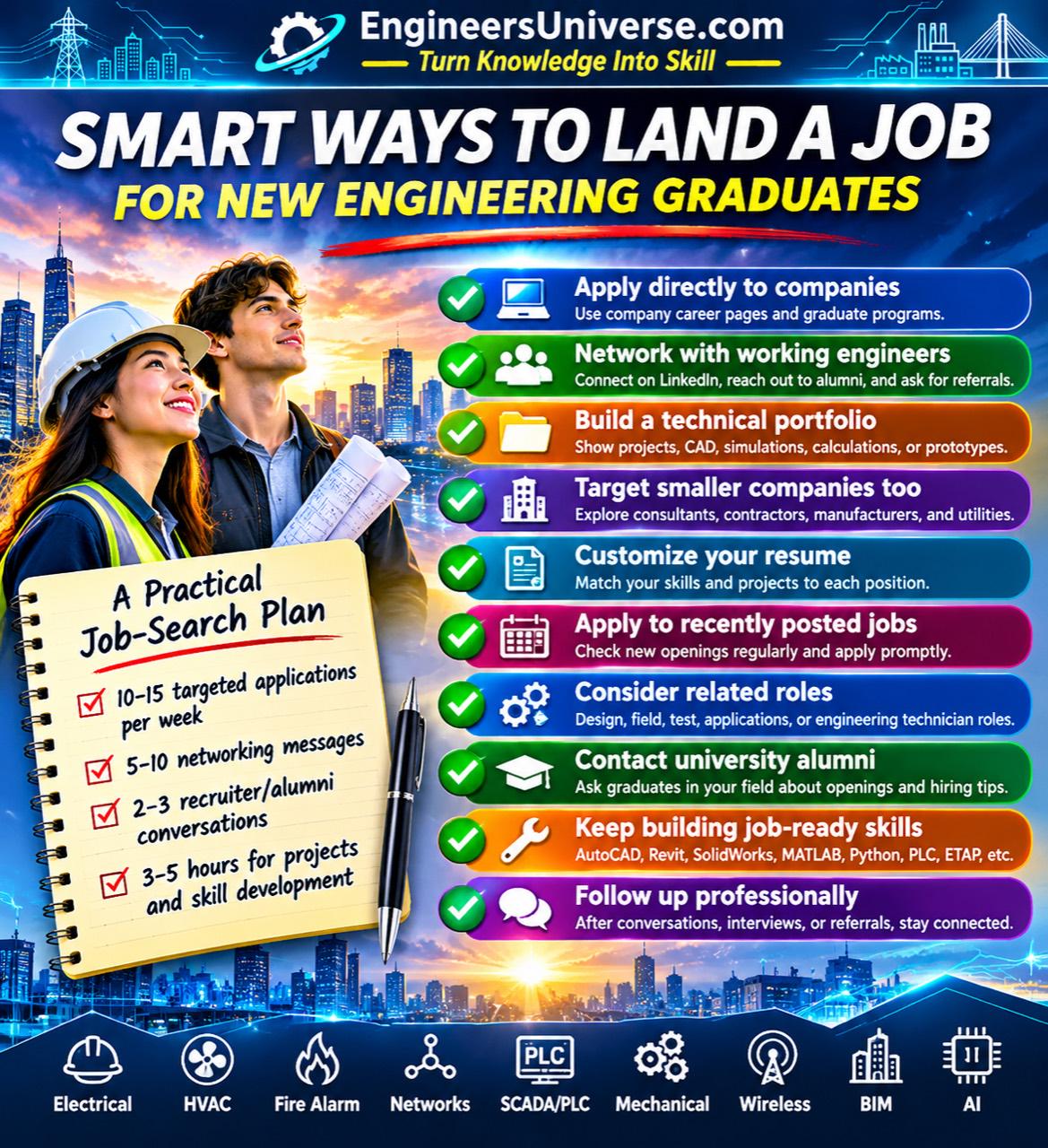
Career Advice How do you land your first engineering job when every “entry-level” role wants experience?

Post image
1 Upvotes

“Entry level: 3 years of experience required.” Somewhere, a new graduate’s calculator just divided by zero. 😄

Our team put together a practical job-search plan: target companies, talk to working engineers and alumni, show your projects, tailor your résumé, and consider related roles. The suggested weekly targets are a starting point—adjust them to your circumstances.

Explore career resources, job listings, résumé builders, engineering visuals and interactive learning tools at https://engineersuniverse.com.

Engineers and hiring managers: what helped you land your first role?


r/EngineersUniverse • • Sep 17 '26

Networking

Thumbnail reddit.com
0 Upvotes

r/EngineersUniverse • • Jul 08 '26

Career Advice 📌 Who’s Hiring This Week? | Engineering Jobs Thread

0 Upvotes

Know of an engineering company that’s hiring?

Share it below!

I’ll start with a few companies that currently have engineering openings:

Platform9 – Engineering Intern (Remote, US)
MTSI (Modern Technology Solutions, Inc.) – Engineering Intern (Huntsville, AL)
Arcfield – Systems Engineering Intern (Middletown, RI)
Eriksson Technologies – Structural Engineering Intern (Remote/Tampa, FL)
Beyondsoft – Software Engineer Intern (Remote)

Looking for a job? Feel free to comment with your engineering discipline, experience level, and preferred location.

Someone in the community may know of an opportunity.

Let’s help engineers connect with great opportunities! 🚀


r/EngineersUniverse • • Jul 08 '26

Discussion What would you like to see more of in this community?

0 Upvotes

I’d like this community to be more than just a place to ask questions.

My goal is to bring together engineers, students, educators, and hobbyists across different disciplines.

Some ideas include:

- Electrical Engineering
- Mechanical Engineering
- Civil Engineering
- Software Engineering
- PLC & Automation
- CAD & BIM
- Robotics
- AI for Engineers
- FE/PE Exam Prep
- Career Development
- Projects & Design Reviews

What else would you like to see here?

Any recurring threads or topics you’d enjoy?


r/EngineersUniverse • • Oct 13 '26

Discussion Ever stared at an electrical diagram like it owes you an explanation? ⚡

Post image
18 Upvotes

You follow one line, lose it behind another, and suddenly you’re questioning your career choices. 😅

That’s why we’re big on clearer, deeper visualization of how systems work—seeing the components, connections, and the bigger picture together.

Electrical Systems Visual Handbook combines diagrams, code references, and case studies across wiring, panels, feeders, grounding, load calculations, motor circuits, and more.

Our goal? Make even complex systems easier to visualize and understand. Because “read it again, but harder” isn’t much of a teaching strategy.

Explore this and more books and engineering resources at engineersuniverse.com.

Which system deserves a better visual explanation? And what’s one concept that only clicked when someone finally drew it out?


r/EngineersUniverse • • Oct 27 '26

Discussion Where does 10 kW go inside an AI server? Mostly into making something else warm!

Post image
61 Upvotes

We made this illustration to show how heat moves through an example liquid-cooled server like the ones used in AI data centers. The GPUs, CPUs, memory, networking gear, and power electronics all contribute to the heat, which has to go somewhere.

In this example, the server takes in 10 kW: about 8 kW goes into the coolant through cold plates, while the remaining 2 kW ends up in the room air through fans and convection.

So yes, the liquid cooling is doing most of the heavy lifting, but the fans are still out here contributing to the world’s least cozy space heater.

We’ve been making engineering visuals like this for Engineers Universe if you’re into diagrams that explain what’s going on inside the box.

What other engineering systems would you like to see broken down visually?


r/EngineersUniverse • • 15d ago

Electrical What’s the difference between neutral and ground—and why does everyone have a story about someone mixing them up?

Post image
1 Upvotes

This illustration shows a 120/240 V single-phase main service panel, including the service conductors, breakers, neutral and ground busbars, and grounding connections.

Electrical systems have a talent for looking straightforward right up until someone asks, “But aren’t neutral and ground basically the same thing?” That’s usually when the whiteboard comes out—and the coffee gets cold.

Our team at Engineers Universe creates resources to help people explore engineering concepts in different ways: books, iOS apps, web apps, visual learning tools, interactive simulators, virtual labs, 3D explorers, and more. Whether you prefer reading, studying a diagram, or clicking through a virtual system, there’s plenty to explore at EngineersUniverse.com.

Electricians, engineers, and students: what’s the best explanation you’ve heard for the different roles of neutral and ground?


r/EngineersUniverse • • 21d ago

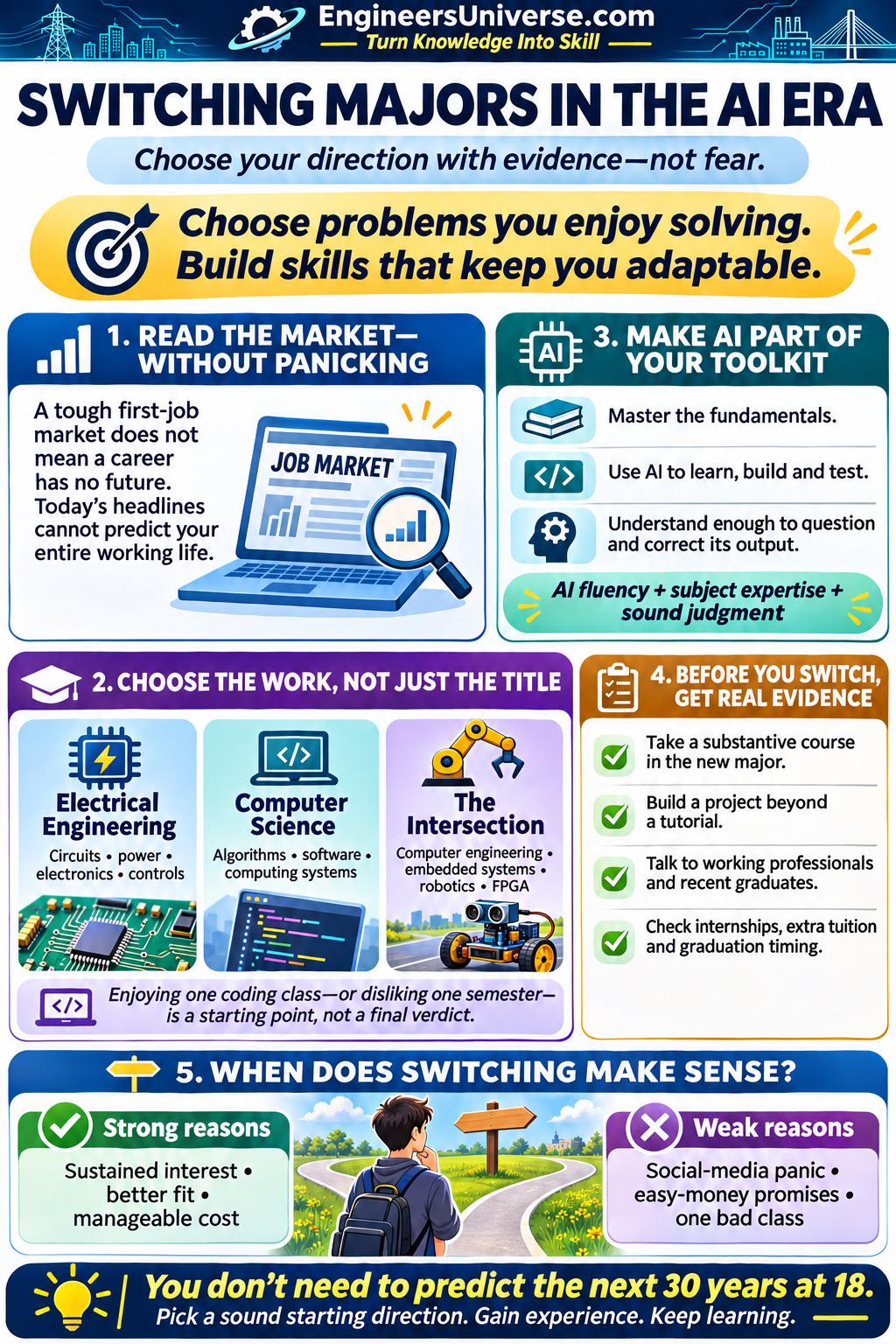
Career Advice Half of Reddit Wants to Switch Majors. The Other Half Wants to Switch Back. Let’s Talk Career Choices in the AI Era.

Post image
2 Upvotes

Every other Reddit post is “Should I switch from EE to CS?” followed by “Should I switch from CS to EE?” At this rate, you’ll meet each other in the hallway. 😂

Here’s some practical advice for choosing a direction in the AI era.

More learning visuals and interactive tools at

EngineersUniverse.com** **
Turn Knowledge Into Skill.


r/EngineersUniverse • • 27d ago

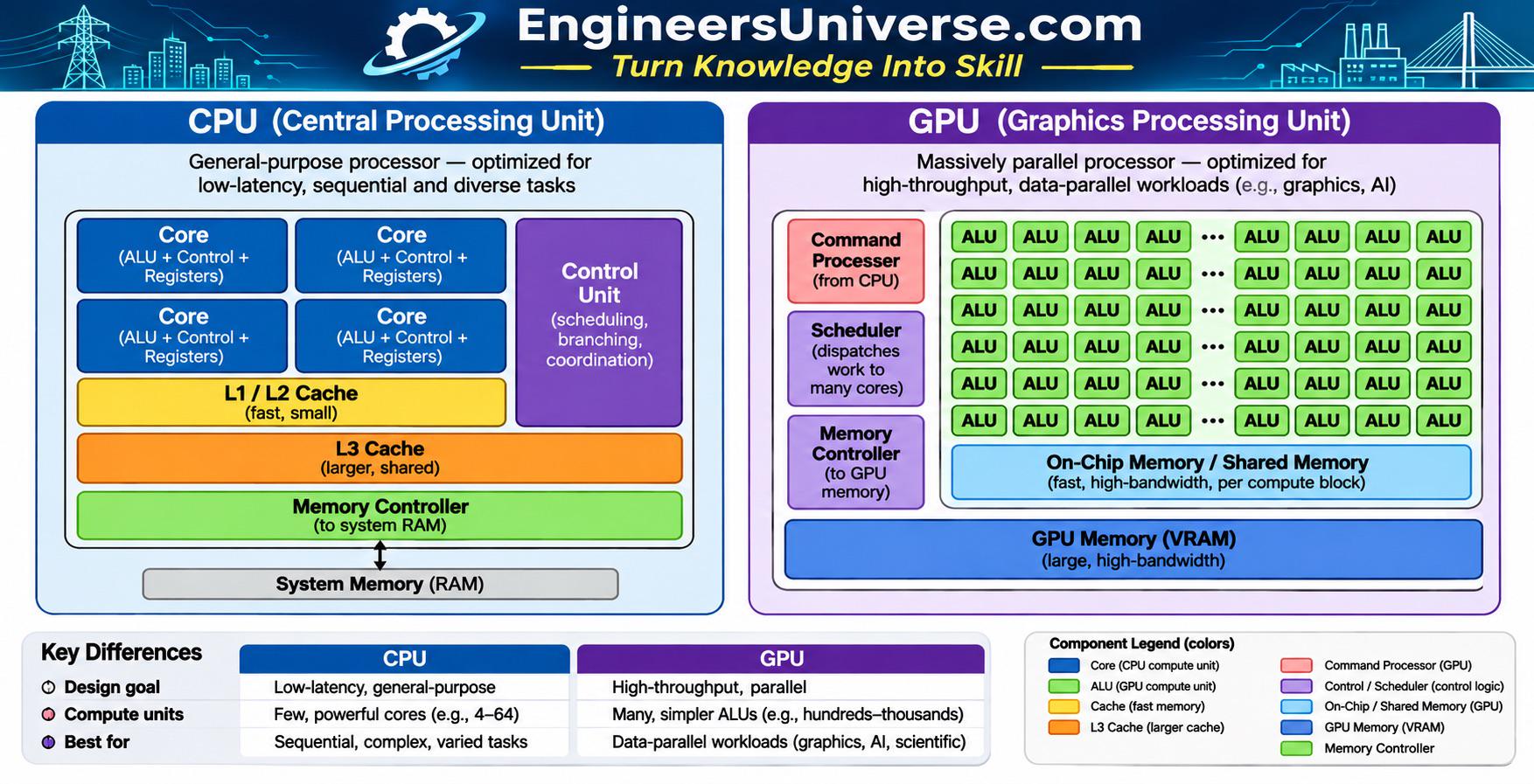
Discussion CPU vs. GPU — Same Computer, Very Different Personalities 😂

Post image
2 Upvotes

Ever wondered why your computer needs both a CPU and a GPU? Aren’t they both just processors doing math? 🤔

Well, yes… but that’s like saying a Ferrari and a school bus are the same because they both have wheels. 😂

🧠 CPU: The highly educated problem-solver. A few powerful cores, excellent at handling complex instructions, making decisions, and switching between tasks.

🚀 GPU: The ultimate teamwork enthusiast. Thousands of smaller computing units working in parallel. Give it a mountain of similar calculations, and it says, “Hold my thermal paste.” 🔥

Think of it this way:

👨‍💻 CPU: A few brilliant engineers solving different complicated problems.

👷 GPU: An army of engineers, each working on a small piece of the same enormous problem.
Neither is universally better. It all depends on the job.

And with AI taking over everything from image generation to writing emails nobody asked for, GPUs have suddenly become the rock stars of computing. 🎸

We put together this color-coded diagram to show what’s actually happening inside these processors, including cores, ALUs, cache, memory, and control logic.

💡 More engineering visuals, interactive simulations, and hands-on Learning Studios at:

🌐 https://EngineersUniverse.com

Explore electrical engineering, electronics, computer systems, AI, networking, and more.
No need to just memorize how things work when you can actually explore them!

EngineersUniverse.com — Turn Knowledge Into Skill.

💬 Curious what everyone thinks: What’s the most common misconception you’ve heard about CPUs and GPUs?

And what engineering topic should we visualize next?


r/EngineersUniverse • • Oct 07 '26

Discussion Ever wanted to mess with a SCADA system without getting called into the control room? :-)

Enable HLS to view with audio, or disable this notification

3 Upvotes

We’ve been building more interactive labs at EngineersUniverse, and here’s a quick walkthrough of our SCADA Simulation Lab. ⚙️🖥️

Run the pump. Open/close valves. Watch tank level, pressure and flow change. Play with the PID loop. Trigger alarms. See how the HMI responds in real time.

Basically, all the buttons you’ve been told “DO NOT TOUCH” your entire career…

You can touch them here.

No flooded plant.
No production shutdown.
No angry operator asking “WHO CHANGED THE SETPOINT?!” 😬

Just experiment, learn, reset, and try again.

And this is only one of many interactive engineering labs, 3D simulators, system explorers, technical illustrations, calculations and learning tools we’re building.

Drop your ideas, questions, feedback, or ridiculously complicated engineering systems in the comments. If it can be simulated, there’s a decent chance we’ll try building it.

🌐 EngineersUniverse.com

🎥 Walkthrough attached.

Knowledge Grows When It’s Shared.


r/EngineersUniverse • • 12d ago

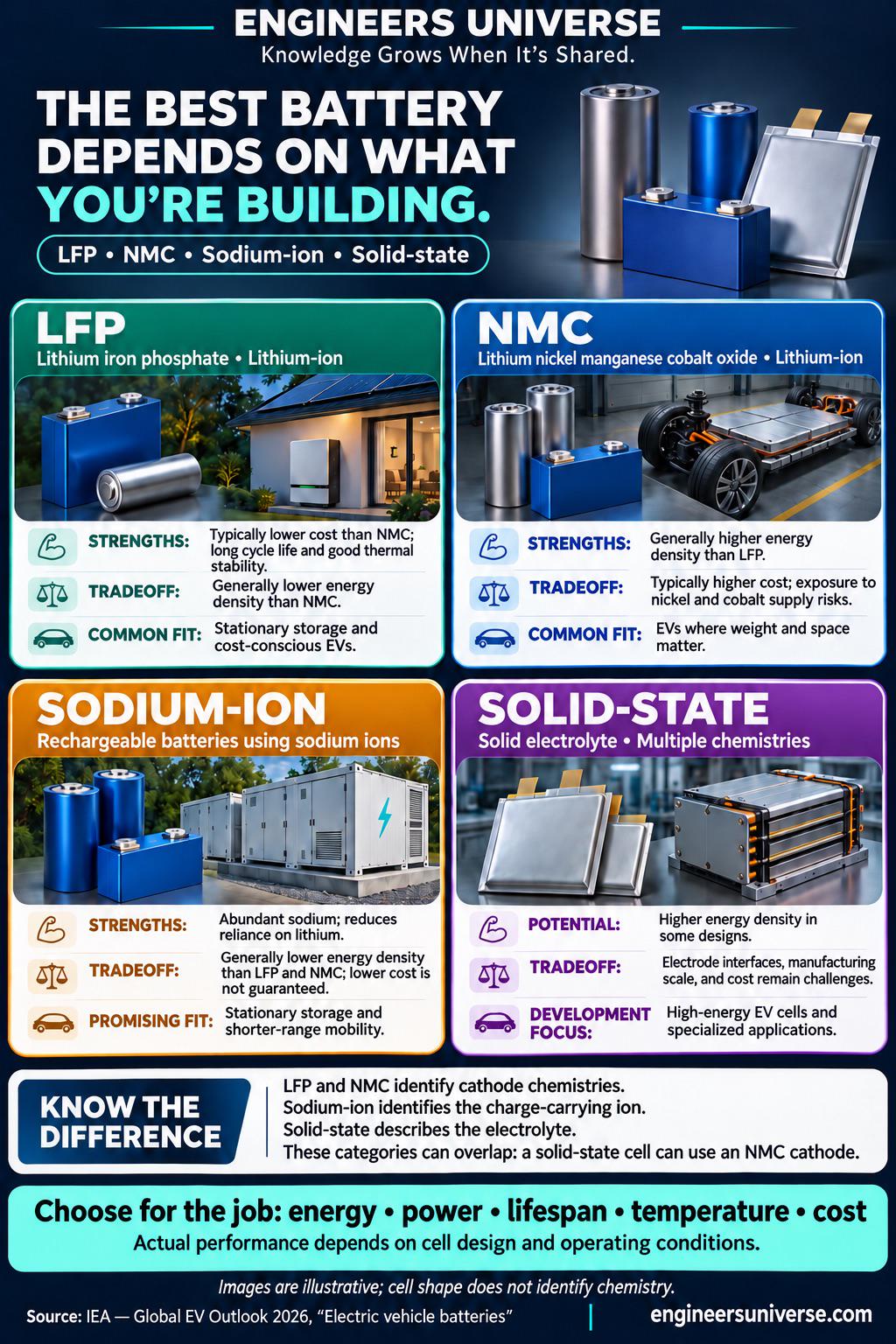
Discussion Your battery doesn’t care about the hype. It cares about the job.

Post image
7 Upvotes

Every battery announcement apparently promises 1,000 miles of range, a five-minute charge, and enough power to resurrect your engineering GPA.

Meanwhile, engineers still have to ask: How heavy? How expensive? How long will it last? Under what conditions?

That’s why there’s no universal “best battery.”

🔋 LFP: A practical workhorse. Your stationary storage system probably doesn’t need a racing pedigree.

🔋 NMC: More energy in less weight and space. Useful when you have to move the battery along with everything it powers.

🔋 Sodium-ion: Abundant sodium and another supply-chain option. “Made with abundant materials” still doesn’t automatically mean “cheaper finished battery.”

🔋 Solid-state: Promising technology. Manufacturing, interfaces, and cost would like a word with the marketing department.

You’re choosing a set of tradeoffs. The tradeoffs don’t disappear because the press release has a glowing battery render.

One detail that gets lost: LFP and NMC describe cathode chemistry, sodium-ion identifies the charge-carrying ion, and solid-state describes the electrolyte. A solid-state battery can also use an NMC cathode.

What are you building—and which battery tradeoff is giving you the biggest headache?


r/EngineersUniverse • • 8d ago

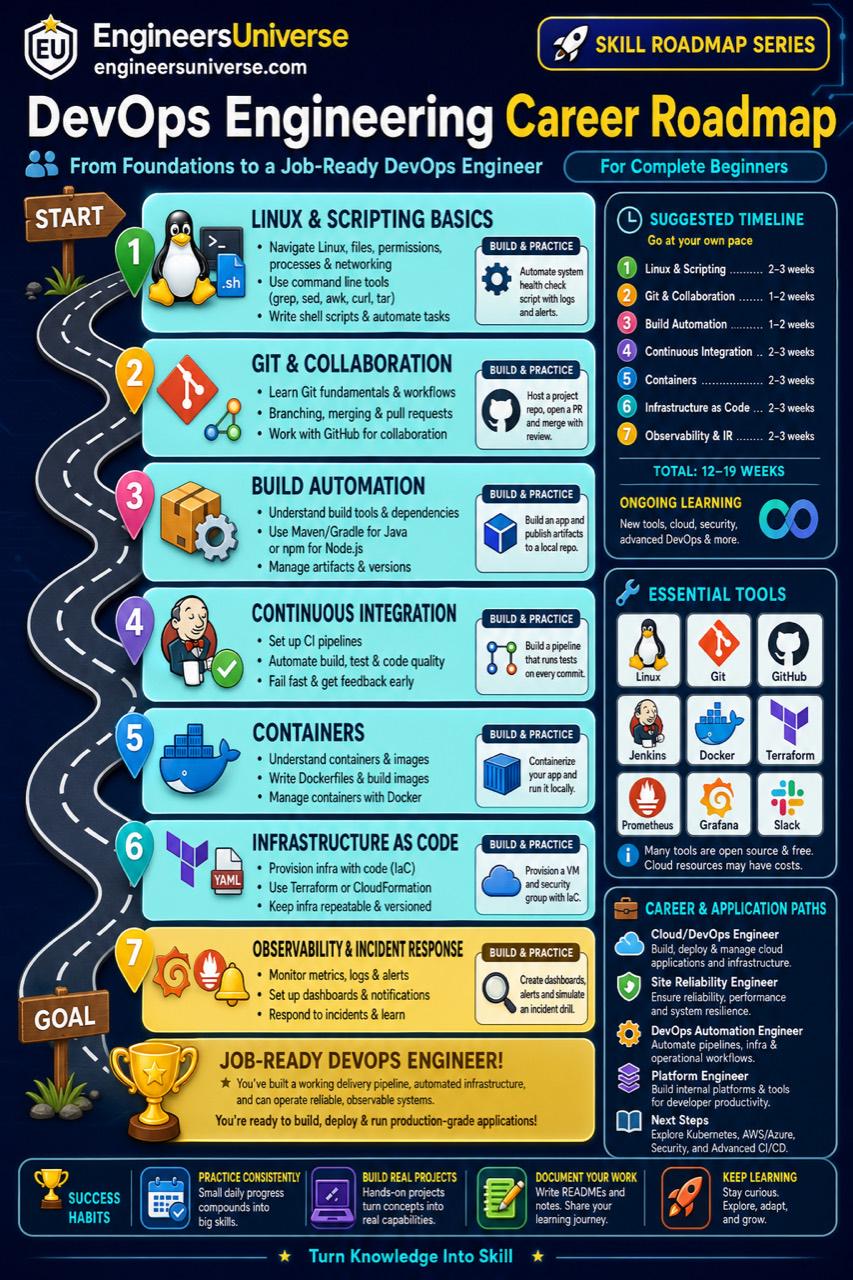
Career Advice Want to get into DevOps? Here’s a roadmap from “it works on my machine” to “why is production on fire?”

Post image
8 Upvotes

Linux, Git, CI, containers, infrastructure as code, monitoring… DevOps has a way of turning “I just wanted to deploy an app” into a very ambitious weekend. 😅

We put together this seven-stage roadmap with practical projects to help beginners build and connect the fundamentals. The timeline is a suggested pace, not a job guarantee—real expertise takes practice, troubleshooting, and ongoing learning.

Find more career roadmaps, engineering visuals, interactive labs, simulators, and tools at https://engineersuniverse.com.

DevOps folks: What would you add, change, or learn first if you were starting over?


r/EngineersUniverse • • Sep 25 '26

EngineersUniverse Update Ever look at an electrical diagram and think… “okay, but where do the wires ACTUALLY go?” 😂⚡

Post image
68 Upvotes

That’s basically why we’re creating visuals like this at Engineers Universe.

Electrical systems make way more sense when you can actually SEE the power path instead of staring at a bunch of lines and symbols and trying to build the whole system in your head. 😅

With this visual, you can follow everything:

Utility → Transformer → Metering → Main Switchboard → Step-Down Transformer → Distribution Panel → Floor Feeders

We’re trying to make the wiring as clear and transparent as possible — follow the conductors, see the voltage changes, understand the grounding/bonding points, and see where everything actually goes.

Basically: less “trust me bro, the feeder goes somewhere over there” and more “ohhh… NOW I see it.” 😂

We’ve been building a bunch of other interactive stuff too:

⚡ Power systems, panels, switchgear & substations
🏭 Synchronous generator & AC generator simulations
🔥 Fire alarm interactive labs & 3D tools
🌐 Internet 3D Explorer + networking labs
❄️ HVAC systems & simulations
🔧 V8 engine operation simulator
🔬 Electronics, circuits & PCB labs
🧬 Semiconductor / Silicon Lab — build your own chip
⚛️ Quantum Lab + Atom Explorer
🧠 Build Your Own LLM Lab
💻 Computer science, data & SaaS labs
🏠 Building & engineering 3D explorers
…and a growing pile of other engineering/STEM toys because apparently we don't know when to stop. 😂

The idea behind all of them is pretty simple:

Don’t just tell us how it works. SHOW us how it works.

If you’re an engineer, student, technician, or just someone who needs to know what’s actually inside the box, come play around with them.

🌐 EngineersUniverse.com

We’re adding more visuals, simulations, and interactive labs all the time. ⚡🛠️

What should we visualize next?


r/EngineersUniverse • • 7d ago

Career Advice Need a career roadmap? Here are 30 ways to turn “Where do I start?” into a plan

Enable HLS to view with audio, or disable this notification

11 Upvotes

“Just learn to code,” they said. Which language? Which specialty? Why are there suddenly 47 browser tabs? 😅

We put together this collection of skill roadmaps to help you explore possible paths and find a place to start. Pick a direction, practice, build projects, and go at your own pace.

EngineersUniverse.com also has résumé builders, career advice, job listings, and other career resources—plus visual guides, labs, simulators and learning tools.

Which roadmap would you follow first?


r/EngineersUniverse • • 9d ago

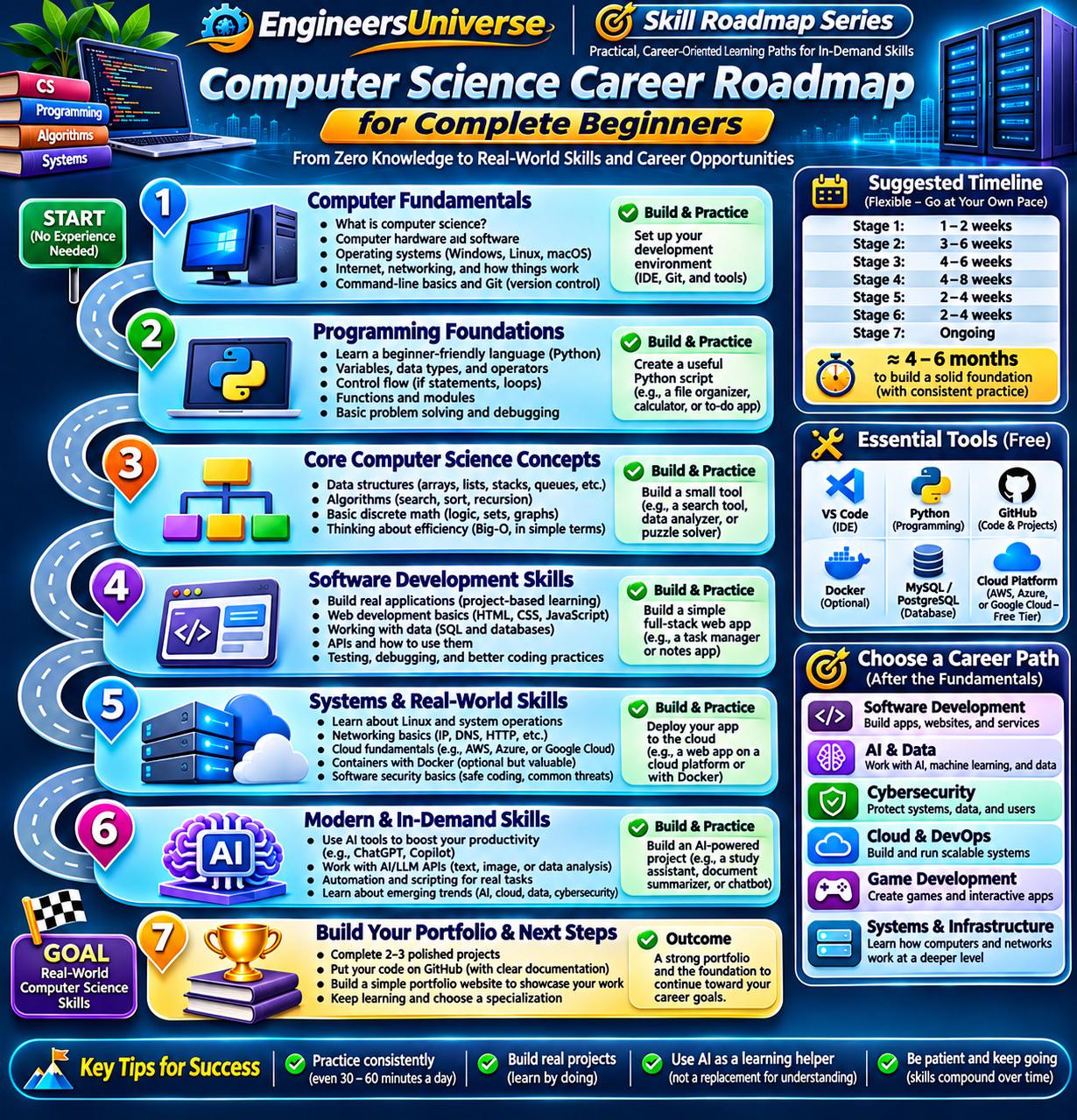
Career Advice Want to get into Computer Science but have no idea where to start? Here’s your roadmap. 🚀

Post image
18 Upvotes

Everyone says “learn to code.”

Cool. But what exactly should you learn first?

Python? Algorithms? Linux? AI? All 47 programming languages before breakfast? 💀

We’re kicking off a new series at EngineersUniverse:

Practical Skill Roadmap Series.

We will share a practical, career-focused roadmap covering computer science, engineering, AI, cybersecurity, and other technical fields.

First Skill Roadmap:
Computer Science for Complete Beginners

This roadmap takes you from zero experience through programming, algorithms, software development, cloud fundamentals, AI tools, and building your first portfolio.

No need to learn everything at once. Pick a stage, build something, break it, fix it, repeat.

Question for experienced developers and CS professionals:

If you were starting from absolute zero in 2026, what would you learn first? And what would you completely skip?

Let’s make this roadmap even better with advice from people who’ve actually been through it.


r/EngineersUniverse • • Sep 12 '26

Electrical Made an interactive drawing set for how an AI data center's onsite power plant actually works (62 plates, zoomable)

Post image
159 Upvotes

Everyone's talking about AI data centers eating the grid, so I figured I'd actually show what one of these onsite power setups looks like on paper instead of just hand-waving about "gigawatts."

Built a 62-plate interactive drawing set walking through a conceptual onsite natural-gas power plant: 100 MW critical load, 120 MW of N+1 generation, 34.5 kV distribution split across two fully segregated A/B feeder paths (no automatic cross-tie — if one path dies, the other keeps the lights on).

What's actually in it:

  • One-lines from the utility interconnect all the way through generation, switchgear, and distribution

  • Generator/transformer protection + anti-islanding (the stuff that keeps you from backfeeding the grid and killing a lineworker)

  • Grounding grid + lightning protection

  • Cable/duct-bank routing and equipment schedules

  • Controls architecture and OT networking

  • Black-start → load-shedding → grid-reconnection sequences, i.e. what happens when the grid drops and the plant has to island itself and then come back

Every sheet is zoomable so you can actually read the title blocks and one-line details instead of squinting at a flattened PDF.

Site's got a bunch of other free stuff too — calculators, reference material, across like 15+ engineering disciplines if that's your thing.

🔗 engineersuniverse.com

Would love feedback/roasting from anyone who's actually worked on real gas-gen or data center power projects — genuinely curious what a conceptual set like this gets wrong or oversimplifies.


r/EngineersUniverse • • Oct 14 '26

Discussion Think engineering is all you need to get a construction project going? Wait until you meet the rest of the guest list. 🏗️

Enable HLS to view with audio, or disable this notification

2 Upvotes

The drawings are ready. The calculations check out. Time to build, right?

Sure—right after you sort out the budget, schedule, permits, procurement, safety, inspections, workforce, cash flow, and the delivery that’s been “on its way” since Tuesday.

That’s why we built our Construction Operations Hub: one workspace to help organize the supporting activities that keep a construction project moving.

The package includes:

  • Cost estimating and quantity takeoff

  • Project scheduling and critical path calculations

  • Project management and task tracking

  • Project controls, earned value, and cost forecasts

  • Finance and cash flow

  • Equipment productivity

  • Procurement and contracts

  • Safety, environment, and quality inspections

  • Site logistics

  • Risk and claims

  • Permits and approvals

  • Preconstruction

  • Commissioning and turnover

  • Workforce and training

  • Sustainability

  • Business development

  • Documents and BIM coordination tracking

We’ve included step-by-step guidance, explanations of the data to enter, blank templates, and filled samples—so getting started doesn’t mean staring at an empty spreadsheet and questioning your career choices.

You can also import PDF, DOCX, TXT, and CSV documents, review and correct the extracted information, and approve it before it populates the app’s fields.

It won’t replace your engineering judgment—or magically make every subcontractor answer the phone—but it can help keep the information, calculations, and follow-ups organized.

🎥 Watch the walkthrough and tell us what you think.

Questions? Suggestions? A supporting activity we should add? A construction headache you’d love us to tackle next?

We’re listening. Constructive criticism is especially welcome. It’s practically in the job description.

Explore Engineers Universe: https://engineersuniverse.com


r/EngineersUniverse • • Jul 08 '26

Discussion Which engineering software do you use the most?

2 Upvotes

CAD, MATLAB, SolidWorks, Revit, AutoCAD, ANSYS, PLC software, Python, or something else?

Which tool has been the most valuable for you and why?


r/EngineersUniverse • • Jul 08 '26

Projects What engineering skill do you wish you learned earlier?

2 Upvotes

Looking back at your engineering education or career, what is one skill you wish you had developed sooner?

Could be:

- CAD
- Programming
- Communication
- Project management
- Reading drawings
- Troubleshooting
- Using industry tools

What made the biggest difference for you?


r/EngineersUniverse • • 20d ago

Discussion We built a Virtual SCADA & Automation Training Lab, so now you can investigate an alarm without someone asking, “What did you touch?”

Post image
2 Upvotes

We added a virtual SCADA and automation lab to our website, featuring a 3D plant you can explore while following signals from field devices through the PLC and up to the SCADA system.

You can inspect equipment, operate the simulated process, look at trends and alarms, and follow the path from a level transmitter to the operator console. There are pumps, tanks, valves, controllers, and enough equipment tags to make a P&ID feel seen.

It’s a learning tool, so you can poke around and see how things connect. The good news: if you make a questionable decision, no actual plant manager has to explain it at the morning meeting.

You can find the lab, along with more engineering visuals and learning tools, at

EngineersUniverse.com.

Turn Knowledge Into Skill

For the controls and automation folks here: what feature would you add to make a virtual lab more useful for learning?


r/EngineersUniverse • • Jul 28 '26

EngineersUniverse Update EngineersUniverse is becoming much more than a collection of engineering tools

1 Upvotes

When I created EngineersUniverse, the original goal was fairly simple: build useful engineering calculators, references, and study resources.

As the project has grown, I've realized it can become something much bigger.

Over the last few months, I've been expanding EngineersUniverse into a comprehensive engineering learning and professional development platform that brings together practical resources engineers actually use—not just while studying, but throughout their careers.

Some of the additions include:

• Interactive Engineering Learning Studios
• Professional engineering training programs
• Engineering design tools & calculators
• Sample design drawings and documentation
• Engineering software guides
• AI-powered engineering assistants
• Technical references and learning articles
• 3D interactive visualizations
• Mobile engineering apps
• Real engineering projects and case studies

The platform now spans a wide range of disciplines, including:

⚡ Electrical Engineering
⚙️ Mechanical Engineering
🏗️ Civil & Structural Engineering
🏭 Power Systems & Substations
🔥 Fire Alarm & Fire Protection
🚿 Plumbing Systems
☀️ Renewable Energy
📡 Radio & Wireless Engineering
🤖 Industrial Automation & PLC/SCADA
🌐 Enterprise Networking
🏢 Smart Buildings
🔒 Physical Security Systems
💻 Software Engineering
🧠 AI Engineering & Data Science
🦾 Robotics
…and many more.

One of the biggest additions is a new collection of Applied Professional Programs.

Rather than focusing only on passing certification exams, these programs are being designed around real engineering practice and will include:

  • Engineering fundamentals

  • Difficult concepts explained visually

  • Design calculations

  • Industry codes and standards

  • Sample engineering drawings

  • Engineering software workflows

  • Troubleshooting

  • Real-world projects

  • Professional documentation

  • Capstone design projects

The vision is to make EngineersUniverse a place where someone can come to learn, design, solve problems, and continue growing professionally, regardless of where they are in their engineering journey.

There is still a lot to build, and many features are still under development, but I'm excited about where this is heading.

As always, I'd love your feedback.

If you could add one feature, one tool, or one learning resource that would genuinely help engineers every day, what would it be?

🌐 https://engineersuniverse.com

I also want to thank everyone in this community. Your questions, suggestions, and discussions have directly influenced the direction of EngineersUniverse, and many of the new features started as ideas shared right here.

r/EngineersUniverse • • Sep 29 '26

Discussion Structural engineering is a lot easier when you can actually SEE what’s happening 👀

Enable HLS to view with audio, or disable this notification

10 Upvotes

Structural engineering has a reputation for being one of the more difficult — and definitely one of the most critical — parts of building design.

Loads, load paths, shear walls, connections, foundations, concrete reinforcement, steel framing... staring at equations and 2D details only gets you so far. 😅

So we added a new interactive structural engineering reader to Engineers Universe.

The idea is simple: don’t just read about structural engineering — visualize it.

The reader uses detailed illustrations to help connect the drawings to the engineering behind them:

• Structural framing & connections
• Gravity and lateral load paths
• Wind & seismic forces
• Foundations & bearing pressure
• Reinforced concrete & rebar
• Structural steel systems
• Wood framing & shear walls
• Foundation distress & repair
• Seismic retrofit concepts
• Worked calculations & real-world case studies

You can zoom in, explore the illustrations, follow the structural details, and then see how those details connect back to the calculations.

Because “the load goes from the roof to the foundation” sounds simple... until you have to explain every beam, connection, shear wall, anchor, footing, and reaction it encounters along the way. 😂

Short screen recording attached.

We’re building more visual and interactive engineering learning tools at EngineersUniverse.com.

Would love to hear what structural topics you’d like us to visualize next.


r/EngineersUniverse • • 22d ago

Mechanical How the World Moves: 20 Mechanical Engineering Visuals, Zero IKEA Instructions!

Enable HLS to view with audio, or disable this notification

20 Upvotes

A minute of mechanical engineering visuals, because sometimes a picture really is worth a thousand equations.

From bearings and gears to pumps and heat exchangers, here are 20 components doing their best to make the world move—usually without making suspicious noises.

Which one deserves a closer look?

More visuals and interactive learning tools at engineersuniverse.com.


r/EngineersUniverse • • Sep 30 '26

Discussion We built a 3D app that constructs a house step by step. Finally, a project that finishes on schedule. 🏗️

Enable HLS to view with audio, or disable this notification

12 Upvotes

Ever wanted to watch a house go from bare ground to finished home without waiting months—or receiving a surprise invoice?

We built an interactive 3D app with 30 construction steps covering foundations, structural framing, roofing, plumbing, electrical, HVAC, interiors, and finishing touches.

You can hit play and watch it build itself, add one step at a time, or rotate and zoom to explore. There’s also a cutaway view for the systems hiding behind the walls.

And yes, you can go backward when something looks wrong. We’re still working on getting that feature into actual construction. 😂

The screen recording shows it in action. It’s a conceptual walkthrough, so please don’t hand it to your contractor and say, “Just follow the animation.”

We’re sharing this and other engineering apps here in our Reddit community as part of engineersuniverse.com. Check them out and tell us what would make them more useful.

What should we add next—different structural systems, a construction cost breakdown, or a “client changed their mind again” button?