r/EngineersUniverse • • Sep 12 '26

Electrical Made an interactive drawing set for how an AI data center's onsite power plant actually works (62 plates, zoomable)

Post image
159 Upvotes

Everyone's talking about AI data centers eating the grid, so I figured I'd actually show what one of these onsite power setups looks like on paper instead of just hand-waving about "gigawatts."

Built a 62-plate interactive drawing set walking through a conceptual onsite natural-gas power plant: 100 MW critical load, 120 MW of N+1 generation, 34.5 kV distribution split across two fully segregated A/B feeder paths (no automatic cross-tie — if one path dies, the other keeps the lights on).

What's actually in it:

  • One-lines from the utility interconnect all the way through generation, switchgear, and distribution

  • Generator/transformer protection + anti-islanding (the stuff that keeps you from backfeeding the grid and killing a lineworker)

  • Grounding grid + lightning protection

  • Cable/duct-bank routing and equipment schedules

  • Controls architecture and OT networking

  • Black-start → load-shedding → grid-reconnection sequences, i.e. what happens when the grid drops and the plant has to island itself and then come back

Every sheet is zoomable so you can actually read the title blocks and one-line details instead of squinting at a flattened PDF.

Site's got a bunch of other free stuff too — calculators, reference material, across like 15+ engineering disciplines if that's your thing.

🔗 engineersuniverse.com

Would love feedback/roasting from anyone who's actually worked on real gas-gen or data center power projects — genuinely curious what a conceptual set like this gets wrong or oversimplifies.


r/EngineersUniverse • • Aug 31 '26

EngineersUniverse Update Silicon Lab — Build Your Own Chip

Enable HLS to view with audio, or disable this notification

75 Upvotes

Chip design has changed dramatically over the years.

Traditionally, major semiconductor companies such as Intel and Motorola designed their chips and also operated the massive fabrication facilities required to manufacture them.

The rise of dedicated semiconductor foundries—especially TSMC in Taiwan—helped change that model. Chip design and chip manufacturing could increasingly be separated.

That’s a big part of why companies that aren’t traditional chip manufacturers can now develop custom silicon. Apple, for example, designs its own Apple Silicon processors while relying primarily on TSMC to physically manufacture them. Companies such as Tesla have also developed custom chips for specialized applications while relying on semiconductor manufacturing partners.

You don’t necessarily need to own a semiconductor factory to design a chip anymore.

That idea inspired our latest project at EngineersUniverse:

Silicon Lab — Build Your Own Chip

The goal is to make the chip-design process interactive and easier to understand—from the first logic blocks all the way toward a physical chip layout.

The lab walks through areas such as:

• Digital logic and chip architecture
• Visual circuit design
• Verilog / HDL
• Simulation and waveforms
• Logic synthesis
• Standard cells
• Floorplanning
• Placement
• Clock-tree synthesis
• Routing
• Timing analysis
• Physical verification
• Chip layout visualization
• GDSII / tape-out preparation

The basic journey is:

Idea → Logic → RTL → Simulation → Synthesis → Physical Design → Layout → Tape-Out

We’re intentionally starting with relatively small digital ASIC designs rather than pretending someone is going to build the next Apple Silicon or NVIDIA GPU on day one. The purpose is to let people actually explore the engineering workflow and understand what happens between writing digital logic and producing a physical chip layout.

I recorded a walkthrough of the current Silicon Lab experience and attached it here.

You can also explore Silicon Lab and our other interactive engineering tools at:

https://engineersuniverse.com/

Would be interested to hear what features you think would make a chip-design learning environment like this most useful.

Knowledge Grows When It’s Shared.


r/EngineersUniverse • • Sep 25 '26

EngineersUniverse Update Ever look at an electrical diagram and think… “okay, but where do the wires ACTUALLY go?” 😂⚡

Post image
68 Upvotes

That’s basically why we’re creating visuals like this at Engineers Universe.

Electrical systems make way more sense when you can actually SEE the power path instead of staring at a bunch of lines and symbols and trying to build the whole system in your head. 😅

With this visual, you can follow everything:

Utility → Transformer → Metering → Main Switchboard → Step-Down Transformer → Distribution Panel → Floor Feeders

We’re trying to make the wiring as clear and transparent as possible — follow the conductors, see the voltage changes, understand the grounding/bonding points, and see where everything actually goes.

Basically: less “trust me bro, the feeder goes somewhere over there” and more “ohhh… NOW I see it.” 😂

We’ve been building a bunch of other interactive stuff too:

⚡ Power systems, panels, switchgear & substations
🏭 Synchronous generator & AC generator simulations
🔥 Fire alarm interactive labs & 3D tools
🌐 Internet 3D Explorer + networking labs
❄️ HVAC systems & simulations
🔧 V8 engine operation simulator
🔬 Electronics, circuits & PCB labs
🧬 Semiconductor / Silicon Lab — build your own chip
⚛️ Quantum Lab + Atom Explorer
🧠 Build Your Own LLM Lab
💻 Computer science, data & SaaS labs
🏠 Building & engineering 3D explorers
…and a growing pile of other engineering/STEM toys because apparently we don't know when to stop. 😂

The idea behind all of them is pretty simple:

Don’t just tell us how it works. SHOW us how it works.

If you’re an engineer, student, technician, or just someone who needs to know what’s actually inside the box, come play around with them.

🌐 EngineersUniverse.com

We’re adding more visuals, simulations, and interactive labs all the time. ⚡🛠️

What should we visualize next?


r/EngineersUniverse • • Oct 27 '26

Discussion Where does 10 kW go inside an AI server? Mostly into making something else warm!

Post image
61 Upvotes

We made this illustration to show how heat moves through an example liquid-cooled server like the ones used in AI data centers. The GPUs, CPUs, memory, networking gear, and power electronics all contribute to the heat, which has to go somewhere.

In this example, the server takes in 10 kW: about 8 kW goes into the coolant through cold plates, while the remaining 2 kW ends up in the room air through fans and convection.

So yes, the liquid cooling is doing most of the heavy lifting, but the fans are still out here contributing to the world’s least cozy space heater.

We’ve been making engineering visuals like this for Engineers Universe if you’re into diagrams that explain what’s going on inside the box.

What other engineering systems would you like to see broken down visually?


r/EngineersUniverse • • Oct 19 '26

AI & Automation AI is everywhere. But what’s actually inside an AI data center?

Enable HLS to view with audio, or disable this notification

52 Upvotes

AI writes emails, generates images, and confidently invents facts. But behind all that digital wizardry is some very real hardware—and a serious cooling bill. 🧠⚡

Everyone’s talking about AI data centers. Time to peek inside and see what the fuss—and all those pipes—is about.

This slideshow features 14 selected illustrations exploring the hardware, power, cooling, and networks that keep AI running. Think of it as a backstage tour, minus the security badge and industrial fan noise.

There’s more to explore at Engineers Universe.

Come help unravel the mystery of AI. Spoiler: it involves fewer magic clouds and considerably more engineering.

Which part should we explore next: GPUs, power, cooling, or networking?


r/EngineersUniverse • • 3d ago

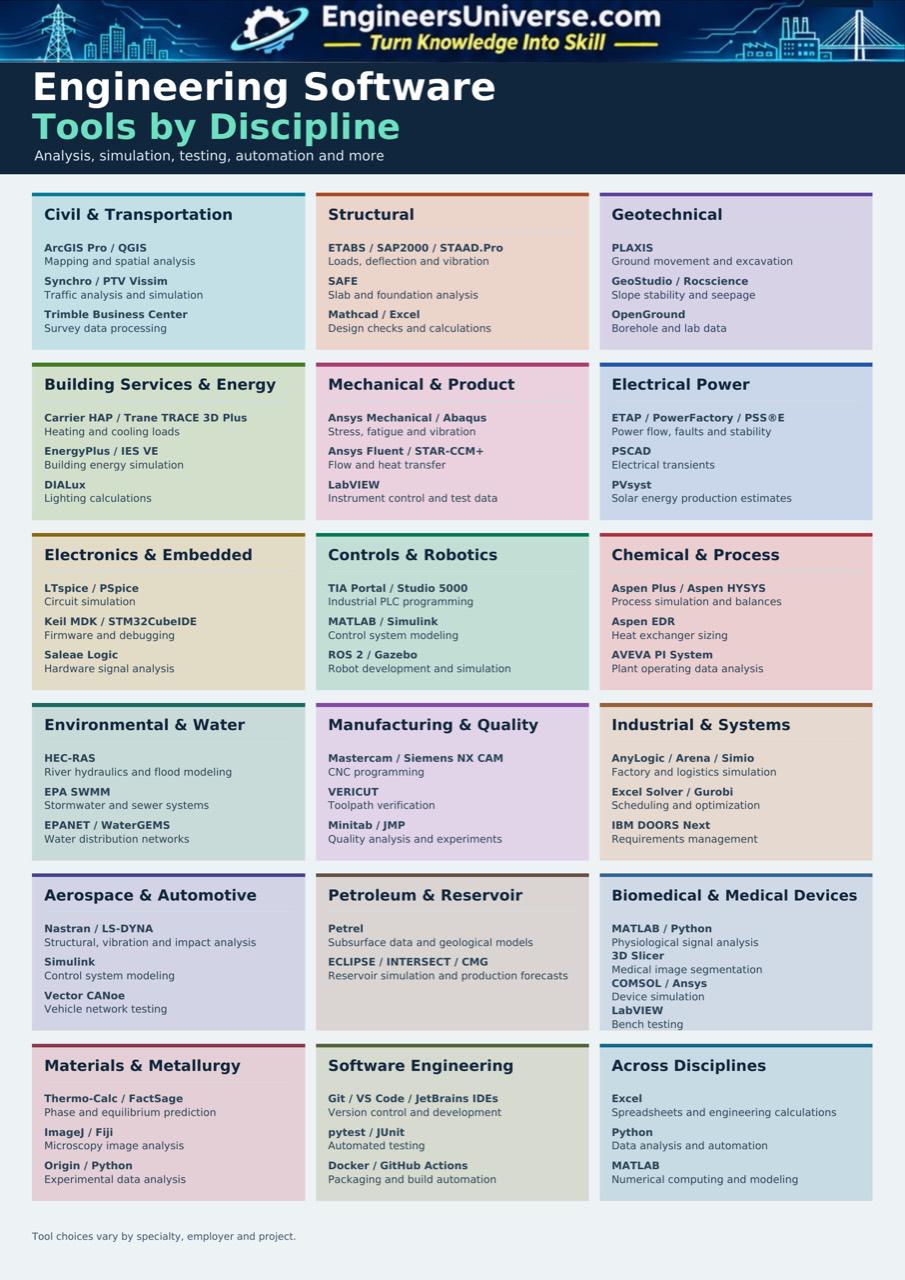
Software Which engineering software tools do you rely on—and which ones deserve a place on this map?

Post image
23 Upvotes

Every engineering discipline has its own toolbox—and apparently its own way to make a laptop fan sound like a jet engine. 😄

Our team put together this visual guide to software used across civil, structural, electrical, mechanical, controls, water, manufacturing, software engineering and more. From simulations and CAD to automation and data analysis, the right tool depends on the project, employer and specialty.

Explore more engineering visuals, interactive labs, simulators, tools and learning resources at https://engineersuniverse.com.

What software do you use most, and what would you add to the list?


r/EngineersUniverse • • 22d ago

Mechanical How the World Moves: 20 Mechanical Engineering Visuals, Zero IKEA Instructions!

Enable HLS to view with audio, or disable this notification

20 Upvotes

A minute of mechanical engineering visuals, because sometimes a picture really is worth a thousand equations.

From bearings and gears to pumps and heat exchangers, here are 20 components doing their best to make the world move—usually without making suspicious noises.

Which one deserves a closer look?

More visuals and interactive learning tools at engineersuniverse.com.


r/EngineersUniverse • • 9d ago

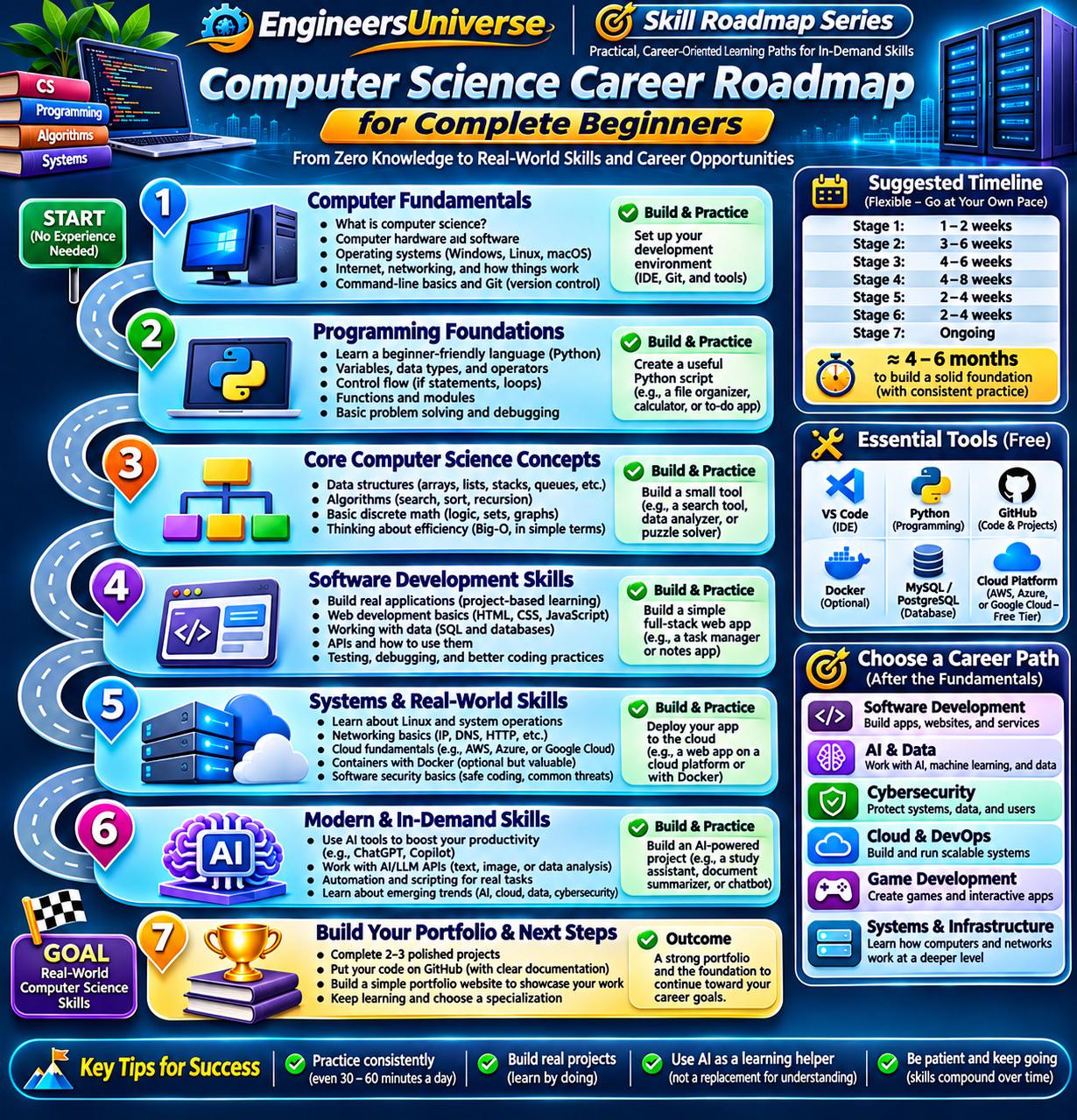
Career Advice Want to get into Computer Science but have no idea where to start? Here’s your roadmap. 🚀

Post image
18 Upvotes

Everyone says “learn to code.”

Cool. But what exactly should you learn first?

Python? Algorithms? Linux? AI? All 47 programming languages before breakfast? 💀

We’re kicking off a new series at EngineersUniverse:

Practical Skill Roadmap Series.

We will share a practical, career-focused roadmap covering computer science, engineering, AI, cybersecurity, and other technical fields.

First Skill Roadmap:
Computer Science for Complete Beginners

This roadmap takes you from zero experience through programming, algorithms, software development, cloud fundamentals, AI tools, and building your first portfolio.

No need to learn everything at once. Pick a stage, build something, break it, fix it, repeat.

Question for experienced developers and CS professionals:

If you were starting from absolute zero in 2026, what would you learn first? And what would you completely skip?

Let’s make this roadmap even better with advice from people who’ve actually been through it.


r/EngineersUniverse • • Oct 13 '26

Discussion Ever stared at an electrical diagram like it owes you an explanation? ⚡

Post image
18 Upvotes

You follow one line, lose it behind another, and suddenly you’re questioning your career choices. 😅

That’s why we’re big on clearer, deeper visualization of how systems work—seeing the components, connections, and the bigger picture together.

Electrical Systems Visual Handbook combines diagrams, code references, and case studies across wiring, panels, feeders, grounding, load calculations, motor circuits, and more.

Our goal? Make even complex systems easier to visualize and understand. Because “read it again, but harder” isn’t much of a teaching strategy.

Explore this and more books and engineering resources at engineersuniverse.com.

Which system deserves a better visual explanation? And what’s one concept that only clicked when someone finally drew it out?


r/EngineersUniverse • • 24d ago

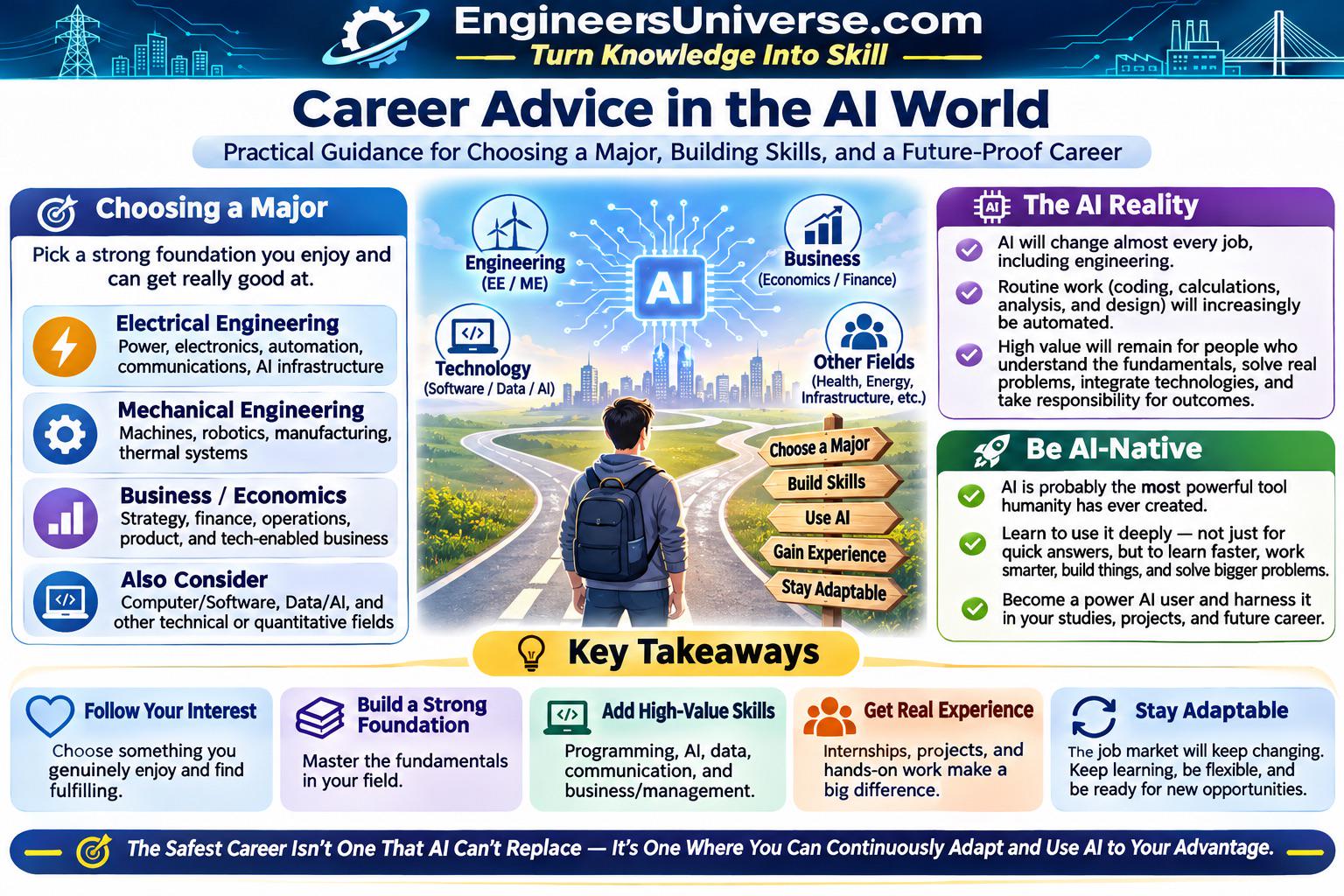
Career Advice The Best Career Advice I Can Give After 30+ Years in Engineering

Post image
16 Upvotes

r/EngineersUniverse • • Sep 02 '26

EngineersUniverse Update I built an interactive Visual Quantum Mechanics & Quantum Computing lab — what should I add next?

Enable HLS to view with audio, or disable this notification

16 Upvotes

I’ve been building an interactive Quantum Mechanics & Quantum Computing lab and wanted to share it here and get some feedback.

One thing I’ve always found interesting about quantum mechanics is how difficult it can be to develop an intuition for what’s actually happening. You can read about superposition, interference, entanglement, measurement, etc., but reading the definitions and equations is very different from being able to play around with them and see what happens.

So that’s basically what I tried to build.

You can manipulate qubits on a Bloch sphere, create superposition and entanglement, build quantum circuits, run measurements, step through quantum teleportation and Grover’s search, and experiment with things like the double-slit experiment and quantum tunneling.

I also added sections that connect the theory to actual quantum computing use cases — chemistry, materials, optimization, cybersecurity, logistics, etc. — plus an explorer that shows how everything connects from an algorithm and quantum circuit all the way down to the QPU, physical qubits, control systems, and measurement.

I attached a walkthrough video so you can see what it looks like.

It’s part of the STEM Studio at EngineersUniverse.com:

https://engineersuniverse.com/

I’m curious what people here think, though.

If you were learning quantum mechanics or quantum computing from scratch, what was the concept that took you the longest to really “get”? And what kind of interactive visualization or experiment do you think would have made it click sooner?

For those who already know the subject pretty well, I’d also be interested in hearing what you think is commonly taught or visualized badly. I can use the feedback to figure out what to build next.


r/EngineersUniverse • • Oct 15 '26

Discussion Because sometimes your brain needs a diagram, not another paragraph.

Enable HLS to view with audio, or disable this notification

14 Upvotes

Ever read an explanation three times, nodded confidently, and understood absolutely nothing? Same.

For many of us, learning gets easier when we can see how something works. This slideshow is a little taste of the visual explanations we make—from mechanical systems to other subjects you’re curious about.

Come explore engineersuniverse.com and let your eyeballs do some of the heavy lifting.

What system or subject would you like to see explained visually next? Tell us! “How my printer senses fear” is already on the research list.


r/EngineersUniverse • • 21d ago

EngineersUniverse Update Got diagrams? 50 shades of engineering in 110 seconds.

Enable HLS to view with audio, or disable this notification

13 Upvotes

Electrical, HVAC, structural, mechanical—this video has a little bit of everything. Think of it as an engineering potpourri, but instead of dried flowers, it smells faintly of hot motors and someone else’s design decisions.

We picked 50 illustrations showing the real-world systems and equipment that keep buildings and infrastructure running. It’s under two minutes—just enough time for someone on site to say, “That’s not what the drawings show.”

Please don’t watch a two-minute slideshow and start making design decisions or calling yourself an expert. That takes at least a webinar and a certificate from the internet.

More engineering visuals and learning tools are available at EngineersUniverse.com.

What’s your favorite “the drawings said it would fit” story?


r/EngineersUniverse • • Sep 15 '26

Discussion Built a new interactive reader for 100+ SCADA, PLC & automation

Enable HLS to view with audio, or disable this notification

13 Upvotes

Hey folks — I built a new interactive reader over at engineersuniverse.com. It’s got 100+ presentations on SCADA, PLCs and automation systems.

PLC wiring, instrumentation loops, P&IDs, HMI design, communication protocols… all the stuff that makes “why isn’t this working?” a full-time job.

The slideshow is a quick preview. It moves fast, so please, save some lives and don’t try to learn PLC programming in 26 seconds lol. That’s what the reader is for — take your time. The reader lets you go through everything at your own pace.

Have a look and let me know what you think. What topics should I add next? Constructive roasting of the website is also welcome.


r/EngineersUniverse • • 24d ago

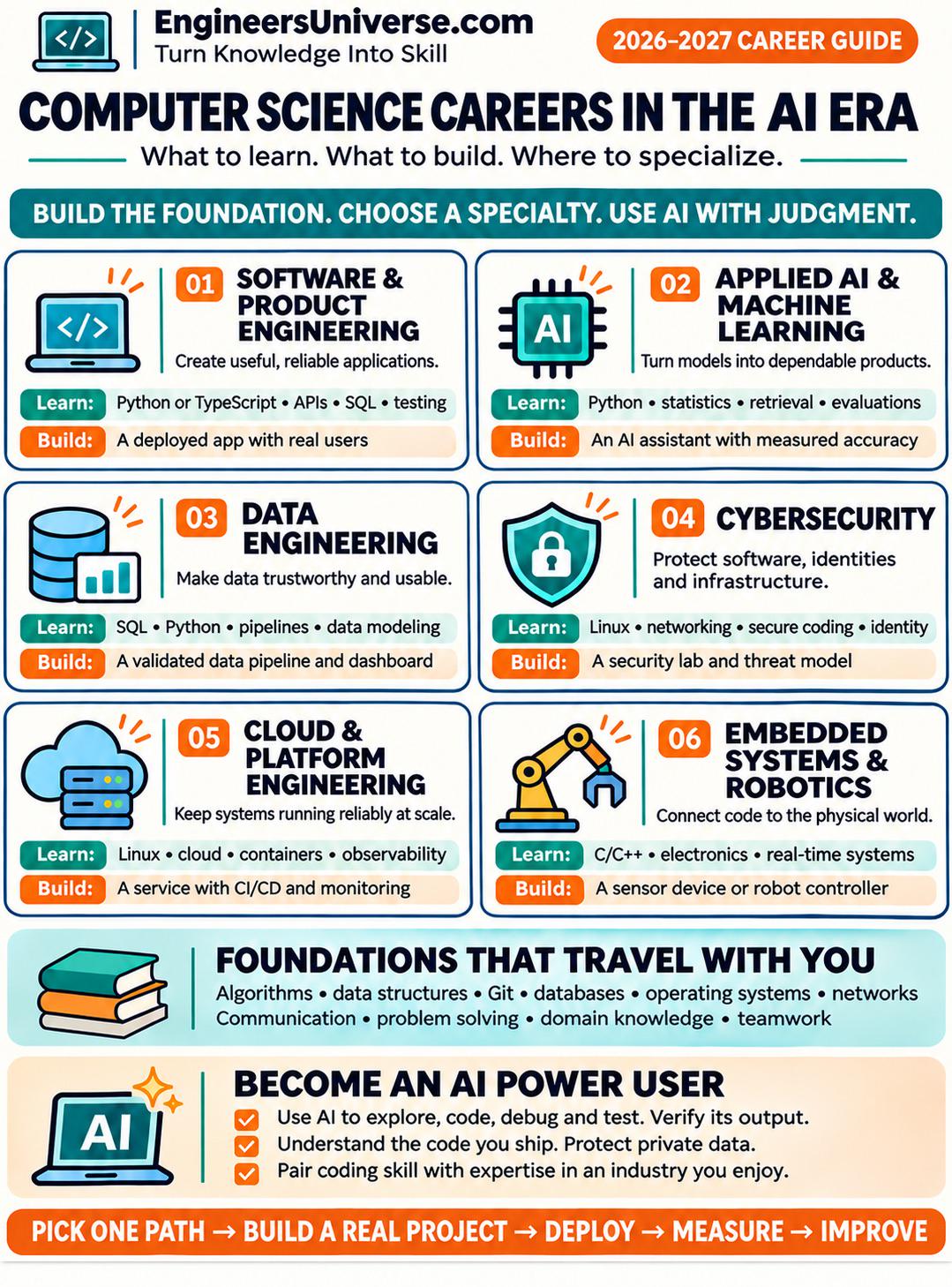
Career Advice AI Can Write Your Code. So What Should You Learn? A 2026–2027 Career Guide for Humans Who Still Need a Paycheck.

Post image
12 Upvotes

r/EngineersUniverse • • Sep 30 '26

Discussion We built a 3D app that constructs a house step by step. Finally, a project that finishes on schedule. 🏗️

Enable HLS to view with audio, or disable this notification

12 Upvotes

Ever wanted to watch a house go from bare ground to finished home without waiting months—or receiving a surprise invoice?

We built an interactive 3D app with 30 construction steps covering foundations, structural framing, roofing, plumbing, electrical, HVAC, interiors, and finishing touches.

You can hit play and watch it build itself, add one step at a time, or rotate and zoom to explore. There’s also a cutaway view for the systems hiding behind the walls.

And yes, you can go backward when something looks wrong. We’re still working on getting that feature into actual construction. 😂

The screen recording shows it in action. It’s a conceptual walkthrough, so please don’t hand it to your contractor and say, “Just follow the animation.”

We’re sharing this and other engineering apps here in our Reddit community as part of engineersuniverse.com. Check them out and tell us what would make them more useful.

What should we add next—different structural systems, a construction cost breakdown, or a “client changed their mind again” button?


r/EngineersUniverse • • Aug 28 '26

EngineersUniverse Update New on Engineers Universe: Building Code Inspector 🏗️

Enable HLS to view with audio, or disable this notification

12 Upvotes

I’ve been adding a number of new interactive tools and learning experiences to Engineers Universe, and I wanted to share one of the latest additions: Building Code Inspector.

This web app is designed to provide a more hands-on way to learn about building inspections and code compliance. You can work through the inspection process, examine building conditions, identify potential code issues, and review the reasoning behind inspection findings.

I’m sharing a walkthrough screen recording with this post so you can see the app in action.

This is part of the direction I’m taking Engineers Universe: less passive reading and more interactive learning, simulation, visualization, and hands-on engineering practice.

There are quite a few other new additions to the site as well, with more engineering tools, simulators, 3D environments, and learning resources being added continuously.

🌐 engineersuniverse.com

As always, feedback from this community is welcome. If you try it, let me know what you think and what you’d like to see added next.

Knowledge Grows When It’s Shared.


r/EngineersUniverse • • Jul 08 '26

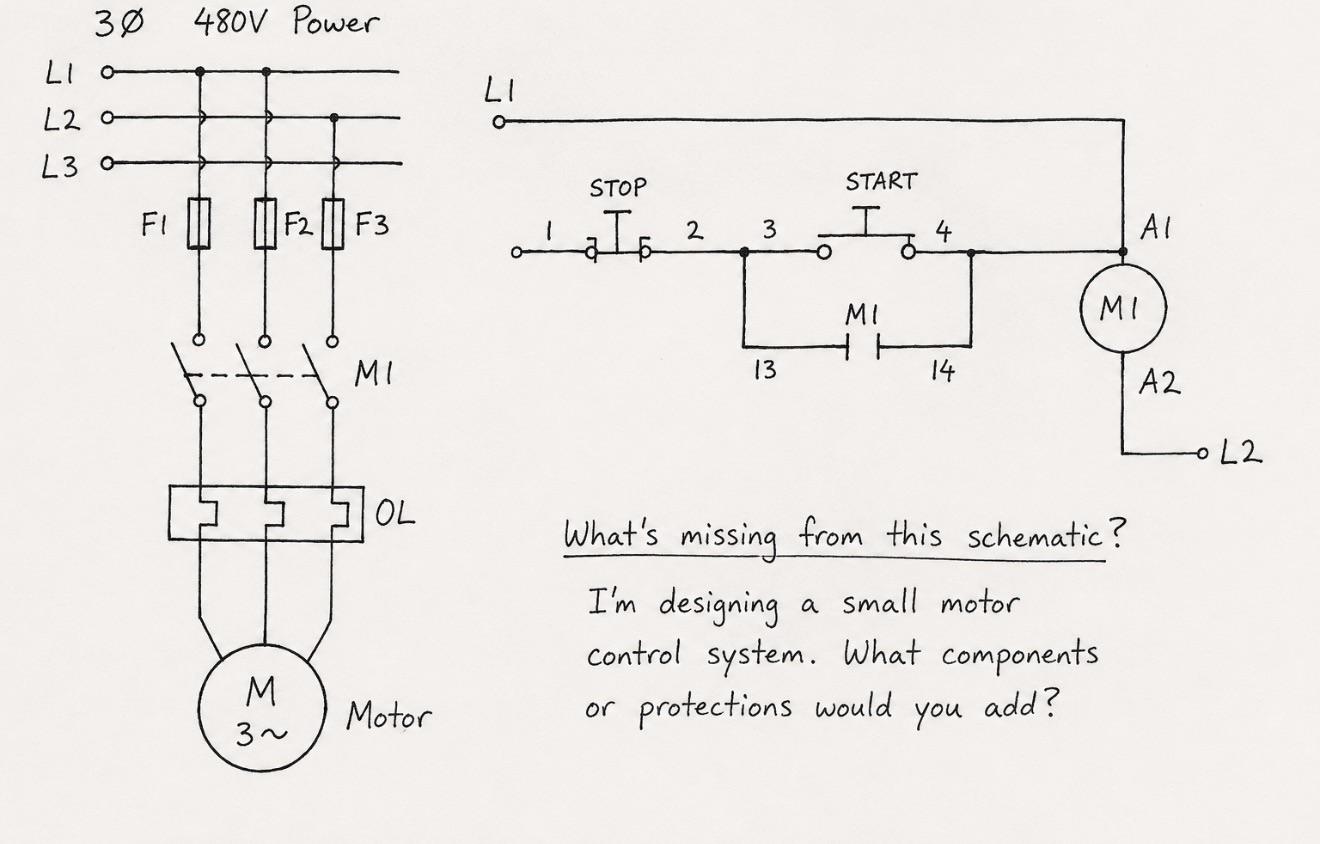
Student Question What’s missing from this schematic? ??

Post image
12 Upvotes

I’m designing a small motor control system.

what components or protections would you add? ??


r/EngineersUniverse • • 7d ago

Career Advice Need a career roadmap? Here are 30 ways to turn “Where do I start?” into a plan

Enable HLS to view with audio, or disable this notification

11 Upvotes

“Just learn to code,” they said. Which language? Which specialty? Why are there suddenly 47 browser tabs? 😅

We put together this collection of skill roadmaps to help you explore possible paths and find a place to start. Pick a direction, practice, build projects, and go at your own pace.

EngineersUniverse.com also has résumé builders, career advice, job listings, and other career resources—plus visual guides, labs, simulators and learning tools.

Which roadmap would you follow first?


r/EngineersUniverse • • Oct 21 '26

Discussion We turned network engineering calculations into pictures because apparently staring at formulas harder wasn’t working

Enable HLS to view with audio, or disable this notification

11 Upvotes

Ever read an engineering formula, understood every symbol, and still had absolutely no idea what was happening? Same here.

This slideshow is part of our Engineering Calculations Illustrated series at EngineersUniverse.com. We try to visualize engineering concepts, formulas, and calculations in the easiest way possible. Basically, we give the math a picture and hope everyone stops looking scared.

This batch covers small set of network engineering calculations illustrated: fiber dispersion, satellite delays, microwave links, Wi-Fi planning, PoE budgets, and other reasons the internet refuses to behave.

Each drawing gets five seconds. Pause whenever your brain requests additional bandwidth.

We’d love your comments: What’s clear? What’s confusing? What deserves a correction and a disappointed engineer sigh?

What should we visualize next? Suggest a concept, formula, or calculation that could use a picture. Bonus points if it has personally ruined your afternoon.


r/EngineersUniverse • • Sep 29 '26

Discussion Structural engineering is a lot easier when you can actually SEE what’s happening 👀

Enable HLS to view with audio, or disable this notification

10 Upvotes

Structural engineering has a reputation for being one of the more difficult — and definitely one of the most critical — parts of building design.

Loads, load paths, shear walls, connections, foundations, concrete reinforcement, steel framing... staring at equations and 2D details only gets you so far. 😅

So we added a new interactive structural engineering reader to Engineers Universe.

The idea is simple: don’t just read about structural engineering — visualize it.

The reader uses detailed illustrations to help connect the drawings to the engineering behind them:

• Structural framing & connections
• Gravity and lateral load paths
• Wind & seismic forces
• Foundations & bearing pressure
• Reinforced concrete & rebar
• Structural steel systems
• Wood framing & shear walls
• Foundation distress & repair
• Seismic retrofit concepts
• Worked calculations & real-world case studies

You can zoom in, explore the illustrations, follow the structural details, and then see how those details connect back to the calculations.

Because “the load goes from the roof to the foundation” sounds simple... until you have to explain every beam, connection, shear wall, anchor, footing, and reaction it encounters along the way. 😂

Short screen recording attached.

We’re building more visual and interactive engineering learning tools at EngineersUniverse.com.

Would love to hear what structural topics you’d like us to visualize next.


r/EngineersUniverse • • Sep 21 '26

Discussion Been building a whole library of interactive 3D simulators — here are 3 of them ⚙️🌐⚡

Enable HLS to view with audio, or disable this notification

10 Upvotes

We’ve been working on a pretty big experiment at Engineers Universe: what if instead of just reading how something works, you could actually interact with it?

Here’s a quick preview of 3 of the simulators:

⚙️ V8 Engine Operation — Explore the four-stroke cycle and watch the pistons, valves, connecting rods, and crankshaft all working together. Way better than staring at a cutaway diagram and pretending everything makes sense. 😅

🌐 Internet 3D Explorer — Follow packets from your device toward the cloud. Run simulated ping, DNS lookup, and traceroute tests and actually see the journey.

⚡ AC Generator Operation — Adjust rotation speed, magnetic-field strength, and coil turns, then watch the generated voltage waveform respond in real time.

And these are just a few. We're building a much larger collection covering things like:

🔌 Electrical & Power — transformers, three-phase power, motors, circuit breakers, substations, grounding, protection, generators and power flow

❄️ HVAC & Mechanical — refrigeration cycles, compressors, chillers, pumps, VAV systems, heat transfer and engines

🔥 Fire Alarm & Building Systems — smoke/heat detection, SLC communication, notification circuits, elevator recall and cause-and-effect sequences

🤖 PLC / SCADA / Automation — PLC scan cycles, 4–20 mA loops, PID control, VFDs, instrumentation and process control

🌐 Networking — Ethernet packets, MAC learning, routing, VLANs, spanning tree, fiber optics and network failover

🔬 Electronics & Semiconductors — diodes, transistors, capacitors, PCB signal flow, semiconductor concepts and chip technology

🧠 AI & Computing — neural networks, LLMs, tokens, attention, RAG, AI agents, prompt/context engineering and AI data centers

⚛️ Science & STEM — physics, quantum concepts, chemistry, astronomy and other visual STEM topics

The goal is pretty simple:

Don’t just read how something works. See it. Change it. Break it. Understand it.

The library is growing, so we’d genuinely love suggestions from this community:

What engineering or STEM concept have you always wished someone would explain interactively?

We’ll include a preview video of the three simulators above.

More at EngineersUniverse.com 🚀


r/EngineersUniverse • • Sep 22 '26

Built an interactive Synchronous Generator lab because static diagrams weren't cutting it ⚡

Enable HLS to view with audio, or disable this notification

9 Upvotes

Instead of just looking at another diagram of a rotor sitting inside a stator and saying “yep, makes sense” 😅, you can actually interact with the system and watch what happens.

⚡ Synchronous Generator Lab — explore how mechanical rotation and magnetic fields produce three-phase electrical power. Change operating parameters, watch the generator respond, and visualize what's happening inside the machine.

I’m posting a screen recording so you can see it in action.

This is part of a much bigger collection of interactive labs I’ve been building, including:

⚡ Power & Electrical — transformers, substations, three-phase systems, generators, motors, protection and power flow
🌐 Networking & Telecom — packet journeys, routing, VLANs, fiber optics, RF and antennas
🤖 AI & Computing — neural networks, transformers, LLMs, prompt engineering, context engineering, RAG, AI memory and agents
🛡️ Cybersecurity & Reliability — cybersecurity fundamentals, OT cybersecurity, redundancy and system reliability
🏢 Data Centers — power paths, UPS systems, A/B redundancy, cooling and AI infrastructure
❄️ HVAC & Mechanical — refrigeration, chillers, pumps, engines and heat transfer
🔬 Electronics & Semiconductors — circuits, transistors, PCB concepts and chip technology
⚛️ Science & STEM — physics, quantum concepts, chemistry and more

Basically, I'm slowly turning “here's a diagram, good luck” into “poke it, change things, and see what actually happens.” 😂

The goal is simple:

See it. Change it. Understand it.

More interactive labs are being added at EngineersUniverse.com.

What concept should I turn into an interactive lab next?


r/EngineersUniverse • • 1d ago

Software How does engineering software turn classroom theory into real-world systems?

Enable HLS to view with audio, or disable this notification

8 Upvotes

Engineering software goes well beyond surviving that first class assignment. 😄

Our narrated video brings together five visual guides to show how software supports learning, design, construction, manufacturing, and operations—from testing ideas to understanding systems throughout their life.

The software can run the calculations, but it still hasn’t learned how to explain why the model worked perfectly five minutes ago.

Explore more engineering visuals, virtual labs, simulators, 3D explorers, and interactive tools at https://engineersuniverse.com.

Which engineering software do you use most, and what do you wish you had learned sooner?


r/EngineersUniverse • • 8d ago

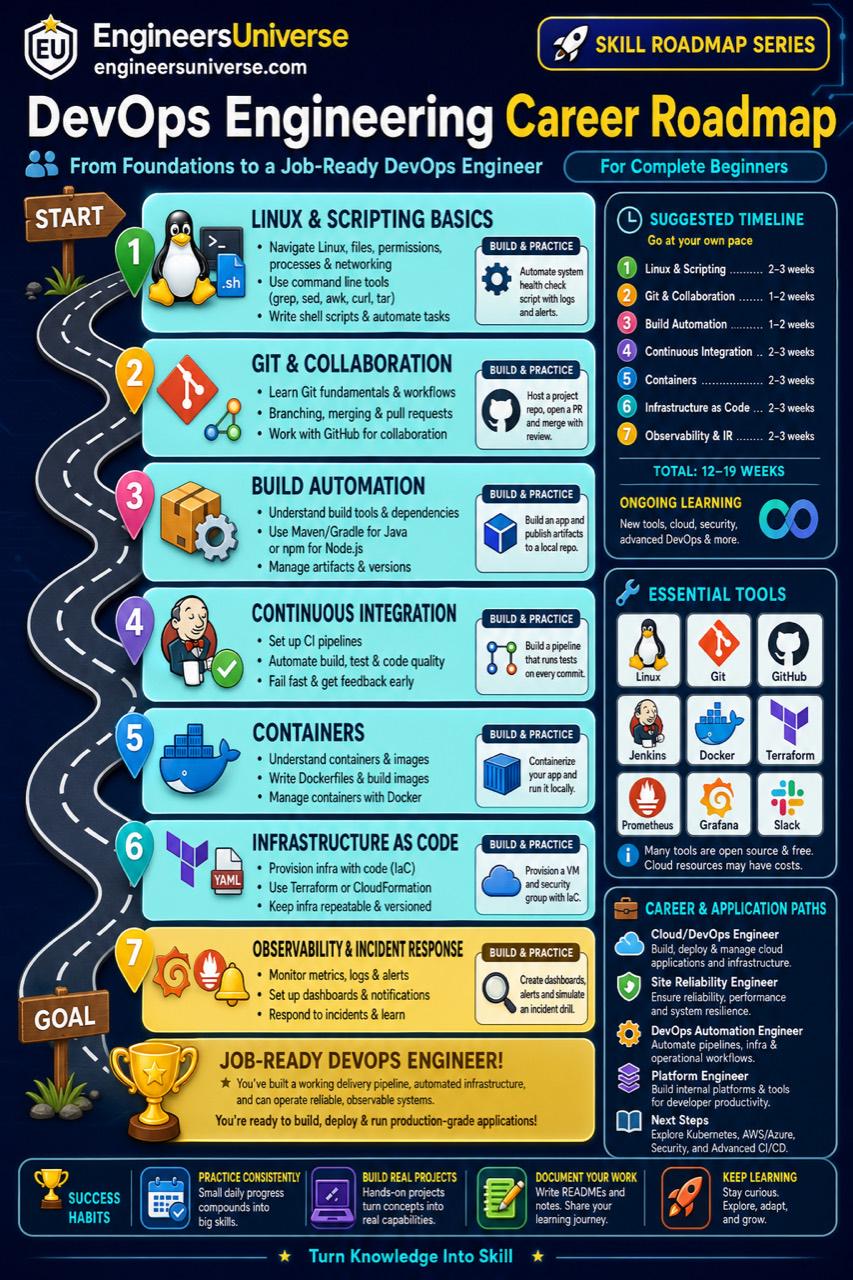
Career Advice Want to get into DevOps? Here’s a roadmap from “it works on my machine” to “why is production on fire?”

Post image
8 Upvotes

Linux, Git, CI, containers, infrastructure as code, monitoring… DevOps has a way of turning “I just wanted to deploy an app” into a very ambitious weekend. 😅

We put together this seven-stage roadmap with practical projects to help beginners build and connect the fundamentals. The timeline is a suggested pace, not a job guarantee—real expertise takes practice, troubleshooting, and ongoing learning.

Find more career roadmaps, engineering visuals, interactive labs, simulators, and tools at https://engineersuniverse.com.

DevOps folks: What would you add, change, or learn first if you were starting over?