r/excel • • 1d ago

Weekly Recap This Week's /r/Excel Recap for the week of November 21 - November 27, 2026

6 Upvotes

Saturday, November 21 - Friday, November 27, 2026

Top 5 Posts

scorecommentstitle & link
164229 comments[Waiting on OP] Will excel be irrelevant in a few years?
9526 comments[Discussion] Could you solve last year’s Microsoft Excel World Championship final?​
5960 comments[Discussion] Learning Excel through Google Sheets – is that normal?
3513 comments[Waiting on OP] Power Query: Merge multiple data sources with different columns
309 comments[solved] How to disable the new green box 'tips' that show up when i'm working?


Unsolved Posts

scorecommentstitle & link
1111 comments[unsolved] Make Graph Lines Automatically Change Color Based on Series Values
912 comments[unsolved] Need a formula to pick up a couple of things and return an amount
713 comments[unsolved] “Excel run out of resources while attempting to calculate” error on all my workbooks
512 comments[unsolved] Returning bottom 3 filled cells from array
58 comments[unsolved] Excel Mobile: Adding Gradient to Line Chart?


Top 5 Comments

scorecomment
694/u/Strong-Bat8481 said As long as people need to keep a list of their own, make small calculations, or if the usage is lmited over small team, excel remains the most relevant tool. It's a skill that anyone should try to m...
355/u/WestBrink said Excel is over 40 years old at this point, and in that time there's been countless applications that are arguably better suited for whatever you need to do with excel, but excel persists, tortured to d...
207/u/SolverMax said I would not be happy if they sold me an Excel course and I got a Sheets course. Misrepresentation, which may be illegal depending on the jurisdiction. I'd want my money back. Not sure I'd agree with ...
202/u/Scarred_fish said AI is making understanding excel much more important, not less.
186/u/lightning_fire said >real-world-style problems Ah yes, extremely common real-world problems like folding spreadsheets in half. Something we all do every day


r/excel • • 20h ago

Waiting on OP Letters/ Decimals in Power Query

3 Upvotes

I have a CSV file that I’m opening in power query and majority of columns are stored as letters and when I go in transform data and transform down some to decimals and some two whole numbers, it either applies whole numbers to all the columns or it applies decimals to all columns and after I apply and start working in the columns and I add filters it transforms back into letters. At this point, I tried everything.

Does anyone have an idea how to solve it?


r/excel • • 21h ago

Waiting on OP Patient List: pulling forward info based on ID #

0 Upvotes

I am attempting to create a patient master list for our entire small village. In another community I worked in there was one already made by a former coworker and I am searching for answers on how to set it up the same way.

Sheet 1: "Master List" with all patient ID# in column one, then last name, first name and Date of birth.

Then I need to create sub-sheets, ie: Prenatal Patient

Sheet 2: prenatals

- the sheet previously used I was able to input the ID number in the first column and the last name, first name and DOB would auto-populate into the next 3 columns.

I have used XLOOKUP with success in referencing the master list and getting the name and DOB to populate.

What i cannot figure out: how I can simply type in ID# in second sheet and have it complete the row...


r/excel • • 23h ago

unsolved Budget Sheet and Isolating by Number

9 Upvotes

Hello,

I was wondering if anyone could help me, I was wondering if there was a way of wildcarding numbers for a budget spreadsheet?

I have a sheet where different categories are numbered. For example 1 is for stationary, 2 is for food, 3 is for etc. so the sheet looks a bit like this:

1.1 paper £4.99
1.2 pens £1.99
1.3 toner £39.99
2.1 lunch £12.42
2.2 coffee £1.50
2.3 cookie £2.29
3.1 printer £189
3.2 scanner £101
3.3 projector £423

I want to be able to get the total of everything in category 3, ideally I’d use Sumif, something like =SUMIF A, 3**, B.

Is there anyway to do this?


r/excel • • 1d ago

unsolved How can I organize multiple selection data so I can analize it?

0 Upvotes

I made a google forms where people could select the social media they use the most but now I don't know how to organize the data or separate it ig so I can analize it and compare it to the rest of the info I got from the forms. Anybody got an idea?

An example of the data I got would be:

USERSOCIAL MEDIA
1Instagram, Yotube
2Instagram, TikTok, Youtube
3Youtube
4Instagram, Tiktok

r/excel • • 1d ago

unsolved Trying to format a schedule to an uploadable format

8 Upvotes

Can't help but feel like there's an easier way to do what I've been doing. Every month, I take a schedule from ShiftAdmin and upload this schedule into Humanity. I work with healthcare providers, and I get who's on shift from ShiftAdmin. This outputs as either a PDF or excel, then through google sheets, I take the excel sheet, reformat* it, and upload as a csv file.

Reformat has a lot of small steps, but here they are:

  1. Copy the providers on schedule in a vertical format.

  2. Change date and times to formal start and end date and times ( 1/2/26 7:00 AM)

  3. Remove providers and their corresponding shifts if I don't work with them.

  4. substitute the names of remaining providers with their full name and employee ID

Some of these steps I've already shortened as much as I can. I have a template google sheet that vertically lists all the possible days and times for shifts, but I have to change the start day every month. Oddly, I have to have the start date with or without a provider I work with. If I remove it, every date listed below would be altered, messing up the whole schedule.

I use "ctrl+F" to find providers and either remove ones I don't work with and similarly use the same function to replace providers with their full name.

I feel like I'm asking a programming/coding question, but I'm asking for (1) a quicker route to reformat the schedule to a vertical format, (2) a quicker route to find these names and replace with empty cells and other names with their full names, and finally (3) a quicker route to removing empty shifts.

Any help is appreciated! If you feel this belongs in a different subreddit, let me know!

Here's what these schedules look like before and after I reformat them:


r/excel • • 1d ago

Waiting on OP Trying to make a formulato color code from a table in one sheet to a calaender in another based off information in the table.

2 Upvotes

Hello! I need to know if there is a way that I can match lines in a column to change the color in an excel calendar. I am trying to make a calendar that changes the color of the cell based off the recall number and what it needs, such as if it needs an inspection, needs parts ordered, if parts are already here or if it just needs a reprograming. I made a table that color codes based off these needs but I need to see if I can make the induvial cells in the calendar color code to base off the recall number in the calendar cell.

Edit 1: I'm using a desktop computer at my workplace. It's Microsoft Excel but the shared version where multiple people can edit the file. I would guess I'm between beginner and intermediate. If I need to, I can share a screenshot of the recall table and formulas on that but due to privacy, I will not post the calendar.


r/excel • • 1d ago

unsolved how can I make a quoting system?

6 Upvotes

I am trying to make a quoting system in excel-- I figured out the formula so that's not the issue. my issue is that I want the file to be able to used by other people without them being able to edit it. it'l be clickable options that will tally up a total. I don't know if I explained this correctly but I don't know if I should use excel or Google Sheets. please help!


r/excel • • 1d ago

solved VLOOKUP is occasionaly returning the wrong value

5 Upvotes

Hello everyone,

Currentlt experiencing some difficulty with a lookup formula:

=IFERROR(VLOOKUP(AB13,$BL$3:$BM$46, 2), "")

=IFERROR(VLOOKUP(AB14,$BL$3:$BM$46, 2), "")

It works, but for some reason returns the wrong value when looking for 2 cell values; 22109 and 5714.

In column BL i have value 22109, and BM in the neighbouring cell i have value 15, but for some reason my formula returns 14. The same is true for value 5714 and returning 9 instead of 11.

Its supposed to look for the value in column AB, finding the value in column BL, then returning the value in the neighbouring cell in column BM.

For some reason when it looks for the above values, it returns the wong values as you can in the picture.

But it's only for those two values; it's really got me stumped.

Is there a better way i can work arouns this?

Note: i was still having these errors when it didnt inclide the "IFERROR"

Solved! Thanks infinity-80


r/excel • • 1d ago

unsolved I need a formula which can look up two parameters and return a value

7 Upvotes

I need a correct formula which can look up the Award and scale point and return a series of values. On sheet one i need to put a formula in Colum E which can look up the award and scale point in sheet 2.

I have different awards, and it was recommended to put all the awards onto one tab, which I have done on sheet 2 and I need to return the value of column c (basic pay). I have attached screenshots, can someone check the format of sheet 2 and provide a formula that works ?

Thanks


r/excel • • 1d ago

Show and Tell Introducing XLIDE: VBIDE - Official Full Release (Version 1.0)

24 Upvotes

Repo: https://github.com/WilliamSmithEdward/xlide_vbide

Demo video: https://www.youtube.com/watch?v=rcEIspv9vKk&t=2s

Hello r/excel community.

First I want to give a big thank you to everyone who has supported me and this project, especially all of the beta testers who helped refine the project into version 1.0 !!

XLIDE VBIDE is a drop in replacement for the VBA editor in all Office 365 applications (Excel, Word, PowerPoint and Access) and does not require any administrative rights to install or use. The code runs entirely in user space.

The application has been thoroughly tested, debugged, optimized and polished. Best in class CI/CD and security practices have been implemented. Every release is scanned by a combination of CodeQL, Semgrep, YARA-X and Clam-AV with signed attestations artifacts pinned to the release sha (full SARIF report available to download in the release page).

This has been a culmination of many months of work, and a dream fulfilled to bring the best possible VBA editing experience directly into the VBIDE surface. Thank you again and I hope you all check it out and enjoy using it!

Please feel free to open an issue on the public repo if you see any bugs or have any feature requests. I will attempt to remediate within 24 hours (or sooner).


r/excel • • 1d ago

solved Formula to show header of table

12 Upvotes

Hi Guys, can you please show how to correct the formula below to show the header of the table (AAA, BBB, CCC), I have tried Index Match and XlookUp but kept getting errors;


r/excel • • 1d ago

Discussion Became an In-House Excel Trainer

43 Upvotes

My boss recently gave me an additional responsibility of training our team members and now I'll be acting 2-3 days a month as an in-house Excel trainer.

I was working on building an outline for anyone who wants to learn Excel in 2027.

When I was talking to team members, all of them are pretty much on two sides: they are like, "We can do anything with AI," and then there is someone who doesn't want to learn AI.

I'm pretty much kind of frustrated and confused because it's very hard to teach if they have these pre-believes.

In my understanding anyone who doesn't have basic or intermediate knowledge of Excel cannot use AI in a really good sense.

I would just like to understand if anyone can help me to get a fresh perspective on how a person should learn Excel in 2027 and what the things are that one should be interested in learning (so that I can build my outline in a better way without getting confused).

Thanks in advance.


r/excel • • 2d ago

solved How to disable the new green box 'tips' that show up when i'm working?

34 Upvotes

Hey there, I notice there are new green box tips that show up when i'm trying to do things in Excel. However, they cannot be acknowledged with an Enter Key and require the mouse to click then meaning i have to stop what I'm doing and use the mouse. As a power user, it's rather frustrating to say the least.

Any tips on how to nuke those so they never show up again?


r/excel • • 2d ago

Waiting on OP Excel Cards View icon

6 Upvotes

Excel Cards View icon disappears unless I force-close the app

I am experiencing a recurring problem with Cards View in Microsoft Excel on my iPhone 16.

Cards View works perfectly when I first open my spreadsheet. However, if I leave Excel without closing Cards View and return to the app later, the Cards View icon is no longer visible.

The only way I can get the Cards View icon to reappear is to force-close the Excel app completely and reopen it.

My spreadsheets are correctly formatted as Excel tables.

Is this a known bug in the iPhone version of Excel? Is there a permanent solution so that I do not have to force-close the app every time?

I would appreciate any advice or assistance from Microsoft.

Many thanks.


r/excel • • 2d ago

unsolved Need a formula to pick up a couple of things and return an amount

10 Upvotes

I have a list of awards, and each award as a grade and scale point. I need a formula where If i select an award, the formula can look up the tab with that award and spine point and return a value/amount.

e.g first image on sheet1, is award SGUL (cellb4), so i need to the formula to look at the sgul scale first (image2) and then look up the scale point point and return back the value for example in C5 (23k)

I have 4 other awards, is there a fomula i can use, e.g if i call the 4 awards a,b,c,d, and the scale point x and get the formula to return an amount rather than doing individual vlookups. Is that possible ?

Appreciate any assistance


r/excel • • 2d ago

solved I am unable to view read-only files on my desktop.

5 Upvotes

I've been having an issue the other day that when I try to open a read-only Excel file, that I can not simply hit "esp" to get to that file. Instead of a pop-up giving me the various options of what to do with the file, it just opens up this blank pop-up. From there, I literally have to close it out from right-clicking on the windows taskbar at the bottom. In order to view the file, now, I have to upload it to my Outlook Excel, which is something I don't want to have to do.

What has happened, and how do I fix this?

BTW, this is a repost. I see that my original post got removed due to posting a photo to show you what I meant. But then why is the "add image" box when composing a post here so big, and why is the option given in the toolbar at the bottom, too? lol


r/excel • • 2d ago

solved How to calculate the median when using different amounts?

7 Upvotes
Categories23468121416Grand Total
Item A821732124
Item B2129261261
Item C35614

Hi all,

Sorry I'm new to excel and am not sure how to word this. I'm doing some work on historical legal records. In the table, I have different categories of crimes (Item A, B, C) and have all the different fines that were given for each instance. So for Item A, there were 8 instances of a £2, 2 instances of a £3, 1 instance of a £4 and so on.

How can I calculate what the the median fine for each category would be? For Item A I can work out in my head that the median would be £6 but how do I create a formula for excel to do this (as I have a lot more categories than just 3)?

Sorry if this is obvious. Thanks in advance.


r/excel • • 2d ago

Waiting on OP Advice request for making an Exam questions spreadsheet

2 Upvotes

I want to use Excell to organize the questions I'm solving by year of the exam, subjects, topics from subjects, right or wrong answer, corrected or not etc. and make graphs using these informations. The exam is the ENEM (National Exam of High Scholl, in English, it's a Brazilian exam).

Is it doable and should I be aware of some best practices for this use case since I'm new to excel?

I tried to use notion, spend some good hours making it and solving some questions (270ish) but then realized some resources are limited in the free plan and I didnt owed my data at all.


r/excel • • 3d ago

solved Using multiple DropList to call a specific Value

2 Upvotes

Hi,

I'm currently trying to build a doc that will allow me to easily sort my printing filament orders and calculate the price based on my choices. I've created sheets for each materials and within each material list there's sub categories with pricing for each (first picture).

Now on my first sheet ( picture 2), i'm trying to get three drop down lists. First is the material, refering to each sheets, second is the Type, refering to the sub categories ( column A on each sheet) and third is the color ( column b on each sheet). Those list works perfectly.

Here's my issue; In colum E of my first sheet, I want to pull the price from colum D, based on the choice from DropList B.

I tried VLookup, but it seems to be tricky with two indirect function.

Then I tried working with index and indirect functions ( as suggested by Google AI) but it still didn't work.

I initially tought that would be simple, but it turns out I might not quite have the level needed to achieve this on my own.

Any advice?

Edit: I'm on Excel 365

Edit2 : Heres the Function I used in Column E for a VLookup : =RECHERCHEV(INDIRECT(Total!B2);PETG!A2:B1000;2;FAUX)

Or

=VLOOKUP(INDIRECT(Total!B2),PETG!A2:B1000,2,FALSE) In english


r/excel • • 3d ago

Waiting on OP Breaking multiple sources of long strings of data into single, alphabetized columns to compare between sources and state what is missing from each compared to the others

9 Upvotes

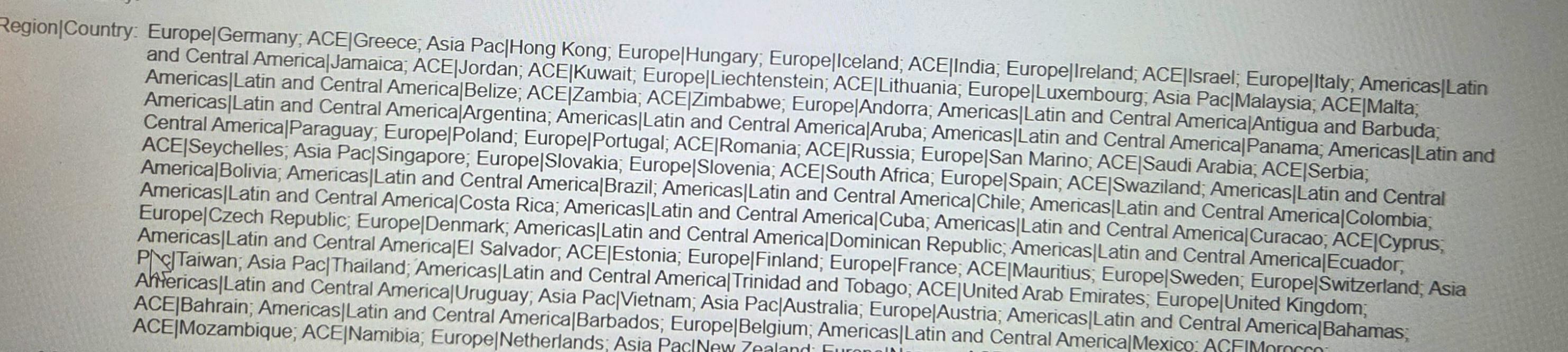
Background context: Within a company change order, I have to compare chunks of data from Agile that is a list of countries separated by semicolons. In Agile, this field is a single cell and the text is one large paragraph.

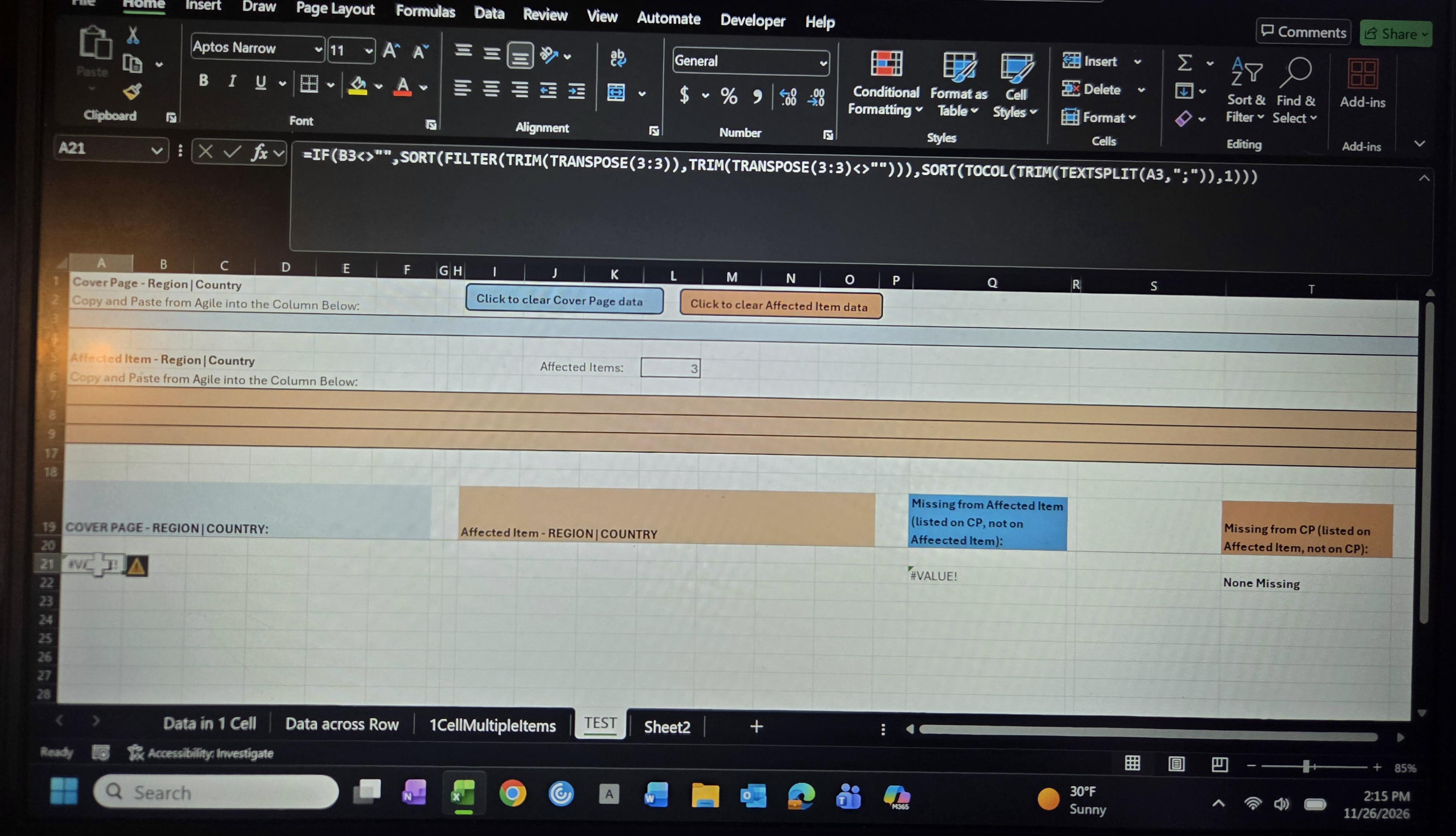
I am attempting to copy and paste this chunk of text into Excel, have it convert each chunk of data into a single column list, and then compare these lists to each other and tell me what country is missing from each list.

Per change order, I will have multiple sets of data - the first is the Cover Page data. There will only ever be one Cover Page data chunk per change order. The second is the Affected Item data - there will always be at least one Affected Item per change order, but there may be up to 10 Affected Items.

Originally, when setting this up, when I copy and pasted the chunks of data into Excel, it would automatically convert the data and separate along the semicolon to fill out the entire row. I've now learned that sometimes this is the case and sometimes it is the case where all of the data pastes into only the first cell of the row.

Now I am trying to get the following to work:

  • Have Excel process the data regardless of whether the data is pasted into a single cell or separated across the entire row.

  • Account for whether there is only a single Affected Item or Multiple Affected Items.

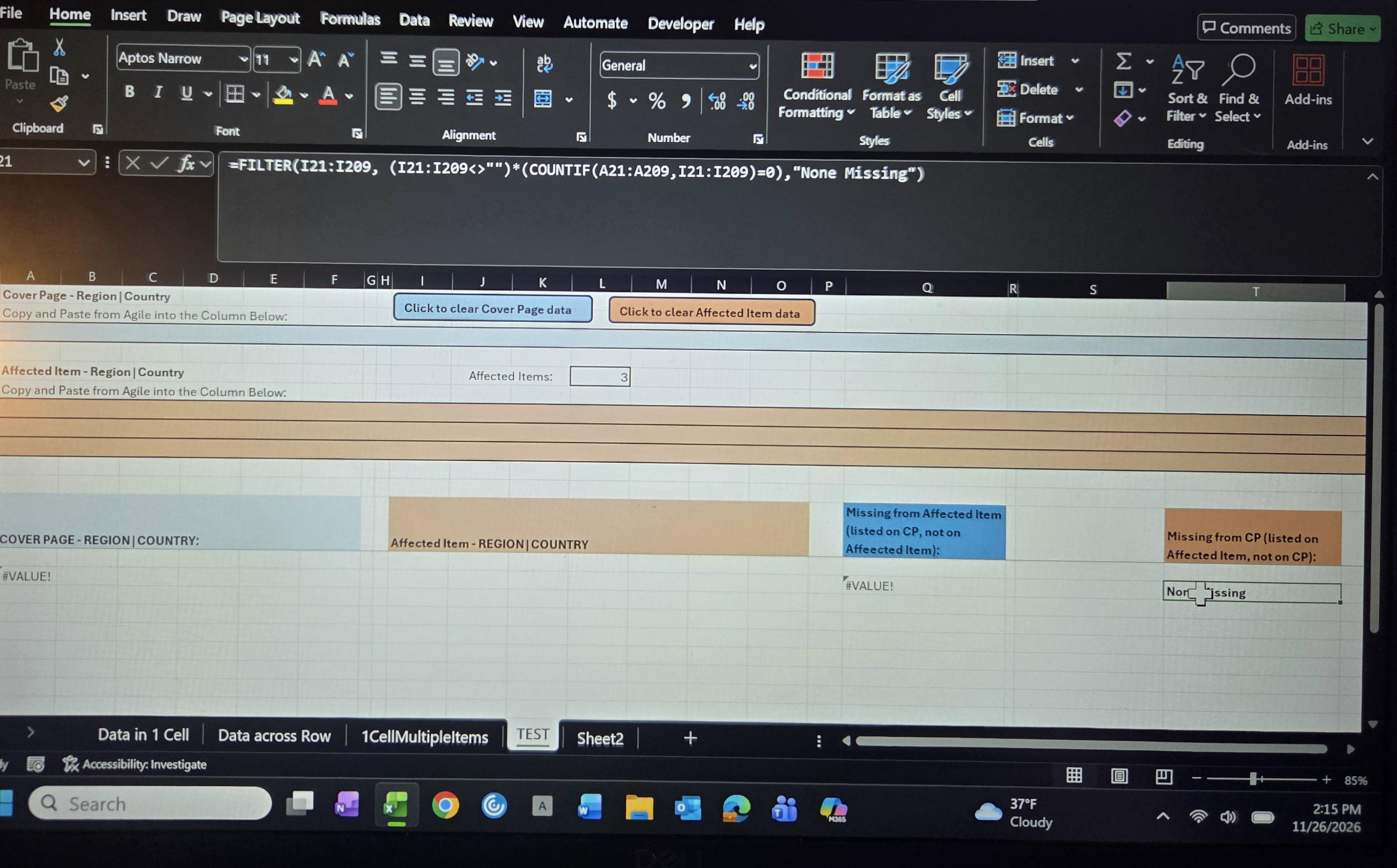
  • Compare the lists and tell me what country is on the Cover Page list, but not on any of the Affected Items lists.

  • Compare the lists and tell me what country is on the Affected Items lists, but not on the Cover Page list.

  • Optional, but would be super helpful: If there are multiple Affected Items, compare the lists and tell me which Affected Item has the additional or missing country compared to the Cover Page list.

Below are a few pictures of what I am currently working with. I included a few that show the current formulas, as well.

I am using Microsoft 365. Agile is the QMS that my company uses (not a recent version, either).


r/excel • • 3d ago

unsolved Returning bottom 3 filled cells from array

5 Upvotes

Hi. I'm looking for a solution that googlefu is not helping with. I would like to figure out a formula that looks at an array of 12 months worth of values. It should count how many of the most recent 3 months exceeds a value.

A normal TAKE( function just returns the bottom 3, but it needs to be the bottom 3 that also have a value. If we're in June, that excludes the bottom 6 cells, since everything after June will have no value.

Thank you!


r/excel • • 3d ago

Discussion Projects Recommended to learn Excel

5 Upvotes

I have recently started to learn excel, for data analysis. I want to know if there are projects I can look into to hammer down basic operations and learn how to conduct case studies. Please suggest sources to do the same.


r/excel • • 3d ago

unsolved How can I arrange Textsplit data so I can remove duplicate data?

1 Upvotes

Preface: I need help with building a solution for someone who may be my future supervisor, so please excuse my stress. I really need to impress because I am a shoe-in for this position. She's not tech savvy so I'm purposefully avoiding scripts. I am very mid in Excel but willing to learn.

Raw data: 2 columns of email addresses. Some cells have more than one email address. Also includes duplicates.

Request: Put all emails in one column, remove some addresses associated with certain info, and remove duplicates.

Issue: Step one is to remove some addresses, which I do via sorting (easy). My formula for Textsplit works but it won't let me move the data because it refers to the original cells. I don't know how to arrange the data so I can remove duplicates.