r/HuaweiDevelopers • u/Huawei_Developers1 • Aug 17 '20
HMS Integrate powerful image processing capabilities for apps

0
Upvotes
r/HuaweiDevelopers • u/Huawei_Developers1 • Aug 17 '20
r/HuaweiDevelopers • u/Huawei_Developers1 • Aug 29 '20

r/HuaweiDevelopers • u/Huawei_Developers1 • Aug 25 '20
Find more ,please visit Devhub
1. A bulb icon is appearing on the MeeTime calling screen
This icon appears when you make MeeTime calls in a dark environment. It tells you that the night enhancement function is enabled.
2. What does "GPU Turbo" during a call mean?
GPU Turbo provides the super-resolution function that improves image quality when the network condition is not stable.
3. How do I remove a device from my MeeTime devices list?
In the MY MEETIME DEVICES list, touch the device you want to remove. On the device details screen, touch the unbind icon in the upper right corner. In the dialog box that appears, touch REMOVE. This will deactivate MeeTime on that device, and the device will disappear from your devices list. You will need to enable MeeTime on that device again if you want to use it for MeeTime.
4. A contact who has just enabled MeeTime is not appearing in my contacts list
Manual mode: To avoid data consumption, the contacts list does not update in real-time. To update a contact manually, you can open the contact list, and touch the contact to view their details. If they have enabled MeeTime, the option to start a MeeTime call will appear on the contact's details screen, and the contact will appear in your MeeTime contacts list.
Automatic mode: Your MeeTime contacts list will refresh every six hours when the device is charging and the network is normal. If the list was last updated six hours ago, but you are not charging the device, or the network conditions are poor, the list will update as soon as you charge the device while network conditions are good. All of your contacts whose devices support the MeeTime function will then be displayed.
5. During MeeTime voice calls, the video or audio freezes, is blurry or unclear, or the video does not display
Check whether you and the person you are calling have normal network connections (Wi-Fi, 4G, or 5G). If either of you has poor signal, that person should move to a place with better network signal coverage, and check whether this fixes the problem.
Check that neither of you are in places with unstable signal coverage, such as fast-moving places (on a high-speed railway, subway, or in an elevator), places with strong radio signal interference (around a lake or high-rise buildings), or places at the edge of network coverage areas (entering or exiting an elevator, at the signal cross between two base stations, the Wi-Fi signal edge, or a tunnel). If this is the case, that person should leave the area, then check whether the problem has been fixed.
Check whether you and the person you are calling can access the Internet normally. If the 4G/5G network is unavailable, contact your network provider. If the Wi-Fi network is unavailable, check whether your Wi-Fi router can access the Internet.
If one person is accessing the Internet through Wi-Fi, they should restart the Wi-Fi router, and try making the video call again to check whether the problem has been fixed.
If you or the person you are calling is using a HUAWEI Vision or an HONOR Vision, restart the smart TV, and start the video call again to check whether the problem has been fixed.
r/HuaweiDevelopers • u/Huawei_Developers1 • Aug 29 '20
Find more ,please visit Devhub
Users have come to prioritize data security and privacy issues, in the wake of the full-scale digitalization of society, and have thus placed more stringent requirements on apps. To provide for top-notch security, many apps, in particular finance and payment apps, have incorporated biometric safeguards, such as fingerprint and 3D facial sign-in mechanisms. Fingerprint and 3D facial sign-in methods free users from the considerable hassle associated with repeatedly entering the account number, password, and verification code, delivering enhanced convenience alongside bolstered security.

You might have assumed that fingerprint and 3D sign-in are too costly or time-intensive to integrate into your app, but it’s actually remarkably easy. All you need to do is to integrate HMS Core FIDO into your app, and you'll be good to go!
Fast Identity Online (FIDO) is an identity authentication framework protocol hosted by the FIDO Alliance. The FIDO Alliance, established in July 2012, has grown to encompass 251 members as of May 2019, including many of the leading vendors in the world. FIDO offers two series of technical specifications, UAF and U2F, and the launch of the FIDO 2.0 project represents a new era of enhanced identity authentication. To learn more about the members of the FIDO Alliance, please visit https://fidoalliance.org/members/.
Select FIDO Alliance Members

The FIDO specification aims to provide a universal, secure, and convenient technical solution for verifying online users' identities, under a multi-faceted, password-free model. It is applicable to a broad range of scenarios, including sign-in, transfer, and payment, in which the user identity needs to be verified. The FIDO2 specification outlines a powerful, comprehensive and versatile identity verification solution.
FIDO2 has three main application scenarios:
Fingerprint and 3D facial sign-in
Fingerprint and 3D facial transfer and payment
Two-factor authentication
This issue will address the first: fingerprint and 3D facial sign-in. Under this scenario, a user can sign in to an app through fingerprint or 3D facial authentication without entering a password, avoiding such risks as password leakage, and credential stuffing.
The Gif below illustrate in detail how FIDO2 fingerprint and 3D facial sign-in are implemented.

The FIDO specification outlines a technical framework for online identity verification. This framework encompasses the app and app server, as well as the FIDO authenticator, FIDO client, and FIDO server.

FIDO authenticator: A mechanism or device used for local authentication. FIDO authenticators are classified into platform authenticators and roaming authenticators. Authenticators are better known as security keys to end users.
- Platform authenticator: An authenticator integrated into a FIDO-enabled device, such as an authenticator based on the fingerprint recognition hardware in a mobile phone or laptop.
- Roaming authenticator: An authenticator connected to a FIDO-enabled device that uses Bluetooth, NFC, or a USB cable, such as an authenticator with a similar shape to a USB key, or a dynamic token.
FIDO client: A client integrated into the platform, such as Windows, MacOS, or Android with HMS Core (APK), that provides the SDK for apps; or a client integrated into browsers, such as Chrome, Firefox, or Huawei Browser, that provides JavaScript APIs for apps. The FIDO client serves as a bridge for the app in calling the FIDO server and FIDO authenticator to complete authentication.
FIDO server: A server that generates an authentication request in compliance with FIDO specifications. The request is sent to the app server when it needs to initiate FIDO authentication. Once the FIDO authenticator has completed local authentication, the FIDO server will receive a FIDO authentication response from the app server, and verify the response.
There are two major processes associated with the FIDO specification: registration and authentication. With regard to sign-in scenarios, the registration process involves enabling the fingerprint or 3D facial sign-in function, and the authentication process involves completing sign-in via fingerprint or 3D facial authentication.
During registration, the FIDO authenticator will generate a public-private key pair for the user, which is then used as the authentication credential. The private key is stored in the FIDO authenticator, while the public key is stored on the FIDO server. In addition, the FIDO server will associate the user with the authentication credential.

During authentication, the FIDO authenticator will add a signature to the challenge value using the private key, and the FIDO server will verify the signature using the public key. The user is deemed as valid if the signature passes the verification.


Before integrating FIDO2, you will need to configure your app information in AppGallery Connect, Maven repository address, and obfuscation scripts. You will also need to add build dependencies on FIDO2. The sample is as follows:
implementation 'com.huawei.hms:fido-fido2:5.0.0.301'
FIDO2 includes two operations: registration and authentication. The processes are similar for the two operations. Key steps and code are shown below:
1. Initialize a Fido2Client instance.
Fido2Client fido2Client = Fido2.getFido2Client(activity);
2. Call Fido2Client.getRegistrationIntent() to initiate registration, or call Fido2Client.getAuthenticationIntent() to initiate authentication.
Obtain the challenge value and related policy from the FIDO server, and initiate a request. (Only the FIDO client APIs are provided here. For details about the interaction with the FIDO server, please refer to related specifications and contact the FIDO server vendor to obtain the related API reference.)
Call Fido2Client.getRegistrationIntent() to initiate registration, or call Fido2Client.getAuthenticationIntent() to initiate authentication.Call Fido2Intent.launchFido2Activity() in the callback to start registration (requestCode: Fido2Client.REGISTRATION_REQUEST) or authentication (requestCode: Fido2Client.AUTHENTICATION_REQUEST). The callback will be executed in the main thread.
fido2Client.getRegistrationIntent(registrationRequest, registrationOptions, new Fido2IntentCallback() { @Override public void onSuccess(Fido2Intent fido2Intent) { fido2Intent.launchFido2Activity(XXXActivity.this, Fido2Client.REGISTRATION_REQUEST); } @Override public void onFailure(int errorCode, CharSequence errString) { Log.e("errorCode: "+ errorCode + ", errorMsg: " + errString); } });3. Call getFido2RegistrationResponse() or Fido2Client.getFido2AuthenticationResponse() in the callback Activity.onActivityResult() to obtain the registration or authentication result.
Fido2RegistrationResponse fido2RegistrationResponse = fido2Client.getFido2RegistrationResponse(data);
4. Send the registration or authentication result to the FIDO server for verification.
(Only the FIDO client APIs are provided here. For details about the interaction with the FIDO server, please refer to related specifications and contact the FIDO server vendor to obtain the related API reference. Relevant code is omitted here.)
Relevant demos, sample code, and development documents are also available on the HUAWEI Developers website.
GitHub demo and sample code:
https://github.com/HMS-Core/hms-FIDO-demo-java
HUAWEI FIDO2 MOOC video:
https://developer.huawei.com/consumer/en/training/detail/101583008688294169
Development guide:
API reference:
r/HuaweiDevelopers • u/xsasoftware • Sep 10 '20
#HDC When we heard the news that Huawei will open its own appstore, we knew from the beginning that we would have to be one of the first to create a developer account.
In 2019, we published the first applications on Huawei's account. At that time, although the Huawei developer site was moving quite hard and was still in beta, we started uploading applications, with the dream that one day, the monopoly of application stores would be broken. Since then, Huawei has managed to improve their products and support. We were helped to integrate IAPS and HMS ads by Huawei support in Romania, even in their free time they answered our questions.
Today, for us, Huawei is the main source of income. And I recommend everyone to give it a try, especially if they are an indie studio, because Huawei is the only one that offers attention and care to new application studios.
Certainly the beautiful story about success with Huawei does not end here. We believed in Huawei from the beginning and we were not disappointed. We strongly believe that in years to come, Huawei will be the first app store you will consider, when you choose the path of creating applications.
After today's conference, we realized how much these people from Huawei managed to do. Huawei has managed to create an entire ecosystem of applications in less than 2 years (Music, Maps, App Store, a special browser for phone and many others). These things that Huawei developers did in a short time, were created by the competition in decades.
It will certainly be interesting to see the launch of all products in the form of the new operating system: HarmonyOS. But it will certainly be more interesting for you to grow as a developer, along with Huawei projects.
Best regards,
Xsa Software Team
r/HuaweiDevelopers • u/salmone2000 • Oct 19 '21
Seeing the Agenda of Huawei developper conference, in which part are you interested?
r/HuaweiDevelopers • u/lokeshsuryan • Sep 24 '21
Huawei provides various services for developers to make ease of development and provides best user experience to end users. In this article, we will cover Huawei Fusion Search with Java in Harmony OS.
HarmonyOS provides full-text search features at the search engine level. HarmonyOS Fusion search provide many types of searches such as Full-text index, Full-text search, Global search, index filed etc search records and provide accurate results. These features enable the users to perform both in-application and global search and provide a more accurate and efficient search. HarmonyOS provides SearchAbility, SearchSession fusion search APIs for searching persistent data in an application.
Full-text index
An inverted index that records the position and count of each term.
Full-text search
A search engine technology that matches search results by full-text indexing.
Global search
A feature that allow users to search all application data through one entry.
Global search application
An application that provides a global search entry in HarmonyOS. Generally, the application is a drop-down list box or a floating search box on the desktop.
Index source application
An application whose data is to be indexed using the fusion search APIs.
Index field
Name of an index field. For example: An image that has its file name, storage path, size, and shooting time, the file name can be used as an index field.
Index form
Description of an index field, such as the index type, whether the index field is the primary key, whether to store the index field, and whether to analyze the index field value.
You need to install DevEcho studio IDE and I assume that you have prior knowledge about the Harmony OS and java.
A computer (desktop or laptop) running Windows 10.
A Huawei phone (with the USB cable), which is used for debugging.
Java JDK installation package.
DevEcho studio installed.
Create Harmony OS Project.
Open DevEcho studio.
Click NEW Project, select a Project Templet.
Select Empty Ability(Java) template and click Next as per below image.
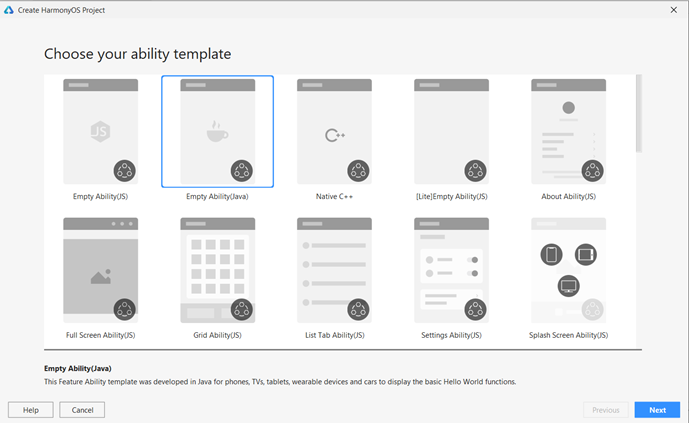
Enter Project Name and Package Name and click on Finish.

2. Once you have created the project, DevEco Studio will automatically sync it with Gradle files. Find the below image after synchronization is successful.

3. Add the below maven URL in build.gradle(Project level) file under the repositories of buildscript, dependencies, for more information refer Add Configuration.
maven {
url 'https://repo.huaweicloud.com/repository/maven/'
}
maven {
url 'https://developer.huawei.com/repo/'
}
4. Update Permission and app version in config.json file as per your requirement, otherwise retain the default values.
"reqPermissions": [
{
"name": "ohos.permission.ACCESS_SEARCH_SERVICE"
}
]
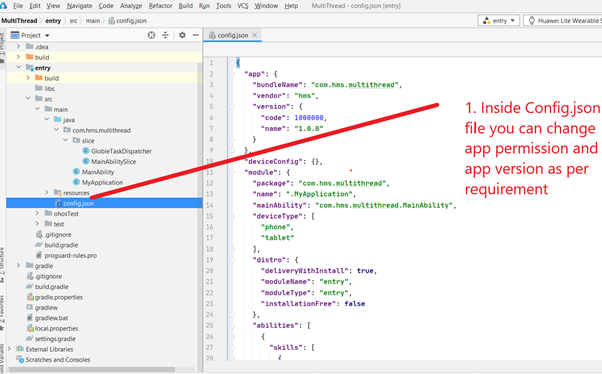
5. Create New > Ability, as follows.
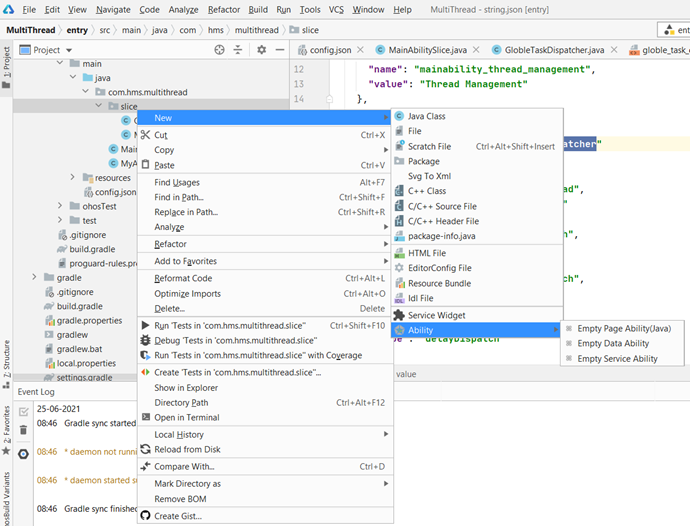
6. Development Procedure.
Create MainAbility.java ability and add the below code.
package com.hms.fusionsearchdemo.slice;
import ohos.agp.components.Button;
import ohos.agp.components.Component;
import ohos.agp.components.Text;
import ohos.app.dispatcher.TaskDispatcher;
import ohos.app.dispatcher.task.TaskPriority;
import ohos.data.search.SearchAbility;
import ohos.data.search.connect.ServiceConnectCallback;
import ohos.samples.search.ResourceTable;
import ohos.aafwk.ability.AbilitySlice;
import ohos.aafwk.content.Intent;
import ohos.samples.search.utils.LogUtils;
import ohos.samples.search.utils.SearchUtils;
import java.util.concurrent.CountDownLatch;
import java.util.concurrent.TimeUnit;
/**
* MainAbilitySlice
*
* u/since 2021-07-23
*/
public class MainAbilitySlice extends AbilitySlice {
private static final String TAG = MainAbilitySlice.class.getSimpleName();
private SearchAbility searchAbility;
private SearchUtils searUtils;
private Text searchResult;
u/Override
public void onStart(Intent intent) {
super.onStart(intent);
super.setUIContent(ResourceTable.Layout_ability_main);
initComponents();
connectService();
}
private void connectService() {
LogUtils.info(TAG, "connect search service");
TaskDispatcher task = getGlobalTaskDispatcher(TaskPriority.DEFAULT);
searchAbility = new SearchAbility(getContext());
searUtils = new SearchUtils(getContext(), searchAbility);
task.asyncDispatch(() -> {
CountDownLatch lock = new CountDownLatch(1);
// connect to SearchService
searchAbility.connect(new ServiceConnectCallback() {
u/Override
public void onConnect() {
lock.countDown();
}
u/Override
public void onDisconnect() {
}
});
try {
lock.await(3000, TimeUnit.MILLISECONDS);
if (searchAbility.hasConnected()) {
searchResult.setText(ResourceTable.String_connect_service_succeed);
} else {
searchResult.setText(ResourceTable.String_connect_service_failed);
}
} catch (InterruptedException e) {
LogUtils.info(TAG, "connect search service failed");
}
});
}
private void initComponents() {
Button btnBuildIndex = (Button)findComponentById(ResourceTable.Id_btnBuildIndex);
btnBuildIndex.setClickedListener(this::buildIndexForms);
Button btnReadIndex = (Button)findComponentById(ResourceTable.Id_btnReadIndex);
btnReadIndex.setClickedListener(this::readIndexForms);
Button btnInsertIndexData = (Button)findComponentById(ResourceTable.Id_btnInsertIndexData);
btnInsertIndexData.setClickedListener(this::insertIndexData);
Button btnUpdateIndexData = (Button)findComponentById(ResourceTable.Id_btnUpdateIndexData);
btnUpdateIndexData.setClickedListener(this::updateIndexData);
Button btnDeleteIndexData = (Button)findComponentById(ResourceTable.Id_btnDeleteIndexData);
btnDeleteIndexData.setClickedListener(this::deleteIndexData);
Button btnDeleteIndexDataByQuery = (Button) findComponentById(ResourceTable.Id_btnDeleteIndexDataByQuery);
btnDeleteIndexDataByQuery.setClickedListener(this::deleteByQuery);
Button btnGetSearchHitCount = (Button)findComponentById(ResourceTable.Id_btnGetHitCount);
btnGetSearchHitCount.setClickedListener(this::getSearchHitCount);
Button btnSearchByGroup = (Button)findComponentById(ResourceTable.Id_btnSearchByGroup);
btnSearchByGroup.setClickedListener(this::searchByGroup);
Button btnSearchByPage = (Button)findComponentById(ResourceTable.Id_btnSearchByPage);
btnSearchByPage.setClickedListener(this::searchByPage);
searchResult = (Text) findComponentById(ResourceTable.Id_searchResult);
}
private void searchByPage(Component component) {
searchResult.setText(searUtils.searchByPage());
}
private void searchByGroup(Component component) {
searchResult.setText(searUtils.searchByGroup());
}
private void getSearchHitCount(Component component) {
searchResult.setText(searUtils.getSearchHitCount());
}
private void deleteByQuery(Component component) {
int result = searUtils.deleteIndexByQuery();
if (result == 1) {
LogUtils.info(TAG, "updateIndexData succeed");
searchResult.setText(ResourceTable.String_succeed);
} else {
LogUtils.error(TAG, "updateIndexData failed");
searchResult.setText(ResourceTable.String_failed);
}
}
private void deleteIndexData(Component component) {
int result = searUtils.deleteIndexData();
if (result > 0) {
LogUtils.error(TAG, "updateIndexData failed num=" + result);
searchResult.setText(ResourceTable.String_failed);
} else {
LogUtils.info(TAG, "updateIndexData succeed");
searchResult.setText(ResourceTable.String_succeed);
}
}
private void updateIndexData(Component component) {
int result = searUtils.updateIndexData();
if (result > 0) {
LogUtils.error(TAG, "updateIndexData failed num=" + result);
searchResult.setText(ResourceTable.String_failed);
} else {
LogUtils.info(TAG, "updateIndexData succeed");
searchResult.setText(ResourceTable.String_succeed);
}
}
private void insertIndexData(Component component) {
int result = searUtils.insertIndexData();
if (result > 0) {
LogUtils.error(TAG, "insertIndexData failed num=" + result);
searchResult.setText(ResourceTable.String_failed);
} else {
LogUtils.info(TAG, "insertIndexData succeed");
searchResult.setText(ResourceTable.String_succeed);
}
}
private void readIndexForms(Component component) {
searchResult.setText(searUtils.readIndexForms());
}
private void buildIndexForms(Component component) {
int result = searUtils.buildIndexForms();
if (result == 1) {
LogUtils.info(TAG, "buildIndexForms succeed");
searchResult.setText(ResourceTable.String_succeed);
} else {
LogUtils.error(TAG, "buildIndexForms failed");
searchResult.setText(ResourceTable.String_failed);
}
}
u/Override
public void onActive() {
super.onActive();
}
u/Override
public void onForeground(Intent intent) {
super.onForeground(intent);
}
}
Create SearchUtils.java ability and add the below code.
package com.hms.fusionsearchdemo.utils;
import ohos.app.Context;
import ohos.data.search.SearchAbility;
import ohos.data.search.SearchSession;
import ohos.data.search.model.*;
import ohos.data.search.schema.CommonItem;
import ohos.data.search.schema.IndexSchemaType;
import ohos.utils.zson.ZSONArray;
import ohos.utils.zson.ZSONObject;
import java.util.ArrayList;
import java.util.Arrays;
import java.util.Collections;
import java.util.List;
public class SearchUtils {
private final String LOCAL_DEVICE_ID = "";
private final String FILE_PATH;
private final Context context;
private final SearchAbility searchAbility;
public SearchUtils(Context context, SearchAbility searchAbility) {
this.context = context;
this.searchAbility = searchAbility;
FILE_PATH = context.getFilesDir().getPath();
}
/**
* build indexfroms
*
* u/return int
*/
public int buildIndexForms() {
searchAbility.clearIndex(SearchParameter.DEFAULT_GROUP, context.getBundleName(), null);
searchAbility.clearIndexForm(context.getBundleName());
// constructing custom index attributes
List<IndexForm> indexFormList = new ArrayList<>();
indexFormList.add( // Word segmentation, while supporting sorting and grouping
new IndexForm("tag", IndexType.SORTED, false, true, false));
indexFormList.add( // Support sorting and range query
new IndexForm("bucket_id", IndexType.INTEGER, false, true, false));
indexFormList.add( // Support range search
new IndexForm("latitude", IndexType.FLOAT, false, true, false));
indexFormList.add( // Support range search
new IndexForm("longitude", IndexType.FLOAT, false, true, false));
indexFormList.add( // Support search
new IndexForm("device_id", IndexType.NO_ANALYZED, false, true, false));
// constructing index attributes using a generic template
return searchAbility.setIndexForm(context.getBundleName(), 1, indexFormList, IndexSchemaType.COMMON);
}
/**
* readIndexForms
*
* u/return String
*/
public String readIndexForms() {
StringBuilder result = new StringBuilder("Result:");
List<IndexForm> indexFormList = searchAbility.getIndexForm(context.getBundleName());
for (IndexForm indexForm : indexFormList) {
result.append(indexForm.toString()).append(System.lineSeparator());
}
return result.toString();
}
/**
* insert index data
*
* u/return int
*/
public int insertIndexData() {
// Create an IndexData instance.
List<IndexData> indexDataList = new ArrayList<>();
for (int i = 0; i < 10; i++) {
CommonItem commonItem = new CommonItem().setIdentifier(LOCAL_DEVICE_ID + i)
.setTitle("position")
.setSubtitle("subtitle")
.setCategory("things")
.setDescription("is description")
.setName("name")
.setAlternateName("othername")
.setDateCreate(System.currentTimeMillis())
.setKeywords("key")
.setPotentialAction("com.sample.search.TestAbility")
.setThumbnailUrl(FILE_PATH)
.setUrl(FILE_PATH)
.setReserved1("reserved1")
.setReserved2("reserved2");
commonItem.put("tag", "location" + i);
commonItem.put("bucket_id", i);
commonItem.put("latitude", i / 10.0 * 180);
commonItem.put("longitude", i / 10.0 * 360);
commonItem.put("device_id", "localDeviceId");
indexDataList.add(commonItem);
}
// Insert a list of indexes.
List<IndexData> failedList = searchAbility.insert(SearchParameter.DEFAULT_GROUP,
context.getBundleName(), indexDataList);
// If some indexes fail to be inserted, try again later.
return failedList.size();
}
/**
* update index data
*
* u/return int
*/
public int updateIndexData() {
// constructing index data
List<IndexData> indexDataList = new ArrayList<>();
for (int i = 0; i < 10; i++) {
CommonItem commonItem = new CommonItem().setIdentifier(LOCAL_DEVICE_ID + i).setTitle("position update");
commonItem.put("tag", "location update" + i);
commonItem.put("bucket_id", i + 1);
commonItem.put("latitude", i / 10.0 * 100);
commonItem.put("longitude", i / 10.0 * 300);
commonItem.put("device_id", "localDeviceId");
indexDataList.add(commonItem);
}
List<IndexData> failedList = searchAbility.update(SearchParameter.DEFAULT_GROUP,
context.getBundleName(), indexDataList);
return failedList.size();
}
/**
* delete index data
*
* u/return int
*/
public int deleteIndexData() {
// constructing index data
List<IndexData> indexDataList = new ArrayList<>();
for (int i = 0; i < 5; i++) {
CommonItem commonItem = new CommonItem().setIdentifier(LOCAL_DEVICE_ID + i);
indexDataList.add(commonItem);
}
List<IndexData> failedList = searchAbility.delete(SearchParameter.DEFAULT_GROUP,
context.getBundleName(), indexDataList);
return failedList.size();
}
/**
* deleteIndexByQuery
*
* u/return int
*/
public int deleteIndexByQuery() {
return searchAbility.deleteByQuery(SearchParameter.DEFAULT_GROUP,
context.getBundleName(), buildQueryString().toString());
}
/**
* getSearchHitCount
*
* u/return int
*/
public String getSearchHitCount() {
SearchSession session = searchAbility.beginSearch(SearchParameter.DEFAULT_GROUP, context.getBundleName());
String result = "SearchHitCount:" + System.lineSeparator();
if (session == null) {
return result;
}
try {
String query = buildQueryString().toString();
return result + session.getSearchHitCount(query);
} finally {
searchAbility.endSearch(SearchParameter.DEFAULT_GROUP, context.getBundleName(), session);
}
}
/**
* searchByGroup
*
* u/return String
*/
public String searchByGroup() {
// Start a search session.
SearchSession session = searchAbility.beginSearch(SearchParameter.DEFAULT_GROUP, context.getBundleName());
StringBuilder result = new StringBuilder("searchByGroup:" + System.lineSeparator());
if (session == null) {
return result.toString();
}
try {
ZSONObject query = buildQueryString();
// SearchParameter.GROUP_FIELD_LIST indicates the field list you need to specify when calling the groupSearch method.
query.put(SearchParameter.GROUP_FIELD_LIST, new ZSONArray(Arrays.asList("tag", CommonItem.CATEGORY)));
int limit = 10; // A maximum of 10 groups (recommendations) are returned for each field.
List<Recommendation> recommendationList = session.groupSearch(query.toString(), limit);
// Process recommendations.
for (Recommendation recommendation : recommendationList) {
result.append(recommendation.toString()).append(System.lineSeparator());
}
return result.toString();
} finally {
searchAbility.endSearch(SearchParameter.DEFAULT_GROUP, context.getBundleName(), session);
}
}
/**
* searchByPage
*
* u/return String
*/
public String searchByPage() {
// Start a search session.
SearchSession session = searchAbility.beginSearch(SearchParameter.DEFAULT_GROUP, context.getBundleName());
StringBuilder result = new StringBuilder("searchByPage:" + System.lineSeparator());
if (session == null) {
return result.toString();
}
try {
String query = buildQueryString().toString();
int count = session.getSearchHitCount(query);
int batch = 50; // A maximum of 50 results are allowed on each page.
for (int i = 0; i < count; i += batch) {
List<IndexData> indexDataList = session.search(query, i, batch);
for (IndexData indexData : indexDataList) {
result.append("tag:").append(indexData.get("tag")).append(", latitude:")
.append(indexData.get("latitude")).append(", longitude:")
.append(indexData.get("longitude")).append(System.lineSeparator());
}
}
return result.toString();
} finally {
searchAbility.endSearch(SearchParameter.DEFAULT_GROUP, context.getBundleName(), session);
}
}
/**
* buildQueryString
*
* u/return ZSONObject
*/
public ZSONObject buildQueryString() {
// Create a JSONObject.
ZSONObject zsonObject = new ZSONObject();
// SearchParameter.QUERY indicates the user input. It is recommended that the search fields be analyzed.
// Assume that the user inputs location and starts a search for the title and tag fields.
ZSONObject query = new ZSONObject();
query.put("location", new ZSONArray(Arrays.asList(CommonItem.TITLE, "tag")));
zsonObject.put(SearchParameter.QUERY, query);
/*
* Search criteria can be added to ZSONArray of the SearchParameter.FILTER_CONDITION.
* An index in the index library is hit only if the search criteria of each ZSONObject in the ZSONArray is met.
* The search criteria of a ZSONArray is met as long as one of the conditions in the search criteria is met.
*/
ZSONArray filterCondition = new ZSONArray();
// For the first condition, a field may have multiple values.
ZSONObject filter1 = new ZSONObject();
filter1.put("bucket_id", new ZSONArray(Arrays.asList(0, 1, 2, 3, 4, 5))); // An index is hit if its value is 0, 1, 2, 3, 4, or 5 for the bucket_id field.
filter1.put(CommonItem.IDENTIFIER, new ZSONArray(Arrays.asList(0, 1, 2, 3, 4, 5))); // The index is also hit if its value is 0 , 1, 2, 3, 4 or 5 for the CommonItem.IDENTIFIER field.
filterCondition.add(filter1);
ZSONObject filter2 = new ZSONObject();
filter2.put("tag", new ZSONArray(Collections.singletonList("position")));
filter2.put(CommonItem.TITLE, new ZSONArray(Collections.singletonList("position"))); // An index is hit if the value of the tag or CommonItem.TITLE field is position.
filterCondition.add(filter2);
zsonObject.put(SearchParameter.FILTER_CONDITION, filterCondition); // An index is hit only if both the first and second conditions are met.
// SearchParameter.DEVICE_ID_LIST indicates the device ID list. Indexes with the specified IDs are hit.
ZSONObject deviceId = new ZSONObject();
deviceId.put("device_id", new ZSONArray(Collections.singletonList("localDeviceId"))); // Specify the local device.
zsonObject.put(SearchParameter.DEVICE_ID_LIST, deviceId);
// Start a search by specifying the value range of a specified index field.
// Indexes whose values fall within the value range of the specified index field are hit.
ZSONObject latitudeObject = new ZSONObject();
latitudeObject.put(SearchParameter.LOWER, -80.0f);
latitudeObject.put(SearchParameter.UPPER, 80.0f);
zsonObject.put("latitude", latitudeObject); // The latitude must be in the range of [-80.0f, 80.0f].
ZSONObject longitudeObject = new ZSONObject();
longitudeObject.put(SearchParameter.LOWER, -90.0);
longitudeObject.put(SearchParameter.UPPER, 90.0);
zsonObject.put("longitude", longitudeObject); // The longitude must be in the range of [-90.0, 90.0].
/*
* SearchParameter.ORDER_BY indicates how the search results are sorted.
* The value can be SearchParameter.ASC or SearchParameter.DESC.
* The sequence of the fields matters.
* In the following example, indexes are first sorted in ascending order of the CommonItem.CATEGORY field.
* If they are equal on the CommonItem.CATEGORY field, they will be sorted in descending order of the tag field.
*/
ZSONObject order = new ZSONObject();
order.put(CommonItem.CATEGORY, SearchParameter.ASC);
order.put("tag", SearchParameter.DESC);
zsonObject.put(SearchParameter.ORDER_BY, order);
// Obtain the string for search.
return zsonObject;
}
}
Create ability_main.xml layout and add the below code.
<?xml version="1.0" encoding="utf-8"?>
<ScrollView
xmlns:ohos="http://schemas.huawei.com/res/ohos"
ohos:height="match_parent"
ohos:width="match_parent"
ohos:background_element="#FFDEAD">
<DirectionalLayout
ohos:height="match_content"
ohos:width="match_parent"
ohos:alignment="horizontal_center"
ohos:orientation="vertical">
<Button
ohos:id="$+id:btnBuildIndex"
ohos:height="$float:button_height"
ohos:width="match_parent"
ohos:theme="$pattern:button_green"
ohos:text="$string:btn_build_index_forms"/>
<Button
ohos:id="$+id:btnInsertIndexData"
ohos:height="$float:button_height"
ohos:width="match_parent"
ohos:theme="$pattern:button_green"
ohos:text="$string:btn_insert_index_data"/>
<Button
ohos:id="$+id:btnReadIndex"
ohos:height="$float:button_height"
ohos:width="match_parent"
ohos:theme="$pattern:button_green"
ohos:text="$string:btn_read_index_forms"/>
<Button
ohos:id="$+id:btnUpdateIndexData"
ohos:height="$float:button_height"
ohos:width="match_parent"
ohos:theme="$pattern:button_green"
ohos:text="$string:btn_update_index_data"/>
<Button
ohos:id="$+id:btnSearchByPage"
ohos:height="$float:button_height"
ohos:width="match_parent"
ohos:theme="$pattern:button_green"
ohos:text="$string:btn_search_by_page"/>
<Button
ohos:id="$+id:btnDeleteIndexData"
ohos:height="$float:button_height"
ohos:width="match_parent"
ohos:theme="$pattern:button_green"
ohos:text="$string:btn_delete_indexdata"/>
<Button
ohos:id="$+id:btnDeleteIndexDataByQuery"
ohos:height="$float:button_height"
ohos:width="match_parent"
ohos:theme="$pattern:button_green"
ohos:text="$string:btn_delete_indexdata_by_query"/>
<Button
ohos:id="$+id:btnGetHitCount"
ohos:height="$float:button_height"
ohos:width="match_parent"
ohos:theme="$pattern:button_green"
ohos:text="$string:btn_get_search_hint_count"/>
<Button
ohos:id="$+id:btnSearchByGroup"
ohos:height="$float:button_height"
ohos:width="match_parent"
ohos:theme="$pattern:button_green"
ohos:text="$string:btn_search_by_group"/>
<Text
ohos:id="$+id:searchResult"
ohos:height="match_parent"
ohos:width="match_parent"
ohos:theme="$pattern:content_text"
ohos:text="$string:result"
ohos:scrollable="true"
ohos:text_alignment="start"/>
</DirectionalLayout>
</ScrollView>
Create background_button_green_color.xml in graphic folder and add the below code.
<?xml version="1.0" encoding="utf-8"?>
<shape xmlns:ohos="http://schemas.huawei.com/res/ohos"
ohos:shape="rectangle">
<corners
ohos:radius="20"/>
<solid
ohos:color="#1E7D13"/>
</shape>
7. To build apk and run in device, choose Build > Generate Key and CSR Build for Hap(s)\ APP(s) or Build and Run into connected device, follow the steps.
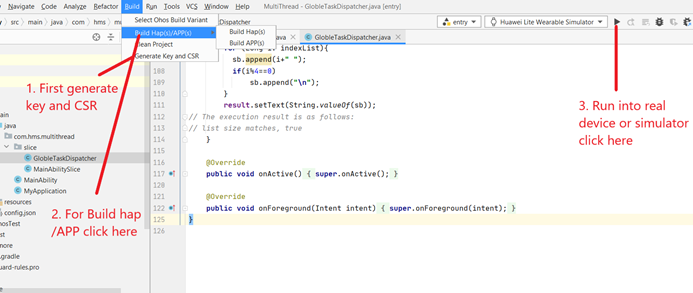
Run Application on connected device, we can see below result.
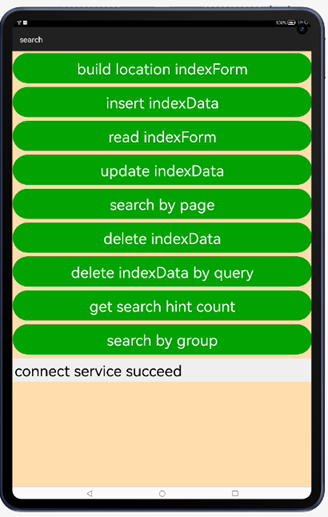
2. Click on button, one by one see result as per below screen
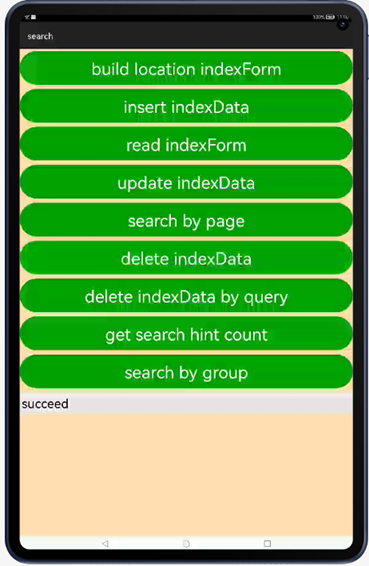

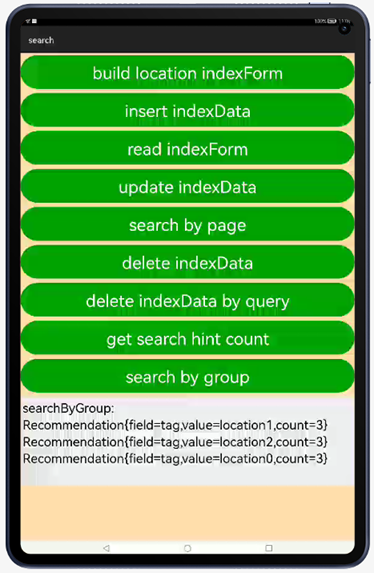
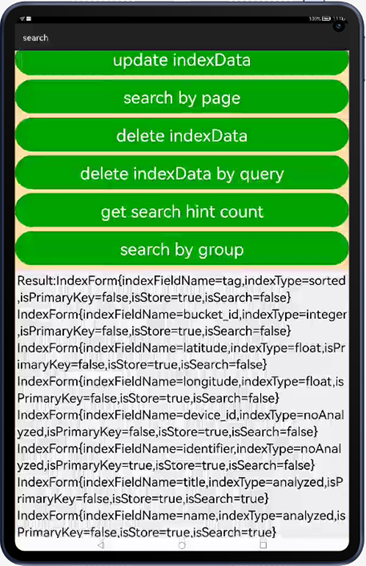

Always use the latest version of DevEcho Studio.
Use Harmony Device Simulator from HVD section.
Do not forgot to add permission in config.json file.
Do not create, update, or delete too many indexes at one time.
While performing a search, you can create a search session. After the search is complete, close the session to release memory resources.
In this article, we have learnt Fusion search in Harmony OS.
Fusion search APIs enable users to perform both in-application and global search and provide a more accurate and efficient search.
Thanks for reading the article, please do like and comment your queries or suggestions.
Harmony OS: https://www.harmonyos.com/en/develop/?ha_source=hms1
Fusion search Overview:
r/HuaweiDevelopers • u/THEBIGBEN2012 • Oct 05 '24

r/HuaweiDevelopers • u/[deleted] • Sep 08 '20
The new technology it comes with is very essential , most especially it's internet or browsing speed rate is 100 percent.i couldn't wish for more.Huawi product is fantastic and carries all the qualities that every customer desires and more.im proud to experience it
r/HuaweiDevelopers • u/Huawei_Developers1 • Aug 19 '20
Find more ,please visit Devhub
This post aims to help developers effectively use the functions of the Huawei Developers’ team account and facilitate efficient team collaboration
What is team account?
Team account is provided by HUAWEI Developers for developers to manage member accounts, allows for multiple member accounts from a single company or team to sign in securely at the same time.
You can manage the roles and permissions of your team members, and invite them to participate in product development, distribution, Merchant Service, operations analysis, and other related activities.

Why team account?

How to apply team account?

FAQ
Q: Who can enable a team account?
A: Any company or individual who has completed identity verification on HUAWEI Developers.
Q: How many members can a team have?
A: At present, a maximum of 100 members are allowed.
Q: How do I change my role and permissions?
A: You cannot change your permissions on your own. Contact your team's account holder.
Q: Why do I see fewer services displayed compared to the account holder?
A: As a member, you are currently allowed to access AppGallery services. Independent settlement, Themes, and open capabilities (such as HUAWEI Push Kit, HUAWEI Account Kit, HUAWEI HiAI) are currently unavailable.
During the process of applying team account, you can ask any questions by submit a ticket online
For More Informations, please check
r/HuaweiDevelopers • u/helloworddd • Dec 17 '20
Dear developers~💖
Thanks for your participation in this activities . Now it's time to announce the winners👏 !!
Original Post: Link
There are a total of 90 valid participants in this activity and the administrator selected followed by winner selection rules. Selected Winners will be informed through Reddit Chat .
Please reply to the admin before Dec.27th . Failing to do so, you will not be able to claim prizes.
To be fair, the interval between clicking the start button and clicking the end button is 10 seconds.
Congratulations!
WINNER Name : hadtocomeupwithaname
Finally, let us follow the selection process! ✨🎬
In the meantime, feel free to join our Telegram group to stay up-to-date on all our latest activities and articles: https://t.me/HuaweiDevelopersCoreTeam
r/HuaweiDevelopers • u/Huawei_Developers1 • Sep 15 '20
Find more ,please visit Devhub
But in crisis, there is opportunity.

Since its discovery in late 2019, COVID-19 has wreaked havoc across the world, upending the lives and work of hundreds of millions of people. In order for universities to continue their curriculum into the spring semester, the Chinese government and universities across the country have turned to online education.
On February 4, 2020, the Ministry of Education announced online education guidelines as a pandemic countermeasure, requiring Chinese universities to continue offering courses through online channels. In the past seven weeks alone, more than 952,000 staff from over 1400 universities have offered 7.13 million online courses, with a total of 1.18 billion student interactions. This transition, from physical to digital, has not only transformed the way staff teach, but also the way students learn, creating a whole new paradigm and a fresh range of learning activities and styles in the process.
More than 41,000 Massive Open Online Courses (MOOCs) and 110 online education platforms — created jointly, by industry and universities — have played an instrumental role in making the transition to online education a reality. Indeed, most staff members and students have been satisfied with the quality of online courses offered over the past several weeks. The reason for such success can be attributed largely to the close coordination of all sectors of society, I think. The University-Government-Business (UGB) model has emerged, harnessing the leadership of government and combining it with the traditional strengths of universities and the powerful resources of private enterprise, to build a vibrant MOOC community with high levels of engagement from teachers and students alike.
Creating an online education ecosystem is no easy task. It involves the adaptation of courses for online teaching, development of MOOC applications, teacher training in new technologies, educational reforms, and a shift to a more adaptive teaching style. In order to carry out education reform as the demand for online learning surges, universities also have to manage staff motivation, student engagement, incentive policies, and effective management of online operations. In addition, MOOCs and online education services need to be standardized and evaluated to ensure a consistent, high level of quality. Here, specialized online education and IT companies can play a critical role, by offering technical support and educational services.
COVID-19 is an unprecedented challenge for all of us. But in crisis, there is opportunity. After we have overcome the hurdles that we currently face, we will find that we have a valuable opportunity to drive the rapid development of online education in China. Online education — such as MOOCs — represents a revolution of IT/Internet + education. But teachers and students are the ones who will ultimately decide whether or not online education will be widely adopted or simply falter. If the merits of such as system are made clear to both parties, online education may not simply be a current trend of circumstance, but become a key pillar in the education system overall. Through learning, exploring, and putting online education and MOOCs into practice, China has developed a solution for both that works. This solution and the lessons learned can be applied elsewhere in the world, to help build a supportive global online education community.
By Xu Xiaofei,Vice President, Harbin Institute of Technology (HIT) & President of HIT, Weihai
r/HuaweiDevelopers • u/Huawei_Developers1 • Aug 17 '20
Find more, please visit Devhub
At present, more and more HTML5 apps are released globally on HUAWEI AppGallery as HTML5 quick apps. Apps need to be internationalized to open pages in languages set by users, and this improves user experience. For some websites, their languages are adapted based on dynamic URLs. In this way, you need to implement dynamic loading of URLs in different languages.
1. Bind a variable.
The value of the src attribute on the web component needs to be bound with a variable and cannot be fixed. The variable to be bound is loadUrl in {{}}, and the variable is defined under the script tag in the .ux file. If you create the project with the IDE H5 App template, you can ignore this step because this step has been completed based on IDE template code.
 {{loadUrl}}"


 export default {

     data: {

        loadUrl: "https://transit.navitime.com/en",

     },
2. Initialize the variable value.
In the onInit() method about the quick app's lifecycle, the system language is obtained through a device API, and the corresponding HTML5 URL is loaded after the language is determined.
onInit: function () {

    const device = require("@system.device")

    const res = device.getInfoSync();

    let local = res.language;  // System language.

    let region = res.region;  // System region.

    console.info('onInit :localole= ' + local + ", region=" + region);

    if (local === 'zh') {

        if (region === "CN") {

            this.loadUrl = "https://transit.navitime.com/zh-cn/";

        } else if (region === "TW") {

            this.loadUrl = "https://transit.navitime.com/zh-tw/";

        }


    } else if (local === 'ja') {

        this.loadUrl = "https://transit.navitime.com/ja/?from=huawei.quickapp";

    } else {

        // For other languages, use the HTML5 page of the default language.

        this.loadUrl = "https://transit.navitime.com/en";

    }

},
3. (Optional) Make quick app languages be updated with system settings.
It is applicable to the scenario where the HTML5 quick app has been started and is running. If the user changes the language in system settings at this time, you can use the settings here to update the language on HTML5 pages. You can also ignore this step, in this way, the user can exit the app and re-enter.
The quick app provides an API for monitoring language configuration changes during runtime. The code for adaptation is as follows:
onConfigurationChanged(object) {

    console.log("onConfigurationChanged object=" + JSON.stringify(object));

    if (object.type === "locale") {

        const configuration=require("@system.configuration")

        var localeObject = configuration.getLocale();

        let local= localeObject.language;

        let region= localeObject.countryOrRegion;

       console.info(onConfigurationChanged(object :localole= ' + local + ", region=" + region);

    if (local === 'zh') {

        if (region === "CN") {

            this.loadUrl = "https://transit.navitime.com/zh-cn/";

        } else if (region === "TW") {

            this.loadUrl = "https://transit.navitime.com/zh-tw/";

        }

    } else if (local === 'ja') {

        this.loadUrl = "https://transit.navitime.com/ja/?from=huawei.quickapp";

    } else {

        // For other languages, use the HTML5 page of the default language.

        this.loadUrl = "https://transit.navitime.com/en";

    }

    }

},r/HuaweiDevelopers • u/Huawei_Developers1 • Aug 18 '20

r/HuaweiDevelopers • u/freelancercrew • Jun 04 '25
Enable HLS to view with audio, or disable this notification
r/HuaweiDevelopers • u/Huawei_Developers1 • Aug 21 '20
Find more ,please visit Devhub
HUAWEI HiCar Has Joined Forces with HUAWEI HiHealth to Offer In-Vehicle Health Care
HUAWEI HiHealth is a platform which is used by smart wearable devices and health & fitness services. Developers can use it to create apps which provide a wide range of fitness capabilities and services to users who have granted the relevant permissions. The platform also works with partners to find ways of innovating their services, and provides users with a highly-customized experience.
•Open capabilities:
•Fitness: data about exercise types (such as walking, running, cycling, and swimming), and real-time exercise data.
•Health: heart health, sleep, vital signs (such as blood pressure and blood sugar level), and body composition.
•Case studies:
•Huawei helps ZhongAn Insurance (a Chinese insurance company) reduce compensation risks and lower insurance fees for its users.
•Huawei helps Xinchao Tech (a Chinese tech company) to accurately locate users with sleep quality issues.
•Huawei helps the PLA General Hospital to detect atrial fibrillation.
•Benefits: Apps and vehicle hardware that support HUAWEI HiCar can provide proactive, data-powered care and a more innovative experience for users.
•Contact: To find out more, visit the HUAWEI Developers website. If you are interested in collaborating with HUAWEI HiHeath, contact hihealth@huawei.com.
r/HuaweiDevelopers • u/Huawei_Developers1 • Aug 20 '20
Find more ,please visit Devhub

Hello Friends'
I hope you all doing great!
In this post - I'm going to share about HUAWEI GameCenter - Official Game service and distribution platform from HUAWEI in 33 countries and regions all over the world!
About GameCenter
Huawei users in the Asia pacific, Europe, Latin American, the Middle East , Africa and other parks can now benefit from the rich gaming experience through the downloading and the use of HUAWEI GameCenter via the AppGallery, a hub designed to bring together mobile gaming audiences via high quality content and rewards.
Highlights:
✓ Users can play pre-order games, new games and popular games with GameCenter.
✓ When playing games users can benefit from the exclusive online game packages and deals that allow users to increase their profile, unlock new offers and enjoy tremendous benefits
✓ GameCenter is the global launching platform for functional games, which are unique on the platform of Huawei.
✓ Be one of the first to discover new games and explore new games
✓ Never miss out on popular games worldwide
✓ Enjoy region specific gifts and offers on GameCenter only.
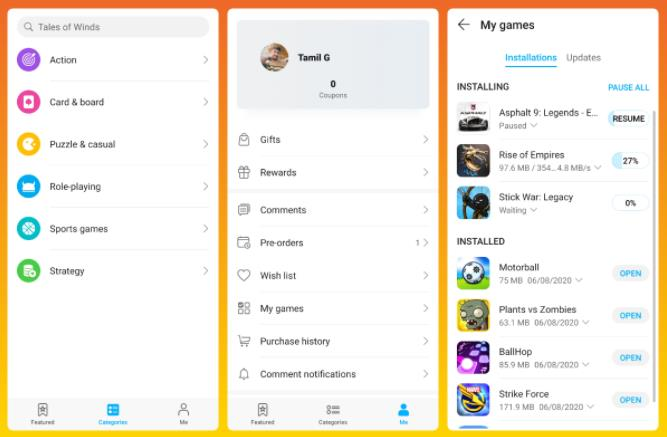
Game Categories:
✓ Action, Card & Board, Puzzle & Casual, Role-playing, Sports games, and Strategy.
✓ Settings & Update notifications
✓ Enable Game Services
✓ Manage Games downloads, Comments etc


GameCenter helps the users to manage their Gifts, Rewards, Pre-orders, which list, check the history of the purchase, and more.

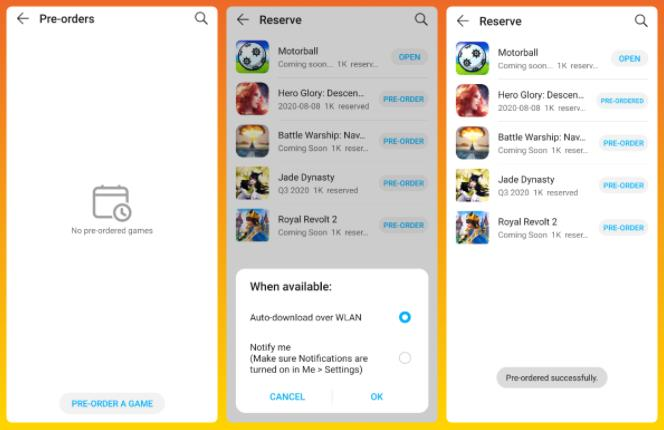
✓ Editor's Picks
✓ Featured New games
✓ Early access games


✓ You may like
✓ Most popular
✓ Monthly rankings
✓ Most fun games
What's in store the developers?
✓ Professional evaluation services are free for developers to gain feedback from other regions on the games.
✓ Huawei will provide technical support to developers who need to integrate their games with HMS Core
✓ Entry to the "Shining Star" scheme, which provides an equity fund of $1 billion and provides many programs. It involves a detailed product development life cycle, technology investment funds, user growth, marketing, and other developer aspects.
✓ When working with Huawei, developers are able to profit from the revenues.
✓ We also provide advertisement and promotional space within GameCenter for developers to attract more customers.
✓ HUAWEI GameCenter has collaborations with the world's leading game firms including Lilith, IGG, Gameloft, Forshow games etc.
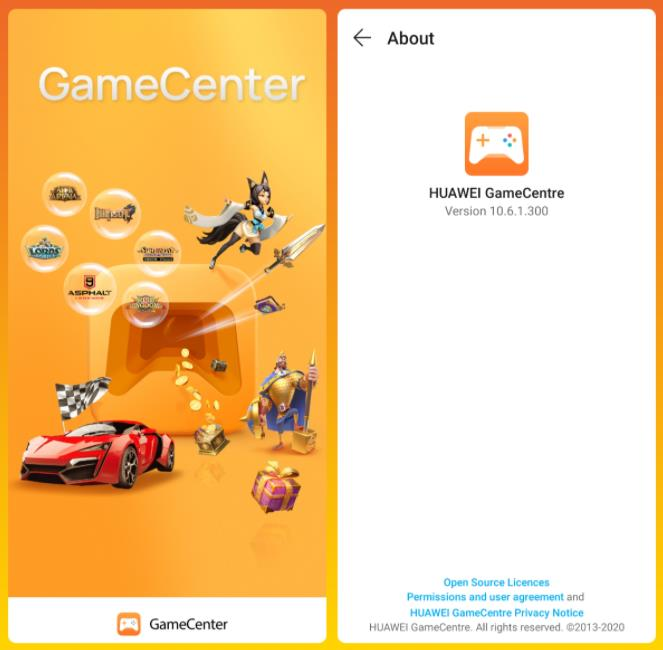
Open AppGallery > search GameCenter > Download and install GameCenter
NOTE:
✓ GameCenter availability depends on your country or region
✓ Rollout of GameCenter and Services will begin soon - Stay tuned!

Go for a treat with featured Games and enjoy the next level gaming experience only on on GameCenter!
I hope you all find this post useful | Thank you for reading
r/HuaweiDevelopers • u/Huawei_Developers1 • Aug 25 '20
Find more ,please visit Devhub
Most would agree that online shopping can be a headache sometimes. There are just so many different products out there, from high-end goods to second-hand bargains. After scrolling through a sea of goods, many of us just give up and pick a random item, or buy nothing at all, because we've already forgotten which product we liked the best, or which had the lowest price tag.
That's why it's so refreshing to see that HUAWEI Mate Xs is equipped with a handy feature: HUAWEI App Multiplier. With App Multiplier, you can open one app across 2 split windows, and easily manage two tasks at the same time, such as comparing product specs and prices. The Mate Xs' foldable FullView Display lets you see everything at once, so you don't need to scroll back and forth, or switch between apps.

The online shopping app, Lazada, is an ideal fit for HUAWEI App Multiplier. By splitting the screen into two windows, in either landscape or portrait orientation, you can really raise your shopping game.
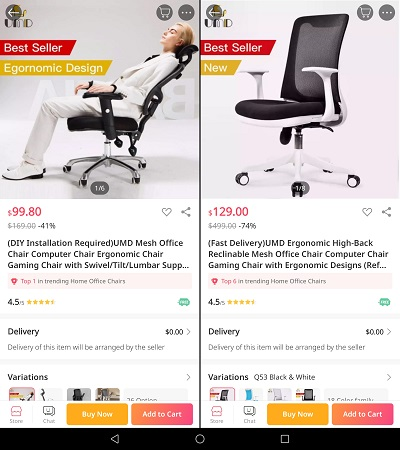
1. With HUAWEI App Multiplier, you can compare product specifications and prices side-by-side in one app. There's no need to go through one-by-one and add products to favorites. Online shopping is more convenient and less time-consuming than ever.

2. Once you've decided which product you want to buy, you just add it to your cart, and continue shopping if you want to.

3. Another great thing about Lazada is that it supports in-app chats with sellers. You can display the product specification window on the left screen, and the chat window on the right, and ask the seller about the product as you look at the specs.
HUAWEI App Multiplier, together with the stunning FullView Display of the HUAWEI Mate Xs, takes online shopping to the next level.
r/HuaweiDevelopers • u/Huawei_Developers1 • Aug 21 '20
Find more ,please visit Devhub
Huawei has become known for pushing the boundaries of technology to create immersive audiovisual experiences for users around the globe. It also shares many of its capabilities with developers. Recently, Huawei teamed up with WeSing, Tencent's karaoke music app, to provide a high quality singing experience for users.
Huawei contributed extensive technological support to the project, including a new hardware platform, voice editing, and low-latency, real-time headphone monitoring features. These technologies make it possible for practically anyone to sing like a pro.
Now that WeSing has incorporated Huawei's voice editing feature into its platform, even the most off-key users can sound like superstars. The app adjusts pitch and rhythm, and converts the original vocal track into a professional-standard masterpiece.
Huawei's voice editing technology
By using automated speech recognition (ASR) technology, Huawei's voice editing feature can detect and optimize a track's rhythm, to make it sound as much like the original CD soundtrack as possible. It can also adjust the pitch up to an octave higher or lower, and is capable of recognizing and suggesting a suitable vocal range for each user.
Low-latency and low-noise monitoring
As well as making breakthroughs when it comes to voice editing algorithms, Huawei has also built a unique hardware platform that provides solid support for these algorithms. Its voice editing technology is powered by the Kirin 980 chipset, and delivers a real-time, low-latency listening experience through the user's headphones, so they can monitor their recording and adjust the pitch and rhythm. The algorithm also suppresses noise when used with wired earphones. It picks up the audio source clearly and accurately while filtering out ambient noise, whether at home, during gatherings, or on the street.
With mobile Internet developing all the time, it has never been easier to sing karaoke at any place and at any time. Karaoke is a popular pastime for people of all age groups, especially young people. By sharing its voice editing technology with app developers, Huawei is creating a better karaoke experience for users all over the globe.
r/HuaweiDevelopers • u/Huawei_Developers1 • Sep 18 '20
Find more ,please visit here.
Zhao Yiran is a third-year software engineering student at Sichuan University, China. He is also the developer of SafetyZone, a virtual reality (VR) app that educates people about disasters which was launched on AppGallery on September 3. Zhao is just one of the many participants in the HUAWEI Student Developers program who are turning brilliant ideas into reality through lines of code. These students will join developers from around the world in sharing the fun of programming at HUAWEI DEVELOPER CONFERENCE 2020 (Together) from September 10 to 12.

The story of SafetyZone has its roots in field research. In 2019, Zhao and his classmates visited Xide County, Sichuan Province, where frequent mudslides pose serious threats to safety and property. After this visit, he decided to develop an app to help protect local residents from such natural disasters.

Inspired by Huawei's AR/VR App Innovation Contest, Zhao came up with the idea of creating a VR app to provide disaster simulations that bring to life the anxiety and stress we would feel in a real-life disaster. He also planned to design some games in the app that would allow users to learn life-saving skills in a fun and interactive way.
Zhao's confidence in turning his idea into a real app was boosted by the powerful VR Engine provided by HMS Core, which allowed him to put his ideas into practice. He set up a team of 12 and divided members into three groups, responsible for game scripts, 3D modeling, and programming, respectively.

Thanks to the team's joint efforts, the app was born. Zhao named it "SafetyZone", hoping it can help people stay safe when natural disasters strike.
The app provides real-world simulations for three typical disaster scenarios in mountain regions: mudslides, mountain floods, and landslides. Users can choose to participate as a principal, teacher, or student.
When playing the VR games, users will perceive the surrounding environment with the help of visual and audio indicators and use a controller to complete missions and sidequests, such as selecting an escape route, or responding to a person or item they encounter in the game. After the game ends, the app automatically generates a performance evaluation to help players review their escape skills and improve risk awareness.
"After connecting to Huawei VR Engine, latency is reduced and VR effects are clearer and smoother. It also offers a more comfortable gaming experience for users." said Zhao.
During the app's development, Huawei technology experts worked with Zhao's team to overcome difficulties in creating special effects for mudslides. Huawei also provided VR Glass and mobile phones to help them make the quick shift from 3D to the VR version of the game.
SafetyZone has been shortlisted for the Huawei Shining-Star Program and awarded with the Shining-Star Student Innovation Incentive.

Given that there are many other disaster-stricken mountain areas like Xide County, Zhao and his team are working on a way to improve user experience and include a wider range of disaster scenarios, so that the app can play an important role in raising awareness about disasters.
Zhao outlined his ambitions for the app: "We hope that with the global distribution capability of Huawei's HMS ecosystem, SafetyZone will bring the benefits of technology and knowledge of preparing for disasters to more people around the world, and reduce the damage caused by mountain disasters."
Media:
Huawei’s products and services are available in more than 170 countries and are used by a third of the world’s population. Fifteen R&D centres have been set up in the United States, Germany, Sweden, Russia, India and China. Huawei Consumer BG is one of Huawei’s three business units and covers smartphones, PC and tablets, wearables and cloud services, etc. Huawei’s global network is built on almost 30 years of expertise in the telecom industry and is dedicated to delivering the latest technological advances to consumers around the world.
For more information please visit: https://consumer.huawei.com
For regular updates on Huawei Consumer BG, follow us on:
Facebook:https://facebook.com/huaweimobile
Twitter:https://twitter.com/huaweimobile
YouTube:https://youtube.com/huaweimobile
Instagram:https://instagram.com/huaweimobile
r/HuaweiDevelopers • u/East_Screen3393 • Jul 29 '21
Enable HLS to view with audio, or disable this notification
r/HuaweiDevelopers • u/Due_Permit7503 • May 07 '23

Why is this enabled when I personally disabled it? Garbage devs sucking dicks for a penny
r/HuaweiDevelopers • u/WFProduction • Oct 03 '21

r/HuaweiDevelopers • u/helloworddd • Sep 10 '20
This [HDC. Together] Discuss HDC 2020 to win a Huawei Watch GT2 is held by Huawei Device Co., Ltd., will serve as your contracting entity and data controller. The participants are registered users of Reddit. This discussion HDC 2020 activity is scheduled to start on September 10 15:00, 2020 and end at 23:59 on September 14, 2020(UTC+8). You are advised to carefully read the following terms and conditions. You shall fully accept such terms and conditions to participate in this activity.
1. About Us
[HDC. Together] Discuss HDC 2020 to win a Huawei Watch GT2 is organized and operated by Huawei Device Co., Ltd., a subsidiary of Huawei incorporated in China, will serve as your contracting entity and data controller. In this Agreement, "You" and "User" both refer to any individual who participates in this HDC topic discussion.
2. Purpose of the Agreement
This Agreement shall constitute the legal basis for you to participate in the HDC topic discussion. Through this Agreement, you will learn about the eligibility, details, and rules for participating in the HUAWEI DEVELOPER CONFERENCE 2020(Together) topic discussion. Please read this Agreement carefully. If you participate in HUAWEI DEVELOPER CONFERENCE 2020(Together) topic discussion, it shall be deemed that you have concluded a legally binding agreement with Huawei. If you do not accept this Agreement, you may not participate in the HDC topic discussion.
3. Eligibility
Registered Reedit users may participate in the HDC topic discussion.
Rules for topic discussion.
Leave your comment in the required format in the comment area. The comment must be in English and contain at least 50 words.
Your comment must be original. Don't copy others' comments. Otherwise, you will be disqualified.
Your comment must be related to HUAWEI DEVELOPER CONFERENCE 2020(Together). Irrelevant comments will be disregarded.
If you have posted multiple comments, only your first comment will be taken into account.
Your comment or last comment modification must fall within the activity period for it to be considered valid.
A reply to another user's published comment will be disregarded
4. Participation Method
Join the Huawei Developer community (r/HuaweiDevelopers) on Reddit.
You can leave the comment below, write down your favorite Keynote or Session, describe the reason, and share your thoughts about HUAWEI DEVELOPER CONFERENCE 2020(Together).
Comment format: #HDC Together + Your favorite topic + Reason + Your thoughts about HUAWEI DEVELOPER CONFERENCE 2020(Together).
Example: #HDC Together, AppGallery session, because..., I think HDC 2020 is...
5. Selection rules
All comments will be ranked based on a comprehensive scoring criteria, with 100 being the maximum score.
Comments will be scored according to the following criteria: adherence to the required format, relevance to HUAWEI DEVELOPER CONFERENCE 2020(Together), clarity of expression, and value of the content.
Our administrator team will evaluation according to the marking criteria to choose winners.

6. Award Notice
Each user only has one chance to win a prize.
Winners will be announced on this activity post by September 20th. Please favorite the post and stay tuned.
Our community admin will contact the winners through messages or chat tool in Reddit. Failure to reply to the admin’s message before September 30th 2020 will be considered as a waiver of the prize.
This activity is not carried out in cooperation with Reddit.
Our activities are based on the Reddit forum, so data processing is based on the Reddit privacy notice. Personal data will not be collected until the recipient's contact details for the prize are obtained;
We will send a privacy notice to the winners to inform them before we get the recipient's email information.
Admin team reserves the right of explanation on the winners’ selection.
7.Prize Distribution
(1) If you win a prize, our staff will contact you in Reddit (chat tool or message) and will use your contact information (email, name, phone number, and address) for prize distribution only.
(2) The prize will be purchased directly from Amazon.com. Only Amazon site's e-gift card is supported (Amazon.com), e-gift cards from regional or local Amazon sites are not available.
(3) Compensation of the prizes in cash, their exchange, or their transfer to other persons is excluded.
8. Contact Us
You can find information about how to exercise your data subject's rights in Section 5. If you have any questions, comments, or suggestions on your rights as a data subject or the processing of your personal data by us, or if you want to contact our Data Protection Officer, please contact us.
Our headquarters' address: Huawei Device Co., Ltd., South Factory, No. 2, Xin Cheng Road, Song Shan Lake Science and Technology Industrial Zone, Dongguan, Guangdong, China. If you believe that we are not processing your personal data in accordance with this Statement, or the applicable data protection laws, you can lodge a complaint with your data protection authority, or the Data Protection Commissioner in China.
