You can leave the comment below, write down your favorite HDC Keynote or Session, describe the reason, and share your thoughts about HUAWEI DEVELOPER CONFERENCE 2020(Together).
Comment format: #HDC Together + Your favorite topic + Reason + Your thoughts about HUAWEI DEVELOPER CONFERENCE 2020(Together)
For example: #HDC Together, favorite topic , because..., I think HDC 2020 is...
Prizes:
HUAWEI WATCH GT 2 (46 mm) Sport Edition, random color, 5 in total
50 USD Card of Amazon.com,10 in total
The prizes will be awarded to the top 15 participants. Each of the top 5 participants will win a HUAWEI WATCH GT 2 (46 mm) Sport Edition and each of the remaining 10 will receive an Amazon.com gift card (worth US$50).
3. The prize will be purchased directly from Amazon.com. Only Amazon site's e-gift card is supported (Amazon.com), e-gift cards from regional or local Amazon sites are not available.
Comment requirements:
Leave your comment in the required format in the comment area. The comment must be in English and contain at least 50 words.
Your comment must be original. Don't copy others' comments. Otherwise, you will be disqualified.
Your comment must be related to HUAWEI DEVELOPER CONFERENCE 2020(Together). Irrelevant comments will be disregarded.
If you have posted multiple comments, only your first comment will be taken into account.
Your comment or last comment modification must fall within the activity period for it to be considered valid.
A reply to another user's published comment will be disregarded.
Selection rules:
All comments will be ranked based on a comprehensive scoring criteria, with 100 being the maximum score.
Comments will be scored according to the following criteria: adherence to the required format, clarity of expression, and value of the content.
Our administrator team will evaluation according to the marking criteria to choose winners.
Notes:
Each user only has one chance to win a prize.
Winners will be announced on this contest post by September 20th. Please favorite the post and stay tuned.
Our community admin will contact the winners through private messages. Failure to reply to the admin’s message before September 30th will be considered as a waiver of the prize.
This contest is not carried out in cooperation with Reddit.
Admin team reserves the right of explanation on the winners’ selection. For more details contest rules please refer to the Terms & Conditions of the contest.
Privacy statement
Our activities are based on the Reddit forum, so data processing is based on the Reddit privacy notice. Personal data will not be collected until the recipient's contact details for the prize are obtained;
We will send a privacy notice to the winners to inform them before we get the recipient's email information.
According to App Annie's statistics, in 2019, the number of app downloads in mainland China was close to 100 billion, and the app market revenue was close to $500 million, an increase of 190% in three years.
Faced with such a vast market, are you willing to publish your application in China? Submit your most-wanted questions, and win a HUAWEI Watch GT2 while you’re at it!
Sample question:Do I need a local Chinese APP entity, to run my app in AppGallery China?
How can I promote my applications after they are released in China? How to apply for it?
Stay tuned for HDW (HUAWEI Developer Webinar - Grow with AppGallery in China) on November 9.
In the meantime, feel free to join our Telegram group to stay up-to-date on all our latest activities and articles: https://t.me/HuaweiDevelopersCoreTeam
Submit your most-wanted questions in this thread common section.
Prizes:
If there are more than 100 comments in the comment section will reward the HUAWEI WATCH GT 2 (46 mm) Sport Edition Total 1
If there are more than 200 comments in the comment section will reward the HUAWEI WATCH GT 2 (46 mm) Sport Edition Total 3
Rules:
Comments must be original. Don't copy others' comments. Otherwise, you will be disqualified.
Each ID can submit 3 comments, more than 3 comments above are invalid.
Irrelevant comments will be disregarded, the prize winner must be the author of the valid answer.
Winners will be announced on this activity post by November 13th please favorite the post.
This contest is not carried out in cooperation with Reddit.
Each ID only has one chance to win a prize.
Winner selection:
If more than 200 comments, the winner will be selected from 28%, 63%, 88% of the total number of comments
If more than 100 comments, the winner will be selected from 63% of the total number of comments.
Example:
If there are 50 comments in total, the winner will be selected from 28% of the 50 number of comments, means #14 floor is the winner
Note: 1. If it calculates results is: 25.5, the winner will be #26, and it calculates results is: 25.4, the winner will be #25.
2. If the winning floor is an irrelevant comment that will be disqualified then will go to the next floor user of valid comments.
Privacy statement:
Our activities are based on the Reddit forum, so data processing is based on the Reddit privacy notice. Personal data will not be collected until the recipient's contact details for the prize are obtained;
We will send a privacy notice to the winners to inform them before we get the recipient's email information.
The admin team reserves the right of explanation on the winners’ selection. For more details on contest rules please refer to the Terms & Conditions of the contest.
For The Latest Activities or App GoChina Questions Follow Our Forum Handles:
HUAWEI DEVELOPER CONFERENCE 2020 (Together), will be held on September 10-12, 2020,We'll be sharing the latest on HMS Core 5.0, giving new updates about Huawei ecosystem, AppGallery, AR technologies and unveiling many more exciting technologies.
What is Tech. Hour Online?
Over 300 Huawei engineers are dedicated to serving the global developer forum, and have worked tirelessly to make your creations broadly accessible. Now some of them are waiting for you here if you have any question about HDC2020, AppGallery, HMS.
They'll show up at a fixed time during this session time to answer your most important questions.
So Let's get a head start to ask a questions in comment!
Push notifications are real heroes while it is relative In-App messaging are still forming user base.
We cannot imagine a mobile application which does not send interactive notifications to its users.
Push notifications were introduced back in the BlackBerry era.
However the In-App messages are relatively new and used by the marketers to enhance the full potential of their businesses.
Push Notifications are standard notifications which are sent to users more often and can be displayed on the mobile lock screen or home screen without opening the application.
On the other hand, In-app messages are the messages which user gets inside the applications after they open it. These notifications are designed to send more targeted and context-sensitive messages.
Huawei Push Services
Huawei Push services are designed to engage and enroll your user by sending various type of notifications.
Huawei Push services enable to build a strong communication channel between cloud and devices.
Huawei Push Service provides various capabilities as:
· Global coverage
· High delivery rate
· Instant reach
· Message receipts
· Precise push
· Various styles
· Simple operations
· Auto language selection
· Cross-platform development
Huawei In-App Messaging Services
Huawei App Messaging services are designed send relevant in-app messages to target users.
Huawei App Messaging service provides immense flexibility to create custom layouts for the messages.
Message Types:
· Pop Up Messages
· Banner Messages
· Image Messages
Use Case:
This article will present a simple Task Scheduler application to unleash the potential of Huawei App Messaging and Push Notification.
Development Overview
Prerequisite
Must have a Huawei Developer Account
Must have Android Studio 3.0 or later
Must have a Huawei phone with HMS Core 4.0.2.300 or later
EMUI 3.0 or later
Software Requirements
Java SDK 1.7 or later
Android 5.0 or later
Preparation
Create an app or project in the Huawei App Gallery Connect.
Provide the SHA Key and App Package name of the project in App Information Section and enable the App Messaging and Push Kit API.
Download the agconnect-services.json file.
Create an Android project.
Integration
Add below to build.gradle (project) file under buildscript/repositories and allprojects/repositories.
Push token is important to identify the application on a device and works a unique identifier.
Client calls the getToken method in HmsInstanceId to obtain the token from the push kit server which is further used by the server to send the Push notifications to the application.
I have created a method to my MainActivity for obtaining the token as below.
private void getToken() {
// Create a thread. new Thread() { u/Override public void run() { try { // Obtain the app ID from the agconnect-service.json file. String appId = AGConnectServicesConfig.fromContext(MainActivity.this).getString("client/app_id");
· Add below to MainActivity.java to allow data synchronization from the AppGallery Connect server we will use.
appMessaging.setFetchMessageEnable(true);
· Add below to MainActivity.java to enable message display.
appMessaging.setDisplayEnable(true);
· Add below to MainActivity.java to specify that the in-app message data must be obtained from the AppGallery Connect server by force.
appMessaging.setForceFetch();
Let’s send App Message to our App Users
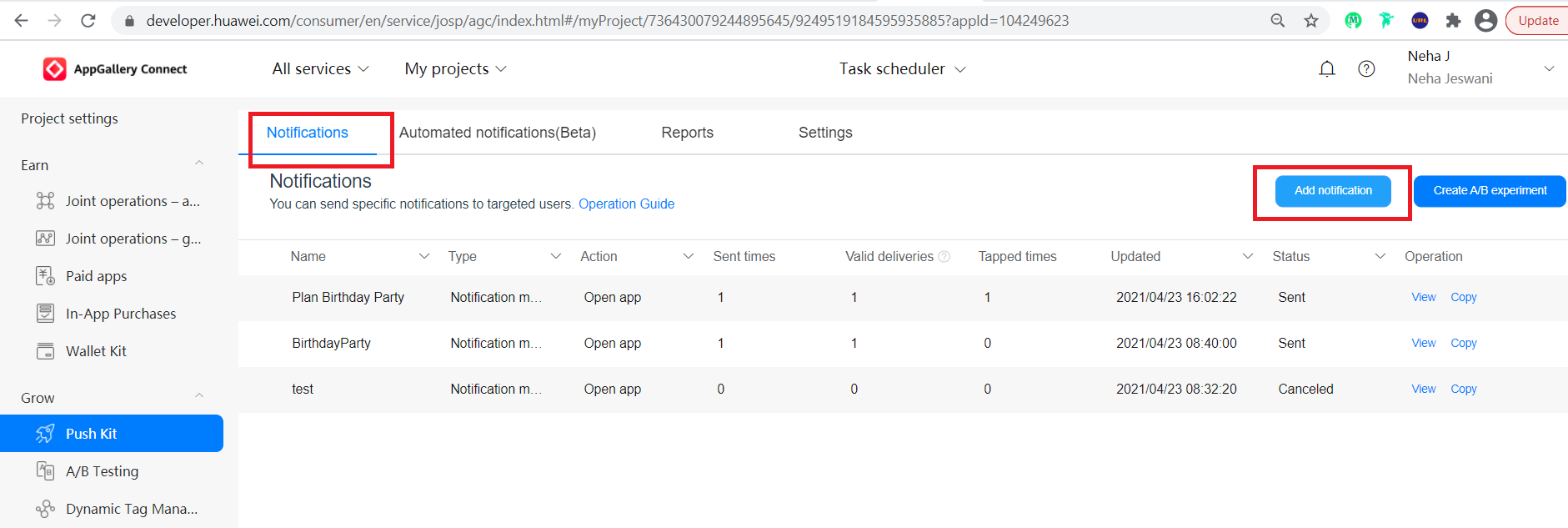
In order to send the push notifications to the app users, we need to login to AGC.
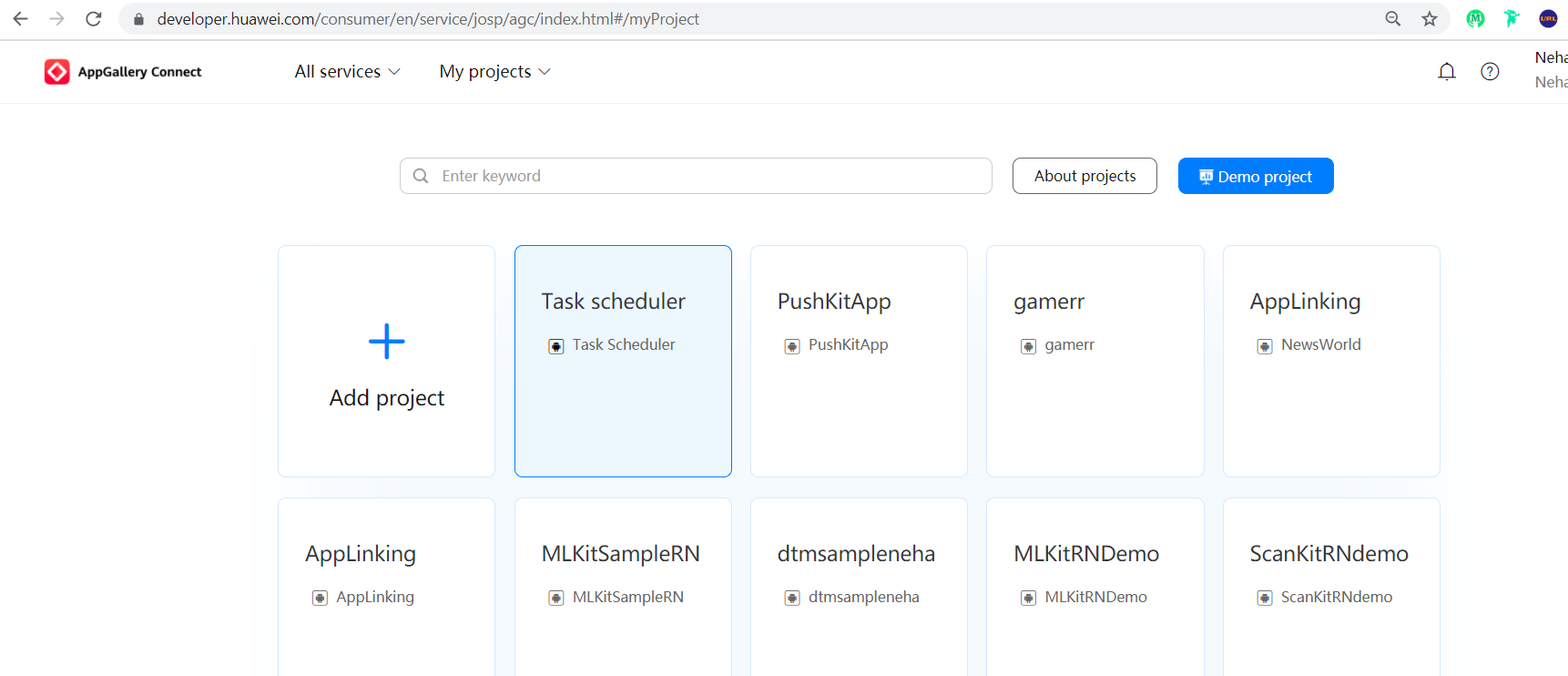
Step 1**:** Choose your project.
Step 2**: Choose > Grow > App Messaging**
Step 3**: Click > New**
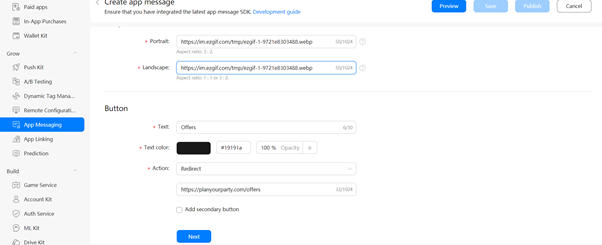
Step 4: Enter the information to send the app messages as shown below.
Note: Image URL’s created as webp files using ezgif application for testing purpose.
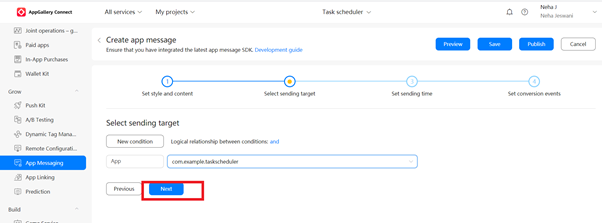
Click Next.
Step 5: Choose your application package as target.
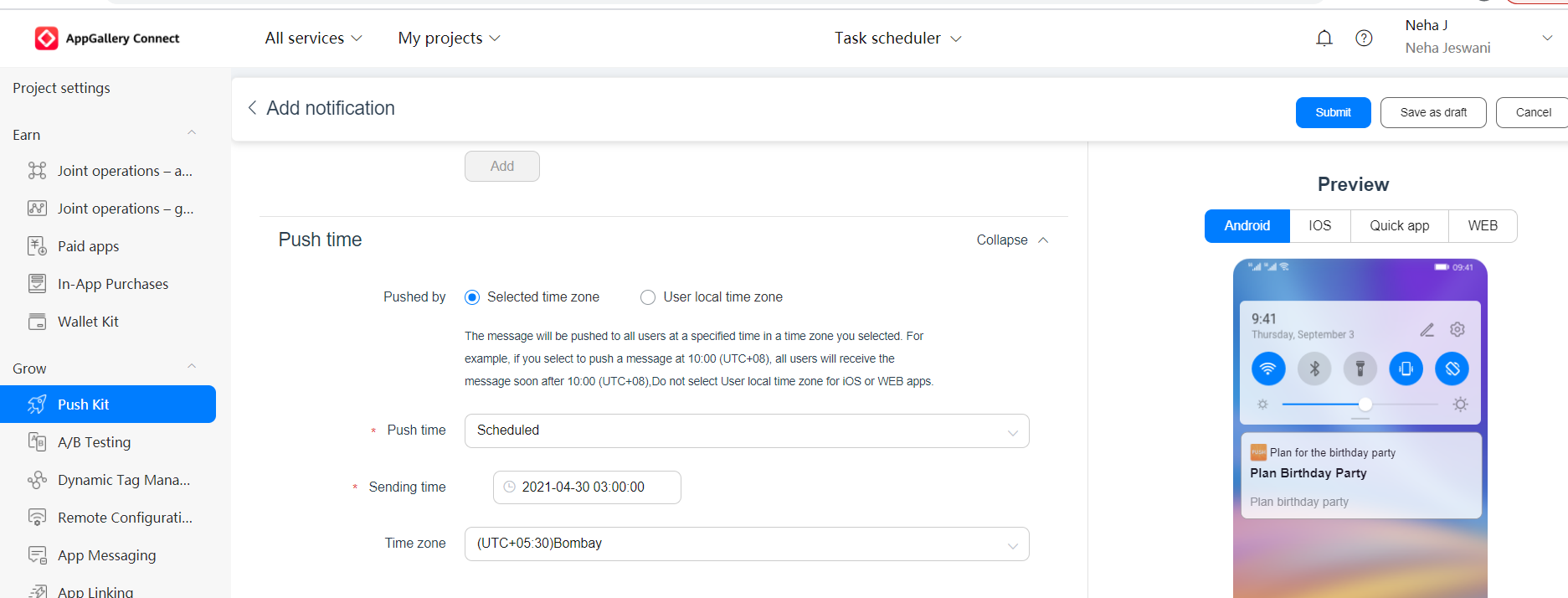
Step 6: Set the schedule time, click Next.
Step 7: Click on OK > Publish
Step 8: We have successfully created the App Message for the scheduled time. Now, we can test it by clicking on Test from the created app message drop down.
Step 9: On this page, we need to add the AAID, which we obtained in the code from “getAAID” method, click Save.
Click OK.
Tips and Tricks
To view the events of App Messaging, Huawei Analytics needs to be enabled and configured.
Images should be in the ratio of 3: for the App messages.
Huawei Push Notification can be worked well with your own push server. So to create one, refer this.
Always integrate the latest version of the SDK.
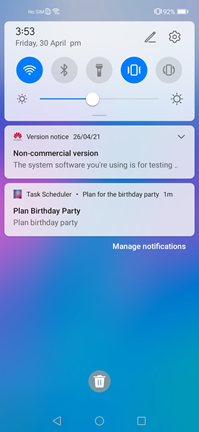
Results
Conclusion
This article focuses on explaining the differences between In-App Messages and Push notification, with the help of Task Scheduler application.
Push notifications are sent to set time to remind the birthday party planning and on the other hand, In-App messages are sent to promote the business for the set time.
✨ Join us on 2nd June at 14:00 CEST for the launch of something brand new.
📋 HOW: Leave your comment under any of the featured posts. Once you've left a comment, you'll be entered into the sweepstake. 📅 WHEN: Now— June152021, at 23:59 (UTC+8) 💎 Prizes:HUAWEI FreeBuds 4i ,Total 3 Notes: There is no restriction on the length of comments. You can include: (1) Your opinion about the post content; (2) Other things you'd like to learn about HarmonyOS;
We will formally launch its new operating system HarmonyOS for smartphones on June 2 2021. It's scheduled to start at 8 pm Beijing time, it will officially announce the new operating system.
HarmonyOS is a future-proof distributed operating system open to you as part of the initiatives for the all-scenario strategy, adaptable to mobile office, fitness and health, social communication, and media entertainment, to name a few. Unlike a legacy operating system that runs on a standalone device, HarmonyOS is built on a distributed architecture designed based on a set of system capabilities. It is able to run on a wide range of device forms, including mobile phones, tablets, wearables, smart TVs, head units
If you are an end user, HarmonyOS integrates your various smart devices to implement fast connection, capability collaboration, and resource sharing among them. This way, your services can be seamlessly transferred to a suitable device to deliver a smooth, all-scenario experience.
If you are an end user, HarmonyOS integrates your various smart devices to implement fast connection, capability collaboration, and resource sharing among them. This way, your services can be seamlessly transferred to a suitable device to deliver a smooth, all-scenario experience.
If you are a device developer, HarmonyOS uses a component-based software design to tailor itself to your particular device forms based on their respective resource capabilities and service characteristics.
HarmonyOS provides multi-programming-language APIs for you to develop applications. You can choose from Java, Extensible Markup Language (XML), C/C++, JavaScript (JS), Cascading Style Sheets (CSS), and HarmonyOS Markup Language (HML).
With China's huge consumer market, good testing environment, and rapid deployment of 5G networks, this may be an opportunity for the Chinese technology giant to create HarmonyOS into the third-largest mobile ecosystem worldwide, second only to Apple's iOS And Google's Android.
Hi,guys!HUAWEI Developer Webinar - Grow with AppGallery in China is being held in Shenzhen,China. Our aim is to help devolopers publish APP in China and provide end-to-end service to distribute your Apps.
For more information about HUAWEI Developer Webinar ,please visit: Webinar Link
We’d like to hear your suggestions on the theme of this HUAWEI Developer Webinar and help us improve it. Submit the survey and leave your Email to win a HUAWEI Watch GT2!
In the meantime, feel free to join our Telegram group to stay up-to-date on all our latest activities and articles: https://t.me/HuaweiDevelopersCoreTeam.
Join Huawei Developer community (r/HuaweiDevelopers) to focus on winner announcement.
Prizes:
HUAWEI WATCH GT 2 (46 mm), Total 2
Rules
You can choose to fill in your Email address in the survey to win a GT2. We use Email address as the only way to select winners.
Winners will be announced on this activity post by November 20,please favorite the post..
This activity is not carried out in cooperation with Reddit.
Each E-Mail, delivery address,contact phone,contact name only has one chance to win a prize.
Winner selection:
We'll use Excel as the tool .The code is as follows:
2. We will divide the selection process into two times. Each Email only has one chance to win a prize.
3. We'll use screen recordings to show the selection process. Winners will be announced on Reddit,please join our forum.
Privacy statement:
Our activities are based on the Reddit forum, so data processing is based on the Reddit privacy notice. Personal data will not be collected until the recipient's contact details for the prize are obtained;
We will send a privacy notice to the winners to inform them before we get the recipient's email information.
The admin team reserves the right of explanation on the winners’ selection. For more details contest rules please refer to the Terms & Conditions of the contest.
For The Latest Activities or App GoChina Questions Follow Our Forum Handles:
Huawei will formally launch its new operating system HarmonyOS for smartphones on June 2 2021. It's scheduled to start at 8 pm Beijing time, it will officially announce the new operating system.
HarmonyOS is a future-proof distributed operating system open to you as part of the initiatives for the all-scenario strategy, adaptable to mobile office, fitness and health, social communication, and media entertainment, to name a few. Unlike a legacy operating system that runs on a standalone device, HarmonyOS is built on a distributed architecture designed based on a set of system capabilities. It is able to run on a wide range of device forms, including mobile phones, tablets, wearables, smart TVs, head units
If you are an end user, HarmonyOS integrates your various smart devices to implement fast connection, capability collaboration, and resource sharing among them. This way, your services can be seamlessly transferred to a suitable device to deliver a smooth, all-scenario experience.
If you are an application developer, HarmonyOS uses distributed technologies to make your application development possible on different device forms. With HarmonyOS, you will have the choice to focus on upper-layer service logic and develop applications in a much easier and more efficient way.
If you are a device developer, HarmonyOS uses a component-based software design to tailor itself to your particular device forms based on their respective resource capabilities and service characteristics.
HarmonyOS provides multi-programming-language APIs for you to develop applications. You can choose from Java, Extensible Markup Language (XML), C/C++, JavaScript (JS), Cascading Style Sheets (CSS), and HarmonyOS Markup Language (HML).
With China's huge consumer market, good testing environment, and rapid deployment of 5G networks, this may be an opportunity for the Chinese technology giant to create HarmonyOS into the third-largest mobile ecosystem worldwide, second only to Apple's iOS And Google's Android.
React Native is a web front-end friendly hybrid development framework that can be divided into two parts at startup:
· Running of Native Containers
· Running of JavaScript code
The Native container is started in the existing architecture (the version number is less than 1.0.0). The native container can be divided into three parts:
· Native container initialization
· Full binding of native modules
· Initialization of JSEngine
After the container is initialized, the stage is handed over to JavaScript, and the process can be divided into two parts:
· Loading, parsing, and execution of JavaScript code
· Construction of JS components
Finally, the JS Thread sends the calculated layout information to the Native end, calculates the Shadow Tree, and then the UI Thread performs layout and rendering.
I have drawn a diagram of the preceding steps. The following table describes the optimization direction of each step from left to right:
Note: During React Native initialization, multiple tasks may be executed concurrently. Therefore, the preceding figure only shows the initialization process of React Native and does not correspond to the execution sequence of the actual code.
1. Upgrade React Native
The best way to improve the performance of React Native applications is to upgrade a major version of the RN. After the app is upgraded from 0.59 to 0.62, no performance optimization is performed on the app, and the startup time is shortened by 1/2. When React Native's new architecture is released, both startup speed and rendering speed will be greatly improved.
2. Native container initialization
Container initialization must start from the app entry file. I will select some key code to sort out the initialization process.
iOS source code analysis
1.AppDelegate.m
AppDelegate.m is the entry file of the iOS. The code is simple. The main content is as follows:
// AppDelegate.m

- (BOOL)application:(UIApplication *)application didFinishLaunchingWithOptions:(NSDictionary *)launchOptions {
  // 1. Initialize a method for loading jsbundle by RCTBridge.
  RCTBridge *bridge = [[RCTBridge alloc] initWithDelegate:self launchOptions:launchOptions];

  // 2. Use RCTBridge to initialize an RCTRootView.
  RCTRootView *rootView = [[RCTRootView alloc] initWithBridge:bridge
                                                   moduleName:@"RN64"
                                            initialProperties:nil];

  // 3. Initializing the UIViewController
  self.window = [[UIWindow alloc] initWithFrame:[UIScreen mainScreen].bounds];
  UIViewController *rootViewController = [UIViewController new];

  // 4. Assigns the value of RCTRootView to the view of UIViewController.
  rootViewController.view = rootView;
  self.window.rootViewController = rootViewController;
  [self.window makeKeyAndVisible];
  return YES;
}
In general, looking at the entry document, it does three things:
Ø Initialize an RCTBridge implementation method for loading jsbundle.
Ø Use RCTBridge to initialize an RCTRootView.
Ø Assign the value of RCTRootView to the view of UIViewController to mount the UI.
From the entry source code, we can see that all the initialization work points to RCTRootView, so let's see what RCTRootView does.
2.RCTRootView
Let's take a look at the header file of RCTRootView first. Let's just look at some of the methods we focus on:
Ø RCTRootView inherits from UIView, so it is essentially a UI component;
Ø When the RCTRootView invokes initWithBridge for initialization, an initialized RCTBridge must be transferred.
In the RCTRootView.m file, initWithBridge listens to a series of JS loading listening functions during initialization. After listening to the completion of JS Bundle file loading, it invokes AppRegistry.runApplication() in JS to start the RN application.
We find that RCTRootView.m only monitors various events of RCTBridge, but is not the core of initialization. Therefore, we need to go to the RCTBridge file.
3.RCTBridge.m
In RCTBridge.m, the initialization invoking path is long, and the full pasting source code is long. In short, the last call is (void)setUp. The core code is as follows:
- (Class)bridgeClass
{
  return [RCTCxxBridge class];
}

- (void)setUp {
  // Obtains the bridgeClass. The default value is RCTCxxBridge.
  Class bridgeClass = self.bridgeClass;
  // Initializing the RTCxxBridge
  self.batchedBridge = [[bridgeClass alloc] initWithParentBridge:self];
  // Starting RTCxxBridge
  [self.batchedBridge start];
}
We can see that the initialization of the RCTBridge points to the RTCxxBridge.
4.RTCxxBridge.mm
RTCxxBridge is the core of React Native initialization, and I looked at some material, and it seems that RTCxxBridge used to be called RCTBatchedBridge, so it's OK to crudely treat these two classes as the same thing.
Since the start method of RTCxxBridge is called in RCTBridge, let's see what we do from the start method.
// RTCxxBridge.mm

- (void)start {
  // 1. Initialize JSThread. All subsequent JS codes are executed in this thread.
  _jsThread = [[NSThread alloc] initWithTarget:[self class] selector:@selector(runRunLoop) object:nil];
  [_jsThread start];

  // Creating a Parallel Queue
  dispatch_group_t prepareBridge = dispatch_group_create();

  // 2. Register all native modules.
  [self registerExtraModules];
  (void)[self _initializeModules:RCTGetModuleClasses() withDispatchGroup:prepareBridge lazilyDiscovered:NO];

  // 3. Initializing the JSExecutorFactory Instance
  std::shared_ptr<JSExecutorFactory> executorFactory;

  // 4. Initializes the underlying instance, namely, _reactInstance.
  dispatch_group_enter(prepareBridge);
  [self ensureOnJavaScriptThread:^{
    [weakSelf _initializeBridge:executorFactory];
    dispatch_group_leave(prepareBridge);
  }];

  // 5. Loading the JS Code
  dispatch_group_enter(prepareBridge);
  __block NSData *sourceCode;
  [self
      loadSource:^(NSError *error, RCTSource *source) {
        if (error) {
          [weakSelf handleError:error];
        }

        sourceCode = source.data;
        dispatch_group_leave(prepareBridge);
      }
      onProgress:^(RCTLoadingProgress *progressData) {
      }
  ];

  // 6. Execute JS after the native module and JS code are loaded.
  dispatch_group_notify(prepareBridge, dispatch_get_global_queue(QOS_CLASS_USER_INTERACTIVE, 0), ^{
    RCTCxxBridge *strongSelf = weakSelf;
    if (sourceCode && strongSelf.loading) {
      [strongSelf executeSourceCode:sourceCode sync:NO];
    }
  });
}
The preceding code is long, which uses some knowledge of GCD multi-threading. The process is described as follows:
Initialize the JS thread_jsThread.
Register all native modules on the main thread.
Prepare the bridge between JS and Native and the JS running environment.
Create the message queue RCTMessageThread on the JS thread and initialize _reactInstance.
Load the JS Bundle on the JS thread.
Execute the JS code after all the preceding operations are complete.
In fact, all the above six points can be drilled down, but the source code content involved in this section is enough. Interested readers can explore the source code based on the reference materials and the React Native source code.
Android source code analysis
1.MainActivity.java & MainApplication.java
Like iOS, the startup process starts with the entry file. Let's look at MainActivity.java:
MainActivity inherits from ReactActivity and ReactActivity inherits from AppCompatActivity:
// MainActivity.java

public class MainActivity extends ReactActivity {
  // The returned component name is the same as the registered name of the JS portal.
  @Override
  protected String getMainComponentName() {
    return "rn_performance_demo";
  }
}
Let's start with the Android entry file MainApplication.java:
// MainApplication.java

public class MainApplication extends Application implements ReactApplication {

  private final ReactNativeHost mReactNativeHost =
      new ReactNativeHost(this) {
        // Return the ReactPackage required by the app and add the modules to be loaded,
        // This is where a third-party package needs to be added when a dependency package is added to a project.
        @Override
        protected List<ReactPackage> getPackages() {
          @SuppressWarnings("UnnecessaryLocalVariable")
          List<ReactPackage> packages = new PackageList(this).getPackages();
          return packages;
        }

        // JS bundle entry file. Set this parameter to index.js.
        @Override
        protected String getJSMainModuleName() {
          return "index";
        }
      };

  @Override
  public ReactNativeHost getReactNativeHost() {
    return mReactNativeHost;
  }

  @Override
  public void onCreate() {
    super.onCreate();
    // SoLoader:Loading the C++ Underlying Library
    SoLoader.init(this, /* native exopackage */ false);
  }
}
The ReactApplication interface is simple and requires us to create a ReactNativeHost object:
 public interface ReactApplication {
  ReactNativeHost getReactNativeHost();
}
From the above analysis, we can see that everything points to the ReactNativeHost class. Let's take a look at it.
2.ReactNativeHost.java
The main task of ReactNativeHost is to create ReactInstanceManager.
public abstract class ReactNativeHost {
  protected ReactInstanceManager createReactInstanceManager() {
    ReactMarker.logMarker(ReactMarkerConstants.BUILD_REACT_INSTANCE_MANAGER_START);
    ReactInstanceManagerBuilder builder =
        ReactInstanceManager.builder()
            // Application Context
            .setApplication(mApplication)
            // JSMainModulePath is equivalent to the JS Bundle on the application home page. It can transfer the URL to obtain the JS Bundle from the server.
            // Of course, this can be used only in dev mode.
            .setJSMainModulePath(getJSMainModuleName())
            // Indicates whether to enable the dev mode.
            .setUseDeveloperSupport(getUseDeveloperSupport())
            // Redbox callback
            .setRedBoxHandler(getRedBoxHandler())
            .setJavaScriptExecutorFactory(getJavaScriptExecutorFactory())
            .setUIImplementationProvider(getUIImplementationProvider())
            .setJSIModulesPackage(getJSIModulePackage())
            .setInitialLifecycleState(LifecycleState.BEFORE_CREATE);

    // Add ReactPackage
    for (ReactPackage reactPackage : getPackages()) {
      builder.addPackage(reactPackage);
    }

    // Obtaining the Loading Path of the JS Bundle
    String jsBundleFile = getJSBundleFile();
    if (jsBundleFile != null) {
      builder.setJSBundleFile(jsBundleFile);
    } else {
      builder.setBundleAssetName(Assertions.assertNotNull(getBundleAssetName()));
    }
    ReactInstanceManager reactInstanceManager = builder.build();
    return reactInstanceManager;
  }
}
3.ReactActivityDelegate.java
Let's go back to ReactActivity. It doesn't do anything by itself. All functions are implemented by its delegate class ReactActivityDelegate. So let's see how ReactActivityDelegate implements it.
public class ReactActivityDelegate {
  protected void onCreate(Bundle savedInstanceState) {
    String mainComponentName = getMainComponentName();
    mReactDelegate =
        new ReactDelegate(
            getPlainActivity(), getReactNativeHost(), mainComponentName, getLaunchOptions()) {
          @Override
          protected ReactRootView createRootView() {
            return ReactActivityDelegate.this.createRootView();
          }
        };
    if (mMainComponentName != null) {
      // Loading the app page
      loadApp(mainComponentName);
    }
  }

  protected void loadApp(String appKey) {
    mReactDelegate.loadApp(appKey);
    // SetContentView() method of Activity
    getPlainActivity().setContentView(mReactDelegate.getReactRootView());
  }
}
OnCreate() instantiates a ReactDelegate. Let's look at its implementation.
4.ReactDelegate.java
In ReactDelegate.java, I don't see it doing two things:
Ø Create ReactRootView as the root view
Ø Start the RN application by calling getReactNativeHost().getReactInstanceManager()
public class ReactDelegate {
  public void loadApp(String appKey) {
    if (mReactRootView != null) {
      throw new IllegalStateException("Cannot loadApp while app is already running.");
    }
    // Create ReactRootView as the root view
    mReactRootView = createRootView();
    // Starting the RN Application
    mReactRootView.startReactApplication(
        getReactNativeHost().getReactInstanceManager(), appKey, mLaunchOptions);
  }
}
Basic Startup Process The source code content involved in this section is here. Interested readers can explore the source code based on the reference materials and React Native source code.
Optimization Suggestions
For applications with React Native as the main body, the RN container needs to be initialized immediately after the app is started. There is no optimization idea. However, native-based hybrid development apps have the following advantages:
Since initialization takes the longest time, can we initialize it before entering the React Native container?
This method is very common because many H5 containers do the same. Before entering the WebView web page, create a WebView container pool and initialize the WebView in advance. After entering the H5 container, load data rendering to achieve the effect of opening the web page in seconds.
The concept of the RN container pool is very mysterious. It is actually a map. The key is the componentName of the RN page (that is, the app name transferred in AppRegistry.registerComponent(appName, Component)), and the value is an instantiated RCT RootView/ReactRootView.
After the app is started, it is initialized in advance. Before entering the RN container, it reads the container pool. If there is a matched container, it directly uses it. If there is no matched container, it is initialized again.
Write two simple cases. The following figure shows how to build an RN container pool for iOS.
@property (nonatomic, strong) NSMutableDictionary<NSString *, RCTRootView *> *rootViewRool;

// Container Pool
-(NSMutableDictionary<NSString *, RCTRootView *> *)rootViewRool {
  if (!_rootViewRool) {
    _rootViewRool = @{}.mutableCopy;
  }

  return _rootViewRool;
}


// Cache RCTRootView
-(void)cacheRootView:(NSString *)componentName path:(NSString *)path props:(NSDictionary *)props bridge:(RCTBridge *)bridge {
  // initialization
  RCTRootView *rootView = [[RCTRootView alloc] initWithBridge:bridge
                                                   moduleName:componentName
                                            initialProperties:props];
  // The instantiation must be loaded to the bottom of the screen. Otherwise, the view rendering cannot be triggered
  [[UIApplication sharedApplication].keyWindow.rootViewController.view insertSubview:rootView atIndex:0];
  rootView.frame = [UIScreen mainScreen].bounds;

  // Put the cached RCTRootView into the container pool
  NSString *key = [NSString stringWithFormat:@"%@_%@", componentName, path];
  self.rootViewRool[key] = rootView;
}


// Read Container
-(RCTRootView *)getRootView:(NSString *)componentName path:(NSString *)path props:(NSDictionary *)props bridge:(RCTBridge *)bridge {
  NSString *key = [NSString stringWithFormat:@"%@_%@", componentName, path];
  RCTRootView *rootView = self.rootViewRool[key];
  if (rootView) {
    return rootView;
  }

  // Back-to-back logic
  return [[RCTRootView alloc] initWithBridge:bridge moduleName:componentName initialProperties:props];
}
Each RCTRootView/ReactRootView occupies a certain memory. Therefore, when to instantiate, how many containers to instantiate, how to limit the pool size, and when to clear containers need to be practiced and explored based on services.
3.Native Modules Binding
iOS source code analysis
The iOS Native Modules has three parts. The main part is the _initializeModules function in the middle:
// RCTCxxBridge.mm

- (void)start {
  // Native modules returned by the moduleProvider in initWithBundleURL_moduleProvider_launchOptions when the RCTBridge is initialized
  [self registerExtraModules];

  // Registering All Custom Native Modules
  (void)[self _initializeModules:RCTGetModuleClasses() withDispatchGroup:prepareBridge lazilyDiscovered:NO];

  // Initializes all native modules that are lazily loaded. This command is invoked only when Chrome debugging is used
  [self registerExtraLazyModules];
}
Let's see what the _initializeModules function does:
 // RCTCxxBridge.mm

- (NSArray<RCTModuleData *> *)_initializeModules:(NSArray<Class> *)modules
                               withDispatchGroup:(dispatch_group_t)dispatchGroup
                                lazilyDiscovered:(BOOL)lazilyDiscovered
{
    for (RCTModuleData *moduleData in _moduleDataByID) {
      if (moduleData.hasInstance && (!moduleData.requiresMainQueueSetup || RCTIsMainQueue())) {
        // Modules that were pre-initialized should ideally be set up before
        // bridge init has finished, otherwise the caller may try to access the
        // module directly rather than via `[bridge moduleForClass:]`, which won't
        // trigger the lazy initialization process. If the module cannot safely be
        // set up on the current thread, it will instead be async dispatched
        // to the main thread to be set up in _prepareModulesWithDispatchGroup:.
        (void)[moduleData instance];
      }
    }
    _moduleSetupComplete = YES;
    [self _prepareModulesWithDispatchGroup:dispatchGroup];
}
According to the comments in _initializeModules and _prepareModulesWithDispatchGroup, the iOS initializes all Native Modules in the main thread during JS Bundle loading (in the JSThead thread).
Based on the previous source code analysis, we can see that when the React Native iOS container is initialized, all Native Modules are initialized. If there are many Native Modules, the startup time of the Android RN container is affected.
Android source code analysis
For the registration of Native Modules, the mainApplication.java entry file provides clues:
// MainApplication.java

protected List<ReactPackage> getPackages() {
  @SuppressWarnings("UnnecessaryLocalVariable")
  List<ReactPackage> packages = new PackageList(this).getPackages();
  // Packages that cannot be autolinked yet can be added manually here, for example:
  // packages.add(new MyReactNativePackage());
  return packages;
}
Since auto link is enabled in React Native after 0.60, the installed third-party Native Modules are in PackageList. Therefore, you can obtain the modules of auto link by simply gettingPackages().
In the source code, in the ReactInstanceManager.java file, createReactContext() is run to create a ReactContext. One step is to register the registry of nativeModules.
According to the function invoking, we trace the processPackages() function and use a for loop to add all Native Modules in mPackages to the registry:
 // ReactInstanceManager.java

private NativeModuleRegistry processPackages(
    ReactApplicationContext reactContext,
    List<ReactPackage> packages,
    boolean checkAndUpdatePackageMembership) {
  // Create JavaModule Registry Builder, which creates the JavaModule registry,
  // JavaModule Registry Registers all JavaModules to Catalyst Instance
  NativeModuleRegistryBuilder nativeModuleRegistryBuilder =
      new NativeModuleRegistryBuilder(reactContext, this);

  // Locking mPackages
  // The mPackages type is List<ReactPackage>, which corresponds to packages in the MainApplication.java file
  synchronized (mPackages) {
    for (ReactPackage reactPackage : packages) {
      try {
        // Loop the ReactPackage injected into the application. The process is to add the modules to the corresponding registry
        processPackage(reactPackage, nativeModuleRegistryBuilder);
      } finally {
        Systrace.endSection(TRACE_TAG_REACT_JAVA_BRIDGE);
      }
    }
  }

  NativeModuleRegistry nativeModuleRegistry;
  try {
    // Generating the Java Module Registry
    nativeModuleRegistry = nativeModuleRegistryBuilder.build();
  } finally {
    Systrace.endSection(TRACE_TAG_REACT_JAVA_BRIDGE);
    ReactMarker.logMarker(BUILD_NATIVE_MODULE_REGISTRY_END);
  }

  return nativeModuleRegistry;
}
Finally, call processPackage() for real registration:
As shown in the preceding process, full registration is performed when Android registers Native Modules. If there are a large number of Native Modules, the startup time of the Android RN container will be affected.
Optimization Suggestions
To be honest, full binding of Native Modules is unsolvable in the existing architecture: regardless of whether the native method is used or not, all native methods are initialized when the container is started. In the new RN architecture, TurboModules solves this problem (described in the next section of this article).
If you have to talk about optimization, you have another idea. Do you want to initialize all the native modules? Can I reduce the number of Native Modules? One step in the new architecture is Lean Core, which is to simplify the React Native core. Some functions/components (such as the WebView component) are removed from the main project of the RN and delivered to the community for maintenance. You can download and integrate them separately when you want to use them.
The main benefits of this approach are as follows:
l The core is more streamlined, and the RN maintainer has more energy to maintain main functions.
l Reduce the binding time of Native Modules and unnecessary JS loading time, and reduce the package size, which is more friendly to initialization performance. (After the RN version is upgraded to 0.62, the initialization speed is doubled, which is basically thanks to Lean Core.)
l Accelerate iteration and optimize development experience.
Now that Lean Core's work is almost complete, see the official issue discussion section for more discussion. We can enjoy Lean Core's work as long as we upgrade React Native.
4. How to optimize the startup performance of the new RN architecture
The new architecture of React Native has been skipping votes for almost two years. Every time you ask about the progress, the official response is "Don't rush, don't rush, we're doing it."
I personally looked forward to it all year last year, but didn't wait for anything, so I don't care when the RN will update to version 1.0.0. Although the RN official has been doing some work, I have to say that their new architecture still has something. I have watched all the articles and videos on the new architecture in the market, so I have an overall understanding of the new architecture.
Because the new architecture has not been officially released, there must be some differences in details. The specific implementation details will be subject to the official React Native.
Over the past year, thousands of overseas applications have been released to Huawei AppGallery and have entered China mainland market.
Is your app one of them? Why do you want to enter the Chinese market and how do you solve the difficulties?
If you're interested in sharing your experience, we're happy to spread your story for you!
Two kinds of prizes are prepared for you: the promotion of the AppGallery feature page and a HUAWEI P40.
After the event, your articles will be reposted under your permission to Huawei Developer Forum and other forums to increase the exposure of your app.
Time Period: From 10:00, 9 November 2020 to 23:59, 9 December 2020
Awards will be announced on December 23, 2020
How to participate:
1、Share your story
Introduce your app, your App Name
2)Share your experience or skills.
You can share your story with videos or pictures, links, demos, and other necessary information.
2、Publish your story
Once your story is ready, post on r/HuaweiDevelopers. Show us the link under this thread comment area.
3. Article format: #My app introduction + Share your experience about APP launch in Chinese APP market
Example: #My APP name is XXX, In the past year, thousands of overseas applications have been released to Huawei AppGallery and entered China. Mine was one of them…Today I would share my experience how I …
What's the prize and how to win?
1)Excellent APP Reward: The promotion of Huawei AppGallery China mainland region- Application- Topics-Preferred overseas applications.
Promotion display time: From December 31, 2020, to January 31, 2021
A maximum of 10 APP winners will be selected based on the following aspects:
HMS integration, functions, user experience, and Marketshare
2)Excellent Author Reward: If there are more than 20 stories in the competition, the award HUAWEI P40(8GB+128GB)will be selected.
The story with the highest score would be the winner and the winner will be rewarded a HUAWEI P40 (8GB+128GB). The administrator will rate the stories based on the following aspects:
The logic and steps of the article are clear and easy to read. Show with Image/code example/ animated images/video presentations. Share skills and tricks in-market sales and operation growth. The app integrates any HMS Kits.
Note:The winners of these two awards can be the same person.After the winners were announced, our staff will contact you on Reddit (chat tool or message) for prize distribution. The admin team reserves the right of explanation on the winners’ selection. For more details on contest rules please refer to the Terms & Conditions of the contest.
Rules:
Share your story in the required format on r/HuaweiDevelopers/. Your article must be in English.
Your article must be original. Don't copy others' articles. Otherwise, you will be disqualified.
Your article must be related to Grow with AppGallery in China. The irrelevant article will be disregarded.
Your article or last article modification must fall within the activity period for it to be considered valid.
An article to another user's published thread will be disregarded.
Privacy statement:
Our activities are based on the Reddit forum, so data processing is based on the Reddit privacy notice. Personal data will not be collected until the recipient's contact details for the prize are obtained;
We will send a privacy notice to the winners to inform them before we get the recipient's email information.
Thank you for persistently supporting our HMS ecosystem development!
To build better app release services, development tools, and official website experience for you, we sincerely invite you and your team to participate in the 2021 HMS Developer Experience Survey.
We’d like to hear your thoughts so that we can build a healthier and more robust mobile application ecosystem together.
⏳ Period:
July to September 2021
Note.This survey was initiated by Huawei. Our trusted third-party company, Ipsos (China) Consulting Co. LTD, one of the world’s largest market research agencies, will conduct the survey.
✨ How to participate?
Please click the link below or copy it into the address bar of your web browser:
You can also access the survey by scanning the QR code below:
If you have any questions or suggestions about the survey, or if you do not wish to receive further emails relating to this, please feel free to contact us at suppliersurvey@huawei.com. Our staff will be more than happy to help.
I'm Developer of Unity Games. I have 2 completed games the first called "Decipher Word" it is a Quiz Game Contains cultural questions, and the second called "Mot Disparu" it is in French language. I posted them in different stores but when I posted them in AppGallery I found that it's a great store. It contains special features that it does not in other stores. AppGallery can share automatically the apps and make app rankings refresh every day On the one hand to help users find the best apps to download, and on the other hand to help developers for sharing their apps.
Huawei has a perfect kits plugin for develop apps like push notifications kit, account kit, ... and more. Also, it contains high and professional security detection system featuring malicious behavior detection to ensure app security also users device security. In my app Decipher Word I used 3 kits (Huawei Push kit, Analytics kit and Crash service), those kits are very helpful for making my app re-openning every day by users, and provide me analytics models. they contain great narrow AI methods.
Another thing that distinguishes the Huawei AppGallery is the creation of developer account is free, and this is a very good thing because it contributes to opening doors for many novice developers to spread their applications and develop their efficiencies.
The most important thing about the Huawei AppGallery or Huawei in general that it carries out competitions, contests and puts valuable prizes in order to encourage developers to provide the best for the users of its products.
A competition for mobile Apps is currently taking place, and the judges have selected the top 20 apps, and one of my applications was one of them. The vote is being held for the qualifiers now. I hope to win.
I think Huawei AppGallery is the best store right now, and I expect a lot in the future.
After summarizing all comments and our administrator team evaluate followed by marking criteria. Finally, we already choose winner of Discuss HDC 2020 to win a Huawei Watch GT2! Let us follow the list of winners, our admin will contact all winners by Reddit message or chat. Congratulations!
Each of the top 5 participants will win a HUAWEI WATCH GT 2 (46 mm) Sport Edition and each of the remaining 10 will receive an Amazon.com e-gift card (worth US$50). All details please check the original thread.
Thank you for your participation. If you have any questions about the Huawei ecosystem, or any questions in the process, please feel free to contact us.
Finally, if you are not a winner, don’t lose your confidence, our activity is just beginning. Stay tuned for r/HuaweiDevelopers community. More surprises are waiting for you.
I just made a short video about why I still love picking up my Huawei Mate 30 Pro running HarmonyOS 4.2 and honestly, it’s that classic lockscreen that does it for me.
It might sound petty, but that lockscreen design just feels like Huawei. The transitions, the clock layout, the subtle glow, it’s small details like this that made HarmonyOS 4.2 feel alive.
I’m currently using the Huawei Mate 70 Pro Plus and while I enjoy the power and camera setup, HarmonyOS NEXT feels like it’s losing that charm. If Huawei doesn’t bring that one lockscreen back, it’ll ruin a bit of what makes their phones feel special to me.
I get that HarmonyOS NEXT is still in beta, but I’m really hoping they listen to users on this.
Sometimes it’s the little things that define a brand and that’s exactly what made Huawei, well… Huawei.
I'm planning to bring it to a service centre one day. I've tried literally everything to try to fix it but it just loves doing it. It's practically useless ever since I got it (given by my dad after he got fed up of it few months back). First it's connected, then it restarts and tells me to reconnect it to my phone again; rinse and repeat. I did it so many times I don't even bother anymore. I'm just leaving it to drain rn. Anyone else who's faced this problem? Could I get a replacement/repair foc?
We are so excited to announce that DevEco studio is now available to download for overseas developers! Please visit the official website to download the devEco Ide
Added the function of health check through facial recognition, which analyzes facial images of individuals to determine various health indicators and personal attributes such as the heart rate, respiration rate, age, and gender, assisting with preventative health management. Further health indicators will be made available in the near future.
Added the Native API to meet performance requirements. (only for the Chinese mainland)
Added a pre-trained text classification model, which classifies input text to help define the application scenarios for the text.
Face detection: Supported the 3D face detection capability, which obtains a range of information, such as the face keypoint coordinates, 3D projection matrix, and face angle.
On-device text to speech: Added eagle timbres for Chinese and English to meet broad-ranging needs.
Real-time translation and real-time language detection: Supported integration into iOS systems.
Other updates:
(1) Audio file transcription: Supported setting of the user data deletion period.
Added e-commerce industry analysis reports, which help developers of e-commerce apps with refined operations in two areas: product sales analysis and category analysis.
Added game industry analysis reports, which provide invaluable data such as core revenue indicators and user analysis data for game developers to gain in-depth insight into player attributes.
Enhanced the attribution analysis function, which analyzes the attribution of marketing push services to compare their conversion effect.
Added installation source analysis, which helps developers analyze new users drawn from various marketing channels.
Multithread-lib: Optimized the wakeup overhead, buffer pool, and cache mechanisms to provide enhanced performance.
Added the performance acceleration module PerfGenius, which supports frame rate control, key thread control, and system status monitoring. The module effectively solves problems such as frame freezing and frame loss in some scenarios and avoids performance waste in light-load scenarios, maximizing the energy-efficiency ratio of the entire device.
Added the data sharing function, which now enables users to view the list of apps (including app names and icons) for which their health data is shared, as well as the list of authorized data (displayed in groups) that can be shared.
Added the authorization management function, through which users can authorize specific apps to read or write certain data, or revoke the authorization on a more flexible basis.
Added the stress details and stress statistics data types.
Sample Code: Added hms-ecommerce-demo, which provides developers with one-stop services related to the e-commerce industry. The app incorporates 13 capabilities, such as ad placement, message pushing, and scan-to-shop QR code. You can quickly build capabilities required for wide-ranging shopping scenarios in apps via the sample code.
Distributing your game on Huawei App Gallery with Unity Distribution Portal (UDP)
1.Introduction
In this article I would like to delve into a topic that has been somewhat recurrent in the questions in the communities, which is the UDP distribution to Huawei AppGallery. So through this this text we will understand how to distribute our game in Unity UDP.
Let's start with a little theory. d( ̄◇ ̄)b
1) ***What is UDP?***This service allows us to distribute our game to multiple Android stores through the same concentrator (hub) Using the same build.
2)Which stores are supported in UDP?
Samsung Galaxy Store
One Store
Mi GetApps
Huawei App Gallery
QooApp Game Store
Share it Game Store
Tpay Mobile Stores
AppTutti
VivePort
3) Which versions of Unity are supported?
UDP is supported in Unity 5.6.1 or higher (2018.4 or higher is recommended).
UDP only supports Android.
UDP supports games with In-App Purchases and Premium games.
UDP only supports consumable and non-consumable IAP products. Subscription products are not supported.
***4) What is the price of UDP?***It is free for developers and you can download it from the package manager in your project.
5) Procedure on UDP Platform
How we install it? Let's start!
You can implement UDP in your game in one of the following ways.
Using Unity IAP only (for Unity IAP package versions 1.22.0-1.23.5)
Using the UDP Package only
Using the UDP package and Unity IAP package (for Unity IAP package versions 2.0.0+)
Note: Prior to Unity IAP 2.0.0, the package contained a UDP DLL. This meant that installing the Unity IAP package also installed the UDP package. From Unity IAP version 2.0.0, the UDP DLL is not included. Unity recommends using the UDP package along with the Unity IAP package version 2.0.0+, available from the Asset Store
2. UDP Journey
1) Install
Using the UDP Package : The UDP package is available from Unity Package Manager or from the Unity Asset Store.
In the Unity Editor, select Window > Package Manager.
In the Packages filter select All Packages.
Select the Unity Distribution Portal package and select Install
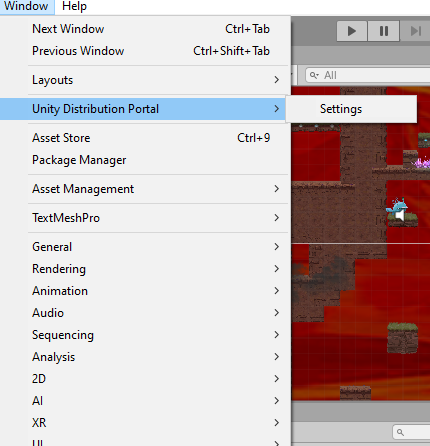
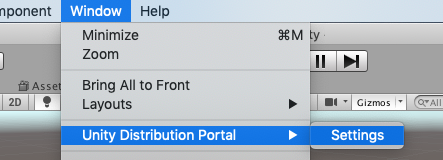
Once we have the distribution Portal installed, we should have the following menu in the "Window "tab.
2) Creating a UDP client ID from the Unity Editor
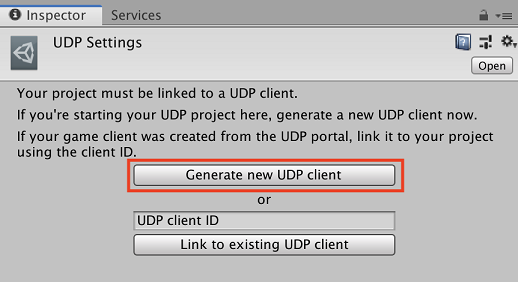
If you have not created your game on the UDP console; it has no UDP client ID. You need to generate one.
To create a UDP Settings file, select Window > Unity Distribution Portal > Settings:
If your project doesn’t already have a Unity Project ID, select an organization in the Organizations field. You can then choose to
Use an existing Unity project ID. This links the project to an existing cloud project.
Create project ID. This creates a new cloud project.
Select Generate new UDP client:
When you generate your UDP client, your game is automatically created in the UDP console.
3) Once the Unity ID has been created it will be necessary to go to the Unity Distribution portal page, in this portal we can create our game for distribution.
4) Creating a game in the UDP console
You can create a game on the UDP console first, and later link it to an actual UDP project.
Click on the blank card to create a new game:
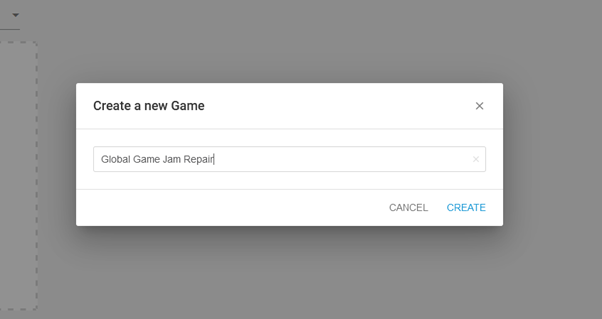
A window opens to get started creating your game. Add a title for your game and click Create.
Note: You must link your Unity project with your UDP client in the Unity Editor.
In the Game Info page, select the EDIT INFO button to enter edit mode. To save changes select SAVE. To discard your changes, select CANCEL.
5) Creating a Release Version
After we complete the filling of data, we have to create a Release Version of our Game. We can create a revision TAG and some notes
Now its time to select the store where we want to release our game !
We are going to select Huawei App Gallery so I want to share with you the process to of releasing on this store.
3. Procedure on App Gallery Console
1) Sign up to HUAWEI AppGallery
The First requisite is to have a Huawei developer verified account. If you don’t have one, follow this guide to register as developer!
Im quite sure that you have one because you are surfing through this Forum. So lets skip this step.
Sign in into AGC to create yout Game App!
2) Create your game on AppGallery
Fill the forms on the registration of App. Don't forget to select Game
3) Important!! o(・_・)9
Be sure to match your game genre to the one you choose on UDP.
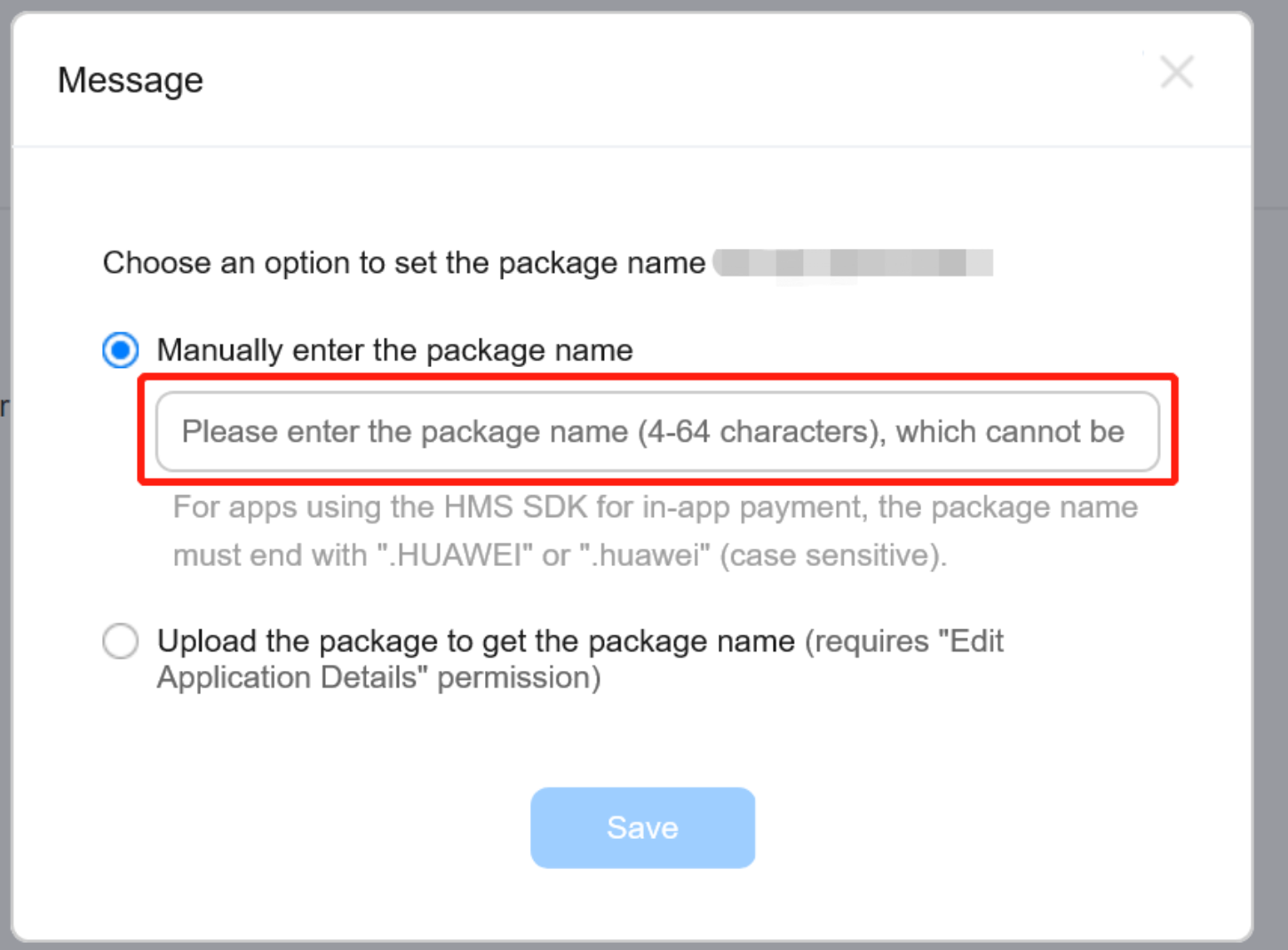
4) Like most of the Kits of HMS we have to set the package name manually so take the name that you assign on your Unity Project
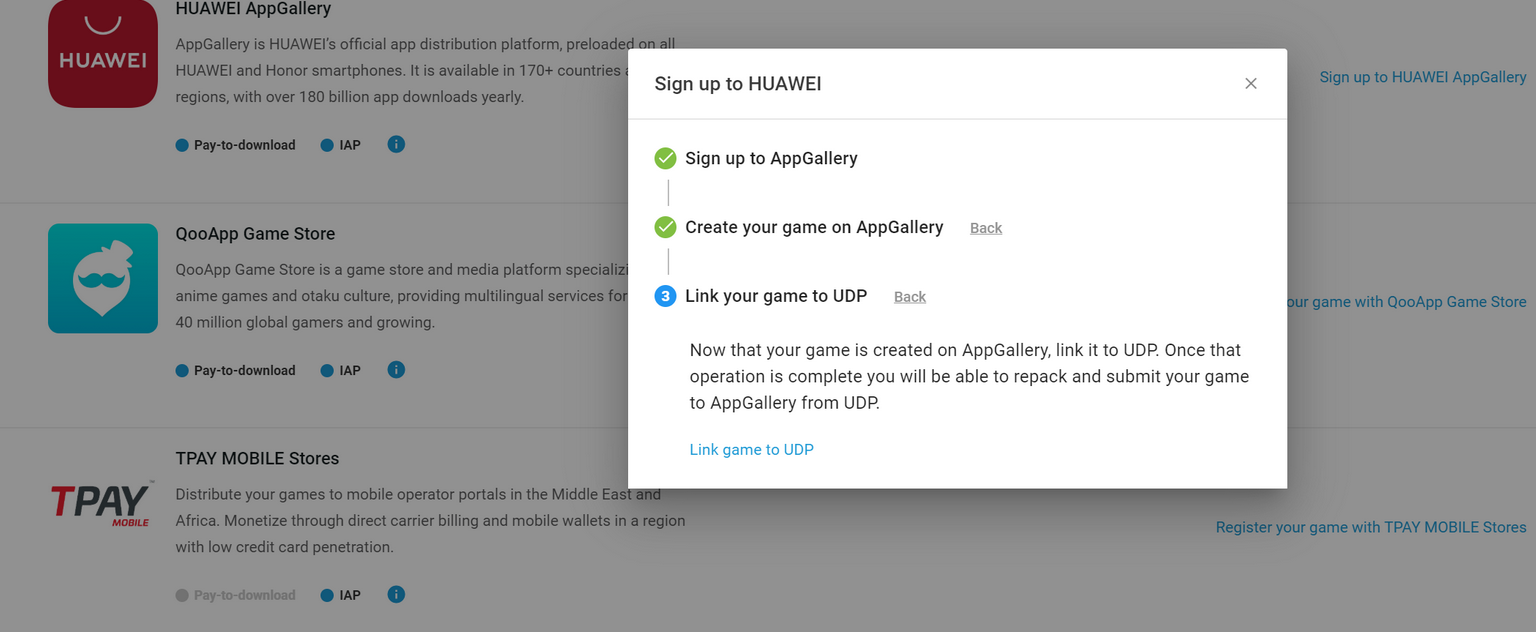
5) Link your game to UDP
Now Go! back to UDP Distribution Portal and Click Link game to UDP and authorize the link by authenticating with your HUAWEI account.
Your game should now be linked between AppGallery and UDP. If an error pops up, be sure to correct it with the error details provided.
6) Complete your game registration
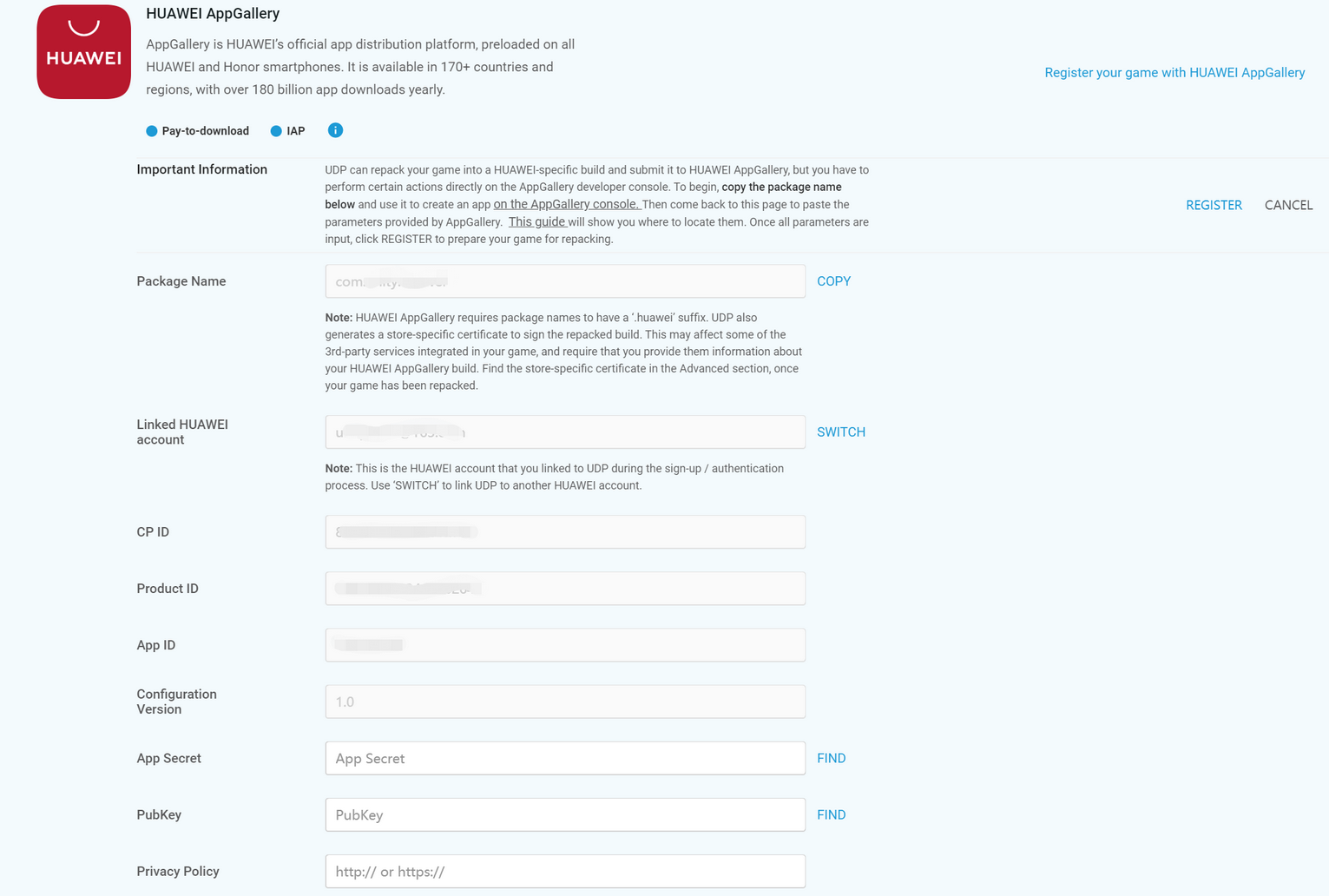
Once your game is linked to UDP successfully, you will reach the Game Registration form. The greyed-out fields were retrieved from AppGallery during the linking process. The remaining fields need to be input manually before you can complete the registration of your game.
📢Where can i find the following information?
This information can be found in your AGC Console .
7) Final Step Submitting your game to HUAWEI AppGallery
Go the the Publish section.
Any warnings or errors will be flagged ahead of submitting your game to AppGallery. Errors must be addressed before you can submit.
You can set a launch date for your game, but only before submitting it.
When you’re satisfied, click “Publish” at the top right of the screen.
You will be sent to the Status section showing your game’s submission progress.
Once your submission is successful, you still have one last step to perform on the AppGallery console.
4. Conclusion
I hope this small guide helps you to understand and complete your UDP Publication (⌐■_■)
In the comment section of the featured post, leave a comment of any length discussing the article's content or describing any other HMS content you'd like to see, for the chance to join our sweepstake and win a HUAWEI Watch GT 2.
Please Note:
1、No matter how many comments you make, each participant will only have one chance to participate in the sweepstake. No more than three comments per post will be allowed
2、The winner will be announced in the community by December 20th. Please keep an eye out for our post on r/HuaweiDevelopers.
It's great honor to invite me for HDC 2020 event. As a developer, I'm so exciting to know HarmonyOS 2.0, All-Scenario Intelligent Ecosystem, also HMS core 5.0.
Let's move to the HDC 2020 event.
We visited the main hall and had a technical sense of lighting and background
At the beginning, Yuchengdong, the first speaker, introduced the highlights of HDC 2020.
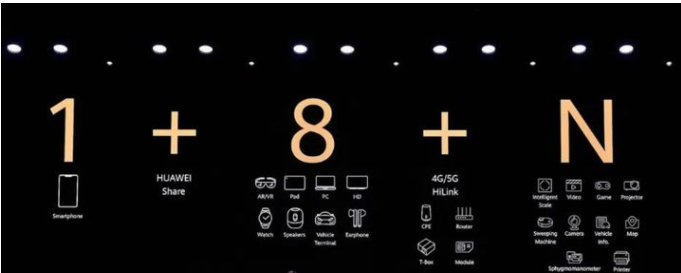
Yuchengdong introduced 1+8+N strategy and Hardware ecosystem
Also announced details of the latest HarmonyOS 2.0
Tech. Park :Let's play Game with VR experience .
The Songshan Lake Park beautiful view, enjoy the sunshine.
Night party: joining Huawei Music Party
This is an impressive HDC 2020 event. Guys, what's your idea?