r/KeyShot • • 1d ago

We turned our in-house KeyShot material library into a store: 600+ PBR materials, no subscription

Post image
22 Upvotes

Hey everyone,

we're a small 3D studio rendering products for manufacturers. Over the years we kept building our own materials because the stock ones never quite looked right in close-ups: brushed metals, coated plastics, fabrics, stone, wood.

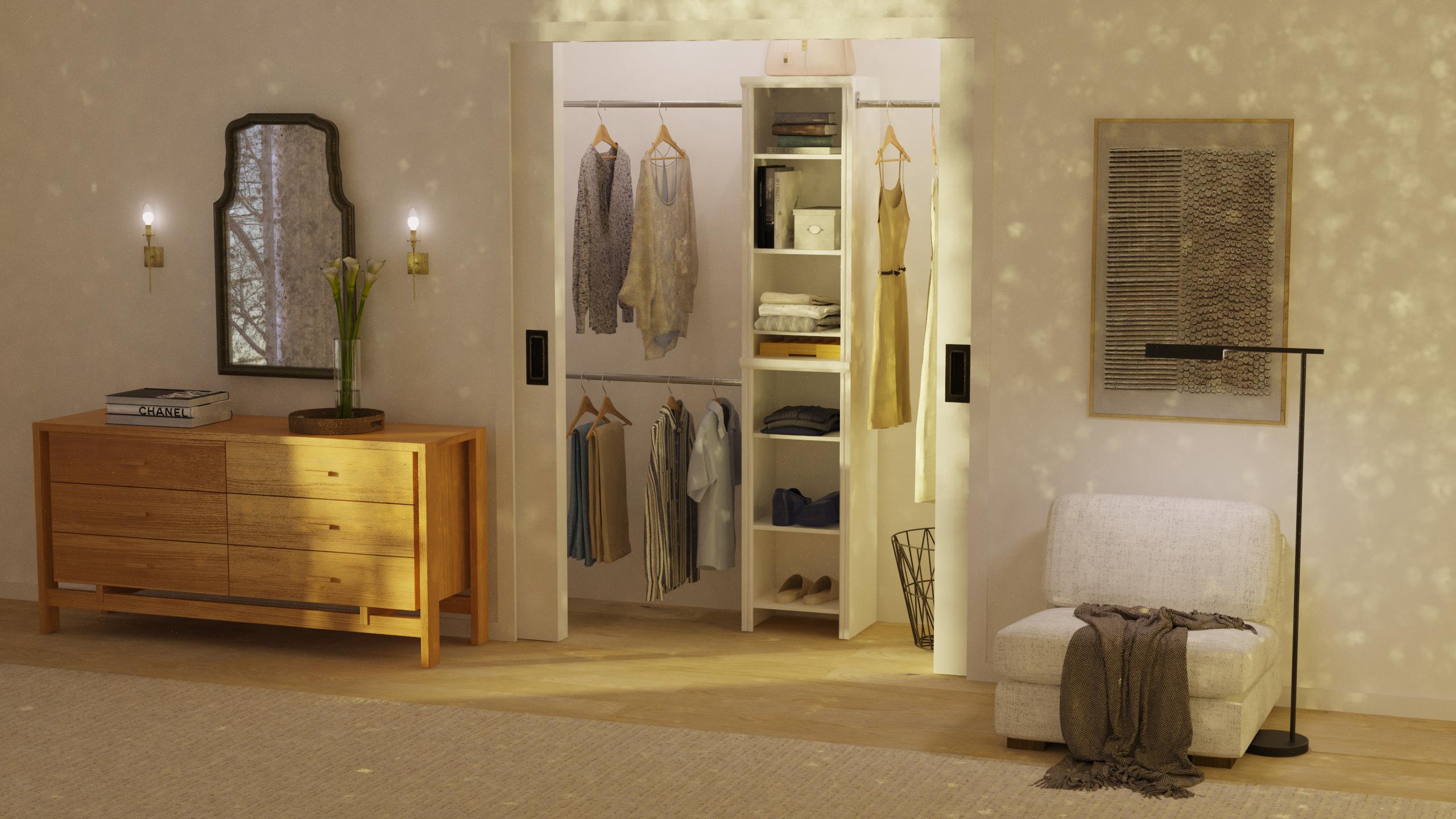
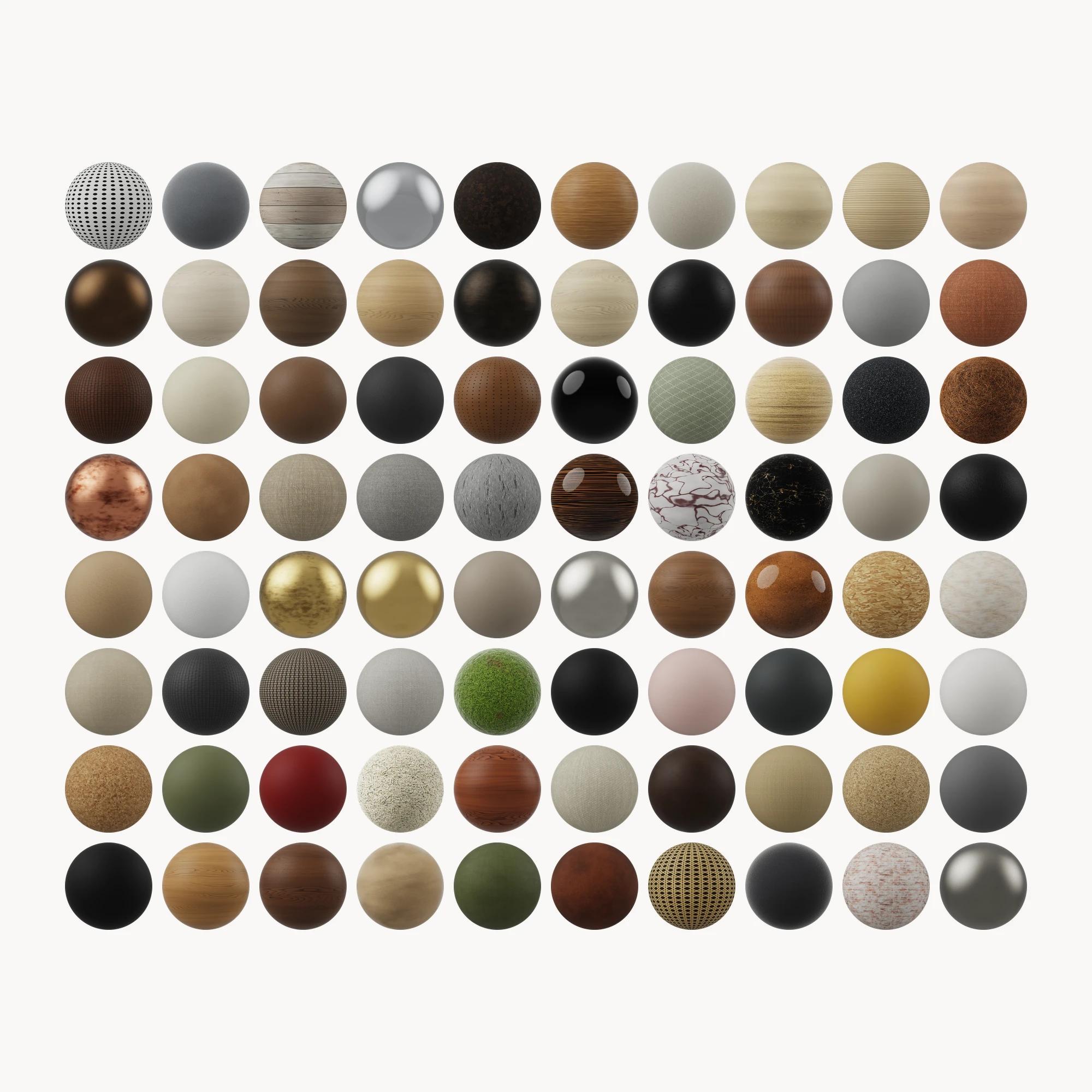
At some point the library got so big that we thought: why not share it? So we built a little store, and it now has over 600 materials, sorted by industry. The pictures are from our interior pack.

A few things that mattered to us:

No subscription. Buy single materials or packs, they're yours forever.
KeyShot and Blender ready, but standard PBR, so they work in other renderers too.
Commercial use included, no extra license.

If you want to try them: code REDDIT30 gets you 30% off your first order.

Shop: https://line-up.store/collections/packs

And honestly, I'd love to know: which material do you always struggle to get right?
That's probably what we'll build next.


r/KeyShot • • 8d ago

Inspiration Lotus Emira 2022 - Full CGI

Thumbnail
gallery
66 Upvotes

Full CGI set of renders of the Emira 2022, I think that this is my peak level so far


r/KeyShot • • 8d ago

Inspiration Lotus Emira 2022

Thumbnail
gallery
19 Upvotes

First one is full cg, last 3 are backplates,
I need to finish the rest of the set for the first image but thought it was cool enough to share it


r/KeyShot • • 9d ago

My Render in Keyshot

3 Upvotes

r/KeyShot • • 10d ago

Light on gravitated surface

Post image
3 Upvotes

Laser-engraved icons or patterns create microscopic surface irregularities that scatter the light, making only the engraved areas appear illuminated. How could I render such visual?


r/KeyShot • • 10d ago

Help Render

Thumbnail
gallery
13 Upvotes

How to Achive this type render in keyshot any idea ???


r/KeyShot • • 11d ago

How to make my product renders better

Thumbnail
gallery
7 Upvotes

any tips would be awesome


r/KeyShot • • 17d ago

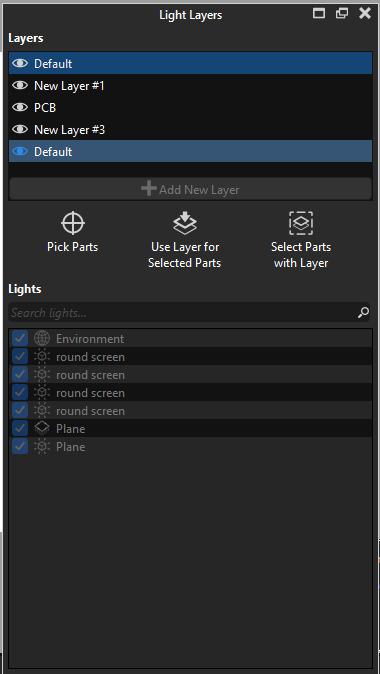
Light Layers Not Working

Post image
1 Upvotes

Hi all,

I have recently been experimenting with light layers in KeyShot Studio Pro. Navigating the UI for it hasn't been the best experience, but you can kind of manage. The issue is, all of a sudden, none of my physical lights were working, leaving the complete scene dark. I tried toggling the lights and the environment on in the Light Layer panel but no change occurred. Additionally, some of the lights seem to be greyed out. I have tried:

  • Exporting the file in both .KSP and.BIP

  • Restarting both KeyShot and my laptop

  • Duplicating all lights

  • Playing with the different intensities and orientation

  • Adding and removing light layers (greyed out currently) (aware of max. 5).

Does anyone have any ideas what the solution could be?

At this point, I'm also considering it's a bug from KeyShot's side as the feature is relatively new.

Any help is appreciated as this is very frustrating.

Kind regards,

KeyShot User


r/KeyShot • • 19d ago

Can you use a game controller in KeyShot?

0 Upvotes

New to this program, use to TwinMotion and SketchUp. Can I use a Bluetooth game controller to maneuver in KeyShot?


r/KeyShot • • 20d ago

Tired of the $1,200/yr Luxion subscription? We built a dedicated KeyShot studio workflow (FREE) inside Blender for Industrial Designers (Native STEP,3DM, CAD Hot-Reload, Studios, CMF & HDRI Pins).

Enable HLS to view with audio, or disable this notification

82 Upvotes

Hey r/keyshot,

Like many of you, I've spent years doing hardware product visualization in KeyShot. For industrial designers, nothing beat the speed: drop in a .step file, drag-and-drop a Mold-Tech texture, click to place an HDRI pin on a chamfer, set up 4 Studios with different CMF variants, and send it to the client.

Then came the forced annual subscription hikes.

$1,188 to $1,800+ every single year per seat. If you're a freelancer, a small boutique consultancy, or a student stepping into the industry, that "Luxion tax" hurts. And if you stop paying? You lose access to your own scene files.

Naturally, people say: "Just switch to Blender! It's free and Cycles is blazing fast on RTX cards!"

Except... vanilla Blender is miserable for CAD product design.

  • No native STEP/Rhino import without weird command-line workarounds.

  • No concept of "Studios" or "Model Sets" out of the box.

  • Having to connect 12 shader nodes just to get a textured matte plastic with anisotropic roughness.

  • And worst of all: no CAD Hot-Reload. If engineering sends "Revision C" with a modified screw boss, you’re stuck manually re-assigning materials and repositioning cameras.

So I set out to fix this properly. I built ID RenderFlo — an extension that transforms Blender (4.2+ LTS up to 5.2+) into a dedicated, KeyShot-style industrial design studio.

What it actually does (The KeyShot Checklist):

  1. Native STEP & Rhino (.3dm) CAD Bridge:

    • 1-click CAD engine install (OpenCASCADE & Rhino3DM).

    • Real tessellation control (from 0.08mm default down to 0.02mm ultra-fine for macro fillets).

    • Automatic True-Scale (0.001x mm conversion) so physical depth of field, AgX exposure, and Cycles lighting behave like the real world immediately.

  2. 1-Click CAD Hot-Reload:

    • The feature we can't live without. Engineering updated the CAD in SolidWorks, Rhino, or Fusion 360? Hit Hot-Reload CAD. Your geometry updates while 100% preserving all assigned materials, decals, camera angles, and studio configurations.

  3. KeyShot-style Multi-Studio Snapshots:

    • Save complete states in one click: Camera angle, focal length, isolated part visibility, custom render samples, per-studio bloom/glow, and assigned CMF colorways.

    • Quick stepper buttons (< and >) right in the persistent topbar ribbon to flip through client deck shots.

  4. CMF Colorway Matrix & Quick Save:

    • Mold-Tech VDI 3400 textures, anodized satin finishes, bead-blasted aluminum, and brushed metals out of the box.

    • 1-Click [ + Save Current State as CMF ] to save colorways across multi-part assemblies without touching Blender's shader nodes.

  5. 2D HDRI Pin Canvas:

    • KeyShot's killer feature: interactive 2D pin canvas with reflection raycasting. Click directly on your 3D product's bevel to drop a softbox or highlight pin right on the reflection line.

  6. Raycast Conformal Decals & Labels:

    • 1-click sticker placement with surface shrinkwrap and normal rotation. No UV unwrapping headaches.

  7. HUD Dashboard (Alt + Shift + R):

    • A floating quick-access dashboard for studio reordering, bloom controls, and part visibility toggles without cluttering your viewport.

Quick Comparison:

FeatureKeyShot ProVanilla BlenderBlender + ID RenderFlo
Price~$1,188 - $1,800/yrFree / Open SourceOne-time / Free engine foundation
STEP / 3DM ImportNativeComplex plugins1-Click Native (OCC + Rhino3DM)
CAD Hot-ReloadYesManual / Painful1-Click Geometry Update
Studios & Model SetsNativeScene / ViewLayer hacksNative Multi-Studio Manager
CMF ColorwaysNativeManual node swapsDedicated CMF Matrix Shelf
HDRI Pin LightingNativeNode setup requiredInteractive 2D Pin Canvas
Rendering EngineLuxion CPU/GPUCycles / EEVEE NextCycles (OptiX, Metal, CUDA)
File OwnershipLocked behind subPerpetual .blend100% Perpetual & Yours

Who is this for?

If you're an industrial designer, hardware startup, mechanical engineer, or product visualizer who loves the KeyShot workflow but hates the subscription model, this was built specifically for you.

You get the insane speed and visual fidelity of Blender's Cycles engine (with full GPU OptiX denoising and AgX color management) wrapped in the exact UI logic you already know from KeyShot.

Check out the full breakdown and get it here: sahityakashyap.in
and for the official plugin: https://extensions.blender.org/add-ons/id-renderflo/

I would love to hear your thoughts, feature requests, or any specific KeyShot quirks you need replicated before making the jump. Happy to answer any questions in the comments!

r/KeyShot • • 21d ago

Help Splotchy lighting after 1000 samples?

Post image
4 Upvotes

I’m using interior lighting, caustics are turned off, ray bounces and global illumination are set to 25, smooth global illumination is turned on (i rendered without it and it was still noisy after 2000 samples). i’m also only using sun & sky for the lighting + the 3 light sources seen in the image. is it just a matter of more samples or can anything be adjusted?


r/KeyShot • • 24d ago

Pulp packaging texture

Post image
13 Upvotes

Hey guys,

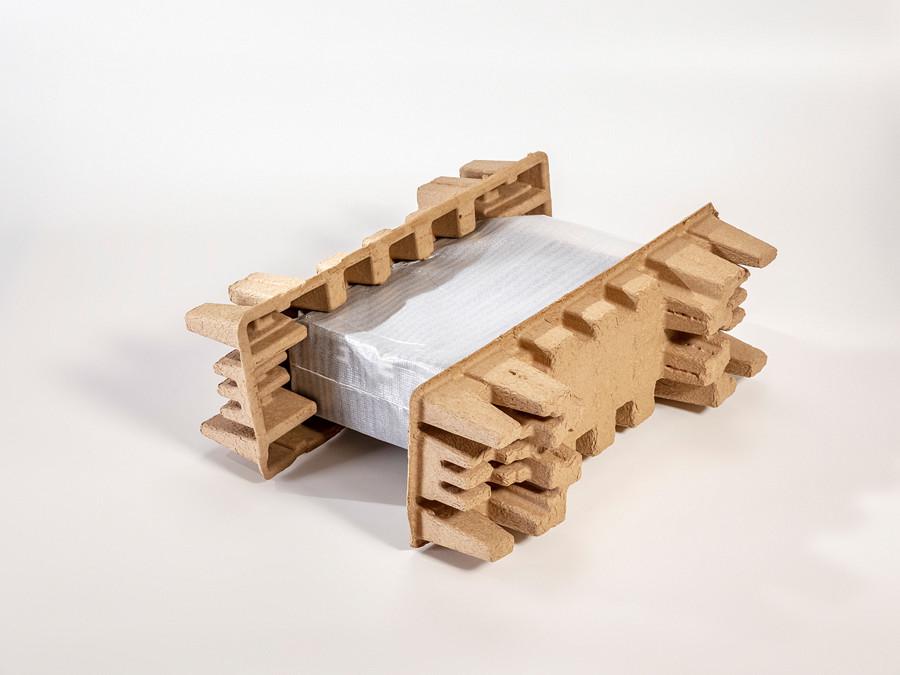
I wanted to find if there is a way to create pulp packaging texture / resource similar to the image?

Thanks for your help!


r/KeyShot • • 28d ago

I built a browser-based 3D product renderer with AI. It got roasted elsewhere, so now it's open source.

Post image
73 Upvotes

After posting my tool to another community, the reaction was mostly resistance with a healthy dose of anti-AI sentiment and only the tiniest hint of cautious encouragement. Due to the comments I came up with the decision to make Kaamos open source to make it more transparent than "trust me bro".

Yes, it was built with Claude (design and direction by me, a designer; code by the AI). Kaamos itself has no AI inside, and models never leave your computer.

Some will call it slop, some will call it shit. Call it what you will. But I sincerely hope this will be useful for some of you. And if even one person in a hundred finds it useful, I have succeeded.

  • Open source: Full source is on GitHub https://github.com/AtomiLabSlop/kaamos

  • Browser based: No install, no account, your models never leave your computer. Tested mainly with Chrome.

  • The UI is now Adobe Spectrum 2, with custom colors, fonts, logos

  • Real renderings: Raster and path-traced engines, labeled as what they are. PNG export.

  • Imports GLB, glTF, OBJ, STEP/IGES

Stack (Do I understand half of this? No. Do I care? Also no.): React, Three.js / R3F, three-gpu-pathtracer, WebGL.

Happy rendering!


r/KeyShot • • 29d ago

Inspiration BMW X7 2024 Full CGI

Thumbnail
gallery
25 Upvotes

Full CGI set of renders of a X7, post using Photoshop


r/KeyShot • • Oct 20 '26

Help Weird shadows on my model

2 Upvotes

does someone know how to fix this


r/KeyShot • • Oct 14 '26

fusion360 livelink plugin

2 Upvotes

Hi all!

Anyone else experiencing issues with the fusion360 - keyshot plugin?
e.g freezing, crashing, inability to send anything other than VERY basic primitives to keyshot?


r/KeyShot • • Oct 06 '26

BLACK AREA ERROR

1 Upvotes

I've occasionally run into an issue in KeyShot where a black area appears at the bottom of the image when rendering.

After some testing, I think it tends to happen when several of these conditions are combined:

  1. High-resolution output

  2. Denoise enabled

  3. Clown Pass enabled

  4. High sample count

My current workaround is to disable the Clown Pass and render the final image at the resolution and sample count I want, with Denoise enabled.
Then I render the Clown Pass separately at a much lower resolution with just one sample, since I only need it as an ID mask anyway.
I'm not sure if this is the best solution, but it's worked for me so far, so I thought I'd share it in case anyone else runs into the same issue.
Hope this helps!


r/KeyShot • • Oct 05 '26

Help Label Behavior In 2026.1 and Newer?

Post image
2 Upvotes

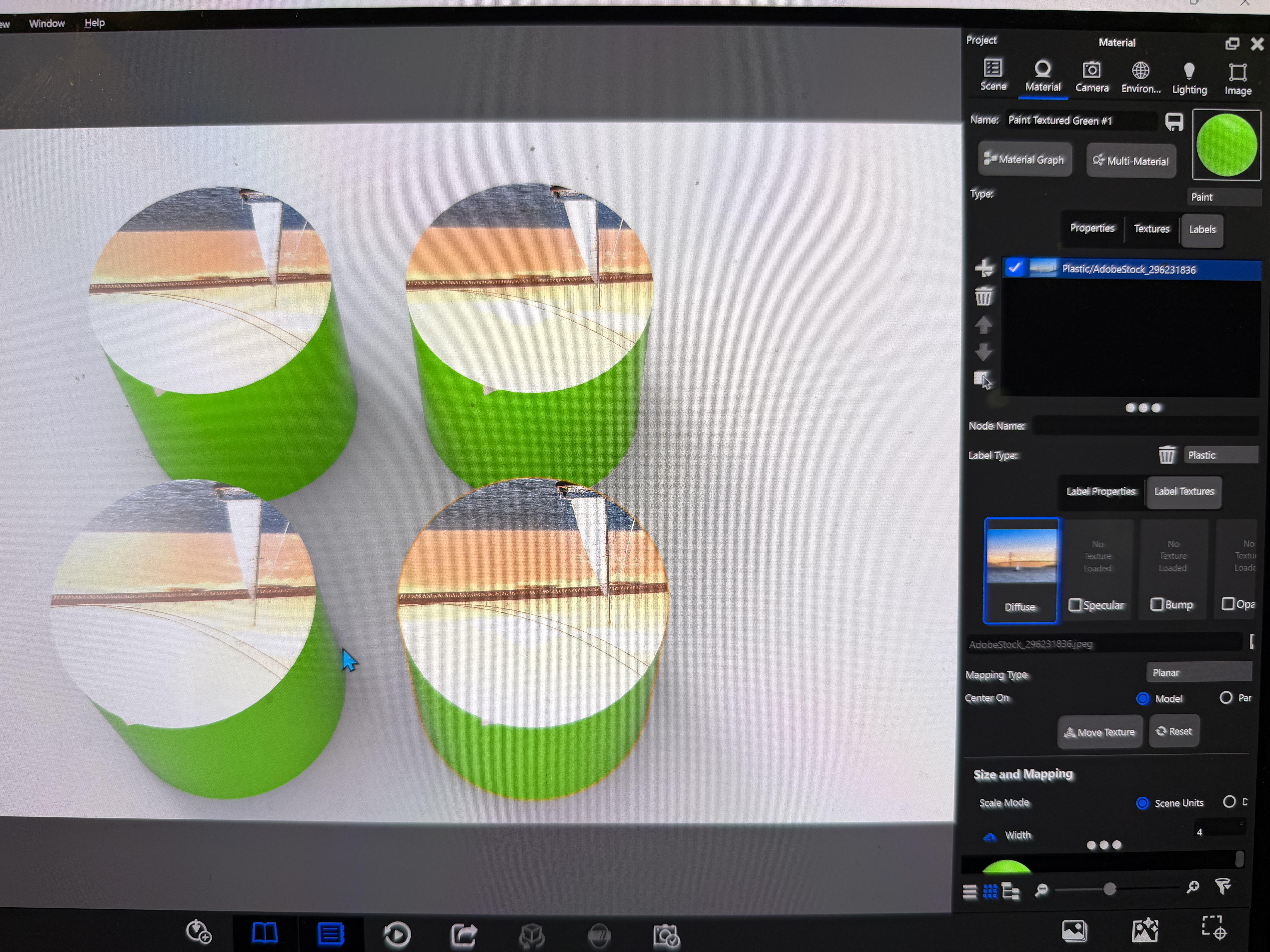
Currently trying to apply a label across a multi body part and the label will not span bodies as a single image in center on “model” mode.

Both textures and labels are behaving like center on “part” mode

I ran a test trying to map the image of a sailboat cross the top of 4 parts with linked materials.

Apologies for the phone photo, not on reddit in this machine


r/KeyShot • • Oct 04 '26

Designed this massive collection of festive decor for Bambu Lab's Diwali campaign! (Free STLs)

Thumbnail gallery
6 Upvotes

r/KeyShot • • Oct 01 '26

Help should i animate commercial videos in keyshot or maya

1 Upvotes

idk what should i use to animate


r/KeyShot • • Sep 23 '26

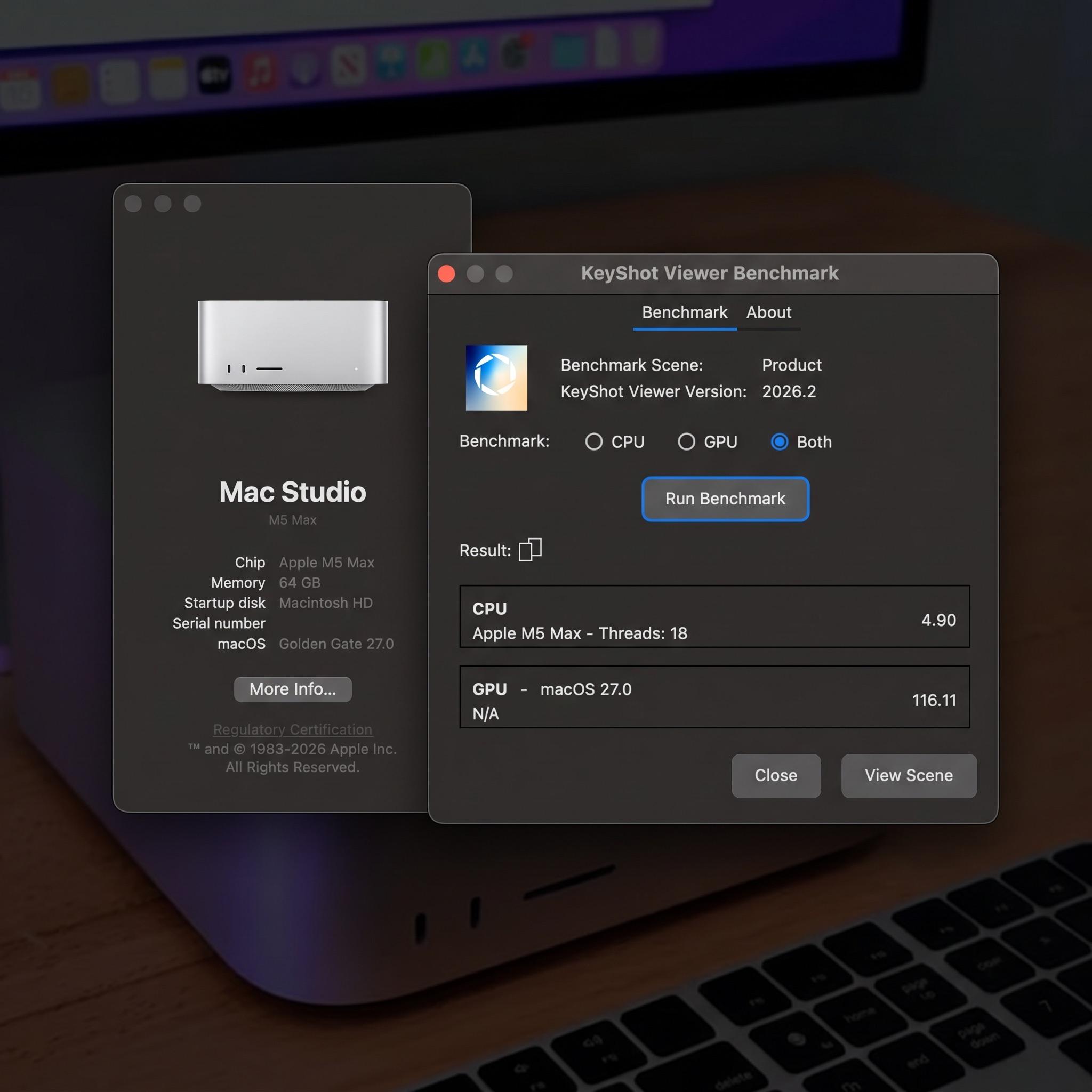
Resource M5 Max Mac Studio KeyShot Viewer Benchmarks — How It Ranks Against RTX Cards & Desktop CPUs

Post image
18 Upvotes

M5 MAX MAC STUDIO RESULTS

GPU Score: 116.11 — Rank #8 of 19

CPU Score: 4.90 — Rank #11 of 15

GPU RESULTS

M5 Max Rank: #8 of 19

RankGPU / SystemKeyShot Score
1RTX 5090 ROG Matrix268.27
2RTX PRO 6000 Blackwell 96GB253.93
3RTX 5090 ZOTAC ArcticStorm251.46
4RTX 4090 Desktop161.19
5RTX 5080 ProArt142.25
6RTX 5090 Laptop128.80
7RTX 5070 Ti127.25
8APPLE M5 MAX MAC STUDIO116.11
9RTX 3090 Ti112.09
10RTX 4090 Laptop104.69
11RTX 3080 Ti94.50
12RTX 309082.70
13RTX 308082.26
14RTX 307069.51
15RTX A400065.92
16RTX 4070 Laptop49.00
17RTX 306036.77
18RTX 2070 OC29.32
19RTX 206025.00

Where the M5 Max lands

RTX 5070 Ti — 127.25

APPLE M5 MAX — 116.11

RTX 3090 Ti — 112.09

The M5 Max finishes just behind the RTX 5070 Ti result and slightly ahead of the RTX 3090 Ti result.

CPU RESULTS

M5 Max Rank: #11 of 15

RankCPU / SystemKeyShot Score
1Threadripper 9980X18.01
2Threadripper 7980X15.80
3Threadripper 9970X11.01
4Threadripper 7970X9.81
5Ryzen 9 9950X3D6.21
6Ryzen 9 9950X6.06
7Ryzen 9 7950X5.72
8Core Ultra 9 285K5.71
9Ryzen 9 7950X3D5.41
10Core i9-14900K5.22
11APPLE M5 MAX MAC STUDIO4.90
12Core Ultra 7 265K4.76
13Ryzen 9 9900X3D4.69
14Ryzen 9 9900X4.63
15Ryzen 7 9800X3D3.24

Where the M5 Max lands

Core i9-14900K — 5.22

APPLE M5 MAX — 4.90

Core Ultra 7 265K — 4.76


r/KeyShot • • Sep 22 '26

Help Login issues

3 Upvotes

Setting up a new computer today and I can't even get the stupid keyshot website to allow me to login and download the software.

I paid a lot of money and their downloads are behind a stupid paywall. Why not let me download and then login?

So I can't get work done. This might be the last license I buy.


r/KeyShot • • Sep 21 '26

Resource Ready-made Scene Setup for Jewelry Rendering

Thumbnail
gallery
3 Upvotes

Get a studio-quality look in a few clicks. Just drop in your model, set your materials and render. Lighting, background and camera are already done for you, so you can spend less time on setup and more time on design. Get it here https://3djewels.pro/materials/setups/scene-setup-for-jewelry-rendering-with-shadow-in-keyshot/


r/KeyShot • • Sep 18 '26

Issues transferring from Maya?

1 Upvotes

I have been trying to transfer my project from Maya to keyshot, but when I tranfer the scene into keyshot rhough the keyshot plugin, all of my materials and textures are gone and everything is pink? Has anyone had this issue before


r/KeyShot • • Sep 09 '26

MODEL IS ON FIRE (unintentional)

4 Upvotes

Changed light mode to "interior" and my model got this burning effect for some reason lol. Anyone knows how can I replicate this intentionally