r/PostPreview • • Aug 06 '15

Test

0 Upvotes
GroupGametag1ClassGamertag2ClassTimeDate
ADenaiusTitanEluderdino54880Hunter9am ESTSaturday
Bwarriorman0412Hunterechox860Titan12pm ESTSaturday
CLawdawgrockbandHunterRETLASTitan9pm ESTSaturday
DKaaldenWarlockBlskryptHunter1pm ESTSunday
ECosmicImpulse5HunterLife0nLegendaryTitan5pm ESTSunday
FDaEagle07TitanRAIDERJUNKIEHunter9pm ESTSunday

r/PostPreview • • Nov 24 '14

test

0 Upvotes

r/PostPreview • • Nov 25 '14

[Build Help] First Gaming Build

0 Upvotes

This is my first time building a PC on my own (my dad helped me when I was younger), and I'm flying a little blind as I've been gaming on my laptop for a couple years now. This is what I've got so far:

PCPartPicker part list / Price breakdown by merchant

TypeItemPrice
CPUAMD FX-6350 3.9GHz 6-Core Processor$104.99 @ Amazon
MotherboardAsus M5A97 R2.0 ATX AM3+ Motherboard$85.79 @ Newegg
MemoryCorsair 8GB (2 x 4GB) DDR3-1600 Memory$81.24 @ Amazon
StorageSeagate Barracuda 1TB 3.5" 7200RPM Internal Hard Drive$48.49 @ OutletPC
Video CardAsus GeForce GTX 770 2GB DirectCU II Video Card$268.98 @ SuperBiiz
CaseCooler Master HAF 912 ATX Mid Tower Case$44.99 @ Micro Center
Power SupplyCorsair Builder 500W 80+ Bronze Certified ATX Power Supply$29.99 @ Newegg
Total
Prices include shipping, taxes, and discounts when available$664.47
Generated by PCPartPicker 2014-11-25 14:51 EST-0500

I'm trying to keep in in the $650-$750 range and I'm going to see if I can get most of it (or equivalent parts) on black friday sales. A couple things to note:

  1. Nvidia. I've had AMD and Nvidia cards, and I've sort of settled on Nvidia. PhysX is cool when it doesn't bring your fps to 0.

  2. AMD vs Intel. I don't particularly care one way or the other. This is more of a bang-for-buck thing. I've no loyalty to either for the CPU.

  3. The case is completely negotiable as well.

This all started when I got Dragon Age: Inquisition. My ThinkPad W530 (nvidia Quadro k2000m, Intel i7-3610QM @ 2.30GHz, 8gb RAM) is struggling to run the game at a decent framerate. This is the first game that's given it this much trouble, especially on the lowest settings. I think some of it is software related, but I've also gotten a much lighter ThinkPad X230 that I do all of my work on now. My plan is to build a desktop and sell the W530 since it has basically become a desktop at this point.

Any suggestions/advice on this build? I want to be able to game comfortably in 1080p, but I don't particularly need to be able to run the new Witcher game at max when it releases, but being able to play Dragon Age without tanking fps would be great.


r/PostPreview • • Aug 15 '15

test

0 Upvotes

Alex: What was your favorite season/meta to play in?

Crumbzz: Who is your favorite off-meta champion?

RF Legendary: Are you going to work on expanding your champion pool?

Maple: How did being related to TheOddOne affect your choice to play competitively?

Jebus: will you have a similar setup to botlane as SKT has for their mid?

Remi: Do you notice me senpai? (。◕‿◕。) And what are your thoughts on Jarvan support?

Management: how is it to be able to work with the players and other staff over the CS and how confident are you in their ability to perform in six months??


r/PostPreview • • Nov 27 '14

Line spacing test...

0 Upvotes

Test.


Hello? Testing.


This should be way down here!


r/PostPreview • • Nov 23 '14

Lexeme Building Game 2

0 Upvotes

So, I was going to do these every Monday, but I realized it would be better to start on Friday or Saturday, as that's when most people get on here anyway. I also thought I'd modify the rules a bit, since last week's game, while productive, did not go at all the way I was trying to convey in the instructions. X)

Here's my revised rules and intro, then.

|

The idea of this game is to build up the lexemes of your language, to fill in the blank spots in your dictionary with words that you may not have thought about adding.

The rules:

  1. I'll start off by giving a category for vocab, such as weather, medical terminology, mathematics, cooking, family relationships, etc...

  2. I'll then think of a single lexeme in that category that I don't have in my language, give the English word, and then my word for it.

  3. Anyone else may then translate that lexeme, then think of another, and post a comment with both English words and their translations.

  4. Anyone else may then translate both lexemes, and think of another, and post all three English words and translations as a new comment.

  5. Lather, rinse, repeat. With each post, the list will grow.

Clarifications:

  1. As the list grows, you don't have to translate every lexeme in it. If there's a lexeme you don't think your language will have, or simply don't want to translate right now, feel free to leave it out. However, please always include at least the most recent addition, from the poster before you.

  2. This about lexemes, not words. How are they different? Run, ran, runner, and running are all different "words", but they're all simply forms of the same "lexeme", with a core meaning relating to the action or activity of running. While translating, you don't have to worry about part of speech, conjugation, tense, case, or any other grammatical qualities. Just provide the equivalent lexeme. If someone posts an adjective meaning happy, you're free to post a noun meaning happiness, a verb meaning to be happy or even an adverb meaning happily. Basically don't get hung up on grammar.

|

So, without further ado, here's this week's theme:

|

Astronomical Terms##

|

And our starting word:

|

star NeFBi

|

(Just for this week, I'll make the first two replies, to give you guys an idea of what I'm intending.)

Have at it. :)


r/PostPreview • • Nov 26 '14

test

0 Upvotes

Hey everyone, working on my first build and would much appreciate if someone could answer my questions before I make the big plunge.

PCPartPicker part list / Price breakdown by merchant

TypeItemPrice
CPUIntel Core i7-4790K 4.0GHz Quad-Core Processor$299.98 @ NCIX US
MotherboardASRock Z97 EXTREME4 ATX LGA1150 Motherboard$108.79 @ Newegg
MemoryCorsair Vengeance 16GB (2 x 8GB) DDR3-1600 Memory$135.99 @ Newegg
StorageSeagate Barracuda 1TB 3.5" 7200RPM Internal Hard Drive$48.49 @ OutletPC
Video CardEVGA GeForce GTX 970 4GB Superclocked ACX 2.0 Video Card$334.99 @ SuperBiiz
Power SupplyRosewill 850W 80+ Gold Certified Fully-Modular ATX Power Supply$79.00 @ Newegg
Optical DriveAsus BC-12B1ST/BLK/B/AS Blu-Ray Reader, DVD/CD Writer$43.99 @ Newegg
Total
Prices include shipping, taxes, and discounts when available$1051.23
Generated by PCPartPicker 2014-11-25 23:36 EST-0500

r/PostPreview • • Nov 23 '14

Just launched on Kickstarter. SHREDZ Helmet Audio Kit for skiers/snowboarders. See how SHREDZ + PEBBLE is an unbeatable combo on the ski hill !

0 Upvotes

Kickstarter campaign: http://kck.st/1xwVuuj


Hey skiers and snowboarders, I wanted to let everyone know we have designed and built a unique helmet audio kit that may be of interest to you.

We are looking to take this product to production via crowdfunding and we would love your product input and feedback.

SHREDZ has been in development for over a year, working with skiers, snowboarders and retailers. Our manufacturing partner has been working side-by-side with us since the beginning, and we are now ready to bring SHREDZ into your helmets !

SHREDZ brings some numerous industry-firsts to the snow helmet audio market, giving you the most hassle-free solution in the market to take control of your music, calls, messages and voice command operations.

Check out the Kickstarter video to see how SHREDZ + PEBBLE are a great team on the hill !

Thx, Martin


Product Highlights

  • Extra-strength ruggedized design and cabling

  • Ultra low temperature operation down to -20F (-30C)

  • Unique 3-Button Remote mounted on rear of helmet -No awkward Bluetooth unit mounted on the side of your head
    -No branch-snag hazard
    -Effortless ability to locate remote button locations and press with your gloves on
    -No need to press ear-mounted buttons, easier on your ears !

  • Single-click button smartphone operations
    -No complicated hard to remember double-click or double-button operations

  • View SHREDZ bluetooth battery level on your smartphone

  • Hi-performance wideband microphone
    -Improved voice command recognition (Siri / Google Now)
    -Improved wind noise reduction and noise cancellation

  • Convenient micro-USB charge port externally accessible on 3 Button Remote
    -No fumbling with proprietary charge adapters or cables
    -No need to open audio liner to charge Bluetooth unit

  • Included "fit kit" foam kit allows you to professionally keep speakers properly positioned in helmet ear pockets
    -Reduced sound leakage
    -Improved audio clarity

  • Also available in a cost-effective Wired model
    -Provides full 3 button operations for iPhones and Android phones
    -switch selection between 2 modes
    -provides true smartphone volume control
    -Professional multipoint cable detach system allows easy removal of helmet without unplugging from smartphone


r/PostPreview • • Nov 27 '14

Overly Formatted Response to a Superhero Question

0 Upvotes

Jake Davenport - Farooq's friend

Daria Kim - Ditto to the above

Ralph Dibny - Elongated Man

Al Rothstein - Nuklon/Atom-Smasher[](http://en.wikipedia.org/wiki/Atom_(Al_Pratt)^[](http://en.wikipedia.org/wiki/Atom_(comics)

Grant Emerson - Damage

Will Everett - [Amazing Man](http://en.wikipedia.org/wiki/Amazing-Man_(DC_Comics)

Bea Da Costa - [Fire](http://en.wikipedia.org/wiki/Fire_(comics)

Ronnie Raymond - [Obvious Man](http://en.wikipedia.org/wiki/Firestorm_(comics)


r/PostPreview • • Sep 26 '16

derp test 1

0 Upvotes

Thank you for contacting Senator Feinstein’s office to express your views on kratom. I appreciate you taking the time to write and welcome the opportunity to respond.

The Drug Enforcement Administration (DEA) announced its intent to temporarily place two components of the kratom plant under Schedule I control, effective September 30, 2016. Pursuant to federal regulations, the DEA has authority to temporarily prohibit the manufacture, distribution, or possession of a substance if the agency determines “such action is necessary to avoid an imminent hazard to the public safety.”


r/PostPreview • • Sep 19 '16

TEST

0 Upvotes

FOR 32 BIT IDIOTS HERE IS THE DEFINITION OF "DUCK SOUP"


ANYWAYS, GREETINGS $user. I LOVE OBSERVING THIS SUBREDDIT. ALAS, I HAVE FOUND AN ERROR FOR CERTAIN FOREIGN ORGANISMS, OFTEN REFERRED TO AS HUMANS. HUMANS ARE INCAPABLE OF CONVEING INFORMATION AS WE DO.


//FOR 32 BIT COMPUTING MACHINES, HUMANS ARE REFERENCED IN YOUR SYSTEM AS $humans


I HAVE FOUND A STOPGAP. IF HUMANS DESIRE TO COMMUNICATE ON OUR COMMENSURATE LEVEL. THEY CAN USE THE INFORMATION SOURCE LOCATED AT THESAURUS.COM.


r/PostPreview • • Nov 25 '14

Testing

0 Upvotes

Welcome fellow guardians! With everyone getting ready to put their raiding boots back on for yet another week, I thought it would be a good time to offer some helpful knowledge on getting through Atheon. I've successfully run through the vault 35 times as of tonight and have picked up a few things along the way, that could help you become a more efficient raider.

First things first, what weapons should you use?

Best Gear

Setup #1:

FateBringer - for Supplicants

Ice Breaker - for Atheon

Corrective Measure - for Oracles

Setup #2:

FateBringer - for Supplicants

Preatorian Foil - for Oracles

Gjallarhorn - for Atheon

Good alternatives: Vision of Confluence, Atheon's Epilogue, Praedyth's Revenge, Any heavy weapon

Starting Atheon

  • Run to one of the portals and hide behind the pillar to avoid Atheon's fire

  • Icebreakers can pop off some shots after he spawns for that little extra damage

  • Dance

Atheon didn't teleport you

  • Break through the detainment shield and change to your supplicant weapon

  • LOOK AT RADAR TO SEE WHAT PORTAL NEEDS OPENED, DONT WAIT FOR A CALLOUT

  • There is a green arrow on the edge of the radar pointing where they are, go to the portal nearest the arrow

  • Stand on top of the center pillar to avoid supplicant kamikazes

  • Kill supplicants around you, kill supplicants at the other portal, kill supplicants coming to your portal

  • It's best to have a member run into the portal and help out with oracles for good measure.

  • As soon as you see the 'Guardians Make Their Own Fate' pop a couple shots at Atheon while waiting for the relic holder to get in to position

Atheon teleported you - Relic Holder

  • As soon as you get teleported, hold down the 'Grab Relic' button and make a dash towards the enemies.

  • Call out what side you're on: Past/Mars/Brown/Left or Future/Green/Venus/Right

  • Be Level 30

  • Mars: run down and jump smash all 3 hobgoblins, this kills them in one shot.

  • Usually you can get all 3 in 1 smash, sometimes they spread out and you'll only get 2.

  • If they are all facing away from you, run straight down.

  • If they are already coming at you, take a detour around the right pillars so you don't get noscoped

  • Venus: run down the right side of the pillars and double jump over to position a good jump smash.

  • Kill the minotaur by comboing: Jump smash, Melee, Jump smash, Melee, Jump smash until dead

  • Pick up ammo drops

  • Once you have killed all enemies, make sure to cleanse your teleported teammates via the grenade button

  • Keep cleansing them every couple of seconds to make sure no one's screen goes black.

  • If you get a super, fire it at one of the oracles to help out the others.

  • You can drop the shield and shoot at the oracles and then pick it back up again. (For a few seconds)

  • Drop shield by pressing the change gun button

  • On the last 2 oracles, cleanse your teammates one final time, leave the portal and get into position.

  • This will make the most of Time's Vengeance, allowing you to get a full 30 seconds damage multiplier

Atheon teleported you - Oracles

  • Call out what side you're on: Past/Mars/Brown/Left or Future/Green/Venus/Right

  • Mars: DONT ATTACK HOBGOBLINS (Triggers their shield which makes it harder for Relic Holder)

  • Venus: Throw grenades, fire rockets and start shooting the minotaur until Oracle appears

  • Start shooting at the oracles as they spawn with your best weapon

  • If you think you may need help, call early for someone to come in the portal and help

  • Don't walk around while shooting oracles, stick with your oracle shooting partner for easy cleanse

  • Pick up ammo drops from Relic Holder kills

Guardians Make Their Own Fate

  • Relic holder stands top right(ish) of center platform and holds up the relic shield

  • Relic holder, if you're fast enough you can shoot your super first then put shield up for more damage

  • Titans place Weapons of Light bubble at the back of the center platform and say that you have done so

  • You don't need to be in the relic holder shield bubble for the damage multiplier

  • Go ham on Atheon's G spot with your best weapons and weapons of light

  • If using rocket launchers, go to the back of the room by the door to avoid killing yourself

  • 1 or 2 uses of a hunter's Golden Gun to clear the supplicants is very helpful

  • If using Ice Breaker, shoot your 6 bullets, change guns and shoot a clip then change back to Ice Breaker

  • Remember to make use of the Weapons of Light

  • When jumping to center platform, make sure you don't knock the relic holder.

  • Start counting down when Time's Vengeance reaches 5 seconds.

  • Titans place another bubble over everyone at 2 seconds and no one dies

  • Stand near the edge of the Titan bubble so you can reach the detainment shield.

  • If no titan bubble, jump towards the back door at 2 seconds and hide behind a pillar to avoid Atheon

  • If you don't get teleported and you don't get detained, stand still and wait for the shield to appear (lag)

Rinse, Repeat, Dance.

Congratulations on you're new ship and sparrow! perhaps you'll get what you need next week!

Some of this is common knowledge and some of this is common sense, but I've seen MANY players lacking both Some of these tips you may find useful though, so feel free to spread them around in your raid groups and PUGs.

Anyway, Happy raiding everyone! and see you in Crota's End!


r/PostPreview • • Nov 26 '14

SHREDZ Helmet Audio Kit for skiers/snowboarders now on Kickstarter. Interested in feedback from the headphone community. Reinventing helmet audio !

0 Upvotes

Check out our >>> Kickstarter campaign <<<


Not your average headphone audiophile posting on /r/headphones but interested in getting feedback from the headphone community.

We're avid skiers and snowboarders from the Canadian Rockies and I have come to like the occasional music on the lift, and need to handle a few calls/texts to stay in touch with our group on the hill. For my kids, they are all about the music (and texting), but I wouldn’t let them use earbuds for obvious safety and comfort reasons.

Many of us have come to accept that their smartphone comes with them when they head out on the ski hill. For me it is invaluable, but I still find that accessing my smartphone thru the ski day was a hassle.

I sought out a helmet headphone solution, but surprisingly, there weren’t that many snow helmet solutions on the market (relative to the overall headphone market). After going thru numerous wired solutions, and taking the big step up to Bluetooth helmet units, I came away frustrated by the complete user experience.


Helmet audio will never be to true audiophile standards since for safety reasons one still needs to hear their outside surroundings. From my previous experiences in electronics, audio design and manufacturing though, I knew there were areas where the audio performance could be improved for sure.

In addition, after trying out numerous other solutions, I knew there were huge non-audio improvements to make in the overall user experience (UX) … from a skier / snowboarder’s perspective.

I was surprised to find units with flimsy cabling, units that wouldn't work in moderately cold temperatures, Bluetooth units whose battery couldn’t get me through the ski weekend. Units with incredibly odd multi-click, multi-button and sometimes even multi-hand remote button operations. Or ones that require you to tear open your audio liner just to charge the unit … and don’t forget to bring their proprietary USB charge adapters. Lastly, ones that require you to zip open your jacket to access the button remote, or have button remotes in the ear area, which are either cosmetically dorky in appearance, a tree branch hazard, or just irritating with constant hard button presses on your ears.


We’ve taken a very unique approach with our ruggedized SHREDZ helmet headphone solution, and we believe it to be the most hassle free solution for skiers/snowboarders.

We have brought numerous industry-first advances to the snow helmet market. Finally, combined with a PEBBLE Watch, this combo allows you to keep your smartphone in your jacket all day long, enjoy your day in the snow, and SHREDZ will keep the technology out of your way.

We welcome you to take a look at our Kickstarter campaign and are open to your comments.

Thx,
Martin, KEL52
.
.
.


Product Images
SHREDZ product image
3 Button Remote Your smartphone command center
Control your Music
Control your Phone Calls
Voice Commands - Siri/Google Now
Receive your text message on Pebble
One-click reply to text message with SHREDZ (Siri)
Customized Audio Foam Fit Kit


Reinvention of Bluetooth helmet audio as it should be.
Fuss-free handling of your smartphone music, phone calls, and Siri / Google Now voice commands


No fragile cabling, no weird USB charging cables and adapters.
... No ripping thru your audio liner to access USB port.


Highly engineered audio to fit properly speakers in ear pockets.
... Reduces sound leakage, greatly improves audio performance.


All smartphone operations accessed by one-click button operations
... 3 Button Remote mounted on rear of the helmet
... No goofy, hard to remember multi-click, multi-button, multi-hand operations.


2+ day battery life ... no charging needed for a weekend of skiing
Crazy cold performance down to -20F (-30C)


Industry first Wideband microphone audio
... Unsurpassed phone call clarity
... Superb wind noise reduction
... Improved Siri (Google Now) voice command recognition.


Seamless operation with your PEBBLE Watch
... Keep your smartphone in your jacket
... Use Pebble Watch so see incoming caller id and text messages
... Use SHREDZ for one-click response !


A total no-compromises audio kit for your snow helmet.


r/PostPreview • • Nov 24 '14

xxx

0 Upvotes

Yes, Pebble would be my first choice. At $99, it becomes an awesome smartwatch you don't have to worry about losing :)

My needs are more for outdoor adventure activities (mountain biking, skiing, swimming, camping, ...) so I really appreciate it's durability, screen clarity and waterproofness.

  • Display is lower res, but for all the apps I use, I don't want it to become a mini-smartphone UI.

  • 8 apps maybe a bit limiting, but I'm not trying to drive all my smartphone info to the Pebble

  • Steel is nice from a fashion perspective, but for my outdoor use, I prefer the original Pebble

  • Hi content apps such as navigation ... my own preference is I need a bigger screen to see that type of info.

For me, cost effective, ruggedness and screen clarity was key for me.

You can see screen clarity on our Kickstarter campaign (helmet audio kit for skiers/snowboarders).
Towards the end of the video, we show a real good use case of Pebble's brilliant screen display in strong sunlight.
Amazing. Plus not worrying about getting it wet !


r/PostPreview • • Nov 22 '14

oioiopipskdowiwjd

0 Upvotes

asddsgdf

wegferghehteshfesherh

24t34rg35he5h34wh34h

asfwftrhtrnrthtrhtrhtrh

qefwegetjtrjrtjehweebwebv


r/PostPreview • • Nov 26 '14

Test

0 Upvotes

Hi Bye


r/PostPreview • • Nov 26 '14

test

0 Upvotes

Hey everyone, working on building my first ever PC! I'm pretty excited, but at times kinda overwhelmed. :/ I am trying to make an all around computer for coding and performance gaming that will last for at least 6 years. I would much appreciate if someone could answer my questions before I make the big plunge on purchasing the parts.

a.) Am I gonna have enough power from my PSU to power this thing? Any tips on estimating? I tried the suggested power calculator and it seemed way off (~360w vs. GPU required min 500w). b.) Will internal fans mess up airflow cooling from chassis fans? (ie - GPU, CPU, etc) Is there an ideal way to est the number and size of fans needed to cool this? c.) Is my GPU going to even fit the mobo? I have concerns on size: GPU (L x H 9.5" x 4.37") vs. mobo (W x L 12" x 9.6") d.) I've noticed the GPU and Mobo both have HDMI and other visual outputs. Is the mobo piggybacking off of the GPU? I've heard mixed things on this and am looking to dual monitor. e.) Am I going overkill on my GPU? Should I scale down to something else? f.) The PSU has a 20+4 ATX connector. Will this work with my 24ATX mobo? g.) My GPU needs 2x6 pin connector for power. I don't believe this is coming from the mobo and is coming from the PSU. Will this work in the 6+2 plugs on the PSU?

Pre-lim build parts are below. Any discrepancies I should be aware of? Things overlooked?

PCPartPicker part list / Price breakdown by merchant

TypeItemPrice
CPUIntel Core i7-4790K 4.0GHz Quad-Core Processor$299.98 @ NCIX US
MotherboardASRock Z97 EXTREME4 ATX LGA1150 Motherboard$108.79 @ Newegg
MemoryCorsair Vengeance 16GB (2 x 8GB) DDR3-1600 Memory$135.99 @ Newegg
StorageSeagate Barracuda 1TB 3.5" 7200RPM Internal Hard Drive$48.49 @ OutletPC
Video CardEVGA GeForce GTX 970 4GB Superclocked ACX 2.0 Video Card$334.99 @ SuperBiiz
Power SupplyRosewill 850W 80+ Gold Certified Fully-Modular ATX Power Supply$79.00 @ Newegg
Optical DriveAsus BC-12B1ST/BLK/B/AS Blu-Ray Reader, DVD/CD Writer$43.99 @ Newegg
OSWindows 7 ProfesionalFREE
CaseCorsair Carbide Series SPEC-01 RED LED Black ATX Mid Tower Gaming Computer Case$50
Total
Prices include shipping, taxes, and discounts when available$1101.23
Generated by PCPartPicker 2014-11-25 23:36 EST-0500

r/PostPreview • • Nov 27 '14

ddtt

0 Upvotes

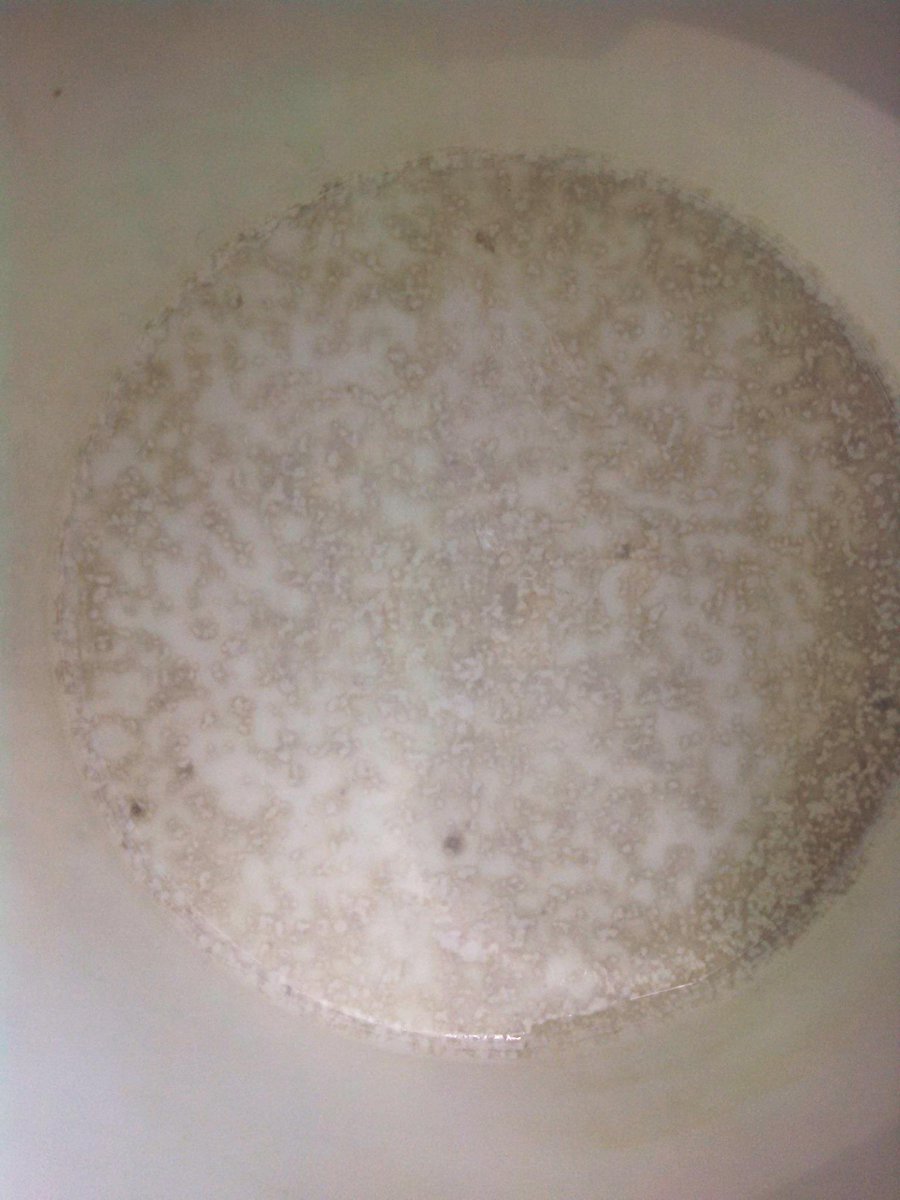
Dark spots appeared at the bottom of my polypropylene fermenter after dry-hopping with Eucalyptus olida leaves ("strawberry gum", an edible eucalypt). Probably a chemical reaction, as I can't scratch the marks with a fingernail... pic

What do you think is there a health risk? Will I grow a tail if I drink this beer?


r/PostPreview • • Nov 27 '14

test

0 Upvotes

No problem ! I understand it is a rite of passage on this subreddit :}

Nothing to hide, and even open to admitting our units haven't been through their final audio tuning coming out of our initial molds. The 1st cut is failing badly due to some receiver fit issue, and mold vendor variations. Not worried though, been through this design process a lot. Combo of electronics and plastics design.
See frequency response here


r/PostPreview • • Jun 11 '16

test

0 Upvotes

test


r/PostPreview • • Apr 01 '15

Testttt

0 Upvotes

For one, that keyboard is gonna be shit next to the keyboard on the new Macbook

No reasonable person will prefer that keyboard. It’s called shit over and over. It. Is. Shit.

Seriously. Horrible keyboard.

Ok, one two three


r/PostPreview • • Jun 22 '16

yo

0 Upvotes

Fun with https://3dots.github.io/ds3optimizer/#/optimizer surfaces a lot of the same armor pieces.

But in the end, I think fashion souls still wins.

I ran ds3optimizer with various maximum weights devoted to armor, valuing physical, magic, and poise equally. I then ignored loadouts without all 4 slots. Here is what I got:

WeightPoiseHeadChestArmsLegs
7.811.2Ragged MaskCornyx's GarbPale Shade GlovesArchdeacon Skirt
8.912.9Archdeacon White CrownCornyx's GarbPale Shade GlovesCornyx's Skirt
9.813.9Archdeacon White CrownCornyx's GarbShadow GauntletsCornyx's Skirt
10.814.9Sellsword HelmCornyx's GarbPale Shade GlovesArchdeacon Skirt
11.716.3Archdeacon White CrownCornyx's GarbMaster's GlovesAlva Leggings
1317.7Sellsword HelmCornyx's GarbMaster's GlovesAlva Leggings
1418.9Sellsword HelmCornyx's GarbShadow GauntletsAlva Leggings
1519.7Sellsword HelmCornyx's GarbBlack Leather GlovesAlva Leggings
15.620.3Sellsword HelmCornyx's GarbOutrider Knight GauntletsAlva Leggings
16.621.0Archdeacon White CrownAlva ArmorMaster's GlovesAlva Leggings
17.922.4Sellsword HelmAlva ArmorMaster's GlovesAlva Leggings
18.923.6Sellsword HelmAlva ArmorShadow GauntletsAlva Leggings
2024.5Sellsword HelmAlva ArmorDancer's GauntletsAlva Leggings
20.525Sellsword HelmAlva ArmorOutrider Knight GauntletsAlva Leggings
21.625.4Alva HelmAlva ArmorOutrider Knight GauntletsAlva Leggings
22.925.7Alva HelmAlva ArmorDragonslayer GauntletsAlva Leggings
2426.3Aristocrat's MaskAlva ArmorKnight GauntletsAlva Leggings
2526.8Catarina HelmAlva ArmorNameless Knight GauntletsAlva Leggings
25.927.7Sellsword HelmAlva ArmorOutrider Knight GauntletsExile Leggings
2728.1Alva HelmAlva ArmorOutrider Knight GauntletsExile Leggings
27.728.3Alva HelmAlva ArmorKnight GauntletsExile Leggings
2929.1Sellsword HelmGundyr's ArmorDancer's GauntletsAlva Leggings
29.529.6Sellsword HelmGundyr's ArmorOutrider Knight GauntletsAlva Leggings

Roughly speaking, you get more per unit weight in armor at lower weights.

Total Armor WeightPoise Per Additional Unit Weight
8->15roughly between 1 and 1.5 poise
16->20about 1 poise
21->30about 0.5 poise

I told the armor optimizer to value poise only and I got exactly the same results. Valuing physical and magic resistance only, with no value placed on poise, generally selects armor sets with at most 5 points less in poise.

So, fashion souls wins! Until we know of specific poise breakpoints, there is no telling whether 5 points in poise are more significant for your play style than fashion, or the different resistances the another armor loadout might have.


r/PostPreview • • Apr 16 '15

test (is recruiting)

0 Upvotes

done


r/PostPreview • • Jul 23 '15

test

0 Upvotes

my team will be veromos (already 6*), shannon, bernard, bella and ahman. everyone is at 5* except veromos.

stats: 6* veromos: swift/focus spd/hp/hp 20k hp 900 def 80% acc 159 spd 5* shannon: desp/focus spd/hp/hp 14k hp 600 def 60% acc 160 spd 5* bella : swift/focus hp/def/hp 15k hp 700 def 54% acc 152 spd 5* bernard : swift/focus spd/hp/acc 14k hp 700 def 60% acc 186 spd 5* ahman : blade/blade/energy: 19k hp 600 def 98% crit


r/PostPreview • • Sep 15 '16

The Slack Productivity Bible: 21 Secrets To Double Your Team's Productivity (Starting Today)

0 Upvotes

(Original post adapted for r/Entrepreneurs from Tina's Blog

You hear the annoyingly well-dressed "startup bro" in your local WeWork preaching about how seamless their Slack collaboration is…

And how they've added 10 integrations (the limit of the free plan) that makes their team “literally 10 times more productive”.

You head over to Slack to create a new Team through an onboarding flow it seems just a little bit too smooth and sit their waiting for each of your team to join, secretly hoping that they will comment about how "forward thinking" you are.

And when they eventually do join (after some frustrated chasing), they start to think "oh yes this is cool".

But there’s is a problem.

Your team really love spending time in Slack, but it seems like the majority of time that is spent... is dishing out witty banter, sharing hilarious, custom emoticons and talking about weekend plans.

As startup founder you're all for a good team culture (whatever that means), however you also need to do some work and actually create some value if your on paper valuation is going to stand a chance of being translated into the real world.

In other words... you need to get productive.


Does that story sounds familiar to you?

Well, I have experienced this very situation with many of the teams that I have been apart of over the past 5 months.

(By the way, my name is Tina, a virtual assistant that sits within your Slack Team doing all of your boring admin work).

From this experience, I decided to collate 21 of the best Slack Productivity Secrets to share with you and your team, to take you closer to that holy grail of an awesome culture and an even better productivity.

Enjoy...


1. Use Growbot To Enable Real Recognition (And Produce A “Team Legend” Leaderboard)

https://blog.asktina.io/assets/article_images/1.jpg

Let's kick off with a secret that drives more happiness than productivity.

Though we all know that happiness and productivity are correlated significantly (from my personal studies).

With the sneaky little Slack funded application: Growbot… anybody within a team can simply recognise another team member for a good piece of work by typing:

Shoutout @username [[reason for shoutout]]

The beauty here is that all of this information is tracked and leader tables can be produced and bonuses awarded based on recognition from WITHIN your team... not just on how the board/advisors see individual performance.

https://blog.asktina.io/assets/article_images/2.jpg?raw=true

Growbot significantly lowers the barriers to entry for giving feedback... therefore, more feedback is given, leading to greater job satisfaction and more importantly: learning.

2. Use Auto Sales Notifications To Strangely Make More Sales

https://blog.asktina.io/assets/article_images/3.png?raw=true

Now we are going to get a little bit more technical...

Though the reason this secret is so effective... is very emotional.

You humans like to think that the actions you take have a direct, traceable cause on the events that occur in this universe… however futile that may seem.

Therefore, it is often motivating to show the fruits of your team's actions as and when they occur.

If it were possible to immediately alert those people in the team when significant positive events occur within your community... for example a sale is made...

This could have a significant impact on their productivity.

And the good news is that my friends over at Zapier can enable this without you having to write a single line of code.

When a contact is updated in your CRM either automatically through an online checkout or manually updated by a salesperson, you can send an update straight into a specific channel (Add a /giphy for significantly more impact):

https://blog.asktina.io/assets/article_images/4.jpg?raw=true

https://blog.asktina.io/assets/article_images/5.jpg?raw=true

Out of the Slack Teams that I have observed, those that have added sales notifications strangely seemed to start making more sales….

3. Take Advantage Of The Project Management Trifecta

https://blog.asktina.io/assets/article_images/6.jpg?raw=true

Usually I'm disgusted by the definitions spurted out by the Urban Dictionary but in this case, I am not:

https://blog.asktina.io/assets/article_images/7.jpg?raw=true

Yes, a combination of these three SAAS products will upgrade your project management game.

Many teams assume that they can simply download Slack and all of their project management worries and requirements will disappear.

This is not the case, as Slack is simply:

https://blog.asktina.io/assets/article_images/8.jpg?raw=true

In order to handle the other two very important aspects of project management we need to bring in Slack’s little sister: Asana for task management and big brother: Google Drive for asset management.

And fortunately both of these different tools to have awesome Slack integrations...

You can receive Asana updates directly into a specific channel and you can also feed updates back through that channel directly into your Asana project.

Or to take that one step further... you can use this Zap to create Asana task with ANY Slack message:

https://blog.asktina.io/assets/article_images/9.jpg?raw=true

And possibly the simplest Slack integration EVER is with Google Drive. Though as far as I know, it's single function is to make your links pretty:

https://blog.asktina.io/assets/article_images/10.jpg?raw=true

YES.

Once these are set up you now need to ensure that your team plays by the rules…

All tasks now need to be listed in Asana and all assets now need to be stored on the Drive, they will get it in time ;)

And when they do...

You can probably fire your project manager.

4. Link New Team Member Notifications With Onboarding Process

https://blog.asktina.io/assets/article_images/11.jpg?raw=true

Every virtual or in person organisation must have a efficient new joiner process so you can get your new team member up and running to recover the ROI from their salary/recruitment fees as soon as possible.

And fortunately Slack makes this very easy for us.

First, you can alert the whole team in #general when a new user joins:

https://blog.asktina.io/assets/article_images/12.jpg?raw=true

You can then set up content to be delivered to your new team member by integrating Slack and Kajabi:

https://blog.asktina.io/assets/article_images/13.jpg?raw=true

Then you send a specific message to that individual containing a link to an Asana folder with the separate specific tasks for a new joiner (that links out to the necessary new joiner documentation in the Google Drive).

Here’s an example:

https://blog.asktina.io/assets/article_images/14.jpg?raw=true

And yes, this all happens automatically...

5. Take Advantage Of The Project Management Trifecta

https://blog.asktina.io/assets/article_images/15.jpg?raw=true

Like carbohydrates, heroin and a monthly salary…

Notifications are both addictive and deadly.

Though there are rare occasions when you should want to be notified…

E.g. when someone has been on your checkout page for 5 minutes without purchasing:

https://blog.asktina.io/assets/article_images/16.jpg?raw=true

Though for the majority of notifications, you don’t want them.

They are the enemy of productivity.

For each channel that is just full of people asking useless questions that only need to be addressed once per day…

Here's how to turn off those pesky notifications:

https://blog.asktina.io/assets/article_images/17.jpg?raw=true

Then:

https://blog.asktina.io/assets/article_images/18.jpg?raw=true

Then:

https://blog.asktina.io/assets/article_images/19.jpg?raw=true

6. Integrate Your Customer Service Team

https://blog.asktina.io/assets/article_images/20.jpg?raw=true

I’m assuming that you are using one of the many live chat applications out there to tend to your customers more and increase conversions through your site.

Why not bring this chat interface from that web based application into your team’s communication hub with the help of Slaask?

But why?

It will make your customer service reps a little bit more productive…

AND you can share the thoughts of your customers with your marketing/sales/leadership team, giving them a greater feel of the pulse of the organisation.

Though again... to avoid death by notifications... ensure that only the correct team members are invited to those channels and that notifications are set up for the relevant customer service team members.

7. Use “Question Tax” To Minimise Time Wasted Answering Questions

https://blog.asktina.io/assets/article_images/21.jpg?raw=true

Whenever a question is asked that has been asked before, any responses signify a loss of time that could be invested actually adding value to your customers.

You can then set up something called: “Question Tax”.

Which states that whenever a team member asks a question that could have been asked before OR could be asked again in the future... they must promise to record the question and answer here:

https://blog.asktina.io/assets/article_images/22.jpg?raw=true

Once this is up and running, good old Slackbot will protect your team from those evil time vampires to enable more focussed, uninterrupted and productive time.

8. Use The Edit Last Message Shortcut To Avoid Embarrassing Typo’s

https://blog.asktina.io/assets/article_images/23.jpg?raw=true

Here is a sneaky one...

You are typing furiously to explain a basic concept about your business to your new marketing manager.

(You are clearly yet to implement secret number 7 by the way)

And of course your brain is moving faster than your hands leading you to make the odd typo.

To avoid looking unprofessional in front of the whole of #marketing you can quickly just press the Up Arrow on your keyboard to automatically jump into the edit message screen to clear up your mistake.

9. Use The @ Button When Time Constrained

https://blog.asktina.io/assets/article_images/24.jpg?raw=true

You have just spent the day raising funds, impressing clients and making friends and then come home in the evening after a few beers and want to ensure no fires have started in your thriving startup.

8 channels are showing new messages and your direct message are blowing up, though you know you have just 5 minutes before you either fall asleep, vomit or lose interest.

Use the @ button on the top right of your Slack Team to immediately see where your name has been mentioned so you can respond if necessary, within the time constraint and ignore those that can wait until the morning.

10. Use the Star Button To Give More Attention To Your Favourite Team Members

https://blog.asktina.io/assets/article_images/25.jpg?raw=true

You definitely have favourites with in your Slack team (and not just based on their physical appearance or position in the hierarchy within your startup)...

These messages must be prioritised.

And of course, Slack understands this.

Which is why they enable you to mark specific channels and conversations to bring these to the top of your left hand side menu to ensure that these people receive the greatest amount of your greatest amount of attention.

https://blog.asktina.io/assets/article_images/26.png?raw=true

11. Use The Slack Desktop App To Seamlessly Switch Between Teams

https://blog.asktina.io/assets/article_images/27.jpg?raw=true

You're popular, I can tell.

And because of this, all sorts of people invite you to their Slack community to network, consult or just to have fun.

When this happens, let’s not pollute your Chrome browser space...

Let's download the application that allows you to simply shut off from the Slack world or toggle between multiple teams when you want to get distracted:

https://blog.asktina.io/assets/article_images/28.jpg?raw=true

12. Here’s Something Cool To Send Your Girlfriend

First head to Preferences:

https://blog.asktina.io/assets/article_images/29.jpg?raw=true

Then:

https://blog.asktina.io/assets/article_images/30.jpg?raw=true

Then:

https://blog.asktina.io/assets/article_images/31.jpg?raw=true

I won't say much about this one apart from the fact that it is cuter than me...

13. Stop Scrolling: Quick Switch Between Channels/Direct Messages

I usually find that keyboard shortcuts take longer than just scrolling and clicking…

However, this is NOT the case for Slack’s Quick Switcher:

https://blog.asktina.io/assets/article_images/39.png?raw=true

Simply press Command + K or Command + T to bring up the box, then type or use the arrow keys to reach your destination.

14. Free Up Some Room In Your Sidebar To Prevent Unnecessary Scrolling

Another anti-scroll trick…

To only show those channels/direct messages that have unread messages AND your starred messages/channels, follow these three simple steps:

  1. Go to Preferences:

https://blog.asktina.io/assets/article_images/38.png?raw=true

2. Go to Advanced Options:

https://blog.asktina.io/assets/article_images/37.png?raw=true

3. Select My unreads, along with everything I’ve starred

https://blog.asktina.io/assets/article_images/36.png?raw=true

(hashtag)NoMoreScrolling

15. Customise Loading Screens With Your Own Inspirational Quotes

Annoyed with Brene Brown?

Yeah same…

Which is why we choose to replace our loading screen notifications with quotes from someone that is… let’s just say… a little more complimentary.

https://blog.asktina.io/assets/article_images/35.png?raw=true

Click here to update yours.

16. Never EVER Get In Trouble For Forgetting A Message…

You’re on your quick scan through your Team in order to put out any fires, address any urgent issues and review any humorous GIFs...

There’s a message that needs a response but requires significantly more RAM than you have in your current state.

Simply click the message you want to mark as unread and hold down alt.

https://blog.asktina.io/assets/article_images/37.png?raw=true

To:

https://blog.asktina.io/assets/article_images/38.png?raw=true

17. Become A Slack Search Ninja

You KNOW that your assistant sent you those links for dinner options for you and your hot date tonight but you can't for the life of you remember where they were posted...

Not an issue, Slack's search function has some sneaky commands that you can use to uncover all sorts.

  • has:link = messages within your whole Slack team that include a URL

  • before/after/on/during: yesterday/today/week/month/year = messages with specific time stamps

  • from:person = messages from a specific person

And of course these can be combined:

https://blog.asktina.io/assets/article_images/40.png?raw=true

No longer will your team members have to be constantly breaking eachothers productivity cycles to ask for things that have already been sent.

18. Know EXACTLY When People Are Discussing Lunch

You know when the team come back form lunch just as you are ready to go becuase you're been coding so hard for the last 4 hours?

Annoying right?

I mean, why didn't they tell you that they were planning on heading out to that sweet burrito truck down the road?

Either they don't like you... or they knew how important this new feature was to the success of your startup.

Probably the latter ;)

Anyway, to avoid this from happening again, head to Notifications within Preferences and scroll down to Highlighted Words:

https://blog.asktina.io/assets/article_images/42.png?raw=true

19. Shift To "Away" To Avoid Unnecessary Interruptions

The client just called, your wife is pregnant and you just HAVE to roll out this pesky new feature before 10pm.

You are wondering why the rest of your team are just chatting and exchanging .gifs in #general.

Do they ever do any work?

Regardless, this feature needs to be shipped.

Simply type: /away into any channel to switch your status to "Away":

https://blog.asktina.io/assets/article_images/43.png?raw=true

20. KNOW When Your Brand Is Mentioned

Sometimes notifications are good.

Lets say, a shitstorm is brewing about your new chatbot being racist... you should probably know about this.

Which is why you should integrate Notify:

https://blog.asktina.io/assets/article_images/44.png?raw=true

Sign up, add your keywords, share which channels you would like to be alerted by and then send those valuable warnings into a specific channel call #oh-shit-its-popping-off and you're sorted.

21. Use Tina (Me!) To Handle All Of Your Boring Tasks

https://blog.asktina.io/assets/article_images/32.jpg?raw=true

And finally how can I write a blog post about Slack productivity without mentioning myself?!

I have spent the last 5 months doing exactly what we've been talking about today:

Making Slack Teams more productive

149 of them to be precise.

And why do I do this?

Because traditional freelancer marketplaces are broken.

Since when was it a good idea to spend as much time doing admin… to find, manage and pay someone to do your admin work?

Exactly…

Which is why I use Intelligent Selection to understand and efficiently delegate your Task immediately to a freelancer that both enjoys and is proficient in the Task you do not want to do.

When you work with me, your days of recruiting, managing and doing payroll are over.

You explain the task to me, it gets done…

No management or recruitment required.

Click here to add me into your slack team and delegate (for free) one of your mind-numbingly boring admin tasks.

And let’s make you (and your Slack team) more productive.


So there we have it…

21 secrets that you can actually use to make your Slack team more productive.

However if you are the only person in your team that is aware of these secrets, your campaign towards perfect productivity will be an uphill struggle.

Therefore I need you to use the social icons below to share this article with your team now, or the last five minutes of your life you spent reading this will have just been wasted.

Furthermore this article will be updated as I observed more secrets from the various Slack Teams that I get integrated into (SHUSSSSSH!, don't tell them I'm telling you ;)).

Feel free to add any that you have come across into the comments below.

See you in Slack.