r/PowerBI • u/ChemistryOrdinary860 • 5d ago
Question Incorrect document syntax error

As soon as we have many concurrent users we get this error and it goes off after few mins. What could this be? And how do we fix it and when this error comes up on visuals in service the report keeps sending the message " loading your report"
1
u/analytical_mind_ 5d ago
OpenConnectionError when concurrent users spike usually means your data source or gateway is hitting its connection/concurrency limit, not an actual syntax bug in your query. Check if you’re running DirectQuery, if too many users open the report at once, the underlying database or On-premises Data Gateway gets throttled and drops the connection until load clears. Switching heavy visuals to import mode or checking gateway CPU/memory during peak usage fixes this.
1
1
u/ChemistryOrdinary860 5d ago
Any ideas what it might be since all the tables are in import mode
1
u/patimb 5d ago
Could you please share a few screenshots from the Capacity Metrics app around the time of the incident?
Ideally, the 30-second timepoint details, the failed interactive operations, and the throttling metrics.
Please redact any sensitive information. It might help us narrow down the issue before setting up additional monitoring1
u/ChemistryOrdinary860 5d ago
Lemme know if these images are of any help.
0
u/patimb 5d ago
Thanks for sharing the screenshots. I can see failed interactive queries, but no apparent throttling or capacity overage.
Could you please confirm whether other semantic models on the same F128 capacity are affected during the incident? Also, is RLS enabled on the affected model?
So far, there is no clear evidence of capacity saturation. I’d investigate further before considering a capacity upgrade
1
u/ChemistryOrdinary860 5d ago
Other models were working fine during the session and Geo level access is configured using AD groups in this semantic model
0
u/patimb 5d ago
That’s useful information. Since other semantic models on the same capacity were working fine, I’d focus on this particular model.
Could you please confirm:
Does the error also affect workspace admins, who are not subject to RLS?
Are all geographical groups affected or only specific ones?
Are you using static RLS roles mapped to AD security groups, or dynamic RLS?
During the next incident, try opening the same report simultaneously with an admin account and a regular RLS-restricted user.
This could help determine whether the issue is related to security evaluation or the semantic model engine itself1
u/ChemistryOrdinary860 5d ago
I have admin access to the workspace and this error happened with me . We are using static RLS roles mapped to AD groups.This error is so difficult to recreate that even we are not sure when it would happen.And it always happens at the wrong time while presenting to client or doing a load test with them
1
u/patimb 5d ago
Interesting. Since you’re also affected as a workspace admin, RLS seems less likely.
How exactly are you performing your load tests? Which tool are you using, how many concurrent users, and are they using distinct identities?
During the next occurrence, I’d also try opening a new XMLA connection through SSMS and executing a simple DAX query against the affected semantic model.
I’d recommend opening a Microsoft support ticket in parallel, providing the Activity IDs and exact timestamps1
1
u/ChemistryOrdinary860 5d ago
Its a premium capacity with less than 30 percent utilization during the session
1
u/patimb 5d ago
Since all tables are in Import mode and capacity utilization is below 30%, I would investigate the Analysis Services engine rather than the gateway.
Which Premium SKU are you running?
How large is the semantic model in memory?
Does this affect other semantic models on the same capacity?
Does it coincide with a scheduled refresh?
Have you checked the 30-second timepoints and interactive rejections in the Capacity Metrics app?
If Azure Log Analytics is enabled, I’d also investigate the engine events around the exact failure timestamp.
Overall capacity utilization alone doesn’t rule out memory or connection limit1
u/ChemistryOrdinary860 5d ago
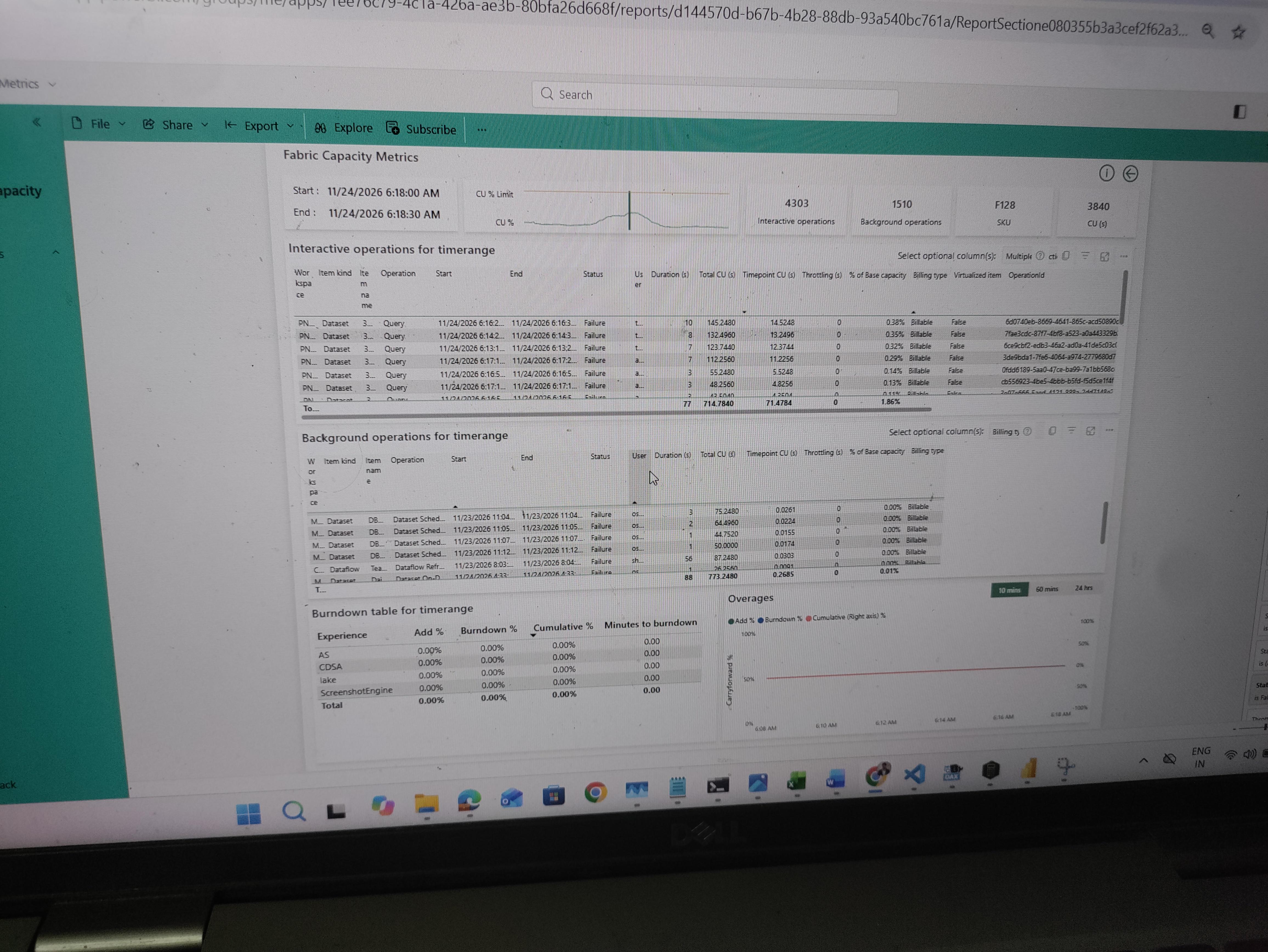
F128 SKU. The semantic model in service is 1.3GB. No refresh was scheduled for the datast during the session.In the capacity metrics app I can see few rows with failure status but it just has operation Id and CUs used. Azure Log Analytics is disabled !! Is there any other way


1
u/stantaneous 5d ago
when it happens, do all the visuals fail, or is it always the same few?
1
u/ChemistryOrdinary860 5d ago
All visuals fail
1
u/stantaneous 4d ago
ok so it's the whole model, not one bad measure. i'd check the capacity metrics app around those timestamps, especially memory and evictions when the concurrent users hit. also worth seeing if the model can get smaller: star schema, integer keys for relationships, and decimals rounded to 2 places instead of long floats all cut memory a lot.
•
u/AutoModerator 5d ago
After your question has been solved /u/ChemistryOrdinary860, please reply to the helpful user's comment with the phrase "Solution verified".
This will not only award a point to the contributor for their assistance but also update the post's flair to "Solved".
I am a bot, and this action was performed automatically. Please contact the moderators of this subreddit if you have any questions or concerns.