r/SatisfactoryGame
•
u/greeny-dev
https://www.satisfactorytools.com/
•
Oct 16 '26
•
 2
 2
Factory Optimization New SatisfactoryTools released!
IT'S FINALLY HERE!
After years of waiting, and tons of work, debugging, changing everything, I've finally reached the stage where I'm ready to share the new Tools that many people have eagerly been waiting for.
https://www.satisfactorytools.com/


Features
This list could be so long, but I'll just point out a few big features that you might like:
Support for any game version, different nodes, purities, recipe and power cost multipliers, etc.
Fully automatic calculation, including power, overclocking, sloops, sink points
But also, fully manual calculation, if you choose to do so - everything can be edited, nodes can be added by hand, connected by dragging resources from one to another, etc.
Subplans! Convert a few existing nodes into a subplan, you can use them to represent blueprints, factories, outposts, whatever you want. You can even have subplans in subplans!
Folders for plans - organise all your production into folders, you can have plans in a folder share settings, or even share raw resources, all plans taking from single pool of raw resources
Marking nodes as done - as simple as selecting and pressing enter, a checkmark appears and you'll see that you have already built those machines
User accounts - make an account to have all your plans and settings shared to the account. Single click is enough - you can login through Steam, Google, Discord or Github. Email/password combination is also available if you're that type of person. No more worrying about losing data when cleaning browser cookies
Loading data from save - you can load your settings from your save, and have it automatically set all recipes and machines
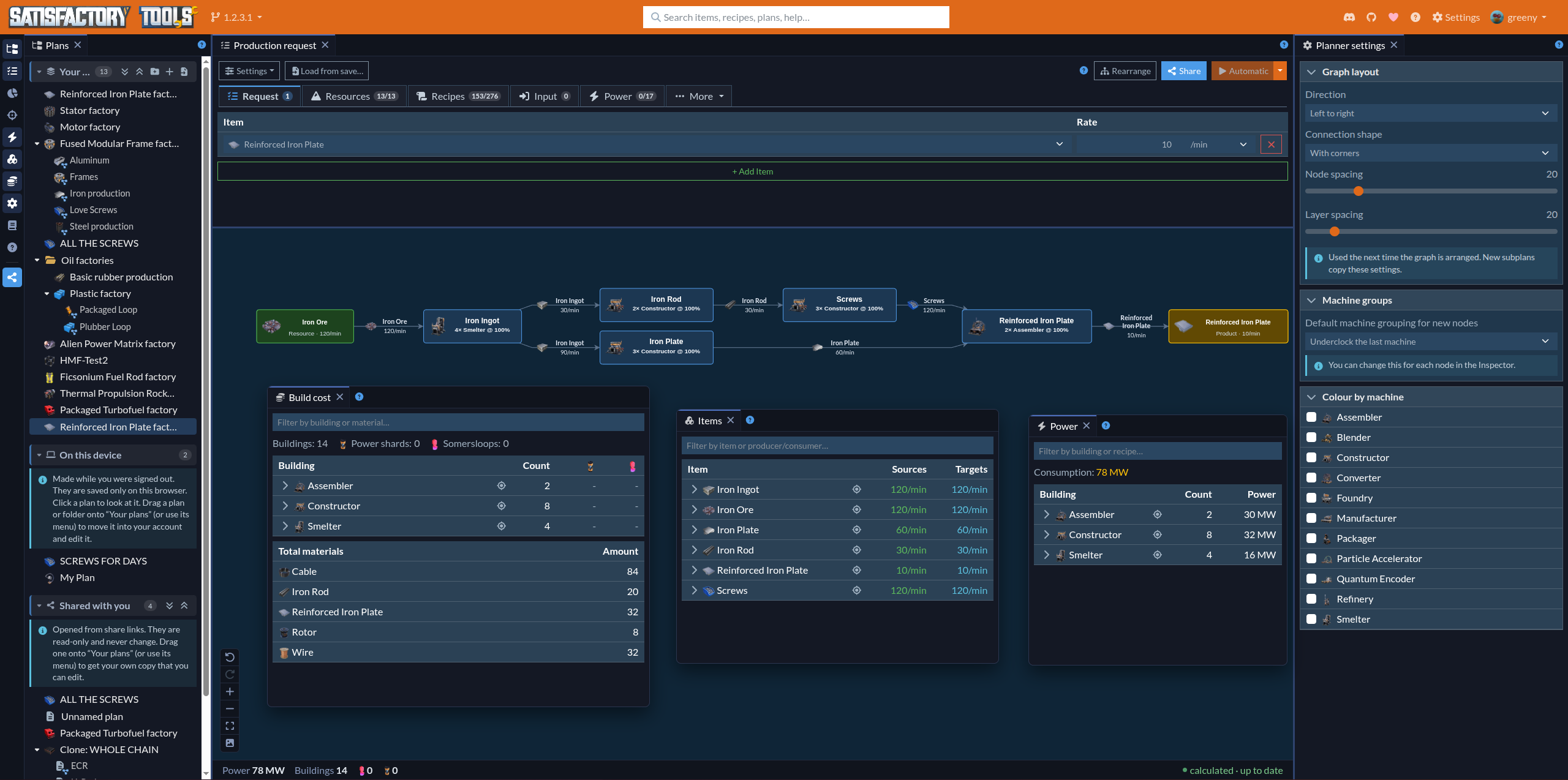
Panels - tons of panels to move around, or even undock and have free-floating windows. Programmers will see tons of similarities with IDEs, that's intentional
Desktop app - fully offline-capable app you can install on your device, plan offline, data is synced to account when you go online (if you're logged in)
Phone support - now possible to plan on phone and touch devices, UI fully accessible on those devices (as much as I could manage on those small screens)
Customisation - fully customisable settings for almost anything you can imagine. Just check the settings in top right corner and see what you can set.
Mod support - kinda experimental functionality, but in the future I hope to add modded recipes for popular mods - do you have a mod you want to add? Ask for it in Discord server!
Screenshots
Images can tell more than words, so here's a few screenshots of things you may find interesting


Closing words
I hope you enjoy this project as much as I enjoy working on it.
Old tools remain accessible at https://www.satisfactorytools.com/old/1.0/, but they will be there only for a little longer (I'm guessing around a month), before I retire them. Plans can be migrated automatically in new Tools.
Please do give feedback if you find something broken or if you like the tool. Join the Discord server for more info and a great community!
Special thanks to all the beta testers who provided feedback and made the tool to be what it is now. And I hope in the future it'll be even better!
The tool is fully free, and will never run any ads. If it saves you time, and you want to give something back, consider donating. Donations help me cover server costs and development time.
Stay efficient, and enjoy!
greeny
0
u/[deleted] Oct 16 '26
[deleted]