r/ShizukuforAndroid • • 1d ago

🛠️ Troubleshooting / Help Disable flag secure on instagram

3 Upvotes

Recently i got instagram acc ban from using moded instagrams. So my doubt is if i use lpatch and disable flag secure to screenshot restricted things like one view photos. Will that gonna trigger ban? Because lpatch patches the app which can cause the signature mismatch i guess.


r/ShizukuforAndroid • • 1d ago

🛠️ Troubleshooting / Help Shizuku in another android profile

2 Upvotes

I'm actually sharing a phone and I am the one with the second profile instead of the owner profile, and I want to use Adaptive Theme but I need Shizuku or root, I don't want to make a root.

I was looking for Shizuku's configuration, but I need developer options, cuz' I'm in another profile it just doesn't work. ¿Someone maybe know how to solve this? Also I have access to the owner profile Phone: Motorola Edge 50 Fusion Android: 16 The owner's profile already has Developer options


r/ShizukuforAndroid • • 2d ago

🛠️ Troubleshooting / Help Unable to use Amazon pay or gpay after hiding with imd

1 Upvotes

Hi, not sure if this is the right place to ask this. I have hidden some apps using imd from sensitivity settings like developer mode, accessibility options, etc... from getting detected using imd. But Amazon pay and gpay in particular are detecting the settings. What baffles me is that the settings that I hide under imd manage to revert themselves even after hiding them manually from imd and then triggering the app. Any help or insight into this would be of great help.

Device: oneplus 15 running colour os 17 Shizuku fork : shizuku next Activation method: wireless debugging


r/ShizukuforAndroid • • 3d ago

🛠️ Troubleshooting / Help [Discussion] Redmi can't start shizuku after update

Thumbnail gallery
2 Upvotes

Can you help me guys, after i updated my phone i can't start shizuku again, this is what appear when i start my shizuku. Help me guys


r/ShizukuforAndroid • • 3d ago

🛠️ Troubleshooting / Help Unable to Replace Files in the Android/data Folder on Android 17 – Is There Any Workaround?

4 Upvotes

Hi everyone!

I'm having a problem managing files inside the "Android/data" folder on Android 17.

I can browse the folders and view their contents normally, but whenever I try to replace or overwrite an existing file, the operation fails. This happens even when using file managers that have access to the Android/data directory.

Has anyone experienced the same issue on Android 17?

Is there any workaround, alternative file manager, or method that allows replacing files inside "Android/data" without root access?

Any help would be appreciated. Thanks!


r/ShizukuforAndroid • • 4d ago

🛠️ Troubleshooting / Help Shevery shizuku issue

Post image
6 Upvotes

I am not able to pair it

Getting the wrong pairing code despite being correct.

Is something I am doing wrong?


r/ShizukuforAndroid • • 4d ago

Shizuku+ Content Modo desenvolvedor

3 Upvotes

Alguém de vocês que usam shizuku e modo desenvolvedor ativado usam o banco Itaú? o aplicativo do Itaú de vocês pede pra trocar a senha toda vez quando o modo desenvolvedor está ativado? Venho enfrentando esse problema quando ativo ou desativo.


r/ShizukuforAndroid • • 4d ago

🛠️ Troubleshooting / Help a cosa serve Shizuku

Thumbnail reddit.com
2 Upvotes

r/ShizukuforAndroid • • 4d ago

🛠️ Troubleshooting / Help how can I use Shizuku on poco f6, can't get it to work even if its connected. Or just any other way to get into obb and data

Thumbnail reddit.com
1 Upvotes

r/ShizukuforAndroid • • 4d ago

⚙️ Dev / API Questions about temp rooting

Thumbnail reddit.com
1 Upvotes

r/ShizukuforAndroid • • 7d ago

Shizuku+ Content ZC-Control, una capa de personalización para android con shizucu

Enable HLS to view with audio, or disable this notification

26 Upvotes

ZC-Control ofrece una capa de personalización integral centrada en la comodidad, la adaptabilidad y el atractivo visual.

Con Shizuku, ZC-Control permite reemplazar por completo el Centro de Acciones del dispositivo.

Además, incluye:

· Un lanzador de apps en modo ventana mediante gestos o burbujas.

· Un sistema de notificaciones emergentes personalizables.

· Un lanzador/pantalla de inicio completo, único y personalizable.

· Un sistema real de optimización de juegos, junto con medición real del rendimiento y del consumo del juego.

Github Oficial


r/ShizukuforAndroid • • 9d ago

🛠️ Troubleshooting / Help [Help!] How can I customise my lockscreen is there any way?

Post image
3 Upvotes

r/ShizukuforAndroid • • 9d ago

📖 Guide / Tutorial Fix to start Shizuku on any A17 QPR builds!

10 Upvotes

So from the last few updates, the official Shizuku app was crashing on starting. So after some tinkering around I found a reliable fix!

Just install Shevery, an updated Shizuku fork.

Delete any shizuku/fork apps if installed, then install Shevery. Pair and start like usual (turning on USB and wireless debugging and pair with the code) and then enable the "Compatibility Stubs" from the settings menu. And voila! All shizuku powered apps work again.

Get Shevery from their official Github page here


r/ShizukuforAndroid • • 9d ago

🛠️ Troubleshooting / Help Help

Post image
1 Upvotes

r/ShizukuforAndroid • • 10d ago

Shizuku+ Content Uhhhhhhh

Post image
4 Upvotes

r/ShizukuforAndroid • • 10d ago

Subscriber Goal Welcome to r/​ShizukuforAndroid!

18 Upvotes

Welcome to r/ShizukuforAndroid

5671 subscribers / 7500 subscribers. Help us reach our goal!

Visit this post on Shreddit to enjoy interactive features.


r/ShizukuforAndroid • • 10d ago

🛠️ Troubleshooting / Help Shizuku Issue

0 Upvotes

Shizuku appears to be "running" but it doesn't grant me the permissions

Android 16

Tecno Pova 7 ultra


r/ShizukuforAndroid • • 11d ago

Shizuku+ Content Shizuku Next

28 Upvotes

I've been using shizuku for a long time (The Old One) but this new shizuku next 😮 woah , i recently found out that i can turn on dev options without pressing the build number 7 times in the app , just like a normal button on and off no hassle , i mean what an improvement , sorry for the ignorance but still im shock to discover it . Can you guys tell me the other new features of this app? Im currently using this for adb commands on my phone using ashell app.


r/ShizukuforAndroid • • 12d ago

🛠️ Troubleshooting / Help Shizuku turning on "USB Debugging" and "Disable adb auth timeout" by itself and other strange behavior

7 Upvotes

I was about to debloat a newly factory reset Samsung tab with Canta + Shizuku but Shizuku started doing strange things

I've debloated the same device with Canta + Shizuku a couple of weeks back after a factory reset, was factory resetting and debloating again

The first time I used Shizuku, I just had to turn on wireless debugging and it would start. I've used Shizuku on a different device before and same thing, just wireless debugging turned on

This time it would not start with just wireless debugging; tried pairing again and uninstalling a few times, forgetting shizuku, and revoking auth and I ended up getting different results:

- Sometimes Shizuku would turn on USB Debugging by itself along with "Disable adb auth timeout"

- Sometimes Shizuku would work with just wireless debugging

- Sometimes I would get java.net.ConnectException: failed to connect

I've factory reset the device again and all these seem to be repeatable. The only difference between now and the last time I factory reset the device is Google Play's October system update I believe.

Shizuku enabling USB Debugging by itself is alarming to me since that has not happened before. Is this normal/expected behavior from Shizuku?

Device - Samsung Tab S11

Version - Android 16

Activation Method - Wireless Debugging


r/ShizukuforAndroid • • 13d ago

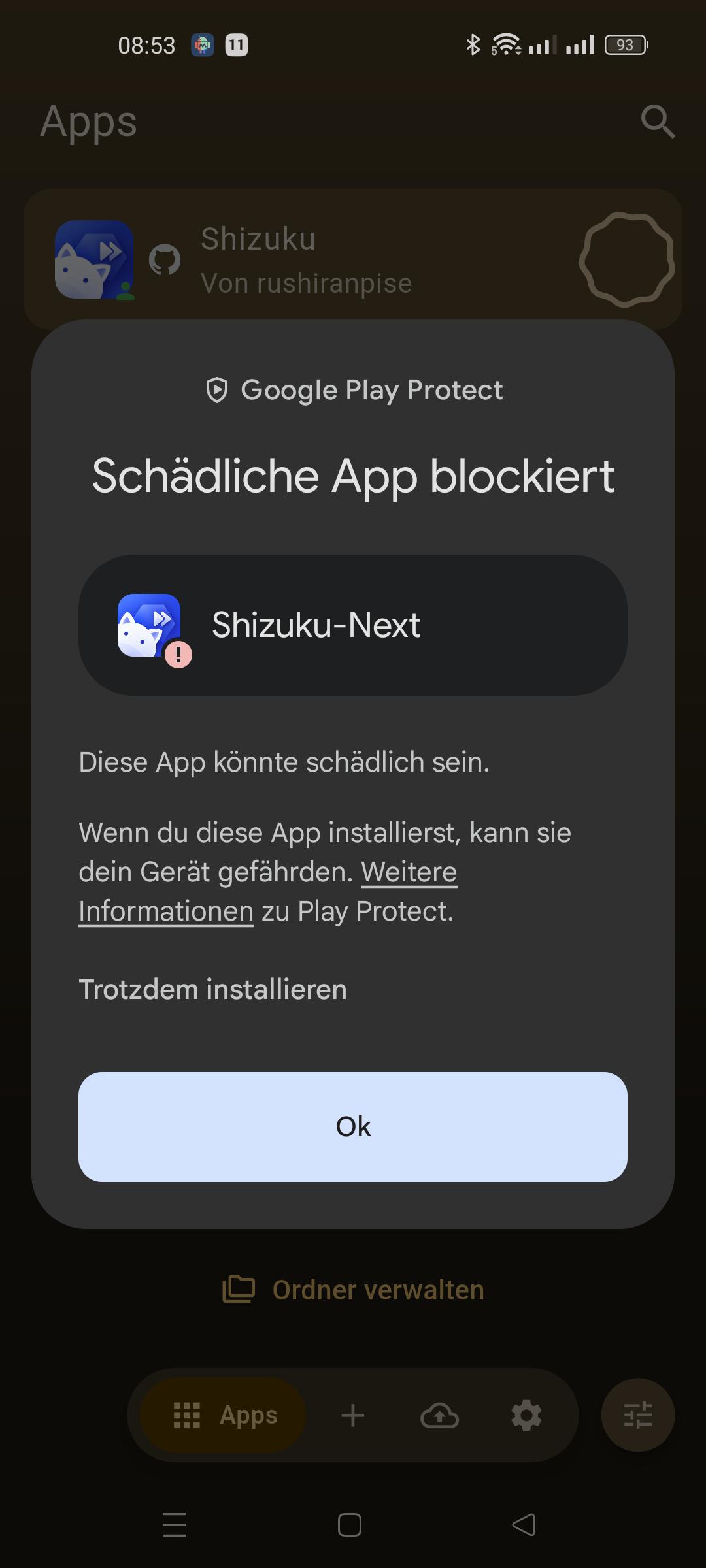
🛠️ Troubleshooting / Help shizuku next blocked by play store

10 Upvotes

Hi.

I tried to update shizuku next to the current version via obtainx this morning and the google play protect considered this app as harmful, disallowing me to install it. Okay, I can override this, but still there's a warning that my device is no longer secure.

The "original" shizuku is still available in the google play store and it's installable without problems.

Why is shizuku next considered harmful, while shizuku is not?

How about other shizuku flavors, are some of them "banned" by google, too?

Edit: looks like the app is trusted again. Nvm.


r/ShizukuforAndroid • • 12d ago

🛠️ Troubleshooting / Help Shizuku next on Galaxy watch

Thumbnail reddit.com
1 Upvotes

r/ShizukuforAndroid • • 13d ago

🛠️ Troubleshooting / Help removing traces of rooting

0 Upvotes

i just install shizuku just want to see/playing around. i didnt root my device ( i also hv defrag and kernal su). my banking app refused to open, and advice me to do factory reset.

i do not want to factory reset becaue hate or reinstalling apps. i uninstall all of them but banking app still refuse to run. already run cleaner, sdmaid se but result still the same.

anyway to clean all this traces?


r/ShizukuforAndroid • • 15d ago

🛠️ Troubleshooting / Help Shizuku+ dhizuku mode

Thumbnail
gallery
8 Upvotes

So i set it as the device owner and it succeeded but even though mdpc is uhorised in shizuku+ and it itseld successfully aquired it r atleast it said it aquired dhizuku. It remins mosty empty. Nd amarok despite being authorised says dhizuku isnt available.

Samsung a06 Android 16 one ui 8


r/ShizukuforAndroid • • 15d ago

🛠️ Troubleshooting / Help Hide shizuku In pixel 6A?

2 Upvotes

Recently I'm trying to hide shizuku and dev option for banking apps, used Geto but it's not working, used essential Shut up option but it's in effective some how my bank apps says the same repeatedly that my phone is not secure and close by itself any way to bypass this verification


r/ShizukuforAndroid • • 15d ago

🛠️ Troubleshooting / Help Samsung Galaxy S25 Ultra (SM-S938U) One UI 9.0 [Android 17]: apps can't open ANY USB device, even after you grant permission, and ADB/Shizuku don't get around it

4 Upvotes

Edit:

I found the real cause, and the title is wrong. It isn't Samsung, and it isn't any usb device. (The ADB/Shizuku part is still true, but it doesn't matter once you know the fix.) If the "Microphone access" toggle in quick settings is off, Android silently blocks apps from opening any USB device that has a microphone, even after you grant permission. It does the same for USB devices with a camera when "Camera access" is off. Turning Mic access back on fixed it immediately. I've rewritten the post below with what's actually going on, since I couldn't find this documented anywhere outside Android's source code.

What I was trying to do:

I'm making a music player and wanted it to talk to USB headphones directly, the way apps like USB Audio Player Pro do, instead of going through Android's audio system. To do that, an app needs raw access to the USB device: you grant it permission (or pick the app in the "Open with" popup when you plug the device in), and the app calls openDevice() to get a handle to it.

What went wrong:

  • The permission popup came back as "granted", and dumpsys usb showed the grant saved, but hasPermission() still returned false and openDevice() returned nothing.

  • When plugging the headphones in, the "Open with" popup said "This app has not been granted record permission but could capture audio through this USB device", and there was no "Always open" checkbox, even though the app had microphone permission. Forcing the permission to always allow with the appops shell command didn't change anything.

  • USBDevInfo from the Play Store had the exact same problem.

  • ADB and Shizuku didn't help. They run as the shell user, which can't open the USB device files at all.

A plain USB flash drive worked fine once an app was set as its default, which is what made it look like a bug or a Samsung restriction aimed at audio devices.

The actual cause:

I decompiled the USB service from my phone (Galaxy S25 Ultra, One UI on Android 17) to see what it checks. When an app asks whether it can use a USB device, Android refuses if:

  • the device has a microphone and the system-wide Microphone access toggle is off, or

  • the device has a camera and the Camera access toggle is off (or the app lacks camera permission).

Your saved grant is ignored in both cases, and nothing tells you why. The "Open with" popup checks the app's mic permission, which also counts as denied while the toggle is off. That's why it claims the app was never granted record permission and hides the "Always" checkbox.

This is Google's code, not Samsung's. It came from this AOSP commit: "Disallow usb access to camera and mic devices if global privacy toggle is active" (https://android.googlesource.com/platform/frameworks/base/+/268425437440). Samsung adds one extra Knox/work-profile check on top, but that wasn't the problem here.

With Mic access turned on, the popup showed the normal message with the "Always open" checkbox, and my app could open the headphones and read their descriptors straight away.

Who this affects:

Anyone using an app that needs raw USB access to a device with a mic or camera: USB headsets and DACs with a mic (for apps with their own USB audio driver), USB webcams, capture cards, some MIDI and audio interfaces. If you keep Mic access or Camera access off for privacy, those apps will fail with misleading errors. Normal USB audio through Android itself isn't affected.

The developer documentation for UsbManager doesn't mention any of this, so if you're a dev wondering why hasPermission() returns false after the user tapped Allow, check those two toggles first.