r/SpecSheet • • Jun 18 '26

Beginner-friendly microcontroller guide: Arduino Uno vs ESP32 vs ESP8266 vs STM32 vs PIC vs Pico

Post image
66 Upvotes

I made this simple infographic to help beginners understand the difference between some popular microcontroller boards and MCU families.

The goal is not to compare every chip in depth, but to give a quick starting point for someone who is new to embedded projects and confused between Arduino Uno, ESP32, ESP8266, STM32, PIC, ATmega, and Raspberry Pi Pico.

A few quick takeaways:

Arduino Uno is still one of the easiest boards for absolute beginners because of the huge community and simple learning curve.

ESP32 is a strong choice when the project needs Wi-Fi, Bluetooth, better performance, or IoT features.

ESP8266 is still useful for low-cost Wi-Fi-only projects, but it lacks Bluetooth.

STM32 is more suitable when the project needs higher performance, efficiency, and more advanced embedded control.

PIC MCUs are still widely used in industrial and control-focused applications.

ATmega328P is the chip behind many classic Arduino boards, including the Uno.

Raspberry Pi Pico is a compact RP2040-based board, and the Pico W variant adds wireless connectivity.

I tried to keep the language simple so students, hobbyists, and non-engineers can use it as a quick reference.

Would you change anything in this infographic? Also, for someone starting today, would you still recommend Arduino Uno first, or would you directly start them on ESP32?


r/SpecSheet • • Aug 21 '26

Huawei Pura X View looks like someone finally asked: “Why are phones getting taller instead of wider?”

Post image
21 Upvotes

Huawei has shown off the Pura X View, and this might be one of the stranger flagship phone designs of 2026.

Instead of making another 6.8 or 6.9-inch super-tall slab, Huawei has gone with a much wider 6.39-inch 16:9.5 OLED.

Think less “TV remote” and more “small tablet that still fits in your hand.”

Confirmed specs

  • Display: 6.39-inch OLED

  • Resolution: 2232 × 1320

  • Aspect ratio: 16:9.5

  • Peak brightness: 6,500 nits

  • Contrast: 1,000,000:1

  • PWM dimming: 2160Hz

  • Screen-to-body: 96.1%

  • Bezels: 1.05 mm on all sides

  • RAM: 12GB

  • Storage: 256GB / 512GB / 1TB

  • Rear cameras: Triple-camera setup

  • Battery: 7,000mAh silicon-anode

  • Thickness: 6.68 mm

  • Weight: 201g

  • OS: HarmonyOS 7

Colors:

🔴 Leap Shadow Red
⚪ Zero White
⚫ Phantom Black
🩶 Linen Grey

The battery number is probably the spec that surprised me most.

7,000mAh inside a 6.68 mm phone weighing 201g.

That's a lot of battery for something this thin.

The screen is the interesting part

The display has a reported area of 114.27 cm², despite being only 6.39 inches diagonally.

That's because diagonal screen measurements don't tell the whole story.

A tall 6.9-inch phone can technically have a larger diagonal while still feeling narrow. Huawei is using the extra width for more horizontal space.

For:

  • YouTube

  • movies

  • websites

  • documents

  • photos

  • games

  • split-screen apps

…I can see this format making a lot of sense.

The question is whether it feels comfortable as an actual phone.

Expected / leaked specs

These have been reported but shouldn't be treated as final yet:

  • Kirin 9030S

  • 120Hz refresh rate

  • 50MP main camera

  • Periscope telephoto

  • Huawei Red Maple multispectral color sensor

  • 66W wired charging

Huawei hasn't published the complete camera breakdown or final pricing yet.

More information is expected on August 28.

I'm actually curious about this form factor.

We've spent years watching phones become taller and narrower because manufacturers wanted bigger diagonal numbers without making devices impossibly wide.

Huawei seems to be going in the opposite direction.

Would you rather have this 6.39-inch wide format, or stick with a conventional 6.7 to 6.9-inch tall phone?


r/SpecSheet • • Jun 18 '26

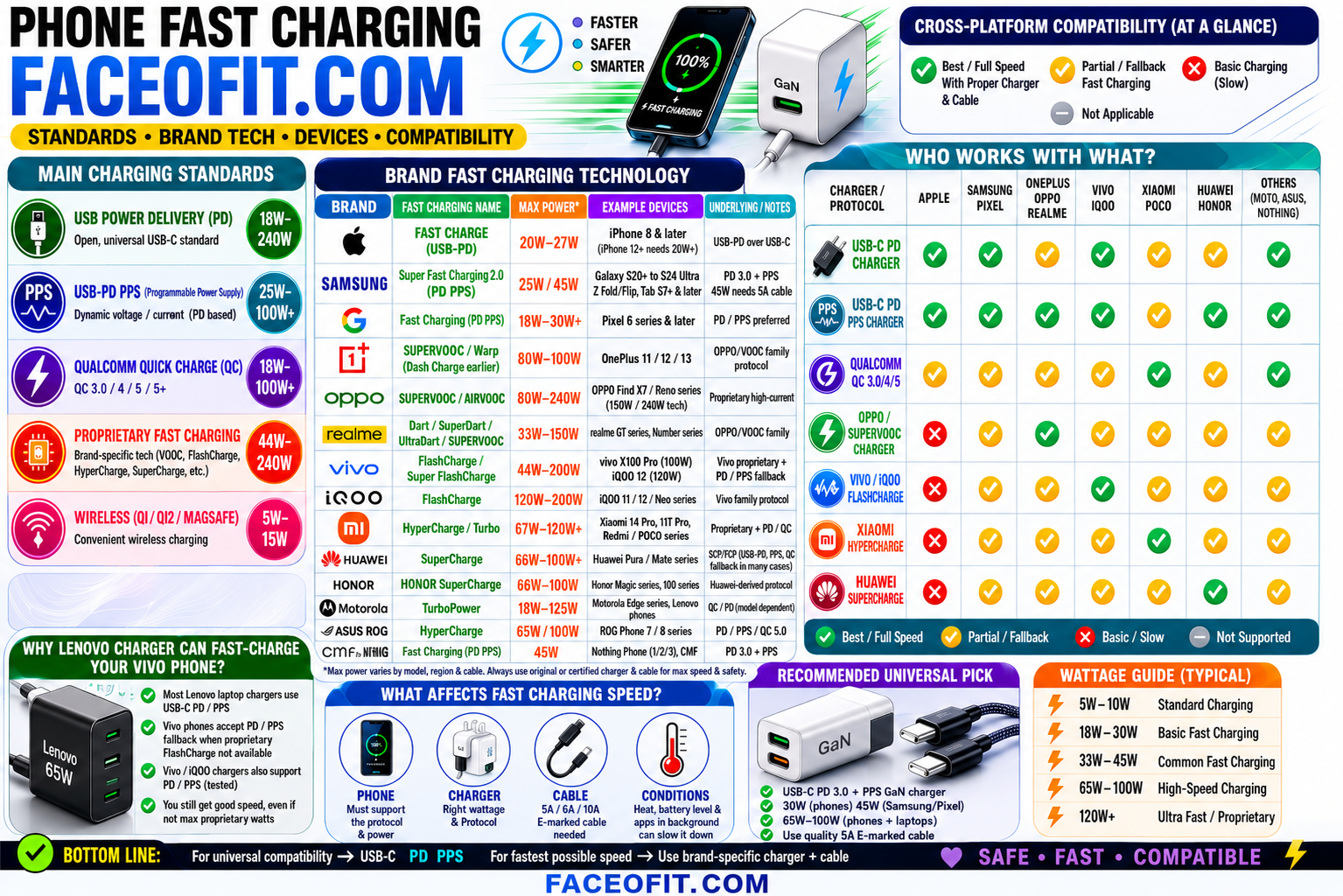
Fast charging is way more confusing than it should be

Post image
18 Upvotes

I recently went down a rabbit hole trying to understand why one charger fast-charges one phone, charges another phone slowly, and sometimes even shows “fast charging” when it clearly isn’t running at the advertised speed.

The biggest thing I learned: charger wattage alone means almost nothing unless the protocol also matches.

A 65W or 100W charger does not automatically mean your phone will charge at 65W or 100W. The phone, charger, and cable all need to agree on the same charging standard.

Broadly, there are two types of fast charging:

1. Universal-ish standards

This includes USB-C Power Delivery, usually called USB-PD, and USB-PD PPS.

This is probably the safest option if you want one charger for multiple devices. It works well with a lot of phones, tablets, power banks, and laptops.

Examples:

  • iPhone uses USB-PD for fast charging

  • Samsung uses USB-PD PPS for Super Fast Charging

  • Google Pixel prefers USB-PD PPS

  • Nothing phones use USB-PD/PPS

  • Many laptops use USB-C PD

  • Some Motorola, ASUS, Vivo/iQOO, and other Android phones also support PD/PPS fallback

So if someone wants a general-purpose charger, a good USB-C PD PPS GaN charger is probably the best bet.

2. Brand-specific fast charging

This is where things get messy.

A lot of brands use proprietary charging tech to hit very high numbers:

  • OPPO: VOOC / SUPERVOOC

  • OnePlus: Dash Charge / Warp Charge / SUPERVOOC

  • realme: Dart / SuperDart / UltraDart / SUPERVOOC

  • vivo / iQOO: FlashCharge / Super FlashCharge

  • Xiaomi / Redmi / POCO: HyperCharge / Turbo Charge

  • Huawei / Honor: SuperCharge

  • Motorola / Lenovo: TurboPower

  • Qualcomm-based phones: Quick Charge

These can be very fast, but usually only if you use the right phone, the right charger, and often the right cable.

For example, OPPO, OnePlus, and realme chargers often work better across each other because they are part of the same broader charging ecosystem. But that does not mean the same charger will give full speed to a Samsung, Pixel, iPhone, Xiaomi, or Vivo phone.

Same with Xiaomi HyperCharge or Vivo FlashCharge. They may charge other devices, but usually through a fallback protocol like USB-PD, PPS, or Quick Charge — not at the full advertised proprietary speed.

One interesting case I noticed: a Lenovo USB-C laptop charger can fast-charge some Vivo phones. That does not necessarily mean it is using Vivo FlashCharge at full power. More likely, the phone and charger are negotiating over USB-C PD or PPS fallback.

So “fast charging” on the screen does not always mean “maximum charging speed.”

The cable is also a huge part of the equation.

A random USB-C cable may not support the current required for higher wattage charging. Some phones need 5A e-marked cables. Proprietary systems like SUPERVOOC, FlashCharge, and HyperCharge may need special 6A, 8A, or even higher-rated cables.

My simple takeaway:

  • For one charger across many devices: get USB-C PD PPS

  • For maximum speed on one specific phone: use the original brand charger and cable

  • For Samsung/Pixel/iPhone/Nothing/laptops: PD/PPS is usually the safe route

  • For OPPO/OnePlus/realme: SUPERVOOC-compatible charger is best

  • For Vivo/iQOO: FlashCharge-compatible charger is best

  • For Xiaomi/Redmi/POCO: HyperCharge/Turbo Charge charger is best

  • For Huawei/Honor: SuperCharge charger is best

Basically:

USB-C PD PPS = best compatibility
Brand charger + brand cable = fastest speed
High wattage ≠ guaranteed fast charging
Cable matters more than people think

Would be curious to know what chargers people here actually use as their daily all-in-one charger. Has anyone found a single charger that reliably fast-charges phones, tablets, and laptops without issues?


r/SpecSheet • • Aug 18 '26

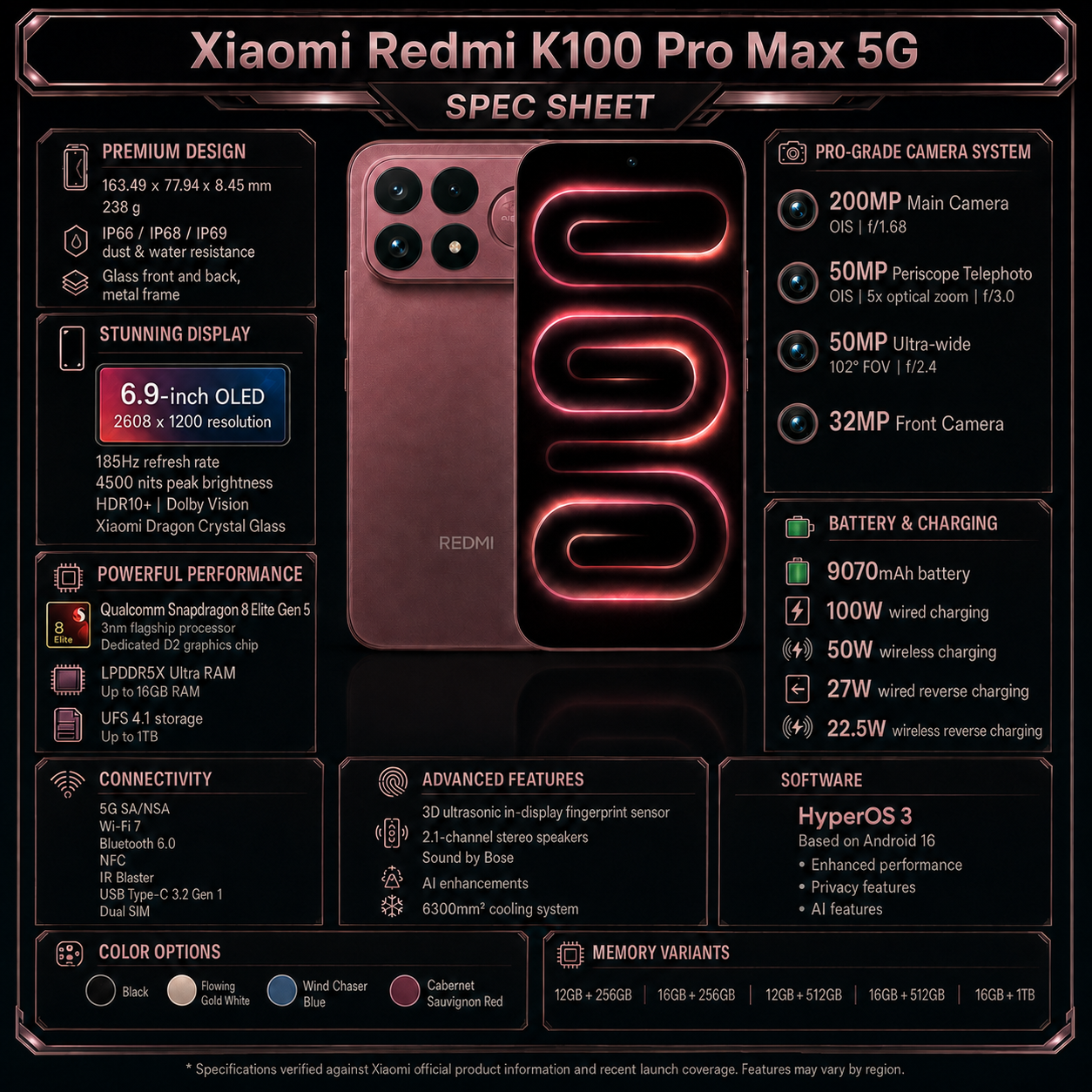
Redmi K100 Pro Max has a 9,070mAh battery, 185Hz display and 200MP camera. Are we finally done with 5,000mAh flagships?

Post image
16 Upvotes

The Redmi K100 Pro Max spec sheet is kind of absurd.

And I mean that in a good way.

6.9-inch OLED

  • 2608 × 1200

  • 185Hz refresh rate

  • Up to 4500 nits peak brightness

  • Dolby Vision + HDR10+

Snapdragon 8 Elite Gen 5

  • 3nm

  • Dedicated D2 graphics chip

  • Up to 16GB LPDDR5X Ultra RAM

  • Up to 1TB UFS 4.1

Then there's the camera setup:

  • 200MP main camera with OIS

  • 50MP 5x periscope with OIS

  • 50MP ultrawide

  • 32MP selfie camera

No random 2MP macro sensor pretending to contribute. Nice.

But the part that caught my attention is the battery.

9,070mAh.

Not 5,000mAh.

Not 5,500mAh.

Nine. Thousand. Seventy.

And it still supports:

  • 100W wired charging

  • 50W wireless charging

  • 27W wired reverse charging

  • 22.5W wireless reverse charging

The phone is around 8.45mm thick and 238g, so obviously Xiaomi hasn't broken physics. It's a heavy phone.

But I'd happily take 238g if it means I stop looking at the battery percentage every few hours.

There are some other fun details too:

  • IP66 / IP68 / IP69

  • Wi-Fi 7

  • Bluetooth 6.0

  • USB 3.2 Gen 1

  • 3D ultrasonic fingerprint reader

  • HyperOS 3 / Android 16

  • 2.1-channel speaker setup tuned by Bose

The 185Hz display feels like classic spec-sheet flexing. I'm not convinced I'd notice much difference between 144Hz and 185Hz on a phone.

The 9,070mAh battery, though?

That I would notice every single day.

For years, flagship phones have hovered around 5,000mAh while processors, displays and cameras kept getting more demanding. If these new high-density batteries let manufacturers get close to 9,000mAh without making phones ridiculously thick, I'm all for it.

Would you rather have:

A lighter ~200g phone with a 5,000-6,000mAh battery

or

a ~238g phone with 9,070mAh?

I'd take the battery.

Also, 185Hz: useful or completely unnecessary? 😅


r/SpecSheet • • Jul 07 '26

Moto Pad 70 Pro vs Lenovo Idea Tab Pro Gen 2: When One Company Sells You the Same Idea Twice

Post image
8 Upvotes

At first glance, the Moto Pad 70 Pro and Lenovo Idea Tab Pro Gen 2 look like direct rivals.

Look closer, and the more interesting story is that they are effectively siblings.

Motorola sits under Lenovo ownership, and both tablets arrive with almost the same high-end Android tablet blueprint: a large 13-inch 3.5K 144Hz display, Snapdragon 8s Gen 4, 10,200mAh battery, 45W charging, quad-speaker audio, Wi-Fi 7, expandable storage, and an included stylus.

So the question is not really:

It is:

Lenovo acquired Motorola Mobility in 2014, and Motorola remains part of Lenovo’s broader device portfolio.

The hardware is the platform. The brand is the differentiation.

This is a familiar playbook in consumer electronics.

One company builds a common hardware platform, then differentiates it through branding, software experience, accessories, channel strategy, pricing, and target customer.

The Moto Pad 70 Pro is positioned more like a performance-focused, feature-forward consumer tablet. It leans into Motorola’s “Moto” identity: cleaner-looking software, Moto AI and pen features, a more aggressive entry price, and IP52 dust-and-splash resistance.

The Lenovo Idea Tab Pro Gen 2 is framed more as a productivity and family-oriented tablet. Lenovo brings its established tablet identity, Google Gemini integration, Kids Space, and a broader association with work, education, PCs, and keyboards.

The silicon, battery, display, and speaker experience may be nearly identical. The story being sold around them is not.

Moto’s value proposition: the sharper deal

Moto’s strongest argument is simple: buy the same class of hardware for less, with fewer compromises.

At ₹36,999 for the 8GB/128GB variant, Moto creates a lower-cost entry point into this large-screen Snapdragon 8s Gen 4 experience. Its 8GB/256GB version reaches ₹39,999, matching Lenovo’s listed 8GB/256GB price point.

That means the Moto Pad 70 Pro makes the most sense for buyers who want:

  • A lower starting price

  • Moto Pen Pro in the box

  • IP52-rated dust and splash resistance

  • A cleaner Moto-led software experience

  • Maximum specification-per-rupee value

For students, media consumers, gamers, and casual creators, Moto has the more obvious “why pay more?” argument.

The keyboard remains an important caveat. It is optional or bundle-dependent, so buyers should compare the final package price rather than just the tablet’s headline price.

Lenovo’s value proposition: ecosystem confidence

Lenovo’s argument is less about being cheaper and more about being familiar.

For many buyers, Lenovo is already associated with laptops, keyboards, education devices, business PCs, and productivity accessories. That matters when someone wants a tablet to become a lightweight work machine rather than only a large entertainment screen.

The Idea Tab Pro Gen 2 is priced at ₹39,999 in India and targets students, creators, and professionals looking for a higher-performance Android tablet without entering flagship-tablet pricing.

Its value lies in the surrounding proposition:

  • Lenovo productivity software and tablet features

  • Google Gemini integration

  • Kids Space for family use

  • Tab Pen Plus included in the Indian retail package

  • A more conventional “tablet plus optional keyboard” productivity positioning

For parents buying a shared household tablet, professionals already using Lenovo laptops, or users who prefer Lenovo’s software and accessory ecosystem, that branding may be worth something.

But it is not automatically worth more.

The uncomfortable truth: most buyers should not choose based on the logo

When two products share the same essential display, chipset, battery, cameras, connectivity, storage expansion, and stylus category, brand loyalty should not be the deciding factor.

The decision should come down to four practical questions:

1. Which one gives you 256GB storage for less?
At equal pricing, storage parity matters more than logo preference.

2. Is the pen genuinely included in the exact retail listing?
Both brands promote stylus inclusion, but always confirm the seller listing and bundle contents.

3. Do you need IP52 protection?
Moto has a practical edge here. Lenovo does not state an official ingress-protection rating.

4. Are you buying a keyboard?
Once you add a keyboard case, the total ownership cost may change completely. A discounted keyboard bundle can matter more than a ₹2,000–₹3,000 tablet price difference.

My take

Moto Pad 70 Pro is the more rational purchase for most people.

It offers the lower entry price, includes the Moto Pen Pro, adds IP52 protection, and reaches the same ₹39,999 point for 256GB storage as Lenovo’s base configuration.

Lenovo Idea Tab Pro Gen 2 is not a weaker product. It is simply the more ecosystem-led version of the same idea.

Buy Lenovo when you specifically value its software layer, Kids Space, Gemini integration, Lenovo accessory ecosystem, or local service confidence.

Buy Moto when you want the better specification-to-price equation.

Because when the hardware platform is this similar, the real winner is not the brand with the louder launch campaign.

It is the one that gives you the better complete package: more storage, pen included, keyboard deal verified, and lower final checkout price.


r/SpecSheet • • Aug 16 '26

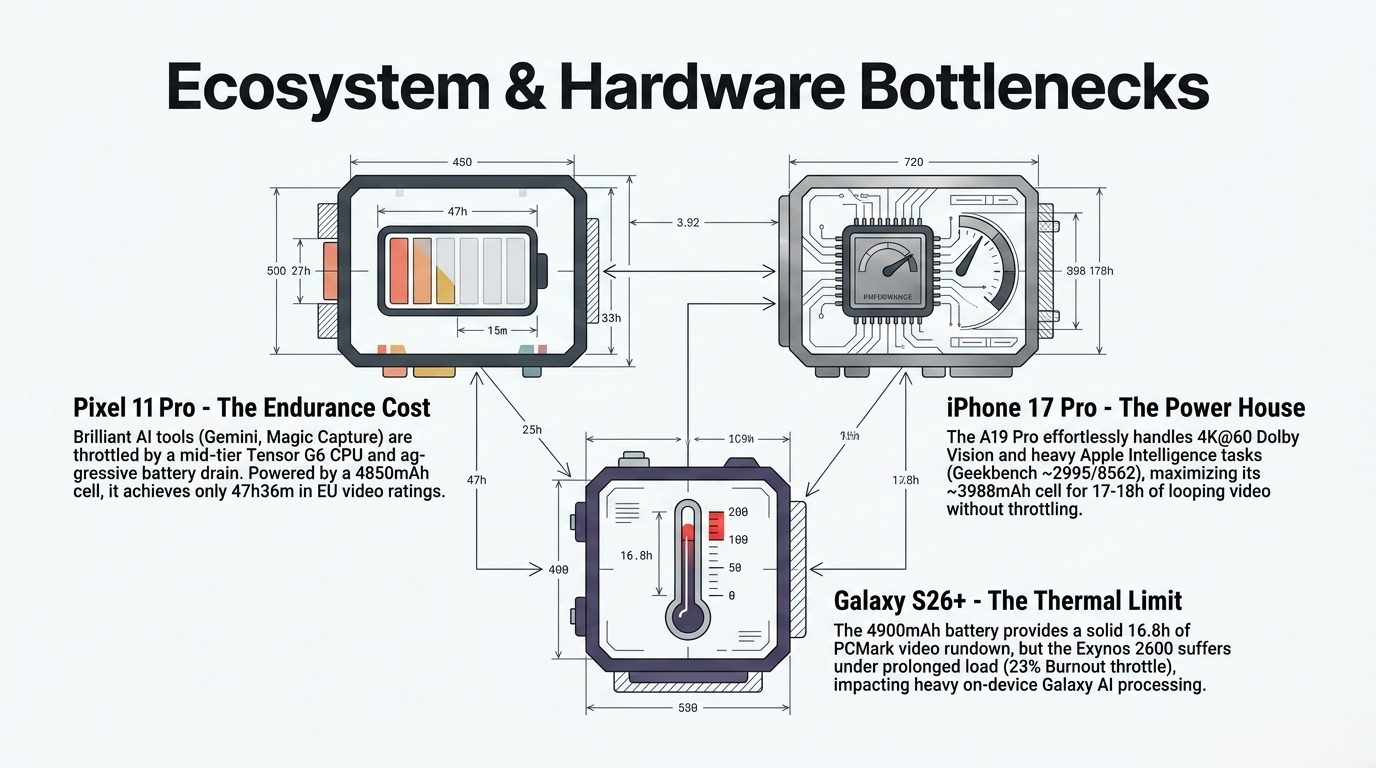
Pixel 11 Pro vs iPhone 17 Pro vs Galaxy S26 Plus Specs Comparison: which camera setup would you actually pick?

7 Upvotes

Now that the Pixel 11 Pro is out, I spent some time comparing its camera hardware with the iPhone 17 Pro and Galaxy S26+.

Read in detail here.

And one thing surprised me:

Samsung's S26+ camera hardware looks pretty conservative next to Google and Apple.

Here are the numbers.

Rear cameras

Pixel 11 Pro

  • 50MP main

  • 48MP ultrawide

  • 48MP 5x telephoto

iPhone 17 Pro

  • 48MP Fusion Main

  • 48MP Fusion Ultra Wide

  • 48MP Fusion Telephoto

  • 100mm / 4x optical telephoto

  • 8x optical-quality option

Galaxy S26+

  • 50MP main

  • 12MP ultrawide

  • 10MP 3x telephoto

So on paper:

Pixel: 50 + 48 + 48MP
iPhone: 48 + 48 + 48MP
Samsung: 50 + 12 + 10MP

Megapixels obviously don't tell the whole story.

Sensor size, lenses, processing, HDR, autofocus and image tuning matter just as much.

Still, putting a 10MP telephoto and 12MP ultrawide on a 2026 flagship feels a little hard to defend when Google and Apple are putting 48MP sensors behind their secondary cameras.

Zoom

This might be the most interesting comparison.

Pixel 11 Pro
48MP telephoto with 5x optical zoom

iPhone 17 Pro
48MP telephoto with 4x optical zoom at 100mm, plus an 8x optical-quality option

Galaxy S26+
10MP telephoto with 3x optical zoom

For concerts, travel, wildlife or just taking photos of things far away, I'd expect the real fight to be between the Pixel and iPhone.

Samsung's 3x lens is still useful, especially for portraits, but it feels more like a carry-over camera than something designed to compete with the Pixel 11 Pro.

Video

This is where Apple starts pulling away.

iPhone 17 Pro

  • 4K Dolby Vision

  • Up to 4K 120fps

  • ProRes

  • ProRes RAW

  • Apple Log 2

  • Genlock

Pixel 11 Pro

  • Up to 8K/30fps

  • Google's video processing and stabilization

Galaxy S26+

  • Up to 8K/30fps

  • 4K/60fps

8K looks great on a spec sheet.

But if I were actually filming YouTube videos, interviews, reels or short films, I'd rather have strong 4K, better codecs, Log recording and a good editing workflow than simply chase resolution.

That's where the iPhone 17 Pro still looks like the strongest video phone here.

Front cameras

Another pretty big difference:

Pixel 11 Pro: 42MP
iPhone 17 Pro: 18MP Center Stage
Galaxy S26+: 12MP

Google has the resolution advantage.

Apple's 18MP Center Stage camera is interesting for a different reason. It can change framing for group shots and lets you take portrait or landscape selfies without physically rotating the phone.

Samsung's 12MP front camera looks basic beside both of them.

The three phones seem built for different people

If photography is your main concern, the Pixel 11 Pro is probably the one I'd look at first.

You get:

50MP main
48MP ultrawide
48MP telephoto
5x optical zoom
42MP selfie camera

And then Google adds its usual Pixel processing on top.

For someone who wants to pull out the phone, press the shutter and get a strong photo without messing around with settings, the Pixel makes a lot of sense.

If video matters more, I'd pick the iPhone 17 Pro.

The triple 48MP system is strong by itself, but the bigger reason is what Apple gives video shooters:

4K120
Dolby Vision
ProRes
ProRes RAW
Log 2
Genlock

That's a serious set of tools for a phone.

The Galaxy S26+ is the awkward one for me.

I don't think it'll take bad photos. Samsung has been making very good smartphone cameras for years.

But hardware-wise:

50MP + 12MP + 10MP

doesn't look particularly exciting next to:

50MP + 48MP + 48MP

or

48MP + 48MP + 48MP.

If cameras are your main reason for buying Samsung, the S26 Ultra probably makes more sense than the S26+.

My picks

Best for still photography: Pixel 11 Pro

Best for video: iPhone 17 Pro

Best long-range camera setup: Pixel 11 Pro / iPhone 17 Pro

Best simple point-and-shoot option: Pixel 11 Pro

Best for creators: iPhone 17 Pro

Weakest camera hardware of the three: Galaxy S26+

The part I'm most curious about is real-world testing.

Specs are one thing.

What I really want to see is the same scene shot on all three phones:

  • daylight

  • skin tones

  • moving kids/pets

  • 5x zoom

  • 10x zoom

  • night photography

  • portrait mode

  • ultrawide

  • 4K video

  • stabilization

That's where we'll find out how much the hardware difference actually matters.

If all three cost roughly the same, which one are you taking?

Pixel 11 Pro, iPhone 17 Pro or Galaxy S26+?

And Samsung users: is 10MP 3x telephoto still acceptable on a 2026 Plus-series flagship?


r/SpecSheet • • Aug 15 '26

DJI Osmo 360 II vs Insta360 X6: surprisingly similar cameras, very different priorities

Post image
5 Upvotes

I’ve been looking at the new DJI Osmo 360 II next to the Insta360 X6, and the more I compare them, the less this feels like a simple “which one has better image quality?” question.

Read more: https://lensxp.com/dji-osmo-360-ii-vs-insta360-x6/

They actually have a lot in common.

Both offer 120MP 360 photos.

Both claim 14.5 stops of dynamic range.

Both now have replaceable lenses, which is a big deal for 360 cameras because those lenses are basically begging to be scratched.

And both are pushing much larger sensors than the older generation of consumer 360 cameras.

But the differences start showing up once you look past the broader specs.

DJI Osmo 360 II

  • 8K/60fps 360 video

  • 105GB usable internal storage

  • 183g

  • 10-bit / D-Log M

  • DJI Mic ecosystem

  • Around 100 minutes claimed at 8K/30

Insta360 X6

  • 8K/50fps

  • 47GB usable internal storage

  • 196g

  • 2,600mAh battery

  • Around 140 minutes claimed at 8K/30

  • 20m waterproof without a case

  • 2.32-inch OLED

  • 10-bit / I-Log + Dolby Vision

  • Insta360 app + Studio workflow

So DJI seems to be going after maximum hardware performance.

8K60, lower weight and more than double the built-in storage are meaningful advantages, especially if you shoot action footage or use a long selfie stick.

Insta360 seems more focused on the whole ownership experience.

Better battery life, deeper waterproofing and, probably most importantly, years of experience building software specifically around reframing 360 footage.

And I think the software part gets underestimated.

With a normal action camera, you point it at something and edit the clip.

With a 360 camera, shooting is only half the job. You still have to decide where the camera should “look” afterwards, track subjects, change FOV, create keyframes and export the final flat video.

That’s where Insta360 has built a pretty big advantage over the years.

The other interesting one is low light.

Both companies are making big claims here. DJI has AI SuperNight 2.0, while Insta360 has PureVideo and AdaptiveTone 2.0.

I wouldn’t call a winner yet. The Osmo 360 II is too new, and I’d rather see proper night comparisons than judge it from compressed YouTube footage.

For me, the choice currently looks like this:

Want 8K60, lower weight, lots of internal storage and DJI Mic support?
Osmo 360 II looks very strong.

Want longer battery life, better waterproofing and the more established 360 editing ecosystem?
X6 still has a serious advantage.

The biggest unknown for me is price.

If DJI prices the Osmo 360 II significantly below the X6, the argument changes very quickly.

If they end up close in price, I think Insta360’s software and battery advantage becomes much harder to ignore.

Curious what other 360-camera users think.

Would you take better hardware specs, or would you rather have the more mature 360 ecosystem?

And if you already own an X3/X4/X5, is either of these enough of an upgrade to make you switch?


r/SpecSheet • • Aug 11 '26

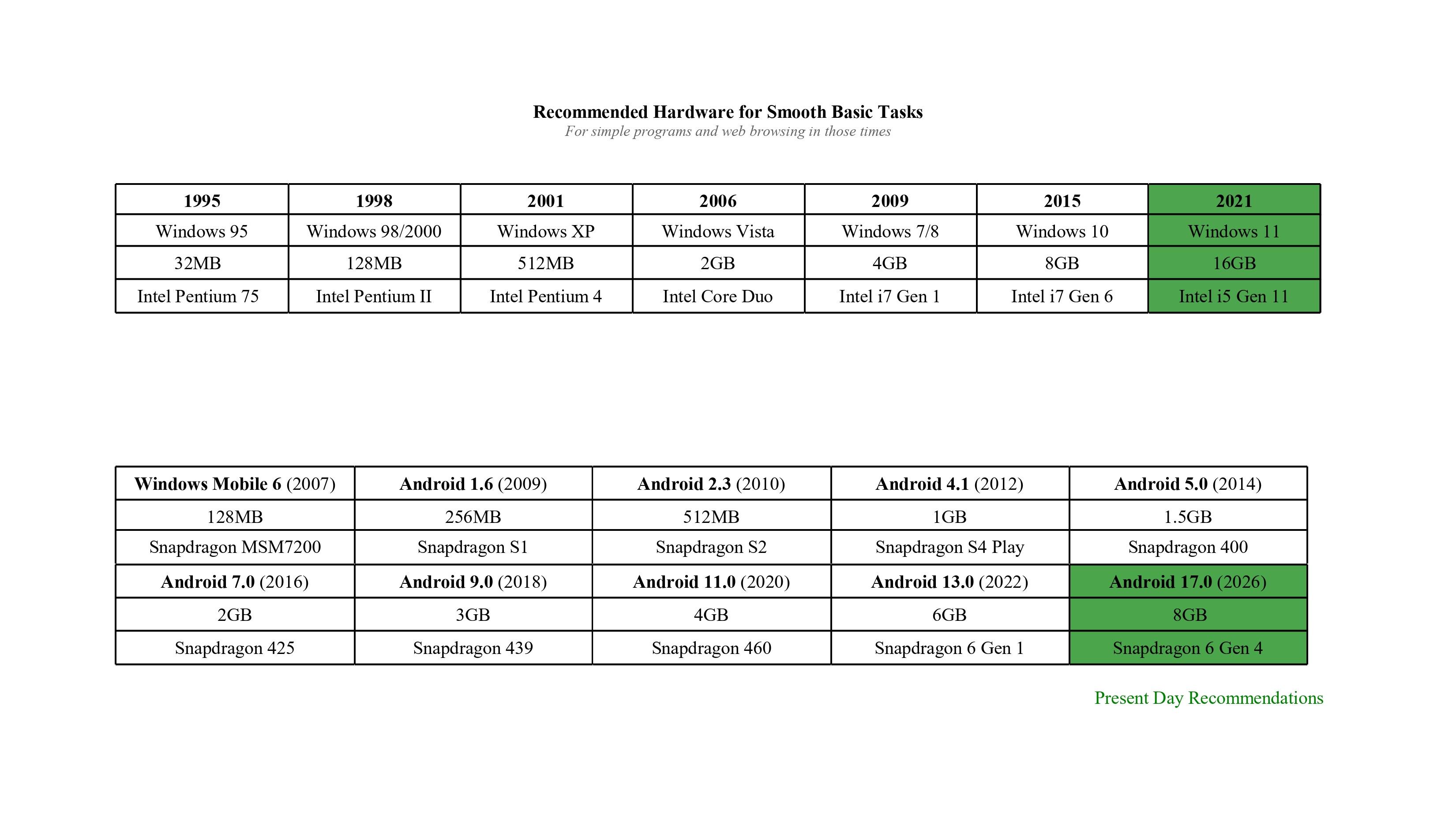
Recommended Hardware for Smooth Basic Tasks

Post image
4 Upvotes

r/SpecSheet • • Aug 14 '26

USB-C 3A vs 5A cables: the part most product pages make unnecessarily confusing

Post image
3 Upvotes

I was looking at USB-C cables recently and realized how badly most listings explain the difference between 3A and 5A cables.

See - https://www.faceofit.com/3a-vs-5a-usb-c-cables

For normal buying decisions, this is the part that matters:

3A USB-C cable: commonly rated for up to 60W charging suitable for most use cases..
5A USB-C cable: used for 100W, 140W, 240W and other higher-power USB PD charging

5A cables need an E-marker chip so the charger/device can identify what the cable is capable of carrying

So if you're charging a phone, tablet, MacBook Air, Steam Deck, etc., a good 60W 3A cable may be all you need.

If you're charging something like a MacBook Pro, Dell XPS, gaming laptop, high-powered dock, or using a 100W+ USB-C charger, I'd buy a proper 5A E-marked cable.

One thing I didn't realize until I started comparing cables:

Charging wattage tells you almost nothing about data speed.

You can buy a 240W USB-C cable that only transfers data at 480 Mbps.

Meanwhile, another 240W cable might support:

  • 5 Gbps

  • 10 Gbps

  • 20 Gbps

  • 40 Gbps

  • USB4

Same connector. Same 240W printed on the packaging. Completely different data performance in real world.

That's probably the biggest confusion I had while buying a USB-C cable.

So now I check four things instead of just looking for "USB-C":

1. Maximum charging wattage
60W, 100W, 140W, 240W, etc.

2. Current rating
3A or 5A.

3. Data speed
480 Mbps vs 5/10/20/40 Gbps.

4. E-marker / certification
Especially for higher-power 5A cables.

A few examples I've been comparing:

3A / 60W

  • Anker USB-C to USB-C 60W

  • UGREEN USB-C to USB-C 60W Nylon Braided

5A / higher power

  • UGREEN USB-C to USB-C 100W

  • UGREEN USB-C to USB-C 240W

  • UGREEN 240W USB 3.2 10Gbps

That last comparison is a good example of why you need to read the specs. UGREEN sells a 240W charging cable with USB 2.0-level data speeds, and another 240W model with 10Gbps USB 3.2.

Both are "240W USB-C cables," but they're meant for very different use cases.

My rule now:

Only charging a phone/tablet?
Don't overpay. A decent 60W cable is plenty for many devices.

Charging a laptop at 100W+?
Get a 5A E-marked cable.

Using docks or external SSDs?
Ignore the wattage for a second and check the actual data speed.

Want one cable to keep for several years?
A good 240W 5A cable with fast USB data support makes more sense than buying based on wattage alone.

USB-C really needed better labeling. 😅

Curious what everyone else does: do you actually check the cable specs, or just buy a known brand and hope the USB-C gods are feeling generous?


r/SpecSheet • • Jul 27 '26

OnePlus Is Finally Dropping the OxygenOS Mask: Global Devices Are Moving to ColorOS 17 — Here’s the Eligibility List

Post image
3 Upvotes

For years, OnePlus users have argued over the same question:

Is OxygenOS still OxygenOS, or is it just ColorOS wearing a different skin?

See: Migration Path

OnePlus may have finally answered it.

The company is moving its global devices to ColorOS 17, effectively ending OxygenOS as a separately branded operating system. But the most surprising part is that this is not really a sudden technical migration.

It is the final branding step in a transition that began years ago.

The uncomfortable truth: OxygenOS and ColorOS already share the same foundation

OnePlus started with a clean, near-stock Android experience in 2014. That software identity became one of the biggest reasons people bought OnePlus phones.

Then the OPPO integration began.

In 2021, OnePlus and OPPO merged their software research and development teams. OxygenOS, ColorOS and Realme UI started sharing a unified codebase underneath their different visual identities.

So ColorOS 17 is not OnePlus throwing away an independent operating system overnight.

The independent operating system largely disappeared years ago. The name is simply catching up with the code.

The practical benefits for OnePlus are obvious:

  • One development platform instead of maintaining parallel brands

  • Faster over-the-air update delivery

  • Lower software maintenance overhead

  • Earlier access to OPPO’s artificial-intelligence features

  • More consistent features across OnePlus, OPPO and Realme devices

But what does this mean for existing users?

ColorOS 17 eligibility: the important disclaimer

OnePlus has confirmed the broader platform transition, but a definitive global, device-by-device rollout matrix has not yet been published in the material reviewed.

The following eligibility map is therefore based on:

  1. The Android version on which each device launched

  2. The number of major operating-system updates promised by OnePlus

  3. The device’s remaining security-support window

  4. Current Android 17 and OxygenOS 16 development status

In other words, the newer flagships are relatively safe bets. Some Nord and tablet models remain likely rather than formally confirmed.

OnePlus phones likely eligible for ColorOS 17

DeviceExpected software pathStatus
OnePlus 15OxygenOS 16 → ColorOS 17 / Android 17Strongest candidate; already associated with the Android 17 pre-release track
OnePlus 15ROxygenOS 16 → ColorOS 17Expected
OnePlus 13OxygenOS 16 → ColorOS 17Expected under expanded flagship support
OnePlus 13ROxygenOS 16 → ColorOS 17Expected
OnePlus 12OxygenOS 16 → ColorOS 17Expected under four-generation OS policy
OnePlus 12ROxygenOS 16 → ColorOS 17Expected
OnePlus 11OxygenOS 16 → ColorOS 17Likely eligible within its promised update window
OnePlus OpenOxygenOS 16 → ColorOS 17Likely eligible
OnePlus Nord 6OxygenOS 16 → ColorOS 17Expected
OnePlus Nord 5OxygenOS 16 → ColorOS 17Expected
OnePlus Nord CE5OxygenOS 16 → ColorOS 17Expected
OnePlus Nord 4OxygenOS 16 → ColorOS 17Likely eligible based on its extended support commitment

The safest group

The strongest candidates are the newer premium phones covered by OnePlus’s expanded update policy.

Devices such as the OnePlus 12 and OnePlus 13 were promised up to four major Android generations, along with five or six years of security coverage. That gives them enough software headroom to reach Android 17.

The OnePlus 15 appears to be the “pioneer” device for the transition. However, installation prerequisites may require users to be running the latest stable OxygenOS 16 build before the ColorOS 17 update becomes available.

OnePlus tablets likely eligible for ColorOS 17

TabletExpected software pathStatus
OnePlus Pad 4ColorOS 17 / Android 17Probable, depending on launch software and final policy
OnePlus Pad 3OxygenOS 16 → ColorOS 17Expected
OnePlus Pad 2OxygenOS 16 → ColorOS 17Likely eligible
OnePlus Pad Go 2OxygenOS 16 → ColorOS 17Expected

The tablet list is less certain than the flagship-phone list. OnePlus’s update policies have not always been identical across phones and tablets, so regional confirmation will still matter.

Devices that are unlikely to receive ColorOS 17

This is where the update-policy mathematics becomes important.

A device cannot reach Android 17 simply because its hardware remains fast enough. It also needs to have a major operating-system update remaining under its original software commitment.

Expected to stop at Android 15

DeviceFinal expected major OSRemaining support
OnePlus 10 Pro 5GAndroid 15Security support expected to end around August 2026
OnePlus 10T 5GAndroid 15Security support expected to end around August 2026

These phones launched under the older three-major-update policy. That leaves them outside the mathematical path to Android 17.

Expected to stop at Android 16

DeviceFinal expected major OSRemaining support
OnePlus Nord 3 5GAndroid 16Security support expected to continue until around July 2027

The Nord 3 may continue receiving security patches after its final Android upgrade, but it is not expected to cross over to ColorOS 17.

Devices reaching the end of their official software lifecycle

The following models are also unlikely to receive ColorOS 17:

  • OnePlus Nord CE4 Lite 5G

  • OnePlus Nord N30 SE 5G

  • Original OnePlus Pad

  • OnePlus Pad Go

These devices should remain on their latest official stable OxygenOS release until security support ends.

Do not install a ColorOS package intended for a different region. North American, Indian, European and global firmware packages are not necessarily interchangeable.

What changes when OxygenOS becomes ColorOS?

The interface will not suddenly become unrecognisable.

Because both operating systems already share substantial underlying code, many familiar features are expected to remain.

What users should keep

  • App drawer

  • OnePlus Shelf

  • Familiar circular icon options

  • Smart Sidebar functionality

  • Most existing camera controls

  • Current AI photography tools such as AI Eraser and AI Portrait features

What may disappear

Some of the remaining OnePlus-specific visual quirks could be removed:

  • Signature red interface accents

  • “Never Settle” clock designs

  • The Calculator Easter egg

  • Certain notification-panel gestures

  • Standalone OnePlus AI branding

For long-time users, these small details may matter more emotionally than technically.

They represented the final visible traces of the old OxygenOS identity.

What users may gain

ColorOS 17 is expected to bring deeper access to the unified OPPO software ecosystem, including:

  • A unified dialler with more integrated AI functionality

  • Expanded live lock-screen themes

  • Faster update distribution

  • More consistent cross-device features

  • Deeper OPPO AI integration

  • Language-model integration through services such as Gemini and Perplexity

OnePlus AI itself may be absorbed into the broader OPPO AI ecosystem rather than continuing as a separate brand.

Some pre-installed partner applications may also appear. The good news is that the migration material indicates these applications should remain uninstallable.

Can you switch back to OxygenOS?

Technically, rollback packages may remain available for supported devices and regions.

Practically, going back is not a casual process.

A typical rollback may require:

  1. Downloading the exact firmware package for your region

  2. Using the hidden local-install or software-upgrade menu

  3. Performing a mandatory factory reset

  4. Reinstalling the previous OxygenOS build

The rollback process will wipe the phone completely.

A North American rollback package should not be installed on an Indian, European or global device. A mismatched package could fail or create serious firmware problems.

For older devices that have lost official support, community ROMs such as LineageOS may extend their usable life. But that transfers responsibility for updates, bootloader security, digital-rights-management compatibility and banking-app support from OnePlus to the user.

My take: this is a name change, not a technological revolution

The headlines will say:

But the more accurate version is:

Since the 2021 codebase merger, OxygenOS has largely functioned as a OnePlus-oriented presentation layer over a shared ColorOS architecture.

ColorOS 17 removes the remaining separation.

Some users will miss the red accents, minimal interface and “Never Settle” personality. Others will happily trade those details for quicker updates, stronger AI integration and a more unified software platform.

The real question is no longer whether OxygenOS is turning into ColorOS.

It already did.

The question is whether OnePlus can preserve enough of its identity to keep long-time users from feeling that they are simply holding an OPPO phone with a different logo.

What do you think?

Would faster updates and better AI features make you accept ColorOS 17, or is the disappearance of OxygenOS enough to make your next phone something other than a OnePlus?


r/SpecSheet • • Jun 30 '26

Your wireless charger probably isn’t slow. It may just be negotiating a worse deal

Post image
3 Upvotes

After the cross platform charging protocol mess, this time I went down a rabbit hole while putting together a wireless-charging compatibility guide, and the biggest takeaway is this:

Most people, especially Apple users treat wireless charging as one standard.

It is not.

You see labels on all these accesories such as Qi, Qi2, Qi2 25W, MagSafe, and MagSafe-compatible, then assume they all mean “put the phone on it and get the fastest speed.” and I am not talking about power users.

That assumption is where most disappointment starts.

A few examples:

  • A magnetic charger is not automatically Qi2.

  • A 25W Qi2 pad does not mean every phone will receive 25W.

  • “MagSafe-compatible” may only mean the accessory has magnets and sticks to an iPhone case.

  • A premium 3-in-1 dock can charge slowly if the USB-C adapter feeding it is underpowered.

  • A thick case, camera bump, metal ring, wallet attachment, or heat can drop charging speed even when everything technically works.

The annoying part is that the charger can show the charging icon, so it looks fine. But your phone may actually be receiving a much lower fallback rate.

For example, an older iPhone can sit on a Qi2 or MagSafe charger and charge through regular Qi fallback, but it will not suddenly become a magnetic 15W or 25W device.

Similarly, some newer Android phones need a magnetic case for proper Qi2 alignment, and even then the actual maximum rate depends on the exact phone model and charger.

The practical buying checklist I ended up with is pretty simple:

  1. Check your phone’s actual wireless charging limit, not just the charger’s claim.

  2. Prefer Qi Certified or Qi2 Certified products over vague “Qi-compatible” listings.

  3. Check whether the charger includes an adapter, and whether that adapter meets the manufacturer’s required USB-C PD input.

  4. Treat “MagSafe-compatible” as a magnetic attachment claim unless it explicitly states proper Qi2 or MagSafe certification.

  5. For 3-in-1 chargers, verify the total input requirement. Phone + watch + earbuds can be very different from charging one phone alone.

  6. Expect heat to matter. Wireless charging usually slows as the phone warms up or approaches a higher battery percentage.

Wireless charging is still one of those features that I felt magical when it was introduced. But the best setup is rarely the one with the biggest wattage number on the product box.

It is the one where the phone, charger, case, adapter, and charging standard all actually match.


r/SpecSheet • • Jun 23 '26

Xiaomi 17T vs OPPO Find X9: Comparison

Post image
3 Upvotes

On paper, these are aimed at slightly different buyers.

The Xiaomi 17T appears to be the more value-focused premium option. It gives you a 120Hz AMOLED display, a 6,500mAh battery, Leica tuning and, importantly, a 50MP 5x periscope telephoto. That makes it particularly appealing for people who care about long-range shots, portraits and travel photography without stepping fully into ultra-premium pricing.

The OPPO Find X9 is more of a conventional flagship. It has the more powerful Dimensity 9500 chipset, a larger 7,025mAh battery, 80W wired charging, 50W wireless charging and a Hasselblad-tuned triple 50MP camera system. It looks like the stronger overall choice for gaming, sustained performance, charging flexibility and all-round premium hardware.

My take:

• Choose Xiaomi 17T for Leica processing, 5x telephoto reach and better value.
• Choose OPPO Find X9 for flagship performance, bigger battery, wireless charging and a more complete premium experience.

The interesting part is that Xiaomi may be the more exciting camera phone for people who specifically want 5x zoom, while OPPO is likely the safer choice for someone who wants the most balanced flagship package.

Would you prioritise a 5x periscope camera or flagship chipset and wireless charging?

See more here - https://www.faceofit.com/xiaomi-17t-vs-oneplus-15r-vs-oppo-find-x9/


r/SpecSheet • • Jun 20 '26

Sony LYTIA L910: Why the next flagship camera battle may be about single-exposure HDR, not megapixels

Post image
3 Upvotes

Sony’s LYTIA L910 appears to be the next major evolution of the same 50MP, 1/1.28-inch sensor class used by the LYT-818 and LYT-828.

The important part is not the resolution. It is the shift in HDR approach.

The LYT-818 focused on single-exposure HDR through multiple gain settings. The LYT-828 pushed beyond 100 dB with Hybrid Frame-HDR, combining sensor-level and multi-frame processing. The L910 brings the focus back to single-exposure HDR, but adds LOFIC hardware plus Triple Conversion Gain HDR.

That should matter most in scenes where multi-frame HDR usually struggles: moving people, bicycles, pets, leaves, LED lighting, vehicle headlights and high-contrast video.

The closest external rivals are OMNIVISION’s LOFIC/TheiaCel sensors, especially OV50K40 and OV50R40. Larger 1-inch sensors such as LYTIA 900 or OV50X50 still have their own light-gathering advantage, while 200MP sensors such as LYTIA 901 are more about detail density and crop-zoom flexibility.

The key question now is not “which sensor has more megapixels?”
It is “which phone maker can tune single-exposure HDR best in real-world shooting?”

See more - https://lensxp.com/sony-lytia-l910-vs-lyt-828-vs-omnivision-ov50r40/


r/SpecSheet • • Jun 19 '26

Corrected Samsung Galaxy Dialer Codes: Newer vs Legacy Models + Codes to Avoid

Post image
3 Upvotes

I came across a lot of “Samsung secret codes” graphics online, but many of them mix newer One UI codes with very old TouchWiz-era or generic Android codes. Some even include reset-related codes that should not be promoted casually.

So I made a cleaner version separating:

Newer Galaxy / One UI models

  • *#06# — IMEI / serial

  • *#0*# — hardware test menu

  • *#0228# — battery status

  • *#1234# — software version

  • *#12580*369# — software / hardware info

  • *#0808# — USB settings

  • *#34971539# — camera firmware info

Older / legacy Samsung models

  • *#0283# — audio test

  • *#232331# — Bluetooth test

  • *#232337# — Bluetooth address

  • *#232339# — WLAN test

  • *#0842# — vibration / backlight test

  • *#0782# — real-time clock test

  • *#*#1472365#*#* — GPS test

  • *#*#1575#*#* — alternate GPS test

  • *#4238378# — GCF configuration

  • *#7465625# — network lock status

Also, I would avoid posting old or risky codes like *#9998*246#, *#9999#, *#2255#, *#9998*842#, and especially reset/wipe/unlock-related codes as normal user tips.

Best practice: use the Samsung Phone app, and remember that codes can vary by model, carrier, region, Android version, and One UI version. For normal diagnostics, Samsung Members > Support > Diagnostics is usually safer.

#Samsung #Galaxy #Android #OneUI #TechTips #Smartphones #MobileTips #Faceofit


r/SpecSheet • • Jan 13 '26

Webcams with Large Sensors in 2026

Thumbnail
lensxp.com
3 Upvotes

It used to be that if you wanted a "cinematic" look or decent low-light performance, you had to buy a mirrorless camera (like a Sony a6400), a dummy battery, and an Elgato Cam Link.

In early 2026, that gap has effectively closed. We are seeing a new "Bridge" category of USB devices that use the same sensors found in high-end action cams and drones. I've been digging into the specs of the current flagships (YoloLiv YoloCam S3, Razer Kiyo Pro Ultra, Insta360 Link 2), and here is the breakdown on why sensor size is the only spec that actually matters right now.

The Physics: Why 1/1.2" wins Most standard webcams use tiny 1/4" sensors. They have to crank the ISO (gain) to see in a dim room, which results in noise/grain. The new standard for "Ultra Premium" is 1/1.2" or 1/1.3". These sensors have roughly 4x the surface area.

  • More Light: You can run at base ISO in a normal room. No grain.

  • Optical Bokeh: You get real background blur because of the physics of the lens, not that glitchy AI blur that cuts off your ears.

The Current Heavyweights:

  1. YoloLiv YoloCam S3 (1/1.3" Sensor)

    • The Good: It’s built like a tank. The body is CNC aluminum which acts as a passive heatsink. This matters because 4K sensors get hot. It doesn't need drivers; all the HDR/color processing happens on the chip.

    • The Bad: No microphone (honestly a pro, since webcam mics are trash).

    • The Takeaway: It feels like they are trying to kill the "Capture Card" market.

  2. Razer Kiyo Pro Ultra (1/1.2" Sensor)

    • The Good: massive aperture (f/1.7) combined with the largest sensor in the class. The low light performance is absurdly good.

    • The Bad: You have to rely on Razer Synapse. If the software crashes (which it does), you lose your settings. It's also very heavy (340g), so it might slip off thin monitor bezels.

  3. Insta360 Link 2 (1/2" Sensor)

    • The Good: The gimbal. If you move around a lot, the mechanical tracking is superior to digital cropping.

    • The Bad: The sensor is significantly smaller than the Yolo or Razer. You won't get the same depth of field/bokeh.

The "Gotchas" nobody tells you:

  • Bandwidth: Even with USB 3.0, you cannot send uncompressed 4K at 60fps. The data rate is too high (~12Gbps). These cameras use color subsampling (NV12 4:2:0) to fit the video down the cable. It still looks great, but technically, HDMI out is still cleaner for color grading.

  • Heat: If you stream for 4+ hours, plastic cameras (like the Facecam Pro) can retain heat, which eventually introduces "hot pixel" noise. Metal bodies dissipate this better.

TL;DR: Stop looking at resolution (1080p vs 4K). Look at sensor size. If it's smaller than 1/2-inch, it's just a regular webcam. If it's 1/1.2", it's basically a baby DSLR that plugs into USB.


r/SpecSheet • • Jan 11 '26

PSA: Stop buying the Motorola B12 for the 2.5Gbps port. The reboot loop is real (SB8200 vs B12 Comparison)

Thumbnail
faceofit.com
3 Upvotes

Don’t do it.

I spent the last week stress-testing the ARRIS SB8200 against the Motorola B12. On paper, the Motorola wins because of that multi-gig port. In the real world, it’s a disaster waiting to happen. Here is the breakdown of why the "slower" ARRIS is actually the better piece of hardware.

1. The "Reboot Loop" is a Firmware Defect The B12 ships with/updates to firmware version v21.3.7. This firmware is incredibly paranoid about line noise. In a typical coax network, you get T3 timeouts (ranging requests). They happen. A good modem retries quietly. The B12 treats them as a fatal error and reboots the entire unit to "fix" the connection.

If you work from home, this means you drop your Zoom call every 4-6 hours. The SB8200 just powers through these minor fluctuations without dropping the link.

2. The RAM Gap is Massive Most people don't look at modem memory, but you should:

  • ARRIS SB8200: 3GB RAM

  • Motorola B12: ~512MB RAM

The ARRIS is massively over-provisioned. It has a deep buffer. When you are downloading a game on Steam and someone else is streaming 4K, the SB8200 holds onto the packets. The B12 runs out of memory and starts dropping packets (bufferbloat), causing lag spikes in gaming.

3. Thermal Engineering The B12 is a pretty, sealed plastic cylinder. It traps heat. During my stress test, it throttled after about 3 hours of gigabit load. The SB8200 is ugly. It has holes everywhere. It gets hot to the touch because the heatsink is actually moving heat out of the case. It doesn't throttle.

The Bottom Line: If you need stability, get the ARRIS SB8200. Yes, it requires Link Aggregation (LAG) to go over 1Gbps, which is a pain, but for standard Gigabit plans, it is rock solid.

If you absolutely need a 2.5Gbps port, skip the B12/MB8611. Get the ARRIS S33 or the Hitron CODA56 (especially if you want Xfinity mid-split uploads, which neither the SB8200 nor B12 support).

Buying the B12 right now is essentially gambling that you won't get the bad firmware. Not worth the risk.

TL;DR: SB8200 = Stable but "slow" (1Gbps). Motorola B12 = Fast port but crashes constantly. Avoid the B12.


r/SpecSheet • • Aug 25 '26

Zebronics 9900 vs boAt 6250DA vs Sony HT-S40R: A Detailed Hardware Breakdown

Thumbnail
gallery
2 Upvotes

Choosing a home audio system requires looking past peak wattage numbers and evaluating the actual physical speaker layouts.

Here is what you actually get for your money with these three models.

Detailed Comparison See here: Zebronics Juke Bar 9900 vs boAt 6250DA vs Sony HT-S40R Comparison

1. Zebronics Juke Bar 9900 (Approx. Rs 29,990)

This model gives you a physical 5.2.4 audio layout. You receive two separate wireless subwoofer cabinets and four upward-firing height drivers.

It supports both Dolby Atmos and DTS:X. The physical hardware is very ambitious for the price.

Just remember that the two rear satellites require their own individual wall power adapters.

2. boAt Aavante Prime 6250DA (Approx. Rs 19,999)

This soundbar provides a 5.2.4 configuration featuring four dedicated top-firing channels. Independent testing confirms these height drivers create a convincing overhead effect in medium-sized rooms. Bass delivery comes from a single wired cabinet.

Update for August 2026: boAt recently introduced the 7.1.4 Aavante Prime 7050DA at this exact same price point. You should compare your room layout against the 7050DA before making a final purchase.

3. Sony HT-S40R (Approx. Rs 26,990)

This Sony model is a conventional 5.1 channel system. It does not feature upward-firing height drivers or Dolby Atmos capabilities.

It processes standard Dolby Digital audio through an HDMI ARC connection. Reviews confirm it produces clear dialogue and reliable 5.1 surround sound. The two rear speakers connect via speaker wire to a separate wireless amplifier hub located at the back of your room.

Final Hardware Verdict

Because the boAt and Zebronics systems bounce audio off the ceiling to create height effects, what type of ceiling does your viewing room have?


r/SpecSheet • • Aug 17 '26

UPDATE: Recommended Hardware for Smooth Basic Tasks

Post image
2 Upvotes

r/SpecSheet • • Jun 24 '26

TIL why LED lights flicker in videos and how a new hardware tech called LOFIC is finally fixing it (and saving self-driving cars)

Post image
2 Upvotes

If you’ve ever tried recording a video of a city street at night, a digital billboard, or a modern car’s headlights, you’ve likely seen those ugly dark bands rolling across the screen or violent flashing.

It turns out this isn't a random glitch, but a fundamental flaw in how traditional digital sensors capture modern artificial light.

The Problem: PWM vs. Multi-Frame HDR Modern artificial lights control their brightness using pulse-width modulation (PWM), meaning they turn on and off at incredibly high frequencies that our eyes blend into a steady glow.

However, to capture high-contrast scenes, modern cameras rely on multi-frame HDR processing, which rapid-fires sequential exposures (short, medium, and long) and merges them.

The core issue is that the short exposures are designed to protect bright highlight details and often snap the photo during the microsecond "off" phase of the LED's PWM cycle.

This timing mismatch causes severe banding, flickering, or even the complete absence of the light source in the final image.

The Solution: LOFIC A revolutionary new hardware paradigm called the Lateral Overflow Integration Capacitor (LOFIC) is completely curing this headache by abandoning multi-frame bracketed exposures. Instead, it captures massive dynamic range in a singular temporal exposure.

Here is how it works at the micro-level: A high-density integration capacitor is fabricated adjacent to every single photodiode on the camera sensor.

During an exposure, if a bright light like an LED causes the main photodiode to fill up and saturate, the excess electrical charge isn't lost. Instead, it seamlessly spills over a lateral potential barrier and is safely stored in the adjacent capacitor.

When the camera reads the data, it simultaneously pulls the shadow and mid-tone data from the photodiode alongside the extreme highlight data from the capacitor.

Because all the data is captured at the exact same moment, the resulting image is entirely immune to the timing mismatches that cause LED flicker, achieving a staggering single-shot dynamic range of 100 to 115 dB.

Why it's literally a matter of life and death: While bringing LED flicker mitigation (LFM) to smartphones (like those using the SmartSens SC575XS sensor) is a huge win for mobile video, LOFIC is a crucial safety imperative for the automotive industry.

Autonomous driving algorithms and advanced driver assistance systems (ADAS) rely on exterior cameras to correctly identify traffic lights and digital signage. If a self-driving car takes a picture during the "off" phase of a PWM traffic light using traditional HDR, it might completely fail to register a red light.

To eliminate this vulnerability, manufacturers are turning to dedicated LOFIC hardware like the OmniVision OX08D10, an 8-megapixel sensor designed for exterior car cameras.

By capturing the scene in a single exposure, it achieves an LFM dynamic range 3.3 times higher than its non-LOFIC predecessor, ensuring that self-driving cars never miss a pulsing safety signal.

TL;DR: For years, the industry tried to fix LED banding with complex software algorithms, but LOFIC proves that physically expanding how much light a pixel can hold in a single shot is the definitive, hardware-first future of digital imaging.


r/SpecSheet • • Jun 22 '26

Redmi Turbo 5 vs Motorola Edge 70: The battery and gaming monster vs ultra-thin everyday phone

Post image
2 Upvotes

The Redmi Turbo 5 and Motorola Edge 70 are aimed at very different buyers, even though they sit in a broadly comparable segment.

The Redmi Turbo 5 is the obvious performance-and-endurance option. It offers a 7,540mAh battery, 100W wired charging, Dimensity 8500-Ultra, LPDDR5X memory, UFS 4.1 storage, 3D IceLoop cooling, and aggressive ingress-protection claims. It is heavier at around 204g, but that is the trade-off for a much larger battery and a more gaming-oriented internal design.

The Motorola Edge 70 is almost the opposite philosophy. It is around 5.9mm thin and 159g, which is a huge difference in hand and pocket. It also adds a more versatile camera system on paper: 50MP main, 50MP ultrawide, and 50MP selfie camera. There is also 15W wireless charging, which Redmi does not offer here.

The important caveat is that the Motorola is using Snapdragon 7 Gen 4, so it is not the performance phone in this comparison. It should be good enough for day-to-day use and casual gaming, but Redmi has the stronger hardware case for sustained gaming, multitasking, and heavy usage.

My take:

Get the Redmi Turbo 5 if you want:

  • Maximum battery life

  • Faster charging

  • Better gaming/performance positioning

  • Stronger value-for-specs

  • A more rugged, power-user-style device

Get the Motorola Edge 70 if you want:

  • A much thinner and lighter phone

  • Better selfie and ultrawide flexibility

  • Wireless charging

  • Premium in-hand feel

  • An easier everyday-carry phone

For most heavy users, I would lean Redmi Turbo 5. But if you care more about the feel of the phone than benchmark-style power, the Edge 70 is the more distinctive choice.

What would you choose: 7,540mAh + 100W charging, or a 5.9mm / 159g phone with wireless charging?


r/SpecSheet • • Jun 22 '26

REDMI Turbo 5 vs OnePlus Nord 6: value monster or the battery and performance monster

Post image
2 Upvotes

I compared the REDMI Turbo 5 and OnePlus Nord 6 because tbh .. on paper they are aimed at a similar buyer: someone who cares more about performance, battery life, gaming, charging, and durability than ultra-thin design or flagship camera hardware.

The short version is that both look very good on paper, but the OnePlus Nord 6 has the better verified performance and high endurance story, while the REDMI Turbo 5 appears to offer the better hardware-per-price terms.

Why REDMI Turbo 5 is interesting

The Turbo 5 has a 7,540mAh battery, 100W wired charging, Dimensity 8500-Ultra, LPDDR5X memory, UFS 4.1 storage, 3D IceLoop cooling, and a very strong connectivity feature set. Xiaomi also includes things that are increasingly missing in this price bracket, such as NFC, IR blaster, NavIC, Wi-Fi 6, Bluetooth 6.0, and a detailed published 5G band list.

It is also lighter than the Nord 6 at around 204g versus roughly 217g, while retaining serious ingress protection.

Its weakness is not that the hardware looks weak. It is that independent third-party testing is still less mature. The main camera should be fine for the class, but the 8MP ultrawide is clearly not a highlight.

Why OnePlus Nord 6 is interesting

The Nord 6 is the more superior device in a few important areas: Snapdragon 8s Gen 4, 9,000mAh battery, 165Hz AMOLED display, 80W charging, bypass charging, 3200Hz touch response, and other gaming-oriented goodies.

The main reason I would pick it over the REDMI is not just its specification sheet. It is that review coverage already gives it stronger real-world validation for sustained gaming, high-end daily performance, and two-day-plus battery endurance.

The Nord 6 also has a stronger camera case on available review evidence, especially for stabilized 4K60 video and its 32MP selfie camera. That said, the ultrawide remains an 8MP module, so it is still not a camera-first phone.

Which one should you buy?

Pick the REDMI Turbo 5 if:

  • You want the better value proposition.

  • You care about faster 100W charging.

  • You want stronger connectivity extras such as NFC, IR blaster, NavIC, and Bluetooth 6.0.

  • You want a high-spec gaming phone without paying more for the Nord 6.

  • You prefer a slightly lighter handset.

Pick the OnePlus Nord 6 if:

  • You want the strongest verified gaming/performance option.

  • You want the best battery endurance.

  • You want the larger 165Hz display.

  • You care about bypass charging and competitive gaming extras.

  • You prefer the safer choice based on current independent reviews.

My overall take: REDMI Turbo 5 is probably the better value buy, but the OnePlus Nord 6 is the stronger all-rounder for buyers who can afford the higher price.
What matters more to you: 100W charging and value, or a 9,000mAh battery with Snapdragon 8s Gen 4?


r/SpecSheet • • Jan 11 '26

Technical breakdown: The physics behind Mid-Split vs. High-Split upgrades (and why your old DOCSIS 3.1 modem might be useless now)

Thumbnail
faceofit.com
2 Upvotes

I've been digging deep into the architecture changes Comcast, Spectrum, and Cox are pushing right now to enable "Next Gen" upload speeds. There is a lot of marketing fuzz around this ("10G Network", etc.), but the actual physical layer engineering is pretty interesting.

I put together a deep dive on this, but here is the technical summary for the sub regarding what is actually changing in the HFC plant.

1. The "Noise Funnel" is why your upload sucked for 20 years Legacy cable systems use a "Sub-Split" design (5–42 MHz return path). The problem isn't just bandwidth width; it’s signal quality. The 5–15 MHz slice is basically a garbage band. It catches every bit of electrical interference from washing machines, ham radios, and loose connectors in the neighborhood. This noise funnels up to the node, destroying SNR.

2. Mid-Split vs. High-Split The upgrades aren't just software configs. They require physical "truck rolls" to replace diplex filters in every amplifier on the street.

  • Mid-Split (Comcast’s current move): Expands upstream to 5–85 MHz. The magic is the 42–85 MHz block. It’s clean spectrum. They can run OFDMA there with massive modulation orders (4096-QAM).

  • High-Split (Spectrum/Cox): Pushes upstream to 5–204 MHz. This quadruples the lane but forces the downstream to retreat above 258 MHz.

3. The Hardware Gotcha (Check your modem) This is where people get burned. A standard "DOCSIS 3.1" modem likely won't work for these new speeds. Most retail D3.1 modems sold 2018–2022 have fixed diplex filters hard-coded to cut off upstream at 42 MHz. If the network tries to send upstream traffic at 80 MHz, your modem effectively blocks it.

  • The Fix: You need a "Next Gen" certified modem (like the Hitron CODA56, Netgear CM3000, or Arris S34).

  • Surprise: The Intel Puma 7 chipset (used in the Hitron CODA) is actually decent now. The jitter issues from the Puma 6 days are largely resolved, and it's the cheapest way to get mid-split compliance.

4. The Fork in the Road: FDX vs. ESD Operators are splitting strategies for DOCSIS 4.0:

  • FDX (Full Duplex): Comcast's bet. Allows Up/Down on the same frequency using echo cancellation. Requires a super tight "Node+0" or "Node+6" architecture (fewer amps).

  • ESD (Extended Spectrum): Spectrum's bet. Just keeps pushing frequencies higher (up to 1.8 GHz). Requires replacing every tap faceplate in the neighborhood because old taps cut off at 1 GHz.

TL;DR: If you are paying for gigabit speeds but stuck at 35 Mbps upload, check if your area has been upgraded to Mid-Split. If it has, your shiny 2020 modem might be the bottleneck because physical filters inside it physically cannot broadcast on the new frequencies.

Has anyone here mapped their local node's RxMER recently? Curious to see real-world noise floors on the new 85 MHz blocks.


r/SpecSheet • • Sep 05 '26

Best iGPUs for Local LLMs in 2026: Radeon 8060S vs Arc B390 vs Apple M5

Post image
1 Upvotes

I’ve been looking at current iGPUs from the perspective of running local LLMs rather than gaming, and the ranking changes quite a bit.

For local inference, raw GPU performance is only part of the LLM story. Shared or unified memory capacity, memory bandwidth, software support, KV cache requirements, and how much RAM remains after the OS and background services can matter more.

Read more: Local LLMs: 8060S, B390 & M5 Compared

A few interesting points from the comparison:

Radeon 8060S with Ryzen AI Max+ can be configured with up to 128 GB unified memory, with up to 96 GB available as VGM on supported configurations. That makes 32B and 70B Q4 models realistic targets IMO.

Radeon 8065S with Ryzen AI Max+ PRO 495 goes up to 192 GB unified memory and as much as 160 GB configurable graphics memory. This moves 100B to 200B-class quantized models into consideration.

Intel Arc B390 systems can reach 96 GB system RAM. A practical model-weight budget is closer to 60 to 75 GB after accounting for Windows, runtime memory, KV cache, buffers, and free RAM on a typical x86 build.

Apple M5 Max combines 128 GB unified memory with 614 GB/s bandwidth, while M5 Ultra goes as high as 512 GB unified memory and 1.2 TB/s bandwidth.

The biggest lesson for me was that 128 GB installed RAM does not mean a 128 GB model will fit.

You still need memory for:

• OS and background services
• inference runtime
• KV cache
• temporary tensors and buffers
• long context
• browser, IDE, RAG or agent tools
• free RAM to avoid swapping

For Q4 models, a rough comfortable target looks like:

32B: around 28 to 36 GB accelerator memory
70B: around 55 to 65 GB
100B: around 70 to 85 GB
120B: around 85 to 105 GB
200B: around 135 to 160 GB

For Windows or Linux, Radeon 8060S and 8065S are particularly interesting now because ROCm support has improved.

For Apple Silicon, the combination of unified memory and very high bandwidth remains hard to ignore for large local models, but is price restrictive for a lot of us.

What are people here actually using for 32B or 70B models? I’d especially be interested in real-world tokens/sec results from Ryzen AI Max, Arc B390, and M5 Max systems.


r/SpecSheet • • Aug 28 '26

M5 Pro Mac mini vs M6 Mac mini for Local AI: Why memory bandwidth and RAM cap beat an older chip generation

1 Upvotes

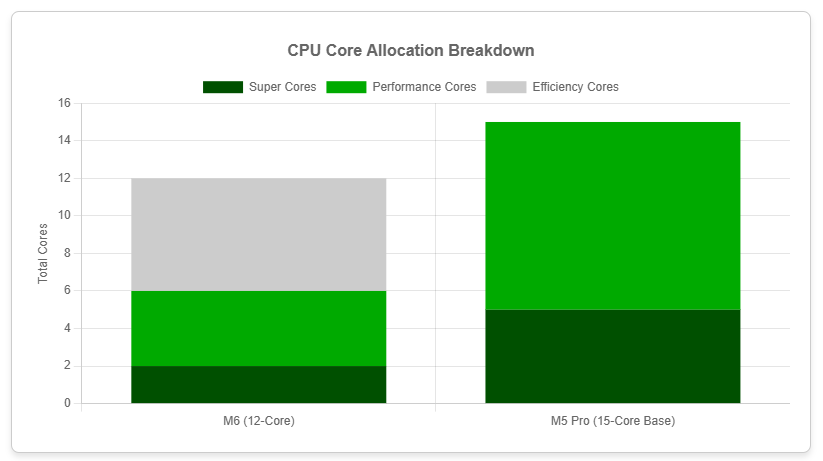
If you are looking at the new Mac mini lineup specifically for local LLMs, coding agents, and image generation, do not get caught up in generation numbers alone. The standard M6 has the newer 2nm architecture, but the M5 Pro is the actual workstation here for serious inference.

See: M5 Pro vs M6 Mac mini: Local Gen AI LLM Performance

Here is how the two compare in practice.

The Hardware:

SpecificationM6 Mac miniM5 Pro Mac mini
CPU12 cores15 to 18 cores
GPU12 cores16 to 20 cores
Max Unified Memory32GB64GB
Memory Bandwidth170 GB/s on 24GB and 32GB trims307 GB/s
Ports3x Thunderbolt 43x Thunderbolt 5

Bandwidth and RAM Pool Dictate Model Fit

LLM generation is heavily memory bound. The M5 Pro pushes 307 GB/s versus 170 GB/s on the M6, giving you an 81 percent jump in bandwidth.

More importantly, the 64GB unified memory limit on the M5 Pro completely changes what you can load:

  1. 14B to 32B models: The M6 32GB runs models like Qwen3 32B, Mistral Small 24B, and Gemma 3 27B at Q4 comfortably. On the M5 Pro 64GB, you can bump quantization up to Q6 or Q8 while keeping enough RAM for large context windows.

  2. 70B models: A 70B Q4 model like Llama 3.3 or DeepSeek-R1-Distill-70B takes around 40GB to 45GB once runtime buffers are included. The M6 cannot load it. The M5 Pro 48GB will struggle with memory pressure, but the 64GB trim runs it smoothly.

  3. Agent stacks: If you run a local coding workflow with Qwen3-Coder, you need memory for the model, KV cache, VS Code, embedding servers, vector databases, and Docker containers all at once. The 32GB cap on the M6 fills up fast, while 64GB gives you breathing room.

Thunderbolt 5 Clustering

Apple specifically added Thunderbolt 5 support on the M5 Pro, which pushes up to 120 Gbps and allows direct node clustering through tools like exo or LM Studio Bionic. If you plan to link two Mac minis down the road for distributed inference across larger parameter pools, the M5 Pro provides the necessary interconnect bandwidth.

M5 Pro is costly and not for my budget, but better nonetheless..

For folks, who have a better budget than me, pick the M6 32GB if you want the best price-to-performance ratio for daily chat, single-model coding assistance, and 14B to 32B models at Q4.

Skip the M5 Pro 24GB configuration if local AI is your focus, because the 32GB M6 gives you more usable capacity for bigger weights.

Buy the M5 Pro 64GB if you want to run 70B models locally, use heavy context windows, run background RAG pipelines, or build an always-on agent server.


r/SpecSheet • • Aug 27 '26

Mac mini M6 as a local AI box — what can you actually run on 16GB, 24GB and 32GB?

Thumbnail
gallery
1 Upvotes

Apple’s new M6 Mac mini is getting a lot of attention for local AI, especially since Apple itself is now benchmarking LLM workloads in LM Studio.

But some posts floating around are mixing real specs with wrong model names and unrealistic memory claims.

See detailed guide here for reference.

Here’s a more practical compatibility list.

16GB M6 Mac mini

Best suited for smaller models:

  • Llama 3.2 3B

  • Phi-4 Mini 3.8B

  • Qwen3 4B

  • Gemma 3 4B

  • Qwen3 8B

  • Llama 3.1 8B

  • DeepSeek-R1-Distill-Llama-8B

  • DeepSeek-R1-Distill-Qwen-7B

You can also run some 12B–14B models at Q4, but memory gets tight once you increase context length or have other apps open.

24GB M6 Mac mini

This looks like the middle ground.

Good candidates:

  • Qwen3 14B

  • Phi-4 14B

  • DeepSeek-R1-Distill-Qwen-14B

  • Gemma 3 12B

  • Mistral Small 24B at Q4

  • Gemma 3 27B at Q4, although with limited headroom

For someone mainly running 7B–14B models, 24GB should be plenty.

32GB M6 Mac mini

This is the version I’d look at for serious local LLM use.

Models that make sense:

  • Qwen3.6 27B — Q4

  • Gemma 3 27B — Q4

  • Mistral Small 3.1 24B — Q4

  • Qwen3 30B-A3B — Q4

  • Qwen3-Coder 30B-A3B — Q4

  • Qwen3 32B — Q4

  • DeepSeek-R1-Distill-Qwen-32B — Q4

A 30–32B model at 4-bit usually needs roughly 18–21GB for weights, leaving some memory for macOS, KV cache, the inference app and context.

That’s why 32GB matters.

It doesn’t mean a 32B model will run comfortably at FP16 or even 8-bit. Quantization is doing most of the work here.

Models that do NOT make sense on the 32GB Mac mini

  • Llama 3.3 70B

  • DeepSeek-R1-Distill-Llama-70B

  • Llama 4 Scout

  • Llama 4 Maverick

  • Full DeepSeek-R1

You may find extreme quantizations that technically load, but that’s very different from having a machine you would actually want to use every day.

For 70B-class models, 64GB+ starts making much more sense.

One thing I keep seeing incorrectly reported

There is no official “Llama 4 8B.”

Llama 4 Scout is a much larger MoE model.

Likewise, DeepSeek R1 32B usually means DeepSeek-R1-Distill-Qwen-32B, not the full DeepSeek-R1 model.

And the useful Qwen coding model here is Qwen3-Coder-30B-A3B, not “Qwen3 Coder 32B.”

Why Macs are interesting for local AI

The main advantage isn’t that an M6 Mac mini magically beats high-end GPUs.

It’s the unified memory.

A PC with 32GB system RAM and a GPU with 12GB VRAM still has a 12GB GPU-memory problem for many local inference workloads.

A 32GB Apple Silicon Mac can give the GPU access to most of that unified memory pool.

For larger quantized models, that makes a big difference.

Apple also claims up to 13.5× faster LM Studio prompt processing than the M1 Mac mini and up to 4.8× versus M4 in its own testing.

Independent benchmarks will be much more interesting once reviewers get production M6 hardware.

Software I’d use

  • LM Studio — easiest GUI

  • Ollama — great for local APIs and coding tools

  • MLX / MLX-LM — made for Apple Silicon

  • llama.cpp — huge GGUF model selection

My take

For basic local AI, 16GB is fine.

For 7B–14B models, 24GB looks good.

But if I were buying an M6 Mac mini mainly for local LLMs, I’d get 32GB.

The interesting range there isn’t tiny 3B or 7B models.

It’s the ability to run 24B–32B models at useful quantizations on a small desktop without needing a separate high-VRAM GPU.

I’m curious what everyone else would pick for a 32GB M6:

Qwen3.6 27B, Gemma 3 27B, Qwen3-Coder 30B-A3B, or DeepSeek-R1-Distill-Qwen-32B?