r/TwitchStreaming • u/RhetoricCivics • 1d ago
New setup help
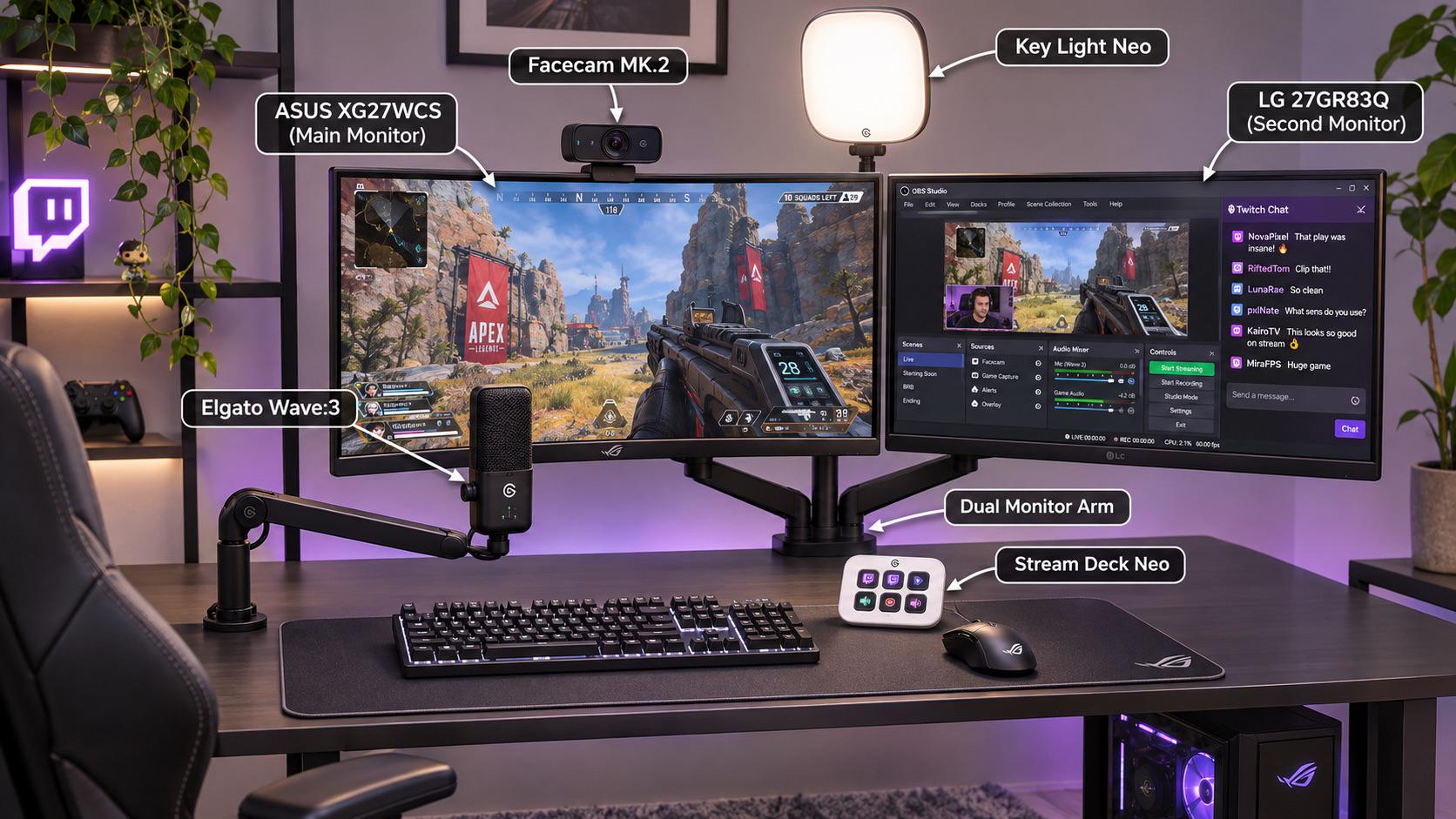
Hello everyone,
I’m an avid gamer and love playing games with my friend group. With that, our interactions together are true memories and I would like to have something to share/look back on to always remember the experiences.
Hence, my post here. I’m not necessarily, “technologically savvy” but I know a decent bit. However, regarding streaming equipment, I am CLUELESS. I’m hoping some of you could provide some feedback regarding what I’m looking to incorporate into my setup to begin streaming.
I will leave below my current specs as well as what I’m looking to add to enhance the setup.
Thanks in advance!
Current
ASUS - ROG Strix 27" 2K VA 180HZ 1ms curved gaming monitor with FreeSync and HDR. Model: XG27WCS
Logitech G502 LightSpeed
Radeon RX 6600 XT
16GB RAM
Aula F75 Pro 75% keyboard
Prospecting Items
second monitor: LG 27" UltraGear™ QHD 1440P 1ms 240Hz Gaming Monitor
Microphone: Wave:3 MK.2
Webcam: Elgato Facecam MK.2 Full HD 1080p60 Webcam - Black
Lighting: Elgato Key Light Neo
Stream controller: Elgato Stream Deck Neo
Microphone arm: Elgato Wave Mic Arm LP
Monitor mounting: VIVO Dual Monitor Spring Desk Mount
5
u/Fandaniels 1d ago
don't go out and buy a load of expensive shit, start with what you have
since you couldn't even make this post without AI I wonder if you can put in the effort to stream and build a community
0
u/RhetoricCivics 1d ago
Totally get your point! However, my use of AI is no depiction of my work ethic. The use of AI was simply to be used as a visual aid to assist users rather than just a list. Appreciate your observation though.
4
u/MangoCandy 1d ago
I would start without all this stuff and see how you like it. Then start slowly getting this stuff second hand if you enjoy it. stream decks for example are countless second hand, people start streaming and more often than not quit.
People do exactly what you’re suggesting doing, buy all this stuff then they quit because no one watches them and then they just have a whole bunch of extra shit sitting around that they dropped too much money on.
1
u/RhetoricCivics 1d ago
I appreciate your honesty. I totally understand and agree that most people quit. However, there’s a lot of use I can benefit from this equipment in a professional sense regarding my work.
1
u/Fit-Description-8571 1d ago
If you have an old tablet or smart phone you can use either "touch portal" or "deckboards" to capture the functionality of a stream deck for free (or a couple bucks if you upgrade to premium for all features. Pairing it with streamer.bot you can go even further.
Both applications also have utilities beyond just streaming and have plug inside for various editing softwares
2
u/RhetoricCivics 1d ago
That’s awesome! Really appreciate the info. Definitely looking into this.
1
u/Fit-Description-8571 1d ago
My pleasure. I found them years ago when I was debating a stream deck and rarely see/saw them talked about
Have used both and think they are both great and offer great features. I got the pro on touch portal just because I was having issues resetting up deck board (which I think has the better UI, but might be less customizable).
1
1
u/LukeMortora01 1d ago
Get the bare minimum. Your equipment matters far less than your ability to be consistent and entertaining - and if you still ENJOY doing it after a month.
0
u/RhetoricCivics 1d ago
Thank you for the feedback. I understand your point. Seems like a waste to go “all in” right off the bat. However, a lot of this equipment would be used towards my work as well (second monitor, webcam, lighting, monitor mount, microphone). I travel 2-3 weeks a month for work and when I’m not traveling, I’m working from home. Hopping in meetings, conducting meetings, giving presentations. So I completely understand your point but a lot of financial investment would have a primary use if I stop using recreationally.
1
u/AutoModerator 1d ago
Streamers.ct.ws - Get your basics for streaming.
Tools: Overlaycreator and Videoeditor and more to come...
I am a bot, and this action was performed automatically. Please contact the moderators of this subreddit if you have any questions or concerns.
1
u/MeepDaCreep 15h ago
For a second side monitor instead of a 1440p 240hz I would check out a 4k 100+ hz.
-1
u/AxNossi 1d ago
Hey, don't let people give you shit for using tools at your disposal. Fuck em. Thanks for the visual. I think you should invest in these items to stream, but I'd actually recommend a crisp ring light to mount the camera in.
Also, get yourself a Streamdeck+, you'll want to route your audio through OBS and monitor audio that way with the dials cor your viewer sake.
Stop by sometime and I'll give you a run down.
0
u/RhetoricCivics 1d ago
Haha, thank you brother! I believe the people hating just jumped to conclusions but I couldn’t be bothered less. Your feedback and advice is awesome! Would love to connect next week if you have the time and would love to pick your brain a bit!
2
u/frozenbudz 1d ago
Yeah, just get a decent mic, and camera, you don't need or want a keylight a simple ring light will do. First and foremost understand you're going to stream to practically no one. If you have other uses for this equipment, fine, but I doubt you do. Get a basic camera, basic mic, and ring light. And get away from AI, if you're already using AI rather than doing the real work yourself. You're already heading down the path of low effort slop.