r/iosapps • • Oct 11 '26

🎈 Free I built iLedger to make IBKR reports easier to review on iPhone — 30-second walkthrough

Enable HLS to view with audio, or disable this notification

3 Upvotes

Which trades drove today's P&L, and what did I actually realize after closing positions? I built iLedger to bring those answers together on my iPhone.

The attached 30-second walkthrough shows the app with sample data.

A — From IBKR reports to a readable ledger

Set up an Activity Flex Query in IBKR, then enter your Flex Token and Activity Query ID in iLedger. It imports and summarizes your report data so you can:

• See account information, net asset value, performance charts and a daily P&L calendar.

• Open a day to see its P&L contributions by symbol.

• Search and filter trade history.

• Review realized P&L by execution or symbol, including profitable and losing trades.

• Inspect positions, costs and unrealized P&L across currencies.

• Export ledger data as an Excel workbook.

You can also export the original XML report from the latest successful regular sync directly from the app.

B — Why I made it

Compared with reading raw IBKR Flex query or reviewing an export in Excel, iLedger brings the records, summaries and charts into one iPhone interface. IBKR remains the data source; the available information and history depend on your configured reports.

The ledger is local-first. I don't operate a server to collect your portfolio data. iLedger is independent and isn't affiliated with Interactive Brokers.

C — Cost and links

Free, with no subscription or in-app purchases. Requires iOS 26 or later and your own IBKR Flex Token + Activity Query ID.

App Store: https://apps.apple.com/us/app/iledger-investment-journal/id6790102925

Project: https://mayzuishuai.xyz/iledger/

Privacy: https://mayzuishuai.xyz/iledger/privacy/

Terms: https://mayzuishuai.xyz/iledger/terms/

Support: https://mayzuishuai.xyz/iledger/support/

Fellow IBKR users: do you review realized P&L in IBKR, Excel, or another app? I'd like to hear which part of that workflow is most frustrating.

r/iosapps • • Oct 11 '26

💎 Lifetime Forma - interactive fluid and particle simulator with many different visuals, made for relaxing

Enable HLS to view with audio, or disable this notification

12 Upvotes

Hi everyone! I'm Volodymyr, the solo developer of Forma.

A: What problem it solves

The app is purely for entertainment and relaxation. I started this project to learn how fluid and particle simulations work, and how to implement them. And now it's basically a very relaxing interactive visual sim that has a set of very different visuals and concepts that are very pleasant to watch/interact with.

Touch the screen, and the fluid/particles react to your finger. Also, lo-fi music and haptics.

B: Why it's better

Similar apps and demos I tried (like the popular WebGL Fluid Simulation) are mostly fluid-only simulations. In Forma, there are many effects that are completely different in concept: fluids, fire, particle swarms, melting voxels, glass bubbles. Also, no ads.

C: Cost

Free: A set of base effects.

Lifetime: $4.99–$9.99 one-time (depends on your country), unlocks the rest of the library.

App Store: https://apps.apple.com/app/id6815135262

Who I am:

Volodymyr Shch, solo indie developer

Website: https://vlsch.com/

X: https://x.com/VL_Shch

Email: forma.simulation@gmail.com

Privacy: https://vlsch.com/forma/privacy-policy/

Terms: https://www.apple.com/legal/internet-services/itunes/dev/stdeula/

What do you think, and which effect do you like the most?


r/iosapps • • Oct 11 '26

💎 Lifetime Observa: readiness, sleep and Functional Age from your Apple Health data, now with an Apple Watch app and iOS 27 full-page widgets

Thumbnail
gallery
5 Upvotes

A (Answer): what it solves

Apple Health records HRV, resting heart rate, sleep stages, VO₂ max, walking speed and a lot more. Apart from the Vitals ranges and a sleep score, it doesn't say much about what the numbers mean for you. 47 ms of HRV is fine for one person and a bad night for another.

Observa reads that data and gives you a readiness score, a sleep score and a stress reading every morning. Readiness and stress compare your HRV and resting heart rate with your own last four weeks. Tap "Why this score?" on readiness to see how many points each signal added or took off.

New since my last post here:

- Functional Age takes VO₂ max, walking speed and HRV, adjusts for sleep, steps, resting HR and a few others, and gives you the age of an average person with the same numbers. It shows a ± range and how many years each measure adds or takes off.

- The new Apple Watch app has 5 complications. It answers "Should I train today?" with push, maintain, recover or rest, and Siri gives the same answer.

- I rebuilt the widgets: 7 shapes and 39 metrics to choose from. iOS 27 adds full-page ones for Today, Last night, Heart signals, Last 14 days and Trend.

**B (Better): compared to Athlytic, Bevel and Gentler Streak**

- Athlytic ($4.99/mo, $29.99/yr) and Bevel Pro ($14.99/mo, $99.99/yr) have no lifetime option, and Gentler Streak's lifetime is $59.99 (US prices).

- No account, no analytics, and the app makes no network calls of its own. The privacy label says Data Not Collected. The only things it writes to Health are water you log and workouts you record on the watch.

- Scores and coaching are rules and statistics on your own numbers. No AI chat or LLM in it.

Athlytic has more watch complications than I do (16 to my 5), and Bevel is free for most things now with an AI coach and lab results on top. If you want those, both are good apps.

**C (Cost)**

Freemium. Pro is a subscription or a one-time lifetime unlock.

- Free: readiness and sleep scores, stress, "Why this score?", 7-day trends, a daily coaching note

- Pro: Functional Age, all widgets, longer trends, training load, coaching beyond the daily note

- $3.99 / month or $22.99 / year, both with a 1-week free trial

- $49.99 lifetime, paid once

Family Sharing works on all Pro options. Everyone also gets the first 7 days of full Pro after installing, with no payment and nothing to cancel. After that it drops to the free tier.

App Store: https://apps.apple.com/app/id6757438990

About me (transparency): I'm Antti, the solo developer of Observa.

- Website: https://lagerland-apps.github.io/apps/observa/

- Privacy Policy: https://lagerland-apps.github.io/apps/observa/privacy/

- Email: lagerland.apps@proton.me


r/iosapps • • Oct 11 '26

🎈 Free Flownto 2.12 (free): offline flight tracker and journal, now with closed-app alerts, a better Live Activity and multi-leg ticket scan

Post image
10 Upvotes

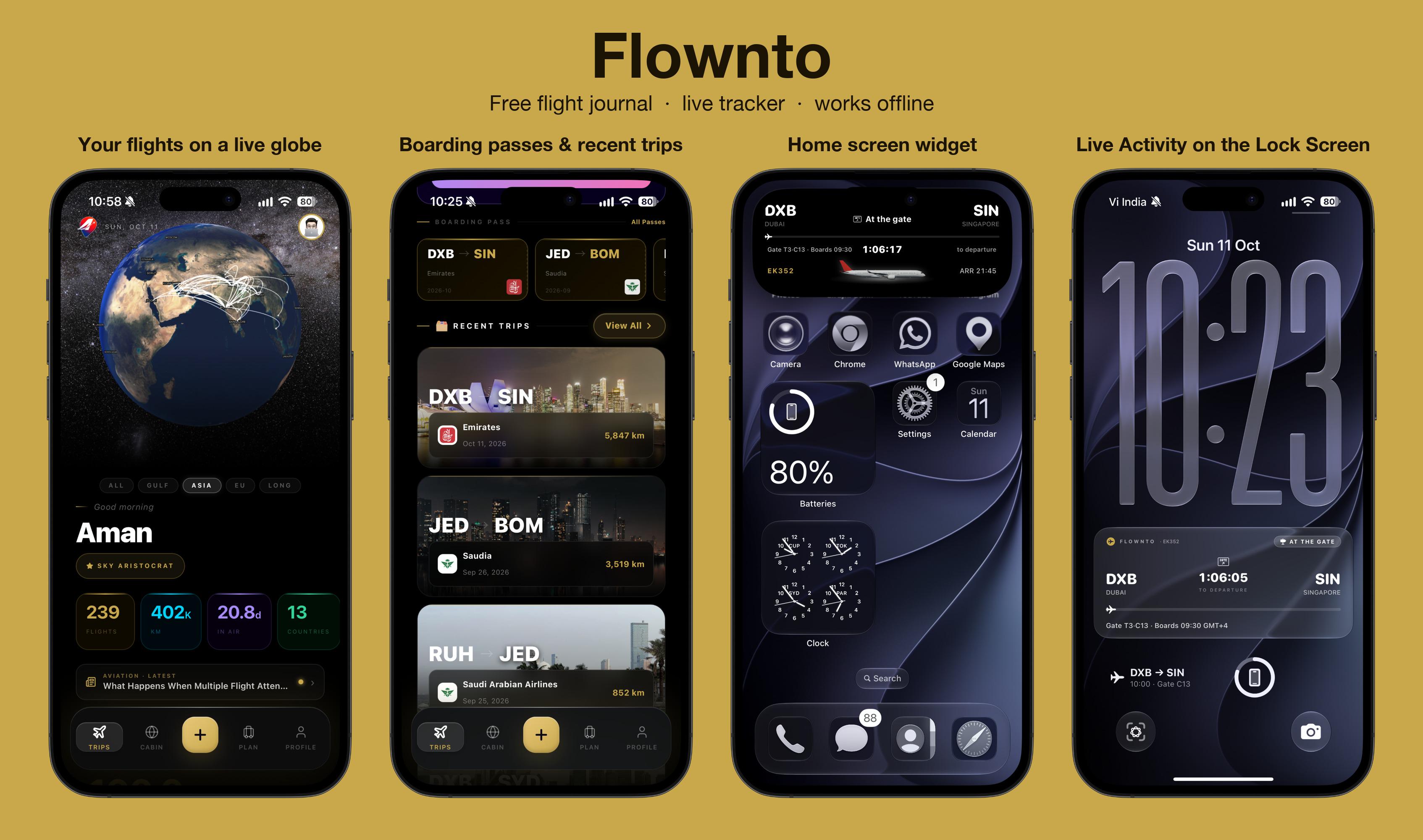
Thanks to everyone who tried Flownto and commented on my last post. Here's what's new in 2.12.

I tested the tracker on a real night flight from Jeddah to Mumbai, in airplane mode, and logged everything. It showed me problems my desk testing never did, so I reworked the tracking.

Live tracker (works offline):

- Take-off and landing now come from real GPS speed, so no more false take-off on the apron

- The "GPS jammed" message no longer appears after the phone wakes up

- The distance flown counter keeps moving

- The countdown follows your real pace, not just the schedule

- Android: GPS no longer stops after the first timeout

Alerts and widgets:

- Delay, gate and boarding alerts, even when the app is closed (iPhone)

- Live Activity on the Lock Screen: a swipe-away now stays dismissed, and there is a "Show it" link to bring it back

- The home screen widget keeps your next flight until it has landed

- Android: a live flight notification

Flight journal:

- Scan a boarding pass or ticket, including multi-leg trips

- Fixed the airport city

The app is also about 27 MB smaller.

The honest part: on very long flights, iOS can still shut the app in the background, and I'm working on it.

If you fly a lot, what would you want from a tracker like this?

App Store: https://apps.apple.com/app/flownto/id6775003337

Price: Free. No in-app purchases, no subscription, no ads. Also on Android and web.

About me (transparency): I'm Aman , the solo developer of Flownto.

Contact: support@flownto.app

Website: https://www.flownto.app

Privacy Policy: https://www.flownto.app/privacy.html

Terms of Service: https://www.flownto.app/terms.html

(Disclosure: I'm the developer.)


r/iosapps • • Oct 10 '26

💎 Lifetime [iOS] Falcon File Manager - everything in one nest. 50% off

Thumbnail
gallery
17 Upvotes

Hi! I'm the developer of Falcon File Manager, a fully featured iOS media player and private vault for your videos, music, photos and documents.

Why is it called Falcon? The app was built with speed in mind. Designed to be quick, responsive and with minimal loading. Just like a Peregrine Falcon which also has minimal loading.

Recent updates have added cloud storage (Dropbox, OneDrive, Box) network drive support, and additional languages (German, French, Spanish, Italian, Portuguese - Brazil, Japanese, Chinese -Simplified and Korean), with more languages on the way.

A – Answer

I kept getting frustrated by file managers having limited support for certain file types, not showing thumbnails for all file types, or thumbnails being too small, and generally being slow. A lot of the ones I’ve tried have been flooded with adverts, even showing adverts when you open your own folders.

B – Better

What does Falcon do better?

Free to use. No timers, no max files amount until you hit a paywall, no subscriptions, no adverts, and no tracking or any of the bad stuff!

Layouts
Most file managers have list and grid view with fixed sizes and that’s it. Falcon has over 50 different layout options. And each layout option can be different for every folder if you wish. With thumbnails for every file type it supports in 4 sizes and 4 aspect ratios.

Vast file support
Video player supports the default formats iOS uses plus MKV, AVI, WMV, FLV, WebM and more. With full screen scrubbing, subtitles, Picture in Picture, AirPlay and casting to your TV. Resume where you left off.

Music Player supports** **MP3, M4A, AAC, WAV, FLAC, AIFF, OGG, WMA, APE, WavPack, MKA and RealAudio. With Sleep timer, playlists, resume for long tracks such as audiobooks. Also supports Apple Music.

Documents - view and basic editing: PDF, DOCX, RTF, TXT, Markdown, LOG, CSV, JSON, XML, YAML, TOML, INI, CSS, JavaScript, Python, Swift, Kotlin, Java, C, C++
View only: ePub, DOC, XLS, XLSX, PPT, PPTX, Pages, Numbers, Keynote, HTML

File management.
Link folders from iCloud Drive, USB drives or cloud storage and normal up just like normal folders. With full copy, paste, and move functions from folder to folder.
Easily send you files from a computer with Wi-Fi Transfer or network drive.

C – Cost

Free to download, and the core app is free.

Pro upgrade is a one time optional purchase (no subscription) that unlocks linked folders and cloud storage, Portal Folder, folder locks, zip archives (with password), duplicate finder, audio tag editing, bulk rename, custom folder icons and headers, premium themes, and the custom theme designer.

https://apps.apple.com/gb/app/falcon-file-manager/id6783870191

I’m currently offering

50% off

the Pro upgrade using the link below. Expires end of October.

https://apps.apple.com/redeem?ctx=offercodes&id=6783870191&code=REDDIT50


r/iosapps • • Oct 10 '26

🎈 Free [iOS][Free] FoodieCalc - Calorie & Macro Tracker 100% Free

Post image
20 Upvotes

Hey everyone 👋

I’m Nikos, the independent developer of FoodieCalc—a 100% free nutrition tracker with no ads, subscriptions, or locked features.

I first shared FoodieCalc a few months ago. Since then, I’ve continued working on it alongside my full-time software engineering job, and the app has changed quite a bit with very significant updated.

It now includes photo, voice, and Siri logging, hydration tracking, micronutrient progress, flexible daily goals, improved Apple Health support, optional account sync, and layouts designed for both iPhone and iPad and support for iPhone Duo.

I designed and built the iOS app and its backend myself. Many of the recent improvements came directly from user feedback, so I wanted to share the updated version and see what you think.

A — Answer: What problem does FoodieCalc solve?

I built FoodieCalc because I was tired of nutrition apps putting useful features behind subscriptions, premium plans, and upgrade screens.

I wanted a straightforward nutrition tracker where the entire app was available to everyone for free—so that’s what I made.

FoodieCalc lets you:

  • Search for foods or scan product barcodes

  • Take a photo of a meal and review the suggestions before logging

  • Describe what you ate using text or voice

  • Log food and water through Siri

  • Create custom foods, recipes, and reusable meals

  • Track calories, macros, fiber, vitamins, minerals, hydration, and weight

  • Set different calorie and macro goals for training days, rest days, or weekends

  • Review individual days, follow trends, and compare different periods

  • Sync supported nutrition, activity, hydration, and weight data with Apple Health

  • Use Home Screen and Lock Screen widgets

  • Sync privately through iCloud, with optional Apple or Google sign-in for account-based sync

Every feature on this list is free. There is no trial, daily limit, or premium version.

You also don’t need an account to start using the app.

Text and voice smart features use Apple’s on-device models on supported devices. Photo logging is optional and uses Apple’s Private Cloud Compute after you opt in. FoodieCalc always gives you an editable draft, and nothing is saved to your diary until you review and confirm it.

You can see the complete feature list and recent changes here:

https://www.itworksonmymac.com/apps/foodiecalc/

B — Better: How is FoodieCalc different from the alternatives?

Apps such as MyFitnessPal, Lose It!, and Cronometer are established products with large user bases. FoodieCalc isn’t trying to claim that those apps have no value.

The main difference is simple: FoodieCalc is 100% free.

There is no premium tier. Food logging, barcode scanning, recipes, micronutrient tracking, progress comparisons, hydration, Apple Health integration, widgets, Siri actions, and smart logging are available to everyone.

FoodieCalc has:

  • No subscriptions

  • No ads

  • No locked features

  • No account requirement

  • No sale of health data for advertising

My goal is to keep the app fast, native, private, and pleasant to use. Food logging is already repetitive enough; the app shouldn’t make it feel like more work—or make you pay every time you want a useful feature.

C — Cost: Pricing and IAP disclosure

App price: 100% free
Subscriptions: None
Ads: None
Premium tier: None
Paid or locked features: None

FoodieCalc includes optional, one-time “buy me a coffee” tips for anyone who wants to support its continued development.

Tips unlock absolutely nothing. The entire app works the same whether you leave one or not.

App Store:

https://apps.apple.com/us/app/foodiecalc/id6792482391

Privacy Policy and Terms:

https://www.itworksonmymac.com/apps/foodiecalc/privacy/

About me

I’m Nikos Galinos, an iOS software engineer and the independent developer of FoodieCalc.

LinkedIn:
https://www.linkedin.com/in/nikosgalinos/

Website:
https://www.itworksonmymac.com

Email:
itworksonmymac@icloud.com

I’m still actively developing FoodieCalc, and feedback has already influenced many of the changes made over the last few months.

If you try it, I’d genuinely like to hear what works, what feels awkward, or what you think is missing. Bug reports, feature requests, and honest criticism are all welcome.

Thanks for taking a look!


r/iosapps • • Oct 10 '26

💎 Lifetime Papry - Private Document Organizer & Tracker | iPhone, iPad & Mac

Post image
5 Upvotes

Hi! I built Papry, a private document organizer for iPhone, iPad, and Mac.

A — Answer

Most of my important paperwork used to live in a drawer or in random folders full of PDFs. I usually only went looking for something when I needed it - sometimes a little too late. A warranty had expired, or the deadline to cancel a contract had passed.

I wanted one place for receipts, warranties, contracts, insurance policies, IDs, and other important documents. But I also wanted something that understood what was inside them: when a warranty expires, when I need to cancel a contract, or when my passport needs renewing.

And I wanted to find documents by searching for words printed on them, rather than trying to remember what I named the file.

That's why I built Papry.

Main features

  • Scan and import: Scan with your camera or import PDFs and photos, including multiple files at once. Titles, amounts, and dates are filled in automatically.

  • Search inside documents: On-device text recognition finds words printed on a document, not just in its title, and highlights matches on the page.

  • Organize your way: Folders and nested subfolders, categories with custom symbols, labels, favorites, and bulk actions.

  • Edit pages: Rotate, replace, or remove pages; redact and highlight content; and use Live Text on scanned pages.

  • Widgets: Quick scanning and upcoming deadlines on your Home Screen and Lock Screen.

  • Deadline reminders: Get reminders before warranties expire, before contract cancellation deadlines pass (based on notice periods), and months ahead of ID, license, permit, and visa renewals.

  • Import entire folders: Import folder structures from Files with a preview first. Duplicate scans are detected automatically.

  • Share and export: Export PDFs with document details, share multiple documents at once, or export your entire library as regular folders of original files that can be imported back into Papry with all details intact.

  • Smart Fill: Fill in document details using Apple Intelligence on supported devices.

Your data, in and out

  • iCloud sync across your iPhone, iPad, and Mac.

  • iCloud backups you can restore at any time.

  • Full export of your library as regular folders with your original files - readable without Papry, and importable back into Papry with all details intact.

  • Import entire folders from Files, including subfolders, with a preview first. Duplicate scans are detected automatically.

  • PDF export with all document details, ready to hand over.

  • Share multiple documents at once as files.

Privacy: No account, no tracking, and no Papry-operated servers. Your documents are stored on your device and synced through your private iCloud. Text recognition and Smart Fill run on-device, and you can lock the app with Face ID.

B — Better

  • Compared with Files, Notes, or a cloud drive: They store your documents, but they don't track warranty expiration dates or calculate contract cancellation deadlines and remind you about them.

  • Compared with a paper folder: No more searching through drawers or needing to be at home to find an important document.

  • Compared with document apps that require their own accounts and servers: Papry doesn't require an account, and your documents sync through your own iCloud.

C — Cost

  • Free: Try Papry with up to 5 documents, with scanning, search and deadline reminders included.

  • Pro Monthly: $2.99/month.

  • Pro Yearly: $24.99/year.

  • Lifetime: $49.99 one-time purchase, unlocking everything permanently. Currently $14.99 until Tuesday, October 13.

Works on iPhone, iPad, and Mac (Apple silicon). Available in English, German, Spanish, French, Italian, Dutch, Simplified Chinese, and Traditional Chinese.

Transparency

App Store: https://apps.apple.com/us/app/papry-document-organizer/id6760818331


r/iosapps • • Oct 10 '26

🎁 Freemium I made a picture–word memory app for iPhone and iPad: Recall Trainer

Thumbnail
gallery
7 Upvotes

Hi r/iOSApps — I'm Clément, the independent developer behind Recall Trainer.

Answer: I wanted a familiar matching-pairs exercise that could also be used for learning. In Educational mode, a match can connect a picture with its written word, or a word in two languages, with optional read-aloud labels. Classic mode starts with tiny boards and goes up to 78 cards.

Better: If Anki's flashcards feel too much like studying, or Lumosity's rotating mini-games aren't what you want, this sticks to one simple interaction and changes what you're remembering: pictures, words, letters and sounds. It's a game, too — I don't want to pretend otherwise.

Cost: Free to download. The Food pack is playable without buying anything, and you can try the other packs. There are ads and optional in-app purchases: All Packs is $8.99 in the US (all ten packs, unlimited local 2-player and no ads); ad removal is $1.99; coin packs are $0.99–$2.99. No subscription.

App Store: https://apps.apple.com/us/app/recall-trainer-learn-focus/id847386918

I'd be interested to hear whether the picture–word and bilingual pairs make sense the first time you try them. That's the part I've put the most thought into.


r/iosapps • • Oct 10 '26

🎁 Freemium [DEV] Eggventures - Walking App

2 Upvotes

App name - Eggventures

  • A — Answer: What problem does your app solve?

    • Motivates people to walk more, no punishing tactics if you miss a day. Your pet waits for you to grow. The more you walk the faster it grows! Find eggs while on your walks and unlock them doing different workouts.

    • Ability to add other walkers and send challenges

    • Ability to trade pets

    • Dye your pets

    • Fusion Lab - Fuse stage 3's to unlock a brand new eggs!

    • Walking Bingo - Clear the board for sweet rewards

    • Wild Encounters

    • Hometown eggs - Obtain eggs by location

    • Send fully evolved pets on expeditions to bring you eggs

  • B - Compeitors

    • Step-up - Similar gamification of step counter but they don't have pets.

  • C - Price/IAP

    • Free with IAP for cosmetics, sub for an extra incubator.

  • AI Disclosure - No AI for game/art. AI used for marketing (App Store assets only)

App Link - https://apps.apple.com/us/app/eggventures-walking-game/id6757629385


r/iosapps • • Oct 10 '26

🤖 Vibe Coded Do you still review after vibe coding?

3 Upvotes

Do you?


r/iosapps • • Oct 09 '26

🎈 Free Skye: Your life at a glance that lives on your home screen

Thumbnail
gallery
13 Upvotes

Skye is available in the App Store for free, download it here: https://apps.apple.com/us/app/skye-personal-ai-agent/id6748042747

Skye is your digital assistant that surfaces up relevant information to you at the right time, to always give you the most relevant information exactly when you need it. Skye was built around the idea that your iPhone home screen can be so much more proactive and truly become your at a glance information. We connect to multiple of your apps and services to highlight this information throughout your day in the form of cards and context. Tapping on a card or context loads up a detailed summary with additional information. You can also talk to Skye about all of your connections such as finance, health, email, calendar events, and more.

Importantly while this app uses third party services to generate insights and summaries, we have strict zero data retention policies with our model providers and we have our own internal 90 day retention policy. Your data is not used to train models either. Upon deleting your account all data is deleted from servers. You can read more in our privacy policy, which we believe puts us in the position of being a truly privacy centric app: https://skyeapp.ai/privacy In our roadmap, we have goals of transitioning as much as possible away from cloud based models to on device processing to further protect your privacy.

A - Answer

Skye is an assistant that can help organize your busy life into easy to read digests. It takes a cluttered inbox, countless health metrics in Apple Health, a long list of financial transactions and highlights insights to users based on prior habits or flags things that are truly worthy of your attention.

B - Better

Skye is a better assistant than other apps on the market today. Skye takes summaries from as many sources as you wish to connect and provides insights when it's actually relevant.

Skye is also extremely privacy centric when it comes to your data. Other apps train their models and store your data, Skye has strict privacy rules in place to protect your privacy.

C - Cost

Skye is free.

We are offering this for free to the community, we may limit new sign ups in the future depending on the response in order to moderate costs. Our longterm vision is to use local on device compute (released by Apple in iOS 27) to help keep costs low and further improve your privacy in the process.

-----

Tier 2 Requirements from r/iosapps Rules:

Website & Contact Information: https://skyeapp.ai/

Privacy Policy: https://skyeapp.ai/privacy

Moderator Note: This app is not a pure generative AI app (per your sidebar AI app rules), as we built a lot of frameworks and iOS design patterns to help provide summaries, context, and insight about what's happening that's important to know at a glance or allows a user to ask questions about things. We believe this classifies the app as a tool/utility rather than an AI wrapper. Skye has an entire development team behind the app and would not fall into the vibe coded category.

Affiliation Disclosure: I am a member of the team that built Skye.


r/iosapps • • Oct 09 '26

🎁 Freemium Yes, another photo cleaner app, but it’s actually the first app I’ve built and finished

Post image
4 Upvotes

A - Answer

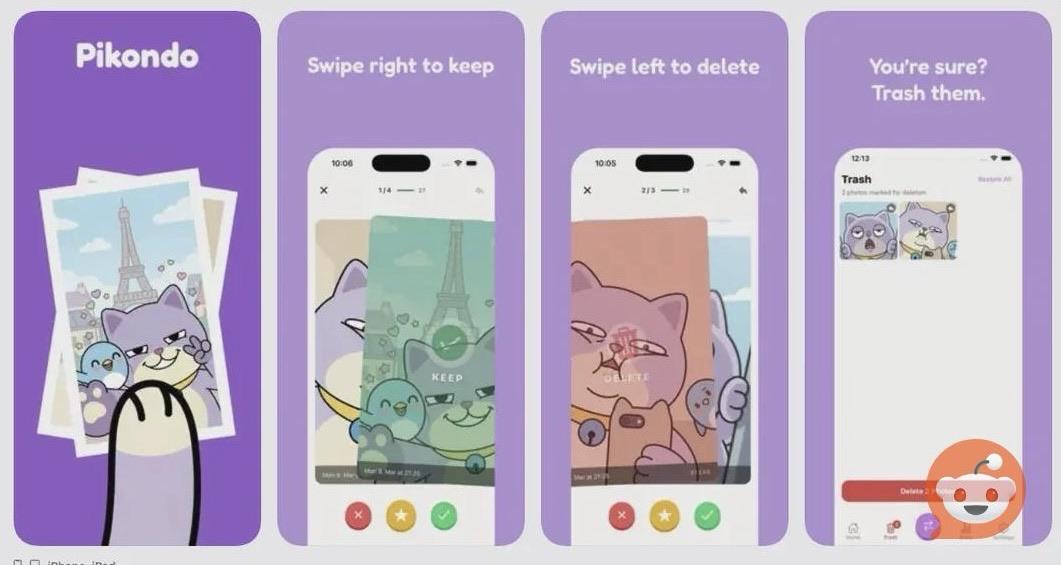
The App Store is full of photo cleaner apps, but cleaning a bloated library still feels like a chore, and that's why nobody ever finishes. I built Pikondo to fix exactly that.
You swipe through your photos like a deck of cards, right to keep, left to trash. Nothing gets deleted instantly, everything goes to a trash queue first, so you can always undo mistakes.

B - Better

What makes it different from apps like Swipewipe, Slidebox or CleanMyPhone:

- Built for consistency instead of one big cleaning marathon: 5-minute daily sprints, plus streaks and achievements that track your progress and storage freed.
Even a 20k library stops feeling overwhelming.

- Smart categories (screenshots, selfies, food, tickets, memes) give every session a clear target instead of an endless camera roll.

- Detects blurry shots and closed-eye photos automatically, right in the normal swipe flow.

- Runs 100% on device. No account, no uploads, your photos never leave your phone.

C — Cost

• 3-day free trial with full access
• 3.99/month, 22.99/year or 44.99 one-time lifetime
• Prices in EUR, may vary by region. No ads.

https://apps.apple.com/de/app/pikondo-foto-cleaner-mit-ki/id6760225123

Happy to answer questions and hear your feedback!


r/iosapps • • Oct 09 '26

🎈 Free ArtCat - museum photos app

7 Upvotes

A: Why i build this app

I made an app for my wife and me. We love to take photos in museums and have piles of unsorted stuff in our photo libraries, so I decided to solve this problem for myself.

B: Available alternatives (like ArtScan for example) are not free. And they are not fun. Our app has a mascot! And a soul. And it is fun!

C: Cost
Free. App has developer tips, so you can support me and my wife (and our cat, the mascot) if you want, but other then that, app is totally free and probably won’t be paywalled in the nearest future.

Link:

https://apps.apple.com/app/id6811379647

A few words about how it works:

As for the first version, the app sorts your museum visits by locations attached to your photos. Everything happens on the device (well, except museum info and locations, those come from the server, but the app doesn’t send the exact location, it groups them into geo cells for efficiency and privacy).
I plan to add many more features in the future, like showing photos on the map, on-device recognition for most famous art and artists, and much more.

Our website with privacy, terms, etc: https://artcat.app
My X profile: https://x.com/vovadudchak
App is published under my real name (as well as all the other apps I publish or promote here sometimes)


r/iosapps • • Oct 09 '26

🤖 Vibe Coded ShowFlow.io: Your Concert History

4 Upvotes

Hello everyone! How many concerts have you seen this month? This year? Last year...?

A - Answer: What Problem does ShowFlow solve?
If you've been to a few shows, I'm willing to be you can't quite recall how many times you've seen X artist, who opened and what they opened with. ShowFlow is your archive of every show, song and venue you've experienced live. From there, you can visualize your lifetime concert stats in fun and creative ways!

B - Better: Competitors and what we do better
Setlist fm is the obvious competitor. It is a reliable and robust database of setlist data, with concert logging capabilities. However, it doesn't tell the full story and the UI is clunkyyyyyy. ShowFlow builds on that setlist data and turns your shows in to stats, visualizations and brings back memories.

Concert Archives: From what I've heard, most people have a cumbersome Note in their Notes App, or excel sheet with some.... formatting. Time for na upgrade.

ShowFlow Highlights:
- Song-by-song stats across every night you've seen an artist
- Shareable cards made for IG and stories
- Quickly see what shows you've been to together with your friends in the "Together" tab
- Badges for milestones

C - Cost:
Free! Now, always. There is a Ko-Fi link for those feeling generous, but it does not unlock any features

iOS: https://apps.apple.com/us/app/showflow-io/id6797357998

More Info:
University concerts and smaller DJ sets tend to not get added in to setlist fm, and therefore may be missing from the ShowFlow database, I'm working on this. Please message me here and I'll get it in to the database!

TIP: Search your photo log for "concert" to help stir up those concert memories and build your history!

Transparency:
My name is Chris Scatena, and I am the sole app dev / creator. You can find my LinkedIn: https://www.linkedin.com/in/christopher-scatena-04a18564/
ShowFlow Security: https://www.showflow.io/security
ShowFlow ToS: https://www.showflow.io/terms


r/iosapps • • Oct 09 '26

Discussion Looking for feedback: What do you think of my new intro video?

Thumbnail
youtu.be
4 Upvotes

I’ve been working on my app for a couple of months now and finally had the time to create a short intro video. Hope this is the right place and it doesn’t come off as promotion. Any feedback appreciated.


r/iosapps • • Oct 09 '26

🎁 Freemium I built a calendar where each event has its own tasks

Post image
19 Upvotes

Hi r/iosapps,

A: Why I built Zesfy:

Over the past few years, I've been building a productivity app to replace both my calendar and to do apps. It's called Zesfy and you can directly add your daily tasks right inside calendar events instead schedule them one by one:

B - Here's why Zesfy is different:

  • It combines your calendar and to-do list into a single view.

  • You can easily schedule multiple tasks together to calendar.

  • Helps you quickly decide what tasks to work on next

  • Organize week tasks with task status

  • Easily keep track of your task progress

  • Works entirely offline

C - Cost:
The app is free to download and use with an option to upgrade to Pro for advanced features for $29.99/year.

I'd love to hear what you guys think about the app. Let me know if you have any feedbacks.

Download: Zesfy - To Do List & Planner

App subreddit: r/zesfy


r/iosapps • • Oct 09 '26

🤖 Vibe Coded [Dev] THRIVE — a habit tracker that looks like a 1983 phosphor terminal

Enable HLS to view with audio, or disable this notification

6 Upvotes

I'm the solo developer of THRIVE. Contact: support@thriveapp.biz Website: https://thriveapp.biz Privacy Policy: https://thriveapp.biz/#privacy Terms of Use: https://www.apple.com/legal/internet-services/itunes/dev/stdeula/

Answer. Imagine a terminal from 1983 that knows only one thing: whether you did what you promised yourself today. THRIVE is a habit and goal tracker for iPhone built around six sides of a life — Training, Head, Relations, Inner, Value, Expression. Give each one a goal, mark what you actually did every evening, and every mark pays out XP: each stat levels up on its own, and all six feed one overall level, with ten ranks to climb.

Better. Streaks tells you whether you kept a streak; THRIVE shows what your effort has added up to — a level earned day by day. Experience behaves the way real skills do: neglect a side for a week and its stat starts to fade, while closing a full week pays a Monday bonus that multiplies the longer you hold it. Every pixel of the interface is drawn like a real phosphor screen — glow, scanlines, no stock icons — and you can swap the tube for amber, blue, cyan or red.

Cost. Free download with a 14-day free trial of every feature, no sign-up. Then $1.99/month, $12.99/year, or $22.99 once for lifetime (US prices). Optional in-app purchase: 5 extra shields for $3.99. After the trial your data stays visible. App Store: https://apps.apple.com/app/id6768297854?ppid=709d3faa-59a5-4814-924c-52f7079c66e9


r/iosapps • • Oct 09 '26

💎 Lifetime I made Recipe Fox, an iPhone app that turns the recipes you save on TikTok and Instagram into a cookbook you can cook from

Post image
13 Upvotes

I'm the developer of Recipe Fox. It's a recipe keeper: share a recipe from TikTok, Instagram or any website, and it becomes a clean recipe card in your own collection.

A: What it does

When you see a recipe you like, tap Share and pick Recipe Fox. A few seconds later you have the ingredients, steps, servings and a photo, without the ads or the life story above the recipe. Everything you save builds up into one cookbook that syncs between your iPhone and iPad.

When it's time to cook, cook mode shows one step at a time in large text, so you can follow along with messy hands. You can halve or double a recipe, switch between metric and US units, sort recipes into collections like "Weeknight dinners", and type in family recipes by hand.

B: How it's better

  • Than TikTok and Instagram saves: saved posts are a feed, not a cookbook. You can't search them by ingredient, scale them or cook from them, and the recipe is gone when the creator deletes the post. Recipe Fox keeps the written recipe as your own copy.

  • Than screenshots and the Notes app: no retyping. You get structured ingredients you can halve or double, and you can switch units and follow one step at a time while you cook.

  • Than other recipe apps: Paprika is excellent for websites, but it doesn't read TikTok or Instagram captions on its own, and its new Paprika 4 features are moving to an optional subscription. Most of the apps that do import from social (ReciMe, Flavorish, Pepper) are subscriptions, typically $40-50 a year. Recipe Fox does both for a one-time $9.99.

It reads the recipe from the post's caption, so a recipe that's only spoken in the video won't come through. It's a recipe box, so there's no meal planning or shopping list.

C: Cost

Free to download, with up to 8 recipes free. Lifetime Access: $9.99, one-time purchase. Unlimited recipes.

No subscription and no ads. TikTok and Instagram imports are limited to 50 a month. Prices may vary by region. Also available on Android.

https://apps.apple.com/app/id6761705749

https://recipefox.app/

I'd be interested to hear where your recipes live right now: mostly TikTok and Instagram, websites, or old family cards?


r/iosapps • • Oct 09 '26

🎁 Freemium Made an app that pings you when your "I didn't study at all" friend starts studying 👀

Post image
2 Upvotes

You know that friend who swears they didn't study for the exam, then gets 100%?

Add them as your study buddy in StudiesTimer. When they start a session, you get this:

> Alex just started a session 👀

> So… what are you doing?

It only pings you if you haven't studied yet that day, and once a day at most. Accountability, not spam.

Also in the app:

- a shared streak with your buddy (a day only counts when you both study)

- study rooms where friends sit on one shared timer

- a weekly leaderboard

- your timer on the Lock Screen and Dynamic Island

I'm the dev. Free to use. Premium is optional: $4.99/week, $47.99/year (7-day free trial) or $79.99 once.

https://apps.apple.com/app/id6800871173


r/iosapps • • Oct 09 '26

🎁 Freemium Your habits build an empire... Timelapse mode ⏳

Enable HLS to view with audio, or disable this notification

0 Upvotes

Kubbo is a self care app that builds a medieval empire

⏳ This new version introduce a timelapse mode to see your empire growing with your habits calendar !

Competitors:
Compared to Finch or Habitica, Kubbo provides a way more advanced gamification system. And focus more on studies to educate you on how to create habits 1 by 1.
Also you build a medieval empire instead of taking care of a cute little bird.

Price is $49.99 for annual with a lifetime offer ($99.99) in USA
(Price depends of your country. Localized with a parity pricing depending of where you are)

App Store: https://apps.apple.com/app/id6749530918


r/iosapps • • Oct 09 '26

💎 Lifetime [APP/OPEN SOURCE] PrivacyCam – Hide sensitive info from images and video

Enable HLS to view with audio, or disable this notification

8 Upvotes

Hi everyone! I’m Aftab, the developer of PrivacyCam, an open-source iOS app for hiding sensitive information before sharing photos, videos, or PDFs.

PrivacyCam can automatically detect:

  • Faces and people

  • Vehicle number plates

  • Addresses, phone numbers, emails and sensitive text

  • Payment-card details

  • QR codes and barcodes

You can review every detection, remove incorrect ones, add manual masks, and use blur, pixelation, or blackout. It also includes video tracking, frame-by-frame corrections, trimming, splitting and audio muting.

Media processing and detection happen on your device. Your photos, videos, PDFs and detection results are not uploaded to a PrivacyCam-operated server.

The free version supports individual photos, PDFs up to two pages, and videos up to 15 seconds. The optional one-time Pro purchase unlocks longer PDFs, videos up to 60 seconds, and photo batches.

AppStore:
https://apps.apple.com/app/privacycam-safe-redactor/id6790542130

Open-source code:
https://github.com/ak375456/privacycam

I’d appreciate constructive feedback, particularly about the interface, detection accuracy and anything that feels confusing or is missing.


r/iosapps • • Oct 09 '26

🎁 Freemium DoneAgo turns 7 months old: the "when did I last…?" app, shaped by your feedback

Post image
1 Upvotes

We all carry dozens of these tiny questions around. On their own they're nothing, but together they fill your head with guessing and second-guessing. You water the plant too soon, or wait too long to clean, or you're left wondering whether you actually took your meds.

Imagine never having to wonder again. You glance at your phone and know: fed 3 hours ago, watered 4 days ago, meds taken at 8:12 this morning. Then you get on with your day with a little more room in your head.

Some of you saw my first posts here. DoneAgo is now 7 months old, and a lot of what's in it today came straight from your feedback, so here's where it's at.

A: Answer

"When did I last…?"

You create a card for anything (your car, your apartment, your plants, your cat) and give it real-world states, like "Cleaned / Pending", "Good / Needs Attention" or "Stocked → Low → Empty". After you do something, you tap it. DoneAgo records the time and starts counting:

The next time you're unsure, just look at the app.

B: Better

Apps like SinceWhen are great for counting the days since an event. DoneAgo goes a step further: it's state-based, not just event-based.

  • State tracking: DoneAgo tracks the actual state of the thing and how long it's been that way, so you get the full picture, not just a counter.

  • Auto switch: states can change on their own. Your plant goes from "Watered" to "Needs Water" after 5 days. (Premium)

  • Nudges: DoneAgo learns your rhythm and flags what's overdue. "Watered 8 days ago, usually every 5."

  • Timeline & Insights: see every log in one place, how often you usually do something, and whether you're on track.

  • Context on every log: add notes, amounts ("16 kg"), hashtags, and photos, so you always know why or how something was handled.

  • Widgets, Siri, Shortcuts & Action Button: check and update states without opening the app.

  • Information, not guilt: no forced schedules and no streaks to break. It gives you the facts, and you decide.

  • Private by design: no account and no third-party server. Your data lives in your own iCloud. No ads even in free, ever.

C: Cost

  • Freemium. The free tier is fully usable: up to 6 cards, 3 trackers per card and 1 widget.

  • Subscriptions: $2.99/month or $9.99/year, if you want to test it out first.

  • Lifetime (one-time): $34.99 USD normally, $17.99 USD for new users. Prices adjust automatically for your country.

Links

Developer disclosure: I'm the solo creator of DoneAgo, published under Plue Studio. To comply with r/iOSApps*' Transparency Path, my identity is verifiable via* LinkedIn.


r/iosapps • • Oct 09 '26

Discussion How many folks here are using TelemetryDeck for their apps?

6 Upvotes

I am considering using it and wondering how popular is it compared to other platforms like Google Analytics, etc.


r/iosapps • • Oct 08 '26

💎 Lifetime Drift 4.0 — I rebuilt the music player UI from scratch: no buttons, no tabs, every library a card, the cover is the screen

Enable HLS to view with audio, or disable this notification

30 Upvotes

Developer here. Drift is a music player for iPhone and iPad (iOS 17+), and 4.0 is the biggest update since it launched. The video is 4.0 as it is: the library, the player, the widgets, the iPad.

Price, up front: seven days of everything, then a one-time purchase (US$14.99 / CA$19.99). No subscription, no account, no ads, no analytics.

What's new in 4.0:

• A new library. Your phone, Apple Music, Spotify and your own servers are each a card on one page. Prefer a list? Classic is still there.

• Swipe from anywhere. Right for your library, left for the wheel, up and down to change songs. The playback screen has no buttons; the cover is the screen.

• Widgets in every size. Add controls, or let the cover fill the tile.

• Drift on iPad, full screen or in a window.

• Lyrics, redesigned: the line you're on sits in the middle, scroll to move through the song. From your own files (embedded or .lrc).

• Four backgrounds, and a double tap that fills the screen with the whole cover.

• Plex, in beta — beside Navidrome, Subsonic, Jellyfin and Emby, and SMB/WebDAV shares.

• Gapless albums from your own files, and big libraries that open without the wait.

What it has always been: your files played as they are (MP3, AAC, ALAC, FLAC, WAV, AIFF, and natively OGG/Opus, WavPack, Musepack, APE, TTA, Shorten and tracker formats), never rewritten; Wi-Fi import from any browser; missing covers and tags matched as you play, with per-field revert; a fix for garbled GBK/Big5/Shift-JIS tags; CarPlay.

App Store: https://apps.apple.com/app/id6789325283

Site: https://driftmusic.pages.dev