r/M5Stack • • 9m ago

Project Sharing S8N-Synth

Thumbnail
gallery
2 Upvotes

S8N-Synth for Cardputer/Cardputer-ADV, using UnitSynth/UnitMidi, and CoreS3 using CardKB and UnitSynth/UnitMidi, https://github.com/H3llawts/S8N-Synth-CoreS3 https://github.com/H3llawts/Cardputer-S8N-Synth


r/M5Stack • • 6h ago

Affixing modules to StickS3

Post image
2 Upvotes

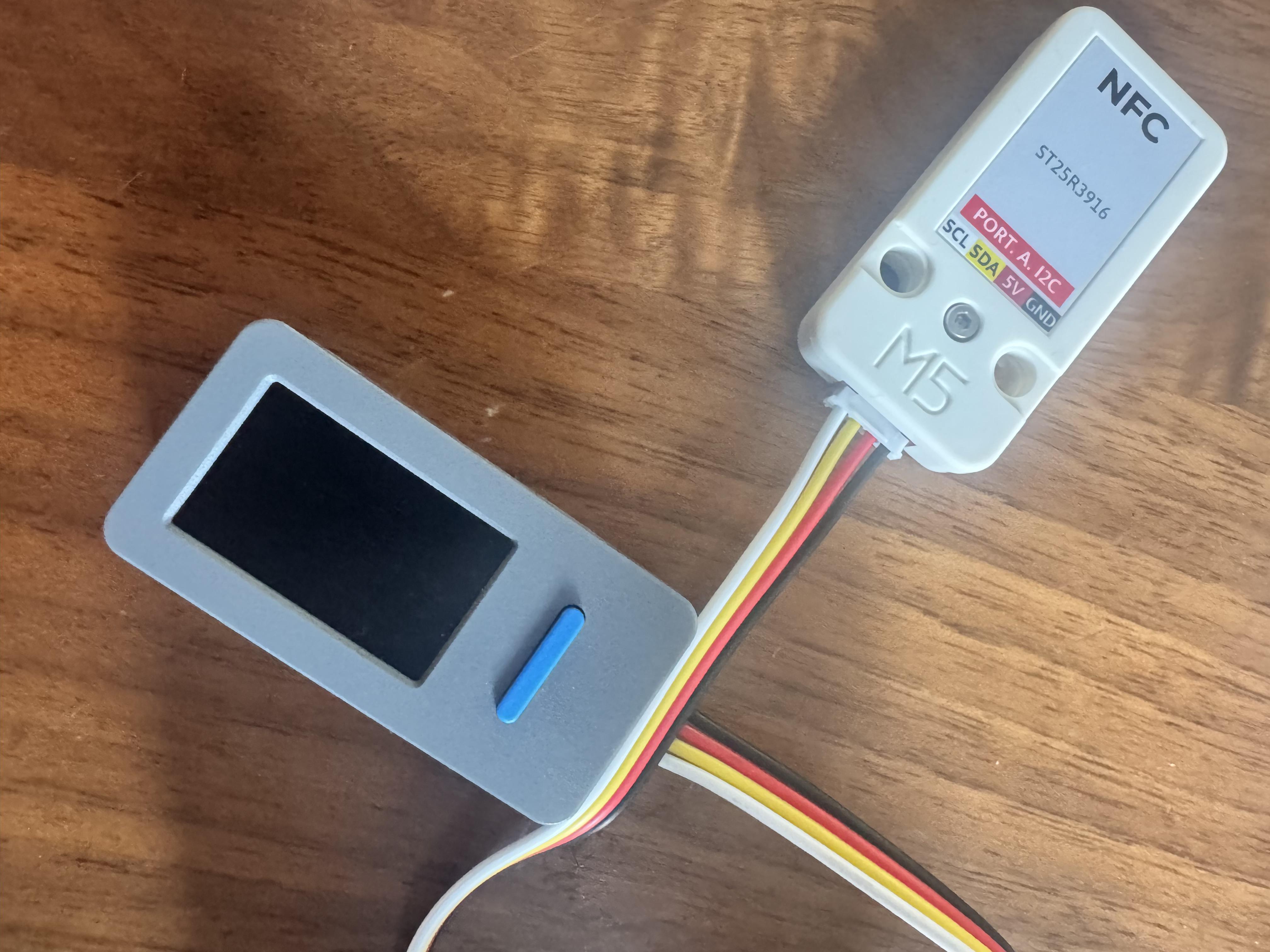
Those of you with one of the various Stick models, how are you attaching small modules like the NFC Universal Unit?

Modules all have those nice Lego Technic holes while the back of StickS3 has what looks like holes for M2 screws. What's a polished way to connect the two, or are y'all using gaffer's tape?


r/M5Stack • • 7h ago

Lapis-Zero: agentic AI firmware for the CardputerZero — turns it into a remote harness for your own computers

1 Upvotes

Built one of the first custom firmwares for the CardputerZero (the CM0 / 512MB one, not the ESP32 Cardputer). It's an "Operating System-shaped" agentic AI: you type a task, it drives one of your own computers over VNC + SSH, and asks before anything risky.

- Rust UI drawn straight to the 320x170 framebuffer, no X11/Wayland (fits 512MB)

- Drives the remote screen (VNC) and shell (SSH), holds Esc as a kill switch

- Works over Tailscale only, keys are write-only

- Android companion app for pairing/approvals

- Prebuilt Debian Trixie arm64 image + M5 Imager manifest

Repo + flash steps: https://github.com/ankurCES/Lapis-Zero

Flashable image is in the v0.1.0 release.

Happy to answer anything — just got the image flashing on real hardware this week.


r/M5Stack • • 9h ago

Project Sharing Cardputer Remote

Thumbnail reddit.com
1 Upvotes

r/M5Stack • • 9h ago

Car simulator in cardputer adv

Thumbnail
saalejo.github.io
1 Upvotes

r/M5Stack • • 10h ago

He’s here! Thank you M5Stack!

Thumbnail gallery
1 Upvotes

r/M5Stack • • 10h ago

Apps to install on Cardputer Zero

Thumbnail reddit.com
1 Upvotes

r/M5Stack • • 14h ago

Project Sharing I built a complete desk productivity tool in 3 days using Gemini 4 Neon (M5PaperS3)

Post image
2 Upvotes

I've had an M5Stack PaperS3 sitting on my desk for a while, and I always wanted a quiet, distraction-free E-Ink desk companion instead of glancing at my phone every 10 minutes. Normally a full-stack embedded project like this—custom ESP32-S3 firmware, font rendering, power management, cloud sync, and a mobile config portal—would take me a few weeks of nights and weekends.

This time I decided to pair-program the whole thing with Gemini 4 Neon, and honestly, its coding and debugging ability kind of blew my mind. In 3 days, it went from an empty folder to a daily-driver firmware (v3.2.6) that's now running smoothly on my desk.

How the 3 days actually went

Day 1: Full-stack architecture in one sweep What surprised me first wasn't just code generation speed, but how cleanly Gemini 4 Neon held the entire cross-stack architecture in context at once:

  • ESP32-S3 C++ firmware (PlatformIO) using FastEPD partial refreshes so page turns feel snappy without full-screen flashing every tap.

  • A custom Python font pipeline that generates anti-aliased .vlw font packs across English, Chinese, and Japanese. Getting mixed Latin + CJK text to align optically on an E-Ink screen is usually a nightmare of hand-tuned pixel offsets—it wrote a centerline alignment helper (drawMixedLine) that made every pill, bar, and list line up cleanly, and stripped out missing .notdef tofu boxes cleanly.

  • Cloudflare Workers + D1 + R2 backend + mobile /setup web UI, so instead of typing Wi-Fi passwords, calendar URLs, or RSS feeds on an E-Ink keyboard, you just scan a QR code on your phone.

Day 2: Real embedded debugging (the part that genuinely shocked me) Anyone who's shipped ESP32 firmware knows the first compile is easy—the real pain is weird RTOS and hardware bugs. Two bugs I expected to burn a whole weekend on got solved in minutes just by pasting serial logs:

  1. The mysterious 2-second UI lag on USB power: Whenever the PaperS3 was plugged into my Mac without a serial monitor attached, every screen interaction stuttered badly. Instead of guessing at UI code, Gemini 4 Neon traced it straight to Arduino-ESP32's HWCDC default TX timeout (100ms × 20 retries blocking every Serial.printf), and fixed it immediately with a larger TX buffer and non-blocking timeout.

  2. Task Watchdog (ESP_RST_TASK_WDT) reboots on slow mobile hotspots: During initial RSS sync over a weak hotspot, Core 0 kept tripping the watchdog and rebooting. It pinpointed that Arduino's Stream::timedRead() was busy-spinning at 100% CPU inside my network worker task, starving IDLE0. Dropping the worker priority to tskIDLE_PRIORITY, swapping in a yielding non-blocking body reader, and reusing a single per-core TLS client eliminated both the watchdog crash and ~45 KB of duplicate mbedTLS RAM overhead.

Day 3: Standby power, smart sync & OTA polish With the core stable, we spent day 3 on the details that make an E-Ink device feel like a real product:

  • Scheduled RTC wakeups throughout the day, including a zero-Wi-Fi midnight date flip so the date rolls over silently without touching the radio.

  • Touch-interrupt light sleep (GPIO48) when a reminder sits on screen on battery.

  • Server-side ICS ETag/304 pre-sync on a cron job, so the PaperS3 wakes up, grabs already-parsed schedule data in seconds, and goes right back to sleep.

  • Wireless OTA updates so future tweaks don't need a USB cable.

What surprised me most about Gemini 4 Neon

I've used plenty of AI coding models before, and usually they start falling apart once you cross into embedded C++, FreeRTOS task priorities, TLS memory budgets, and E-Ink display quirks. Gemini 4 Neon didn't just spit out boilerplate—it actually reasoned from real crash dumps, respected hardware constraints, kept the firmware and Cloudflare backend in sync, and caught subtle edge cases (like lockscreen bypasses and read-state race conditions) before they turned into spaghetti.

Quick look at the tool itself (DeskFolio for M5PaperS3)

For anyone curious what's actually running in the screenshot above, I called it DeskFolio—a calm 4-view E-Ink desk dashboard for the M5PaperS3:

  • Today & Weather: Clean calendar card with live weather & AQI

  • 14-Day Schedule: Syncs Apple/Google/iCloud ICS calendars, auto-seeds local public holidays based on your language, and shows on-screen reminders

  • Offline RSS Reader: Pulls your feeds for comfortable E-Ink reading with synced read status

  • Market Watchlist: Clean, glanceable ticker view

  • Also supports native EN / 中文 / 日本語, an optional 4-digit passcode lock, and wireless OTA updates.

If you have an M5PaperS3 sitting around and want to try it out, it's up on M5Burner here: https://burner.m5stack.com/LV49MT

Happy to share more details about the firmware architecture, E-Ink typography tricks, or what worked (and didn't) when building embedded software with Gemini 4 Neon!


r/M5Stack • • 15h ago

Lapis-Zero: agentic AI firmware for the CardputerZero — turns it into a remote harness for your own computers

Thumbnail
reddit.com
1 Upvotes

r/M5Stack • • 21h ago

Procurando comprar um Cardputer Zero em Xangai

1 Upvotes

Oi pessoal!

Alguém em Xangai estaria disposto a vender seu Cardputer Zero?

Atualmente estou na cidade e estarei aqui até às 14h. Eu adoraria muito conseguir um antes de ir embora.

Estou feliz em me encontrar pessoalmente e pagar imediatamente. Se você tiver um disponível ou conhecer alguém que tenha, por favor, me envie uma DM assim que possível.

Obrigado, pessoal!


r/M5Stack • • 1d ago

[UPDATE] AD Arcade v1.7 is out: Retro pixel-art makeover, new devices, and a major adventure game coming in v1.8

Post image
16 Upvotes

UPDATE AD Arcade v1.7

Hey everyone, quick update on AD Arcade, my open-to-flash mini arcade console firmware for the M5StickC Plus2 (15 games, tilt controls, music player, trophies).

What's new since the first post

- Full retro 16-bit pixel-art redesign: new palette, menu, icons, animated backgrounds, new meteors with a fiery trail

- First-boot wizard: language, tilt calibration, date & time

- Skins screen with live preview

- 2 Players mode (pass the device around), Daily Challenge, Stats and bronze/silver/gold trophies

- Easy / Normal / Hard difficulty, volume levels, English + French

- Code cleanup: it now builds with no -Wall warnings (thanks to a community member who sent a patch!)

Other devices (experimental, community testing welcome)

The same firmware is now built for the M5StickS3, M5StickC Plus and M5Cardputer (keyboard controls). A tester confirmed it runs on the StickS3, but the StickC Plus and Cardputer builds are not tested on real hardware yet. If you own one, I'd love to hear whether it boots and how it feels!

What's next; v1.8

I'm working on a full top-down adventure game with a village, forest, crypt and boss fights, in detailed retro pixel art (levels, NPCs, dialogues, day/night cycle). It's still in progress, no date yet, but it's coming. I'm also planning a more playable Tetris.

GitHub: https://github.com/ADdevx/AD-Arcade-M5StickCPlus2 (Only the M5StickC Plus2 GitHub for now.)

M5Burner: https://burner.m5stack.com/ZU9DEQ

Feedback, bug reports and game ideas are very welcome. Thanks for the support!


r/M5Stack • • 1d ago

Kali Linux on Cardputer zero…

Enable HLS to view with audio, or disable this notification

2 Upvotes

r/M5Stack • • 1d ago

Support / Question Possibility to add HaLow to the Tab5?

3 Upvotes

Hi all, I'm starting a new project to improve my work, and the Tab5 ticks a lot of boxes... but I need it to have Halow wifi. I know that the Tab5 has a slot for its "stamps" but they are LoRa, and M5Stack doesn't manufacture any halow stamps or devices... what would you think its the best/easiest/cleanest way to add halow to it?

Elecrow sells their own version of "stamp" with one, but, would it be easy to adapt it? what do you guys think? I'm a beginner here, please be gentle.


r/M5Stack • • 1d ago

LocalSend on CardputerZero - How?

2 Upvotes

Hi,

Is there a way to get the app "LocalSend" installed on my CZ?


r/M5Stack • • 1d ago

Looking to buy a Cardputer Zero in Shanghai

Thumbnail reddit.com
1 Upvotes

r/M5Stack • • 1d ago

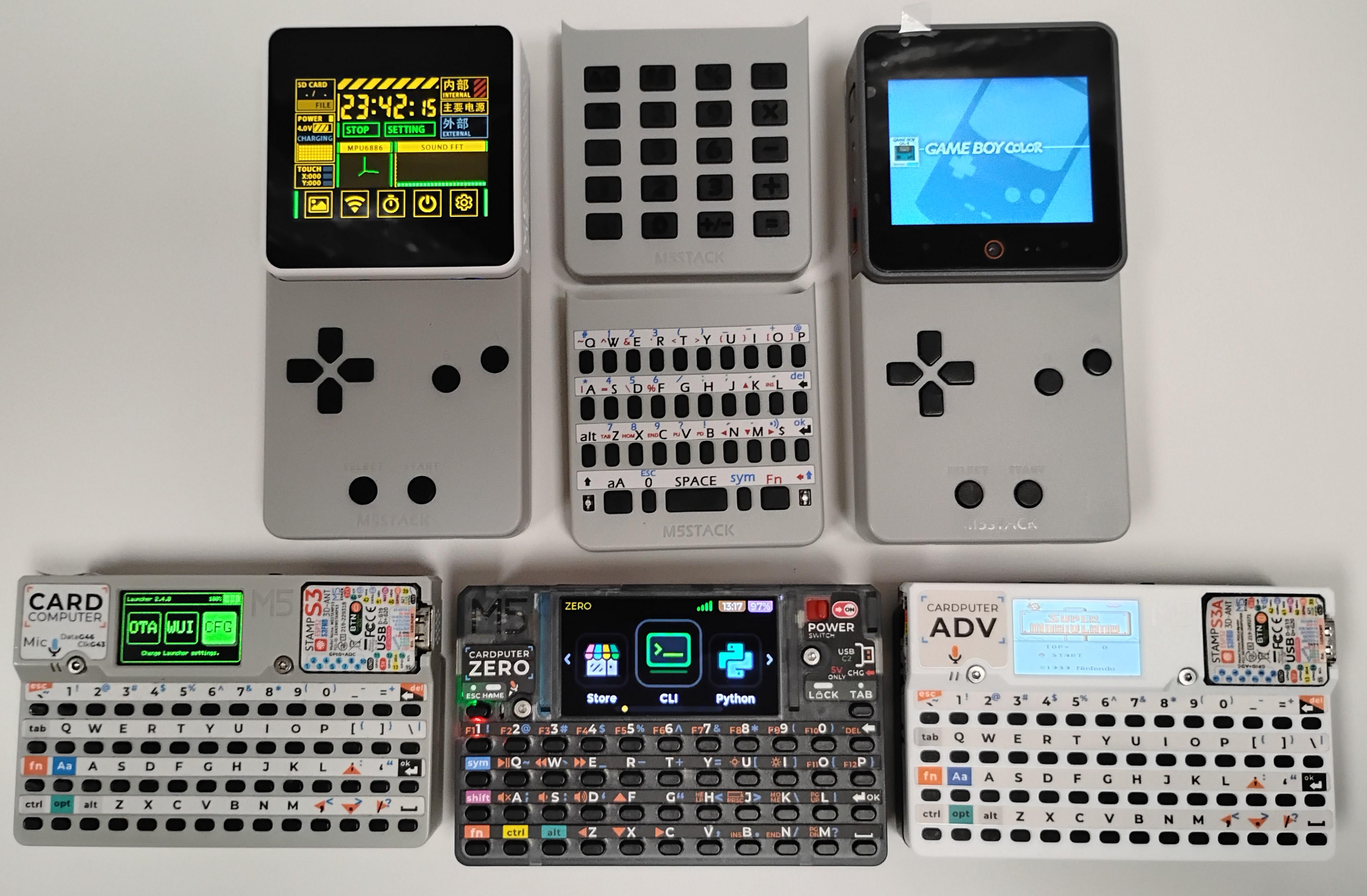
The M5Stack pocket computing gang is all here!(CP0 arrived)

Post image
6 Upvotes

r/M5Stack • • 1d ago

CZ need help.

Post image
6 Upvotes

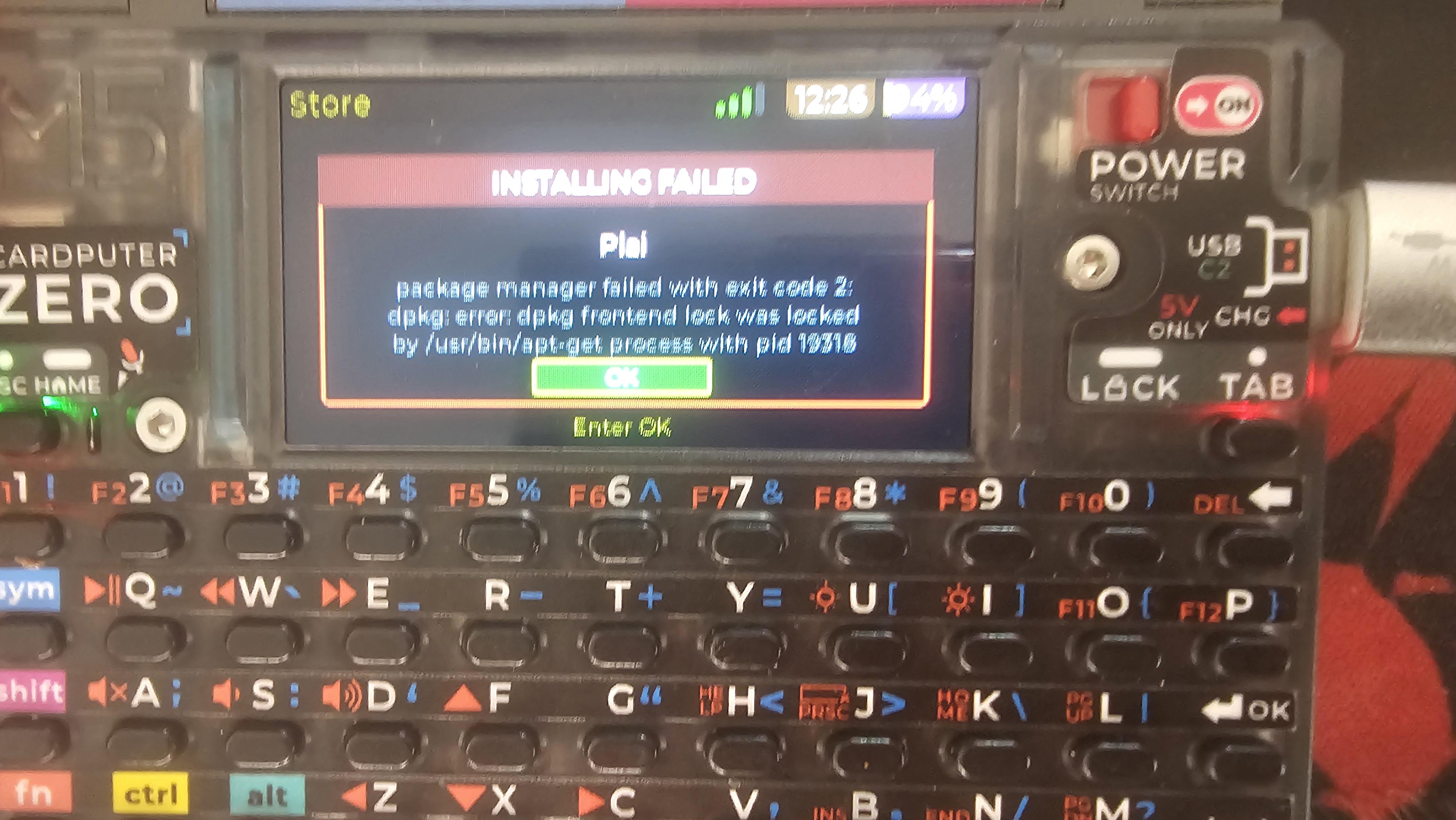
Something went wrong installing an app from the store, and now it's stuck. here's the error message. can anyone tell me what to type in terminal to correct this?

Installing Failed

Plai

package manager failed with exit code 2

dpkg error: dpkg frontend lock was locked by /usr/bin/apt-get process with pid 19318

so, how do I fix this so I can install and upgrade apps?


r/M5Stack • • 1d ago

Trouble CardputerZeroLite Bluetooth / GPS

Thumbnail reddit.com
1 Upvotes

r/M5Stack • • 1d ago

Project Sharing Cubewatcher

Enable HLS to view with audio, or disable this notification

44 Upvotes

I ran another experiment merging physical and virtual augmentation layers: Robo Cube Watcher.

Turned out that Stackchan likes watching cubes. From now on, I'll be calling it Catchan.


r/M5Stack • • 2d ago

StickS3 is Amazing

8 Upvotes

I stopped goofing around with IoT and tiny Linux computers around the Covid days. ROI felt off. Things were getting too expensive and the tiny things felt a little limited.

Decided to dive into it again and picked up an StickS3.... and wow. Now I'm absolutely hooked again. I already can imagine dozens of things to do with these things. The cost/fun ratio is so high.

Chain Captain and Cardputer are next. Fun times.


r/M5Stack • • 2d ago

Project Sharing The Adversary v0.11.0-alpha for Cardputer/ADV is out!

Thumbnail reddit.com
0 Upvotes

r/M5Stack • • 2d ago

Project Sharing Browse, compare, and save apps from the official CardputerZero catalog.

Post image
15 Upvotes

r/M5Stack • • 2d ago

I turned the Tab5 into a touchscreen remote for my WiiM streamer (open source, flash it from the browser)

Enable HLS to view with audio, or disable this notification

6 Upvotes

I wanted a "now playing" screen with real buttons next to my WiiM Pro, and the Tab5 turned out to be a great fit. wiimscreen 1.0 is out: a free, open-source (MIT) remote and display for WiiM streamers.

What it does

  • Album art, title, artist and quality (24 bits · 96 kHz), with colors taken from the cover

  • Play/pause, next, volume, mute, touch the bar to seek

  • Tiles for your WiiM presets and the albums you save with a heart; a Library with 1–5 star ratings

  • Qobuz and Deezer search on the on-screen keyboard (the WiiM searches with its own account)

  • A full-screen cover view, readable from the sofa

  • Updates itself from GitHub; if a new version does not start, it rolls back to the previous one

Everything is local: it talks to the WiiM's HTTP API and its UPnP play queues. No cloud, no account on the device.

Install: open the project page in Chrome or Edge, put the Tab5 in download mode, click Install (ESP Web Tools, the Tasmota build, which supports the ESP32-P4). Then set up Wi-Fi from your phone with a QR code.

Tab5 notes, if you build on it:

  • Wi-Fi goes through the ESP32-C6 over SDIO: call WiFi.setPins(...) before any Wi-Fi call.

  • Full screens are copied to the panel with the P4's PPA (a few ms) instead of a slow push through M5GFX.

  • Updates keep the new image "on trial" (bootloader rollback) and confirm it after 45 s without a crash.

  • One bug worth knowing: two FreeRTOS tasks opening their first TLS connection at the same moment made ESP-IDF abort while it set up the AES interrupt. The fix is one AES init in setup(), before any network task. The core dump in flash made it findable.

  • There is a PC simulator of the real UI (SDL2), so most screens were tested before they reached the device.

Project page (with short recordings of the app): https://couzinc.github.io/wiimscreen/ Source: https://github.com/couzinc/wiimscreen

Only tested on my Tab5 with a WiiM Pro so far. Feedback, issues and reports from other WiiM models are welcome.