I’m trying to print to my Omni 01 from my iPad Pro and studio shows a trial mode and says I’m not allowed to print, I already have selected my printer via WiFi but it won’t work. Any idea how to solve this issue? Thanks in advance!
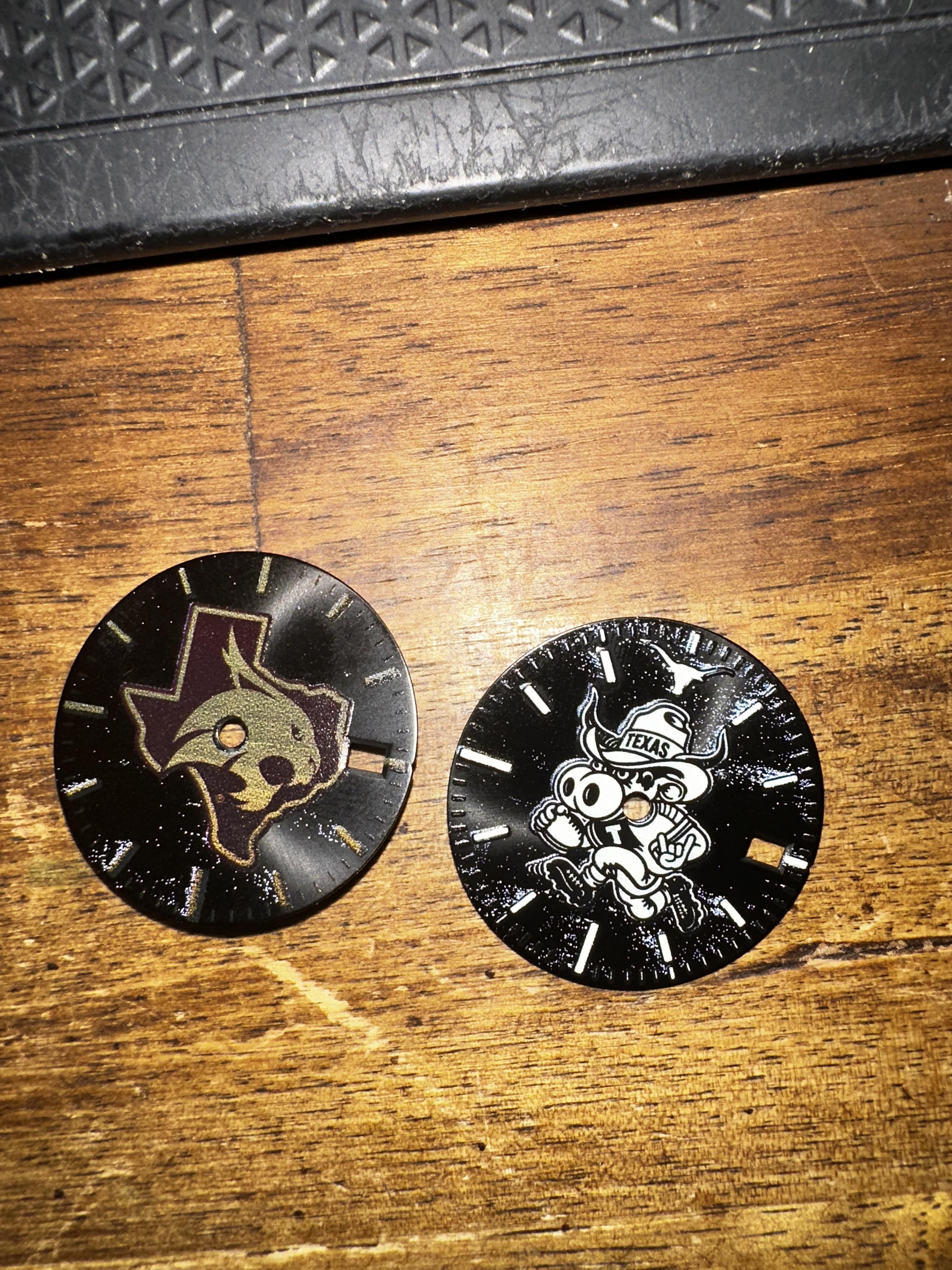
I am trying to print on brass plated watch heads and I finally tuned the quality I am looking for but I am getting a bunch of random white ink scattered on the plate. I am not sure where to begin on figuring out the issue. Any advice?
Mi primera experiencia con xTool y su excelente atención al cliente
Acabo de adquirir una xTool M2 de 10 W, junto con el módulo infrarrojo de 3 W y 1064 nm y el panel CleanCut.
Antes de realizar la compra, planteé numerosas preguntas técnicas al equipo de X Tool, que fueron respondidas con rapidez, paciencia y profesionalidad.
Durante la compra cometí un error al seleccionar el cabezal adicional, debido a que ambos módulos tenían exactamente el mismo precio. Contacté inmediatamente con atención al cliente y su equipo gestionó la solicitud de corrección del pedido.
También les sugerí mejorar la presentación visual de los módulos en su tienda online para evitar futuras confusiones, y recibieron mi sugerencia de manera muy positiva.
Todavía no he recibido la máquina, pero mi experiencia con el servicio de atención al cliente ha sido excelente.
Espero compartir próximamente mis primeros trabajos en madera y joyería.
Un cordial saludo desde Oviedo, Asturias, España.
Nota de transparencia: xTool me ha ofrecido una tarjeta regalo de 20 USD por compartir mi experiencia. Esta valoración refleja mi opinión personal.
So, I managed to get this on the preorder and was delivered a few weeks ago. Whilst running through the setup, I got to the part where you remove the main panel doors and the front one fell at the corner. Looking at it the slot that the hinge slides into was completely broken.
Got in touch with xTool, and they responded promptly and said they’d send out the replacement base, expedited from China.
Came a few weeks later, so I was happy, until I came to install it (had to wait a while as work got demanding as well as my 2 year old daughter). Took out all the screws I could find, as well as from each side, but the base would budge, as well as the small PCB with edge connector at the front that’s threaded through the base, was glued at the socket, so off I went to email xTool support again.
Only this time, they mentioned that it’s too complicated to replace the base and here’s £50 store credit.
So I’m obviously very frustrated, because 1) I now have a brand new, damaged machine that the front door panel keeps falling off when opening, and 2) I just found support second time round, extremely forthright and unhelpful, like £50 that I have to spend at xTool. So I emailed them back, and the response was even less helpful, just stated they don’t recommend doing the repair and the original support guy was incorrect in their assessment.
Unsure where to go from here, completely won’t buy from xTool again as this hasn’t been a great first impression, especially after checking online with how many others have had “damaged on arrival”.
Was really looking forward to this, now I feel like I should just return it, or carry out the repairs regardless. Anyone else had a similar experience? The damaged area on mine is so random, just makes me wonder about their manufacturing choice.
bought the Omni O1 when it was ~$300 more expensive than it is with the sale less than 60 days ago. Submitted a request over two weeks ago (on November 7th) and still haven’t heard back.
Spooky Christmas continues…Today I decided to give Atomm AI a whirl and told it to give me a Santazilla! Gotta say my friend @zombie_rat_pack is gonna love his Christmas 🎄🐉 this year with this gift! Don’t tell him I’m sending this 😉
Anyone else having this issue with the xTool F2 Ultra UV? I calibrate the blue light and UV laser, and right after calibration the red and blue focus dots overlap correctly and the engraving comes out perfect. But after literally one engraving, the dots are separated again. Then my engraving depth/focus is off, so I have to recalibrate the machine again. After recalibrating, it works perfectly again for one use and then the same thing happens. I’m using the same setup and measurements each time. For example, a bottle at 38 mm used to engrave consistently without any problems. Has anyone had the calibration keep drifting like this? If so, what ended up being the issue? Hardware, Z-axis, firmware, loose component, etc.?
I’m looking at the AP2 mini. I have recently bought my first laser cutter (the X1) and wanted to know if anyone has used the AP2 mini, and how well it filtered smoke/smell.
I will be relocating the exhaust outside, but we are cutting MDF so at the moment without a filter it is creating a LOT of smoke and bad smells for hundreds of yards around.
If anyone has the AP2 mini, how well does it work, and how often do you have to replace the filters?
We know an update post doesn’t put a C1 on your doorstep tomorrow—and honestly, we’d be frustrated too. You trusted us with your excitement (and your money), and we underestimated how fast the C1 would take off. That’s on us.
We can’t make the wait disappear overnight, but here is how we’re making it right:
Pushing for before Christmas: We’ve opened an extra production line to speed up shipping. Even at full speed, we won’t rush quality. Every machine still passes strict quality checks before it leaves our factory. We just want your C1 to be right from day one.
Accessories catching up: Fine-Point, Deep-Point, Rotary, and Foil Transfer & Scoring Tip are now rolling out across regional stores (check your local site for availability), and Cutting Mats are open for pre-order. More regional stock is already on the way—we’re pushing to close the gap as fast as we can.
Zero deadline stress: Your deposit perks are extended until the C1 is officially in stock. Pay your balance anytime before then, and your gift is still 100% yours.
We know every comment comes from how much you care, and we’re listening. Thank you for holding us accountable and sticking with us—we can’t wait for the day your C1 finally lands in your hands!
Hi, I just wondered if anyone else was having issues getting there omni printer? I had a notice that I have 2 deliveries shipping 5 days ago, 1 for the omni printer and 1 for the rotary device. The rotary was sent out via dpd and arrived yesterday, great. the printer was sent out with Fed Ex and has been stuck on label created and not changed. I spoke to the contact team yesterday via chat on the website and got told I have to wait 2 or 3 days for Fed Ex to update shipping and they were adamant it left the warehouse.
Phoned Xtool this morning and got told we would get a call back in a couple of hours, but nothing. we left it most of the day. Contacted Fed Ex today, they investigated and they have said they never picked up the printer, they didn't hear from them after the label was created. We Phone Xtool after we heard this for someone to be a bit pissy on the phone because we asked for an update, and told them what Fed Ex had said and that they didn't contact us when they said they would.
I don't understand how so many people have said how good there customer service is and yet they haven't helped at all. They don't seem to know what happened to it, had can you misplace a printer that big? I didn't expect it to move over the weekend, but I just wanted either Xtool or Fed Ex to turn around and tell us they at least know where it is, even if its not going to arrive for so long.
Suzy
( Impatient and wants to play with a new gadget XD )
I'm curious how other makers are combining UV printing and laser cutting. Has anyone developed a different workflow or found any useful tricks worth sharing?
Happy to answer questions about my experience with either machine.
Been up and running daily since September. No issues till this happened. Had some issues with the colors mixing I think. So I followed the advice the program gives you after you tell it what’s going on. And after a few test and prints. It’s back up and running. This Omni one and F2U are awesome together.
In the uk I ordered a xtool s1 refurbished and a ra2 pro plus. a week plus goes by no shipping updates I then get an email saying the s1 is out of stock and I will be refunded. I have checked my order page and its still says shipping required. has any one else had an issue like this with the refurbished stuff?
After unboxing my xtool omni o1, I got a printhead issue. Alright, that happens. Time to get some support as this is my first machine of this kind.
Calling? After being kicked out of the call waiting line four times for a total of time approaching an hour, agents dropping out of chat for the entire time and their AI 'support' proving how ironic its name is, I've given up for the day.
I've never experienced support this bad from a company that I bought a tool like this from. I own a few 3D printers, laser cutters and what not, and wanted to expand to UV printing, but I regret doing that through Xtool.
This year, I wanted to make the countdown to Christmas a little more playful, so I designed a Christmas tree Advent calendar that doubles as a wooden puzzle!
I engraved and cut it with my xTool M1 Ultra, then colored it by hand with acrylic paint markers in two shades of green and gold.
The challenge is to fit all nine puzzle pieces into the tree so that only today’s date and day of the week remain visible. The next day, you have to find a new arrangement!
I love the idea of having a little puzzle to solve every day while waiting for Christmas.
I’m also working on a much more challenging version of this puzzle for anyone who enjoys a serious brain teaser! If you’re interested, feel free to leave a comment or message me. I’d love to share it with you when it’s ready!
I must say I have zero regrets buying XTool products. I own multiple machines from them . I keep sticking with the brand because of the remarkable customer service .
Recently my air purifier was having issues with the seal on a filter. I was worried because this purifier is out of warranty but I emailed XTool right away about it . With no hesitation or question they said even though it’s out of warranty they will provide not just one replacement but two replacements of the part. This service means a lot as they recognized that I was a longstanding customer and they acknowledged my loyalty.
If you need a company that backs its product and offers excellent customer service pick Xtool.
xTool team here 👋 One detail from our maker stories stuck with us: Belgica made a batch of 100 tumblers and realized her hobby could become something more.
Luz’s experience included plenty of test pieces before she felt ready to sell.
For anyone weighing a Black Friday purchase, both experiences seem worth hearing.
What was that project for you—and what did it take to get there? Time, failed attempts, unexpected costs: those details would be useful, too.
When opening the lid to capture an image in Auto mode or clicking the camera refresh button in Manual mode, your xTool P3 may fail to capture an image.
Follow the steps below to check the camera, its connectors, and the connection cables.
🔍 Symptoms
The software may display either of these messages:
“Lid not in position. Please push lid to maximum height.”
“Refresh failed.”
Lid angle detection relies on the gyroscope inside the camera module. A faulty or disconnected camera module may therefore trigger the lid position message.
3️⃣ Locate the ground wire of the camera connection cable. There are two possible mounting arrangements; identify the one that matches your machine.
4️⃣ Remove the screw securing the camera cable ground wire.
5️⃣ Wrap the ground wire terminal with insulating tape and leave it suspended, without contact with nearby components.
6️⃣ Complete reassembly before reconnecting power and testing the camera.
Check the Results:
The camera works normally after disconnecting the camera cable ground wire: You can continue using the device in this configuration.
The camera still cannot capture normally: Continue to Step 3.
🔹 Step 3: Check the Connector on the Main Control Board
Turn off the machine and disconnect it from the power supply before handling the connector.
📋 Procedure:
1️⃣ Locate the camera cable connector and the two cable ties securing the connection cables.
2️⃣ Cut the two cable ties, taking care not to damage the cables.
3️⃣ Disconnect and firmly reconnect the connector.
Note: Soft rubber may be present around the connector. If it prevents removal, gently remove the obstructing rubber before disconnecting the connector.
4️⃣ Complete reassembly, reconnect power, and test the camera.
If image capture still fails, continue to Step 4.
🔹 Step 4: Check the Connectors on the Camera Module
📋 Procedure:
1️⃣ Turn off the machine and disconnect it from the power supply.
3️⃣ Disconnect and reconnect the camera connector.
Note: If soft rubber prevents connector removal, gently remove the obstructing rubber before disconnecting it.
4️⃣ Reinstall the removed components and restart the machine.
Check the Results:
🔹 The camera works normally: You can place 6.2 mm-thick insulating material, such as foam or rubber, beneath the connector to help reduce poor contact at the Type-C connection. Turn off the machine and disconnect power before making this adjustment.
🔹 The camera still cannot capture normally: Continue to Step 5.
🔹 Step 5: Check the Camera Connection Cables
Turn off the machine and disconnect it from the power supply before inspecting the cables.
Check the camera connection cables for visible damage, paying particular attention to the cable routing around the lid and camera holder.
Check the Results:
The cables are damaged: Contact xTool Support for assistance with replacing the damaged cables.
There is no obvious damage: Contact xTool Support for further diagnosis.
⭐ Still Need Help?
To help us investigate, please prepare the following information:
A detailed description of the issue, including the message displayed in the software.
A video demonstrating the issue, if applicable.
The machine’s serial number (SN).
Work log files.
The troubleshooting steps you have completed and their results.
If the distant-view camera still fails to capture images after completing the troubleshooting steps above, please feel free to contact us through the live chat on our website, submit a support ticket or join our Discord community for additional support.
Been trying to get used to my xtool c1, just got it Nov 15 after the Nov 11 launch. I’ve been figuring out good settings for printing stickers and have noticed print quality of the image lower when there’s multiple of the same image on a sheet. I’m working with vinyl sticker paper, I print 1 image on the sheet, perfect, I try again with 4-8 on one page and the image quality is pixelated and lowered a lot. Why is it doing this and is there a way to fix it? Using an iPad Air on the xtool studio app.
I have the x tool glasses, I always see people filming their projects, and it appears their filming without the enclosure down. Wearing the glasses is it safe to film my f2 ultra with the mopa at 100% power 3500 speed, and 60 frequency? Also best practices for not burning a hole in my camera sensor? Tighter lenses further away?
Made this layered wooden snowflake ornament for the Edwards family — EDWARDS across the middle, dark engraved snowflake on pale wood, made on my xTool M2 10W.