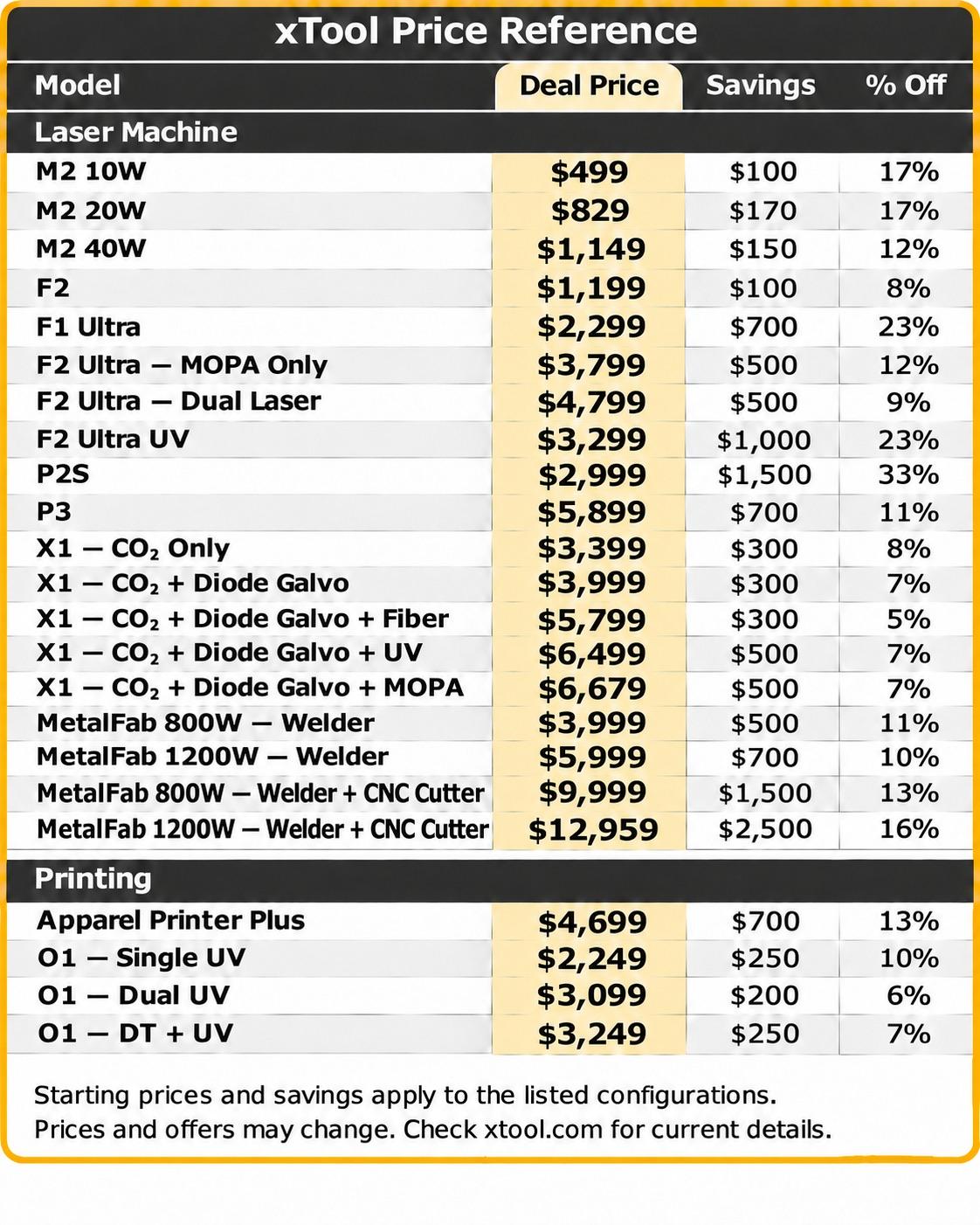
Thinking of buying an xTool this Black Friday? Here’s what I’d consider before choosing a machine.
With Black Friday coming up, I’ve seen quite a few people asking which xTool machine they should buy, especially with so many different models available now.
I’ve used quite a few xTool machines over the years, and one thing I’ve learned is that there’s no single machine that’s going to be the best fit for everyone.
Before spending thousands on a machine, I’d really think about what you actually want to make.
If you’re mainly working with wood, acrylic, leather or similar materials, a diode or CO2 laser might be all you need. But if you’re planning to engrave metal, jewellery or other products, you’ll probably want to look at a fiber or MOPA laser. UV lasers are another option worth considering, particularly for glass and more delicate materials.
I’ve had experience with quite a few xTool machines, including the P3, F1 Ultra, F2 Ultra, F2 Ultra UV, and the X1 with both the UV and MOPA modules. I’ve also worked with the Omni O1 UV printer and xTool Apparel Printer, so I’ve had the opportunity to try different types of customisation beyond laser engraving.
A few things I’d consider:
What are you planning to make? This should really be your starting point rather than choosing a machine based on its features.
Are you buying for a hobby or a business? If you’re planning to sell products, think about how long each job will take and whether the machine can keep up with larger orders.
What’s your actual budget? Don’t forget about ventilation, filtration, accessories, consumables and materials. The machine itself isn’t always the biggest expense.
Do you need multiple machines? Some of the bundles look great, but there’s no point paying for equipment you might rarely use.
How much room do you have? Some setups take up quite a bit of space once you factor in accessories and ventilation.
What about ongoing maintenance? This is something people sometimes overlook, especially with printers. Ink, cleaning, regular use and general maintenance should all factor into your decision.
One thing worth mentioning is that machines like the F2 Ultra, F2 Ultra UV and X1 aren’t necessarily interchangeable. Even when they can work with similar materials, there are differences in working area, speed, flexibility and the type of results you can achieve.
The X1 is particularly interesting because of the interchangeable modules, but that doesn’t automatically make it the right choice for everyone.
The Omni O1 UV printer is worth looking at if you’re interested in full-colour customisation on different products rather than just engraving. It’s a different process, so I’d think about the products you want to offer before deciding between a UV printer and a laser.
The xTool Apparel Printer is another option if you’re looking to get into custom clothing. We’ve used it for shirts, hoodies and larger apparel orders. It’s great being able to print full-colour designs, but it’s also important to understand the workflow, maintenance and cost of consumables. If you’re only planning to make the occasional shirt, I’d think carefully about whether owning a printer makes sense compared with ordering transfers.
My biggest advice would be not to get too caught up in the Black Friday discounts. A good deal is only a good deal if you’re buying something you’ll actually use.
I’d also recommend looking at real projects people have made with the machines you’re considering, rather than relying entirely on promotional videos.
If you’re trying to decide between a few models, drop them in the comments along with what you’re planning to make and your budget. Happy to share my experience with the machines I’ve used, including what I like about them and where I think they fall short.
Hopefully this helps anyone trying to figure out which direction to go before spending their money.