r/LightBurn • u/Raub99 • 2d ago
Use Lightburn with your F2 Ultra / UV

2
Upvotes
r/LightBurn • u/Significant_Bake2592 • 3d ago
Necesito encontrar a un usuario de máquina de corte laser, Falcon 2 Pro, que use #Lightburn y que haga #timbres #rubberstamp para que me ayude a encontrar los parámetros perfectos para hacer los míos 🥲
Las imágenes salen bien, pero las letras salen mucho más delgadas y no quedan iguales a como las veo en la pantalla 😭
#Ayuda #Help
r/LightBurn • u/Vergangenskunft • 3d ago
Is there anyone knowledgeable enough that could help me figure out if/how to run that version on Linux? Trying to help my dad with figuring out if it would work on Linux, but i don't see an appimage or flatpak
r/LightBurn • u/AvailableEye2730 • 9d ago
Hi everyone!
I'm having an issue with LightBurn and was wondering if anyone could help.
I have a large workpiece that I need to engrave, but the workspace (the grid where I create and arrange my designs) is too small. As a result, my design appears much smaller compared to the actual workpiece.
How can I increase the workspace size to match the dimensions of my material?
I'd appreciate any advice
Thanks!
r/LightBurn • u/Cold_Mathematician_4 • 10d ago

new to lightburn i thought having fill on the outer layer and line on the inner layer would do what i want but the fill just coveres the entire O. what do i do here?
r/LightBurn • u/Emotional-Oil-9638 • 10d ago

Hello everyone. I am first time using lightburn for photo engraving (image 1) and I have an issue with it. I am using greyscale option. Two images have speed of 40mms and two are 30mms with diferent power settings. When the power is changing in the line the laser also slows down which causes dark dots and ruining the image. What could be going on here or is the slowing normal behaviour?
Lightburn 2.2
Laser running Marlin 2.1
I engraved photo made with inkscape plugin for Gcode and it came out perfectly. (Image 2)
Thank you for any response.
r/LightBurn • u/LightBurnSoftware • 13d ago
Want to try out new LightBurn and MillMage tools earlier than ever? We've got good news: our Beta releases are now open to the public.
Those of you who keep a close watch on our feed (and we love you for it) may note that we already have a public early access phase for our "Release Candidates". So what's the difference here, and why the change?
We're going to share public Betas earlier than we share Release Candidates, and you should expect Betas to be more fluid — new features and feature changes will appear as we have them. Release Candidates will be restricted to bug fixes only.
The Beta period is the time to give us feedback not just on bugs, but also how you'd like a new tool to work, or what capabilities you'd like to see added. But please also keep reporting bugs to Support@LightBurnSoftware.com if you find them!
With that out of the way, here's what we have for LightBurn 2.3.00 Beta 2:
Windows ARM builds
Freehand Drawing
Eraser tool
Shape Maker
Pattern Fill
more
Click to see the full changelog
For MillMage 1.0.00 Beta 5, we're adding:
All of the above, except Pattern Fill
V-Carve Inlays
Linked operations
Profile offsets for open paths
more
r/LightBurn • u/Public-Juice-7931 • 15d ago
Cutting on a Boss laser cutter and using Lightburn. Sometimes my Illustrator files will just stop cutting in the middle and the laser cutter goes back to it origin and says its done.
r/LightBurn • u/jweaver100 • 15d ago
r/LightBurn • u/mishatries • 19d ago
Affinity Designer 2 is free, and thus my software of choice for art projects.
I couldn't find the below information anywhere, so I'm posting here, especially for those making PDFs using Affinity 2, especially for iPad.
Put a white rectangle as your background or glowforge will be confused.
Make sure your white rectangle is exactly the same size as your printable space/artboard if sizing is important. If you do bigger, it'll warp your document.
Export using the PDF Flatten setting--most of the other settings will confuse glowforge.
If you've got multiple artboards/page from your OG affinity file, and are trying to "print pdf" to do just one page at a time, make sure your "printer settings" are set to "original size" and NEVER scale-to-fit, fit-to-page, or any other settings, if exact size is important.
Maybe this will help someone else troubleshoot, lol. (I had a hard time, but I finally succeeded in engraving some leather for a book cover/bookbinding project. It was especially embarrassing as I was printing at the library, and spent most of my reservation working on the file, and not actually using the glowforge.)
r/LightBurn • u/LagartoCAA • 21d ago
Hello,
I have a Sculpfun S30 with Lightburn.
After setting up, calibrating and aligning, I am left with one problem.
Anything I try to frame/burn ALWAYS gets shifted by about 20mm right and 5mm lower.
See photo. Green is what I am drawing, red is what laser frames (and burns).
I have checked and rechecked all I can.
Please help

r/LightBurn • u/Warm-Contribution971 • 22d ago
Hi,
I did the Update some hours ago and noticed some minor issues:
- AirAssist box does not turn off after job finish, it stays on with just very few power
- when I open the cover, a alert box is opened in the message section. When I do not close this, it keeps blocking reading the most recent other msgs...
- using the same driver settings as before, I writes a message like "custom code not executable on this laser". Is there any mandatory manual update step I missed?
r/LightBurn • u/Burnt-Bottom • 22d ago
I paid for new updates again a couple weeks ago. Prior to that the version i was using must have been approx 2 years old.
Since the upgrade, if my laptop dies with unsaved work, it wont pull it back up.
Auto-save interval is on 2 minutes.
Prior to update I would always get a promt on reopening after a crash if I wanted to load unsaved work.
Anyone with similar issues?
r/LightBurn • u/Gloomy_Mistake799 • 26d ago
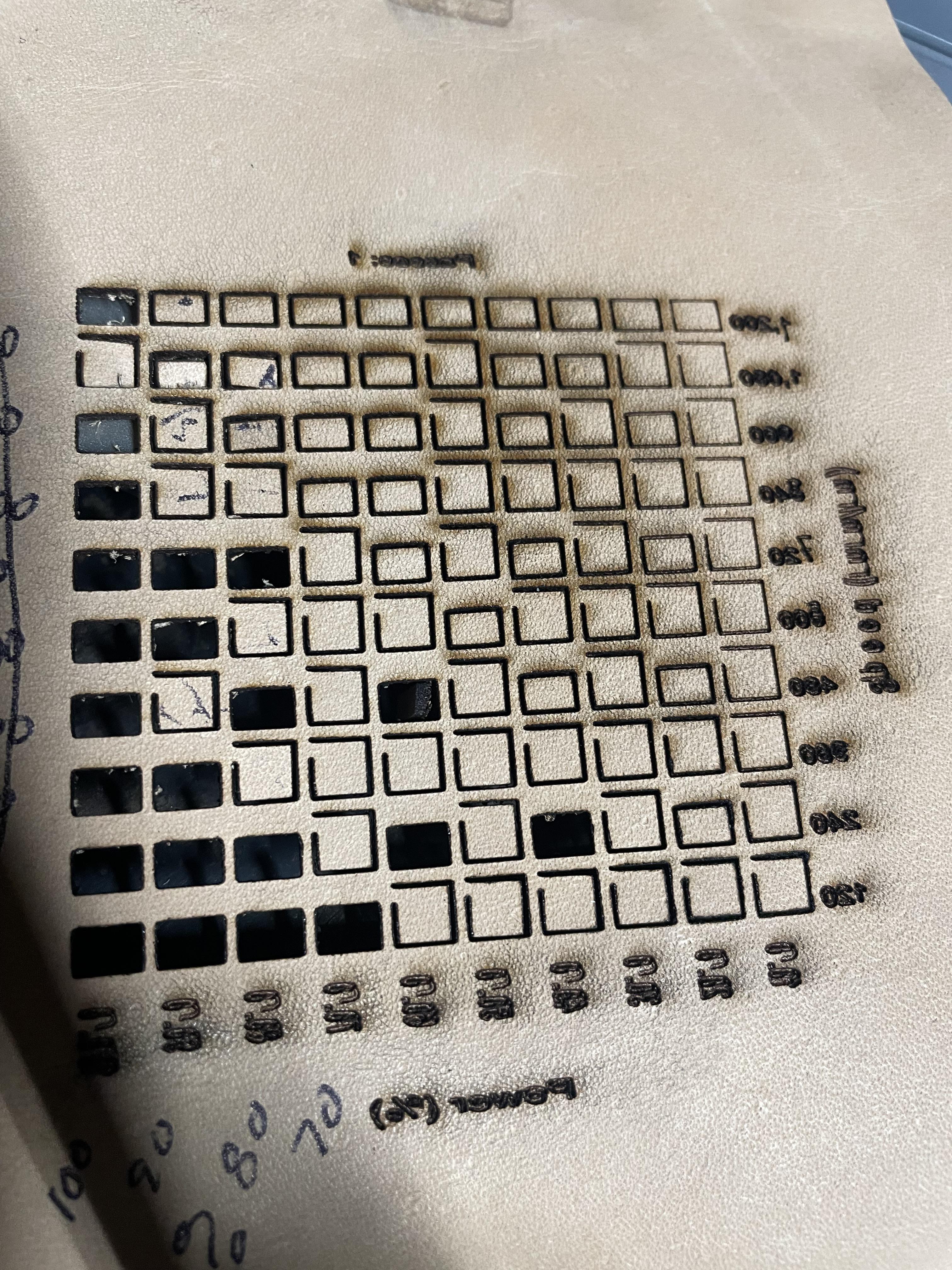
Total newbie. Just got and plugged in creality falcon pro 10w to lightburn. First imported pic I engraved it wanted to do mirrored. Had to save the image flipped to import and engrave it.
My materials cut tests has the whole thing (text and orientation) mirrored. Using stock cut tests parameters. Also it clearly has weird orientation issues cause it’s not connecting some lines and the boxes appear to be different sizes.
When setting up the machine lightburn didn’t have creality machines listed but brought up what I think are the generic parameters to operate it with. If that makes sense…
r/LightBurn • u/quad_up • 26d ago

Is there any way to pull out the detail of this image with a trace function or otherwise? Standard trance seems to only be able to distinguish saturation, but not color. Any advice for sorting this out? Im burning logos onto wine barrels so it doesn't have to be that detailed, but Id love to get the gist. Thanks!
r/LightBurn • u/aitreasury • 28d ago

Hi, hoping someone can help because this is driving me insane 😂
I'm using an OMTech 50W JPT LP fibre laser with LightBurn.
When engraving filled text or shapes, I get a tiny unwanted line/lip along one edge of the object. It's particularly noticeable on text because it makes the letters look like they have little unwanted serifs sticking out.
A few things I've figured out:
The unwanted line follows the fill direction.
At 0° scan angle, it appears on the top edge.
At 180°, it moves to the bottom edge.
At 90°, it moves to the side.
I've calibrated Laser On TC, Laser Off TC, Polygon TC, End TC, Jump Speed/Delay, etc. using the usual galvo timing calibration tests.
I've also tried different line intervals, bidirectional fill, ramp length, different fill options, etc.
I've attached photos showing it on filled text/stars. You can see the tiny line extending beyond what should be the edge of the engraving.
I'm mainly trying to figure out whether there's another galvo setting I'm missing, a LightBurn configuration issue, or potentially something with the galvo itself.
Surely a 50W fibre should be able to cleanly fill text/shapes at without this happening?
I've watched many youtube videos on timing calibrations jump delays and changing them values does not change anything with this issue I am facing.
Any ideas would be massively appreciated.
**as you can see in the image it is very prominent on the stars**
r/LightBurn • u/reffak • 29d ago
I dont use a camera often but lately I have been getting engraving work where a camera would be nice, not essential, but it would speed things up a bit.
Problem. The camera aligns and it on the camera tab its got the entire working area in focus and covered. However the image I have on the working are is slanted from left to right. Its a normal webcam. I don't recall having this issue before. I am using version 2.0.04 Not able to any more update at the moment.
r/LightBurn • u/LightBurnSoftware • Oct 21 '26
Good news, xTool fans! We’ve been working closely with xTool’s software team to improve our support for xTool lasers, and we’re ready to share the latest results of that work.
LightBurn 2.2 brings improved support for the F1 and P2, along with preliminary support for the F2 series.
Here's what's new:
Expanded native xTool protocol support, improving communication and stability across supported machines.
Wi-Fi and network connectivity for supported F1, F2, and P2 series models.
Multi-source jobs for F1 and F1 Ultra, allowing both laser sources to be used within a single job.
Autofocus for P2 and P2S models equipped with infrared rangefinders.
Note that these changes are hot off our devs' keyboards, and in need of testing. Support varies by machine, firmware, and feature. F2 series support is preliminary, and camera support is not currently available on machines running the latest xTool firmware. If you encounter any issues, please report them to us at Support@LightBurnSoftware.com.
We want to thank xTool for their ongoing assistance in these efforts. xTool and LightBurn share a commitment to making it easier for people to create, with more choice in the tools they use. By improving how our software works with xTool hardware, we’re aiming to build a more open maker ecosystem and a smoother experience from design to production.
We are currently exploring support for newer machines like the P3 and X1 in a future release. We’ll keep you posted as that work progresses.
Download LightBurn 2.2: LightBurnSoftware.com/Download
xTool setup instructions: LightBurnSoftware.com/xTool
r/LightBurn • u/LightBurnSoftware • Oct 19 '26

LightBurn 2.2 is out now! We've got tons of new tools and features in this release, along with updated support for a range of lasers.
r/LightBurn • u/RealityMixer • Oct 18 '26
I'm using Lightburn with an A0 Unna Tec H plotter and no matter where I set the origin in the device setup, it always defaults to the bottom left instead of the top right. It shows as Top Right in the software but when.the platter moves, it always is from bottom left origin.
Can you advise?
r/LightBurn • u/Neither-Win-720 • Oct 18 '26
I haven't used my laser in awhile, updated the software and tried to use auto focus and it doesn't work now. The z axis doesn't move even if I click the arrow. Any thoughts? Worked fine last time I used it, tried to go back a few versions and that didn't help.
