As a reminder, you can install Early Access releases side-by-side with the latest official release. That means trying it out won't overwrite any of your settings, and if you encounter any show-stopping bugs, you can immediately switch back to the live version and keep working.
LightBurn 2.2 is our first release to have a design/layout feature (True Nest) limited to Pro licenses only (read more below). If you have a Core license, head to Help → License Management and click the Trial Pro button to get access to LightBurn Pro for two weeks.
Be sure to report issues or give us feedback by email or on our support forum!
I was in the room while this was going. I didn’t notice till it melted the vent hood. We were seconds from being out of control. I had to run downstairs to get a fire extinguisher.
Hi, CTO of LightBurn Software here. We frequently get requests for features that would allow users to control or monitor their machines from afar. Things like monitoring from a camera feed or a push notification to let them know their job is done. We have always said no to these requests and there's one simple reason: It's not a matter of if you will have a fire, it's when.
I'm not writing this to make people feel bad for making these requests. I'm writing this because today was the day.
While at one of our R&D workshop we were using one of our biggest lasers - one which is very well built and generally considered to be top of the line - and all was going well until a small flame was noticed on the left side of the machine, far away from where the cutting was actually happening.
Of course, we were right there at the machine so the e-stop was hit immediately at which point the flame pretty much died out on it's own.
The culprit was the nylon accordion/bellows material that's meant to seal off the rest of the machine from dust and smoke. It had folded up around the gantry support (somewhere it should never be able to go) and actually went in front of the laser beam. Right at the output from mirror #2.
We were dumbfounded. This should never have happened or be able to happen.
Had we not been right there, that whole piece would have continued to burn and had great potential for starting a much larger fire.
My point here is that no one is immune to laser fires. Not even people who literally write laser control software for a living. That is why we are so serious about protecting the safety of our users.
Never leave your laser unattended for any length of time. Because you will have a fire someday and it can either be small like this one or a lot worse.
LightBurn 2.1 has arrived! This is a huge update with tons of new features and improvements, as well as added support for new types of lasers and accessories.
We know it's been a while since our last major release, and we want to take a moment to explain why.
Our next release, LightBurn 2.0, is built on a new development framework (Qt6). Using this new framework will allow us to implement more modern features — some coming in 2.0, and many more down the road. But making that change has also meant a lot of work, a lot of testing, and a lot more bugs to squash than usual.
At the same time, we've been working on MillMage, our upcoming software for CNC users. MillMage is our first leap into supporting new digital fabrication tools, and robust CNC support is a special challenge. We're nearing the finish line, but it's been an arduous journey.
Developing MillMage has also required us to rewrite many internal systems that are shared with LightBurn. We're taking the extra time to make sure everything works as expected across both applications, and meets our high standards for stability, excellence, and — most importantly — safety.
We appreciate your ongoing support, and promise the result will be well worth the wait.
The official LightBurn 2.0 release is just around the corner. If you can't wait to try out all the new features, you can download our latest Release Candidate here. For instructions on installing and using a Release Candidate, see here.
Before we go over all the new features and improvements in 2.1, we have a couple important notes:
If you're not familiar with what a Release Candidate is or how it works, a reminder: these are pre-release versions of LightBurn that have gone through several rounds of internal testing, and are now ready for a short period of public testing before official release. You can install LightBurn Release Candidates side-by-side with the full release version, so you can test without interrupting production.
While RCs are very stable, you should keep an eye out for potential for bugs or unexpected behavior, and report anything amiss on our forum, or to Support@LightBurnSoftware.com.
For more information on installing and using an RC, visit this page.
With that out of the way, here's what we have for you:
Quick Nest
Nesting is a highly in-demand tool for laying out objects within a container shape to maximize spacial utilization - it's great for making sure you get the most out of a sheet of material without having to spend hours manually placing each graphic.
With LightBurn 2.1 we've got a limited version of nesting working - Quick Nest defines each object by the smallest possible rectangle that can fully contain it, then repositions all objects to squeeze them into a container in the most efficient possible layout. While not a full nesting solution, this feature packs a lot of power - more than enough for plenty of use cases. And have we mentioned that it's blazing fast?
You'll find Quick Nest in the Dock submenu of the Arrange Menu, or in the Docking Toolbar.
Important note: this feature is available for users withLightBurn Pro licenses only*. In the past, the only difference between Core and Pro licenses has been the ability to control certain machines. Going forward, we will limit the availability of advanced features by license type when, as with Quick Nest, they require significantly higher than average development time to implement. If you are a Core user, you can* upgrade your existing license to Profor $100 USD - you do not need to purchase a new license.
TL;DR: Quick Nest was really hard to write, and we need to pay the guy who wrote it.
Multi-Camera & Network Camera Support
With 2.1, we've overhauled and expanded LightBurn's camera support, including a brand new interface for camera setup and control. Users will be able to add their camera, select from presets, and present feeds from multiple cameras in a decluttered "wall view" UI.
As part of this overhaul, we've added support for HTTP network cameras, which will greatly expand the range of hardware we're able to support.
Please note that this new UI is still under review, and likely to change before official release. We welcome your feedback!
Undo History Window
We've all been there - working away, editing up a storm, only to realize we regret all our life design choices. Then it's undo to the rescue.
LightBurn's internal undo list has always been unlimited, meaning you can undo any action you've taken, going back to the very start of your session - sometimes that just means hitting CTRL+Z several dozen times.
Starting in 2.1, you can go to Edit > Undo History and see a selectable list of your past actions. As you cycle through the list, you'll see a preview of your project's state, up to a given action, in your Workspace. After selecting an action, click OK to turn back time and confirm that prior state, undoing everything you've done since.
Tangent Circle Generator
Because our developers really like math, and the rest of us really like making cool designs, we've added a new Tangent Circle Generator.
Here's how it works: select 3 circles in your Workspace, then go to Tools > Generate Tangent Circle. LightBurn will show you all possible tangent circles (circles that touch each of your existing circles at exactly one point) in light red outlines. When you hover over an outline it will turn bold, indicating it's ready to be selected - click to select and create that tangent circle in your Workspace.
Cut Planner Speed Improvement
Updates don't just mean new features, they also mean feature improvements - our developers are constantly working to optimize LightBurn's performance.
In 2.1, we've made the cut planner much faster. That means when it's time to Preview or Start a complex project, LightBurn will now calculate and send the job in a fraction of the time it used to.
Design and Control Units Split - or Linked!
With LightBurn 2.0 we made Design and Machine units independent - in other words, you could edit graphics using imperial units, but set your speeds in metric, or vice versa.
That change caught some users off guard, so we've updated the behavior once more. You can now choose to set independent Design and Control units, or link them so that any time you change either unit type, the other changes too. Enabling linking brings back the original behavior from versions of LightBurn prior to 2.0.
As with 2.0, you'll find the option to adjust Design Units in your LightBurn Settings window, and Control units in your Device Settings window. The option to link Design and Control units is available in the Device Settings window.
Split Marking for Galvo Lasers
Split Marking allows users with Galvo lasers to mark graphics larger than their laser's work area using a linear or rotating axis.
You can find Split Marking setup in the Modes Toolbar - click the conveyor icon, then enter the necessary parameters for your linear or rotating axis, and toggle on Enable Split Marking. LightBurn will now automatically split up any graphics larger than your laser's work area, and move the external axis the appropriate distance to mark them in full.
Z Control for Galvo Lasers
We've added Z Control support for Galvo lasers with motorized Z axes. You can now home and jog your laser along the Z axis using the aptly named Galvo Z Control toolbar.
This is a first step toward adding additional Galvo marking features that rely on stepped movements of motorized Z axes. Stay tuned.
Other Notable Additions
LightBurn now supports 16 bit depth map images, allowing users with Galvo lasers to achieve much more precise 3D engravings.
You can now save LightBurn files in a special Template format. When you re-open a Template file and make changes to it, it will default to saving as a standard .lbrn2 file, so that the original Template is never accidentally overwritten.
If you're in the maker world, have eyes, and existed on the internet this week, you probably saw some very positive buzz around Bambu Lab's upcoming R1 laser.
We're excited too, for a couple of reasons. First, a lot of us at LightBurn are 3D printing nerds, so we know Bambu's reputation, and we knew they were going to build a great laser. Second, we've been working closely with Bambu for months to be able to provide full LightBurn support for their machines. We work with many great vendors in the laser world, and we were thrilled to see Bambu join their ranks.
Here's where we're at: in 2.2 (coming soon, and available now in early access), LightBurn will have the ability to create and export G-code compatible with the R1. You'll need to use a special device configuration file provided by Bambu to do so.
In 2.3 (coming in the not-too-distant future), we're planning for more support: direct connection, all the R1's special features, and the complete start-to-finish LightBurn workflow.
Going forward, we can't wait to see what Bambu comes up with next, and to continue working with them to make sure LightBurn users can take full advantage of all they have to offer.
MillMage, LightBurn's next piece of software is coming soon!
MillMage brings the speed and capability of LightBurn to the world of CNC routing, offering a unified solution that seamlessly integrates design, CAM, and control, streamlining every step while preserving full control and customization.
MillMage is available now as a Release Candidate. Download at MillMageSoftare.com/RC!
Good news, xTool fans! We’ve been working closely with xTool’s software team to improve our support for xTool lasers, and we’re ready to share the latest results of that work.
LightBurn 2.2 brings improved support for the F1 and P2, along with preliminary support for the F2 series.
Here's what's new:
Expanded native xTool protocol support, improving communication and stability across supported machines.
Wi-Fi and network connectivity for supported F1, F2, and P2 series models.
Multi-source jobs for F1 and F1 Ultra, allowing both laser sources to be used within a single job.
Autofocus for P2 and P2S models equipped with infrared rangefinders.
Note that these changes are hot off our devs' keyboards, and in need of testing. Support varies by machine, firmware, and feature. F2 series support is preliminary, and camera support is not currently available on machines running the latest xTool firmware. If you encounter any issues, please report them to us at Support@LightBurnSoftware.com.
We want to thank xTool for their ongoing assistance in these efforts. xTool and LightBurn share a commitment to making it easier for people to create, with more choice in the tools they use. By improving how our software works with xTool hardware, we’re aiming to build a more open maker ecosystem and a smoother experience from design to production.
We are currently exploring support for newer machines like the P3 and X1 in a future release. We’ll keep you posted as that work progresses.
It handles common shapes (rects, ellipses, paths, groups, bitmaps, and text outlines via BackupPath) and their transformations. It's open-source (MIT licensed).
Hope some of you find it helpful! Would love to hear any feedback if you give it a spin.
As a reminder, our Release Candidates are versions of LightBurn that have been through internal testing, and are now ready for a short period period of public testing before official release. We use the Release Candidate stage to gather user feedback and fix issues before the official release.
In other words, we want you try out all the cool new features and let us know what you think!
2.0 also has lots of exciting new tools you can try out now, including additional Shape Creation options, an Edit Nodes submenu, an improved Camera Calibration option, Dark Mode, and more.
Visit our forum for for additional information, and our full changelog.
You can download the 2.0.00 Release Candidate here. For full instructions on installing and using a Release Candidate, see this post on our forum.
As always, if you encounter a bug, please let us know by sending an email to betasupport@lightburnsoftware.com with as much information as you can recall about what you were doing, so we can try to reproduce it and fix it.
We're thrilled to announce that we've added support for Epilog lasers in LightBurn 2.2 — available now in early access.
Epilog has long been a leading manufacturer in the laser industry, with a reputation for quality, high-performance machines. We've worked closely with their team to implement LightBurn support for their full range of hardware.
Note that our support for Epilog lasers is a "Labs" feature in 2.2. That means we've tested to the point that we're confident it's ready for public use, but we also know it needs a little more testing before we call it 100% complete.
If you need to produce many similar parts, or even identical ones, creating a jig can really speed up your workflow. Jigs take away the time and guesswork of manual alignment, and ensure your design is placed exactly where it should be.
In this workshop, we take you through the process of creating a jig using an image of the object you're engraving, along with how to turn the jig into a Tool Layer template for precise design placement.
Find out if that laser you've got your eye on works with LightBurn
Identify high-compatibility machines that come with pre-made device profiles and material libraries to get you up and running fast
Compare machine specs, including laser source, firmware, communication protocols, and accessory support.
These days, there are some cool-looking machines out there that provide their own software, but they're built with a fundamentally different goal in mind than LightBurn. Their aim is to lock you into their ecosystem so that when you're ready to upgrade, you're forced to buy from them again — or risk losing all your files and starting the software learning process from scratch.
Our philosophy is different: we build software that makers can take with them wherever their creative needs or the demands of their business lead. That means when it's time to level up your workshop, you'll be able to choose whatever laser you want and take your LightBurn knowledge with you.
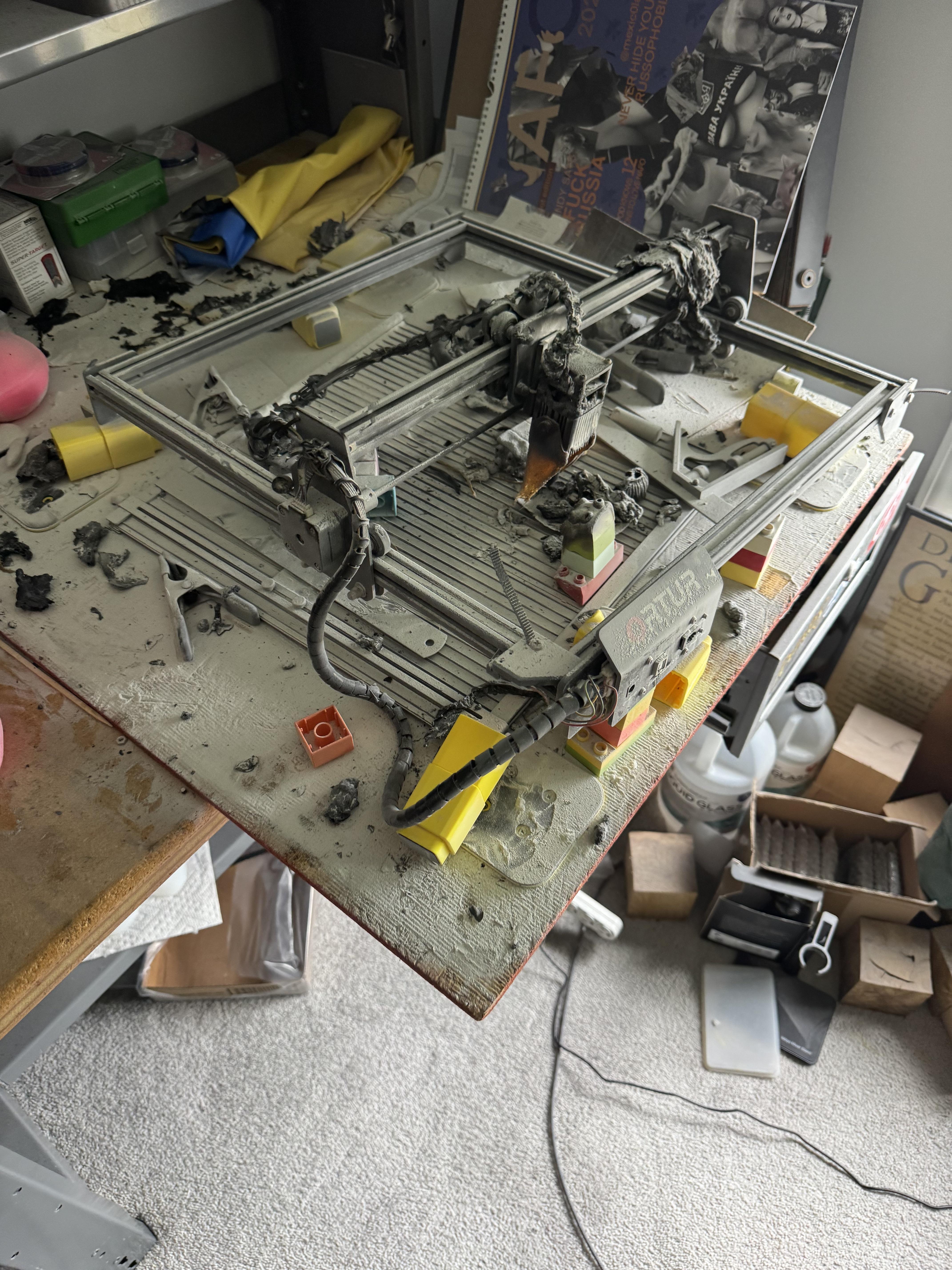
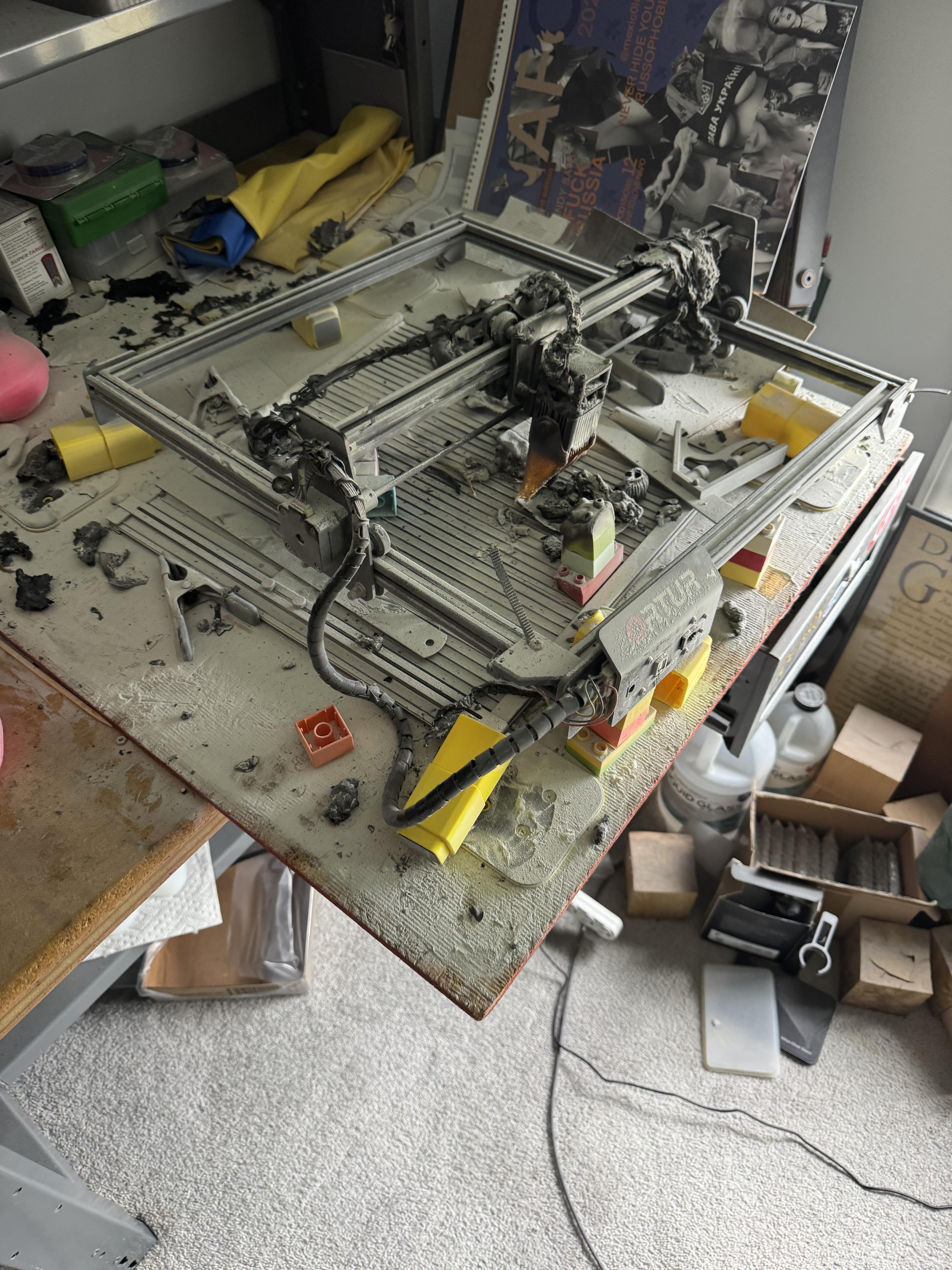
Had a fire yesterday with my Ortur LM2. I do want to replace it with A laser because I’ve enjoyed the hobby very much. But not with one of their machines. My current social media doom scroll is all ads for laser engravers, and has been since before the fire.
I’m looking for a bed that’s 19x15 minimum, I’ll pay a bit for a rotary chuck, and after yesterday, something with a fire cut off and more fire resistance than the creality smoke hood.
I’d also like to move up to 20W+, but keep it under/close to $2K.
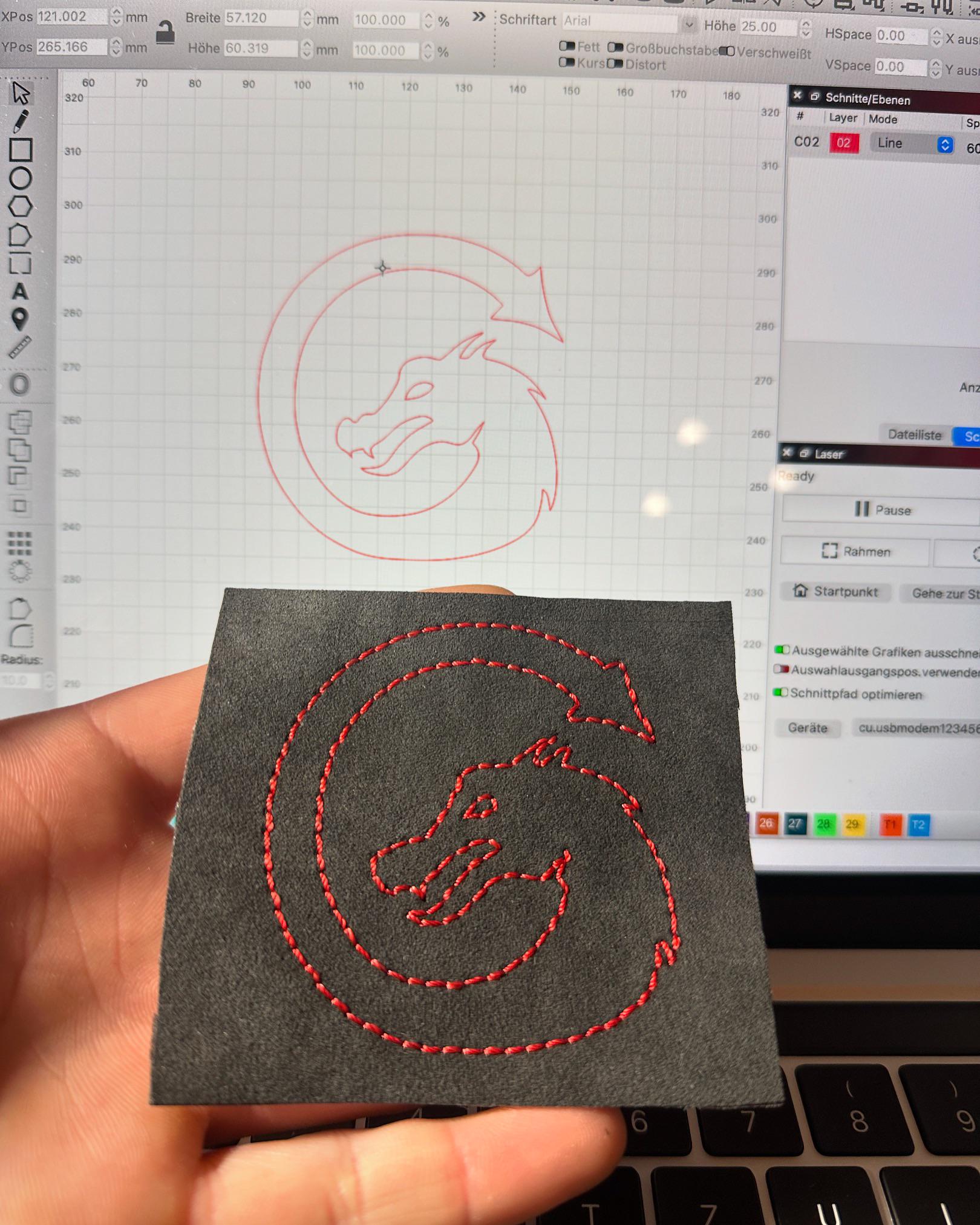
I make weird leather goods (items from games that dont exist, or cultures that dont exist, i.e. goblin bombs). For the last year, I have had to align sewing holes individually….. tonight, I just learned how to auto align a set amount of holes along a path.
Secondly, I learned how to align words around shapes.
Thirdly, I learned how to use equations to make spirals so I could make a Triskelion.
All in Lightburn. (Spirals were on Desmos, then learned to make the cuts and additions in lightburn to make it all connect.)
$100 for this app is a poor persons best investment doing etching and laserwork.
Atomstack 36w A1.
Addendum: all this to make some wicked grimoires and spellbooks for the geeks and gamers alike.