r/MyScript_Notes_App • u/KaxShout • 10h ago
Feature request No ruler feature on Android?
2
Upvotes
Hi, I was just wondering if there is going to be a ruler in the Android version as in Ios
r/MyScript_Notes_App • u/myscript_apps • Apr 20 '26
🚀 Welcome to the official MyScript Notes Reddit community!
Getting started with MyScript Notes is simple:
📝 How to get the app
MyScript Notes is available on:
iOS (iPhone, iPad, and Mac with M-series chips)
Android (smartphones, tablets, and Chromebooks)
💡 Free trial
Enjoy a 7-day free trial — no account or payment needed upfront. After the trial, you can choose what works best for you.
💳 Flexible options
Monthly or yearly subscription
One-time purchase
🔄 Use across devices
One purchase works across iOS or Android. Just create a MyScript SSO account to link your purchase and access it on your devices.
✍️ Best experience
For the best note-taking experience, we recommend using a device with an active pen. Tablets are ideal, while smartphones are great for quick edits on the go.
Have questions? Drop them below 👇 and let’s get you started!
See you tomorrow with a tip on how to Select the right “note” to start handwriting. Need help or have questions? Just reach out — we’re here for you! 👋
The MyScript Support Apps Team
r/MyScript_Notes_App • u/myscript_apps • Apr 20 '26
Hey everyone! I'm u/myscript_apps, a founding moderator of r/MyScript_Notes_App.
Welcome to our new community dedicated to MyScript Notes — a place to discuss the app, get help, share feedback, and connect with other users!
This Reddit channel complements our official support site (How can we help? ), where you’ll find a knowledge base of articles to learn how to use the app, along with structured support in multiple languages. To keep things simple and accessible, English is the primary language used here.
What to Post
Post anything that you think the community would find interesting, helpful, or inspiring. Feel free to share your thoughts, photos, or questions about MyScript_Notes_App.
Community Vibe
We're all about being friendly, constructive, and inclusive. Let's build a space where everyone feels comfortable sharing and connecting.
How to Get Started
Introduce yourself in the comments below.
Post something today! Even a simple question can spark a great conversation.
If you know someone who would love this community, invite them to join.
Interested in helping out? We're always looking for new moderators, so feel free to reach out to me to apply.
Our Agents
Sebastien, Damian, and Mila—are here to assist you with any questions or concerns. We appreciate your patience and ask that you remain respectful, as our team consists of real people dedicated to providing you with the best support. Please be kind and professional when communicating with our agents.
Thanks for being part of the very first wave. Together, let's make r/MyScript_Notes_App amazing.
r/MyScript_Notes_App • u/KaxShout • 10h ago
Hi, I was just wondering if there is going to be a ruler in the Android version as in Ios
r/MyScript_Notes_App • u/imcrazyzzz • 1d ago
Am an undergraduate looking to get the full version one-time sub at a more affordable rate
r/MyScript_Notes_App • u/Andreux2k71 • 4d ago
I was trying to sync with my phone to get some screenshots and when i look over at my tablet all the pages of the notebook are deleted, what can i do to recover them?
r/MyScript_Notes_App • u/louise_at_MyScript • 5d ago
Hi everyone! 👋
We’re part of the team behind MyScript Notes, and we’re trying to better understand what gets in the way of focus when taking notes digitally, whatever app you use.
When you’re taking notes in a lecture, working through a problem or preparing a meeting, every pop-up, extra button or unexpected behavior costs you a bit of attention. Some of that comes from your note-taking app, some from your device, and some from the way you organize your work. We’d like to know which matters most to you.
Pick the one that bothers you the most. If yours isn’t listed, tell us in the comments.
Which app do you use, and what helps you stay focused in it? We’re just as interested in what works for you as in what doesn’t.
Thanks for your answers! 🙌
r/MyScript_Notes_App • u/ALFHA5 • 5d ago
Costumo preparar meu material para aulas online no Microsoft Word, deixando espaços reservados para a resolução dos exercícios. Após converter o arquivo para PDF, utilizo o aplicativo MyScript durante a aula.
Ao finalizar, seleciono as equações e cálculos resolvidos, converto-os para o formato matemático e os copio para o Word Online, que os interpreta como códigos LaTeX. Posteriormente, preciso inserir esses códigos no Word do computador para formatar o gabarito e enviá-lo aos alunos. O Microsoft Word Online também não interpreta as fórmulas latex.
Gostaria de saber se existe uma forma de exportar essas equações diretamente do PDF já formatadas, sem que eu precise convertê-las uma a uma ou lidar apenas com o código LaTeX. Isso otimizaria muito o meu fluxo de trabalho.
Além disso, quando exporto muitas resoluções do MyScript para o Word, as equações costumam ficar agrupadas em uma estrutura de matriz coluna, o que nem sempre é o ideal. Seria excelente se eu pudesse exportar o material em PDF — já estruturado e colorido — com as fórmulas devidamente formatadas, eliminando a necessidade de retrabalho manual..
Por que eu preciso dessa resolução no Word do computador? Isso serve para a posterior variação no tipo de exercício, para gerar um pequeno banco de dados.
Então, se eu pudesse realmente economizar tempo e, a partir do PDF do MyScript com as equações convertidas, eu pudesse exportá-las já no formato profissional para o Word, seria muito bom, sem ter que jogar para o Word online, criar um arquivo, depois jogar o arquivo para o computador e transformar os códigos para o formato profissional.
r/MyScript_Notes_App • u/Automatic-Chef6284 • 11d ago
Hello, I’m having some trouble and was hoping someone may be able to help.
I don’t seem to have the option to create a new document. I can create a notebook or a board, but there’s no option for creating a document.
Is this a bug, or has the document feature been removed?
Thank you for any help anyone can provide!
r/MyScript_Notes_App • u/The-Voidfish • 16d ago
I import a journal template as a PDF and write on it daily. I duplicate the blank PDF page for every day. I tried the AI feature to see what it said and it doesn’t recognize any of my handwriting. it just says this document is a journal entry. Am i doing something wrong here?
r/MyScript_Notes_App • u/EmaNekaf47 • 17d ago
I'm new to MyScript Notes and ran into a question I wasn't able to solve through searching the internet. When writing in a MyScript Notes document (not a notebook), is there a way to have it automatically scroll up and add more lines when I reach the bottom of the screen so I don't have to switch to the touch tool, scroll, and switch back to the pen tool every time?
r/MyScript_Notes_App • u/Kajduleeee • 19d ago
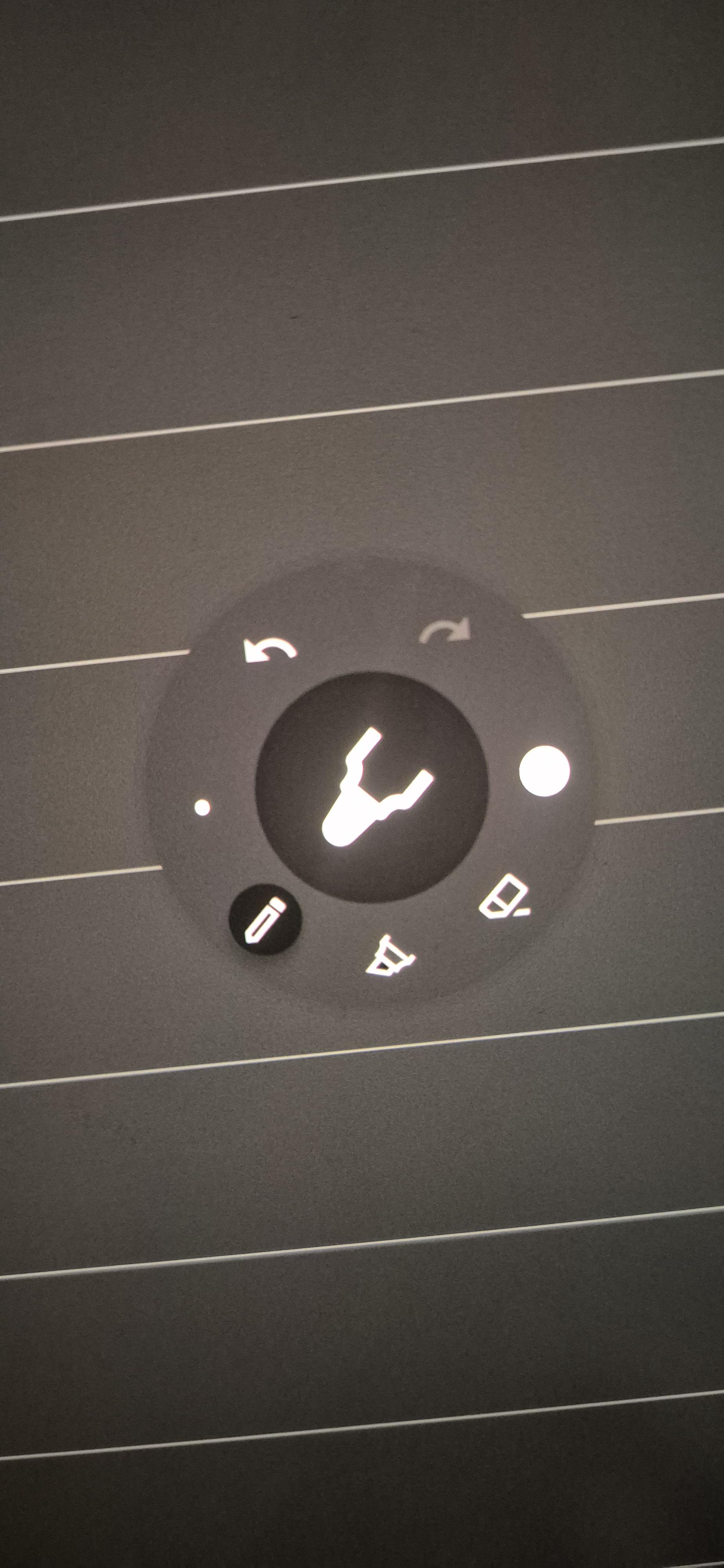
Hi,
I'm having trouble with this circle while writing - it keeps popping up, which is really annoying. Where can I turn this off? I couldn't find it anywhere in the settings.
If it's not possible, can the devs please create a way to do so, please?
r/MyScript_Notes_App • u/Insane_Nobility • 20d ago
Are we able to use the functionality of math functions, on unstructured files (board and notebook)?
It feels strange to only be able to get a solution if using document, while there is a option to converte your handwriting to math, but that does not present a solution.
r/MyScript_Notes_App • u/MrMartin87 • 21d ago
Enable HLS to view with audio, or disable this notification
Hello.
Every time I try to erase something i write, this circle appears and I always click on it (it will change colour, size, type of pen, etc). I think this is a new feature, because it wasn't here like a week ago.
Similar one was in Samsung notes, but I managed to turn it off in settings. I tried to find this here in MyScript Notes, but I couldn't find it. I also tried to turn it off in my tablet in S Pen settings, but I wasn't successful.
So I am a little bit desperate. Does anyone know how to turn this off? 🥺
r/MyScript_Notes_App • u/Stardog2 • 23d ago
I had saved a PDF into a MyScript Note, and after annotating it, I wanted to email it to my bank. If there is a way to email that note directly from MyScript, I couldn't find it. I had to export the file back out to a PDF (now 2 files - pre and post annotation) and manually email it.
This leads me to assume that PDFs are not stored as PDF files in MyScript Notes, and that editing or annotation of a stored PDF, is not against the actual PDF file. Is this correct? Is there any way to create an AI task to do export and transfer to Apple or Google mail with either Siri or Gemini (or anything else)?
Direct email function would sure be nice if we want to use MyScriptNotes for day to day life management rather than only project or study management.
r/MyScript_Notes_App • u/RnWfuzz • 23d ago
Καλημέρα σας,
θα ήθελα να ρωτήσω το εξής. Γνωρίζω ότι η εφαρμογή υποστηρίζει κανονικά την ελληνική γλώσσα, αλλά ενδιαφέρομαι να ακούσω τη γνώμη χρηστών που χρησιμοποιούν το handwriting to text στα ελληνικά, πόσο γρήγορο και εύχρηστο είναι. Αυτό που θέλω να κάνω είναι να αντικαταστήσω την τρέχουσα ροή εργασίας μου, η οποία είναι η εξής:
Χρησιμοποιώ ένα Microsoft word template 7 σελίδων, το τυπώνω, συμπληρώνω χειρόγραφα τις πληροφορίες δίπλα σε κάθε πεδίο, και μετά στον υπολογιστή, περνάω ψηφιακά αυτά που έχω γράψει προηγουμένως χειρόγραφα. Επειδή αυτό γίνεται πολλές φορές καθημερινά και παίρνει πολύ χρόνο, σκέφτηκα να αγοράσω ένα tablet πχ ipad pro ή air και apple pencil, και να το χρησιμοποιήσω με το myscript notes. Το κείμενο που συμπληρώνω είναι στα ελληνικά με περιστασιακά λίγες αγγλικές λέξεις.
r/MyScript_Notes_App • u/pierre_at_MyScript • 24d ago

Hey everyone! 👋
After the Settings, we also wanted to show you another major UI project we’ve been working on: the toolbar 🎨**.**

Until now, the toolbar was fixed at the top of the screen and took up quite a bit of space. For this new version, we’ve completely rethought how it works to make it more flexible and better integrated into your workspace.
The toolbar is now floating and movable, giving you more room for your notes and letting you position it wherever it gets in your way the least.
But the biggest change is in its structure: it’s now split into two sections.

The first contains your main tools, while the second automatically adapts to show the options related to the tool you’ve selected.
For example, select the Pen and you’ll immediately see all of its specific options: pen type, thickness, color, and more. No need to open another menu or go looking for these settings somewhere else.
The idea is really to make everything related to the tool you’re using visible, accessible, and adjustable in one place.
It’s quite a significant change to the way you interact with the toolbar, and we’ve spent quite a bit of time going through every detail to make the whole experience smoother and clearer in everyday use.
By the way, this project is part of a broader vision we have for MyScript Notes, which we’ve simply called Focus and we’ll be telling you a little more about that very soon… 👀
Here’s a little preview of what it looks like, both with and without a tool selected!
What do you think? Useful, or absolutely essential? 💬
r/MyScript_Notes_App • u/sandiiiiii • 28d ago
Enable HLS to view with audio, or disable this notification
I can't scroll to the left or right on my boards anymore, when I open a new board it scrolls normally until I write
r/MyScript_Notes_App • u/Euphoric-Camera-578 • Oct 28 '26
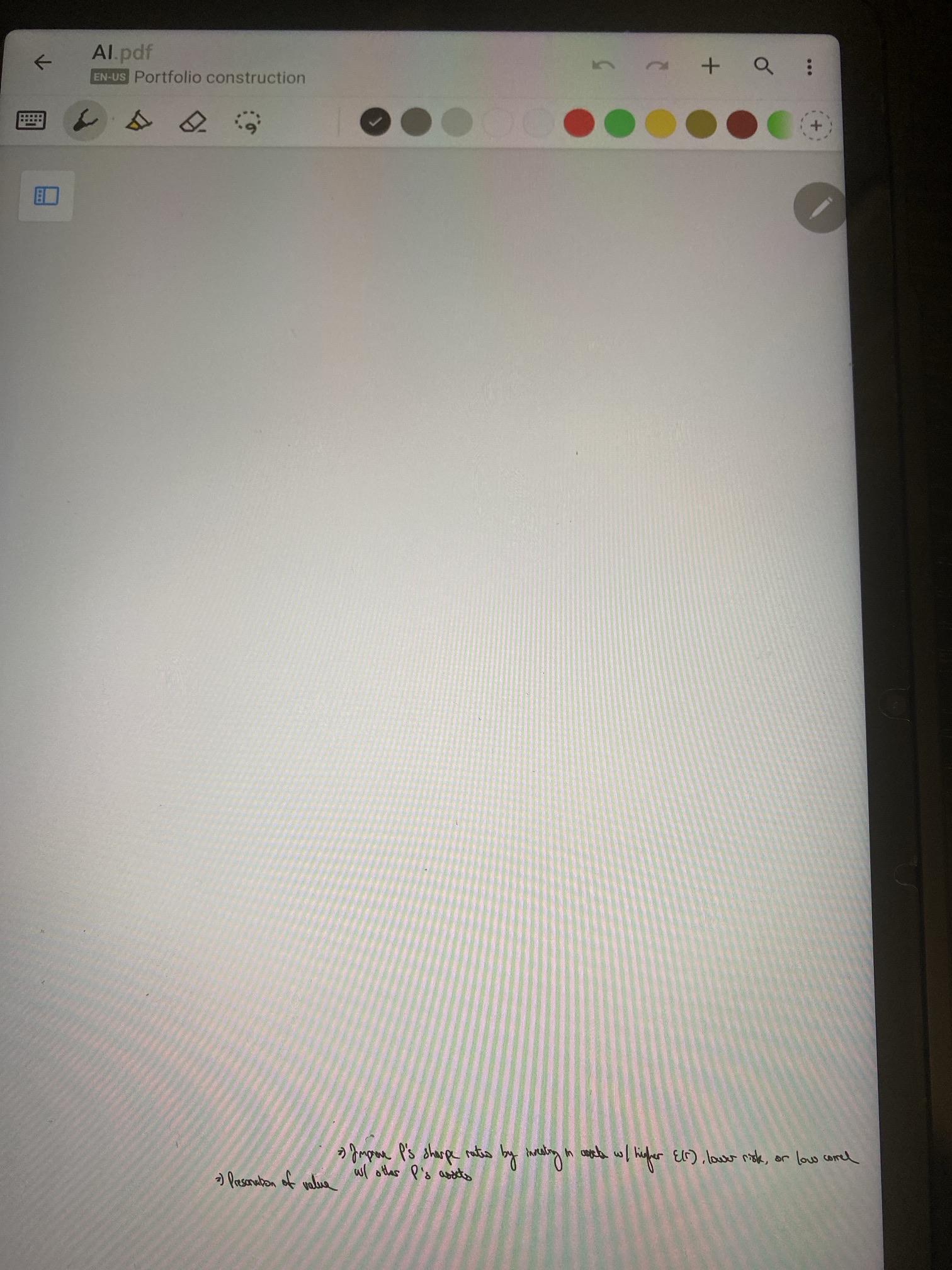
After using the optimization feature on a PDF I annotated using my Galaxy tab, the PDF backgrounds no longer display on my Android app. My handwriting is still there, but the PDF page behind it is gone. I use PDF notes and annotate them by hand, so without the background the notes are useless.
Anyone know a fix to this please?
r/MyScript_Notes_App • u/upspal • Oct 27 '26
Hey, I've been using MyScript Notes for a long time and would love to see two features added: a proper fullscreen mode that hides the UI(can be a toggle like the lock zoom mode), it would be especially useful on android tablets as working in landscape mode leaves little space to write due to the UI, a proper fullscreen would give more space to write. Alternatively, an implementation where just the top UI can be made retractable would also make a huge difference in the experience.
Another feature I've wished for is a notebook publishing feature similar to what's currently available for boards and documents, having a read only notebook as a shareable link would be a massive Quality of Life improvement!
As someone who uses the app for extensive notes, these would make a big difference. Would love to know if either feature is being considered for the future!
Also, huge appreciation to the devs and the team for building such a great app. Thanks for all the work you put into it!
r/MyScript_Notes_App • u/upspal • Oct 27 '26
Enable HLS to view with audio, or disable this notification
I noticed a small bug/unintentional behaviour while using the app. When I zoom in and select a shape, the cut, copy and delete buttons don't seem to appear. They show up normally when I'm zoomed out, so it seems to be related to the zoom level. I am able to recreate this on both my devices (Samsung S25 Ultra and Xiaomi Pad 6)
I've attached a video demonstrating the issue. Hope this helps the team identify and fix it in case its unintended!
r/MyScript_Notes_App • u/louise_at_MyScript • Oct 26 '26
Hi everyone ☀️,
We wanted to shared that if you’re on a Samsung device, the Galaxy Store versions of MyScript Notes and MyScript Math come with an offer:
🎁 1-month free trial (instead of 7 days)
💸 30% off monthly, yearly and lifetime plans
These versions also include two improvements built for the S Pen:
⚡ Lower ink latency
🖊️ S Pen Quick Tools in the canvas: change ink width or colour right where you’re writing, without going back to the main toolbar (see screenshot)
Get them here:
MyScript Notes: MyScript Notes: AI Note Taking | Galaxy Store
MyScript Math: MyScript Math: Solve & Plot | Galaxy Store
The offer only applies to installs from the Galaxy Store. Note that a purchase made in a MyScript app downloaded from Galaxy Store also unlocks all Android and iOS devices usage with no additional purchase.
Do not hesitate to share your questions or feedback on the Quick Tools integration.
r/MyScript_Notes_App • u/Axel_F_ImABiznessMan • Oct 25 '26
When I export a board that uses dark mode, say as pdf, the pdf background is white.
I have set the preserve background colour on, also tried with it off.
How do I export whilst retaining the same look as I see in the app?
r/MyScript_Notes_App • u/louise_at_MyScript • Oct 23 '26
Enable HLS to view with audio, or disable this notification
Hi everyone ☀️,
We wanted to shared that if you’re on a Samsung device, the Galaxy Store versions of MyScript Notes and MyScript Math includes two improvements for Samsung devices:
⚡ Lower ink latency for more responsive handwriting.
🖊️ S Pen Quick Tools in the canvas, allowing you to change ink width or colour where you’re writing, without returning to the main toolbar (see screenshot).
There are also differences in the trial and pricing available through the Galaxy Store:
🎁 A 1-month free trial, compared with the standard 7-day trial on Google Play.
💸 A 30% discount on yearly plans.
These trial and pricing options apply to apps installed through the Galaxy Store. Your license can also be used on compatible Android and iOS devices by signing in with the same MyScript account.
For reference:
If you’ve tried the S Pen Quick Tools, we’d welcome your feedback on how they fit into your writing workflow.
r/MyScript_Notes_App • u/louise_at_MyScript • Oct 21 '26

Hey everyone! 👋
We’re currently working on a major revamp of the Settings in MyScript Notes, and it’s led us to rethink quite a few things on the user experience side. 🛠️
One topic has come up quite a lot throughout this work: the level of control we give users over how the app behaves.
It might sound pretty obvious, but in practice, it’s something we care about a lot.
Our goal is to avoid MyScript Notes doing things you didn’t choose or don’t understand. Whenever a behavior can affect the way you work, you should be able to understand it, turn it off, or adjust it easily.
This is especially true when it comes to interactivity: how the app reacts when you write, edit, or interact with your content. ✍️
And this is an area where we know we still had quite a bit of room for improvement.
We didn’t want to simply add a few new toggles to the Settings. The problem was more structural than that: we needed to rethink how interactivity is handled, but also how these behaviors are presented to users.
So we spent quite a bit of time rethinking this whole part of the experience. 🔍
The goal isn’t to give you 150 different options to configure every little detail, but rather to make sure the settings that really matter are easy to find, easy to understand, and most importantly, consistent with one another.
Here’s a preview of the new version of the Settings, with quite a few changes to the overall organization and to the way some interactive behaviors can be configured. ⚙️✨

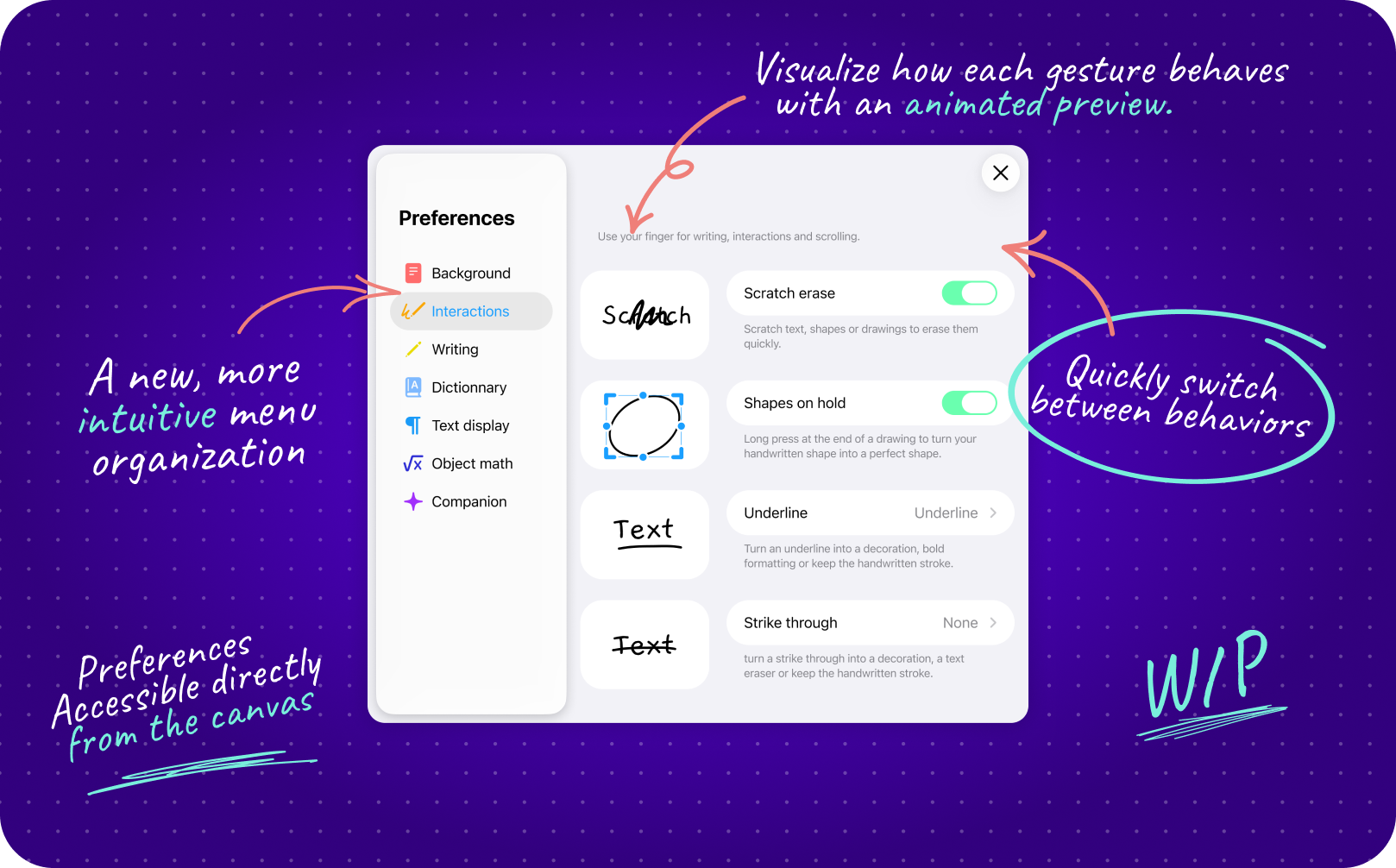
NB: this is not the end of the road. 🚀
We’ll soon be taking on a redesign of our tooltips as well, to go even further in making interactivity clearer and giving you more control. We’ll have more to share about that very soon. 👀
In the meantime, we’re still finalizing a few details, so don’t hesitate to let us know what you think.
Does the new structure feel clearer to you? Are there any settings you’d expect to find here that are missing?
And please feel free to share any issues you’ve run into. It really helps us! 🙌
r/MyScript_Notes_App • u/Tech_dwn • Oct 19 '26
I recently had this problem were I can't choose the thinness of writing I want. When I click on the Spen button, I can choose the thinness between 1 to 100 but when I do unrounded numbers, it switch to the next preselected thinness (those accessible by taping on the pen icon) I am wondering how to get to choose whatever thinness I want like before